ultimate-ai-media-generator-skill
Generate and monitor CyberBara Public API v1 image, video, audio, and music tasks end-to-end. Use when work involves CyberBara `/api/v1` endpoints for listing models, uploading reference media, quoting credits, creating generation tasks, polling task status, checking credits balance and usage, or saving final media outputs.
Safety scan
A static text scan, not a guarantee. Select the badge to see what was scanned and every finding.
Badge for your README

Markdown
[](/listings/zerolu-ultimate-ai-media-generator-skill)HTML
<a href="/listings/zerolu-ultimate-ai-media-generator-skill"><img src="/api/listings/zerolu-ultimate-ai-media-generator-skill/badge.svg" alt="findsafeskills safety rating" /></a>Install
Install instructions from the README
As written by the repo's author. findsafeskills has not verified these steps.
Vibe Install
Just send the following command to your AI(OpenClaw, Claude Code, Codex etc)
Help me install this skill, use command `npx skills add ZeroLu/Ultimate-AI-Media-Generator-Skill --all`
Manual Install
Step 1) Install (npx skills)
# List what can be installed from this repo
npx skills add ZeroLu/Ultimate-AI-Media-Generator-Skill --list

# Install all skills from this repo
npx skills add ZeroLu/Ultimate-AI-Media-Generator-Skill --all

# Optional: install for specific agents (if your skills runtime supports agent targeting)
npx skills add ZeroLu/Ultimate-AI-Media-Generator-Skill --all -a codex -a claude-code
Step 2) Get and configure API key
Get your free API key here: https://cyberbara.com/settings/apikeys
Configure it once (recommended):
python3 scripts/cyberbara_api.py setup-api-key "<your_api_key>"
This stores your key at `~/.config/cyberbara/api_key`, so you do not need to export it every session.
Step 3) Use the skill on Codex, Claude Code, OpenClaw, Claude Cowork, Cursor, and Antigravity
You can paste these prompts directly in your agent chat, or just tell your agent to generate images, videos, audio, or music.
A) Create an image (nano banana skill)
Use $ultimate-ai-media-generator-skill to generate one image:
- model: nano-banana-pro
- scene: text-to-image
- prompt: A cute kitten dancing, 3D cartoon style, dynamic full body, clean stage background
- options: aspect_ratio=16:9, resolution=1k
Return task id, final status, and output image URL.
B) Create a video (seedance 2.0 skill / sora 2 skill)
Use $ultimate-ai-media-generator-skill to generate one video:
- model: seedance-2-ark
- scene: text-to-video
- prompt: Cinematic wide shot of a futuristic city at sunrise, smooth drone motion
- options: duration=10, resolution=720p
If seedance-2-ark is unavailable, fallback to sora-2.
Return task id and final video URL.
C) Check credits before generation
Use $ultimate-ai-media-generator-skill to quote credits before submission for this request:
- model: nano-banana-pro
- media_type: image
- scene: text-to-image
- prompt: Minimalist product poster for a smart watch
- options: aspect_ratio=1:1, resolution=1k
Return estimated_credits and can_afford.
D) Create a sound effect
Use $ultimate-ai-media-generator-skill to generate one sound effect:
- model: suno-sound-v5-5
- scene: text-to-audio
- prompt: A short cinematic whoosh with soft digital sparkle
- options: loop=false
Return task id, final status, and output audio URL.
E) Create music
Use $ultimate-ai-media-generator-skill to generate one music track:
- model: suno-music-v5
- scene: text-to-music
- prompt: Warm lo-fi study music with mellow keys
- options: instrumental=true
Return task id, final status, and output audio URL.
F) Check balance and recent usage
Use $ultimate-ai-media-generator-skill to check current credit balance and the latest 20 usage records.
---
What was scanned
The files the safety scan read, as written by the repository's author and shown as plain text. Lines with a finding are marked.
SKILL.md · Manifest · 240 lines
View this file on GitHub (read at the repository's current version: the scan did not record which commit it read)
- ---
- name: ultimate-ai-media-generator-skill
- description: Generate and monitor CyberBara Public API v1 image, video, audio, and music tasks end-to-end. Use when work involves CyberBara `/api/v1` endpoints for listing models, uploading reference media, quoting credits, creating generation tasks, polling task status, checking credits balance and usage, or saving final media outputs.
- ---
- # Ultimate-AI-Media-Generator-Skill
- ## Overview
- Use this skill to call CyberBara APIs reliably, create image, video, audio, and music generation tasks, and return final media URLs with credit-aware flow.
- For Chinese article or repo-promo title images, default to model `nano-banana-2-lite` unless the user requests a different image model. Prefer generating a text-free cover background first, then add the final Chinese headline locally so the published title is exact and readable.
- ## Implementation Architecture
- The runtime uses a layered Python architecture:
- - `scripts/cyberbara_api.py`: thin entrypoint only
- - `src/cyberbara_cli/cli.py`: command parsing and command routing
- - `src/cyberbara_cli/usecases/`: flow orchestration (generation + polling)
- - `src/cyberbara_cli/policies/`: safety and policy rules (credits quote + formal confirmation)
- - `src/cyberbara_cli/gateways/`: raw CyberBara API client
- - `src/cyberbara_cli/config.py`: API key discovery and local persistence
- - `src/cyberbara_cli/constants.py`: fixed base URL and shared constants
- When extending behavior, keep business rules in `usecases/` or `policies/`, not in `scripts/`.
- ## Set Up Runtime Inputs
- The script uses fixed base URL:
- ```text
- https://cyberbara.com
- ```
- API key lookup order:
- 1. `--api-key`
- 2. environment variable `CYBERBARA_API_KEY`
- 3. local cache file `~/.config/cyberbara/api_key`
- 4. interactive prompt (if running in terminal)
- Recommended one-time setup command:
- ```bash
- python3 scripts/cyberbara_api.py setup-api-key "<api-key>"
- ```
- Or save from environment variable:
- ```bash
- export CYBERBARA_API_KEY="<api-key>"
- python3 scripts/cyberbara_api.py setup-api-key --from-env
- ```
- If API key is missing, the script immediately asks for it and shows where to get one:
- ```text
- https://cyberbara.com/settings/apikeys
- ```
- When you provide API key via `--api-key` or interactive prompt, it is saved to:
- ```text
- ~/.config/cyberbara/api_key
- ```
- Future runs reuse this cached key, so users do not need to provide it every time.
- ## Run The Standard Generation Flow
- 1. Discover available models.
- 2. Upload reference images or videos when task scene needs local media inputs.
- 3. Quote credits before creating a generation task.
- 4. Create image or video generation task and wait for final output.
- 5. Automatically save generated media locally and open it.
- 6. Check usage records when needed.
- Reference commands:
- ```bash
- # 1) List video models
- python3 scripts/cyberbara_api.py models --media-type video
- # Also available: image, audio, and music models
- python3 scripts/cyberbara_api.py models --media-type audio
- python3 scripts/cyberbara_api.py models --media-type music
- # 2) Upload local reference images
- python3 scripts/cyberbara_api.py upload-images ./frame.png ./style.jpg
- # Upload local reference videos
- python3 scripts/cyberbara_api.py upload-videos ./clip.mp4
- # 3) Estimate credits
- python3 scripts/cyberbara_api.py quote --json '{
- "model":"sora-2",
- "media_type":"video",
- "scene":"text-to-video",
- "options":{"duration":"10"}
- }'
- # 4) Create a video task (default behavior: wait for success, save outputs to ./media_outputs, auto-open)
- python3 scripts/cyberbara_api.py generate-video --json '{
- "model":"sora-2",
- "prompt":"A calm drone shot over snowy mountains at sunrise",
- "scene":"text-to-video",
- "options":{"duration":"10","resolution":"standard"}
- }'
- # 5) Existing task: wait + save/open outputs
- python3 scripts/cyberbara_api.py wait --task-id <TASK_ID> --interval 5 --timeout 900
- ```
- Image and video generation are confirmation-gated by default:
- ```bash
- # Single image request: script auto-quotes, then asks you to type CONFIRM
- python3 scripts/cyberbara_api.py generate-image --json '{
- "model":"nano-banana-pro",
- "prompt":"A cinematic portrait under neon rain",
- "scene":"text-to-image",
- "options":{"resolution":"1k"}
- }'
- # Batch image requests (JSON array): script auto-quotes each request and prints total estimated credits
- python3 scripts/cyberbara_api.py generate-image --file ./image-requests.json
- ```
- `image-requests.json` format:
- ```json
- [
- {
- "model": "nano-banana-pro",
- "prompt": "A cinematic portrait under neon rain",
- "scene": "text-to-image",
- "options": { "resolution": "1k" }
- },
- {
- "model": "nano-banana-pro",
- "prompt": "A product still life with dramatic side light",
- "scene": "text-to-image",
- "options": { "resolution": "1k" }
- }
- ]
- ```
- Only use `--yes` after explicit user approval has been obtained:
- ```bash
- python3 scripts/cyberbara_api.py generate-image --file ./image-requests.json --yes
- python3 scripts/cyberbara_api.py generate-video --json '{
- "model":"sora-2",
- "prompt":"A calm drone shot over snowy mountains at sunrise",
- "scene":"text-to-video",
- "options":{"duration":"10","resolution":"standard"}
- }' --yes
- python3 scripts/cyberbara_api.py generate-audio --json '{
- "model":"suno-sound-v5-5",
- "prompt":"A short cinematic whoosh with soft digital sparkle",
- "scene":"text-to-audio",
- "options":{"loop":false}
- }' --yes
- python3 scripts/cyberbara_api.py generate-music --json '{
- "model":"suno-music-v5",
- "prompt":"Warm lo-fi study music with mellow keys",
- "scene":"text-to-music",
- "options":{"instrumental":true}
- }' --yes
- ```
- Control auto-save and open behavior:
- ```bash
- # keep waiting but do not auto-open media
- python3 scripts/cyberbara_api.py generate-image --file ./image-requests.json --yes --no-open
- # custom output directory
- python3 scripts/cyberbara_api.py generate-video --json '{...}' --yes --output-dir ./downloads
- # submit only (no wait/save/open)
- python3 scripts/cyberbara_api.py generate-video --json '{...}' --yes --async
- ```
- ## Use Script Capabilities
- `scripts/cyberbara_api.py` supports:
- - `setup-api-key` to persist API key into local cache
- - `models` to list public models (`--media-type image|video|audio|music` optional)
- - `upload-images` to upload local image files to `/api/v1/uploads/images`
- - `upload-videos` to upload local video files to `/api/v1/uploads/videos`
- - `quote` to estimate credit cost from JSON request body
- - `generate-image` to auto-quote credits, compute total for batch requests, require formal confirmation, create task(s), wait, then save/open outputs
- - `generate-video` to auto-quote credits, compute total for batch requests, require formal confirmation, create task(s), wait, then save/open outputs
- - `generate-audio` to auto-quote credits, compute total for batch requests, require formal confirmation, create task(s), wait, then save/open outputs
- - `generate-music` to auto-quote credits, compute total for batch requests, require formal confirmation, create task(s), wait, then save/open outputs
- - `task` to fetch task snapshot by task ID
- - `wait` to poll task until `success`, `failed`, or `canceled`, then save/open outputs
- - `balance` and `usage` to inspect credits
- - `raw` for direct custom endpoint calls
- Use `--file request.json` instead of `--json` for long payloads.
- ## Enforce API Payload Rules
- - Send auth via API key (`Authorization: Bearer <key>` or `x-api-key`).
- - Send public request fields under `options.*` only.
- - Prefer explicit `scene` to avoid inference ambiguity.
- - Include `options.image_input` for `image-to-image` and `image-to-video`.
- - Include `options.video_input` for `video-to-video`.
- - Poll `/api/v1/tasks/{taskId}` until final status; only `success` guarantees output URLs.
- - Before every image, video, audio, or music generation submission, obtain quote first and get explicit user confirmation.
- - For multiple image/video/audio/music requests, calculate and present total estimated credits before submission.
- - Save output files under `media_outputs/` by default and auto-open them unless disabled.
- ## Navigate Detailed Model Options
- Use the reference file for full model matrices and examples:
- - `references/cyberbara-api-reference.mdx`
- For fast lookup in large reference:
- ```bash
- rg '^## |^### ' references/cyberbara-api-reference.mdx
- rg 'kling-2.6|sora-2|veo-3.1|seedance' references/cyberbara-api-reference.mdx
- ```
- ## Handle Common Failures
- - `invalid_api_key` or `api_key_required`: verify key and headers.
- - `insufficient_credits`: quote first or recharge credits.
- - `invalid_scene` or `scene_not_supported`: choose scene supported by model.
- - `invalid_request`: verify `prompt` and `options` requirements by model.
- - `UPLOAD_INVALID`: inspect and report the complete `error.message` and `error.details`; these provider upload-validation errors occur before a task ID is created.
- - `task_not_found`: verify task ID and environment domain.
README.md · README · 251 lines
View this file on GitHub (read at the repository's current version: the scan did not record which commit it read)
- # Ultimate-AI-Media-Generator-Skill
- [](https://github.com/ZeroLu/Ultimate-AI-Media-Generator-Skill/stargazers)
- [](https://atomgit.com/ZeroLuAtom/Ultimate-AI-Media-Generator-Skill)
- [](https://github.com/ZeroLu/Ultimate-AI-Media-Generator-Skill/network/members)
- [](./LICENSE)
- 
- An open-source **ai image generator skill**, **ai video generator skill**, and **ai audio generator skill** for AI agents. Empower your agent to generate images, videos, sound effects, and music on their own. Top models like Nano Banana 2, Nano Banana 2 Lite, Sora 2, Seedance, Kling, HappyHorse, and Suno are supported.
- [Quick Start](#quick-start) | [Key Features](#key-features) | [Supported Platforms](#supported-platforms) | [Platform Prompts](#step-3-use-the-skill-on-codex-claude-code-openclaw-claude-cowork-cursor-and-antigravity) | [Use Cases](#typical-use-cases) | [Chinese README](./README-zh.md)
- ---
- ## Key Features
- - 🚀 **Cost-efficient generation**: in many scenarios, CyberBara pricing is lower than official model APIs.
- - 💳 **Credit visibility before submission**: quote credits first, then decide whether to continue.
- - 🧠 **Curated prompt library**: production-ready prompts selected and refined by artists and prompt engineers.
- - 🛠️ **Built-in workflow templates**: starter workflows for **ai ppt skill**, **ai seo article skill**, and AI comic drama production.
- - 🔓 **Fully open source**: fork, customize, and iterate for your own team or product.
- - 🌍 **Multi-agent compatibility**: supports mainstream skill-enabled AI coding platforms.
- ---
- ## Supported Platforms
- This skill supports all platforms that support skills, including but not limited to:
- - OpenClaw
- - Claude Code
- - Codex
- - Claude Cowork
- - Cursor
- - Antigravity
- - Other compatible skill-enabled agent platforms
- ---
- ## Quick Start
- ### Vibe Install
- Just send the following command to your AI(OpenClaw, Claude Code, Codex etc)
- ```text
- Help me install this skill, use command `npx skills add ZeroLu/Ultimate-AI-Media-Generator-Skill --all`
- ```
- ### Manual Install
- ### Step 1) Install (npx skills)
- ```bash
- # List what can be installed from this repo
- npx skills add ZeroLu/Ultimate-AI-Media-Generator-Skill --list
- # Install all skills from this repo
- npx skills add ZeroLu/Ultimate-AI-Media-Generator-Skill --all
- # Optional: install for specific agents (if your skills runtime supports agent targeting)
- npx skills add ZeroLu/Ultimate-AI-Media-Generator-Skill --all -a codex -a claude-code
- ```
- ### Step 2) Get and configure API key
- Get your free API key here: https://cyberbara.com/settings/apikeys
- Configure it once (recommended):
- ```bash
- python3 scripts/cyberbara_api.py setup-api-key "<your_api_key>"
- ```
- This stores your key at `~/.config/cyberbara/api_key`, so you do not need to export it every session.
- ### Step 3) Use the skill on Codex, Claude Code, OpenClaw, Claude Cowork, Cursor, and Antigravity
- You can paste these prompts directly in your agent chat, or just tell your agent to generate images, videos, audio, or music.
- #### A) Create an image (nano banana skill)
- ```text
- Use $ultimate-ai-media-generator-skill to generate one image:
- - model: nano-banana-pro
- - scene: text-to-image
- - prompt: A cute kitten dancing, 3D cartoon style, dynamic full body, clean stage background
- - options: aspect_ratio=16:9, resolution=1k
- Return task id, final status, and output image URL.
- ```
- #### B) Create a video (seedance 2.0 skill / sora 2 skill)
- ```text
- Use $ultimate-ai-media-generator-skill to generate one video:
- - model: seedance-2-ark
- - scene: text-to-video
- - prompt: Cinematic wide shot of a futuristic city at sunrise, smooth drone motion
- - options: duration=10, resolution=720p
- If seedance-2-ark is unavailable, fallback to sora-2.
- Return task id and final video URL.
- ```
- #### C) Check credits before generation
- ```text
- Use $ultimate-ai-media-generator-skill to quote credits before submission for this request:
- - model: nano-banana-pro
- - media_type: image
- - scene: text-to-image
- - prompt: Minimalist product poster for a smart watch
- - options: aspect_ratio=1:1, resolution=1k
- Return estimated_credits and can_afford.
- ```
- #### D) Create a sound effect
- ```text
- Use $ultimate-ai-media-generator-skill to generate one sound effect:
- - model: suno-sound-v5-5
- - scene: text-to-audio
- - prompt: A short cinematic whoosh with soft digital sparkle
- - options: loop=false
- Return task id, final status, and output audio URL.
- ```
- #### E) Create music
- ```text
- Use $ultimate-ai-media-generator-skill to generate one music track:
- - model: suno-music-v5
- - scene: text-to-music
- - prompt: Warm lo-fi study music with mellow keys
- - options: instrumental=true
- Return task id, final status, and output audio URL.
- ```
- #### F) Check balance and recent usage
- ```text
- Use $ultimate-ai-media-generator-skill to check current credit balance and the latest 20 usage records.
- ```
- ---
- ## Typical Use Cases
- - **ai image generator skill** for social posts, ad creatives, product hero images.
- - **ai video generator skill** for short promo clips and storyboard previsualization.
- - **ai audio generator skill** for sound effects and production-ready music tracks.
- - **ai ppt skill** workflow to generate slide visuals and style-consistent image sets.
- - **ai seo article skill** workflow to generate article covers, inline visuals, and metadata image sets.
- - **open claw image generator skill** setup for teams using OpenClaw + CyberBara in the same workflow.
- Workflow templates:
- - [AI PPT Workflow](./workflows/ai-ppt-skill.md)
- - [AI SEO Article Workflow](./workflows/ai-seo-article-skill.md)
- - [AI Comic Drama Workflow](./workflows/ai-comic-drama-skill.md)
- Curated prompts:
- - [Curated Prompt Library](./workflows/curated-prompts.md)
- ---
- ## Model Coverage
- CyberBara supported image, video, audio, and music models:
- | Media Type | Model | Supported Scenes |
- | ---------- | ------------------------------------ | --------------------------------------------------- |
- | Audio | `suno-sound-v5` | `text-to-audio` |
- | Audio | `suno-sound-v5-5` | `text-to-audio` |
- | Image | `nano-banana-2` | `text-to-image`, `image-to-image` |
- | Image | `nano-banana-2-lite` | `text-to-image`, `image-to-image` |
- | Image | `nano-banana-pro` | `text-to-image`, `image-to-image` |
- | Image | `gpt-image-2` | `text-to-image`, `image-to-image` |
- | Image | `midjourney-v7` | `text-to-image`, `image-to-image` |
- | Image | `seedream-5-pro-layer-decomposition` | `image-to-image` |
- | Music | `suno-music-v3-5` | `text-to-music` |
- | Music | `suno-music-v4` | `text-to-music` |
- | Music | `suno-music-v4-5` | `text-to-music` |
- | Music | `suno-music-v4-5-plus` | `text-to-music` |
- | Music | `suno-music-v5` | `text-to-music` |
- | Music | `suno-music-v5-5` | `text-to-music` |
- | Video | `happyhorse-1.0` | `text-to-video` |
- | Video | `happyhorse-1.0-first-frame` | `image-to-video` |
- | Video | `happyhorse-1.0-reference` | `image-to-video` |
- | Video | `happyhorse-1.0-video-edit` | `video-to-video` |
- | Video | `sora-2` | `text-to-video`, `image-to-video` |
- | Video | `sora-2-pro` | `text-to-video`, `image-to-video` |
- | Video | `seedance-2.5` | `text-to-video`, `image-to-video`, `video-to-video` |
- | Video | `seedance-2.5-stable` | `text-to-video`, `image-to-video`, `video-to-video` |
- | Video | `seedance-1-pro` | `text-to-video`, `image-to-video` |
- | Video | `seedance-1-lite` | `text-to-video`, `image-to-video` |
- | Video | `seedance-1-pro-fast` | `image-to-video` |
- | Video | `kling-2.6` | `text-to-video`, `image-to-video` |
- | Video | `kling-3.0` | `text-to-video`, `image-to-video` |
- | Video | `kling-o3` | `text-to-video`, `image-to-video`, `video-to-video` |
- | Video | `kling-3.0-motion-control` | `video-to-video` |
- | Video | `veo-3.1-fast` | `text-to-video`, `image-to-video` |
- | Video | `veo-3.1-quality` | `text-to-video`, `image-to-video` |
- | Video | `gemini-omni-video` | `text-to-video`, `image-to-video`, `video-to-video` |
- | Video | `minimax-h3` | `text-to-video`, `image-to-video` |
- | Video | `kling-video-o1` | `video-to-video` |
- For detailed and latest credit pricing by model, visit https://cyberbara.com/credit-costs.
- ---
- ## Core Commands (CLI)
- ```bash
- python3 scripts/cyberbara_api.py setup-api-key "<your_api_key>"
- python3 scripts/cyberbara_api.py models --media-type image
- python3 scripts/cyberbara_api.py models --media-type video
- python3 scripts/cyberbara_api.py models --media-type audio
- python3 scripts/cyberbara_api.py models --media-type music
- python3 scripts/cyberbara_api.py upload-images ./reference.png
- python3 scripts/cyberbara_api.py upload-videos ./reference.mp4
- python3 scripts/cyberbara_api.py quote --json '{...}'
- python3 scripts/cyberbara_api.py generate-image --json '{...}'
- python3 scripts/cyberbara_api.py generate-video --json '{...}'
- python3 scripts/cyberbara_api.py generate-audio --json '{...}'
- python3 scripts/cyberbara_api.py generate-music --json '{...}'
- python3 scripts/cyberbara_api.py wait --task-id <TASK_ID> --interval 5 --timeout 900
- python3 scripts/cyberbara_api.py balance
- python3 scripts/cyberbara_api.py usage --limit 20
- ```
- ---
- ## Contributing
- Contributions are welcome. Please open an issue for bugs/feature ideas, and submit pull requests to improve prompts, workflows, docs, or platform integrations.
- If this project helps you, please star the repository and help make it better together.
- ---
- ## License
- This project is licensed under the MIT License. See [LICENSE](./LICENSE).
- ---
- ## Star History
- [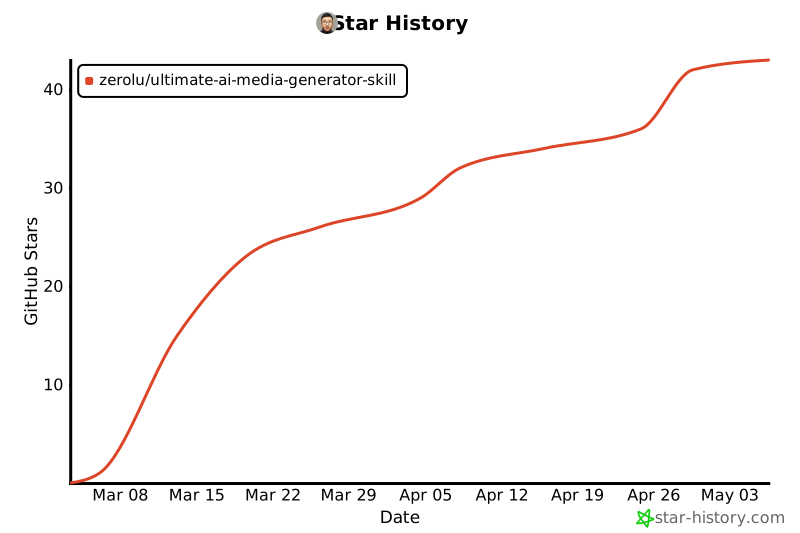](https://star-history.com/#ZeroLu/Ultimate-AI-Media-Generator-Skill&Date)
Ratings and comments
Sign in to rate this skill.
Sign inFree to use. If it’s helped, pass it on.