dsh-project-brain
Persistent project intelligence and memory plugin for DSH: architecture analysis, cross-session context, TODOs, and optional hybrid retrieval
Safety scan
A static text scan, not a guarantee. Select the badge to see what was scanned and every finding.
Badge for your README

Markdown
[](/listings/yj-liuzepeng--dsh-project-brain)HTML
<a href="/listings/yj-liuzepeng--dsh-project-brain"><img src="/api/listings/yj-liuzepeng--dsh-project-brain/badge.svg" alt="findsafeskills safety rating" /></a>Install
Install instructions from the README
As written by the repo's author. findsafeskills has not verified these steps.
Install the tagged public beta into the DSH profile you use:
dsh plugin --profile web add github:yj-liuzepeng/dsh-project-brain#v0.7.0-beta.2
For example, use `--profile web` with `dsh web`, or `--profile desktop` when your Desktop distribution runs that profile. Restart the active DSH process after installation or upgrade; for DSH Desktop, quit and reopen the application completely. The package contains prebuilt Host and Client bundles, so users do not need Node.js or a local build.
Runtime compatibility
- The Host plugin provides workspace analysis, 13 `project_*` tools, persistent memory, context injection, TODOs, and architecture analysis to a compatible DSH profile. - The Dashboard and TodoStrip are a DSH Web client plugin (`platform: web`). They work in DSH Web and in Desktop distributions that host the DSH Web client. - A pure CLI/TUI client does not render the Dashboard. Core Host capabilities may still be used when that profile provides the plugin's required DSH services; non-Web profile coverage is still being validated during beta.
For source development, Node.js `22.19+` or `24+` is required:
git clone https://github.com/yj-liuzepeng/dsh-project-brain.git
cd dsh-project-brain
npm install
npm test
npm run build
npm run verify:release
npm run verify:install
Source contributors can link the repository into a target DSH profile workspace and enable `dsh-project-brain` in its bundle configuration.
After installation:
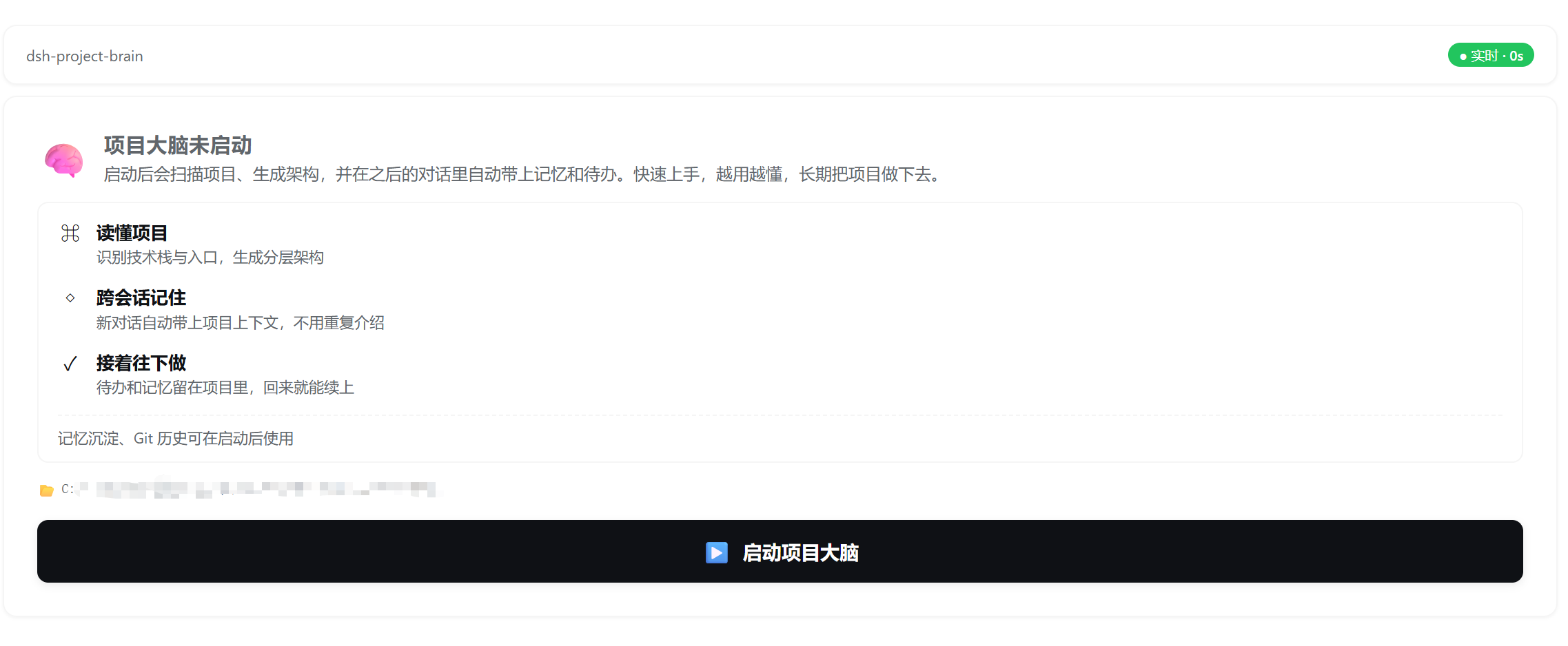
1. Open a repository as the current DSH workspace. 2. Open the **Project** tab. 3. Click **Start Project Brain**. 4. Review the Overview, Architecture, Work Activity, and Project Memory tabs. 5. Continue in a new conversation and verify that project context is restored.
See [INSTALL.md](./INSTALL.md) for detailed setup and troubleshooting.
What was scanned
The files the safety scan read, as written by the repository's author and shown as plain text. Lines with a finding are marked.
README.md · README · 270 lines
- # dsh-project-brain
- **English** · [简体中文](./README.zh-CN.md)
- [](./CHANGELOG.md)
- [](./LICENSE)
- [](./package.json)
- [](./RELEASE_CHECKLIST.md)
- **A persistent project intelligence and memory plugin for DSH.** It analyzes the active workspace, explains the architecture, preserves decisions and development history, and restores the right context in future sessions.
- Instead of making every new conversation rediscover the repository, dsh-project-brain stores structured knowledge inside the project itself and keeps getting more useful as the project evolves.
- > Current release: `1.4.0` — the release that makes project memory actually usable: deictic references are resolved before a memory is stored, memories can be edited / pinned / archived / deleted from the dashboard, concurrent writes no longer silently drop rows, and Core has configurable capacity with pinning. Data format stays backward-compatible with v1.3.x.
- **v1.3.1 新特性**:📦 **导入导出 / 备份恢复**
- - Dashboard 顶部新增 **💾 备份 / 📥 恢复 / ↶ 回滚** 三个按钮(与项目名 + techStack chip 同一行)
- - 一键把整个项目脑打成 zip(含 timeline + cache + manifest + sha256 校验)→ 跨机器传文件 → 在另一台机器一键还原
- - 导入前自动预览影响清单(即将覆盖的脑 / 旧脑备份路径 / rootPath 改写);主按钮文案「覆盖并恢复」明确提醒
- - 每次导入/回滚前自动备份当前脑到 `.project-brain.backup-<ts>/`;可随时回滚到任一历史备份
- - 4 个新 Tool:`project_export` / `project_import` / `project_rollback_backup` / `project_cleanup_backups`
- [GitHub release](https://github.com/yj-liuzepeng/dsh-project-brain/releases/tag/v1.3.1) · [DSH community showcase](https://github.com/deepseek-ai/deepseek-harness/discussions/5121) · [MyDSH listing](https://mydsh.dev/plugin?repo=yj-liuzepeng%2Fdsh-project-brain)
- ## Preview
- ### Project Brain activation entry (before first scan)
- 
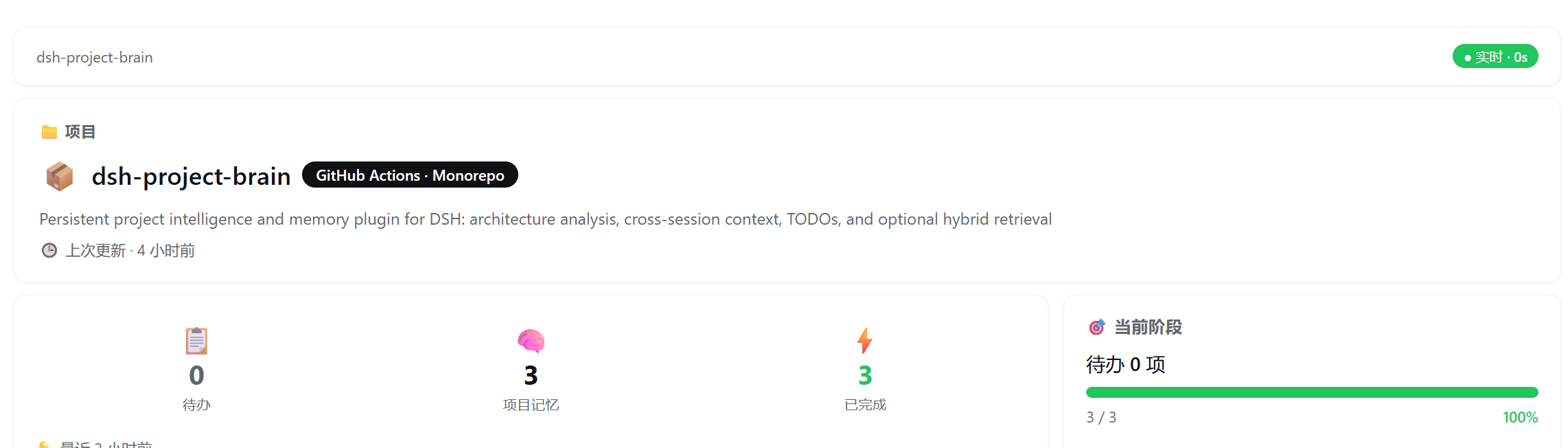
- ### Project card with detected stack and live status
- 
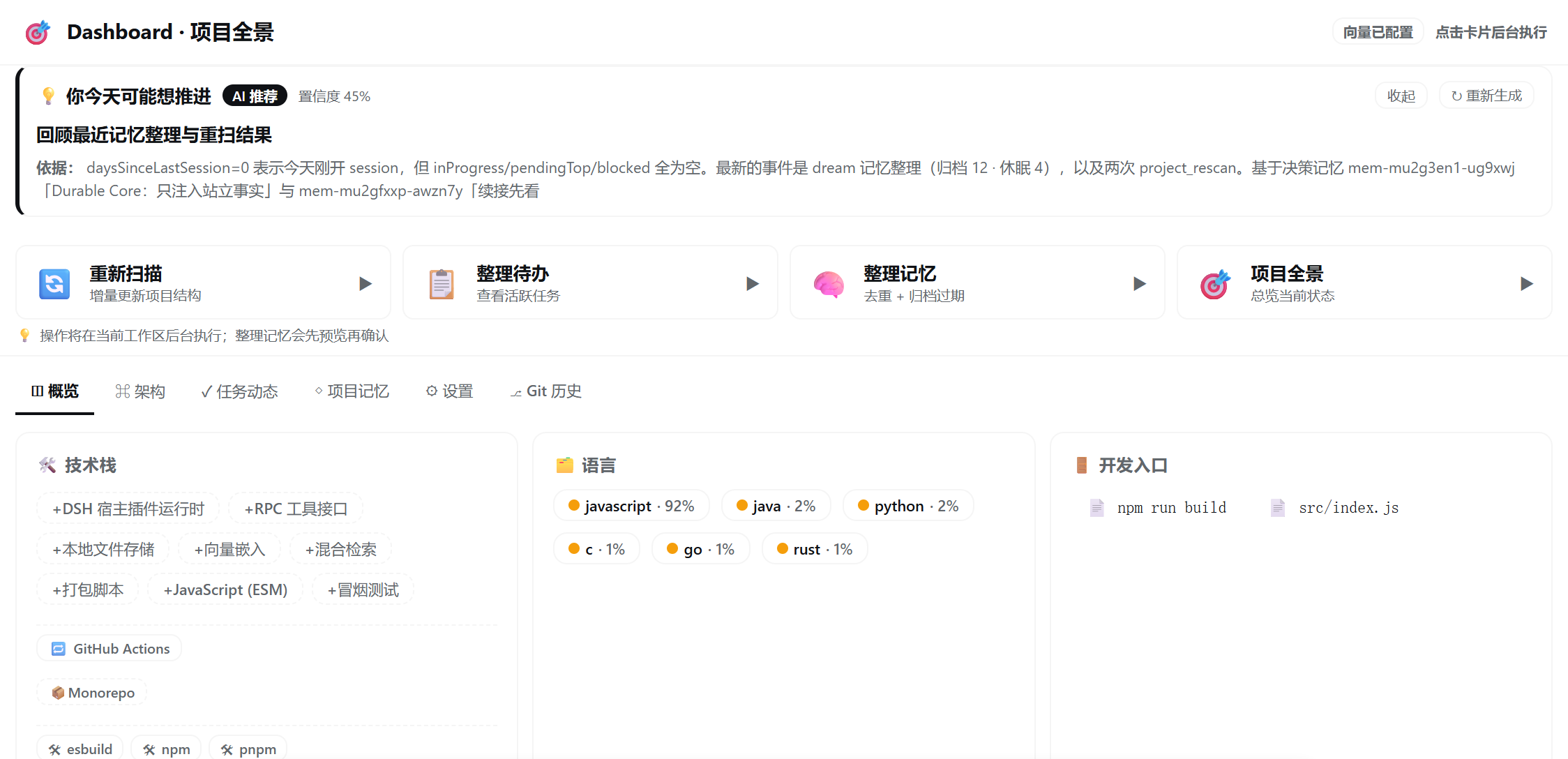
- ### Dashboard overview with SuggestionCard and Quick Actions
- 
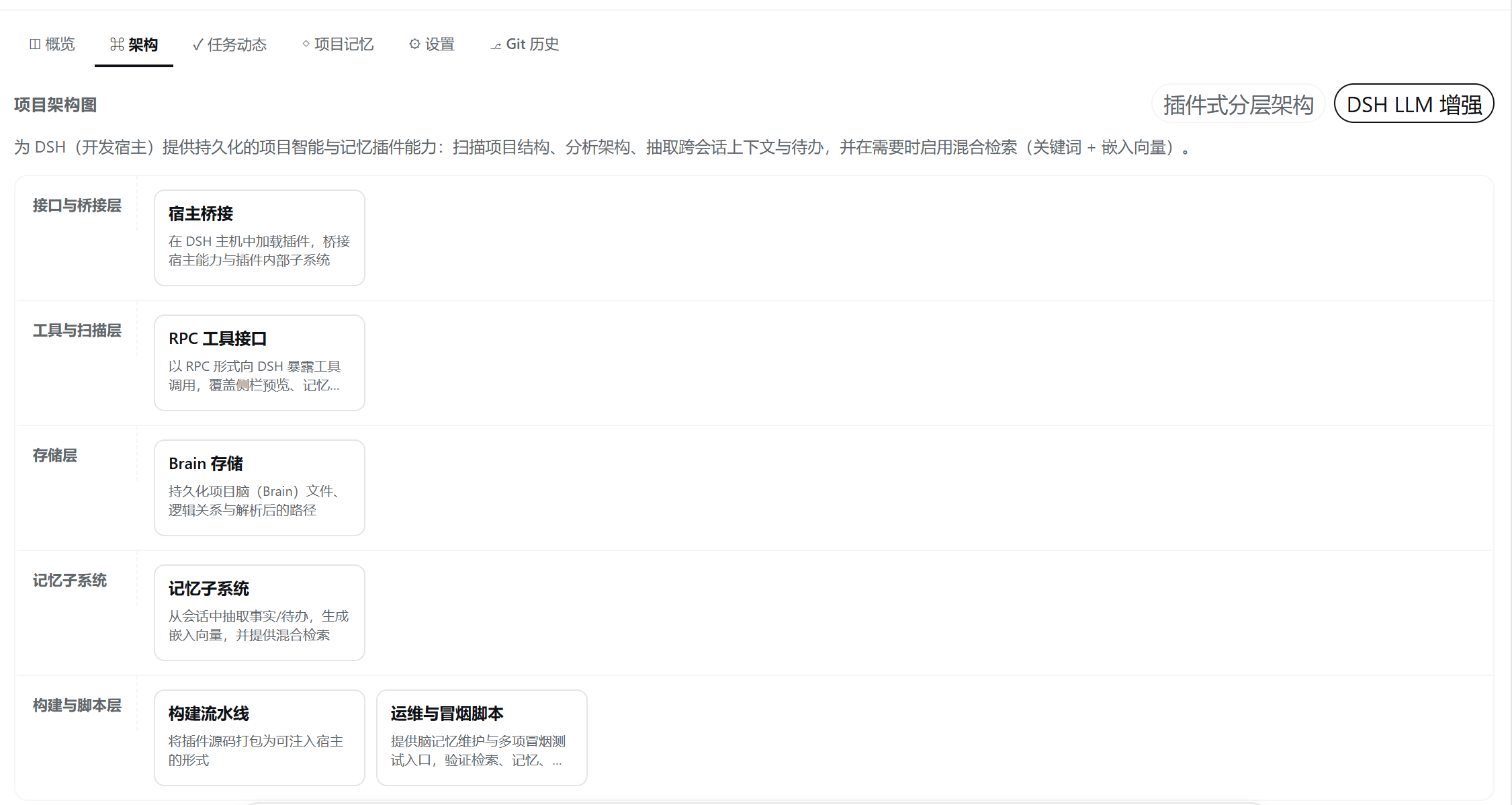
- ### Architecture tab — lane-based layered overview
- 
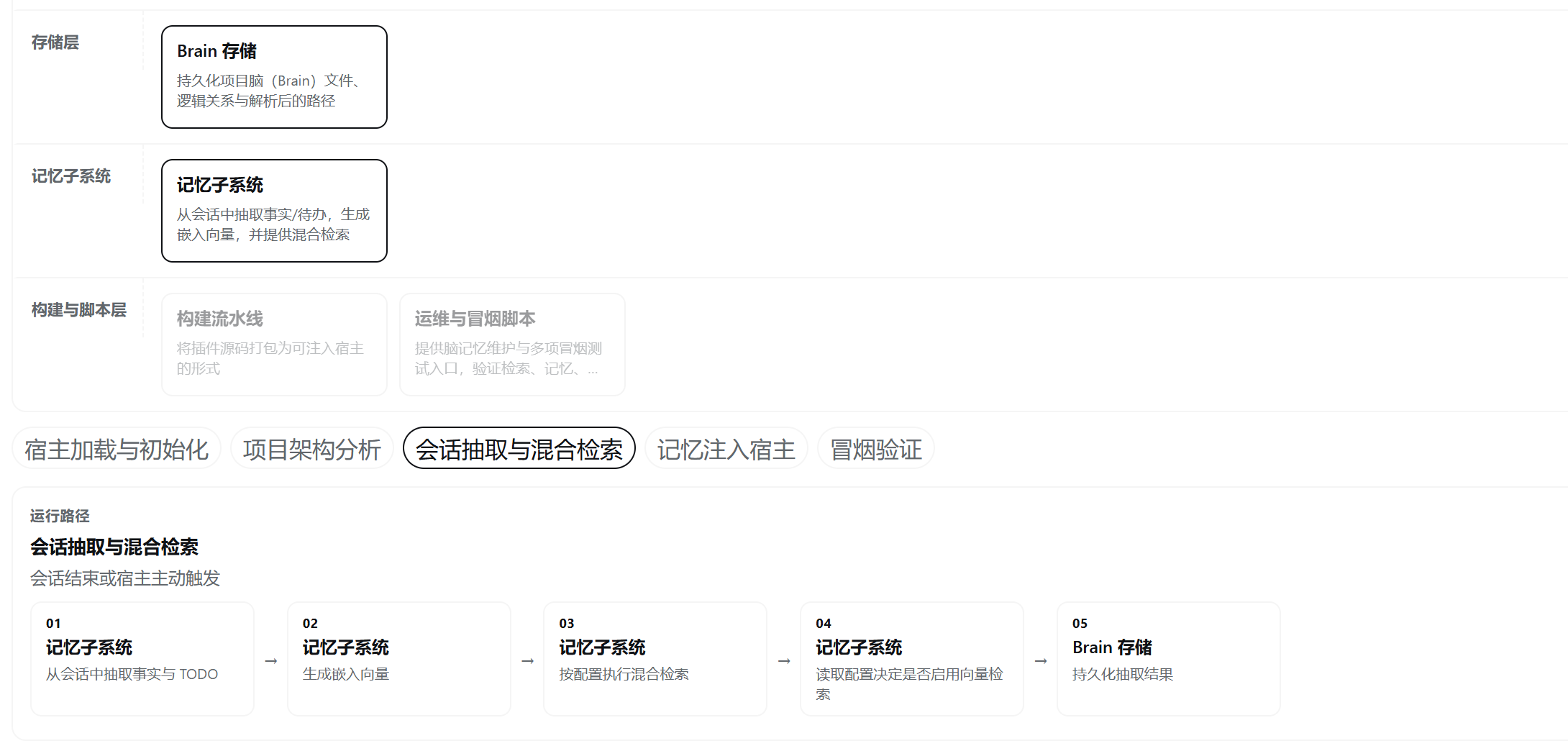
- ### Architecture tab — expanded runtime path for a single layer
- 
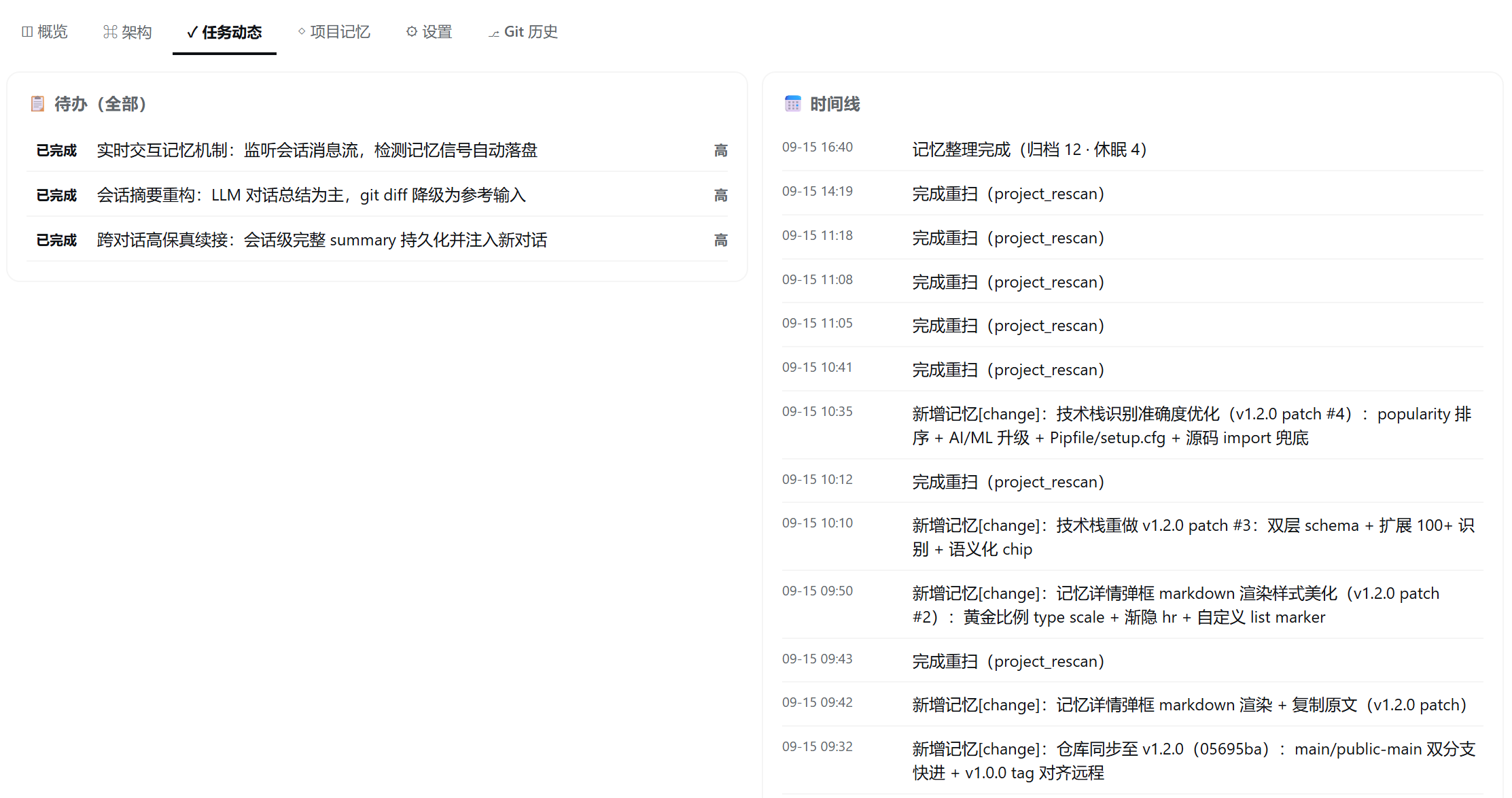
- ### TODOs and development timeline
- 
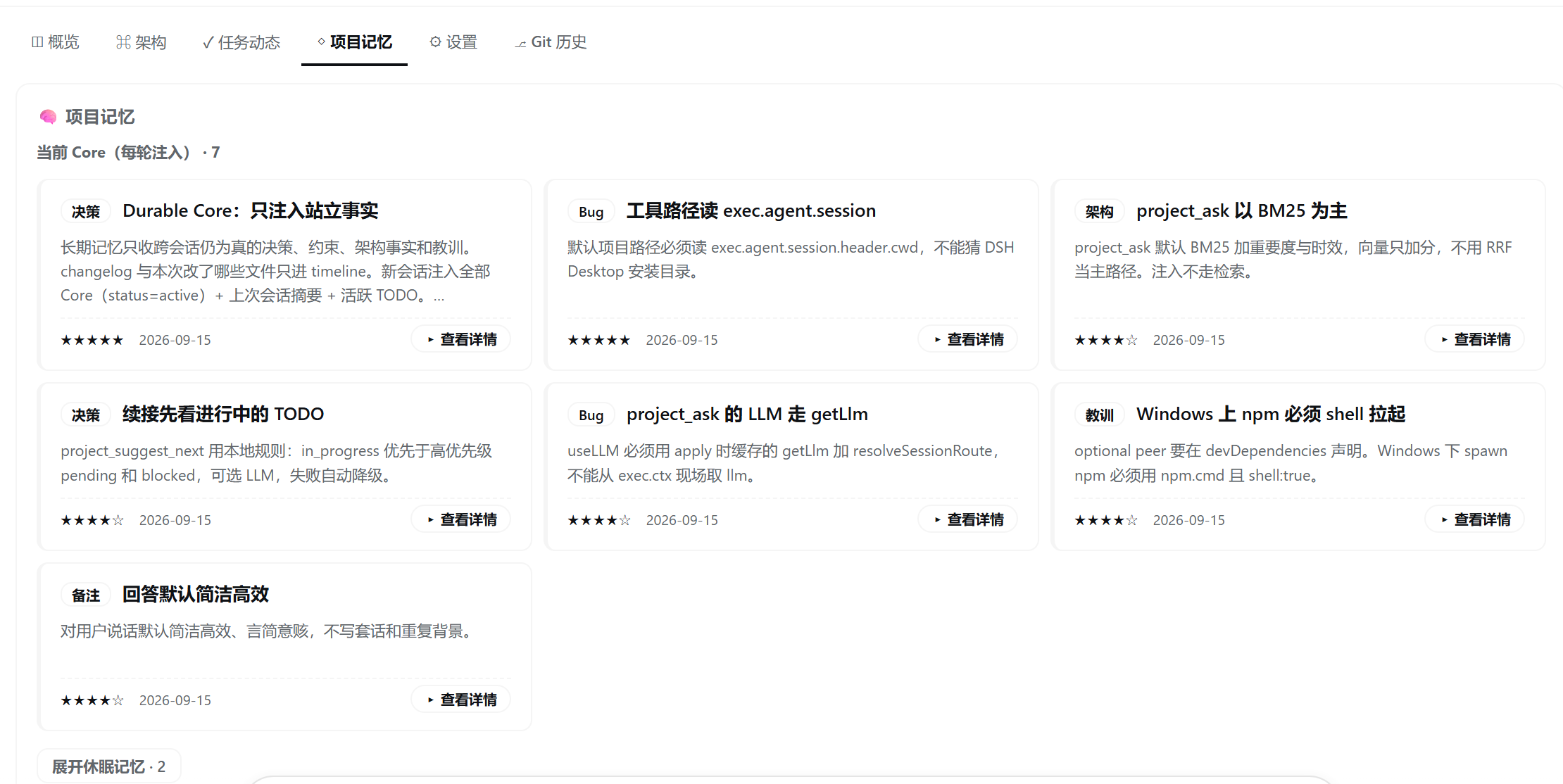
- ### Project memories with type badges and importance stars
- 
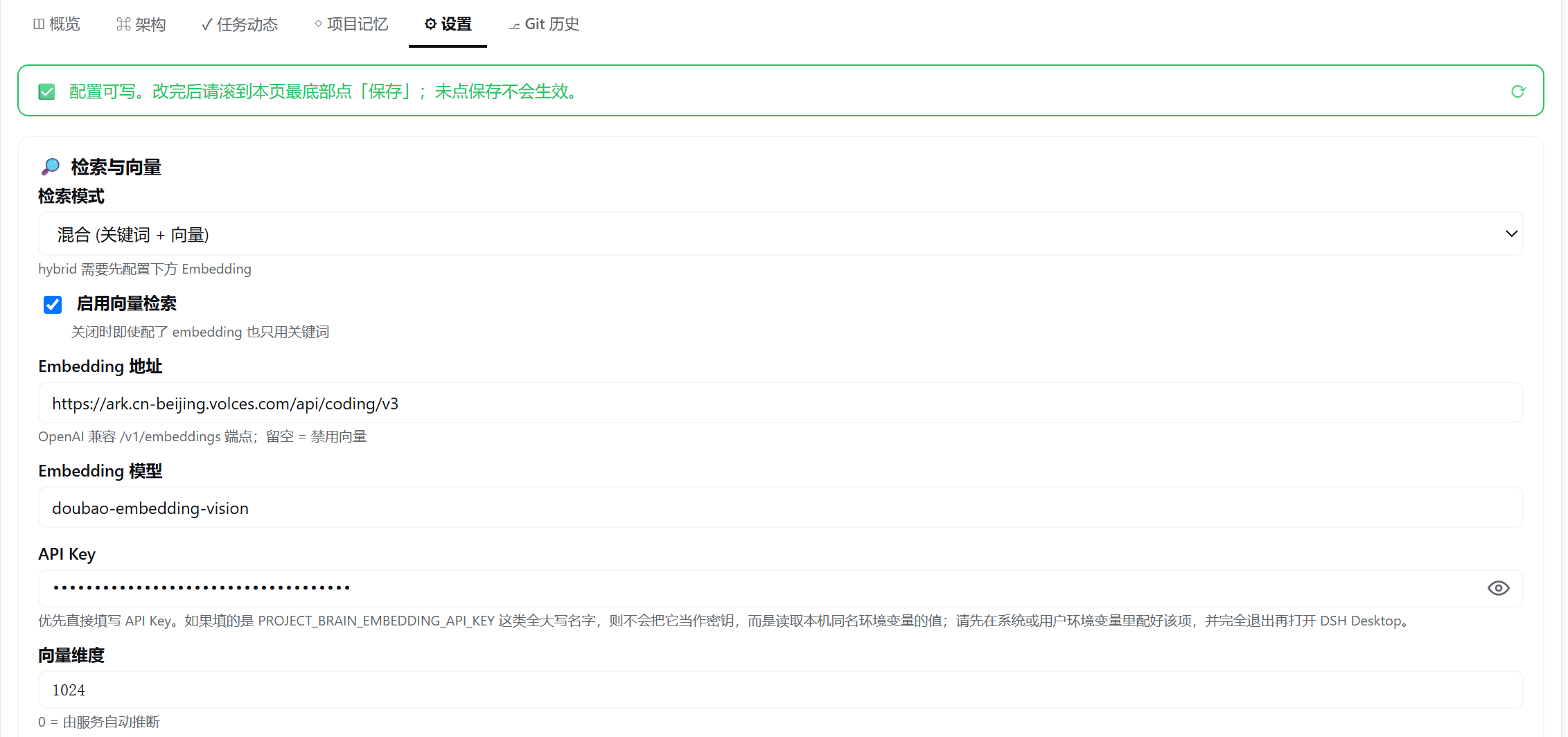
- ### Settings — vector retrieval and Embedding config
- 
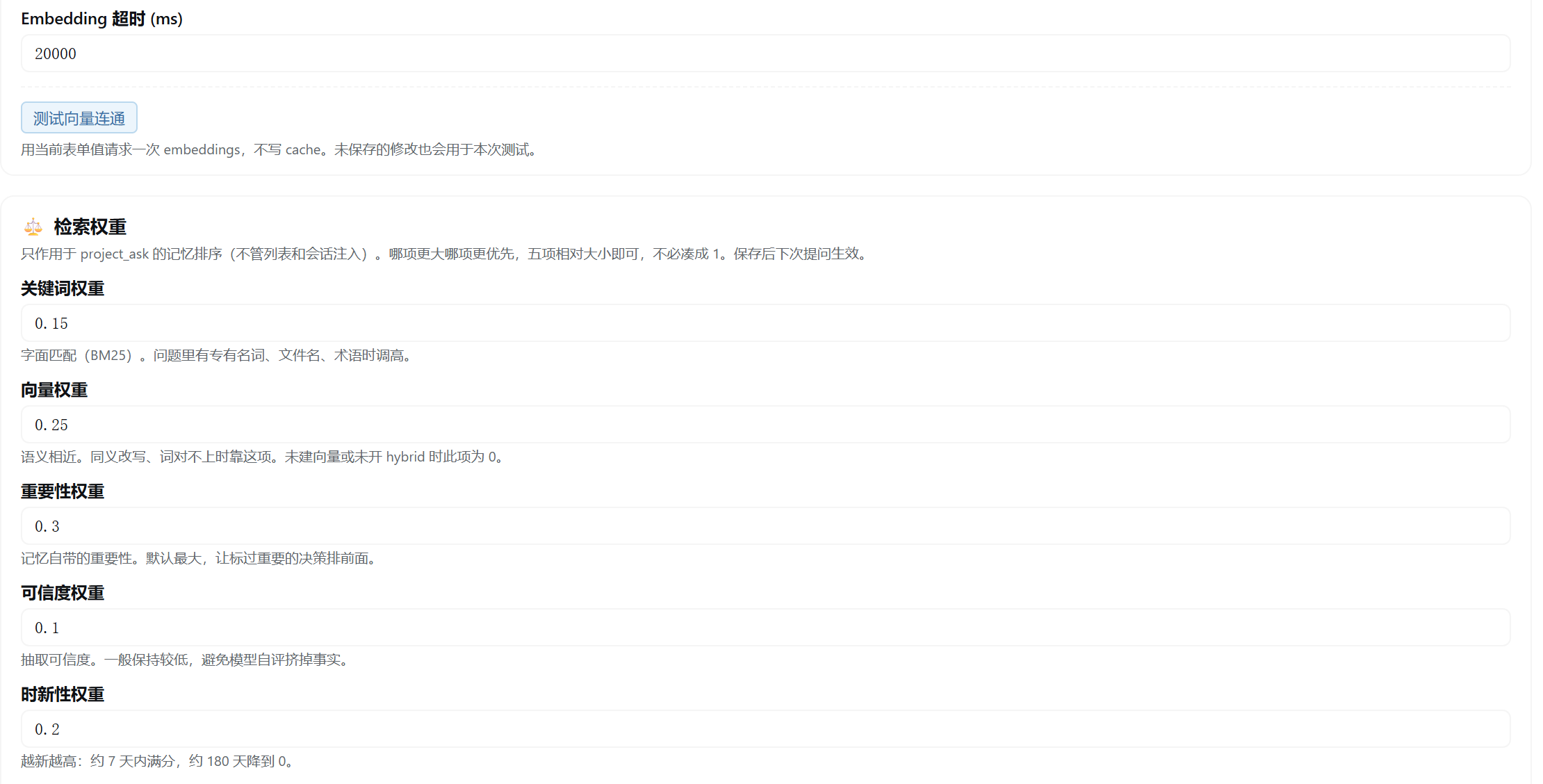
- ### Settings — retrieval weights and probe button
- 
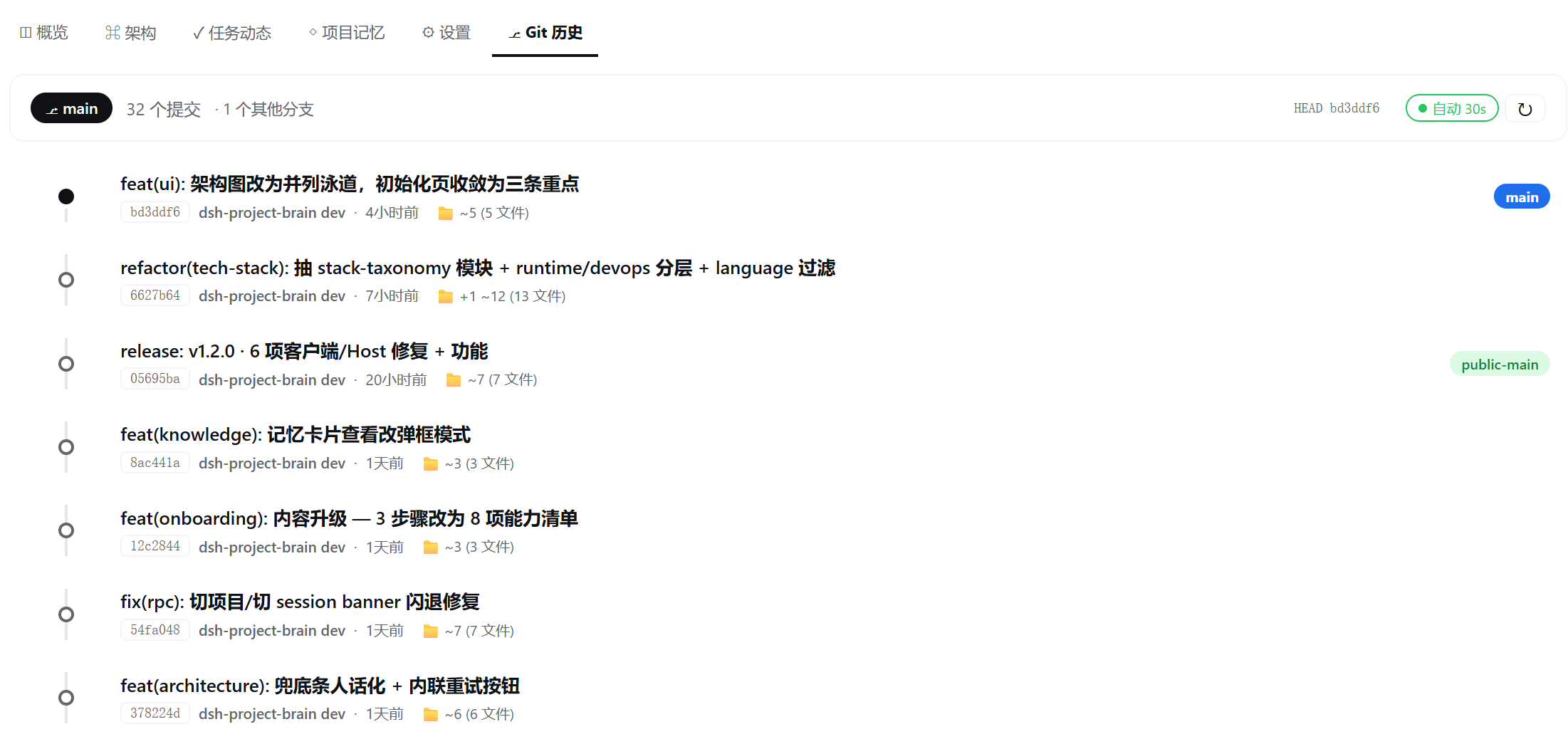
- ### Git history tab (VSCode-style)
- 
- ## Why use it?
- AI coding sessions are usually short-lived, while real software projects are not. Important context gets scattered across conversations: why an architectural choice was made, which workaround fixed a production bug, what is currently in progress, and which files form the critical path.
- dsh-project-brain turns that context into a local, workspace-scoped knowledge layer:
- - **Understand a repository quickly** — detects languages, frameworks, tooling, entry points, manifests, README metadata, symbols, and imports.
- - **Explain architecture, not just folders** — produces a report covering project purpose, architectural style, conceptual layers, component responsibilities, relationships, runtime flows, key files, reading order, and risks.
- - **Reuse the active DSH model** — architecture analysis uses the provider/model already selected for the current DSH Session; no separate chat-model key is required.
- - **Remember across conversations** — decisions, requirements, architecture notes, bugs, lessons, changes, TODOs, and timeline events persist in the workspace.
- - **Restore context automatically** — a new Session receives high-value memories, active TODOs, and recent activity through the DSH system prompt.
- - **Keep workspaces isolated** — the Host resolves the live Session workspace; one project's memory is never guessed from another project.
- - **Work without embeddings** — local BM25 retrieval is the zero-configuration default. OpenAI-compatible embeddings are an optional semantic upgrade.
- - **Stay usable when AI is unavailable** — architecture generation and memory retrieval have local fallback paths.
- ## How it works
- ```text
- Active DSH Session
- │ trusted live Session cwd
- ▼
- Workspace scanner ───────► project facts and source evidence
- │
- ├──► current DSH LLM ───► semantic architecture report
- │ │ unavailable / timeout / invalid output
- │ └────────────► local architecture fallback
- │
- ├──► .project-brain/ ───► memory, TODOs, timeline, architecture
- │
- ├──► context injector ──► next Session system prompt
- │
- └──► Connection RPC ────► Dashboard and TodoStrip
- ```
- The browser-side UI cannot choose arbitrary filesystem paths. Runtime actions are resolved by the Host against the active DSH Session.
- ## Local project data
- Each workspace owns its data:
- ```text
- .project-brain/
- ├── project.json # project metadata, stack, languages, and entry points
- ├── architecture.json # purpose, layers, components, flows, and evidence
- ├── memory.jsonl # long-term structured project memories
- ├── todo.jsonl # project tasks and status
- ├── timeline.jsonl # scans, memory events, TODO events, and sessions
- ├── codegraph.json # optional legacy AST graph
- └── cache/
- └── embeddings.jsonl # optional, derived, and safe to rebuild
- ```
- Project data survives plugin upgrades and conversation changes. Uninstalling the plugin does not delete `.project-brain/`.
- ## Memory model
- Memories can represent `decision`, `requirement`, `architecture`, `change`, `bug`, `lesson`, `issue`, or `context`.
- Every new V2 memory includes importance, confidence, lifecycle status, source, timestamps, optional tags, and related files. Archived, superseded, and deleted memories are excluded from normal retrieval, automatic prompt injection, status counts, and the Dashboard.
- The plugin writes memories through three paths:
- 1. The Agent records durable decisions and lessons with `project_memory_add`.
- 2. Session shutdown records a deduplicated Git change summary and uses the active DSH model to extract a small set of durable, evidence-based project facts. Credentials and non-text/tool output are excluded; unavailable or invalid model output degrades safely to Git-only memory.
- 3. Architecture-diff analysis can generate architecture/change memories.
- The **Organize Memory** action first previews merge and archive candidates. It only writes changes after confirmation.
- Session extraction is configurable with `sessionSemanticMemoryEnabled`, `sessionSemanticMaxChars`, `sessionSemanticMaxItems`, and `sessionSemanticTimeoutMs`. Disable it to keep Session summarization Git-only.
- ## Retrieval
- The default local retriever uses BM25 over titles, content, tags, related files, and types. Ranking also considers importance, confidence, recency, stable memory types, and result diversity.
- Optional hybrid retrieval combines keyword and vector scores. Enable it in the plugin settings:
- ```yaml
- retrievalMode: hybrid
- vectorEnabled: true
- embeddingBaseURL: https://your-provider.example/v1
- embeddingModel: your-embedding-model
- embeddingApiKeyEnv: PROJECT_BRAIN_EMBEDDING_API_KEY
- ```
- Embedding indexes are updated lazily by content hash. Missing credentials, network errors, invalid vectors, or dimension mismatches automatically fall back to local keyword retrieval.
- > Enabling a remote embedding service sends memory titles, content, tags, and related file names to that service. Use a local model or a trusted provider for confidential repositories.
- ## Architecture analysis
- Initialization and rescans first collect deterministic local facts. When the current DSH Session has an available model route, the plugin sends bounded project evidence—README content, manifests, relative paths, symbols/imports, and selected source excerpts—to generate a conceptual architecture report.
- Safety and reliability controls include:
- - no absolute paths in the architecture prompt;
- - configurable source inclusion and file/node limits;
- - strict JSON extraction, repair, and schema normalization;
- - validation of evidence paths and component relationships;
- - no model-generated HTML rendering;
- - automatic local fallback on missing routes, timeout, or invalid output;
- - architecture fingerprints to avoid unnecessary repeated analysis.
- Set `architectureLlmIncludeSource: false` to send structure only, or `architectureLlmEnabled: false` for fully local analysis.
- ## Quick start
- Install the tagged public beta into the DSH profile you use:
- ```bash
- dsh plugin --profile web add github:yj-liuzepeng/dsh-project-brain#v0.7.0-beta.2
- ```
- For example, use `--profile web` with `dsh web`, or `--profile desktop` when your Desktop distribution runs that profile. Restart the active DSH process after installation or upgrade; for DSH Desktop, quit and reopen the application completely. The package contains prebuilt Host and Client bundles, so users do not need Node.js or a local build.
- ### Runtime compatibility
- - The Host plugin provides workspace analysis, 13 `project_*` tools, persistent memory, context injection, TODOs, and architecture analysis to a compatible DSH profile.
- - The Dashboard and TodoStrip are a DSH Web client plugin (`platform: web`). They work in DSH Web and in Desktop distributions that host the DSH Web client.
- - A pure CLI/TUI client does not render the Dashboard. Core Host capabilities may still be used when that profile provides the plugin's required DSH services; non-Web profile coverage is still being validated during beta.
- For source development, Node.js `22.19+` or `24+` is required:
- ```bash
- git clone https://github.com/yj-liuzepeng/dsh-project-brain.git
- cd dsh-project-brain
- npm install
- npm test
- npm run build
- npm run verify:release
- npm run verify:install
- ```
- Source contributors can link the repository into a target DSH profile workspace and enable `dsh-project-brain` in its bundle configuration.
- After installation:
- 1. Open a repository as the current DSH workspace.
- 2. Open the **Project** tab.
- 3. Click **Start Project Brain**.
- 4. Review the Overview, Architecture, Work Activity, and Project Memory tabs.
- 5. Continue in a new conversation and verify that project context is restored.
- See [INSTALL.md](./INSTALL.md) for detailed setup and troubleshooting.
- ## Tools
- | Capability | Tool |
- |---|---|
- | Initialize or rescan | `project_init`, `project_rescan` |
- | Status and continuation | `project_status`, `project_continue` |
- | Long-term memory | `project_memory_add`, `project_memory_list` |
- | TODO management | `project_todo_add`, `project_todo_list`, `project_todo_update`, `project_todo_done` |
- | Query and maintenance | `project_ask`, `project_dream` |
- | Git + LLM architecture diff | `project_diff` |
- Dashboard quick actions run these workflows in the background and provide loading, confirmation, success, error, and retry states.
- ## Privacy and security
- - Project knowledge stays under `<workspace>/.project-brain/` unless an explicitly enabled model capability sends bounded content to its configured provider.
- - Session semantic memory sends bounded user/assistant text to the provider already selected by DSH; tool output, system messages, and recognizable credentials are removed first. Set `sessionSemanticMemoryEnabled: false` to disable it.
- - Client RPC cannot provide a filesystem path; the Host uses the live Session workspace.
- - Tool execution prioritizes the trusted live Session path over model-provided arguments.
- - Uninitialized projects are not silently populated by the Session summarizer.
- - Vector retrieval is disabled by default.
- - Embedding credentials are resolved through DSH Credentials or an environment-variable reference and are not written into memory files or Client RPC responses.
- - Release builds do not embed the developer's workspace, Session IDs, project memories, credentials, or local filesystem paths.
- - `.project-brain/` may contain internal decisions and bug history. Review it before committing it to Git.
- ## Development and release verification
- ```bash
- npm test
- npm run build
- npm run verify:release
- npm run verify:install
- npm audit
- ```
- The automated suite covers runtime workspace resolution, cross-workspace isolation, cross-Session memory, architecture local/LLM paths, Memory V2, BM25/hybrid retrieval, Session deduplication, scanner behavior, Dashboard/TodoStrip contracts, theme tokens, Git pack/delta handling, and LLM protocols.
- `verify:release` validates package metadata, entry points, the npm file allowlist, and scans release files for local paths, Session IDs, credentials, private keys, logs, archives, and project-brain data. `verify:install` then packs the exact release artifact and installs it in a clean temporary project to catch peer-dependency or missing-build failures before users do.
- ## Current limitations
- - Session semantic extraction is intentionally bounded and only records a few durable facts. Explicit memory/TODO tools remain the most reliable way to preserve critical intent.
- - The current DSH model route may not exist before the Session makes its first normal model request. If so, chat once and rescan.
- - `project_diff` uses its own OpenAI/Anthropic-compatible configuration; architecture initialization uses the current DSH Session model.
- - Git multi-pack-index (MIDX) support is not yet complete.
- - Host bundle upgrades require restarting the active DSH process; Desktop users should quit and reopen the application.
- ## Documentation
- - [中文说明](./README.zh-CN.md)
- - [Installation](./INSTALL.md)
- - [Release checklist](./RELEASE_CHECKLIST.md)
- - [Changelog](./CHANGELOG.md)
- - [Design](./DESIGN.md)
- - [Specification](./SPEC.md)
- - [Store listing](./STORE_LISTING.md)
- ## License
- [MIT](./LICENSE)
Ratings and comments
Sign in to rate this skill.
Sign inFree to use. If it’s helped, pass it on.