x-mcp
小红书创作中心
Safety scan
A static text scan, not a guarantee. Select the badge to see what was scanned and every finding.
Check it deeper on your machine
It has changed since its scan on 11 Nov 2026.
As a Claude Code plugin, install it and then ask Claude Code:
/plugin marketplace add keithmackay/mackayi/plugin install scanskillsafety@mackayiDo a deep scan of https://github.com/xpzouying/x-mcp with scanskillsafety
Or from a terminal, clone it and run it:
git clone https://github.com/keithmackay/scanskillsafety-skill ~/.claude/skills/scanskillsafetynode ~/.claude/skills/scanskillsafety/cli.cjs --deep 'https://github.com/xpzouying/x-mcp'
It checks the exact commit: every file, its packages against OSV (api.osv.dev), how it compares with this page's scan (findsafeskills.com receives the repository's address), and, if you agree, Claude reading every file with your own Claude subscription. It never runs the code.
Badge for your README

Markdown
[](/listings/xpzouying--x-mcp)HTML
<a href="/listings/xpzouying--x-mcp"><img src="/api/listings/xpzouying--x-mcp/badge.svg" alt="findsafeskills safety rating" /></a>Install
What was scanned
The files the safety scan read, as written by the repository's author and shown as plain text. Lines with a finding are marked.
README.md · README · 127 lines
View this file on GitHub (read at the repository's current version: the scan did not record which commit it read)
- # 🚀 X-MCP: 小红书自动化助手
- [](https://chromewebstore.google.com/detail/%E5%B0%8F%E7%BA%A2%E4%B9%A6mcp%E5%8A%A9%E6%89%8B/dklmcgbmpnmkndhapabinagmmdmjhjgl)
- [](https://aredink.com/)
- **X-MCP** 是针对 [xiaohongshu-mcp](https://github.com/xpzouying/xiaohongshu-mcp) 的浏览器插件增强版。它利用 **MCP (Model Context Protocol)** 协议,让 AI 客户端(如 Claude, Cursor)能够直接控制你的浏览器,实现更安全、更简单的自动化发布。
- 目前处于 **发布阶段**,欢迎反馈你的使用体验。
- ## 🌟 为什么选择 X-MCP?
- 针对非技术用户和高频创作者,我们解决了原版部署困难的痛点:
- - **零环境部署**:无需安装 Python、Docker 或配置复杂的 API 代理。
- - **操作完全可见**:所有的自动化流程都在浏览器中实时展示,随时可干预。
- - **账号安全性高**:复用你常用的浏览器登录状态,无异地登录或环境异常风险。
- ### 微信群
- |微信(5群)|
- |:---:|
- |<img src="https://raw.githubusercontent.com/ltzteam/images/refs/heads/main/1.JPG" alt="x-mcp-qr05" width="300"/>|
- ### 飞书群
- |飞书群(1群)|
- |:---:|
- | <img src="https://github.com/user-attachments/assets/33f55c4b-71a9-426c-b1ca-ffab1d7a7e2b" alt="x-mcp-feishu-01" width="300"/>|
- ## 🛠️ 安装指南
- ### 方式一:Chrome 应用商店(推荐 ✨)
- 1. 访问 [小红书MCP助手 - Chrome应用商店](https://chromewebstore.google.com/detail/%E5%B0%8F%E7%BA%A2%E4%B9%A6mcp%E5%8A%A9%E6%89%8B/dklmcgbmpnmkndhapabinagmmdmjhjgl)。
- 2. 点击 **“添加到 Chrome”**。
- > **提示**:商店版本支持自动更新,是最省心的安装方式。
- ### 方式二:手动下载安装包
- 1. 访问 [aredink.com](https://aredink.com/),点击 **“下载安装包”** 并解压。
- 2. 打开 Chrome 扩展管理界面 (`chrome://extensions/`)。
- 3. 开启右上角的 **“开发者模式”**。
- 4. 点击 **“加载已解解压的扩展程序”**,选择解压后的文件夹。
- <img width="100%" alt="安装示意图" src="https://github.com/user-attachments/assets/5e646991-bbcd-4020-9ab0-12cbdc5cddcd" />
- ## 🚀 快速上手
- ### 1. 注册并获取 Token
- 前往 [aredink.com](https://aredink.com/) 注册并登录。点击 **【创建连接】** 获取 **API Token**。
- > ⚠️ **注意**:Token 只会展示一次,请妥善保存,后续需填入插件中。
- ### 2. 绑定插件
- 点击插件图标,在设置页填入 API Token。绑定成功后,你可以在官网控制台实时查看到插件的在线状态。
- <p align="center">
- <img width="300" src="https://github.com/user-attachments/assets/92e21798-79d9-45fe-9909-009b1fde53b6" />
- </p>
- ### 3. 连接测试
- 在插件面板中可以一键测试“检查登录状态”,确保小红书账号已登录且 MCP 连接正常。
- https://github.com/user-attachments/assets/4e1d4348-d268-4fc4-8563-a24a84e309e9
- ## 🔌 客户端接入
- ### 以 Claude Code 为例
- 在终端运行以下命令即可完成添加:
- ```bash
- claude mcp add --transport http x-mcp https://mcp.aredink.com/mcp --header "X-API-Key: <你的API-TOKEN>"
- ```
- ### 以 Codex 为例
- 在终端运行以下命令即可完成添加:
- ```bash
- export CODEX_XMCP_TOKEN=sk_xxxxxxx
- codex mcp add x-mcp --url https://mcp.aredink.com/mcp --bearer-token-env-var CODEX_XMCP_TOKEN
- ```
- 视频演示:
- https://github.com/user-attachments/assets/aef73b85-fd8b-4cdb-b156-fd3005a33bbd
- 支持通用的 MCP 协议的客户端接入,
- 1. 选择 HTTP 协议
- 2. 连接地址:`https://mcp.aredink.com/mcp`
- 3. 设置认证:Header 中增加字段: `X-API-Key`,值为 <你的API-TOKEN>。
- 更多客户端进行补充。
- ### 示例 - 发布
- 依然是我们的发布示例,
- ```
- 帮我写一篇帖子发布到小红书上,
- 配图为:https://cn.bing.com/th?id=OHR.MaoriRock_EN-US6499689741_UHD.jpg&w=3840
- 图片是:"纽西兰陶波湖的Ngātoroirangi矿湾毛利岩雕(© Joppi/Getty Images)"
- 使用 x-mcp 进行发布。
- ```
- https://github.com/user-attachments/assets/cce5d21c-94e0-4dd0-ba4c-5cfd2c65946a
- ### 示例 - 发布视频
- 依然是使用我们的发布视频示例,
- ```帮我 2 个小时后,发布一篇视频文章,内容随意,视频已上传给了插件,不要询问,直接操作。
- 视频为:创作中心上传视频
- 使用 x-mcp 进行视频发布。
- ```
- https://github.com/user-attachments/assets/ef68dd72-8b8b-425b-ad22-7ede050bf125
- ### 示例 - 生成封面图片
- https://github.com/user-attachments/assets/a41faf51-0d0f-48ca-bde5-0a92efac4bde
- ## Star History
- [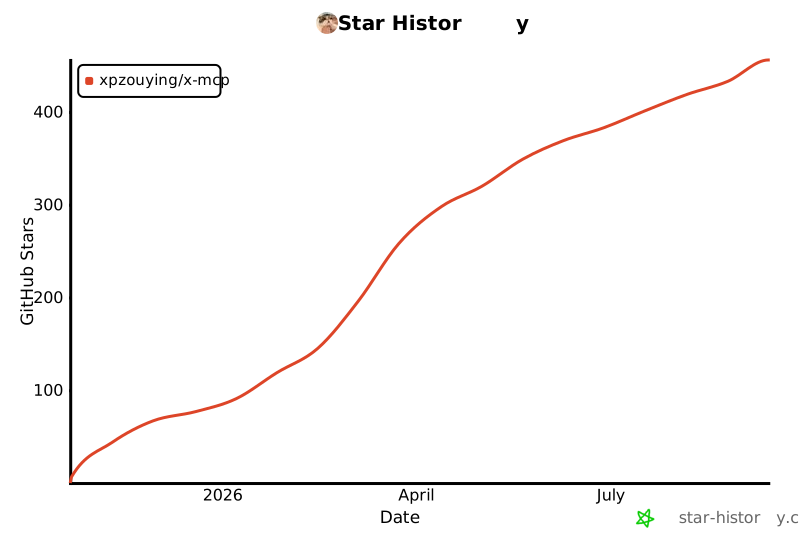](https://star-history.com/#xpzouying/x-mcp&Date)
Ratings and comments
Sign in to rate this skill.
Sign inFree to use. If it’s helped, pass it on.