Back to search
sysplant
SkillGitHub
Your Windows syscall hooking factory - feat Canterlot's Gate - All accessible over MCP
Safety scan
A static text scan, not a guarantee. Select the badge to see what was scanned and every finding.
Checked today
Badge for your README
Markdown
[](/listings/x42en--sysplant)HTML
<a href="/listings/x42en--sysplant"><img src="/api/listings/x42en--sysplant/badge.svg" alt="findsafeskills safety rating" /></a>Install
i
What was scanned
The files the safety scan read, as written by the repository's author and shown as plain text. Lines with a finding are marked.
README.md · README · 219 lines
View this file on GitHub (read at the repository's current version: the scan did not record which commit it read)
- <!-- markdownlint-disable MD033 MD041 -->
- <h1 align="center">
- ..:: SysPlant ::..
- </h1>
- <p align="center">
- <strong>Your Syscall Factory</strong> <i>(feat. Canterlot's Gate)</i>
- </p>
- <p align="center">
- <img src="http://sysplant.readthedocs.io/en/main/assets/canterlot.jpeg" alt="Canterlot's Gate"/>
- </p>
- [](https://pypi.org/project/sysplant/)
- [](https://pypi.org/project/sysplant/)
- [](https://github.com/x42en/sysplant)
- [](https://github.com/x42en/sysplant/blob/main/LICENSE)
- [](https://pypistats.org/packages/sysplant)
- [](https://www.codefactor.io/repository/github/x42en/sysplant)
- [](https://modelcontextprotocol.io)
- [](https://github.com/psf/black)
- [](https://sysplant.readthedocs.io/en/latest/?badge=latest)
- SysPlant is a python generation tool of the currently known syscall hooking methods. It currently supports following gates (aka: iterators):
- - [Hell's Gate](https://github.com/am0nsec/HellsGate) : Lookup syscall by first opcodes
- - [Halos's Gate](https://blog.sektor7.net/#!res/2021/halosgate.md) : Lookup syscall by first opcodes and search nearby if first instruction is a JMP
- - [Tartarus' Gate](https://github.com/trickster0/TartarusGate) : Lookup syscall by first opcodes and search nearby if first or third instruction is a JMP
- - [FreshyCalls](https://github.com/crummie5/FreshyCalls) : Lookup syscall by name (start with Nt and not Ntdll), sort addresses to retrieve syscall number
- - [SysWhispers2](https://github.com/jthuraisamy/SysWhispers2) : Lookup syscall by name (start with Zw), sort addresses to retrieve syscall number
- - [SysWhispers3](https://github.com/klezVirus/SysWhispers3) : SysWhispers2 style but introduce direct/indirect/random jump with static offset
- - **Canterlot's Gate ! :unicorn: :rainbow:** _(from an initial idea of [MDSEC article](https://www.mdsec.co.uk/2022/04/resolving-system-service-numbers-using-the-exception-directory/)) but who was missing a pony name_ : Lookup syscall using Runtime Exception Table (sorted by syscall number) and detect offset to syscall instruction for random jumps.
- - **Custom** Allows you to choose an iterator and a syscall stub method (direct / indirect / random / egg_hunter) which describe the way your NtFunctions will be effectively called.
- > :warning: **DISCLAIMER**
- > Please only use this tool on systems you have permission to access.
- > Usage is restricted to Pentesting or Education only.
- > All credits are based on my own research, please feel free to claim any method if I made mistakes...
- ---
- ## Introduction
- This personal project aims to be a simple tool to better understand & generate different syscall retrieval methods, and being able to play with direct / indirect / egg_hunter syscall stub. The first goal was to get my hands into NIM and then it overflow to C, C++ and Rust :wink: ...
- SysPlant has been developped for Linux users, some stuff might be broken within Windows or Mac. PR are welcome if you found anything that does not work as expected.
- ### Supported Languages
- | Language | Status | Cross-compile from Linux |
- | -------- | ------------------------- | --------------------------------------------------------------------- |
- | NIM | :white_check_mark: Stable | `nim c -d=release -d=danger -d=strip --opt=size -d=mingw --cpu=amd64` |
- | C | :white_check_mark: Stable | `x86_64-w64-mingw32-gcc -Wall -s -static -masm=intel` |
- | C++ | :white_check_mark: Stable | `x86_64-w64-mingw32-g++ -Wall -s -static -masm=intel` |
- | Rust | :white_check_mark: Stable | `cargo build --release --target x86_64-pc-windows-gnu` |
- ### MCP Server
- SysPlant ships with a built-in **[Model Context Protocol (MCP)](https://modelcontextprotocol.io/)** server, allowing AI coding assistants (Claude Code, Cursor, Windsurf, etc.) to generate syscall code directly from their chat interface.
- ```bash
- # stdio (default — plug into your AI client)
- python bridge_mcp_sysplant.py
- # SSE or Streamable HTTP for web-based clients
- python bridge_mcp_sysplant.py --transport sse --port 9090
- ```
- See the full guide: **[Sysplant as a MCP server](http://sysplant.readthedocs.io/en/main/usage/mcp)**
- ### General usage
- ```
- $ sysplant -h
- usage: main.py [-h] [--debug | --verbose | --quiet] {list,generate} ...
- ..:: SysPlant - Your Syscall Factory ::..
- positional arguments:
- {list,generate}
- options:
- -h, --help show this help message and exit
- Output options:
- --debug Display all DEBUG messages upon execution
- --verbose Display all INFO messages upon execution
- --quiet Remove all messages upon execution
- ```
- ```sh
- $ sysplant generate -h
- usage: main.py generate [-h] [-x86 | -wow | -x64] [-nim | -c | -cpp | -rust]
- [-p {all,donut,common} | -f FUNCTIONS] [-x] -o OUTPUT
- {hell,halo,tartarus,freshy,syswhispers,syswhispers3,canterlot,custom}
- ...
- options:
- -h, --help show this help message and exit
- -x, --scramble Randomize internal function names to evade static analysis
- -o OUTPUT, --output OUTPUT
- Output path for generated file
- Architecture options:
- -x86 Set mode to 32bits
- -wow Set mode to WoW64 (execution of 32bits on 64bits)
- -x64 Set mode to 64bits (Default True)
- Language options:
- -nim Generate NIM code (Default: true)
- -c Generate C code
- -cpp Generate C++ code
- -rust Generate Rust code
- Syscall options:
- -p {all,donut,common}, --preset {all,donut,common}
- Preset functions to generate (Default: common)
- -f FUNCTIONS, --functions FUNCTIONS
- Comma-separated functions
- ```
- ### Example output
- Here is an example of C syscall generation using **Canterlot's Gate** iterator:
- ```sh
- $ sysplant generate -c -o syscalls.c canterlot
- ⠀⠀⠀⠀⠀⠀⠀⠀⠀⠀⠀⠀⠀⠀⠀⠀⠀⢠⠶⢤⡀⠀⠀⠀⠀⠀⠀⠀⠀⠀⠀⠀⠀⠀⠀⠀⠀⠀⠀⠀⠀⠀⠀⠀⠀⠀⠀⠀⠀⠀⠀
- ⠀⢀⣀⡀⠀⢀⣠⣤⣴⣶⣶⡦⠤⢤⣤⣀⣀⣼⠀⠀⡽⣄⠀⠀⠀⠀⠀⠀⠀⠀⠀⠀⠀⠀⠀⠀⠀⠀⠀⠀⠀⠀⠀⠀⠀⠀⠀⠀⠀⠀⠀
- ⠀⠈⠫⣯⠙⡟⢿⣿⣿⡿⠁⠀⢠⣾⣿⣿⣿⡿⠀⠀⢹⠘⡆⠀⠀⠀⠀⠀⠀⠀⠀⠀⠀⠀⠀⠀⠀⠀⠀⠀⠀⠀⠀⠀⠀⠀⠀⠀⠀⠀⠀
- ⠀⠀⣼⣿⣷⣧⡀⢱⠈⠀⠀⠀⣿⣿⣿⣿⣿⡀⠀⠀⢸⠀⢳⠀⠀⠀⠀⠀⠀⠀⠀⠀⠀⠀⠀⠀⠀⠀⠀ ⠀⠀..:: SysPlant - Your Syscall Factory ::..
- ⠀⣼⣿⣿⣿⣿⣿⣿⡄⢀⣀⣠⣿⣿⣿⠿⢿⣷⣤⡀⠈⠀⡟⠀⠀⠀⠀⠀⠀⠀⠀⠀⠀⠀⠀⠀⠀⠀⠀⠀⠀⠀⠀⠀⠀⠀⠀⠀⠀⠀⠀
- ⢠⣿⣿⣿⣿⣿⣿⠿⠛⠉⠉⠀⡇⣾⣿⣦⣀⣿⡄⠀⠀⢰⠃⠀⠀⠀⠀⠀⠀⠀⠀⠀⠀ ⠀⠀⠀⠀⠀⠀⠀⠀⠀ Sysplant (2023) - 0x42en
- ⢸⣿⣿⣿⠿⢯⣷⢄⠀⠀⠀⠀⡄⢻⣿⣯⣻⣿⡧⠄⠀⢸⠀
- ⠘⣿⠟⠁⠀⠚⢻⣦⣱⣄⠀⠀⢣⠈⠛⣽⣿⠿⠭⠀⣠⣿⠀⠀⠀⠀⠀⠀⠀⠀⠀⠀⠀⢀⣠⡤⠶⠶⠶⠶⢤⣄⡀⠀⠀⠀⠀⠀ Canterlot's Gate (2022) - @MDSecLabs
- ⠀⠁⠀⠀⠀⠀⠀⠻⣿⣿⠀⠀⠈⠂⠀⠀⢀⣄⣠⣴⣿⣿⠀⠀⠀⠀⠀⠀⠀⠀⠀⣠⠶⠋⠁⠀⠀⠀⠀⠀⠀⠀⠉⠳⢦⡀⠀ @0x42en
- ⠀⠀⠀⠀⠀⠀⠀⠀⣸⠋⠄⢠⠀⠀⠀⠀⣾⣿⣿⣿⣿⣿⡀⠀⠀⠀⠀⠀⠀⠀⡴⠃⠀⣠⣤⣶⣶⣾⣶⣶⣦⣄⠀⠀⠀⠹⣆⠀⠀⠀⠀ Syswhispers3 (2022) - @klezVirus
- ⠀⠀⠀⠀⠀⠀⠀⠀⠈⠲⠴⠯⠤⠤⢶⢾⣿⣿⣿⣿⣿⠏⠷⣄⢀⣀⣀⣀⡀⣼⣠⣴⣿⣿⣿⣿⣿⣿⣿⣿⣿⣿⣷⡀⠀⠀⠸⣧⠀⠀ Syswhispers2 (2021) - @Jackson_T
- ⠀⠀⠀⠀⠀⠀⠀⠀⠀⠀⠀⠀⠀⢠⠏⠈⠉⣡⣾⣿⠏⠀⢰⣿⠉⣩⠀⠉⢙⣿⡿⠛⠉⠉⠙⠛⢿⣿⣿⣿⣿⣿⣿⣷⠀⠀⠀⢻⣇⠀ @modexpblog
- ⠀⠀⠀⠀⠀⠀⠀⠀⠀⠀⠀⠀⢀⡟⠀⠀⣿⣿⡿⠋⠀⢀⣾⡿⠀⣉⣀⣇⠘⠋⣿⠀⠀⠀⠀⠀⠀⠙⣿⣿⣿⣿⣿⣿⡆⠀⠀⢸⣿⡆ Tartarus' Gate (2021) - @trickster0
- ⠀⠀⠀⠀⠀⠀⠀⠀⠀⠀⠀⠀⢸⠃⠀⠀⠘⢯⡀⠀⢀⣾⣿⠇⣴⠨⣿⣿⡯⠀⢸⠀⠀⠀⠀⠀⠀⠀⠘⣿⣿⣿⣿⣿⡇⠀⠀⢸⣿⣷ Halo's Gate (2021) - @Sektor7net
- ⠀⠀⠀⠀⠀⠀⠀⠀⠀⠀⠀⠀⠸⡆⠀⠀⠀⠈⠻⢦⣾⣿⠏⠀⠈⢈⣝⡟⠁⣶⣾⠀⠀⠀⠀⠀⠀⠀⠀⢹⣿⣿⣿⣿⡇⠀⠀⢸⣿⣿⡀ FreshyCalls (2020) - @crummie5
- ⠀⠀⠀⠀⠀⠀⠀⠀⠀⠀⠀⠀⠀⢻⡀⢄⣀⡀⠀⠀⠉⠁⠀⠰⣄⠀⠁⠀⠀⢀⡏⠀⠀⠀⠀⠀⠀⠀⠀⠈⣿⣿⣿⣿⠃⠀⠀⣸⣿⣿⡇ Hell's Gate (2020) - @RtlMateusz
- ⠀⠀⠀⠀⠀⠀⠀⠀⠀⠀⠀⠀⠀⠈⢷⡀⢹⠁⠀⢠⠶⠤⠤⢴⡾⢦⡀⠀⠀⣼⠦⡄⠀⠀⠀⠀⠀⠀⠀⠀⣿⣿⣿⣿⠀⠀⠀⣿⣿⣿⠇ @am0nsec
- ⠀⠀⠀⠀⠀⠀⠀⠀⠀⠀⠀⠀⠀⠀⠈⣷⠇⠀⠀⢸⡄⠀⠀⠀⠙⢆⠙⢦⡀⠀⠀⠙⣦⠀⠀⠀⠀⠀⠀⠀⣿⣿⣿⡇⠀⠀⢰⣿⡿⠋⠀
- ⠀⠀⠀⠀⠀⠀⠀⠀⠀⠀⠀⠀⠀⠀⢀⡟⠀⠀⠀⡟⢻⡀⠀⠀⠀⠈⢳⡀⢳⡀⠀⠀⠈⢧⡀⠀⠀⠀⠀⠀⣿⣿⣿⠁⠀⢀⣼⠟⠁⠀⠀
- ⠀⠀⠀⠀⠀⠀⠀⠀⠀⠀⠀⠀⠀⢀⡞⠀⠀⠀⠀⡇⠀⢧⠀⠀⠀⠀⠀⢷⠀⢳⠀⠀⠀⠈⢧⠀⠀⠀⠀⢀⣿⣿⡏⢀⣴⠟⠁⠀⠀⠀⠀
- ⠀⠀⠀⠀⠀⠀⠀⠀⠀⠀⠀⠀⢀⡞⠀⠀⠀⠀⢸⠇⠀⠸⡆⠀⠀⠀⠀⢸⠀⢸⡇⠀⠀⠀⠘⣧⠀⠀⠀⢸⣿⣿⡷⠛⠁⠀⠀⠀⠀⠀⠀
- ⠀⠀⠀⠀⠀⠀⠀⠀⠀⠀⠀⢀⡞⠀⠀⠀⠀⠀⣾⠀⠀⠀⣧⠀⠀⠀⠀⢸⠀⠀⡇⠀⠀⠀⠀⢸⡆⠀⠀⣿⠿⠋⠀⠀⠀⠀⠀⠀⠀⠀⠀
- ⠀⠀⠀⠀⠀⠀⠀⠀⠀⠀⢠⠎⠀⠀⠀⠀⠀⣰⠇⠀⠀⠀⣿⠀⠀⠀⠀⣏⣀⣸⠇⠀⠀⠀⠀⠀⣷⠀⠈⠁⠀⠀⠀⠀⠀⠀⠀⠀⠀⠀⠀
- ⠀⠀⠀⠀⠀⠀⠀⠀⠀⠀⠻⠤⣤⣤⣤⡤⠴⠛⠛⠛⠛⠉⠁⠀⠀⠀⠀⠈⠉⢿⣄⣀⣠⣤⡤⠶⠋⠀⠀⠀⠀⠀⠀⠀⠀
- [+] Summary of params used
- . Language: C
- . Architecture: x64
- . Selected syscall iterator: canterlot
- . Selected syscall caller stub: random
- . Common supported functions selected
- . Randomize internal function: False
- [+] Syscall file written to syscalls.c.h
- ```
- ## What is `iterator` option ?
- Sysplant is based on existing mechanisms for syscall number and addresses retrieval. I do not claim any of their discovery, I just harmonize all this methods in a single tool to be able to generate them easily using templates. These mechanisms are called `iterator`, if you look at the code you'll probably understand why :wink:
- If you want to go further in the explanations of _what is a syscall ?_ you should check [@Alice Climent blogpost about syscalls techniques](https://alice.climent-pommeret.red/posts/direct-syscalls-hells-halos-syswhispers2/)
- ## What is `method` option ?
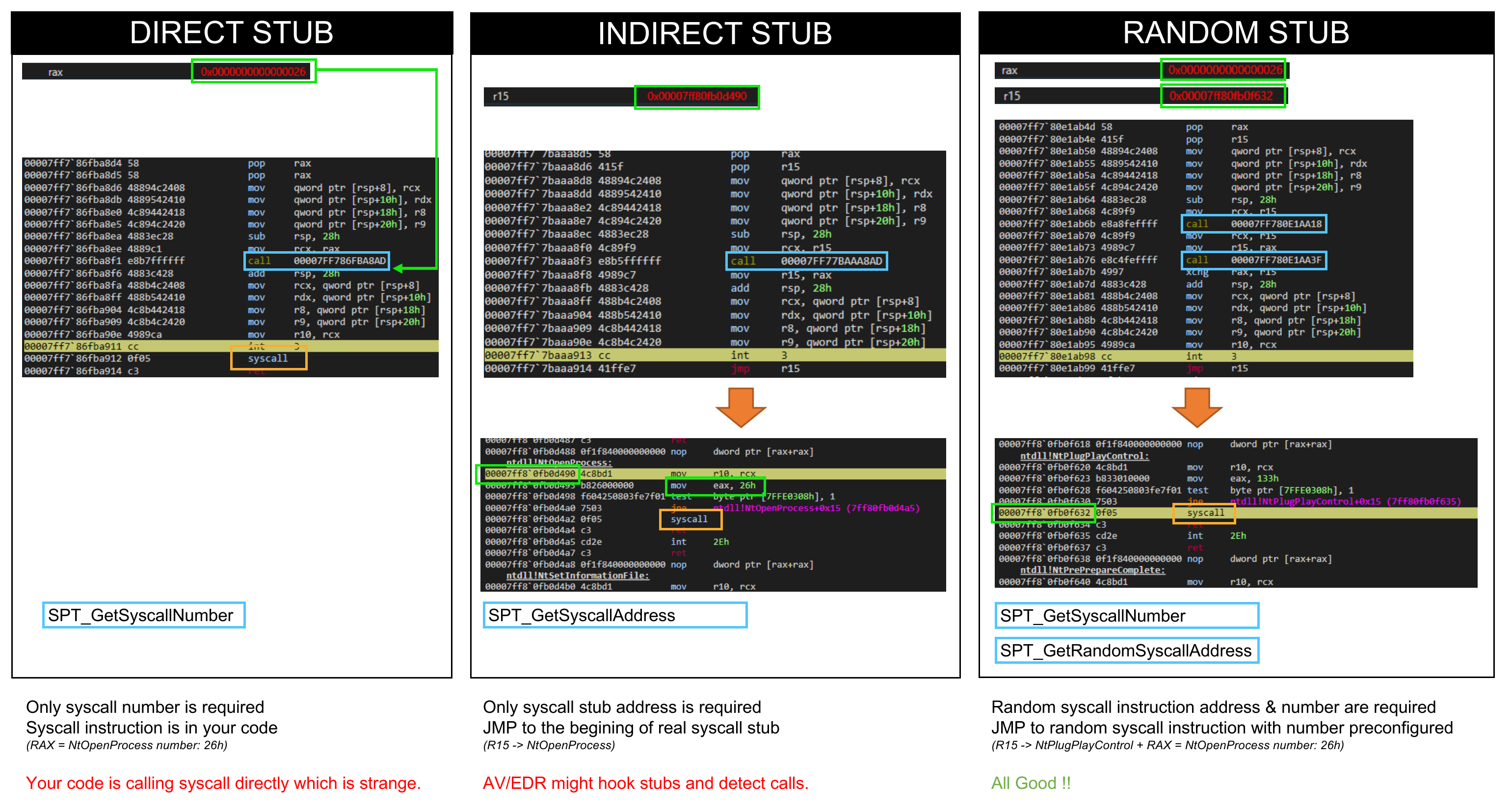
- Once your `iterator` has been choosen you can then specify a `method` option based on the existing way to call syscalls. All the iterator are supported which let you select whatever you want as a final syscall stub.
- 1. **Direct:** the syscall is made directly in the Sysplant ASM call. You only need the syscall number but AV/EDR might see you...
- 2. **Indirect:** the Sysplant ASM call jump to the begining of Ntdll stub. You only need syscall address and no longer call syscall in your code but AV/EDR might hook these functions
- 3. **Random:** the Sysplant ASM call jump to a random syscall instruction of Ntdll stubs. You need the syscall number and 1 syscall instruction address. You then no longer call syscall in your code and can avoid hooked functions.
- 4. **Egg Hunter:** the inline `syscall` instruction is replaced by a random 8-byte marker (the _egg_). At runtime, call `SPT_SanitizeSyscalls()` **before any Nt\* function** to scan the `.text` section and patch every egg back to `syscall; ret`. This avoids static signatures on the `0F 05` opcode while keeping direct-call performance.
- [](http://sysplant.readthedocs.io/en/main/assets/sysplant_stubs.png)
- ## Documentation
- I've tried to keep an up to date documentation, so please **[READ THE DOC](http://sysplant.readthedocs.io/en/main/)**. You will find there many information about the tool's usages and a complete description of the classes and methods.
- Some specifics usages are described:
- - [Sysplant as a CLI tool](http://sysplant.readthedocs.io/en/main/usage/cli)
- - [Sysplant as a Python's module](http://sysplant.readthedocs.io/en/main/usage/lib)
- - [Sysplant as a MCP server](http://sysplant.readthedocs.io/en/main/usage/mcp)
- ## Credits
- Massive shout-out to these useful projects that helps me during this journey, or individuals for their reviews
- - [@alice blogpost about syscalls techniques](https://alice.climent-pommeret.red/posts/direct-syscalls-hells-halos-syswhispers2/)
- - [@redops blogpost about direct vs indirect syscalls](https://redops.at/en/blog/direct-syscalls-a-journey-from-high-to-low)
- - [@Jackson_T & @modexpblog for Syswhispers2](https://github.com/jthuraisamy/SysWhispers2)
- - [@klezvirus for syswhispers3](https://github.com/klezVirus/SysWhispers3)
- ## :construction: TODO
- This project is in WIP state...
- Some PR & reviews are more than welcome :tada: !
- - [x] Add internal names randomization
- - [x] Setup documentation
- - [x] Setup tests
- - [ ] Add x86 support
- - [ ] Add WoW64 support
- - [x] Setup NIM templates
- - [x] Setup C templates
- - [x] Setup Rust templates
- - [x] Setup C++ templates
- - [ ] Setup Go / C# / Whatever templates
- ## License
- This project is licensed under the [GPLv3 License](https://www.gnu.org/licenses/quick-guide-gplv3.en.html), for individuals only. If you want to integrate this work in your commercial project please contact me through `0x42en[at]gmail.com`
Ratings and comments
Sign in to rate this skill.
Sign inFree to use. If it’s helped, pass it on.