Back to search
COMSOL_Multiphysics_MCP
SkillGitHub
MCP Server for COMSOL Multiphysics simulation automation via AI agents.
Safety scan
A static text scan, not a guarantee. Select the badge to see what was scanned and every finding.
Checked today
Badge for your README
Markdown
[](/listings/wjc9011--comsol-multiphysics-mcp)HTML
<a href="/listings/wjc9011--comsol-multiphysics-mcp"><img src="/api/listings/wjc9011--comsol-multiphysics-mcp/badge.svg" alt="findsafeskills safety rating" /></a>Install
i
Install instructions from the README
As written by the repo's author. findsafeskills has not verified these steps.
# Clone repository
git clone https://github.com/wjc9011/COMSOL_Multiphysics_MCP.git
cd COMSOL_Multiphysics_MCP

# Install dependencies
python -m pip install -e .

# Test server
python -m src.server
What was scanned
The files the safety scan read, as written by the repository's author and shown as plain text. Lines with a finding are marked.
README.md · README · 500 lines
View this file on GitHub (read at the repository's current version: the scan did not record which commit it read)
- # COMSOL MCP Server
- MCP Server for COMSOL Multiphysics simulation automation via AI agents.
- English | [中文](README_CN.md)
- ## Star History
- [](https://github.com/wjc9011/COMSOL_Multiphysics_MCP/stargazers)
- [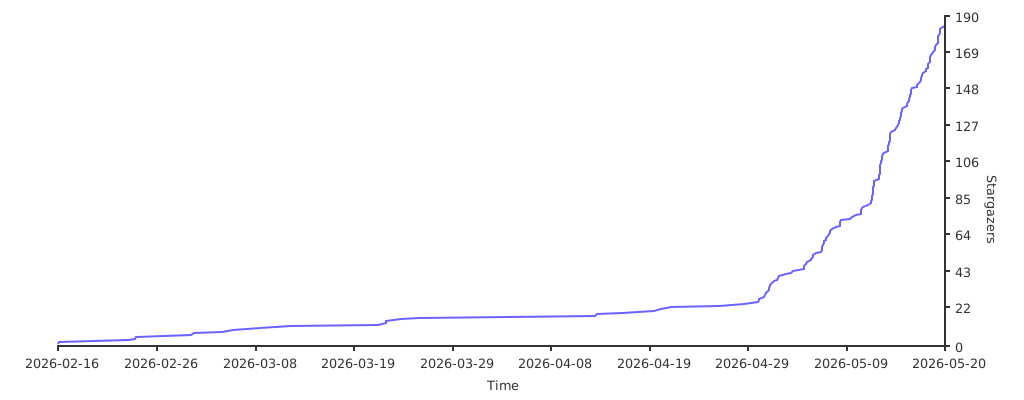](https://starchart.cc/wjc9011/COMSOL_Multiphysics_MCP)
- ## Publication and Citation
- The research paper describing COMSOL-MCP is available in *Neurocomputing*:
- > Naiyin Zhang and Junchao Wang, “[COMSOL-MCP: An open-source model context protocol interface for AI-assisted multiphysics simulation](https://doi.org/10.1016/j.neucom.2026.134481),” *Neurocomputing*, vol. 703, article 134481, 2026.
- Publisher page: [ScienceDirect](https://linkinghub.elsevier.com/retrieve/pii/S0925231226018795)
- If COMSOL-MCP contributes to your research, please cite the paper:
- ```bibtex
- @article{Zhang2026COMSOLMCP,
- title = {COMSOL-MCP: An Open-Source Model Context Protocol Interface for AI-Assisted Multiphysics Simulation},
- author = {Zhang, Naiyin and Wang, Junchao},
- journal = {Neurocomputing},
- volume = {703},
- pages = {134481},
- year = {2026},
- doi = {10.1016/j.neucom.2026.134481},
- url = {https://doi.org/10.1016/j.neucom.2026.134481}
- }
- ```
- ### Citation guidance
- - Cite the paper when referring to the COMSOL-MCP method, architecture, capabilities, or evaluation.
- - If you use or modify the software, cite both the paper and the repository. Use GitHub’s **Cite this repository** menu, which is backed by [`CITATION.cff`](CITATION.cff).
- - For reproducibility, identify the exact release tag or commit used and include the repository URL and access date in your data/code availability statement.
- ## Project Goal
- Build a complete COMSOL MCP Server enabling AI agents (like Claude, opencode) to perform multiphysics simulations through the MCP protocol:
- 1. **Model Management** - Create, load, save, version control
- 2. **Geometry Building** - Blocks, cylinders, spheres, boolean operations
- 3. **Physics Configuration** - Heat transfer, fluid flow, electrostatics, solid mechanics
- 4. **Meshing & Solving** - Auto mesh, stationary/time-dependent studies
- 5. **Results Visualization** - Evaluate expressions, export plots
- 6. **Knowledge Integration** - Embedded guides + PDF semantic search
- ## Requirements
- - **COMSOL Multiphysics** (version 5.x or 6.x)
- - **Python 3.10+** (NOT Windows Store version)
- - **Java runtime** (required by MPh/COMSOL)
- ## Installation
- ```bash
- # Clone repository
- git clone https://github.com/wjc9011/COMSOL_Multiphysics_MCP.git
- cd COMSOL_Multiphysics_MCP
- # Install dependencies
- python -m pip install -e .
- # Test server
- python -m src.server
- ```
- ## Building PDF Knowledge Base
- ```bash
- # Install additional dependencies
- pip install pymupdf chromadb sentence-transformers
- # Build knowledge base
- python scripts/build_knowledge_base.py
- # Check status
- python scripts/build_knowledge_base.py --status
- ```
- ## Usage
- ### Option 1: With opencode
- Create `opencode.json` in project root:
- ```json
- {
- "$schema": "https://opencode.ai/config.json",
- "mcp": {
- "comsol": {
- "type": "local",
- "command": ["python", "-m", "src.server"],
- "enabled": true,
- "environment": {
- "HF_ENDPOINT": "https://hf-mirror.com"
- },
- "timeout": 30000
- }
- }
- }
- ```
- ### Option 2: With Claude Desktop
- ```json
- {
- "mcpServers": {
- "comsol": {
- "command": "python",
- "args": ["-m", "src.server"],
- "cwd": "/path/to/COMSOL_Multiphysics_MCP"
- }
- }
- }
- ```
- ## Code Structure
- ```
- comsol_mcp/
- ├── opencode.json # MCP server config for opencode
- ├── pyproject.toml # Python project config
- ├── README.md # This file
- │
- ├── src/
- │ ├── server.py # MCP Server entry point
- │ ├── tools/
- │ │ ├── session.py # COMSOL session management (start/stop/status)
- │ │ ├── model.py # Model CRUD + versioning
- │ │ ├── parameters.py # Parameter management + sweeps
- │ │ ├── geometry.py # Geometry creation (block/cylinder/sphere)
- │ │ ├── physics.py # Physics interfaces + boundary conditions
- │ │ ├── mesh.py # Mesh generation
- │ │ ├── study.py # Study creation + solving (sync/async)
- │ │ └── results.py # Results evaluation + export
- │ ├── resources/
- │ │ └── model_resources.py # MCP resources (model tree, parameters)
- │ ├── knowledge/
- │ │ ├── embedded.py # Embedded physics guides + troubleshooting
- │ │ ├── retriever.py # PDF vector search retriever
- │ │ └── pdf_processor.py # PDF chunking + embedding
- │ ├── async_handler/
- │ │ └── solver.py # Async solving with progress tracking
- │ └── utils/
- │ └── versioning.py # Model version path management
- │
- ├── scripts/
- │ └── build_knowledge_base.py # Build PDF vector database
- │
- ├── client_script/ # Standalone modeling scripts (examples)
- │ ├── create_chip_tsv_final.py # Example: Chip thermal model
- │ ├── create_micromixer_auto.py # Example: Fluid flow simulation
- │ ├── create_chip_thermal*.py # Various chip thermal variants
- │ ├── create_micromixer*.py # Various micromixer variants
- │ ├── visualize_*.py # Result visualization scripts
- │ ├── add_visualization.py # Add plot groups to model
- │ └── test_*.py # Integration tests
- │
- ├── comsol_models/ # Saved models (structured)
- │ ├── chip_tsv_thermal/
- │ │ ├── chip_tsv_thermal_20260216_*.mph
- │ │ └── chip_tsv_thermal_latest.mph
- │ └── micromixer/
- │ └── micromixer_*.mph
- │
- └── tests/
- └── test_basic.py # Unit tests
- ```
- ## Available Tools (100+ total)
- ### Session (4)
- | Tool | Description |
- |------|-------------|
- | `comsol_start` | Start local COMSOL client |
- | `comsol_connect` | Connect to remote server |
- | `comsol_disconnect` | Clear session |
- | `comsol_status` | Get session info |
- ### Model (9)
- | Tool | Description |
- |------|-------------|
- | `model_load` | Load .mph file |
- | `model_create` | Create empty model |
- | `model_save` | Save to file |
- | `model_save_version` | Save with timestamp |
- | `model_list` | List loaded models |
- | `model_set_current` | Set active model |
- | `model_clone` | Clone model |
- | `model_remove` | Remove from memory |
- | `model_inspect` | Get model structure |
- ### Parameters (5)
- | Tool | Description |
- |------|-------------|
- | `param_get` | Get parameter value |
- | `param_set` | Set parameter |
- | `param_list` | List all parameters |
- | `param_sweep_setup` | Setup parametric sweep |
- | `param_description` | Get/set description |
- ### Geometry (16)
- | Tool | Description |
- |------|-------------|
- | `geometry_list` | List geometry sequences |
- | `geometry_create` | Create geometry sequence |
- | `geometry_add_feature` | Add generic feature |
- | `geometry_add_block` | Add rectangular block |
- | `geometry_add_cylinder` | Add cylinder |
- | `geometry_add_sphere` | Add sphere |
- | `geometry_add_rectangle` | Add 2D rectangle |
- | `geometry_add_circle` | Add 2D circle |
- | `geometry_boolean_union` | Union objects |
- | `geometry_boolean_difference` | Subtract objects |
- | `geometry_import` | Import CAD file |
- | `geometry_build` | Build geometry |
- | `geometry_list_features` | List features |
- | `geometry_get_boundaries` | Get boundary numbers |
- | `geometry_create_box_selection` | Create a named selection by position |
- | `geometry_create_side_selections` | Create left/right/top/bottom selections |
- ### Physics (28)
- | Tool | Description |
- |------|-------------|
- | `physics_list` | List physics interfaces |
- | `physics_get_available` | Available physics types |
- | `physics_add` | Add generic physics |
- | `physics_add_electrostatics` | Add Electrostatics |
- | `physics_add_solid_mechanics` | Add Solid Mechanics |
- | `physics_add_heat_transfer` | Add Heat Transfer |
- | `physics_add_laminar_flow` | Add Laminar Flow |
- | `physics_add_acoustics` | Add a geometry-based acoustic interface by COMSOL type |
- | `physics_add_pressure_acoustics` | Add Pressure Acoustics |
- | `physics_add_coefficient_form_pde` | Add Coefficient Form PDE |
- | `physics_add_general_form_pde` | Add General Form PDE |
- | `physics_add_weak_form_pde` | Add Weak Form PDE |
- | `physics_configure_boundary` | Configure boundary condition |
- | `physics_configure_acoustic_boundary` | Configure one acoustic boundary condition |
- | `physics_setup_acoustic_boundaries` | Configure multiple acoustic boundary conditions |
- | `physics_configure_pde_boundary` | Configure one PDE boundary condition |
- | `physics_setup_pde_boundaries` | Configure multiple PDE boundary conditions |
- | `physics_get_acoustic_boundary_conditions` | List common acoustic boundary feature types |
- | `physics_get_pde_boundary_conditions` | List common PDE boundary feature types |
- | `physics_set_material` | Assign material |
- | `physics_list_features` | List physics features |
- | `physics_remove` | Remove physics |
- | `multiphysics_add` | Add coupling |
- | `physics_interactive_setup_heat` | Interactive heat BC setup |
- | `physics_setup_heat_boundaries` | Configure heat boundaries |
- | `physics_interactive_setup_flow` | Interactive flow BC setup |
- | `physics_boundary_selection` | Generic boundary setup |
- ### Electrochemistry (10)
- Battery, fuel cell, electrodeposition, and corrosion support backed by a type
- registry **verified against a live COMSOL 6.3 session** (26 interfaces, 600+
- feature/subfeature types). A complete worked example — an 18650 cell 1C
- constant-current discharge — is included in
- `src/knowledge/prompts/electrochemistry.md`; call `docs_get("electrochemistry")`
- to retrieve it at runtime.
- | Tool | Description |
- |------|-------------|
- | `electrochemistry_get_interfaces` | List verified interface types (battery, current distribution, corrosion, ...) |
- | `electrochemistry_get_feature_types` | List verified feature types of an interface with dimensions |
- | `electrochemistry_add_interface` | Add a verified interface (e.g. `LithiumIonBatteryMPH`, `LumpedBattery`) |
- | `electrochemistry_list_features` | Inspect features with actual COMSOL types (`getType()`) |
- | `electrochemistry_add_feature` | Create a feature, incl. subfeatures via `parent_feature` |
- | `electrochemistry_set_feature_selection` | Assign domains/boundaries to an existing feature |
- | `electrochemistry_set_feature_properties` | Set feature properties (rejected names reported) |
- | `electrochemistry_list_feature_properties` | Ask COMSOL for a feature's valid property names |
- | `electrochemistry_list_interface_properties` | Read interface-level property groups (e.g. `BatterySettings`) |
- | `electrochemistry_set_interface_properties` | Configure interface-level settings (capacity, SOC, current, ...) |
- ### Mesh (4)
- | Tool | Description |
- |------|-------------|
- | `mesh_list` | List mesh sequences |
- | `mesh_create_sequence` | Create a mesh sequence |
- | `mesh_create` | Generate mesh |
- | `mesh_info` | Get mesh statistics |
- ### Study & Solving (8)
- | Tool | Description |
- |------|-------------|
- | `study_list` | List studies |
- | `study_solve` | Solve synchronously |
- | `study_solve_async` | Solve in background |
- | `study_get_progress` | Get progress |
- | `study_cancel` | Cancel solving |
- | `study_wait` | Wait for completion |
- | `solutions_list` | List solutions |
- | `datasets_list` | List datasets |
- ### Results (9)
- | Tool | Description |
- |------|-------------|
- | `results_evaluate` | Evaluate expression |
- | `results_global_evaluate` | Evaluate scalar |
- | `results_inner_values` | Get time steps |
- | `results_outer_values` | Get sweep values |
- | `results_export_data` | Export data |
- | `results_export_image` | Export plot image |
- | `results_exports_list` | List export nodes |
- | `results_plots_list` | List plot nodes |
- ### Knowledge (8)
- | Tool | Description |
- |------|-------------|
- | `docs_get` | Get documentation |
- | `docs_list` | List available docs |
- | `physics_get_guide` | Physics quick guide |
- | `troubleshoot` | Troubleshooting help |
- | `modeling_best_practices` | Best practices |
- | `pdf_search` | Search PDF docs |
- | `pdf_search_status` | PDF search status |
- | `pdf_list_modules` | List PDF modules |
- ## Example Cases
- ### Case 1: Chip Thermal Model with TSV
- 3D thermal analysis of a silicon chip with Through-Silicon Via (TSV).
- **Geometry**: 60×60×5 µm chip, 5 µm diameter TSV hole, 10×10 µm heat source
- ```python
- # Key steps:
- # 1. Create chip block and TSV cylinder
- # 2. Boolean difference (subtract TSV from chip)
- # 3. Add Silicon material (k=130 W/m·K)
- # 4. Add Heat Transfer physics
- # 5. Set heat flux on top, temperature on bottom
- # 6. Solve and evaluate temperature distribution
- ```
- **Script**: `client_script/create_chip_tsv_final.py`
- **Run**:
- ```bash
- cd /path/to/COMSOL_Multiphysics_MCP
- python client_script/create_chip_tsv_final.py
- ```
- **Results**: Temperature rise from ambient with heat flux of 1 MW/m²
- ### Case 2: Micromixer Fluid Flow
- 3D laminar flow simulation in a microfluidic channel.
- **Geometry**: 600×100×50 µm rectangular channel
- ```python
- # Key steps:
- # 1. Create rectangular channel block
- # 2. Add water material (ρ=1000 kg/m³, μ=0.001 Pa·s)
- # 3. Add Laminar Flow physics
- # 4. Set inlet velocity (1 mm/s), outlet pressure
- # 5. Add Transport of Diluted Species for mixing
- # 6. Solve and evaluate velocity profile
- ```
- **Script**: `client_script/create_micromixer_auto.py`
- **Run**:
- ```bash
- cd /path/to/COMSOL_Multiphysics_MCP
- python client_script/create_micromixer_auto.py
- ```
- **Results**: Velocity distribution, concentration mixing profile
- ## Model Versioning
- Models are saved with structured paths:
- ```
- ./comsol_models/{model_name}/{model_name}_{timestamp}.mph
- ./comsol_models/{model_name}/{model_name}_latest.mph
- ```
- Example:
- ```
- ./comsol_models/chip_tsv_thermal/chip_tsv_thermal_20260216_140514.mph
- ./comsol_models/chip_tsv_thermal/chip_tsv_thermal_latest.mph
- ```
- ## Key Technical Discoveries
- ### 1. mph Library API Patterns
- ```python
- # Access Java model via property (not callable)
- jm = model.java # NOT model.java()
- # Create component with True flag
- comp = jm.component().create('comp1', True)
- # Create 3D geometry
- geom = comp.geom().create('geom1', 3)
- # Create physics with geometry reference
- physics = comp.physics().create('spf', 'LaminarFlow', 'geom1')
- # Boundary condition with selection
- bc = physics.create('inl1', 'InletBoundary')
- bc.selection().set([1, 2, 3])
- bc.set('U0', '1[mm/s]')
- ```
- ### 2. Boundary Condition Property Names
- | Physics | Condition | Property |
- |---------|-----------|----------|
- | Heat Transfer | HeatFluxBoundary | `q0` |
- | Heat Transfer | TemperatureBoundary | `T0` |
- | Heat Transfer | ConvectiveHeatFlux | `h`, `Text` |
- | Laminar Flow | InletBoundary | `U0`, `NormalInflowVelocity` |
- | Laminar Flow | OutletBoundary | `p0` |
- | Pressure Acoustics | SoundHard | No additional property |
- | Pressure Acoustics | SoundSoft | No additional property |
- | Pressure Acoustics | Pressure | `p0` |
- | Pressure Acoustics | Impedance | `Zn` |
- | Pressure Acoustics | NormalAcceleration | `nacc` |
- | Pressure Acoustics | NormalVelocity | `nvel` |
- | Pressure Acoustics | PlaneWaveRadiation | No additional property |
- | Pressure Acoustics | SphericalWaveRadiation | No additional property |
- | PDE | DirichletBoundary | `r` |
- | PDE | FluxBoundary | `g`, `q` |
- | PDE | ZeroFluxBoundary | No additional property |
- | PDE | WeakContribution | `weak` |
- | PDE | PeriodicCondition | No additional property |
- ### 3. Client Session Limitation
- The mph library creates a singleton COMSOL client. Only one Client can exist per Python process:
- ```python
- # This is handled in session.py - client is kept alive and models are cleared
- client.clear() # Clear models instead of full disconnect
- ```
- ### 4. Offline Embedding Model
- PDF search supports offline operation with local HuggingFace cache:
- ```bash
- # Set mirror for China
- export HF_ENDPOINT=https://hf-mirror.com
- ```
- ## Development Status
- | Phase | Description | Status |
- |-------|-------------|--------|
- | 1 | Basic framework + Session + Model | Done |
- | 2 | Parameters + Solving + Results | Done |
- | 3 | Geometry + Physics + Mesh | Done |
- | 4 | Embedded knowledge + Tool docs | Done |
- | 5 | PDF vector retrieval | Done |
- | 6 | Integration tests | In Progress |
- ## Next Steps
- 1. **Complete Phase 6** - Full integration test with proper boundary conditions
- 2. **Visualization Export** - Generate PNG images from plot groups
- 3. **LSP Warnings** - Fix type hints in physics.py
- 4. **More Examples** - Add electrostatics, solid mechanics cases
- 5. **Error Handling** - Improve error messages and recovery
- ## Resources
- | URI | Description |
- |-----|-------------|
- | `comsol://session/info` | Session information |
- | `comsol://model/{name}/tree` | Model tree structure |
- | `comsol://model/{name}/parameters` | Model parameters |
- | `comsol://model/{name}/physics` | Physics interfaces |
- ## License
- MIT
Ratings and comments
Sign in to rate this skill.
Sign inFree to use. If it’s helped, pass it on.