dsh-bloom-theme
DeepSeek Harness (DSH) 主题插件:Bloom 莫兰迪配色 10 套中国风命名(黛蓝/朱砂/桃夭/天青/竹青/赭石/青金/琥珀/落霞/青莲),OKLCH 调色,明暗双主题,顶栏一键切换,20 组配色实测全部达 WCAG AA
Safety scan
A static text scan, not a guarantee. Select the badge to see what was scanned and every finding.
Check it deeper on your machine
It has changed since its scan on 11 Nov 2026.
As a Claude Code plugin, install it and then ask Claude Code:
/plugin marketplace add keithmackay/mackayi/plugin install scanskillsafety@mackayiDo a deep scan of https://github.com/webkubor/dsh-bloom-theme with scanskillsafety
Or from a terminal, clone it and run it:
git clone https://github.com/keithmackay/scanskillsafety-skill ~/.claude/skills/scanskillsafetynode ~/.claude/skills/scanskillsafety/cli.cjs --deep 'https://github.com/webkubor/dsh-bloom-theme'
It checks the exact commit: every file, its packages against OSV (api.osv.dev), how it compares with this page's scan (findsafeskills.com receives the repository's address), and, if you agree, Claude reading every file with your own Claude subscription. It never runs the code.
Badge for your README

Markdown
[](/listings/webkubor--dsh-bloom-theme)HTML
<a href="/listings/webkubor--dsh-bloom-theme"><img src="/api/listings/webkubor--dsh-bloom-theme/badge.svg" alt="findsafeskills safety rating" /></a>Install
Install instructions from the README
As written by the repo's author. findsafeskills has not verified these steps.
> **桌面端**:在应用内的插件管理里安装、升级。桌面 profile 由应用独占托管, > 命令行的 `dsh plugin --profile desktop ...` 会直接报 > `profile "desktop" is managed exclusively by the Electron application` —— 不是权限问题,是设计如此。
<details> <summary>自建 profile(CLI / 服务器 / web)的装法</summary>
# 1) 装进你的 profile(profile 名按自己的改)
dsh plugin --profile <你的 profile> add dsh-bloom-theme

# 2) 接进 boot graph:把 "dsh-bloom-theme" 加进
#    ~/.dsh/profiles/<你的 profile>/package.json 的 dsh.profile.bundles 数组

# 3) 重启 DSH
</details>
装完刷新页面,顶栏右上角会出现「黛蓝 ▾」主题按钮。点击展开即可在 **10 套配色**间切换, 下拉底部显示当前版本号;npm 上有更新的版本时会亮一个 `↑ vX` 徽标(点它跳 Release 页)。
What was scanned
The files the safety scan read, as written by the repository's author and shown as plain text. Lines with a finding are marked.
README.md · README · 64 lines
View this file on GitHub (read at the repository's current version: the scan did not record which commit it read)
This file has changed since it was scanned, so this is not exactly the text that was scanned, and no line is marked. The findings are listed with the safety scan above.
- <p align="center">
- <img src="https://img.webkubor.online/projects/dsh-bloom-theme/bloom-banner-v0.27.0.png" alt="Bloom for DSH" width="100%" />
- </p>
- <h1 align="center">🌊 Bloom for DSH</h1>
- <p align="center"><strong>给 DeepSeek Harness 一套耐看的中国风玻璃主题。</strong><br/>15 套莫兰迪配色 · 三种玻璃质感 · 随主题变化的背景</p>
- <p align="center">
- <a href="https://www.npmjs.com/package/dsh-bloom-theme"><img src="https://img.shields.io/npm/v/dsh-bloom-theme?style=for-the-badge&color=A873C4&logo=npm" alt="npm" /></a>
- <a href="https://www.npmjs.com/package/dsh-bloom-theme"><img src="https://img.shields.io/npm/dm/dsh-bloom-theme?style=for-the-badge&color=92a8b3" alt="每月下载量" /></a>
- <a href="https://github.com/webkubor/dsh-bloom-theme"><img src="https://img.shields.io/github/stars/webkubor/dsh-bloom-theme?style=for-the-badge&color=e1af78" alt="GitHub Stars" /></a>
- <img src="https://img.shields.io/github/license/webkubor/dsh-bloom-theme?style=for-the-badge&color=5fa8b2" alt="MIT License" />
- <a href="https://awesome-dsh-plugin.com"><img src="https://awesome-dsh-plugin.com/badge.svg" alt="Awesome DSH Plugin 社区收录" /></a>
- <a href="https://dshhub.dev/plugins/dsh-bloom-theme"><img src="https://dshhub.dev/badge/dsh-bloom-theme.svg" alt="DSH Hub 社区收录" /></a>
- <img src="https://img.shields.io/badge/WCAG-AA-6a9955?style=for-the-badge" alt="主题主色与背景配色对达到 WCAG AA" />
- <img src="https://img.shields.io/badge/dependencies-0-92a8b3?style=for-the-badge" alt="零运行时依赖" />
- </p>
- <p align="center"><a href="README.en.md">English</a> · <a href="https://github.com/webkubor/dsh-bloom-theme">⭐ 喜欢就点个 Star</a></p>
- <!-- demo-video -->
- https://github.com/user-attachments/assets/6e07c15e-1ada-4364-a41a-5b1f1cf2195c
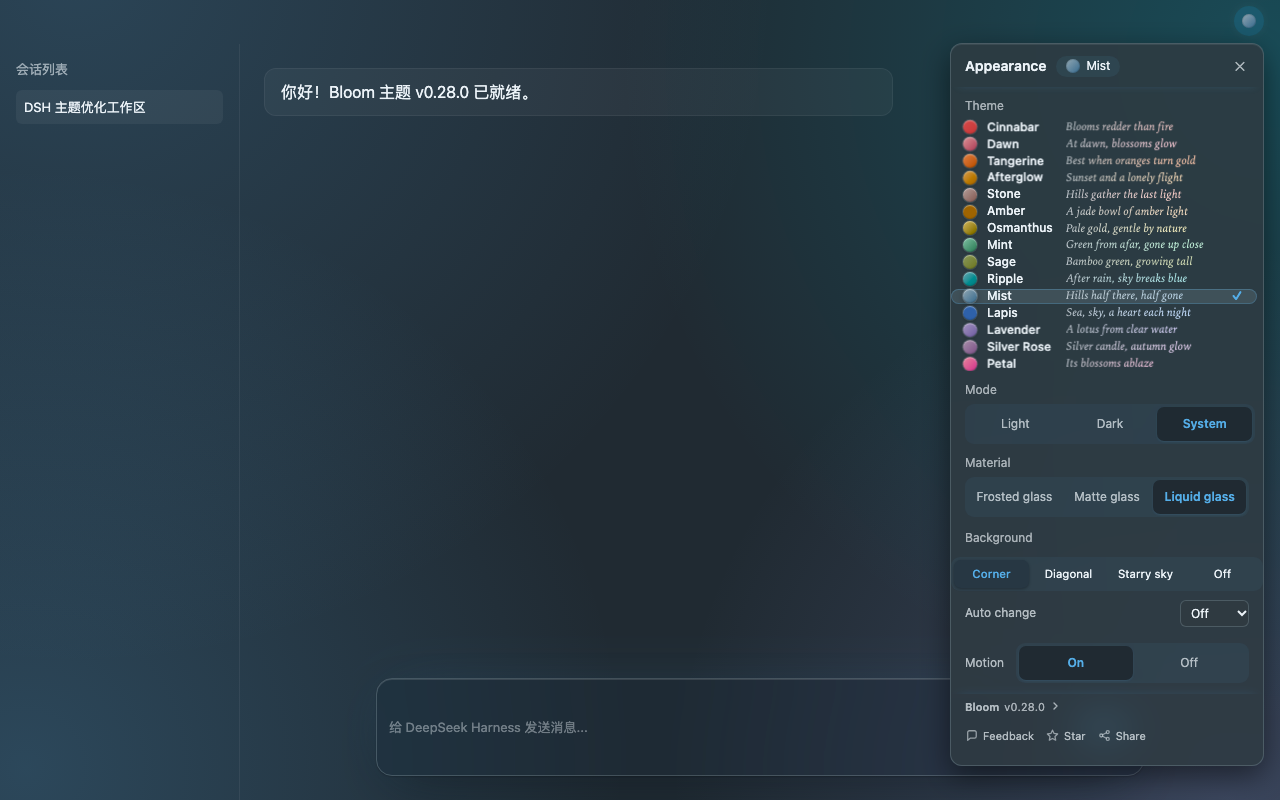
- [▶ 观看原画质演示:换色、切玻璃、看星空](https://img.webkubor.online/projects/dsh-bloom-theme/bloom-demo-v0.28.0.mp4)
- 
- ### 为什么选择 Bloom?
- | 15 套配色 · 12 套精选 | ≥ 4.5:1 | 0 个运行时依赖 |
- | :-- | :-- | :-- |
- | 朱砂、青莲、黛蓝……低饱和中国风配色,明暗各有一套 | 15 套配色的明暗主色与底色,共 30 组对比度均 ≥ 4.5:1 | 无额外运行时依赖,顶栏一键切换 |
- - **颜色既耐看,也清楚。** 用 OKLCH 调色,把文字和按钮的可读颜色与大面积氛围色分开;换色时,面板、输入区和背景一起变化。
- - **玻璃和背景,自由搭配。** 液态、磨砂、毛玻璃三种材质;浅色水彩与深色背景分别记忆。夜晚打开「漫天星辰」,星辉与流星跟随主题色变化。
- - **细节不打扰工作。** 输入和思考时有轻柔的主题色动效;系统启用减少动态效果时,支持相应的静态处理。
- ### 看看颜色
- | 浅色配色 | 深色配色 |
- | :-- | :-- |
- | 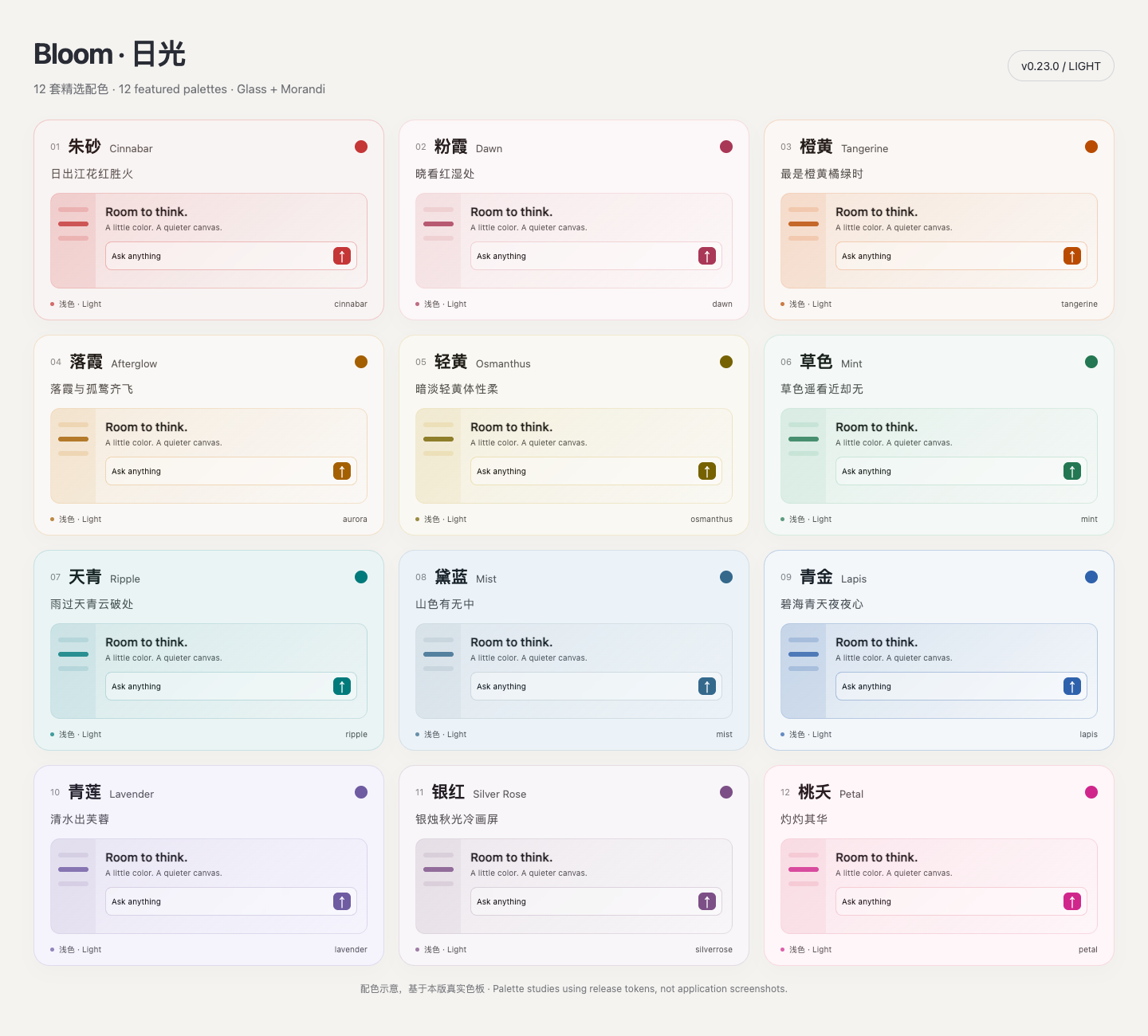 | 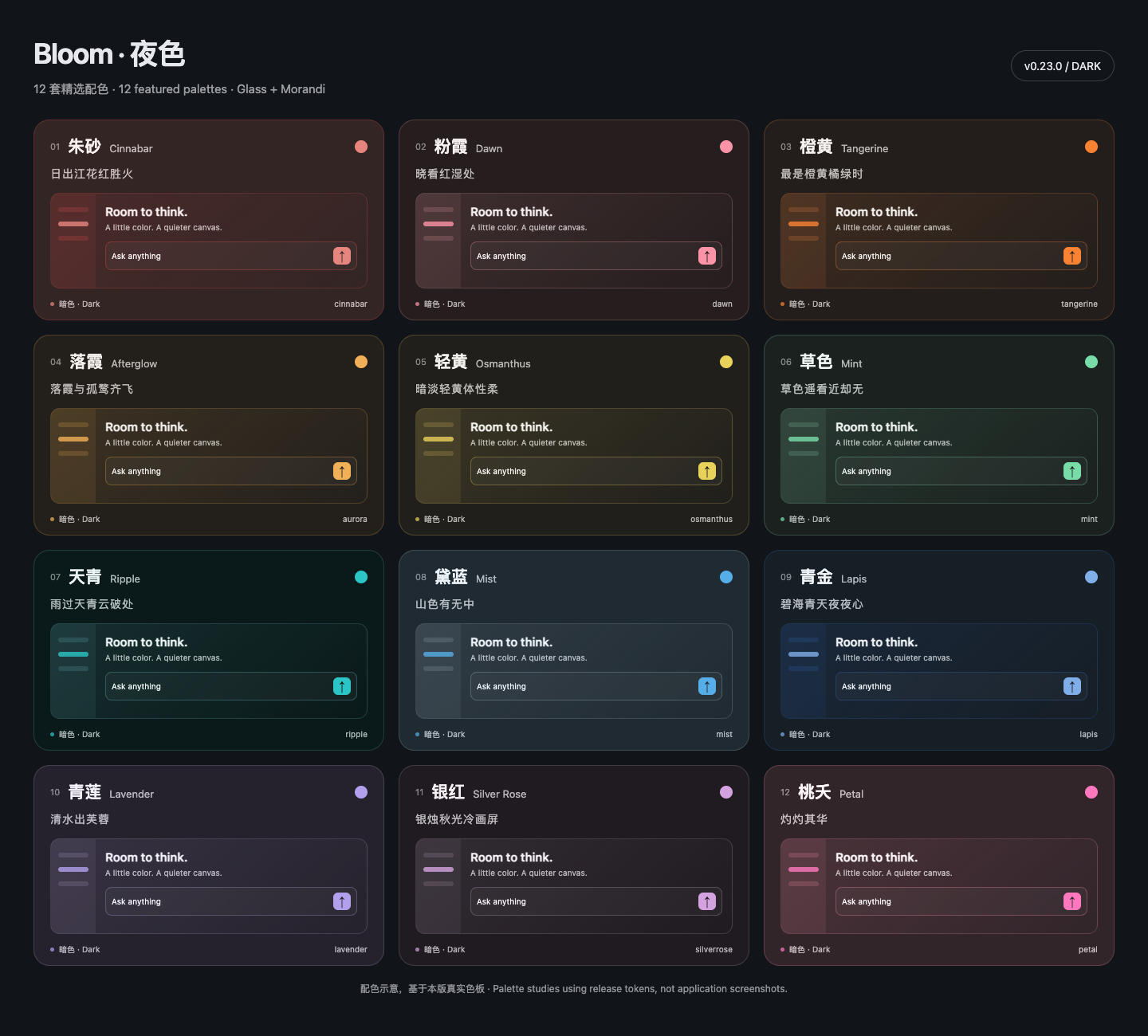 |
- <sub>色板来自 v0.23 的真实色值,是配色示意而非界面截图;本版实际界面见上方演示。</sub>
- ### 安装
- 在 DeepSeek Harness 的「插件」里搜索 **`dsh-bloom-theme`** 并安装;按提示重启后,点顶栏的主题按钮就能开始搭配。
- 本地迭代当前工作区时,一条命令即可构建并装入默认的 `desktop` profile:
- ```bash
- npm run install:desktop
- ```
- 如需指定 profile 或 dsh CLI 路径:`DSH_PROFILE=tui DSH_BIN=/path/to/dsh npm run install:desktop`。
- 喜欢 Bloom?[点一颗 ⭐ Star](https://github.com/webkubor/dsh-bloom-theme) 让更多人看到它,也欢迎分享你的配色。
- <sub>演示录自 DSH Web 的发行前功能构建,录制时面板仍显示 v0.26.0;使用脱敏示例会话。截图和录屏功能依宿主支持;当前桌面端若无法打开选择器,请使用系统截图或录屏工具。</sub>
- [问题反馈](https://github.com/webkubor/dsh-bloom-theme/issues) · [排障指南](docs/troubleshooting.md) · [更新记录](CHANGELOG.md) · [MIT License](LICENSE) · 配色灵感:[typora-Bloom-theme](https://github.com/webkubor/typora-Bloom-theme)
Ratings and comments
Sign in to rate this skill.
Sign inFree to use. If it’s helped, pass it on.