sandvault
Run AI agents isolated in a macOS user account and sandbox-exec. Configured to run Claude Code, OpenAI Codex, Cursor Agent, Google Gemini.
Safety scan
A static text scan, not a guarantee. Select the badge to see what was scanned and every finding.
Check it deeper on your machine
It has changed since its scan on 11 Nov 2026.
As a Claude Code plugin, install it and then ask Claude Code:
/plugin marketplace add keithmackay/mackayi/plugin install scanskillsafety@mackayiDo a deep scan of https://github.com/webcoyote/sandvault with scanskillsafety
Or from a terminal, clone it and run it:
git clone https://github.com/keithmackay/scanskillsafety-skill ~/.claude/skills/scanskillsafetynode ~/.claude/skills/scanskillsafety/cli.cjs --deep 'https://github.com/webcoyote/sandvault'
It checks the exact commit: every file, its packages against OSV (api.osv.dev), how it compares with this page's scan (findsafeskills.com receives the repository's address), and, if you agree, Claude reading every file with your own Claude subscription. It never runs the code.
Badge for your README

Markdown
[](/listings/webcoyote--sandvault)HTML
<a href="/listings/webcoyote--sandvault"><img src="/api/listings/webcoyote--sandvault/badge.svg" alt="findsafeskills safety rating" /></a>Install
Install instructions from the README
As written by the repo's author. findsafeskills has not verified these steps.
Install via Homebrew:
brew install sandvault
Install via git:
# Clone the repository
  git clone https://github.com/webcoyote/sandvault

# Option 1: add the sandvault directory to your path
  export PATH="$PATH:/path/to/where/you/cloned/sandvault"

# Option 2: add to your shell configuration for easy access
  echo >> ~/.zshrc  'alias sv="/path/to/where/you/cloned/sandvault/sv"'
  echo >> ~/.bashrc 'alias sv="/path/to/where/you/cloned/sandvault/sv"'
What was scanned
The files the safety scan read, as written by the repository's author and shown as plain text. Lines with a finding are marked.
README.md · README · 631 lines
View this file on GitHub (read at the repository's current version: the scan did not record which commit it read)
This file has changed since it was scanned, so this is not exactly the text that was scanned, and no line is marked. The findings are listed with the safety scan above.
- # SandVault - Run AI agents and shell commands in a sandboxed macOS user account. Sandboxed web and app testing with Chrome and iOS Simulator.
- <img src="https://www.codeofhonor.com/images/projects/sandvault.webp" align="left" width="200px"/>
- SandVault (`sv`) manages a limited user account to sandbox shell commands and AI agents, providing a lightweight alternative to application isolation using virtual machines.
- </br>
- </br>
- - **AI ready** - Includes Claude Code, OpenAI Codex, OpenCode, Google Gemini, pi, Muse Code, and the [herdr](https://herdr.dev) agent multiplexer
- - **Web and iOS automation** - sandbox access to Chrome / Lightpanda and iOS Simulator
- - **Fast context switching** - No VM overhead; instant user switching
- - **Passwordless** - switch accounts without a prompt (after setup)
- - **Shared workspace** - joint access to `/Users/Shared/sv-$USER`
- - **Defense in depth** - limited user account + `sandbox-exec`
- - **Clean uninstall** - Complete removal with `sv uninstall`
- </br>
- </br>
- ---
- ## Quick Links
- 0. Run [Browser Automation](#Browser-Automation) from within the sandbox that can be used for testing web interactions.
- 1. Run [iOS Simulator Automation](#iOS-Simulator-Automation) from within the sandbox that can be used for iOS app testing.
- 2. To run `xcodebuild` or `swift` see [Sandboxing xcodebuild and swift](#Sandboxing-xcodebuild-and-swift) for details.
- 3. To run other sandboxed applications inside sandvault, use the `-x` option. See [Sandboxing other apps](#Sandboxing-other-apps) for details.
- 4. It's not possible to run GUI applications from within the sandbox; see [Running GUI Applications](#Running-GUI-Applications) for details.
- ## Security Model
- SandVault has limited access to your computer:
- - Cannot access your home directory
- - Runs with standard user privileges
- - Cannot modify system files
- - Has no access to mounted drives
- ```
- - writable: /Users/Shared/sv-$USER -- only accessible by you & sandvault-$USER
- - writable: /Users/sandvault-$USER -- sandvault's home directory
- - readable: /usr, /bin, /etc, /opt -- system directories
- - no access: /Users/* -- other user directories
- - writable: /Volumes/Macintosh HD -- accessible as per file permissions
- - no access: /Volumes/* -- cannot access mounted/remote/network drives
- ```
- ## Installation
- Install via Homebrew:
- ```bash
- brew install sandvault
- ```
- Install via git:
- ```bash
- # Clone the repository
- git clone https://github.com/webcoyote/sandvault
- # Option 1: add the sandvault directory to your path
- export PATH="$PATH:/path/to/where/you/cloned/sandvault"
- # Option 2: add to your shell configuration for easy access
- echo >> ~/.zshrc 'alias sv="/path/to/where/you/cloned/sandvault/sv"'
- echo >> ~/.bashrc 'alias sv="/path/to/where/you/cloned/sandvault/sv"'
- ```
- ## Quick Start
- ```bash
- # Run Claude Code in the sandbox
- # shortcut: sv cl
- sv claude
- # Run OpenAI Codex in the sandbox
- # shortcut: sv co
- sv codex
- # Run OpenCode in the sandbox
- # shortcut: sv o
- sv opencode
- # Run Google Gemini in the sandbox
- # shortcut: sv g
- sv gemini
- # Run pi in the sandbox
- # shortcut: sv p
- sv pi
- # Run Muse Code in the sandbox
- # shortcut: sv m
- sv muse
- # Run herdr (many agents, one terminal) in the sandbox
- # shortcut: sv hd
- sv herdr
- # Run command shell in the sandbox
- # shortcut: sv s
- sv shell
- ```
- ## Connect via SSH
- The default mode for sandvault runs commands as a limited user (basically `sudo -u sandbox-$USER COMMAND`). Sandvault also configures the limited sandvault account so that you can run commands via SSH (`ssh sandbox-$USER@127.0.0.1`), and everything works the same. Use the `-s` or `--ssh` option to use SSH mode with `sv`, or use `tmux` or `screen` for users so inclined.
- ```bash
- # Run using impersonation
- # sv COMMAND
- sv gemini
- # Run using ssh
- # sv -s/--ssh COMMAND
- sv --ssh gemini
- ```
- To let other keys SSH into the sandvault user, drop each public key into its own file in `~/.config/codeofhonor/sandvault/authorized_keys.d/`, then run any `sv` command to apply it:
- ```bash
- cp ~/.ssh/id_ed25519_laptop.pub ~/.config/codeofhonor/sandvault/authorized_keys.d/laptop
- sv build
- ```
- Those files are the source of truth: sandvault regenerates the sandvault user's `authorized_keys` from them plus its own key on every run, so deleting a file revokes that key on the next run. Files that are not SSH public keys are ignored with a warning, and a private key left there stops the build rather than being copied into the sandbox.
- ## Advanced Commands
- ```bash
- # Run AI agent with optional arguments
- # Usage:
- # sv <agent> [PATH] [-- AGENT_ARGUMENTS]
- # Example:
- sv gemini -- --continue
- # Run shell command in sandvault and exit
- # Usage:
- # sv shell [PATH] -- [SHELL_COMMAND]
- # Example:
- sv shell /Users -- pwd # output: /Users
- # Send input via stdin
- # Usage:
- # <producer> | sv shell [PATH] [-- SHELL_COMMAND]
- # Examples:
- echo "pwd ; exit" | sv shell /Users # output: /Users
- echo ABC | sv shell -- tr 'A-Z' 'a-z' # output: abc
- cat PROMPT.md | sv gemini
- # Clone local/remote Git repository into /Users/Shared/sv-$USER/repos/<git-repository> and open there
- # Usage:
- # sv-clone [OPTIONS] URL_OR_LOCAL_PATH [-- SV_ARGS]
- # Examples:
- sv-clone https://github.com/webcoyote/sandvault.git -- codex
- sv-clone ~/src/my-app -- codex
- sv-clone https://github.com/webcoyote/sandvault.git -- shell
- sv-clone ../my-app -- shell
- ```
- Use a full or relative path with a directory name for local clones. Everything
- after `--` is passed to `sv`, so `sv-clone ~/src/my-app -- claude -- --model opus`
- clones the repository and starts Claude Code there. Run `sv-clone --help` for the
- full list of options, including `-k`/`-w` to provision a per-repository deploy key.
- For local Git repositories, sandvault also wires remotes:
- - Your local Git repository gets/updates remote `sandvault` -> `/Users/Shared/sv-$USER/repos/<git-repository>`
- - This lets you run `git fetch sandvault` from the original local Git repository to pull commits made in the sandvault Git repository.
- ## Native Install
- By default, SandVault installs AI tools via Homebrew on the host side. With `--native-install` (`-N`), tools are instead installed inside the sandbox using their own installers:
- - **Claude Code** — installed via `curl -fsSL https://claude.ai/install.sh | bash`
- - **Codex** — installed via `npm install -g @openai/codex`
- - **OpenCode** — installed via `curl -fsSL https://opencode.ai/install | bash`
- - **Gemini** — installed via `npm install -g @google/gemini-cli`
- - **pi** — installed via `npm install -g @earendil-works/pi-coding-agent`
- - **Muse Code** — installed via `curl -fsSL https://dev.meta.ai/install.sh | bash`
- - **herdr** — installed via `curl -fsSL https://herdr.dev/install.sh | sh`
- Tools are installed on first run and reused on subsequent runs.
- ```bash
- # Install and run Claude Code natively
- sv --native-install claude
- sv -N claude
- # Works with all AI agents
- sv -N codex
- sv -N opencode
- sv -N gemini
- sv -N pi
- sv -N muse
- sv -N herdr
- ```
- To make native install the default, set `SANDVAULT_ARGS`:
- ```bash
- # Add to your shell profile (~/.zshrc, ~/.bashrc, etc.)
- export SANDVAULT_ARGS="--native-install"
- # Now 'sv claude' uses native install automatically
- sv claude
- ```
- ## Environment Variables
- Set `SANDVAULT_ARGS` to supply default arguments that are prepended to the command line:
- ```bash
- # Add to your shell profile (~/.zshrc, ~/.bashrc, etc.)
- export SANDVAULT_ARGS="--verbose --ssh"
- # Now these are equivalent:
- sv claude
- sv --verbose --ssh claude
- ```
- Shell quoting is supported, so arguments with spaces work:
- ```bash
- export SANDVAULT_ARGS='shell "/Users/me/my project"'
- ```
- Explicit command-line arguments are appended after `SANDVAULT_ARGS`, so they are processed afterwards.
- ## Maintenance Commands
- ```bash
- # Build sandvault but do not run a command
- sv build
- sv b
- # Rebuild sandvault, including updating all file permissions and ACLs in the shared volume
- sv build --rebuild
- sv b -r
- # Fix permissions when using a restrictive umask (e.g. 077)
- sv --fix-permissions
- sv --fix-permissions build
- # Uninstall sandvault (does not delete files in the shared volume)
- sv uninstall
- # Misc commands
- sv --version
- sv --help
- ```
- ## Running sandvault from a non-admin user account
- Setting up sandvault requires administrative permission to create a new user account, shared directories, a sudoers file, and more, so a standard user account without the ability to run sudo cannot configure sandvault.
- It is possible for an administrative user to setup sandvault on behalf of a standard user account (here, `somebody`) by temporarily giving that person administrative rights, then revoking permission afterwards:
- ```
- # assumes sandvault is already installed via `brew install sandvault`
- echo 'somebody ALL=(ALL) NOPASSWD: ALL' | sudo tee /etc/sudoers.d/tmp-somebody
- sudo -u somebody -i sv build
- sudo rm /etc/sudoers.d/tmp-somebody
- ```
- ## `agentsview` Integration
- [`agentsview`](https://www.agentsview.io) is a dashboard for AI coding agents that shows session history, search, and cost tracking. If you have agentsview installed on the host, `sv-agentsview-setup` mirrors sandbox session data so that it appears next to your host-side sessions.
- ```bash
- # Detect agentsview, prompt to opt in, and configure
- sv-agentsview-setup
- ```
- You are prompted once, on the first run. After that, `sv-agentsview-setup` re-syncs on every run. It installs the mirror symlinks and adds the missing scan paths to `~/.agentsview/config.toml`. New agents that sandvault adds in a later release appear the next time you run the command. When a new scan path is added, the command shows a diff and asks for confirmation. If you decline, that agent is skipped permanently. Remove its key from `/Users/Shared/sv-$USER/_sandvault/setup/agentsview-declined.keys` to enable it again.
- Then run `agentsview serve`. You will see your sandvault AI sessions in the `agentsview` dashboard.
- ## Running many agents with herdr
- [herdr](https://herdr.dev) is a terminal multiplexer for coding agents: run several agents as panes in one session, with a sidebar showing which are working, blocked or done.
- ```bash
- sv herdr # start, or reattach to, herdr in the sandbox
- sv herdr -- --session experiments # arguments after -- go to herdr (separate server)
- ```
- Detach with `ctrl+b q`; the panes keep running and the next `sv herdr` reattaches.
- herdr runs a background server that **outlives the `sv` command**, and every pane is a child of that server. So panes keep the sandbox and environment of the session that first started the server, not of the session that later attaches:
- - `--no-sandbox` is refused with herdr: an unsandboxed first launch would leave every later pane unsandboxed too. Running `herdr` from inside `sv -x shell` is refused for the same reason.
- - `--chrome` and `--ios` are refused with herdr. Their endpoints are torn down when you detach, but the server's panes would keep the stale `SV_BROWSER_ENDPOINT` / `SV_IOS_SIMULATOR_ENDPOINT`. Run `sv --lightpanda herdr`, as the lightpanda browser runs inside the sandbox.
- - The starting directory and `-N` setting are also fixed when the server starts. Use `-- --session NAME` for a separate server.
- herdr can install state-reporting hooks into other agents (`herdr integration install claude`). This is not done automatically because it edits those agents' config files; run each agent once first so its config folder exists.
- ## Nested sandboxes
- In addition to running in a different macOS user account, sandvault also runs applications using macOS `sandbox-exec`, which further limits what resources are accessible.
- Some applications, like `swift`, already run inside a sandbox. Because macOS does not support nested (i.e. recursive) sandboxes, these applications fail to run.
- Read on for solutions.
- ### Sandboxing xcodebuild and swift
- For `swift` (and `xcodebuild`, which runs `swift`), you can set the following variables in your build scripts to run inside sandvault:
- For `swift`:
- ```bash
- ARGS=()
- # Disable sandboxing when running inside sandvault to avoid nested sandbox-exec
- if [[ -n "${SV_SESSION_ID:-}" ]]; then
- ARGS+=(--disable-sandbox)
- fi
- swift build "${ARGS[@]}" "$@"
- ```
- For `xcodebuild`:
- ```bash
- ARGS=()
- # Disable sandboxing when running inside sandvault to avoid nested sandbox-exec
- if [[ -n "${SV_SESSION_ID:-}" ]]; then
- export SWIFTPM_DISABLE_SANDBOX=1
- export SWIFT_BUILD_USE_SANDBOX=0
- ARGS+=("-IDEPackageSupportDisableManifestSandbox=1")
- ARGS+=("-IDEPackageSupportDisablePackageSandbox=1")
- # shellcheck disable=SC2016 # Expressions don't expand in single quotes # that is intentional
- ARGS+=('OTHER_SWIFT_FLAGS=$(inherited) -disable-sandbox')
- fi
- xcodebuild \
- build \
- "${ARGS[@]}" \
- ...
- ```
- ### Sandboxing other apps
- If the app you intend to run does not support disabling the use of sandbox-exec like `xcodebuild` and `swift` you can run sandvault without `sandbox-exec`:
- ```bash
- # Disable use of sandbox-exec (app still runs as sandvault user) using -x / --no-sandbox
- sv -x claude
- sv --no-sandbox codex
- sv --no-sandbox shell $HOME/projects/my-app -- xcodebuild ...
- ```
- Disabling `sandbox-exec` has the following security implications:
- - No protection against reading/writing removable drives (`/Volumes/...`)
- - No protection against writing files with `o+w` (`0002`) file permissions
- ```bash
- # To find all files on your computer that are "world writable" (perms: `o+w` / 0002)
- # run this command from your account (not in sandvault):
- find / \
- -path "/Users/sandvault-$USER" -prune \
- -o -path "/Users/sv-$USER" -prune \
- -o -perm -o=w -print 2>/dev/null
- ```
- ## Troubleshooting
- If your sandbox is misbehaving you can fix it with a rebuild or uninstall/reinstall. They're both safe and will not delete files in the shared sandbox folder.
- ```bash
- # Force rebuild
- sv --rebuild build
- # Uninstall then reinstall
- sv uninstall
- sv build
- ```
- ### Fix the security popup
- 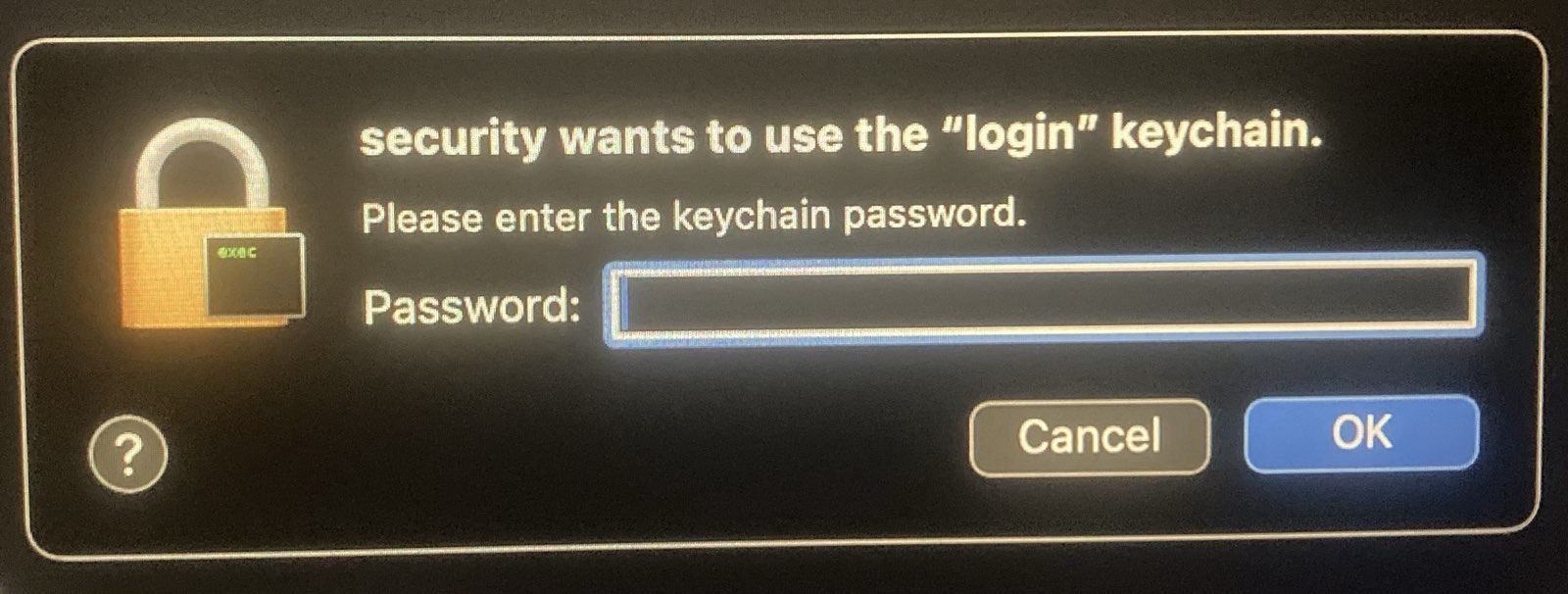
- If you see a security popup above, it may be because files in the shared sandvault directory don't have the correct ACLs, which occurs when another user's files are copied into the sandvault shared directory (`/Users/Shared/sv-$USER`). This can be corrected by running the rebuild command `sv --rebuild build`, or adding the rebuild flag to any command, e.g. `sv -r shell`. This only needs to be done once.
- ### Fix permission errors from restrictive umask
- If you see "Permission denied" errors when running `sv`, your shell may have a restrictive `umask` (e.g., `077` instead of the default `022`). Check with:
- ```bash
- umask
- ```
- SandVault detects this and warns you. To fix it for the current session, add `--fix-permissions`:
- ```bash
- # Fix permissions (standalone or with build)
- sv --fix-permissions
- sv --fix-permissions build
- ```
- If you previously installed Homebrew under a restrictive umask, you may also need to fix its directory permissions:
- ```bash
- sudo chmod -R o+rX /opt/homebrew
- ```
- ## Custom Shell Configuration
- If you're using `sandvault`, you're probably the type of person who also sets custom shell configuration files, and you'd be disappointed if you had to use default zsh while running `sv shell`. Here's how to configure your custom configuration for sandvault:
- 1. Ensure sandvault has been installed by running a command like `sandvault build`, `sandvault shell`, `sandvault claude`, etc.
- 2. Copy your desired configuration files (e.g. `.zshrc`, `.zprofile`, etc.) to `/Users/Shared/sv-${USER}/user/`.
- Next time you run sandvault, your files will be copied to the sandvault user home directory, and your zsh configuration files will be sourced:
- .zshenv → .zprofile → .zshrc
- NOTE: .zlogin and .zlogout not supported
- > **Note:** Earlier versions of sandvault supported configuration files in `guest/home/user/`, which didn't work for Homebrew installations. Consequently, this is no longer supported, and you'll get an error message asking you to move `guest/home/user` to `/Users/Shared/sv-${USER}/user/`.
- ## Browser Automation
- SandVault supports a headless browser for automation from within the sandbox. The browser runs inside the sandbox as the sandvault user, so it can only read and write the same files the sandbox can, and agents connect to it via the Chrome DevTools Protocol (CDP) over localhost. Two backends are supported: **Lightpanda** (default) and **Chrome**.
- > **Chrome:** macOS does not let Chrome apply its own internal sandbox inside the
- > sandvault sandbox, so Chrome is launched with `--no-sandbox`. A malicious web page
- > that exploits a Chrome bug would get the sandvault user's access, the same access
- > the agent already has, rather than Chrome's tighter per-page sandbox.
- > **Muse Code:** `sv --browser muse` starts the browser, but muse is not told the
- > endpoint exists — it is the one agent with no way to inject a system prompt. The
- > `SV_BROWSER_ENDPOINT` variable below is still set in its environment, so mention
- > it in your prompt or the project's `AGENTS.md` to make muse aware of it.
- ### Usage
- ```bash
- # Launch with browser support (Lightpanda by default)
- sv --browser claude
- sv --browser shell
- # Explicit backend selection
- sv --lightpanda claude # same as --browser
- sv --chrome claude # use Chrome instead of Lightpanda
- ```
- Inside the sandbox, the `SV_BROWSER_ENDPOINT` environment variable contains the CDP endpoint URL (e.g. `http://127.0.0.1:52858`).
- ```javascript
- // Playwright
- const browser = await chromium.connectOverCDP(process.env.SV_BROWSER_ENDPOINT);
- // Puppeteer
- const browser = await puppeteer.connect({ browserURL: process.env.SV_BROWSER_ENDPOINT });
- ```
- See also [`./tests/chrome/*.js`](./tests/chrome) and [`./tests/lightpanda/*.js`](./tests/lightpanda) for examples of using Playwright and Puppeteer. See [`guest/home/bin/prompts/browser.md`](./guest/home/bin/prompts/browser.md) for prompt.
- ### How it works
- - The browser is launched headless on the host side (one per sandvault session), and the sandbox connects via `localhost`.
- ## iOS Simulator Automation
- SandVault can expose the iOS Simulator to sandboxed AI agents for iOS app testing. The simulator runs on the host (it is a GUI app and cannot run inside the sandbox), and an HTTP bridge on localhost translates sandbox-side requests into `xcrun simctl` and [`iosef`](https://github.com/riwsky/iosef) invocations.
- > **Muse Code:** `sv --ios muse` boots the simulator, but muse is not told the
- > bridge exists — it is the one agent with no way to inject a system prompt. The
- > `SV_IOS_SIMULATOR_ENDPOINT` variable below is still set in its environment, so
- > mention it in your prompt or the project's `AGENTS.md`.
- ### Usage
- ```bash
- # Launch with iOS Simulator support
- sv --ios claude
- sv --ios shell
- ```
- Add `--ios-gui` to also show the Simulator.app window — useful when debugging interactively or watching an agent's actions:
- ```bash
- sv --ios-gui shell
- ```
- Simulator.app is left running on session exit so that other simulators (yours or other tools') aren't disrupted.
- Inside the sandbox, the `SV_IOS_SIMULATOR_ENDPOINT` environment variable points at the HTTP bridge (e.g. `http://127.0.0.1:52861`).
- ```bash
- # Check if simulator is ready
- curl $SV_IOS_SIMULATOR_ENDPOINT/ready
- # Read the accessibility tree
- curl $SV_IOS_SIMULATOR_ENDPOINT/describe
- # Tap a button by accessibility name
- curl -X POST -H 'Content-Type: application/json' \
- -d '{"name":"Sign In"}' \
- $SV_IOS_SIMULATOR_ENDPOINT/tap
- # Launch an app by bundle id
- curl -X POST -H 'Content-Type: application/json' \
- -d '{"bundle_id":"com.apple.Preferences"}' \
- $SV_IOS_SIMULATOR_ENDPOINT/launch
- # Save a screenshot as JPG (point resolution)
- curl -o low_res.jpg $SV_IOS_SIMULATOR_ENDPOINT/view
- # Save a screenshot as PNG (pixel resolution)
- curl -o high_res.png $SV_IOS_SIMULATOR_ENDPOINT/view_pixels
- ```
- See [`guest/home/bin/prompts/ios-simulator.md`](./guest/home/bin/prompts/ios-simulator.md) for the full list of endpoints. This file is automatically included in your AI agent prompt when using --ios/--ios-gui. See [`tests/ios-simulator/scripts/tests`](./tests/ios-simulator/scripts/tests) for a runnable example.
- ### How it works
- - A fresh scratch simulator (named `sandvault-<session-id>`) is created and booted on the host for each `--ios` session, and deleted on exit.
- - A Python HTTP bridge (`helpers/sv-ios-bridge`) listens on a dynamic localhost port and fronts a whitelisted set of `iosef` and `xcrun simctl` subcommands.
- - `.app` bundles passed to `/install` must live under `/Users/Shared/` (so the sandbox user can already access them); the bridge rejects paths outside that tree.
- - All subprocess calls use explicit argv lists, not shells.
- ### Requirements
- - Xcode with at least one iOS runtime installed (Xcode → Settings → Platforms).
- - Homebrew (used to install `uv`, which installs `iosef`). sandvault installs both automatically on first use.
- ## Running GUI Applications
- TL;DR: Sorry, macOS security limitations prevent this from working.
- It would be great to be able to run GUI applications (e.g. browsers, Claude Desktop) in the sandbox account to limit their access to main account resources.
- The issue seems to be that an application cannot report to a WindowServer that's owned by a different user.
- Internet posts suggest it's possible using `sudo su`, `sudo launchctl asuser`, and `sudo launchctl bsexec`, but those answers are from long ago and it seems likely that Apple improvements to macOS security have closed those doors.
- In the event you do find a solution, send a PR please :)
- ## Why SandVault?
- After exploring Docker containers, Podman, sandbox-exec, and virtualization, I needed something that:
- - Works natively on macOS without virtualization overhead
- - Provides meaningful isolation without too much complexity
- - Runs Claude Code with `--dangerously-skip-permissions`
- - Runs OpenAI Codex with `--dangerously-bypass-approvals-and-sandbox`
- - Runs OpenCode with `OPENCODE_PERMISSION='{"*":"allow"}'`
- - Runs Google Gemini with `--yolo`
- - Runs pi with `--approve` to trust project-local files (pi needs no permission bypass)
- - Runs Muse Code with `--yolo`, which disables both its approval prompts and its own sandbox — sandvault is already the sandbox, and muse's nested one defaults to proxy-only network and workspace-only writes
- - Runs herdr unmodified (it is a multiplexer, not an agent) and refuses to run it without the sandbox or with `--browser` / `--ios`, because its server outlives the session
- - Automates Chrome for web testing (via Chrome DevTools Protocol)
- - Automated iOS Simulator for app testing (via `xcrun simctl`, and `iosef`)
- - Maintains a clean separation between trusted and untrusted code
- SandVault uses macOS's Unix heritage and user account system to create a simple but effective sandbox.
- # Alternatives
- - [ClodPod](https://github.com/webcoyote/clodpod) runs Claude Code inside a macOS virtual machine.
- - [Chamber](https://github.com/cirruslabs/chamber) is a proof-of-concept app for running Claude Code inside a macOS virtual machine.
- - [Claude Code Sandbox](https://github.com/textcortex/claude-code-sandbox) runs Claude Code in a Docker container (Linux)
- # License
- Apache License, Version 2.0
- SandVault Copyright © 2026 Patrick Wyatt
- See [LICENSE.md](LICENSE.md) for details.
- # Contributors
- We welcome contributions and bug reports.
- See [CONTRIBUTORS.md](CONTRIBUTORS.md) for the list of contributors to this project.
- # Thanks to
- This project builds on the great works of other open-source authors:
- - [Claude](https://www.anthropic.com/claude) - AI coding assistant
- - [Codex](https://openai.com/codex/) - AI coding assistant
- - [CMux](https://github.com/manaflow-ai/cmux) - an awesome terminal
- - [Ghostty](https://ghostty.org) - an awesome terminal & terminal library
- - [Homebrew](https://brew.sh): 🍺 The missing package manager for macOS (or Linux)
- - [Shellcheck](https://www.shellcheck.net): finds bugs in your shell scripts
- - [uv](https://docs.astral.sh/uv/): An extremely fast Python package and project manager, written in Rust
- - [Claude Code Hooks Mastery](https://github.com/disler/claude-code-hooks-mastery): Quickly master how to use Claude Code hooks to add deterministic (or non-deterministic) control over Claude Code's behavior
- - [StatusLine](https://gist.github.com/dhkts1/55709b1925b94aec55083dd1da9d8f39): project status information for Claude Code
- ... as well as GNU, BSD, Linux, curl, Git, Sqlite, Node, Python, netcat, jq, and more. "We stand upon the shoulders of giants."
Ratings and comments
Sign in to rate this skill.
Sign inFree to use. If it’s helped, pass it on.