vllm-mlx
High-performance OpenAI and Anthropic compatible LLM inference server for Apple Silicon. Native MLX, continuous batching, multimodal models, MCP tool calling, and Claude Code support.
Safety scan
A static text scan, not a guarantee. Select the badge to see what was scanned and every finding.
Badge for your README

Markdown
[](/listings/waybarrios--vllm-mlx)HTML
<a href="/listings/waybarrios--vllm-mlx"><img src="/api/listings/waybarrios--vllm-mlx/badge.svg" alt="findsafeskills safety rating" /></a>Install
Install instructions from the README
As written by the repo's author. findsafeskills has not verified these steps.
New users: follow the [isolated release install](docs/getting-started/installation.md#install-a-release) and [first-response check](docs/getting-started/quickstart.md#first-response). The example below assumes that environment is activated. Initial model download/loading time depends on the machine and connection.
The version below is this walkthrough's pinned reference release, not an automatically updated latest version.
python -m pip install 'vllm-mlx==0.4.1'
vllm-mlx serve mlx-community/Llama-3.2-3B-Instruct-4bit --host 127.0.0.1 --port 8000
After the first response, restart with `--continuous-batching` to try [continuous batching and its cache options](docs/guides/continuous-batching.md). The minimal command above uses the default engine without that flag.
**OpenAI SDK:**
Install `openai` in your Python client environment first; it is not installed by the server package. See the [client setup](docs/getting-started/quickstart.md#option-1-openai-compatible-server).
from openai import OpenAI
client = OpenAI(base_url="http://localhost:8000/v1", api_key="not-needed")
r = client.chat.completions.create(model="mlx-community/Llama-3.2-3B-Instruct-4bit", messages=[{"role": "user", "content": "Hi!"}])
print(r.choices[0].message.content)**Anthropic SDK / Claude Code:**
export ANTHROPIC_BASE_URL=http://localhost:8000
export ANTHROPIC_API_KEY=not-needed
claude
What was scanned
The files the safety scan read, as written by the repository's author and shown as plain text. Lines with a finding are marked.
README.md · README · 340 lines
View this file on GitHub (read at the repository's current version: the scan did not record which commit it read)
- # vllm-mlx
- **Continuous batching + OpenAI + Anthropic APIs in one server. Native Apple Silicon inference.**
- **Read this in other languages:** [English](README.md) · [Español](README.es.md) · [Français](README.fr.md) · [中文](README.zh.md)
- [](https://pypi.org/project/vllm-mlx/)
- [](https://pepy.tech/projects/vllm-mlx)
- [](https://www.python.org/downloads/)
- [](LICENSE)
- [](https://support.apple.com/en-us/HT211814)
- [](https://github.com/waybarrios/vllm-mlx)
- ---
- ## What is vllm-mlx?
- A vLLM-style inference server for Apple Silicon Macs. Unlike `Ollama` or `mlx-lm` used directly, it ships **continuous batching, paged KV cache, prefix caching, and SSD-tiered cache**, and exposes **both OpenAI `/v1/*` and Anthropic `/v1/messages`** from a single process. Run LLMs, vision models, audio, and embeddings on Metal with unified memory, no conversion step.
- ## Quick start
- New users: follow the [isolated release install](docs/getting-started/installation.md#install-a-release)
- and [first-response check](docs/getting-started/quickstart.md#first-response).
- The example below assumes that environment is activated. Initial model
- download/loading time depends on the machine and connection.
- The version below is this walkthrough's pinned reference release, not an
- automatically updated latest version.
- ```bash
- python -m pip install 'vllm-mlx==0.4.1'
- vllm-mlx serve mlx-community/Llama-3.2-3B-Instruct-4bit --host 127.0.0.1 --port 8000
- ```
- After the first response, restart with `--continuous-batching` to try
- [continuous batching and its cache options](docs/guides/continuous-batching.md).
- The minimal command above uses the default engine without that flag.
- **OpenAI SDK:**
- Install `openai` in your Python client environment first; it is not installed
- by the server package. See the [client setup](docs/getting-started/quickstart.md#option-1-openai-compatible-server).
- ```python
- from openai import OpenAI
- client = OpenAI(base_url="http://localhost:8000/v1", api_key="not-needed")
- r = client.chat.completions.create(model="mlx-community/Llama-3.2-3B-Instruct-4bit", messages=[{"role": "user", "content": "Hi!"}])
- print(r.choices[0].message.content)
- ```
- **Anthropic SDK / Claude Code:**
- ```bash
- export ANTHROPIC_BASE_URL=http://localhost:8000
- export ANTHROPIC_API_KEY=not-needed
- claude
- ```
- ## Coding CLI compatibility
- **Validated with OpenCode, pi, Codex, Claude Code, GitHub Copilot CLI, Cline CLI,
- and OpenClaw's embedded agent.** All seven completed a streamed tool interaction
- and an exact file edit in one local run with Qwen3.8-27B-4bit on September 19,
- 2026. Results apply to the tested client versions and settings.
- See the [validated CLI matrix and setup guide](docs/guides/client-acceptance.md#validated-cli-versions)
- for versions, API transports, reproduction commands, and coverage limits.
- ## Features
- ### APIs
- - **OpenAI-compatible**: `/v1/chat/completions`, `/v1/completions`, `/v1/embeddings`, `/v1/rerank`, `/v1/responses`
- - **Anthropic-compatible**: `/v1/messages` (streaming, tool use, system prompts)
- - **MCP Tool Calling**: 19 parsers (OpenAI, Anthropic, Gemini, Qwen, DeepSeek, Gemma, and more)
- - **Structured output**: JSON Schema via `response_format` (lm-format-enforcer)
- ### Throughput & memory
- - **Continuous batching**: high throughput for concurrent requests
- - **Paged KV cache**: memory-efficient with prefix sharing
- - **SSD-tiered KV cache**: spill prefix cache to disk for long-context agents (`--ssd-cache-dir`)
- - **Warm prompts**: preload popular prefixes at startup (`--warm-prompts`) for 1.3-2.25x TTFT
- - **Prefix cache**: trie-based, shared across requests
- ### Multimodal
- - **Text + image + video + audio** from one server
- - Vision models: Gemma 3, Gemma 4, Qwen3-VL, Pixtral, Llama vision
- - **Audio input** in chat (`audio_url` content blocks)
- - **Native TTS**: 11 voices, 15+ languages (Kokoro, Chatterbox, VibeVoice, VoxCPM)
- - **STT**: Whisper family with RTF up to 197x on M4 Max
- ### Reasoning & advanced
- - **Reasoning extraction**: Qwen3 and DeepSeek-R1 parsers (`--reasoning-parser`)
- - **MoE expert reduction**: `--moe-top-k` for +7-16% on Qwen3-30B-A3B
- - **Speculative decoding**: `--enable-mtp` for supported models
- - **Sparse prefill**: attention-based `--specprefill` for supported model/draft combinations
- ### Observability
- - **Prometheus metrics**: `/metrics` endpoint with `--enable-metrics`
- - **Built-in benchmarker**: `vllm-mlx bench-serve` for prompt sweeps with CSV/JSON output
- ### Native GPU acceleration
- - Apple Silicon only (M1, M2, M3, M4, M5) with Metal kernels via MLX
- - Unified memory, no model conversion
- ## Performance
- **LLM decode (M4 Max, 128 GB, greedy, single stream):**
- | Model | Tok/s | Memory |
- |-------|------:|-------:|
- | Qwen3-0.6B-8bit | 417.9 | 0.7 GB |
- | Llama-3.2-3B-Instruct-4bit | 205.6 | 1.8 GB |
- | Qwen3-30B-A3B-4bit | 127.7 | ~18 GB |
- **Audio speech-to-text (M4 Max, RTF = real-time factor):**
- | Model | RTF | Use case |
- |-------|----:|----------|
- | whisper-tiny | 197x | Real-time / low latency |
- | whisper-large-v3-turbo | 55x | Quality + speed |
- | whisper-large-v3 | 24x | Highest accuracy |
- See [docs/benchmarks/](docs/benchmarks/) for continuous-batching results, KV-cache quantization (4-bit / 8-bit / fp16), and MoE top-k sweeps.
- ## Examples
- ### Anthropic API (Claude Code, OpenCode)
- ```bash
- vllm-mlx serve mlx-community/Qwen3-8B-4bit --port 8000
- export ANTHROPIC_BASE_URL=http://localhost:8000
- export ANTHROPIC_API_KEY=not-needed
- claude
- ```
- ### Reasoning models (Qwen3, DeepSeek-R1)
- ```bash
- vllm-mlx serve mlx-community/Qwen3-8B-4bit --reasoning-parser qwen3
- ```
- ```python
- r = client.chat.completions.create(
- model="mlx-community/Qwen3-8B-4bit",
- messages=[{"role": "user", "content": "What is 17 * 23?"}],
- )
- print("Thinking:", r.choices[0].message.reasoning)
- print("Answer:", r.choices[0].message.content)
- ```
- ### Multimodal (image + text)
- ```bash
- vllm-mlx serve mlx-community/Qwen3-VL-4B-Instruct-3bit --port 8000
- ```
- ```python
- r = client.chat.completions.create(
- model="mlx-community/Qwen3-VL-4B-Instruct-3bit",
- messages=[{"role": "user", "content": [
- {"type": "text", "text": "What is in this image?"},
- {"type": "image_url", "image_url": {"url": "https://example.com/cat.jpg"}},
- ]}],
- )
- ```
- ### Structured output (JSON Schema)
- With the text server from the quick start:
- ```python
- r = client.chat.completions.create(
- model="mlx-community/Llama-3.2-3B-Instruct-4bit",
- messages=[{"role": "user", "content": "List 3 colors."}],
- response_format={
- "type": "json_schema",
- "json_schema": {
- "schema": {"type": "object", "properties": {"colors": {"type": "array", "items": {"type": "string"}}}}
- },
- },
- )
- ```
- ### Reranking (`/v1/rerank`)
- ```bash
- curl http://localhost:8000/v1/rerank -H 'Content-Type: application/json' -d '{
- "model": "default",
- "query": "apple silicon inference",
- "documents": ["MLX is Apples framework", "Metal kernels on M-series", "CUDA on NVIDIA"]
- }'
- ```
- The built-in MLX reranker forward path supports standard BERT/XLM-RoBERTa
- sequence-classification weights with `gelu`, `gelu_new`/`gelu_fast`, `relu`, or
- `silu`/`swish` `hidden_act` values. Other activations fail explicitly so custom
- reranker architectures can add a dedicated adapter instead of silently using the
- wrong activation.
- ### Embeddings
- ```bash
- vllm-mlx serve <llm-model> --embedding-model mlx-community/all-MiniLM-L6-v2-4bit
- ```
- ```python
- emb = client.embeddings.create(model="mlx-community/all-MiniLM-L6-v2-4bit", input=["Hello", "World"])
- ```
- ### Audio (TTS / STT)
- ```bash
- pip install vllm-mlx[audio]
- brew install espeak-ng # macOS, needed for non-English TTS
- python examples/tts_example.py "Hello, how are you?" --play
- python examples/tts_multilingual.py "Hola mundo" --lang es --play
- ```
- ### Built-in benchmarking
- ```bash
- vllm-mlx bench-serve --url http://localhost:8000 --concurrency 5 --prompts prompts.txt --output results.csv
- # Product-style workload with quality checks and metrics deltas
- vllm-mlx bench-serve --url http://localhost:8000 --workload workload.json --repetitions 5 --output results.json
- # Append workload rows into SQLite for longitudinal comparisons
- vllm-mlx bench-serve --url http://localhost:8000 --workload workload.json --repetitions 5 --format sqlite --output bench.db
- ```
- ### Model acquisition and conversion
- ```bash
- # Inspect repo metadata, file sizes, config, and rough fit before downloading weights
- vllm-mlx model inspect mlx-community/Llama-3.2-3B-Instruct-4bit
- # Acquire with resumable Hugging Face transfer and write a local artifact manifest
- vllm-mlx model acquire mlx-community/Llama-3.2-3B-Instruct-4bit --target-dir ./models/llama-3b-4bit
- # Wrap mlx-lm conversion and record the exact recipe in the converted artifact
- vllm-mlx model convert meta-llama/Llama-3.2-3B-Instruct --output ./models/llama-3b-mlx-q4 --quantize --q-bits 4 --q-group-size 64 --q-mode affine
- ```
- ### Prometheus metrics
- ```bash
- vllm-mlx serve <model> --enable-metrics
- curl http://localhost:8000/metrics
- ```
- ## Installation
- Use the [release walkthrough](docs/getting-started/installation.md#install-a-release)
- for an isolated environment and a pinned server version. If you already manage
- CLI tools with uv, its isolated equivalent is:
- ```bash
- uv tool install 'vllm-mlx==0.4.1'
- ```
- Keep [development checkouts](docs/getting-started/installation.md#development-checkout)
- separate. See the [Installation Guide](docs/getting-started/installation.md) for
- optional extras and [Audio Guide](docs/guides/audio.md) for audio setup.
- ## Documentation
- Browse the complete documentation at [vllm-mlx.is-a.dev](https://vllm-mlx.is-a.dev/).
- - **Getting started**: [Installation](docs/getting-started/installation.md) · [Quick Start](docs/getting-started/quickstart.md)
- - **Servers & APIs**: [OpenAI server](docs/guides/server.md) · [Anthropic Messages API](docs/guides/server.md#anthropic-messages-api) · [Python API](docs/guides/python-api.md)
- - **Client compatibility**: [Run coding-client acceptance checks](docs/guides/client-acceptance.md)
- - **Features**: [Multimodal](docs/guides/multimodal.md) · [Audio](docs/guides/audio.md) · [Embeddings](docs/guides/embeddings.md) · [Reasoning](docs/guides/reasoning.md) · [MCP & Tool Calling](docs/guides/mcp-tools.md) · [Tool Parsers](docs/guides/tool-calling.md)
- - **Performance**: [Continuous Batching](docs/guides/continuous-batching.md) · [Multi-Model Serving](docs/guides/model-registry.md) · [Warm Prompts](docs/guides/warm-prompts.md) · [MoE Top-K](docs/guides/moe-top-k.md)
- - **Reference**: [CLI](docs/reference/cli.md) · [Models](docs/reference/models.md) · [Configuration](docs/reference/configuration.md)
- - **Benchmarks**: [LLM](docs/benchmarks/llm.md) · [Image](docs/benchmarks/image.md) · [Video](docs/benchmarks/video.md) · [Audio](docs/benchmarks/audio.md)
- ## Architecture
- ```
- ┌─────────────────────────────────────────────────────────────────────────┐
- │ vllm-mlx Server │
- │ OpenAI /v1/* · Anthropic /v1/messages · /v1/rerank · /metrics │
- └─────────────────────────────────────────────────────────────────────────┘
- │
- ▼
- ┌─────────────────────────────────────────────────────────────────────────┐
- │ Continuous batching · Paged KV cache · Prefix cache · SSD tiering │
- └─────────────────────────────────────────────────────────────────────────┘
- │
- ┌─────────────┬────────────┴────────────┬─────────────┐
- ▼ ▼ ▼ ▼
- ┌───────────────┐ ┌───────────────┐ ┌───────────────┐ ┌───────────────┐
- │ mlx-lm │ │ mlx-vlm │ │ mlx-audio │ │mlx-embeddings │
- │ (LLMs) │ │ (Vision) │ │ (TTS + STT) │ │ (Embeddings) │
- └───────────────┘ └───────────────┘ └───────────────┘ └───────────────┘
- │
- ▼
- ┌─────────────────────────────────────────────────────────────────────────┐
- │ MLX · Metal kernels · Unified memory │
- └─────────────────────────────────────────────────────────────────────────┘
- ```
- ## Contributing
- Bug fixes, perf work, docs, and benchmarks on different Apple Silicon chips all welcome. See the [Contributing Guide](docs/development/contributing.md).
- ## License
- Apache 2.0. See [LICENSE](LICENSE).
- ## Citation
- ```bibtex
- @software{vllm_mlx2025,
- author = {Barrios, Wayner},
- title = {vllm-mlx: Apple Silicon MLX Backend for vLLM},
- year = {2025},
- url = {https://github.com/waybarrios/vllm-mlx},
- note = {Native GPU-accelerated LLM and vision-language model inference on Apple Silicon}
- }
- ```
- ## Acknowledgments
- - [MLX](https://github.com/ml-explore/mlx). Apple's ML framework.
- - [mlx-lm](https://github.com/ml-explore/mlx-lm). LLM inference library.
- - [mlx-vlm](https://github.com/Blaizzy/mlx-vlm). Vision-language models.
- - [mlx-audio](https://github.com/Blaizzy/mlx-audio). Text-to-Speech and Speech-to-Text.
- - [mlx-embeddings](https://github.com/Blaizzy/mlx-embeddings). Text embeddings.
- - [Rapid-MLX](https://github.com/raullenchai/Rapid-MLX). Community fork of vllm-mlx.
- - [vLLM](https://github.com/vllm-project/vllm). High-throughput LLM serving. vllm-mlx is inspired by vLLM and adopts its continuous-batching and paged KV-cache design for Apple Silicon via MLX.
- ## Star history
- [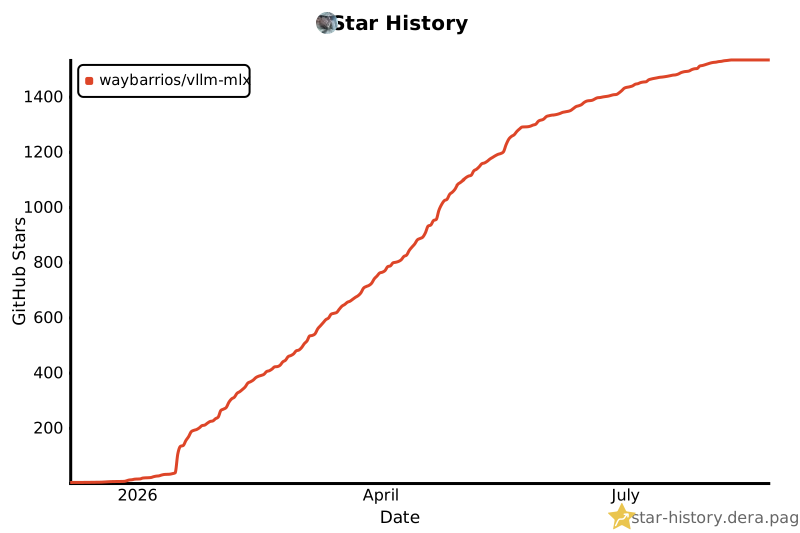](https://star-history.dera.page/#waybarrios/vllm-mlx&Date)
- ---
- **If vllm-mlx helped you, please star the repo. It helps more Apple Silicon devs find it.**
Ratings and comments
Sign in to rate this skill.
Sign inFree to use. If it’s helped, pass it on.