ArgusBot
ArgusBot: A 24/7 supervisor Agent for Codex CLI and Claude Code CLI that keeps agents running, reviewing, and planning until the job is actually done.
Safety scan
A static text scan, not a guarantee. Select the badge to see what was scanned and every finding.
Badge for your README

Markdown
[](/listings/waltstephen--argusbot)HTML
<a href="/listings/waltstephen--argusbot"><img src="/api/listings/waltstephen--argusbot/badge.svg" alt="findsafeskills safety rating" /></a>Install
Install instructions from the README
As written by the repo's author. findsafeskills has not verified these steps.
If you want to control your main project from Telegram 24/7 with an always-on daemon, use this flow:
Prerequisites and cost notes:
- You must have your chosen backend CLI installed and authenticated first (make sure `codex` or `claude` works before running `argusbot init`). - For 24/7 daemon operation, choosing `high` or `xhigh` reasoning can lead to token usage close to running one Codex session continuously for 24 hours. Plan budget carefully. - `medium` reasoning is usually a good quality/cost tradeoff for long-running background control.
1. Clone this repo and install it in editable mode. 2. Go to your target project directory (the repo you actually want to operate on). 3. Run `argusbot init`, choose control channel and execution backend, then complete setup prompts. 4. After setup, daemon starts in background and keeps running. 5. Chat with your Telegram bot (`/run`, `/inject`, `/status`, `/stop`) to control work at any time.
Example:
# 1) clone + install ArgusBot
git clone <your-ArgusBot-repo-url> ArgusBot
cd ArgusBot
python -m pip install -e .

# 2) go to your main project
cd ..
cd <your_main_project>

# 3) initialize daemon config in this project
argusbot init
During `argusbot init`, first choose control channel (`1. Telegram`, `2. Feishu (适合CN网络环境)`), then choose execution backend (`1. Codex CLI`, `2. Claude Code CLI`), then enter the selected channel credentials. Config is persisted under `.argusbot/` in your main project.
What was scanned
The files the safety scan read, as written by the repository's author and shown as plain text. Lines with a finding are marked.
README.md · README · 751 lines
View this file on GitHub (read at the repository's current version: the scan did not record which commit it read)
- # ArgusBot
- 
- [](LICENSE)
- [](CONTRIBUTING.md)
- Docs: [Quick Start](QUICKSTART.md) | [Recent Updates](WHATS_NEW.md) | [Contributing](CONTRIBUTING.md)
- > What's New: See [Recent Updates](WHATS_NEW.md) for the latest user-visible changes. (Sorry, we've been too busy lately, we'll be updating again in May.)
- `ArgusBot` is a Python supervisor plugin for Codex CLI and Claude Code CLI:
- - Main agent executes the task through the selected runner backend
- - Reviewer sub-agent evaluates completion (`done` / `continue` / `blocked`)
- - Planner sub-agent maintains a live framework view and proposes next-session objectives
- - Loop only stops when reviewer says `done` and all acceptance checks pass
- This solves the common "agent stopped early and asked for next instruction" problem.
- Current defaults:
- - `max_rounds` defaults to `500`.
- - Daemon child model defaults now inherit the selected backend's defaults unless you explicitly set a preset/override.
- - Daemon-launched idle runs try to resume from the last saved `session_id` before starting a fresh thread.
- ## Important Warnings
- 1. Security risk: daemon-launched runs use `--yolo` by default. This grants the selected backend high local execution power. Run only in trusted repositories/workspaces.
- 2. Visibility and debugging: Telegram/Feishu snippets may hide important details. If behavior looks wrong, run `argusbot` in the target workspace and watch local live output/logs first.
- 3. Cost and loop risk: long-running objectives can consume significant tokens. Planner or reviewer quality can also cause repeated loops. Always set clear acceptance checks, monitor runtime, and stop/re-scope when needed.
- 4. Credential and remote-control security: ArgusBot supports daemonized remote control through channels such as Telegram and Feishu, while daemon-launched runs may execute with high local privileges. **Treat bot tokens, app secrets, and related credentials as highly sensitive.** If these credentials are leaked, an unauthorized party may be able to issue remote commands that execute on your local machine or workspace. Never share tokens, never commit them to a repository, and rotate them immediately if exposure is suspected.
- 
- ## Community
- If you're using ArgusBot for research workflows, welcome to join our user community.
- - WeChat user group: scan the QR code below
- - Please note your background / use case when joining
- <p align="center">
- <img src="Feishu_readme/wechat-group.jpg" alt="ArgusBot WeChat Group" width="260" />
- </p>
- ## Quick Start (24/7 Telegram Control)
- If you want to control your main project from Telegram 24/7 with an always-on daemon, use this flow:
- Prerequisites and cost notes:
- - You must have your chosen backend CLI installed and authenticated first (make sure `codex` or `claude` works before running `argusbot init`).
- - For 24/7 daemon operation, choosing `high` or `xhigh` reasoning can lead to token usage close to running one Codex session continuously for 24 hours. Plan budget carefully.
- - `medium` reasoning is usually a good quality/cost tradeoff for long-running background control.
- 1. Clone this repo and install it in editable mode.
- 2. Go to your target project directory (the repo you actually want to operate on).
- 3. Run `argusbot init`, choose control channel and execution backend, then complete setup prompts.
- 4. After setup, daemon starts in background and keeps running.
- 5. Chat with your Telegram bot (`/run`, `/inject`, `/status`, `/stop`) to control work at any time.
- Example:
- ```bash
- # 1) clone + install ArgusBot
- git clone <your-ArgusBot-repo-url> ArgusBot
- cd ArgusBot
- python -m pip install -e .
- # 2) go to your main project
- cd ..
- cd <your_main_project>
- # 3) initialize daemon config in this project
- argusbot init
- ```
- During `argusbot init`, first choose control channel (`1. Telegram`, `2. Feishu (适合CN网络环境)`), then choose execution backend (`1. Codex CLI`, `2. Claude Code CLI`), then enter the selected channel credentials. Config is persisted under `.argusbot/` in your main project.
- ## Current Feature Snapshot
- - Persistent main-agent loop with reviewer gating (`done/continue/blocked`).
- - Planner/manager agent with live plan snapshots, workstream table, and follow-up objective proposal.
- - Planner TODO board (`plan_todo.md`) and explorer backlog maintained across planning sweeps.
- - Stall watchdog with soft diagnosis and hard restart safety window.
- - Live visibility: terminal streaming, dashboard, Telegram push, typing heartbeat.
- - Telegram inbound control during active run: `/inject`, `/status`, `/stop`, voice/audio transcription.
- - Feishu inbound control during active run: text polling for `/run`, `/inject`, `/status`, `/stop`, `/plan`, `/review`, and plain-text routing.
- - Always-on daemon mode for idle startup: `/run` can launch new runs when no loop is active.
- - Daemon follow-up prompt: after a run ends, Telegram can offer the planner's next suggested objective as a one-click continuation, but auto follow-up stays locked until `/plan <session-goal>` confirms the current session goal.
- - Planner modes: `off`, `auto`, `record`; setup defaults to `auto`, while daemon follow-up stays `execute-only` until `/plan` confirms the session goal.
- - Dual control channels for daemon: Telegram and terminal (`argusbot-daemon-ctl`).
- - Single-word operator entrypoint: `argusbot` (first run setup, later auto-attach monitor).
- - Token-exclusive daemon lock: one active daemon per Telegram token.
- - Operator message history persisted to markdown and fed to reviewer decisions.
- - PPTX auto-generation for run handoff: builds a presentation-ready slide deck summarizing the completed work.
- - Interactive PPTX opt-in: when running `argusbot-run` interactively, the CLI asks whether to generate a PPTX report before starting. Answer `Y` (default) to enable or `n` to skip. Daemon-launched runs (Telegram/Feishu) also ask via the control channel before each `/run` launch — reply `Y` or `N` to confirm. Use `--pptx-report` / `--no-pptx-report` to bypass the prompt.
- - Final handoff artifacts generated after reviewer `done`: Markdown via `--final-report-file` and PPTX via `--pptx-report-file`, with notifier delivery when ready.
- - Run archive persisted as JSONL with date/workspace/session metadata for resume continuity.
- - Utility scripts: start/kill/watch daemon logs, plus sanitized cross-project setup examples.
- ## Runner Backends
- ArgusBot keeps the same `/run`, `/inject`, `/btw`, planner, reviewer, and daemon flows across both backends.
- - `--runner-backend codex` uses Codex CLI.
- - `--runner-backend claude` uses Claude Code CLI.
- - `--runner-bin` selects the underlying executable path; `--codex-bin` remains as a compatibility alias.
- - Copilot proxy applies only to the Codex backend.
- - Claude accepts `low|medium|high` effort only, so ArgusBot maps `xhigh -> high` when Claude is selected.
- ## Why this is a plugin, not a native flag
- Current Codex CLI and Claude Code CLI do not expose a built-in `--autoloop` flag, so this repo adds a wrapper layer around their native task execution commands.
- ## Install
- ```bash
- python -m venv .venv
- source .venv/bin/activate
- pip install -e .
- ```
- ### PPTX Report Dependencies (optional)
- The PPTX run report generator uses a Node.js script. To enable it:
- ```bash
- npm install # installs pptxgenjs and other JS dependencies
- ```
- If `node` is not available, PPTX generation is silently skipped and does not block the loop.
- ## GitHub Copilot via `copilot-proxy`
- ArgusBot can route Codex backend calls through a local `copilot-proxy` checkout, so main/reviewer/planner/BTW runs can use GitHub Copilot-backed quota instead of OpenAI API billing.
- Simplest setup:
- ```bash
- argusbot init
- ```
- During `argusbot init` / `argusbot-setup`, ArgusBot will:
- - auto-detect an existing proxy checkout in `~/copilot-proxy`, `~/copilot-codex-proxy`, or `~/.argusbot/tools/copilot-proxy`
- - if you select the `copilot` preset (or explicitly enable Copilot proxy), offer to auto-install the proxy into `~/.argusbot/tools/copilot-proxy`
- Direct CLI example:
- ```bash
- argusbot-run \
- --copilot-proxy \
- --main-model gpt-5.4 \
- --reviewer-model gpt-5.4 \
- --plan-model gpt-5.4 \
- "实现功能并跑完验证"
- ```
- Notes:
- - `--copilot-proxy-dir` is only needed when your proxy checkout lives outside the auto-detected locations above.
- - When enabled, ArgusBot auto-starts `proxy.mjs` if needed and injects Codex provider overrides per run, so you do not have to rewrite your global `~/.codex/config.toml`.
- - Claude backend ignores Copilot proxy settings by design.
- - Prefer Copilot-supported models such as `gpt-5.4`, `gpt-5.2`, `gpt-5.1`, `gpt-4o`, `claude-sonnet-4.6`, `claude-opus-4.6`, or `gemini-3-pro-preview`.
- ## Native GitHub Copilot CLI backend
- ArgusBot also supports GitHub Copilot CLI as a native execution backend, separate from the `copilot-proxy` flow above.
- Use it from setup:
- - `argusbot init`
- - choose backend `3. GitHub Copilot CLI`
- Or directly from CLI:
- ```bash
- argusbot-run \
- --runner-backend copilot \
- "实现功能并完成验证"
- ```
- Notes:
- - If you leave model settings empty, ArgusBot does not pass `--model`, so Copilot CLI keeps its own official default model.
- - `--main-model`, `--reviewer-model`, and `--plan-model` are forwarded to Copilot CLI `--model` when you explicitly set them.
- - `--main-reasoning-effort`, `--reviewer-reasoning-effort`, and `--plan-reasoning-effort` map to Copilot CLI `--reasoning-effort`.
- - `--yolo` maps to Copilot CLI `--yolo` / `--allow-all` for highest-permission runs.
- - In non-interactive prompt mode, ArgusBot grants Copilot CLI tool auto-approval so the run can proceed autonomously; native Copilot backend does not use `copilot-proxy`.
- ## One-word operator workflow (`argusbot`)
- Run:
- ```bash
- argusbot
- ```
- List supported features/commands:
- ```bash
- argusbot help
- ```
- Behavior:
- - First run: asks you to choose control channel (`1. Telegram`, `2. Feishu (适合CN网络环境)`, default Telegram), then choose runner backend (`1. Codex CLI`, `2. Claude Code CLI`, `3. GitHub Copilot CLI`), then collects selected channel credentials, writes `.argusbot/daemon_config.json`, and starts daemon in the current shell directory.
- - Later runs: reuses config, ensures daemon is running, then directly attaches to live output.
- - `argusbot init`: stops all current ArgusBot daemons, prompts control channel + backend + credentials/model/play mode, starts daemon in background, then exits.
- - After `init`, run `argusbot` to attach monitor to that background daemon.
- - Same terminal can control daemon/run:
- - `/run <objective>`
- - `/new`
- - `/inject <instruction>`
- - `/mode <off|auto|record>`
- - `/btw <question>`
- - `/confirm-send` (when BTW attachments > 5, confirm and continue upload)
- - `/cancel-send` (when BTW attachments > 5, skip upload)
- - BTW attachment return supports Telegram/Feishu media upload: images/photos, videos, and generic files/documents.
- - `/plan <session-goal-or-direction>` (confirm the current session-level goal for planning; required before auto follow-up)
- - `/review <criteria>`
- - `/show-main-prompt`
- - `/show-plan`
- - `/show-plan-context`
- - `/show-review [round]`
- - `/show-review-context`
- - `/status`, `/stop`, `/daemon-stop`
- - plain text auto-routes: running => inject, idle => run
- Planner mode semantics:
- - `off`: disable plan agent behavior for daemon-launched runs.
- - `auto` (default): planner stays enabled and may propose the next request, but daemon does not auto-run follow-up until `/plan <session-goal>` confirms the current session goal.
- - `record`: planner records markdown only; no automatic follow-up execution.
- YOLO policy:
- - Daemon-launched runs always use `--yolo` by default.
- Directly disable daemon from terminal:
- ```bash
- argusbot daemon-stop
- ```
- You can still use low-level commands when needed:
- ```bash
- argusbot-daemon-ctl --bus-dir .argusbot/bus status
- argusbot-daemon-ctl --bus-dir .argusbot/bus inject "先修测试再继续"
- ```
- ## Run
- ```bash
- argusbot-run \
- --max-rounds 10 \
- --check "pytest -q" \
- "Implement feature X and keep iterating until tests pass"
- ```
- Report artifact example:
- ```bash
- argusbot-run \
- --state-file .argusbot/state.json \
- --final-report-file .argusbot/review_summaries/final-task-report.md \
- --pptx-report-file .argusbot/run-report.pptx \
- "实现功能并同时产出 Markdown 与 PPTX 汇报"
- ```
- This keeps both handoff artifacts in predictable paths. The PPTX report is also the file pushed by Telegram/Feishu when the run emits `pptx.report.ready`.
- Release note: if `--pptx-report-file` is not passed, ArgusBot still resolves a default PPTX artifact path under the run artifact directory using the standard file name `run-report.pptx`.
- Common options:
- - `--runner-backend {codex,claude,copilot}`: select the execution backend
- - `--runner-bin <path>`: select the backend executable path
- - `--session-id <id>`: continue an existing runner session
- - `--main-model` / `--reviewer-model`: set model(s)
- - `--planner-model`: override the manager/planner model (defaults to reviewer settings when omitted)
- - `--copilot-proxy [--copilot-proxy-port 18080] [--copilot-proxy-dir /custom/path]`: route Codex backend through local `copilot-proxy`
- - `python -m codex_autoloop.model_catalog`: list common models and presets
- - `--yolo`: request the selected backend's highest-permission autonomous mode
- - `--full-auto`: request automatic tool approval mode when supported by the selected backend
- - `--state-file <file>`: write round-by-round state JSON
- - `--final-report-file <file>`: write the final handoff Markdown report after reviewer `done`
- - `--pptx-report-file <file>`: write the auto-generated PPTX run report (default artifact name: `run-report.pptx`)
- - `--plan-report-file <file>`: write the latest planner markdown snapshot
- - `--plan-todo-file <file>`: write the latest planner TODO board markdown
- - `--plan-update-interval-seconds 1800`: run background planning sweeps every 30 minutes
- - `--verbose-events`: print raw JSONL stream
- - `--dashboard`: launch a live local web dashboard
- - `--dashboard-host 0.0.0.0 --dashboard-port 8787`: expose dashboard to other devices in LAN
- - `--telegram-bot-token` + `--telegram-chat-id`: send progress to Telegram (recommended for cross-network access)
- - `--telegram-events`: choose which events are pushed (comma-separated)
- - `--telegram-live-interval-seconds 30`: push live agent message deltas every 30s (only when changed)
- - `--feishu-app-id` / `--feishu-app-secret` / `--feishu-chat-id`: enable Feishu notifications and control
- - `--feishu-events`: choose which events are pushed to Feishu (comma-separated)
- - `--feishu-live-updates` + `--feishu-live-interval-seconds 30`: push live agent message deltas to Feishu (only when changed)
- - `--feishu-heartbeat-interval-seconds 600`: when a run is still active, send a Feishu heartbeat (`typing...`) every 10 minutes
- - `--feishu-control`: allow Feishu inbound control (`/inject`, `/status`, `/stop`, `/plan`, `/review`) while loop is running
- - `--no-live-terminal`: disable realtime terminal prints (default is on)
- - `--stall-soft-idle-seconds 3600`: after 1h no new output, run stall sub-agent diagnosis (do not force kill)
- - `--stall-hard-idle-seconds 10800`: after 3h no new output, force restart as hard safety valve
- - `--telegram-control`: allow Telegram inbound control (`/inject`, `/stop`, `/status`) while loop is running
- - `--telegram-control-whisper`: enable Telegram voice/audio transcription for control messages (default on)
- ## Feishu Setup Checklist
- how to create a bot? [EN](Feishu_readme/Feishu_readme.md) [CN](Feishu_readme/Feishu_readme_CN.md)
- Use this when running in CN network environments or when Telegram is unavailable.
- Required parameters:
- - `--feishu-app-id`
- - `--feishu-app-secret`
- - `--feishu-chat-id` (for `receive_id_type=chat_id`, this should look like `oc_xxx`)
- Common optional parameters:
- - `--feishu-receive-id-type chat_id`
- - `--feishu-events "loop.started,round.review.completed,loop.completed"`
- - `--feishu-live-updates --feishu-live-interval-seconds 30`
- - `--feishu-heartbeat-interval-seconds 600`
- - `--feishu-control`
- Feishu group command notes:
- - Commands can be sent directly as `/run`, `/inject`, `/stop`, etc.
- - Mention-prefixed commands in groups (for example `@bot /stop`) are normalized and parsed as commands.
- Minimal run example:
- ```bash
- argusbot-run \
- --feishu-app-id "$FEISHU_APP_ID" \
- --feishu-app-secret "$FEISHU_APP_SECRET" \
- --feishu-chat-id "$FEISHU_CHAT_ID" \
- "your objective"
- ```
- App-side enablement steps (Feishu Open Platform):
- 1. Enable bot capability for the app.
- 2. Grant message-related app scopes (at least one required by API): `im:message.history:readonly`, `im:message:readonly`, or `im:message`.
- 3. Publish a new app version and install/update it in your tenant.
- 4. Add the bot into the target group, then use that group's `chat_id` (`oc_xxx`) in config.
- Common errors:
- - `230006 Bot ability is not activated`: bot capability is disabled or not published/installed yet.
- - `230002 Bot/User can NOT be out of the chat`: bot is not in the target group, or `feishu_chat_id` points to a different chat.
- - `99991672 Access denied ... scopes required`: required Feishu scopes are not enabled for the app.
- ## How to Instruct the System
- The most important field is the final goal. Put it first.
- A good objective usually has this shape:
- ```text
- Final Goal:
- <the end state you actually want>
- Current Task:
- <what should be done in this session>
- Acceptance Criteria:
- <how the system knows it is done>
- Constraints:
- <repo, time, safety, cost, model, dataset, or style constraints>
- Notes:
- <optional hints, references, known risks, or preferred approach>
- ```
- Practical guidance:
- - Put `Final Goal` first, even if the immediate task is small.
- - Say what “done” means in concrete terms.
- - If you want planner behavior, say whether it should explore, only record, or stay off.
- - If your wording is messy, you can ask any AI tool to rewrite your request into the template above before sending it here.
- - Optional: ArgusBot setup now includes an `Objective Rewrite` switch for `/run`. It is off by default, and it can rewrite a new idle `/run` request into this structure before handing it to the main agent.
- - Warning: keep that rewrite switch off for specialized projects unless it is clearly helping. 对于特化项目,建议按需开启,不要默认依赖它。
- ### Example 1: Reproduce a Paper
- Use this only when the paper has usable open-source code or a strong public implementation.
- ```text
- Final Goal:
- Reproduce the paper's core result well enough to run inference, complete one smoke training run, and generate a structured reproduction report in this repository.
- Current Task:
- Set up the repo, inspect the available code path, create the reproduction plan, wire the experiment directories, and run the minimum smoke path needed to prove the project is alive.
- Acceptance Criteria:
- 1. The repository has a clear plan_report.md and plan_todo.md.
- 2. The selected implementation path is documented.
- 3. At least one runnable inference or smoke-training command succeeds.
- 4. The next highest-priority follow-up experiment is recorded.
- Constraints:
- 1. Prefer official or high-quality open-source implementations.
- 2. Do not aim for full SOTA reproduction in the first session.
- 3. Keep the work resumable from Telegram and daemon state files.
- ```
- ### Example 2: Extend an Existing Project
- ```text
- Final Goal:
- Turn this repository into a maintainable, planner-driven project where completed work, remaining work, and next-step execution suggestions are always visible.
- Current Task:
- Map the architecture, identify the missing module boundaries, implement the highest-leverage missing feature, and update the project reports.
- Acceptance Criteria:
- 1. The new feature is implemented and validated.
- 2. Planner outputs reflect what is done and what remains.
- 3. The next follow-up objective is concrete enough to run as a new session.
- Constraints:
- 1. Preserve the existing coding style.
- 2. Prefer small verifiable steps over large speculative rewrites.
- ```
- Example with live dashboard (Do not expose yourself on the public internet! It's extremely dangerous!):
- ```bash
- argusbot-run \
- --dashboard \
- --dashboard-host 0.0.0.0 \
- --dashboard-port 8787 \
- --check "pytest -q" \
- "帮我在这个文件夹写一下pipeline"
- ```
- Then open `http://<your-machine-ip>:8787` on phone or browser.
- ## Safer cross-network monitoring (Telegram)
- If phone and server are not in the same network, do not expose dashboard publicly by default.
- Use Telegram push notifications instead:
- ```bash
- argusbot-run \
- --max-rounds 12 \
- --check "pytest -q" \
- --telegram-bot-token "$TELEGRAM_BOT_TOKEN" \
- --telegram-events "loop.started,round.review.completed,loop.completed" \
- "帮我在这个文件夹写一下pipeline"
- ```
- `--telegram-chat-id` defaults to `auto` and will be resolved from `getUpdates`.
- If auto resolve fails, send `/start` to bot and run again, or pass explicit chat id.
- Live visibility defaults:
- - Terminal prints main/reviewer agent messages in realtime.
- - Telegram sends live message deltas every 30 seconds only if there are new changes.
- Telegram control channel defaults:
- - `/inject <text>` or plain text message: interrupt current main-agent run and apply new instruction next round.
- - Voice/audio message: auto-transcribed via Whisper and treated like text input (for example spoken `/inject ...`).
- - `/status`: return current loop state.
- - `/stop`: interrupt current run and stop the loop.
- - `/help`: print command summary.
- Whisper-related options:
- - `--telegram-control-whisper-api-key`: OpenAI API key (defaults to `OPENAI_API_KEY`).
- - `--telegram-control-whisper-model`: transcription model (default `whisper-1`).
- - `--telegram-control-whisper-base-url`: OpenAI-compatible API base URL.
- - `--telegram-control-whisper-timeout-seconds`: transcription request timeout.
- Stall watchdog defaults:
- - If no new output for 1 hour, sub-agent inspects the latest message/tails and decides whether restart is needed.
- - If no new output reaches 3 hours, process is force-restarted regardless.
- Typing heartbeat is enabled by default during execution. Disable with:
- ```bash
- --telegram-no-typing
- ```
- Security notes:
- - Keep dashboard on `127.0.0.1` unless you have VPN/auth in front.
- - Never commit bot token to git.
- - Prefer sending round summaries, not every raw log line.
- Troubleshooting:
- - Bot token must be full format: `<digits>:<secret>`, not only the secret part.
- - If no message arrives, run once with `--verbose-events` and check stderr lines prefixed with `[telegram]`.
- - If control commands are ignored, verify command comes from the same chat id resolved for notifications.
- ## Always-on Telegram daemon (start jobs even when idle)
- If you want Telegram to trigger runs when no loop process is active, run:
- ```bash
- argusbot-daemon \
- --telegram-bot-token "$TELEGRAM_BOT_TOKEN" \
- --telegram-chat-id auto \
- --run-check "pytest -q"
- ```
- Daemon commands from Telegram:
- - `/run <objective>`: start a new `ArgusBot` run
- - `/status`: daemon/child status
- - `/stop`: stop active run
- - After `/stop`, use `/run <objective>` to continue. By default daemon resumes the last `session_id` when available.
- - `/help`
- - After a child run finishes, the daemon can offer a Telegram button to execute the planner's next suggested objective.
- - If the current session goal was confirmed with `/plan`, daemon may auto-execute the planned next session after the follow-up countdown (default: 10 minutes); otherwise auto follow-up is skipped and the user is reminded to confirm the session goal first.
- - Before executing that follow-up, daemon creates a git checkpoint commit when the workspace is dirty.
- - Telegram follow-up options are: direct execute, reject plan, or modify then execute while inheriting the planner objective. That follow-up starts as a fresh session.
- For background mode:
- ```bash
- TELEGRAM_BOT_TOKEN=... TELEGRAM_CHAT_ID=... ./scripts/start_telegram_daemon.sh
- ```
- Recommendation: prefer `systemd` or supervisor over raw `nohup` for production reliability.
- ## Interactive first-run setup (recommended)
- Run once:
- ```bash
- argusbot-setup --run-cd .
- ```
- If command is not found in your environment, use:
- ```bash
- python -m codex_autoloop.setup_wizard --run-cd .
- ```
- The wizard will:
- 1. Check the selected runner CLI availability and basic auth probe.
- 2. Prompt for control channel: Telegram, Feishu, or both.
- 3. Prompt only for the selected channel credentials.
- 4. Prompt optional default check command (empty means no forced check command).
- 5. Prompt for planner mode after model selection.
- 6. Start daemon in background and save config under `.argusbot/`.
- Default behavior for daemon-launched runs:
- - `--yolo` is enabled by default.
- - No default `--check` is enforced unless you set one.
- - Daemon-launched runs inherit the selected backend defaults unless you explicitly set preset/overrides.
- - When the daemon is idle, a new `/run` or terminal `run` command will reuse the last saved `session_id` if available.
- - One Telegram token can only be owned by one active daemon process (second daemon returns an error).
- - In daemon mode, only daemon polls Telegram updates; child runs receive control via daemon bus (avoids getUpdates 409 conflicts).
- - If daemon detects `invalid encrypted content` from a resumed run, it raises a warning and auto-arms fresh session for the next run.
- - Inside a running child loop, `invalid_encrypted_content` now triggers an immediate in-loop fresh-session retry instead of spinning reviewer `continue` loops.
- - Operator messages (initial objective + terminal/Telegram injects) are appended to a shared `.argusbot/logs/operator_messages.md` so reviewer can see global inject history across runs.
- - Each run also appends start/finish records into `.argusbot/logs/argusbot-run-archive.jsonl` (includes date + workspace + session metadata) for continuity and auditing.
- - Re-running setup or start script will stop the previous daemon under the same `home-dir` before launching the new one.
- After setup, use terminal control:
- ```bash
- argusbot-daemon-ctl --bus-dir .argusbot/bus run "帮我在这个文件夹写一下pipeline"
- argusbot-daemon-ctl --bus-dir .argusbot/bus inject "先修测试再继续"
- argusbot-daemon-ctl --bus-dir .argusbot/bus status
- argusbot-daemon-ctl --bus-dir .argusbot/bus stop
- argusbot-daemon-ctl --bus-dir .argusbot/bus daemon-stop
- ```
- One-click kill script:
- ```bash
- ./scripts/kill_telegram_daemon.sh
- ```
- Realtime log mirror:
- ```bash
- ./scripts/watch_argusbot_logs.sh .argusbot
- ```
- This mirrors:
- - `.argusbot/daemon.out`
- - `.argusbot/logs/daemon-events.jsonl` (Telegram/terminal control interactions)
- If `argusbot-daemon-ctl` is not found, replace it with:
- ```bash
- python -m codex_autoloop.daemon_ctl
- ```
- ## Model presets
- Show local model presets and common names:
- ```bash
- python -m codex_autoloop.model_catalog
- ```
- ### OpenAI / Codex Models
- Current presets:
- - `quality`: `main=gpt-5.4/high`, `reviewer=gpt-5.4/high`
- - `copilot`: `main=gpt-5.4/high`, `reviewer=gpt-5.4/high`
- - `codex52-xhigh`: `main=gpt-5.2-codex/xhigh`, `reviewer=gpt-5.2-codex/xhigh`
- - `quality-xhigh`: `main=gpt-5.4/xhigh`, `reviewer=gpt-5.4/xhigh`
- - `balanced`: `main=gpt-5.3-codex/high`, `reviewer=gpt-5.1-codex/medium`
- - `codex-xhigh`: `main=gpt-5.3-codex/xhigh`, `reviewer=gpt-5.3-codex/xhigh`
- - `cheap`: `main=gpt-5.1-codex-mini/medium`, `reviewer=gpt-5-codex-mini/low`
- - `max`: `main=gpt-5.1-codex-max/xhigh`, `reviewer=gpt-5.3-codex/high`
- ### Qwen Models (Alibaba Cloud DashScope)
- To use Qwen models, you need to set the following environment variables:
- ```bash
- # Set your Alibaba Cloud DashScope API Key
- export DASHSCOPE_API_KEY="your-dashscope-api-key"
- export DASHSCOPE_API_BASE="https://dashscope.aliyuncs.com/compatible-mode/v1"
- ```
- Get your API key from: https://dashscope.console.aliyun.com/
- Qwen presets:
- - `qwen3-quality`: `main=qwen3-30b-a3b/high`, `reviewer=qwen3-30b-a3b/high` - High quality Qwen3
- - `qwen3-balanced`: `main=qwen3-32b/high`, `reviewer=qwen3-14b/medium` - Balanced Qwen3
- - `qwen3-coder`: `main=qwen3-coder-32b/high`, `reviewer=qwen3-coder-14b/medium` - Code-optimized Qwen3
- - `qwen3-cheap`: `main=qwen3-coder-7b/medium`, `reviewer=qwen3-8b/low` - Budget Qwen3
- - `qwen25-quality`: `main=qwen2.5-max/high`, `reviewer=qwen2.5-max/high` - High quality Qwen2.5
- - `qwen25-balanced`: `main=qwen2.5-72b/high`, `reviewer=qwen2.5-32b/medium` - Balanced Qwen2.5
- - `qwen25-coder`: `main=qwen2.5-coder-32b/high`, `reviewer=qwen2.5-coder-14b/medium` - Code-optimized Qwen2.5
- - `qwen25-cheap`: `main=qwen2.5-coder-7b/medium`, `reviewer=qwen2.5-7b/low` - Budget Qwen2.5
- - `qwen35-quality`: `main=qwen3.5-72b/high`, `reviewer=qwen3.5-32b/high` - High quality Qwen3.5
- - `qwen35-balanced`: `main=qwen3.5-32b/high`, `reviewer=qwen3.5-14b/medium` - Balanced Qwen3.5
- - `qwen35-coder`: `main=qwen3.5-coder-32b/high`, `reviewer=qwen3.5-coder-14b/medium` - Code-optimized Qwen3.5
- - `qwen35-cheap`: `main=qwen3.5-coder-7b/medium`, `reviewer=qwen3.5-8b/low` - Budget Qwen3.5
- Note:
- - `gpt-5.4` is the model name.
- - `high` is the reasoning effort level, not part of the model name.
- - For always-on daemon use, `medium` is often the safer default for token cost while keeping solid quality.
- Daemon overrides:
- ```bash
- python -m codex_autoloop.setup_wizard --run-cd .
- ```
- The wizard now lets you choose either:
- - a preset for both agents, or
- - separate `main` / `reviewer` model names
- ## Example: Use in another project (`newproject`) with sanitized paths
- Use this pattern when `ArgusBot` is cloned under a different workspace and you want the daemon to run tasks in `newproject`.
- ```bash
- # Replace with your own locations (public-safe placeholders)
- export WORKSPACE_ROOT="/path/to/workspace"
- export LOOP_REPO="$WORKSPACE_ROOT/ArgusBot"
- export TARGET_REPO="$WORKSPACE_ROOT/newproject"
- cd "$TARGET_REPO"
- python -m pip install -e "$LOOP_REPO"
- # First-time setup (interactive)
- python -m codex_autoloop.setup_wizard \
- --run-cd "$TARGET_REPO" \
- --home-dir "$TARGET_REPO/.argusbot"
- ```
- After setup:
- ```bash
- # Terminal control (same running daemon)
- python -m codex_autoloop.daemon_ctl --bus-dir "$TARGET_REPO/.argusbot/bus" status
- python -m codex_autoloop.daemon_ctl --bus-dir "$TARGET_REPO/.argusbot/bus" run "run 100-step smoke and validate checkpoint+infer"
- python -m codex_autoloop.daemon_ctl --bus-dir "$TARGET_REPO/.argusbot/bus" inject "fix test failures first, then continue"
- ```
- Telegram control in parallel:
- - `/run <objective>`
- - `/inject <instruction>`
- - `/status`
- - `/stop`
- ## `codex --autoloop` style shim
- You can add a shell function so `codex --autoloop ...` routes to this plugin.
- ```bash
- codex() {
- if [[ " $* " == *" --autoloop "* ]]; then
- /data/yijia/ArgusBot/scripts/argusbot_shim.sh "$@"
- else
- command codex "$@"
- fi
- }
- ```
- Put it in `~/.bashrc` or `~/.zshrc`, then reload shell.
- ## Loop policy
- Per round:
- 1. Run main agent in the same Codex thread (`exec` then `exec resume`)
- 2. Run acceptance checks (`--check`, repeatable)
- 3. Run reviewer sub-agent with structured JSON schema output
- 4. Stop only if reviewer says `done` and all checks pass
- 5. Otherwise build a new continue prompt and run next round
- Safety stop conditions:
- - `max_rounds` reached
- - repeated no-progress rounds
- - reviewer returns `blocked`
- ## Contributing
- Contributions are welcome. See [CONTRIBUTING.md](CONTRIBUTING.md) for workflow, attribution, and acknowledgement details.
- ## License
- This project is licensed under the MIT License. See [LICENSE](LICENSE).
- ## Star History
- [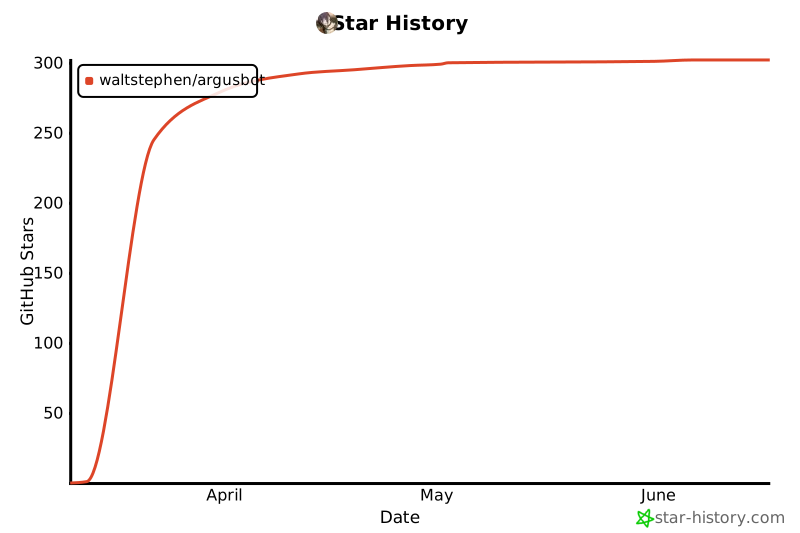](https://www.star-history.com/#waltstephen/ArgusBot&Date)
Ratings and comments
Sign in to rate this skill.
Sign inFree to use. If it’s helped, pass it on.