dsh-ink-whale
DeepSeek Harness 手写墨迹开屏插件:按真实笔顺写出你的文字,收在鲸鱼锁标上;字体、文字与深浅色都在设置里配置。
Safety scan
A static text scan, not a guarantee. Select the badge to see what was scanned and every finding.
Badge for your README

Markdown
[](/listings/w-j-y-wjy--dsh-ink-whale)HTML
<a href="/listings/w-j-y-wjy--dsh-ink-whale"><img src="/api/listings/w-j-y-wjy--dsh-ink-whale/badge.svg" alt="findsafeskills safety rating" /></a>Install
Install instructions from the README
As written by the repo's author. findsafeskills has not verified these steps.
DSH Desktop:在 App 里打开 **插件** 页搜索 `dsh-ink-whale` 安装。桌面端的 profile 归 App 独占,命令行会被拒绝(`profile "desktop" is managed exclusively by the Electron application`)。
`dsh web` 等其他 profile 用命令行:
dsh plugin --profile web add dsh-ink-whale
升级时重新执行同一条命令(`dsh plugin` 是 pnpm 的透传,也可 `... add dsh-ink-whale@latest`);桌面端在插件页卸载重装,或装 dshmarket 后用它的「更新」。改 Host 半或升级插件后重启 dsh;只改浏览器半刷新页面即可。本地源码:`pnpm install` → `npm run build`,再让插件管理器从本目录安装。
What was scanned
The files the safety scan read, as written by the repository's author and shown as plain text. Lines with a finding are marked.
README.md · README · 82 lines
- # dsh-ink-whale · 墨鲸开屏
- [](https://www.npmjs.com/package/dsh-ink-whale)
- [](LICENSE)
- [](https://dsh-plugin.org/plugins/w-j-y-wjy/dsh-ink-whale)
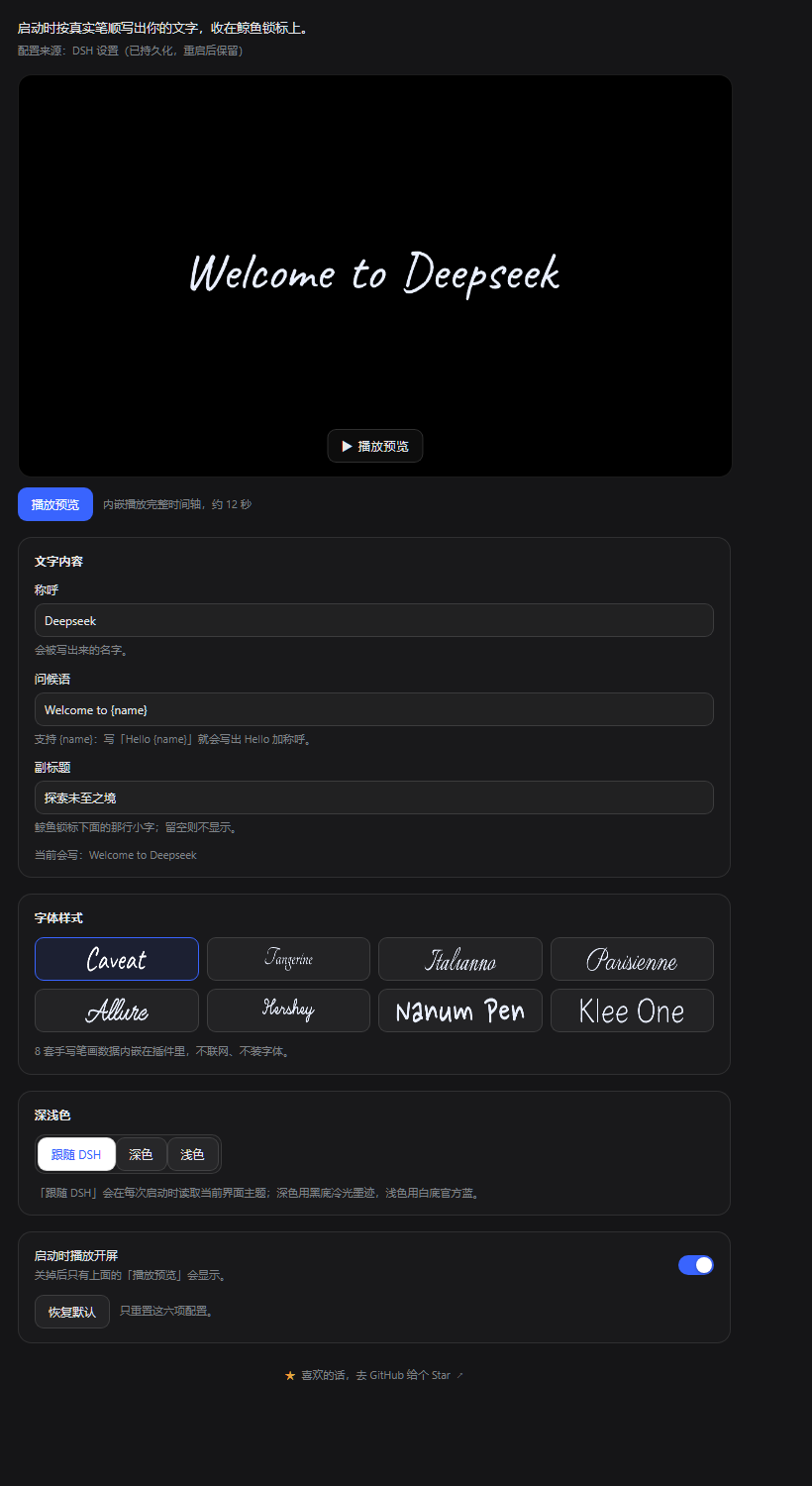
- DeepSeek Harness(DSH)开屏插件:启动时按**真实笔顺**写出你的文字,最后收在鲸鱼锁标与副标题上,再让鲸鱼缓慢推近、整屏淡出,主界面顺势露出来。字体、文字、深浅色、播放节奏都在「设置 → 内置插件 → 开屏」里配置。
- > **非官方项目**,与 DeepSeek 无关联。鲸鱼与 `deepseek` 字标取自 DeepSeek 官方资源,版权与商标归 DeepSeek 所有,本项目未获授权;仅作个人界面装饰,请勿用于冒充官方或商业用途。详见 [NOTICE.md](NOTICE.md)。
- ## 演示
- 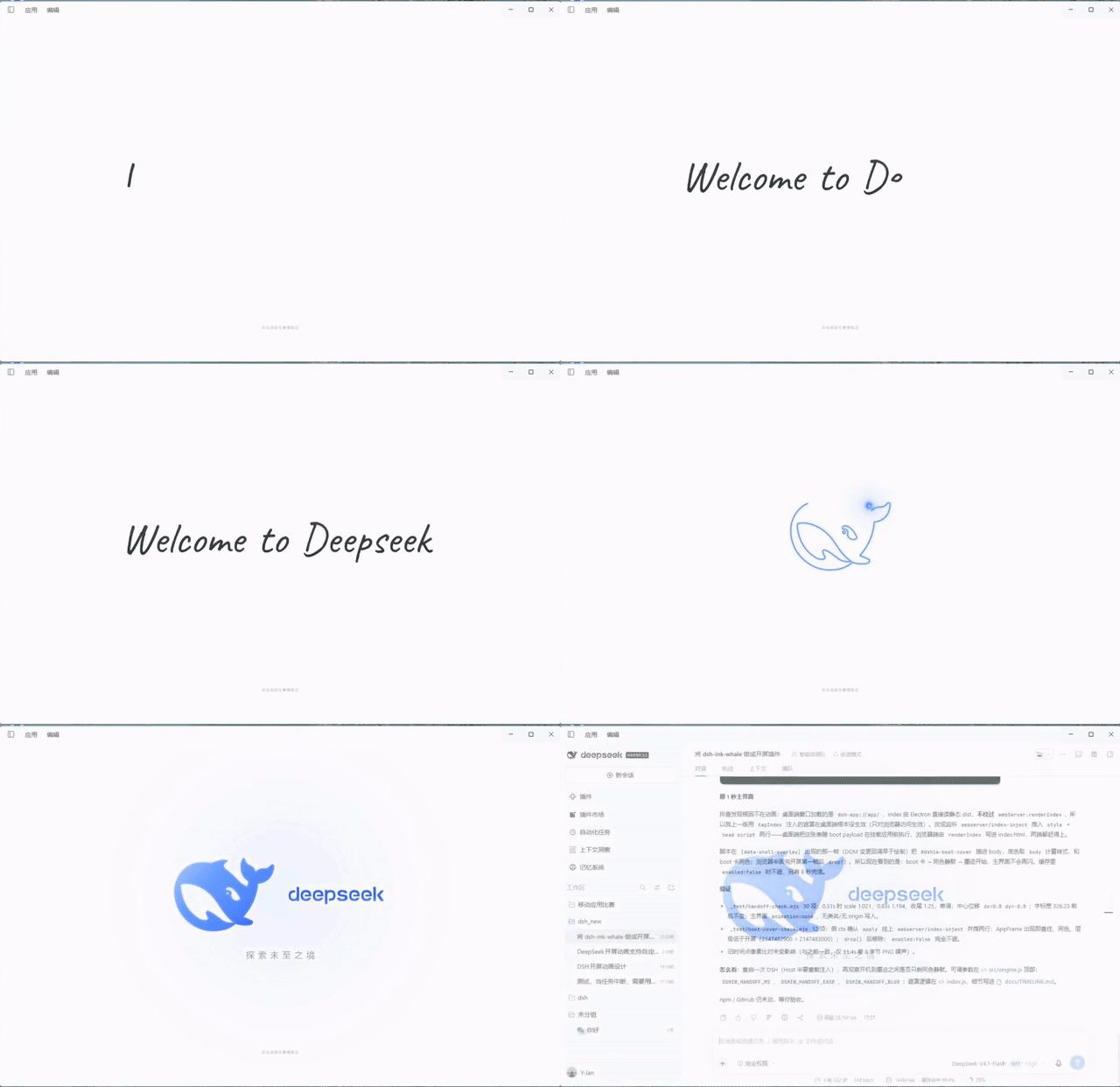
- [▶ 高清 MP4(1280×826,620 KB)](https://github.com/w-j-y-wjy/dsh-ink-whale/blob/main/assets/demo.mp4) · 浅色主题,15 秒完整流程
- 
- 更多截图见 [docs/DEMO.md](docs/DEMO.md)。
- ## 安装
- DSH Desktop:在 App 里打开 **插件** 页搜索 `dsh-ink-whale` 安装。桌面端的 profile 归 App 独占,命令行会被拒绝(`profile "desktop" is managed exclusively by the Electron application`)。
- `dsh web` 等其他 profile 用命令行:
- ```powershell
- dsh plugin --profile web add dsh-ink-whale
- ```
- 升级时重新执行同一条命令(`dsh plugin` 是 pnpm 的透传,也可 `... add dsh-ink-whale@latest`);桌面端在插件页卸载重装,或装 dshmarket 后用它的「更新」。改 Host 半或升级插件后重启 dsh;只改浏览器半刷新页面即可。本地源码:`pnpm install` → `npm run build`,再让插件管理器从本目录安装。
- ## 使用
- - 每次页面加载播放一次,点击或按任意键跳过;系统开启「减少动态效果」时直接呈现终帧。
- - **设置 → 内置插件 → 开屏**:内嵌 16:9 预览、称呼 / 问候语 / 副标题、8 套手写体、深浅色、播放节奏、启动开关。
- - 配置写进 profile 的 Cordis patch,重启后保留;Host 设置不可用时退回本机 localStorage。
- | 字段 | 默认 | 说明 |
- | --- | --- | --- |
- | `enabled` | `true` | 启动时播放开屏 |
- | `font` | `caveat` | `caveat` / `tangerine` / `italianno` / `parisienne` / `ems-allure` / `hershey-script` / `nanum-pen-script` / `klee-one` |
- | `name` | `DeepSeek` | 写出来的称呼 |
- | `greeting` | `{name}` | 问候语模板,`{name}` 替换为称呼 |
- | `caption` | `探索未至之境` | 鲸鱼锁标下方的副标题,留空则不显示 |
- | `theme` | `auto` | `auto` 跟随 DSH 主题,或 `dark` / `light` |
- | `skipWhale` | `false` | 关闭后续鲸鱼动画:写完字直接淡出进主界面,总时长约 8 秒 |
- | `speed` | `1` | 播放倍速:`0.5` / `1` / `1.5` / `2` / `3`,按倍数压缩整段开屏 |
- 也可以直接改 profile 的 `cordis.patch.yml`:
- ```yaml
- - id: ink-whale
- config:
- font: tangerine
- name: Deepseek
- greeting: Welcome to {name}
- caption: 探索未至之境
- theme: auto
- enabled: true
- skipWhale: false
- speed: 1
- ```
- ## 构建与验收
- ```powershell
- npm run build # src/engine.js + 内嵌数据 → client.js
- npm run build:standalone # 旧的独立演示页 index.html / index-light.html
- npm run verify # 清单、产物、locale、icon、许可文件检查
- node _test/handoff-check.mjs # 开发期:鲸鱼推近 / 整屏淡出 / 帧间隔
- node _test/boot-cover-check.mjs # 开发期:首屏遮罩(主界面不闪)
- ```
- 交接时长、缓动与可选模糊只在 `src/engine.js` 顶部改:`DSHIW_HANDOFF_MS`、`DSHIW_HANDOFF_EASE`、`DSHIW_HANDOFF_BLUR`;首屏遮罩在 `index.js` 里,细节见 [docs/TIMELINE.md](docs/TIMELINE.md)。
- ## 许可
- 代码 MIT © [w-j-y-wjy](https://github.com/w-j-y-wjy)([LICENSE](LICENSE))。8 套笔画数据为 7×SIL OFL 1.1 + Hershey 条款([LICENSES/](LICENSES/FONTS-ATTRIBUTION.md))。DeepSeek 鲸鱼 / 字标路径版权归 DeepSeek,**未获授权**;本项目是非官方个人项目,使用限制见 [NOTICE.md](NOTICE.md)。
- [](https://github.com/deepseek-ai/deepseek-harness)
Ratings and comments
Sign in to rate this skill.
Sign inFree to use. If it’s helped, pass it on.