mcp-pandoc
MCP server for document format conversion using pandoc.
Safety scan
A static text scan, not a guarantee. Select the badge to see what was scanned and every finding.
Badge for your README

Markdown
[](/listings/vivekvells--mcp-pandoc)HTML
<a href="/listings/vivekvells--mcp-pandoc"><img src="/api/listings/vivekvells--mcp-pandoc/badge.svg" alt="findsafeskills safety rating" /></a>Install
Install instructions from the README
As written by the repo's author. findsafeskills has not verified these steps.
Installing manually via claude_desktop_config.json config file
- On MacOS: `open ~/Library/Application\ Support/Claude/claude_desktop_config.json` - On Windows: `%APPDATA%/Claude/claude_desktop_config.json`
a) Only for local development & contribution to this repo
<details> <summary>Development/Unpublished Servers Configuration</summary>
ℹ️ Replace <DIRECTORY> with your locally cloned project path
"mcpServers": {
  "mcp-pandoc": {
    "command": "uv",
    "args": [
      "--directory",
      "<DIRECTORY>/mcp-pandoc",
      "run",
      "mcp-pandoc"
    ]
  }
}</details>
b) Published Servers Configuration - Consumers should use this config
"mcpServers": {
  "mcp-pandoc": {
    "command": "uvx",
    "args": [
      "mcp-pandoc"
    ]
  }
}npx -y @smithery/cli install mcp-pandoc --client claude
- If you face any issue, use the "Published Servers Configuration" above directly instead of this cli.
**Note**: To use locally configured mcp-pandoc, follow "Development/Unpublished Servers Configuration" step above.
What was scanned
The files the safety scan read, as written by the repository's author and shown as plain text. Lines with a finding are marked.
README.md · README · 435 lines
View this file on GitHub (read at the repository's current version: the scan did not record which commit it read)
- [](https://pypi.python.org/pypi/mcp-pandoc)
- [](https://github.com/vivekVells/mcp-pandoc/actions/workflows/ci.yml)
- <br />
- 
- <!-- [](https://pepy.tech/project/mcp-pandoc) -->
- <!--  -->
- <!--
- [](https://pypi.python.org/pypi/mcp-pandoc)
- [](https://github.com/vivekVells/mcp-pandoc/actions/workflows/ci.yml)
- <a href="https://smithery.ai/server/mcp-pandoc"><img alt="Smithery Badge" src="https://smithery.ai/badge/mcp-pandoc"></a> <a href="https://glama.ai/mcp/servers/xyzzgaj9bk"><img width="380" height="200" src="https://glama.ai/mcp/servers/xyzzgaj9bk/badge" /></a>
- -->
- [](https://mseep.ai/app/vivekvells-mcp-pandoc)
- <a href="https://glama.ai/mcp/servers/xyzzgaj9bk"><img width="380" height="200" src="https://glama.ai/mcp/servers/xyzzgaj9bk/badge" />
- # mcp-pandoc: A Document Conversion MCP Server
- > Officially included in the [Model Context Protocol servers](https://github.com/modelcontextprotocol/servers/blob/main/README.md) open-source project. 🎉
- ## Overview
- A Model Context Protocol server for document format conversion using [pandoc](https://pandoc.org/index.html). This server provides tools to transform content between different document formats while preserving formatting and structure.
- Please note that mcp-pandoc is currently in early development. PDF support is under development, and the functionality and available tools are subject to change and expansion as we continue to improve the server.
- Credit: This project uses the [Pandoc Python package](https://pypi.org/project/pandoc/) for document conversion, forming the foundation for this project.
- ## 📋 Quick Reference
- **New to mcp-pandoc?** Check out **[📖 CHEATSHEET.md](CHEATSHEET.md)** for
- - ⚡ Copy-paste examples for all formats
- - 🔄 Bidirectional conversion matrix
- - 🎯 Common workflows and pro tips
- - 🌟 Reference document styling guide
- _Perfect for quick lookups and getting started fast!_
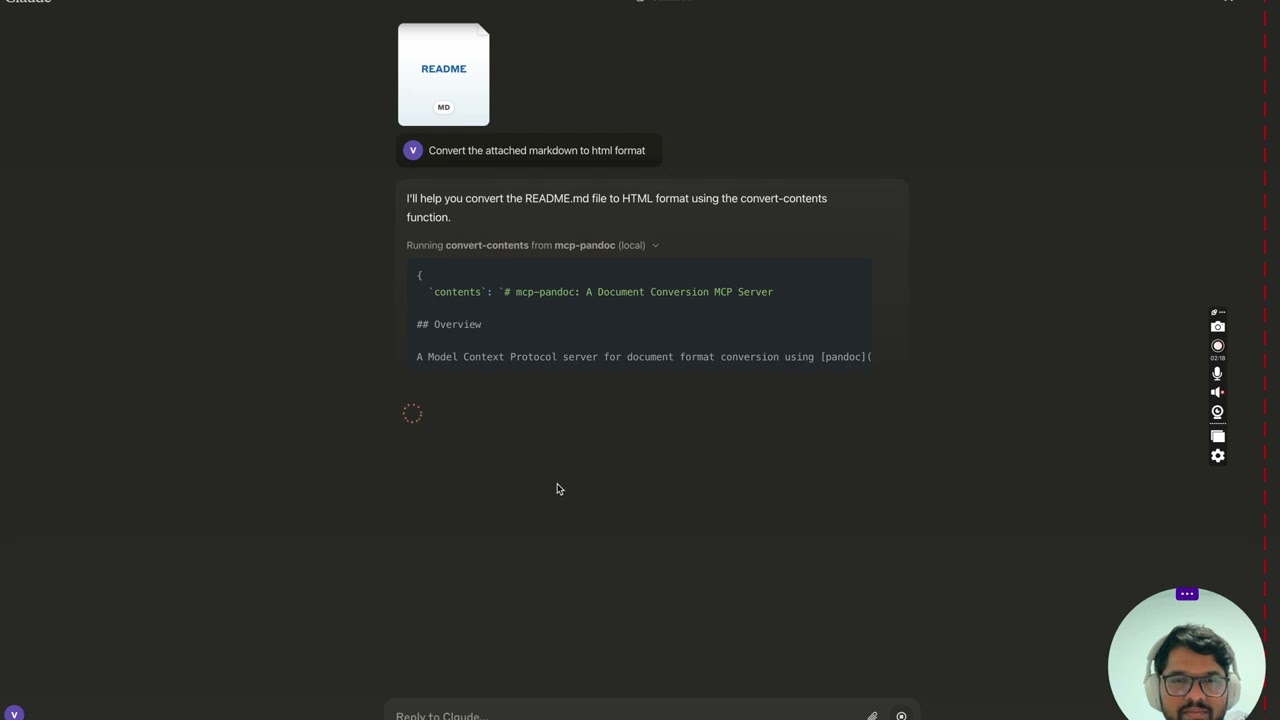
- ## Demo
- [](https://youtu.be/vN3VOb0rygM)
- > 🎥 [Watch on YouTube](https://youtu.be/vN3VOb0rygM)
- <details>
- <summary>Screenshots</summary>
- <img width="2407" alt="Screenshot 2024-12-26 at 3 33 54 PM" src="https://github.com/user-attachments/assets/ce3f5396-252a-4bba-84aa-65b2a06b859e" />
- <img width="2052" alt="Screenshot 2024-12-26 at 3 38 24 PM" src="https://github.com/user-attachments/assets/8c525ad1-b184-41ca-b068-7dd34b60b85d" />
- <img width="1498" alt="Screenshot 2024-12-26 at 3 40 51 PM" src="https://github.com/user-attachments/assets/a1e0682d-fe44-40b6-9988-bf805627beeb" />
- <img width="760" alt="Screenshot 2024-12-26 at 3 41 20 PM" src="https://github.com/user-attachments/assets/1d7f5998-6d7f-48fa-adcf-fc37d0521213" />
- <img width="1493" alt="Screenshot 2024-12-26 at 3 50 27 PM" src="https://github.com/user-attachments/assets/97992c5d-8efc-40af-a4c3-94c51c392534" />
- </details>
- More to come...
- ## Tools
- 1. `convert-contents`
- - Transforms content between supported formats
- - Inputs:
- - `contents` (string): Source content to convert (required if input_file not provided)
- - `input_file` (string): Complete path to input file (required if contents not provided)
- - `input_format` (string): Source format of the content (defaults to markdown)
- - `output_format` (string): Target format (defaults to markdown)
- - `output_file` (string): Complete path for output file (required for pdf, docx, rst, latex, epub, odt, pptx formats)
- - `reference_doc` (string): Path to a reference document to use for styling (supported for docx, odt and pptx output; the file must match the output format)
- - `defaults_file` (string): Path to a Pandoc defaults file (YAML) containing conversion options
- - `filters` (array): List of Pandoc filter paths to apply during conversion
- - Supported formats, by direction:
- | Format | Read | Write |
- | -------- | :--: | :---: |
- | markdown | ✅ | ✅ |
- | html | ✅ | ✅ |
- | docx | ✅ | ✅ |
- | odt | ✅ | ✅ |
- | rst | ✅ | ✅ |
- | latex | ✅ | ✅ |
- | epub | ✅ | ✅ |
- | ipynb | ✅ | ✅ |
- | txt | ✅ | ✅ |
- | **pdf** | ❌ | ✅ |
- | **pptx** | ❌ | ✅ |
- - Note: For advanced formats (pdf, docx, rst, latex, epub, odt, pptx), an output_file path is required
- ### 🔧 Advanced Features
- #### Defaults Files (YAML Configuration)
- Use defaults files to create reusable conversion templates with consistent formatting:
- ```yaml
- # academic-paper.yaml
- from: markdown
- to: pdf
- number-sections: true
- toc: true
- metadata:
- title: "Academic Paper"
- author: "Research Team"
- ```
- Example usage: `"Convert paper.md to PDF using defaults academic-paper.yaml and save as paper.pdf"`
- #### Pandoc Filters
- Apply custom filters for enhanced processing:
- Example usage: `"Convert docs.md to HTML with filters ['/path/to/mermaid-filter.py'] and save as docs.html"`
- > 💡 **For comprehensive examples and workflows**, see **[CHEATSHEET.md](CHEATSHEET.md)**
- ## 📊 Supported Formats & Conversions
- ### Bidirectional Conversion Matrix
- Rows are source formats, columns are targets. PDF and PPTX have no rows because pandoc cannot read them.
- | From\To | MD | HTML | TXT | DOCX | ODT | RST | LaTeX | EPUB | IPYNB | PDF | PPTX |
- | ------------ | --- | ---- | --- | ---- | --- | --- | ----- | ---- | ----- | --- | ---- |
- | **Markdown** | ✅ | ✅ | ✅ | ✅ | ✅ | ✅ | ✅ | ✅ | ✅ | ✅ | ✅ |
- | **HTML** | ✅ | ✅ | ✅ | ✅ | ✅ | ✅ | ✅ | ✅ | ✅ | ✅ | ✅ |
- | **TXT** | ✅ | ✅ | ✅ | ✅ | ✅ | ✅ | ✅ | ✅ | ✅ | ✅ | ✅ |
- | **DOCX** | ✅ | ✅ | ✅ | ✅ | ✅ | ✅ | ✅ | ✅ | ✅ | ✅ | ✅ |
- | **ODT** | ✅ | ✅ | ✅ | ✅ | ✅ | ✅ | ✅ | ✅ | ✅ | ✅ | ✅ |
- | **RST** | ✅ | ✅ | ✅ | ✅ | ✅ | ✅ | ✅ | ✅ | ✅ | ✅ | ✅ |
- | **LaTeX** | ✅ | ✅ | ✅ | ✅ | ✅ | ✅ | ✅ | ✅ | ✅ | ✅ | ✅ |
- | **EPUB** | ✅ | ✅ | ✅ | ✅ | ✅ | ✅ | ✅ | ✅ | ✅ | ✅ | ✅ |
- | **IPYNB** | ✅ | ✅ | ✅ | ✅ | ✅ | ✅ | ✅ | ✅ | ✅ | ✅ | ✅ |
- ### A Note on Write-Only Formats
- **PDF** and **PPTX** can be produced but not read.
- Pandoc has never shipped a PDF reader. Pandoc gained a PowerPoint reader in 3.8.3 (released 2025-12-01), but this project declares no minimum pandoc version, and Ubuntu 24.04 still ships pandoc 3.1.3, so `pptx` input is not offered. Tracked in [#54](https://github.com/vivekVells/mcp-pandoc/issues/54) and [#49](https://github.com/vivekVells/mcp-pandoc/issues/49).
- PPTX **output** needs no particular pandoc version. The PowerPoint writer has existed since pandoc 2.0.5.
- ### Format Categories
- | Category | Formats | Requirements |
- | ------------ | ---------------------------------- | ------------------------------- |
- | **Basic** | MD, HTML, TXT, IPYNB | None, returned inline |
- | **Advanced** | DOCX, ODT, PDF, PPTX, RST, LaTeX, EPUB | Must specify `output_file` path |
- | **Styled** | DOCX, ODT, PPTX with reference doc | Custom template support ⭐ |
- ### Requirements by Format
- - **PDF (.pdf)** - requires TeX Live installation
- - **DOCX (.docx), ODT (.odt), PPTX (.pptx)** - support custom styling via reference documents, and the reference must be the same format as the output
- - **All others** - no additional requirements
- Note: For advanced formats:
- 1. Complete file paths with filename and extension are required
- 2. **PDF conversion requires TeX Live installation** (see Critical Requirements section -> For macOS: `brew install texlive`)
- 3. When no output path is specified:
- - Basic formats: Displays converted content in the chat
- - Advanced formats: May save in system temp directory (/tmp/ on Unix systems)
- ## Usage & configuration
- **NOTE: Ensure to complete installing required packages mentioned below under "Critical Requirements".**
- To use the published one
- ```bash
- {
- "mcpServers": {
- "mcp-pandoc": {
- "command": "uvx",
- "args": ["mcp-pandoc"]
- }
- }
- }
- ```
- **💡 Quick Start**: See **[CHEATSHEET.md](CHEATSHEET.md)** for copy-paste examples and common workflows.
- ### ⚠️ Important Notes
- #### Critical Requirements
- 1. **Pandoc Installation**
- - **Required**: Install `pandoc` - the core document conversion engine
- - Installation:
- ```bash
- # macOS
- brew install pandoc
- # Ubuntu/Debian
- sudo apt-get install pandoc
- # Windows
- # Download installer from: https://pandoc.org/installing.html
- ```
- - **Verify**: `pandoc --version`
- 2. **UV package installation**
- - **Required**: Install `uv` package (includes `uvx` command)
- - Installation:
- ```bash
- # macOS
- brew install uv
- # Windows/Linux
- pip install uv
- ```
- - **Verify**: `uvx --version`
- 3. **PDF Conversion Prerequisites:** Only needed if you need to convert & save pdf
- - TeX Live must be installed before attempting PDF conversion
- - Installation commands:
- ```bash
- # Ubuntu/Debian
- sudo apt-get install texlive-xetex
- # macOS
- brew install texlive
- # Windows
- # Install MiKTeX or TeX Live from:
- # https://miktex.org/ or https://tug.org/texlive/
- ```
- 4. **File Path Requirements**
- - When saving or converting files, you MUST provide complete file paths including filename and extension
- - The tool does not automatically generate filenames or extensions
- #### Examples
- ✅ Correct Usage:
- ```bash
- # Converting content to PDF
- "Convert this text to PDF and save as /path/to/document.pdf"
- # Converting between file formats
- "Convert /path/to/input.md to PDF and save as /path/to/output.pdf"
- # Converting to DOCX with a reference document template
- "Convert input.md to DOCX using template.docx as reference and save as output.docx"
- # Converting to ODT with a reference document template
- "Convert input.md to ODT using template.odt as reference and save as output.odt"
- # Converting to a branded PowerPoint deck
- "Convert slides.md to PPTX using template.pptx as reference and save as deck.pptx"
- # Step-by-step reference document workflow
- "First create a reference document: pandoc -o custom-reference.docx --print-default-data-file reference.docx" or if you already have one, use that
- "Then convert with custom styling: Convert this text to DOCX using /path/to/custom-reference.docx as reference and save as /path/to/styled-output.docx"
- ```
- ❌ Incorrect Usage:
- ```bash
- # Missing filename and extension
- "Save this as PDF in /documents/"
- # Missing complete path
- "Convert this to PDF"
- # Missing extension
- "Save as /documents/story"
- ```
- #### Common Issues and Solutions
- 1. **PDF Conversion Fails**
- - Error: "xelatex not found"
- - Solution: Install TeX Live first (see installation commands above)
- 2. **File Conversion Fails**
- - Error: "Invalid file path"
- - Solution: Provide complete path including filename and extension
- - Example: `/path/to/document.pdf` instead of just `/path/to/`
- 3. **Format Conversion Fails**
- - Error: "Unsupported format"
- - Solution: Use only supported formats:
- - Basic: txt, html, markdown
- - Advanced: pdf, docx, rst, latex, epub
- 4. **Reference Document Issues**
- - Error: "Reference document not found"
- - Solution: Ensure the reference document path exists and is accessible
- - Error: "reference_doc must be a '.odt' file when output_format is 'odt'"
- - Solution: The reference document must be the same format as the output. Pandoc does not check this itself: a mismatched reference is silently ignored for DOCX output, and produces an ODT file that cannot be opened
- - Note: Reference documents work with DOCX, ODT and PPTX output formats
- - How to create: `pandoc -o reference.docx --print-default-data-file reference.docx`, and likewise with `reference.odt` or `reference.pptx`
- ## Quickstart
- <!-- Uncomment after smithery fix
- ### Install
- #### Option 1: Installing manually via claude_desktop_config.json config file
- -->
- ### Installing manually via claude_desktop_config.json config file
- - On MacOS: `open ~/Library/Application\ Support/Claude/claude_desktop_config.json`
- - On Windows: `%APPDATA%/Claude/claude_desktop_config.json`
- a) Only for local development & contribution to this repo
- <details>
- <summary>Development/Unpublished Servers Configuration</summary>
- ℹ️ Replace <DIRECTORY> with your locally cloned project path
- ```bash
- "mcpServers": {
- "mcp-pandoc": {
- "command": "uv",
- "args": [
- "--directory",
- "<DIRECTORY>/mcp-pandoc",
- "run",
- "mcp-pandoc"
- ]
- }
- }
- ```
- </details>
- b) Published Servers Configuration - Consumers should use this config
- ```bash
- "mcpServers": {
- "mcp-pandoc": {
- "command": "uvx",
- "args": [
- "mcp-pandoc"
- ]
- }
- }
- ```
- <!-- Uncomment after smithery cli fix
- #### Option 2: To install Published Servers Configuration automatically via Smithery
- Run the following bash command to install **published** [mcp-pandoc pypi](https://pypi.org/project/mcp-pandoc) for Claude Desktop automatically via [Smithery](https://smithery.ai/server/mcp-pandoc):
- ```bash
- npx -y @smithery/cli install mcp-pandoc --client claude
- ```
- -->
- - If you face any issue, use the "Published Servers Configuration" above directly instead of this cli.
- **Note**: To use locally configured mcp-pandoc, follow "Development/Unpublished Servers Configuration" step above.
- ## Development
- ### Testing
- To run the comprehensive test suite and validate all supported bidirectional conversions, use the following command:
- ```bash
- uv run pytest tests/test_conversions.py
- ```
- This ensures backward compatibility and verifies the tool's core functionality.
- ### Building and Publishing
- To prepare the package for distribution:
- 1. Sync dependencies and update lockfile:
- ```bash
- uv sync
- ```
- 2. Build package distributions:
- ```bash
- uv build
- ```
- This will create source and wheel distributions in the `dist/` directory.
- 3. Publish to PyPI:
- ```bash
- uv publish
- ```
- Note: You'll need to set PyPI credentials via environment variables or command flags:
- - Token: `--token` or `UV_PUBLISH_TOKEN`
- - Or username/password: `--username`/`UV_PUBLISH_USERNAME` and `--password`/`UV_PUBLISH_PASSWORD`
- ### Debugging
- Since MCP servers run over stdio, debugging can be challenging. For the best debugging
- experience, we strongly recommend using the [MCP Inspector](https://github.com/modelcontextprotocol/inspector).
- You can launch the MCP Inspector via [`npm`](https://docs.npmjs.com/downloading-and-installing-node-js-and-npm) with this command:
- ```bash
- npx @modelcontextprotocol/inspector uv --directory /Users/vivekvells/Desktop/code/ai/mcp-pandoc run mcp-pandoc
- ```
- Upon launching, the Inspector will display a URL that you can access in your browser to begin debugging.
- ---
- ## Contributing
- We welcome contributions to enhance mcp-pandoc! Here's how you can get involved:
- 1. **Report Issues**: Found a bug or have a feature request? Open an issue on our [GitHub Issues](https://github.com/vivekVells/mcp-pandoc/issues) page.
- 2. **Submit Pull Requests**: Improve the codebase or add features by creating a pull request.
- ---
Ratings and comments
Sign in to rate this skill.
Sign inFree to use. If it’s helped, pass it on.