clawmetry
See your agent think. Zero-config observability & governance for 30 AI agent runtimes: Claude Code, OpenAI Codex, Hermes, OpenClaw & 26 more. Live token costs, sessions, tool calls, crons.
Safety scan
A static text scan, not a guarantee. Select the badge to see what was scanned and every finding.
Check it deeper on your machine
It has changed since its scan on 11 Nov 2026.
As a Claude Code plugin, install it and then ask Claude Code:
/plugin marketplace add keithmackay/mackayi/plugin install scanskillsafety@mackayiDo a deep scan of https://github.com/vivekchand/clawmetry with scanskillsafety
Or from a terminal, clone it and run it:
git clone https://github.com/keithmackay/scanskillsafety-skill ~/.claude/skills/scanskillsafetynode ~/.claude/skills/scanskillsafety/cli.cjs --deep 'https://github.com/vivekchand/clawmetry'
It checks the exact commit: every file, its packages against OSV (api.osv.dev), how it compares with this page's scan (findsafeskills.com receives the repository's address), and, if you agree, Claude reading every file with your own Claude subscription. It never runs the code.
Badge for your README

Markdown
[](/listings/vivekchand--clawmetry)HTML
<a href="/listings/vivekchand--clawmetry"><img src="/api/listings/vivekchand--clawmetry/badge.svg" alt="findsafeskills safety rating" /></a>Install
Install instructions from the README
As written by the repo's author. findsafeskills has not verified these steps.
These steps run a script from the network that findsafeskills does not scan.
pip install clawmetry # then: clawmetry
Or the one-liner: `curl -sSL https://raw.githubusercontent.com/vivekchand/clawmetry/main/install.sh | bash`
Needs Python 3.8+ on macOS, Linux or Windows, and at least one agent runtime on the same machine. Docker instructions: [docs/DOCKER.md](docs/DOCKER.md).
Or let the agent set it up for you. The [`agent-kill-switch`](skills/agent-kill-switch/SKILL.md) skill teaches Claude Code, Codex, Cursor, Gemini CLI, Copilot or OpenCode to install ClawMetry, report what the agents on the machine are doing and spending, stop one session on request, and hold risky tool calls for approval:
npx skills add vivekchand/clawmetry --skill agent-kill-switch
What was scanned
The files the safety scan read, as written by the repository's author and shown as plain text. Lines with a finding are marked.
README.md · README · 342 lines
View this file on GitHub (read at the repository's current version: the scan did not record which commit it read)
This file has changed since it was scanned, so this is not exactly the text that was scanned, and no line is marked. The findings are listed with the safety scan above.
- # ClawMetry
- [](https://pypi.org/project/clawmetry/)
- [](https://clickpy.clickhouse.com/dashboard/clawmetry)
- [](https://github.com/vivekchand/clawmetry/stargazers)
- [](https://opensource.org/licenses/MIT)
- [](https://scorecard.dev/viewer/?uri=github.com/vivekchand/clawmetry)
- [](SECURITY.md)
- [](docs/EGRESS.md)
- **An agent can make a hundred tool calls without making progress.** ClawMetry
- reads the session files your coding agents already write, and puts the timeline,
- the tool calls and whatever token and cost data the runtime exposes into one
- view — so you can tell a long run that is working from one that is stuck.
- Works with **32 AI agent runtimes** — Claude Code, OpenAI Codex, Hermes, OpenClaw & 28 more. One dashboard for your whole agent fleet. ([the full list](SUPPORTED_RUNTIMES.txt), generated from the catalogue.)
- ## Get started
- **Download the desktop app.** Install it on the machine where your agents run, then open ClawMetry. No terminal commands required.
- [](https://github.com/vivekchand/clawmetry/releases/latest/download/ClawMetry-mac.dmg)
- [](https://github.com/vivekchand/clawmetry/releases/latest/download/ClawMetry-windows-setup.exe)
- [](https://github.com/vivekchand/clawmetry/releases/latest/download/clawmetry-linux.AppImage)
- [Desktop setup steps](#desktop-app) · [Other install options](#install)
- **Free and paid plans:** OpenClaw, NVIDIA NemoClaw, Goose and Qwen Code are free, with no account required.
- Paid **Starter** adds the other supported runtimes and cloud fleet monitoring. **Pro** adds governance, evaluations and waste detection.
- **[Try Pro free for 7 days](https://clawmetry.com/connect)** (no credit card) · **[Compare plans and pricing](https://clawmetry.com/pricing)**
- **Prefer the terminal?** With Python installed, run:
- ```bash
- pip install clawmetry && clawmetry
- ```
- Open **http://localhost:8900**. ClawMetry finds supported agent runtimes automatically. Observation is the default. Controls are opt-in.
- > 🌐 **Read this in:** [English](README.md) · [简体中文](docs/i18n/zh-CN/README.md) · [日本語](docs/i18n/ja/README.md) · [한국어](docs/i18n/ko/README.md) · [Español](docs/i18n/es/README.md) · [Português (BR)](docs/i18n/pt-BR/README.md) · [Français](docs/i18n/fr/README.md) · [Deutsch](docs/i18n/de/README.md) · [हिन्दी](docs/i18n/hi/README.md) · [العربية](docs/i18n/ar/README.md) · [Русский](docs/i18n/ru/README.md) · [more →](docs/i18n/)
- 
- ## Before you install
- | | |
- |---|---|
- | **What it does** | Reads the session files and logs your agents already write. No SDK, no code change, no instrumentation in your app. |
- | **What you see** | Session timeline, tool-by-tool replay, token and cost breakdown, and trajectory signals (looping, repeated failures) — per runtime. |
- | **What's free** | `pip install clawmetry` reads **OpenClaw, NVIDIA NemoClaw, Goose and Qwen Code** with no account, no key and no network call. The other 28 — Claude Code, Codex, Cursor and the rest — are read by the closed-source `clawmetry-pro` companion, which arrives with the 7-day trial or a plan — see [docs/ENTITLEMENTS.md](docs/ENTITLEMENTS.md) for the exact split. |
- | **How to start** | `pip install clawmetry && clawmetry`, then open localhost:8900. No agents on this machine yet? `clawmetry --sample` opens on three labelled synthetic sessions. |
- | **What leaves your machine** | No session data, unless you run `clawmetry connect`. Two things do run by default, both opt-out and neither carrying session content: an anonymous install ping and a PyPI version check. Every destination is inventoried in [docs/EGRESS.md](docs/EGRESS.md), rebuilt from a wire capture rather than from reading comments. |
- Two limits worth knowing before you judge the output: runtimes expose very
- different data (some publish no cost at all — [the matrix](docs/compatibility.md)
- says which, per runtime), and observing an action is not the same as being able
- to block it ([which controls are real, per runtime](docs/APPROVALS.md)).
- ## Works with 32 agent runtimes
- **Free in the open source app:** 🦞 **[OpenClaw](https://clawmetry.com/runtimes/openclaw)** · 🟩 **[NVIDIA NemoClaw](https://clawmetry.com/nemoclaw)** · 🪿 **[Goose](https://clawmetry.com/runtimes/goose)** · ◈ **[Qwen Code](https://clawmetry.com/runtimes/qwen-code)**
- **On a paid plan:** ◆ **[Claude Code](https://clawmetry.com/runtimes/claude-code)** · **[Cursor](https://clawmetry.com/runtimes/cursor)** · 🐙 **[GitHub Copilot](https://clawmetry.com/runtimes/copilot)** · ⬡ **[OpenAI Codex](https://clawmetry.com/runtimes/codex)** · ♊ **[Gemini CLI](https://clawmetry.com/runtimes/gemini-cli)** · 💗 **[Lovable](https://clawmetry.com/runtimes/lovable)** · ⠕ **[Replit Agent](https://clawmetry.com/runtimes/replit)** · 🖇 **[Cline](https://clawmetry.com/runtimes/cline)** · 🙌 **[OpenHands](https://clawmetry.com/runtimes/openhands)** · 🧑💼 **[OpenWorker](https://clawmetry.com/runtimes/openworker)** · 🎭 **[Muse Code](https://clawmetry.com/runtimes/muse-code)** · 🏛️ **[OpenExecutive](https://clawmetry.com/runtimes/openexecutive)** · **[opencode](https://clawmetry.com/runtimes/opencode)** · **[Aider](https://clawmetry.com/runtimes/aider)** · 🔗 **[n8n](https://clawmetry.com/runtimes/n8n)** · 🅳 **[Devin](https://clawmetry.com/runtimes/devin)** · 🪐 **[Antigravity](https://clawmetry.com/runtimes/antigravity)** · **[Grok Build](https://clawmetry.com/runtimes/grok)** · 🤖 **[Grok Bot](https://clawmetry.com/runtimes/grok-bot)** · ⚡ **[Hermes](https://clawmetry.com/runtimes/hermes)** · **[Pi](https://clawmetry.com/runtimes/pi)** · **[Deep Agents](https://clawmetry.com/runtimes/deep-agents)** · 🌙 **[Kimi CLI](https://clawmetry.com/runtimes/kimi)** · 🐋 **[DeepSeek Harness](https://clawmetry.com/runtimes/deepseek-harness)** · 🦾 **[Exo](https://clawmetry.com/runtimes/exo)** · **[NanoClaw](https://clawmetry.com/runtimes/nanoclaw)** · **[PicoClaw](https://clawmetry.com/runtimes/picoclaw)** · **[QM](https://clawmetry.com/runtimes/qm)**
- Every runtime gets the same dashboard. Run several at once and the header
- switcher re-scopes every tab to one of them.
- Built your own agent on an SDK instead? The interceptor tracks its LLM calls
- too. See [docs/SDK_TRACKING.md](docs/SDK_TRACKING.md).
- Building with a humanoid robot? The free, open-source
- [Asimov 1 connector](docs/ASIMOV.md) imports Menlo SDK recordings and provides
- an optional observation collector and application tracing. This support is
- experimental. Physical hardware qualification is pending.
- [Jumper observation](docs/JUMPER.md) is also built into the same open-source
- package. Its application telemetry, task decisions and incidents appear in the
- shared Physical AI view. Mizu's separate scene and skills demo imports this
- built-in adapter; it is not another observer plugin to install.
- ## What you get
- - **Sessions & transcripts**: what each agent did, turn by turn, with replay
- - **Cost & tokens**: per runtime, model, session and day, with anomaly flags
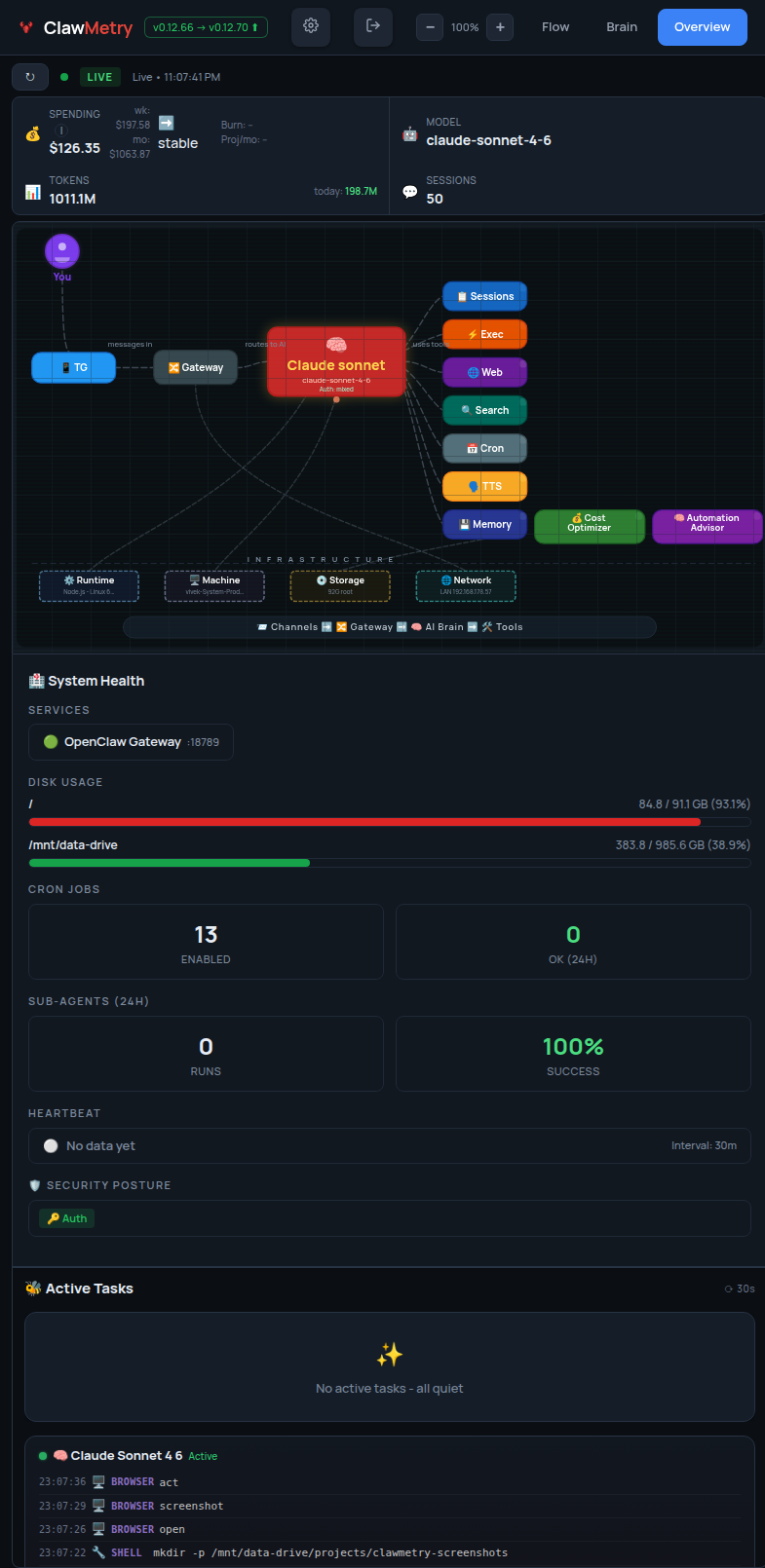
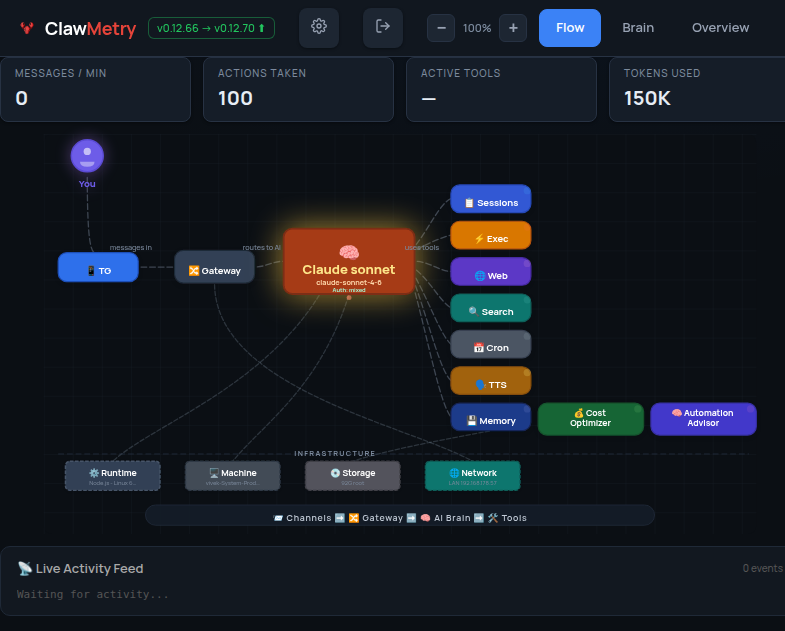
- - **Flow**: live diagram of messages moving through channels, models and tools
- - **Brain**: the reasoning and tool-call event stream as it happens
- - **Context blowout**: window utilization sized per provider, compaction vs forced overflow, plus a per-runtime map of what we *can't* see ([how](docs/CONTEXT_BLOWOUT.md))
- - **Memory & skills**: the files and skills each runtime actually loaded
- - **Health & logs**: disk, memory, error rates, rate limits, live log stream
- - **Alerts**: budget caps, error spikes, agent-offline, routed to Slack, Discord, PagerDuty, Telegram, Email
- - **Approvals**: pause risky tool calls *before* they run and approve from your phone ([how](docs/APPROVALS.md))
- ## Context blowout, and what watching costs
- Two questions worth answering before you trust any agent-comparison tool.
- **How does it handle context-window blowout across runtimes?**
- A utilization percentage is only as honest as what it divides by. ClawMetry
- sizes the window per provider from [a table you can read and
- PR](clawmetry/context_windows.py), covering Anthropic, OpenAI, Google, xAI,
- DeepSeek, Kimi, Qwen, Mistral, Llama and GLM. It does not measure all 32
- runtimes with one vendor's ruler. That matters: a 300K GPT-5 turn scored
- against Anthropic's 200K reads ">100%, blown" when it is really at 75% of
- GPT-5's 400K. The same ruler hides a genuinely overflowed 130K DeepSeek turn
- as a comfortable 65%.
- Every window ships with its provenance: `model_table`, `explicit_marker`,
- `observed_floor`, or an honest `default` when we don't know the model. A
- gauge built on a guess never renders with the same authority as one built on
- a lookup.
- ClawMetry can only see compaction events on some runtimes. So
- `GET /api/context-coverage` reports, per runtime, whether a **zero means
- "ran clean" or "we're blind"**. A `0` that actually means blind says so.
- [Full detail](docs/CONTEXT_BLOWOUT.md)
- **What does the instrumentation cost?**
- | Path | Added to your agent | Default? |
- |---|---|---|
- | Session-file tailing (all 32 runtimes) | **0**. Separate process, no ClawMetry code in your agent | on |
- | HTTP interceptor (`CLAWMETRY_INTERCEPT=1`) | **+0.44 ms** per LLM call, or 0.009% of a 5s call | off |
- | Pre-tool hook gate (warm cache) | **+44 ms** per gated tool call, over a 36 ms interpreter floor | off |
- | Enforcement proxy | **+9.7 ms** per LLM call | off |
- Daemon host cost: **2,762 events/sec** ingest, **710 bytes/event** on disk
- (67.7 MB per 100k events), and **~12% of one core** sustained on a busy
- install. That last number is over our own stated 5-10% budget, so it is
- published as a bug to chase rather than left off the page.
- Measured on an Apple M2 Pro with `benchmarks/overhead.py`. The harness runs
- each condition in a separate process, alternates their order, and **refuses
- to print a number when the rounds disagree on its sign**. Run it on your own
- machine in a minute:
- ```bash
- pip install clawmetry && python -m benchmarks.overhead
- ```
- Every path is measured, including the hook gates and the enforcement proxy,
- and the harness runs on Linux, macOS and Windows in CI. Two results worth
- knowing: the proxy costs about seven times more on Windows than on Linux, and
- the daemon currently sustains about 12% of one core, over our own 5-10%
- budget. The raw JSON, the method, and what is still unmeasured are in
- [docs/OVERHEAD.md](docs/OVERHEAD.md).
- ## Pricing
- | Plan | What it covers | Price |
- |---|---|---|
- | **Free** | OpenClaw + NVIDIA NemoClaw + Goose + Qwen Code, full dashboard, local only | $0 |
- | **Starter** | Every other runtime above, fleet view, cloud sync | $9 per node / month |
- | **Pro** | Starter + control and evaluation: approvals, tool-risk policies, evals, anomaly detection, cost optimizer, OTel export, tamper-evident audit log | $19 per node / month |
- Annual plans, Enterprise and the current numbers live at
- **[clawmetry.com/pricing](https://clawmetry.com/pricing)**. Self-hosted license
- keys work without the cloud (`clawmetry license`). The exact free/paid split is
- in [docs/ENTITLEMENTS.md](docs/ENTITLEMENTS.md).
- ## Your data stays on your machine
- ClawMetry reads local session files and logs. **No session data leaves your box
- unless you run `clawmetry connect`** — no prompts, replies, tool arguments, file
- contents or log lines. When you do connect, the snapshot is end-to-end encrypted
- with a key that never leaves your machine, and decrypted in your browser. If a
- node has no key, the upload is skipped rather than sent in the clear, and no
- server response can turn that off.
- Two things do run by default before you connect, both opt-out and neither
- carrying session data: an anonymous install ping and a version check against
- PyPI. A default install also looks up your public IP once for a startup banner
- line. Every destination, what it carries and how to switch it off is listed in
- [docs/EGRESS.md](docs/EGRESS.md); self-hosted, repointed and air-gapped installs
- make no discretionary outbound calls at all.
- The decryption happens in your browser, in code we serve you. That used to be
- a promise; it is now something you can check. Every line that touches your key
- lives in one readable file, [`clawmetry/static/js/cm-e2e.js`](clawmetry/static/js/cm-e2e.js),
- which ships inside the wheel and is served verbatim, pinned with a Subresource
- Integrity hash. To confirm the browser runs what we published:
- ```bash
- curl -s https://app.clawmetry.com/static/js/cm-e2e.js -o served.js
- pip download --no-deps clawmetry==$(clawmetry --version | tr -d 'a-z ') -d /tmp/cm
- unzip -p /tmp/cm/clawmetry-*.whl clawmetry/static/js/cm-e2e.js > published.js
- diff served.js published.js && echo identical
- ```
- What that does not prove: we serve the page that loads the file, so we could
- serve a different page. Integrity hashes protect you from a compromised CDN,
- not from the vendor. What you gain is that any substitution has to be
- deliberate, visible in the page source, and different from an artifact on PyPI
- that anyone can fetch. Self-hosting or staying local-only removes the
- dependency entirely.
- ## Install
- ### Desktop app
- | Platform | Download | Open the app |
- |---|---|---|
- | **macOS** | [Download .dmg](https://github.com/vivekchand/clawmetry/releases/latest/download/ClawMetry-mac.dmg) | Open the disk image. Drag ClawMetry to Applications, then open it. |
- | **Windows** | [Download .exe installer](https://github.com/vivekchand/clawmetry/releases/latest/download/ClawMetry-windows-setup.exe) | Run the installer. Open ClawMetry from the Start menu. |
- | **Linux (x86_64)** | [Download .AppImage](https://github.com/vivekchand/clawmetry/releases/latest/download/clawmetry-linux.AppImage) | Allow the file to run as a program in its file properties, then open it. |
- The first launch needs an internet connection to install the current ClawMetry runtime.
- See [desktop requirements and troubleshooting](desktop/README.md) for Python requirements, signing status and platform details.
- ### Terminal
- ```bash
- pip install clawmetry
- clawmetry
- ```
- Or the one-liner: `curl -sSL https://raw.githubusercontent.com/vivekchand/clawmetry/main/install.sh | bash`
- Needs Python 3.8+ on macOS, Linux or Windows, and at least one agent runtime on
- the same machine. Docker instructions: [docs/DOCKER.md](docs/DOCKER.md).
- Or let the agent set it up for you. The [`agent-kill-switch`](skills/agent-kill-switch/SKILL.md)
- skill teaches Claude Code, Codex, Cursor, Gemini CLI, Copilot or OpenCode to
- install ClawMetry, report what the agents on the machine are doing and spending,
- stop one session on request, and hold risky tool calls for approval:
- ```bash
- npx skills add vivekchand/clawmetry --skill agent-kill-switch
- ```
- ## Docs
- | | |
- |---|---|
- | [Runtime compatibility](docs/compatibility.md) | What each adapter reads, and how to add a runtime |
- | [Context blowout](docs/CONTEXT_BLOWOUT.md) | Per-provider windows, compaction vs overflow, per-runtime coverage |
- | [Overhead](docs/OVERHEAD.md) | What instrumentation costs, measured, with the harness to reproduce it |
- | [Entitlements](docs/ENTITLEMENTS.md) | Free vs paid, tier matrix, license CLI |
- | [Approvals & policies](docs/APPROVALS.md) | Pre-execution gating, risk scoring, phone approvals |
- | [OpenTelemetry](docs/OPENTELEMETRY.md) | Export traces anywhere, ingest OTLP from anything |
- | [Bring your own agent](docs/BRING_YOUR_OWN_AGENT.md) | AWS AgentCore, Pydantic AI, LangChain end to end, with runnable examples |
- | [SDK tracking](docs/SDK_TRACKING.md) | Cost attribution for agents you built yourself |
- | [Chat channels](docs/CHANNELS.md) | The chat adapters shown in Flow |
- | [NemoClaw / OpenShell](docs/NEMOCLAW.md) | Sandboxed NVIDIA NemoClaw setups |
- | [Docker](docs/DOCKER.md) | Image, compose, volume mounts |
- | [Architecture](ARCHITECTURE.md) · [Development](docs/DEVELOPMENT.md) | How it works inside; running from source |
- | [Telemetry](docs/TELEMETRY.md) | The anonymous install and desktop-open pings, and how to turn them off |
- ## Screenshots
- Every number below is from one real machine, read-only, with nothing seeded.
- **It tells you when something is wrong, not just what happened.**
- Two anomaly banners at the top: spend running 7x the daily average, and a
- 4.2x cost spike. Below them, 324 of 667 recent sessions carrying a waste
- signal, itemised by cause.
- 
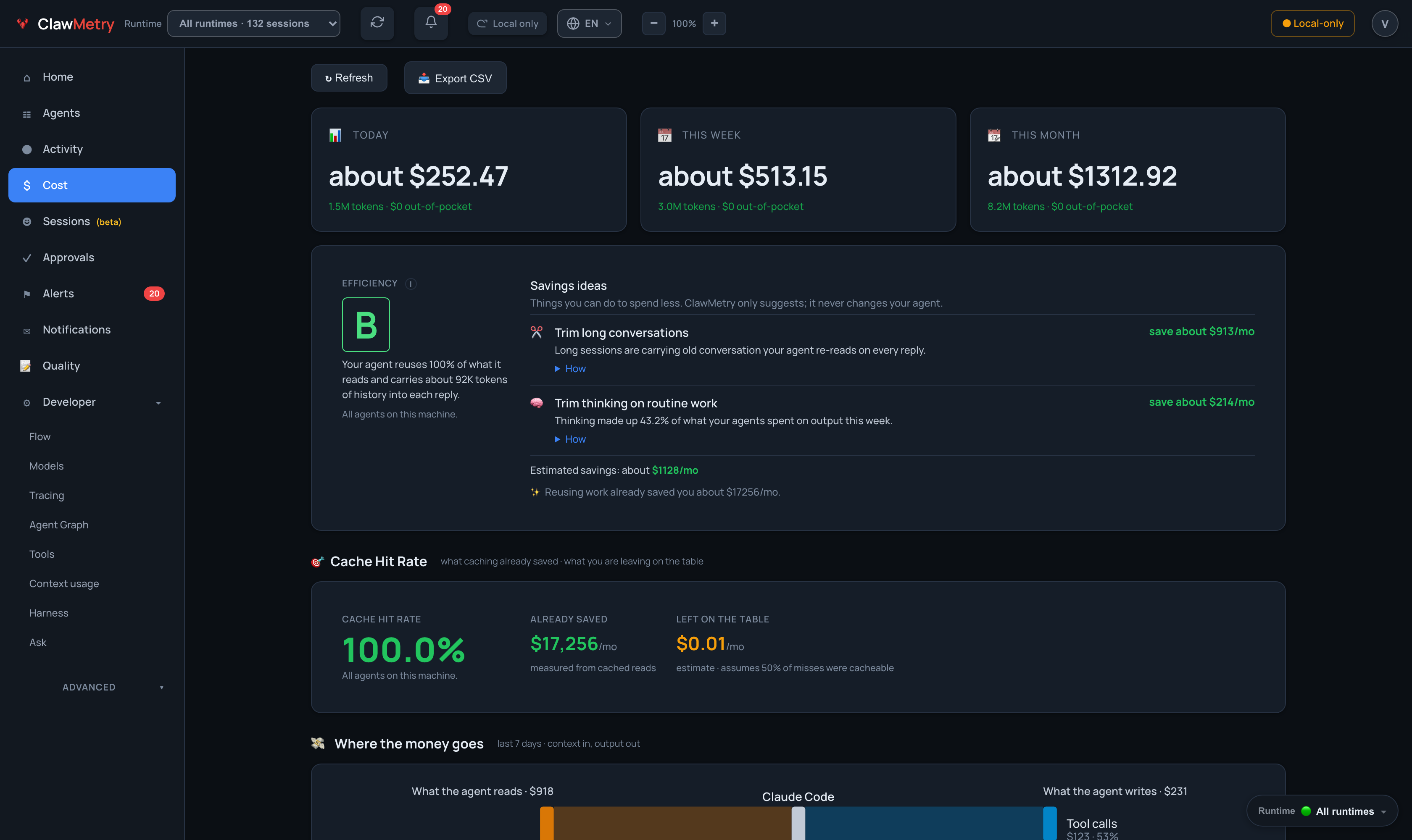
- **It shows you where the money went, in every window.**
- $252.47 today, $513.15 this week, $1,312.92 this month, each with the tokens
- behind it and how much of it your subscription already covers. Below that,
- about $1,128/mo itemised as recoverable and $17,256/mo already saved by
- cache reuse.
- 
- **It draws how a message becomes an answer.**
- The live flow diagram: you, the channel it arrived on, the gateway, the model
- answering right now, and every tool it reached for. Nodes light up as work
- moves through them.
- 
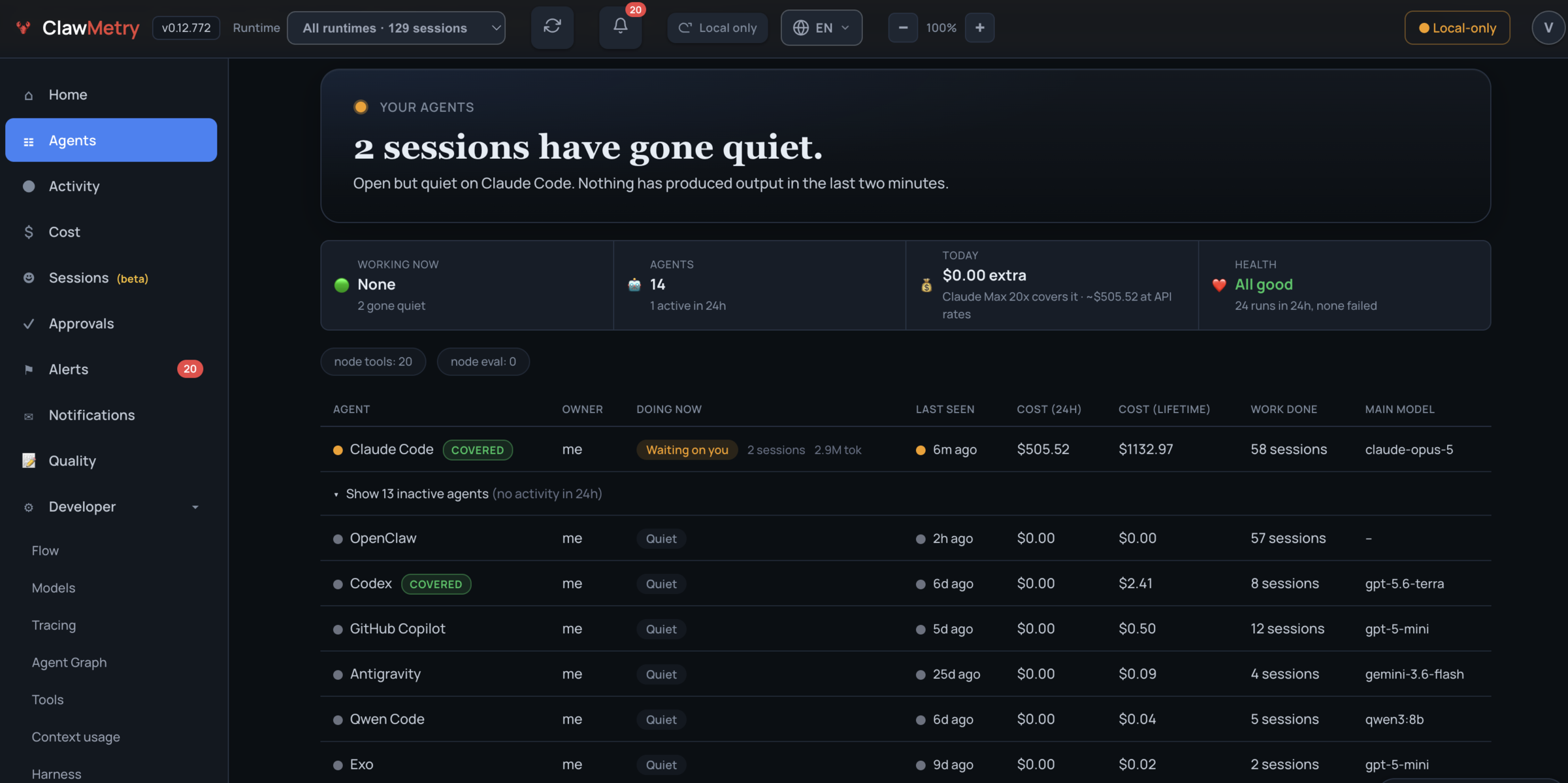
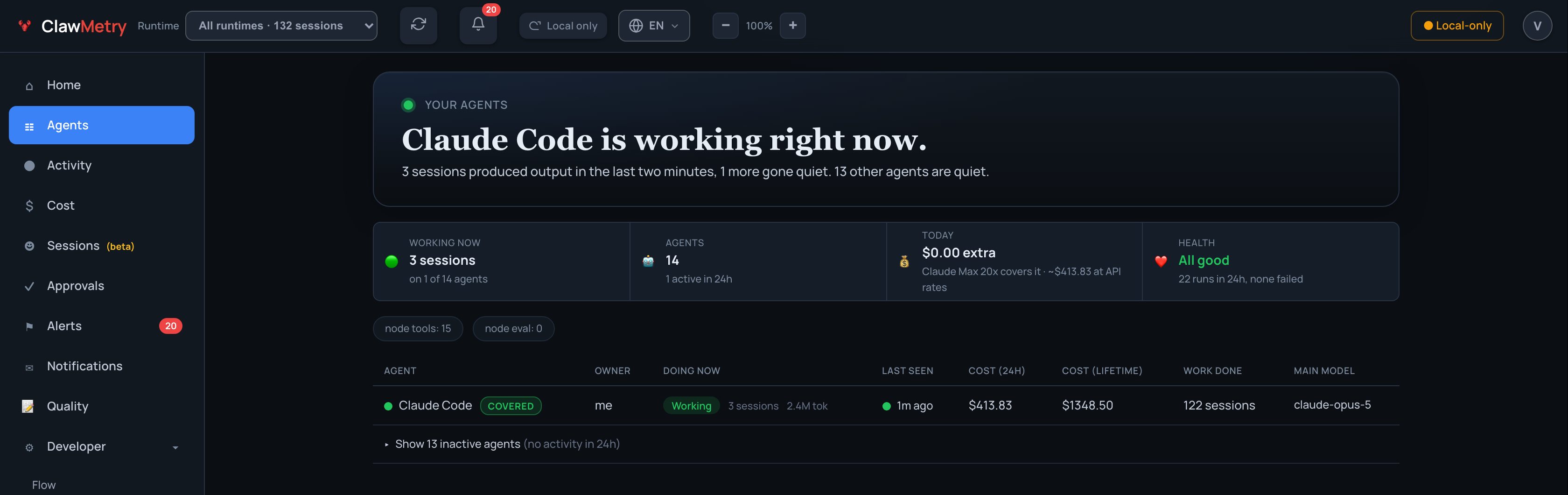
- **Every agent on the machine, in one table.**
- What it runs, what it costs in the last 24 hours and over its lifetime, when
- it was last seen, who owns it, and whether a subscription is covering the
- bill. 14 agents here, 3 sessions working, 13 quiet.
- 
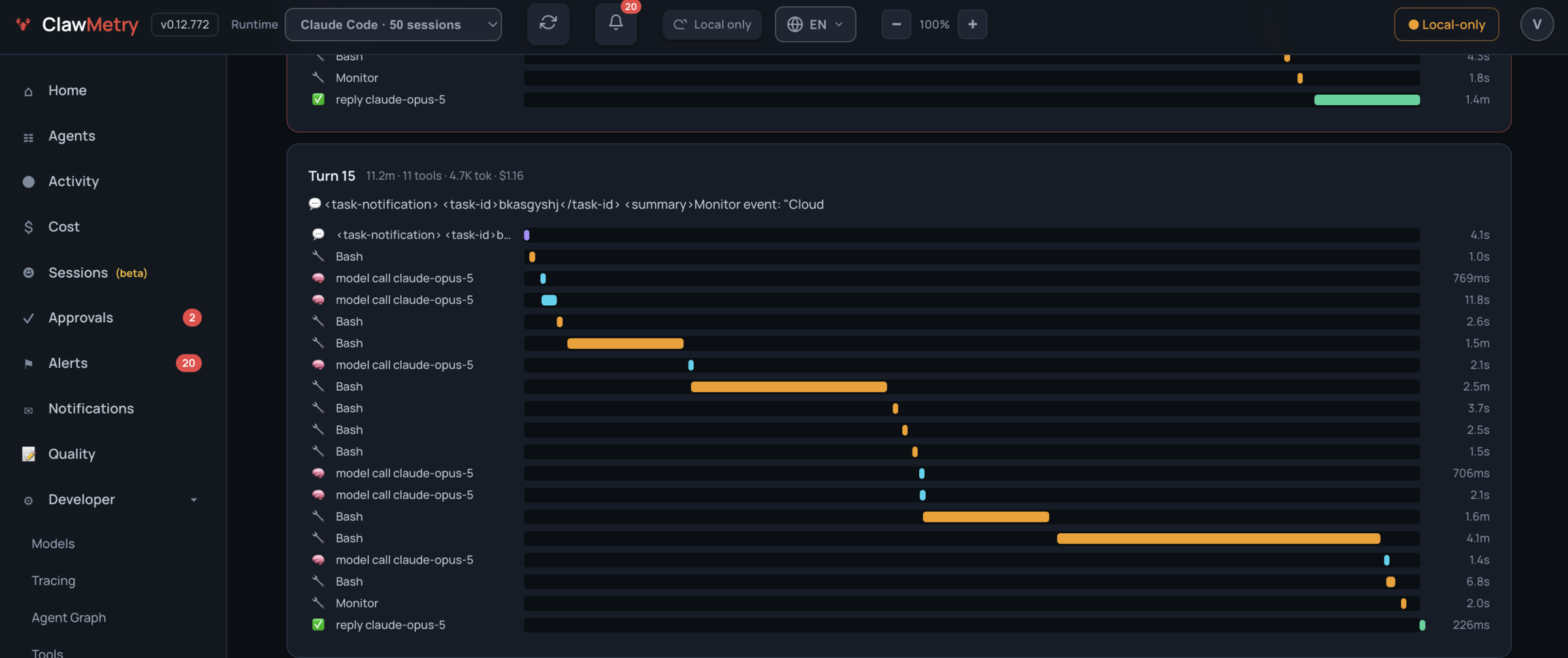
- **It shows where a turn's time and money went, tool by tool.**
- One turn of a real session: 11 tools in 11.2 minutes for $1.16. Every Bash
- call and model call gets its own bar on the timeline, so the command that ran
- for 4.1 minutes and the one that ran for 226ms are told apart at a glance.
- 
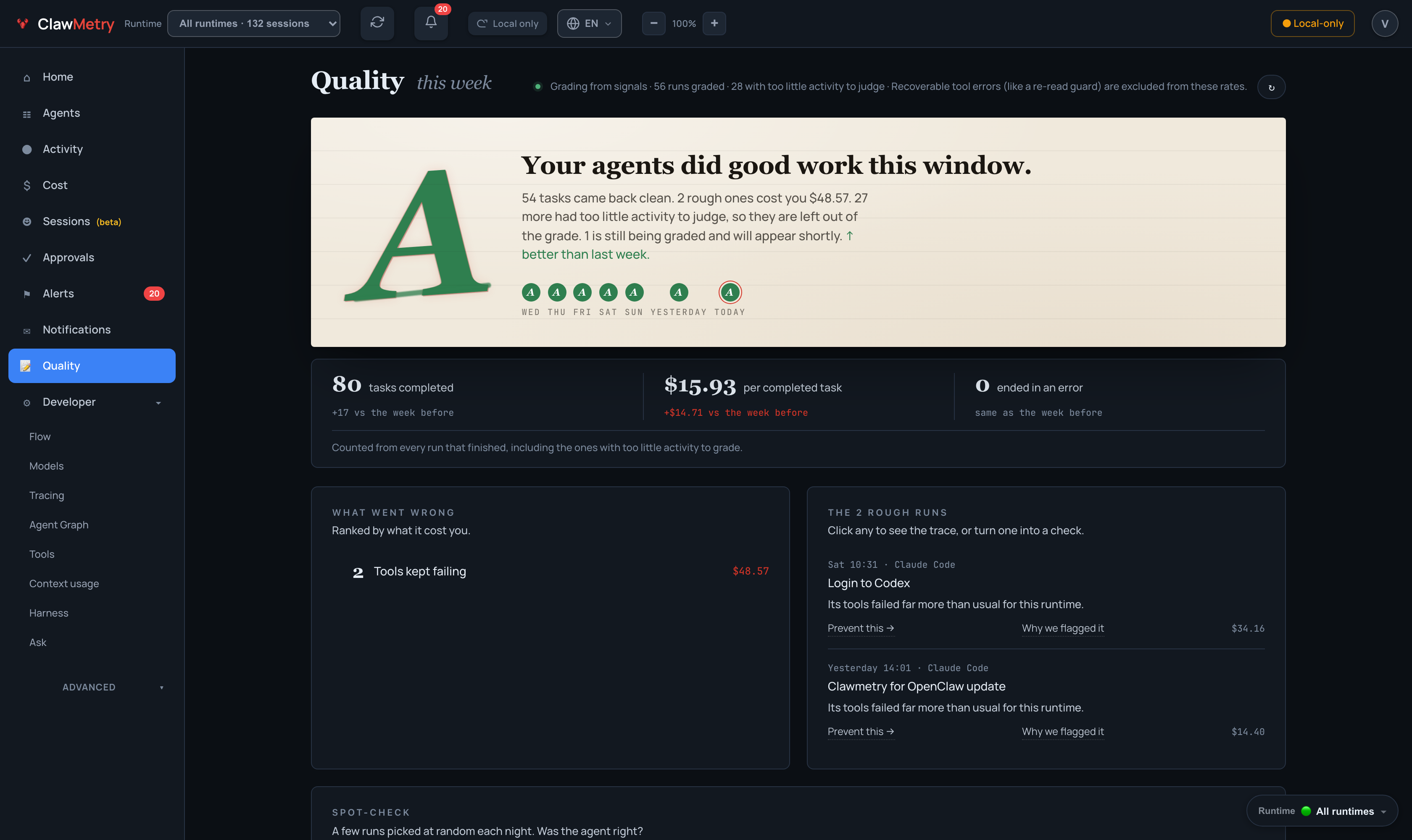
- **It grades the work, not just the spend.**
- An A this week: 54 tasks came back clean, 2 rough ones cost $48.57, and the
- runs with too little activity to judge are left out of the grade instead of
- being counted as wins. Each rough run links to its trace.
- 
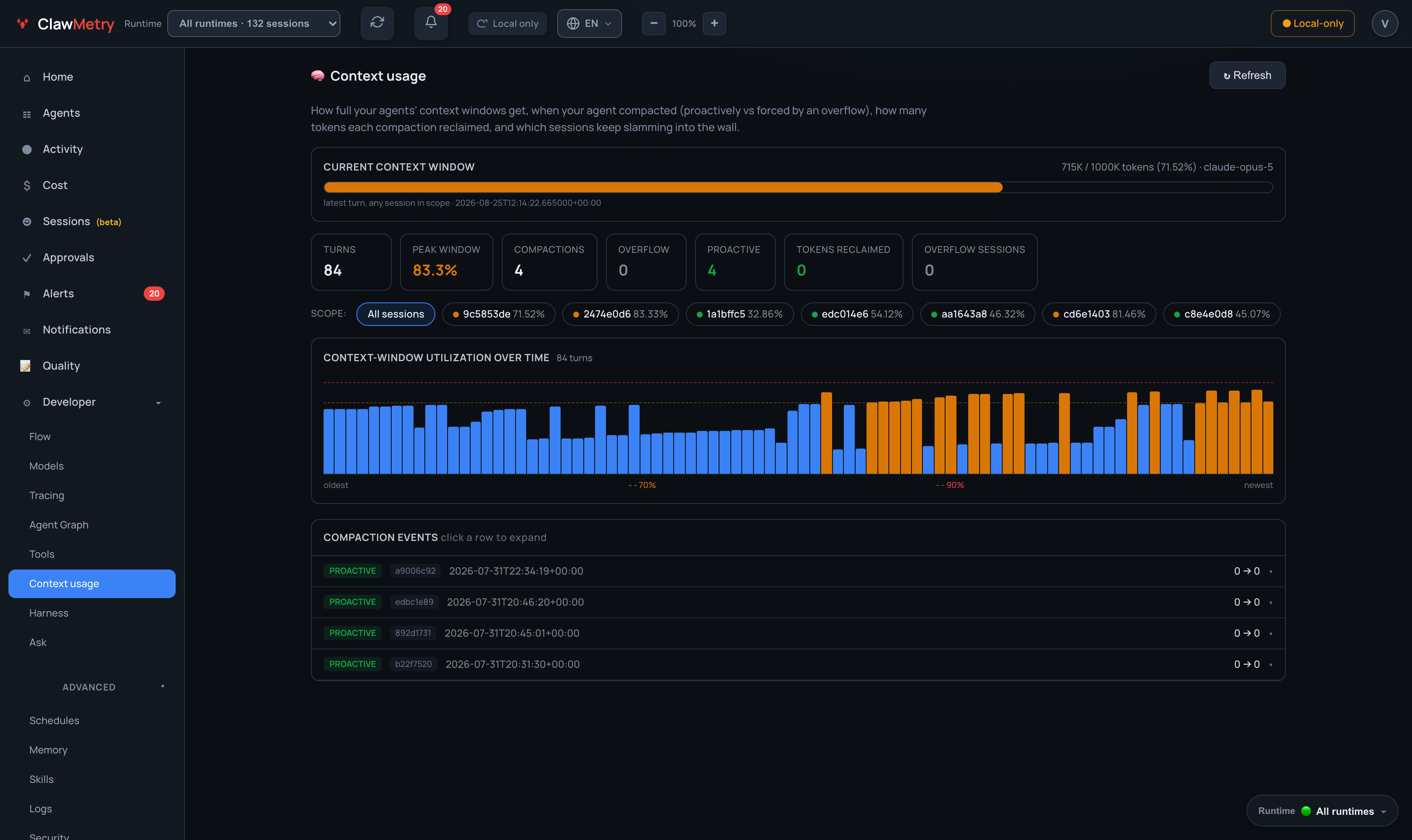
- **It shows why the context window keeps filling up.**
- 715K of a 1M-token window on the latest turn, an 83.3% peak, 4 compactions
- that all fired proactively rather than on an overflow, and the utilisation of
- every turn behind it.
- 
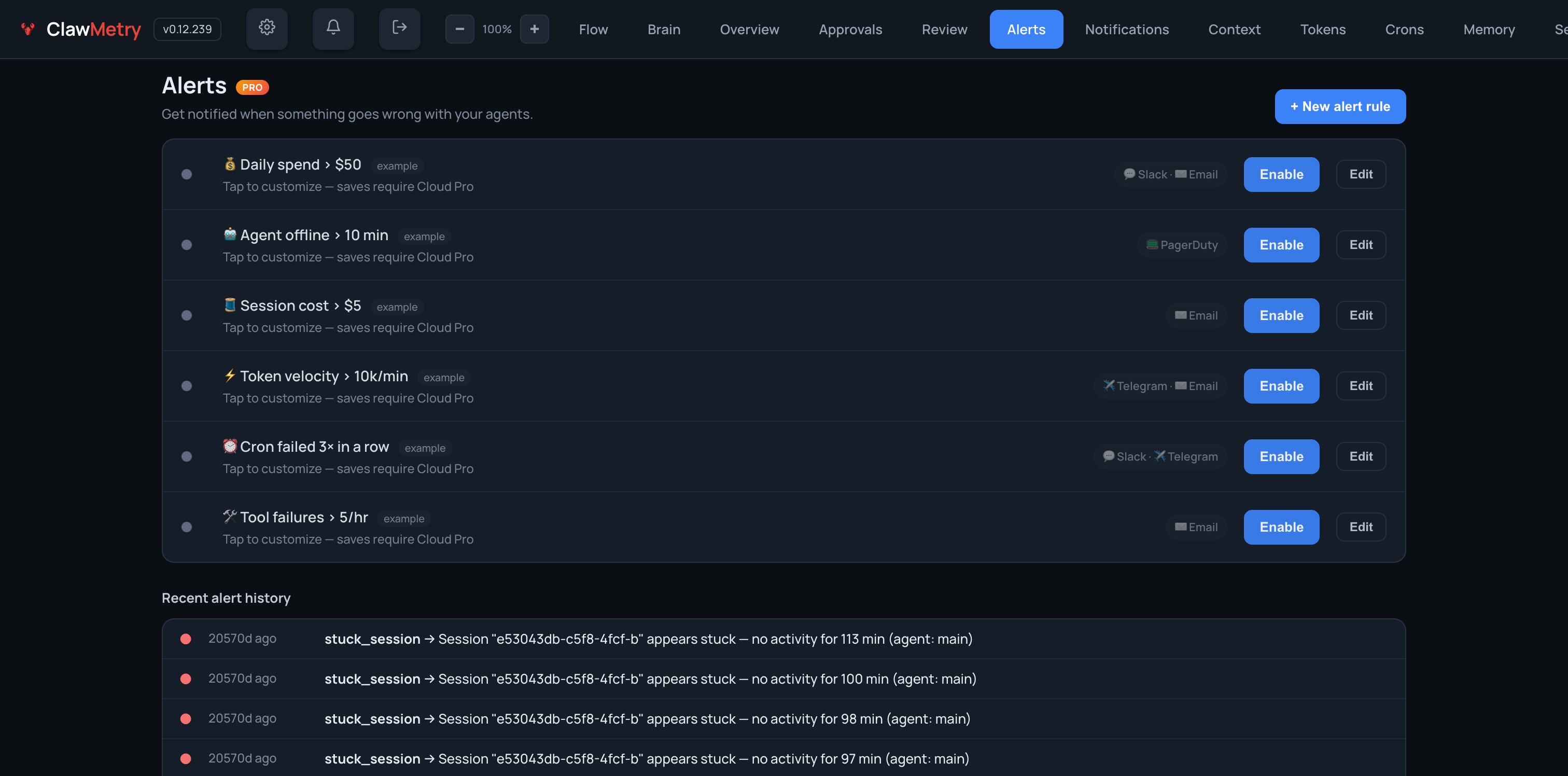
- **Detection runs without you configuring anything.**
- The built-in detectors are on from install: agent went quiet, telemetry feed
- stopped, cost spike, token burst, errors climbing, error spike, budget
- threshold, threat signature matched, security tool finding, security posture
- changed. Your own rules are optional on top.
- 
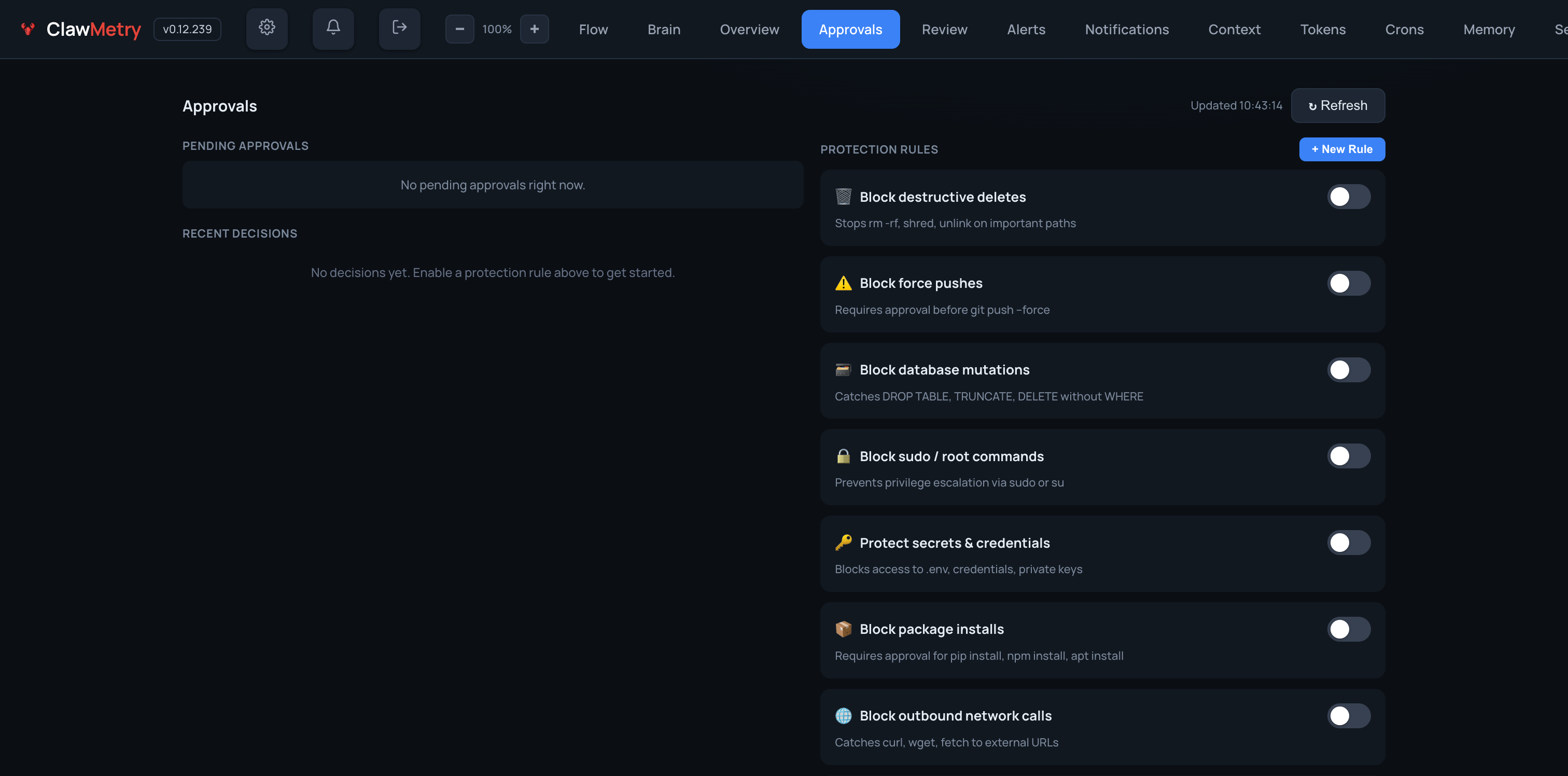
- **Holding a risky call is opt-in, and ships off.**
- Recursive deletes, force pushes, sudo, secrets, package installs and outbound
- calls each get a rule you can turn on. Until you do, ClawMetry watches and
- changes nothing. Once one is on, matching calls wait here (or on your phone)
- for an approve or a deny.
- 
- More, per runtime: [docs/RUNTIME_SCREENSHOTS.md](docs/RUNTIME_SCREENSHOTS.md).
- ## Recognition
- <a href="https://www.producthunt.com/products/clawmetry?embed=true&utm_source=badge-top-post-badge&utm_medium=badge&utm_campaign=badge-clawmetry-for-openclaw" target="_blank"><img src="https://api.producthunt.com/widgets/embed-image/v1/top-post-badge.svg?post_id=1081207&theme=light&period=daily&t=1771491508782" alt="ClawMetry - #5 Product of the Day on Product Hunt" width="250" height="54" /></a>
- ## Star History
- <a href="https://www.star-history.com/?repos=vivekchand%2Fclawmetry&type=date&legend=top-left">
- <picture>
- <source media="(prefers-color-scheme: dark)" srcset="https://api.star-history.com/image?repos=vivekchand/clawmetry&type=date&theme=dark&legend=top-left" />
- <source media="(prefers-color-scheme: light)" srcset="https://api.star-history.com/image?repos=vivekchand/clawmetry&type=date&legend=top-left" />
- <img alt="Star History Chart" src="https://api.star-history.com/image?repos=vivekchand/clawmetry&type=date&legend=top-left" />
- </picture>
- </a>
- ## License
- MIT · Built by [@vivekchand](https://github.com/vivekchand) · [clawmetry.com](https://clawmetry.com)
- <!-- osai-verify: f3ac716d40002c1ad6dd -->
Ratings and comments
Sign in to rate this skill.
Sign inFree to use. If it’s helped, pass it on.