skills
agent skills for vibe motion
Safety scan
A static text scan, not a guarantee. Select the badge to see what was scanned and every finding.
Badge for your README

Markdown
[](/listings/vibe-motion-skills)HTML
<a href="/listings/vibe-motion-skills"><img src="/api/listings/vibe-motion-skills/badge.svg" alt="findsafeskills safety rating" /></a>Install
Install instructions from the README
As written by the repo's author. findsafeskills has not verified these steps.
npx skills add vibe-motion/skills
> 提示:这是一个交互式安装脚本。用空格选择要安装的 skills,建议全部安装;另外别忘了选择对应的智能体(例如 Claude Code),不同智能体的 skill 存放路径不同。
What was scanned
The files the safety scan read, as written by the repository's author and shown as plain text. Lines with a finding are marked.
README.md · README · 155 lines
View this file on GitHub (read at the repository's current version: the scan did not record which commit it read)
This file has changed since it was scanned, so this is not exactly the text that was scanned, and no line is marked. The findings are listed with the safety scan above.
- <p align="right">
- 简体中文 | <a href="./README.en.md">English</a>
- </p>
- ## 安装
- ```bash
- npx skills add vibe-motion/skills
- ```
- > 提示:这是一个交互式安装脚本。用空格选择要安装的 skills,建议全部安装;另外别忘了选择对应的智能体(例如 Claude Code),不同智能体的 skill 存放路径不同。
- ## 可用技能
- ### perspective-illusion
- 制作日式透视错觉风格的循环插画 3D 视频:长焦平面场景通过推拉变焦和环绕运镜展开纵深,适用于街道、路口、车站、商店、房间、公园或屋顶等场景。
- <img src="perspective-illusion/assets/demo.gif" alt="perspective-illusion effect" width="540" />
- ### ruler-progress-render
- 生成尺子进度动画。触发关键词:尺子进度动画;可配置文字和进度等参数。
- <img src="https://img.laosunwendao.com/skill-uploads/916118e2be5c4b33a8c16f35a3b12200.gif" alt="ruler-progress effect" width="540" />
- ### claude-typer
- 把提示词文本转换为 Claude Code CLI 风格的打字动画演示。
- 
- ### fisheye-motion
- 制作屏摄风格的鱼眼畸变效果:桶形畸变 + 摩尔纹 + 暗角,可对任意图片做「推镜聚焦 + 黄色标注滑入」的 Remotion 视频。Skill 指引 clone [fisheye-motion](https://github.com/vibe-motion/fisheye-motion) 项目并按需改参数渲染。
- <img src="fisheye-motion/assets/fisheye-demo.gif" alt="fisheye focus effect" width="440" />
- ### procedural-fish-render
- 生成循环游动的 procedural fish 动画。
- 
- ### pixel2motion
- 将 PNG/JPG/WebP/截图里的 logo 转成平滑、低复杂度、可动效化的 SVG,再生成品牌 logo motion、交互式 HTML 展示、GIF/视频预览和运动 QA 证据。适用于 logo animation、SVG logo reveal、品牌动效交付和像素图到矢量动效的工作流。
- <img src="pixel2motion/assets/demo.gif" alt="pixel2motion logo animation effect" width="540" />
- ### brand-launch-video-star
- 从公司官网、官方品牌资料或用户上传的产品图出发,制作 15–30 秒、快节奏、强视觉、丝滑的品牌与产品宣传视频。Skill 会先核验 logo、字体、颜色、图片与产品信息,再设计叙事、逐帧时间线和真实产品演示;默认英文、16:9、15 秒,也支持用户自定义时长和画幅。
- 适合 AI/SaaS 发布片、官网动效视频、消费品牌广告、实体产品宣传、服务与公司理念片。重点不是套模板,而是用真实素材突出产品特性、使用场景、交互过程和结果。
- 安装后可直接这样使用:
- ```text
- 使用 $brand-launch-video-star,基于 https://example.com 制作一条 15 秒、
- 16:9、全英文的产品发布片。使用官网真实 logo 和素材,展示核心功能,
- 整体快节奏、视觉冲击强、转场丝滑。
- ```
- **Burger King — Flame Shift**
- <img src="brand-launch-video-star/assets/burger-king-flame-shift.gif" alt="Burger King fast-paced brand launch video" width="300" />
- **Moonshot AI — Product Hypercut**
- <img src="brand-launch-video-star/assets/moonshot-product-hypercut.gif" alt="Moonshot AI product launch video" width="360" />
- ### remotion-candlestick
- 在 Remotion 项目中创建带动画的金融 K 线图(蜡烛图),涵盖 Yahoo Finance 数据获取、Canvas 逐帧绘制、深色交易终端风格、时间线设计,以及 Studio 预览和渲染输出。
- <img src="remotion-candlestick/sp500-kline-demo.gif" alt="S&P 500 candlestick animation" width="440" />
- ### light-spotlight-render
- 生成摆动聚光灯扫过文字的 reveal 动画 HTML,可配置文本、摆幅、灯罩缩放、辉光和背景颜色。
- <img src="light-spotlight-render/assets/demo.gif" alt="light spotlight effect" width="540" />
- ### printed-curtain-render
- 把 PNG、JPEG 或 WebP 图片和可选文字织进可交互的 p5.js 线帘模拟。图案烘焙在布料材质坐标中,会随独立丝线拉伸、折叠和散开;输出为可离线运行的 HTML 目录,并带实时物理参数面板。
- <img src="printed-curtain-render/assets/maoxuezhang-printed-curtain.gif" alt="printed curtain simulation with 猫学长 artwork" width="300" />
- <sub>线帘引擎改编自 Jason Labbe 的 Dynamic ropes 2,按 CC BY-SA 4.0 许可。</sub>
- ### remotion-3d-ticker
- 生成基于 Remotion 的无限循环 3D 照片滚动墙/瀑布流动画。可自由配置图片列、滚动方向与速度。
- <img src="remotion-3d-ticker/assets/VerticalTicker.gif" alt="3d ticker effect" width="540" />
- ### remotion-vinyl-player
- 生成优雅逼真的黑胶唱片机/音乐播放器动画。支持自定义专辑封面、歌曲信息,并包含唱片无限旋转与文字无缝循环滚动(跑马灯)的视觉效果。
- <img src="remotion-vinyl-player/assets/VinylPlayer.gif" alt="vinyl player effect" width="540" />
- ### threejs-earth-render
- 克隆或更新 `vibe-motion/threejs-earth`,并使用 Puppeteer 渲染 Three.js 3D 地球航线飞行动画。适用于地球飞线、城市航线转场和 16:9 地球动效 GIF/MP4 导出。
- <img src="threejs-earth-render/assets/earth.gif" alt="threejs earth route animation" width="448" />
- ### 3d-chladni-render
- 克隆或更新 `nolangz/3D-Chladni`,并通过项目自带的确定性导出器生成 3D 克拉尼粒子 MP4 或透明 ProRes MOV。支持动态声沙、模态声沙、宇宙网、动态宇宙网,以及音频驱动、粒子密度、灯光、旋转和可复现种子。
- <img src="3d-chladni-render/assets/3d-chladni-cosmic.gif" alt="3D Chladni cosmic particle motion" width="304" />
- <sub>预览素材:3D Chladni media by Lykno,采用 CC BY-NC 4.0 许可。</sub>
- ### wechat-2d-render
- 克隆或更新 `sxhzju/wechat-2d`,并渲染默认微信聊天 2D 动效视频。适用于微信聊天动画、视频消息气泡动效和透明背景 Remotion 导出。
- <img src="wechat-2d-render/assets/wechat-2d-demo.gif" alt="wechat 2d chat motion effect" width="390" />
- ### disney-animation-rule-skill
- 将迪士尼动画12原则应用于程序化动画的设计与工程实践。适用于创建、改进、审查或调试代码驱动的动画(Web、SVG、Canvas、React、Remotion、游戏、UI、角色、摄像机、3D 场景等),尤其当动画感觉僵硬、轻飘、机械、不清晰或物理正确但视觉表现力不足时。
- ### colorize
- 黑白 → 彩色的上色转场:单彩渐变 + 动感模糊 + 丁达尔旋焦。画面先是黑白并带旋转模糊,彩色从左向右扫入,旋焦从中心向外回正,最后留下柔和光晕。支持图片、视频、iPhone 实况照片(HEIC/JPG + MOV)和安卓动态照片,多个素材可拼成一条短片。独立仓库:[vibe-motion/colorize](https://github.com/vibe-motion/colorize)。
- <img src="colorize/assets/demo.gif" alt="colorize black-and-white to color reveal" width="440" />
- ## 提交贡献
- 提交 PR 前,请先压缩所有 GIF。每个 GIF 必须小于 1 MB(1,000,000 字节),建议控制在 250 KB(250,000 字节)以内。可以通过降低预览分辨率、帧率和色板大小来压缩;提交前请确认完整时长、循环以及关键文字和主体仍可辨识。
- ## 杂项
- ### 鱼群模拟
- 基于 Three.js 的 boids 鱼群模拟项目。这个不是 skill,只作为独立项目展示。
- 项目地址:[vibe-motion/threejs-boids](https://github.com/vibe-motion/threejs-boids)
- <img src="https://raw.githubusercontent.com/vibe-motion/threejs-boids/%E4%BA%A4%E4%BA%92%E9%B1%BC%E7%BC%B8/demo.gif" alt="threejs boids fish school simulation" width="540" />
- ## 交流
- 到 https://github.com/vibe-motion 主页加联系方式
- ## Star History
- [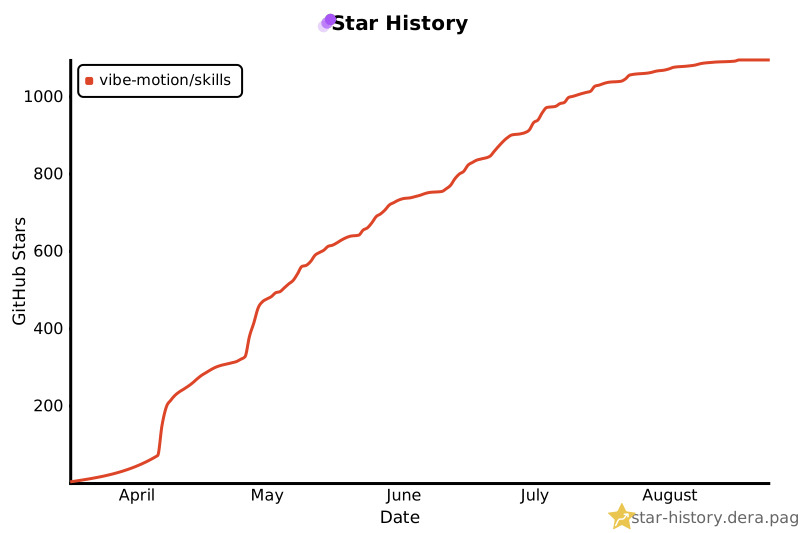](https://star-history.dera.page/#vibe-motion/skills&Date)
Ratings and comments
Sign in to rate this skill.
Sign inFree to use. If it’s helped, pass it on.