simon-skills
不露脸做视频账号的 AI skill 合集:调查长片 + 手绘白板讲解视频,一句选题出片、配音字幕、封面与各平台文案
Safety scan
A static text scan, not a guarantee. Select the badge to see what was scanned and every finding.
Badge for your README

Markdown
[](/listings/trustfuture--simon-skills)HTML
<a href="/listings/trustfuture--simon-skills"><img src="/api/listings/trustfuture--simon-skills/badge.svg" alt="findsafeskills safety rating" /></a>Install
Install instructions from the README
As written by the repo's author. findsafeskills has not verified these steps.
git clone https://github.com/trustfuture/simon-skills.git
cd simon-skills

# 装进 Claude Code(软链,以后 git pull 就是更新)
mkdir -p ~/.claude/skills
for s in investigation-video whiteboard-video video-common; do
  ln -sfn "$PWD/skills/$s" ~/.claude/skills/$s
done
用 Codex 的话,把上面的 `~/.claude/skills` 换成 `~/.codex/skills`。`video-common` 一定要一起装,并且跟另外两个平级,两个 skill 都按 `../video-common/` 引用它。
也可以直接让 AI 帮你装:
帮我安装这个 skill 合集:https://github.com/trustfuture/simon-skills ,三个 skill 平级软链进我的 skills 目录,然后按各自 README 把环境配好
每个 skill 的环境和第一次跑通的步骤,看各自的 README:
- [investigation-video/README.md](skills/investigation-video/README.md):Node、Remotion(版本固定)、FFmpeg、Python,火山 TTS 凭证 - [whiteboard-video/README.md](skills/whiteboard-video/README.md):Node、FFmpeg、Playwright、codex CLI,火山 TTS 凭证;`bin/wb build` 一分钟跑出示例成片
两个 skill 的配音都走火山引擎语音合成,凭证各放在自己目录的 `.env`,字段见各自的 `.env.example`。
What was scanned
The files the safety scan read, as written by the repository's author and shown as plain text. Lines with a finding are marked.
README.md · README · 175 lines
View this file on GitHub (read at the repository's current version: the scan did not record which commit it read)
- # simon-skills
- 
- 
- 
- 
- [](./LICENSE)
- 不露脸做视频账号的 AI skill 合集。给 AI 智能体一句选题,它查资料、写稿、配音、做画面、出封面、写各平台发布文案,交回一条能直接发的成片。
- 每个 skill 都来自一个真实在更新的账号,文档里的数字是实测,规则都对应踩过的坑。截至 2026 年 10 月,这两个 skill 在作者自己的账号上已经出了 80 多期。以 [Claude Code skill](https://docs.anthropic.com/en/docs/claude-code) 的格式写成,Codex 这类能读写文件、跑命令的智能体也能用。
- <img src="https://github.com/trustfuture/simon-skills/releases/download/readme-assets-v1/hero-wall.jpg" alt="两种风格的封面墙:深色实拍底加黄色大字的是调查长片,米白纸面手绘的是白板讲解">
- 深色实拍底、黄绿大字的是调查长片,米白纸面手绘的是白板讲解。
- ## 里面有什么
- | skill | 做什么 | 成片 |
- | --- | --- | --- |
- | [investigation-video](skills/investigation-video/) | 商业 / 消费调查长片:事实链、真实素材拼贴、Remotion 合成、闪避配乐、八平台文案 | 10 分钟以上,横屏 |
- | [whiteboard-video](skills/whiteboard-video/) | 手绘白板风"边画边讲"讲解视频:Excalidraw 风格逐笔动画、codex 生图贴纸、官方 Logo、烧录字幕、横竖封面 | 2 分钟上下,横屏 |
- | [video-common](skills/video-common/) | 上面两个共用的公共工序:事实核查与来源台账、封面验收、平台文案、成片验收、合规自查 | |
- ## 作品集
- 下面全部是这两个 skill 给作者账号 SimonTalk 做的正式成片,画面右上角和封面上的 "Simon Talk" 是作者的字标。仓库里的品牌是占位值,改一处配置就换成你自己的(见各 skill 的 README)。
- ### 调查长片 · investigation-video
- 一条片子 10 分钟以上,画面主体是新闻原片和证据截图,机制用 MG 拆开讲,每个镜头左下角标来源和日期。
- | 新闻原片做主体 | 开场大字与卡点音效 |
- | --- | --- |
- | <img src="skills/investigation-video/assets/sample-preview.gif" width="420" alt="《预制菜明示》开头:新闻报道原片带白描边,右侧花字给时间与人物,底部整句字幕,左下角来源标注"> | <img src="https://github.com/trustfuture/simon-skills/releases/download/readme-assets-v1/inv-hook.gif" width="420" alt="《问界专属专营》开场:华为门店划掉换成专营店,鸿蒙座舱等关键词弹出又压暗,九月十五日公告截图逐句刷绿"> |
- | 《预制菜明示》前 14 秒 | 《问界专属专营》开场 13 秒 |
- | 账目拆开给你看 | 一期出什么 |
- | --- | --- |
- | <img src="https://github.com/trustfuture/simon-skills/releases/download/readme-assets-v1/inv-ledger.gif" width="420" alt="一单蛋糕的钱怎么分:报价从一百压到八十,央视报道截图做成纸片卡,消费者付的 252.3 元拆成电商平台、幽灵店铺、制作商家三段"> | 10 分钟以上 1080p 成片<br>逐句字幕 SRT<br>3:4 和 4:3 两张 AI 封面<br>八平台发布文案(过校验脚本)<br>事实与素材来源台账<br>素材使用区间表 |
- | 外卖蛋糕账目拆分,16 秒 | |
- 封面,每期一张 4:3 横版:
- | | | |
- | --- | --- | --- |
- | <img src="https://github.com/trustfuture/simon-skills/releases/download/readme-assets-v1/inv-cover-01.jpg" width="280" alt="零食称重封面"><br>零食称重 | <img src="https://github.com/trustfuture/simon-skills/releases/download/readme-assets-v1/inv-cover-02.jpg" width="280" alt="黑加油点封面"><br>黑加油点 | <img src="https://github.com/trustfuture/simon-skills/releases/download/readme-assets-v1/inv-cover-03.jpg" width="280" alt="假保健品生意封面"><br>假保健品生意 |
- | <img src="https://github.com/trustfuture/simon-skills/releases/download/readme-assets-v1/inv-cover-04.jpg" width="280" alt="酒店月饼封面"><br>酒店月饼 | <img src="https://github.com/trustfuture/simon-skills/releases/download/readme-assets-v1/inv-cover-05.jpg" width="280" alt="刘翔买断封面"><br>刘翔买断 | <img src="https://github.com/trustfuture/simon-skills/releases/download/readme-assets-v1/inv-cover-06.jpg" width="280" alt="野人先生封面"><br>野人先生 |
- | <img src="https://github.com/trustfuture/simon-skills/releases/download/readme-assets-v1/inv-cover-07.jpg" width="280" alt="卫龙魔芋原料封面"><br>卫龙魔芋原料 | <img src="https://github.com/trustfuture/simon-skills/releases/download/readme-assets-v1/inv-cover-08.jpg" width="280" alt="外卖红灯停表封面"><br>外卖红灯停表 | <img src="https://github.com/trustfuture/simon-skills/releases/download/readme-assets-v1/inv-cover-09.jpg" width="280" alt="高铁票价封面"><br>高铁票价 |
- | <img src="https://github.com/trustfuture/simon-skills/releases/download/readme-assets-v1/inv-cover-10.jpg" width="280" alt="啄木鸟报价单封面"><br>啄木鸟报价单 | <img src="https://github.com/trustfuture/simon-skills/releases/download/readme-assets-v1/inv-cover-11.jpg" width="280" alt="预制菜明示封面"><br>预制菜明示 | <img src="https://github.com/trustfuture/simon-skills/releases/download/readme-assets-v1/inv-cover-12.jpg" width="280" alt="问界专属专营封面"><br>问界专属专营 |
- ### 白板讲解 · whiteboard-video
- 一条片子 2 分钟上下,画面上每一笔都是代码画的:标题一个字一个字写出来,铅笔跟着笔尖走,人物和道具是 codex 生图的贴纸,公司用官方 Logo。下面的动图是每期开头,1.5 倍速。
- | | |
- | --- | --- |
- | <img src="https://github.com/trustfuture/simon-skills/releases/download/readme-assets-v1/wb-clip-1.gif" width="420" alt="白板动画:Haiku 5.5 标题写出,三个特点圈出,价格从一美元划到一毛"> | <img src="https://github.com/trustfuture/simon-skills/releases/download/readme-assets-v1/wb-clip-2.gif" width="420" alt="白板动画:Gemini agent 标题写出,给步骤和给目标两个框用箭头连起来,工牌贴纸擦出"> |
- | 《Claude 最便宜的模型,又便宜了九成》2:21 | 《谷歌的 AI,有自己的邮箱了》2:25 |
- | <img src="https://github.com/trustfuture/simon-skills/releases/download/readme-assets-v1/wb-clip-3.gif" width="420" alt="白板动画:手机贴纸配问号,SynthID Detector 标题写出,图片和视频两个标签画出"> | <img src="https://github.com/trustfuture/simon-skills/releases/download/readme-assets-v1/wb-clip-4.gif" width="420" alt="白板动画:微软 Logo,Decision-1 标题,不写文章不聊天只做选择题,选项条按百分比画出"> |
- | 《是不是 AI 做的,谷歌帮你查》2:01 | 《微软新模型,只做选择题》2:18 |
- 封面同样一期一张 4:3:
- | | | |
- | --- | --- | --- |
- | <img src="https://github.com/trustfuture/simon-skills/releases/download/readme-assets-v1/wb-cover-01.jpg" width="280" alt="拖延不是懒,是在躲一种情绪"> | <img src="https://github.com/trustfuture/simon-skills/releases/download/readme-assets-v1/wb-cover-02.jpg" width="280" alt="道理都懂,为什么没变化"> | <img src="https://github.com/trustfuture/simon-skills/releases/download/readme-assets-v1/wb-cover-03.jpg" width="280" alt="Jev 是什么"> |
- | <img src="https://github.com/trustfuture/simon-skills/releases/download/readme-assets-v1/wb-cover-04.jpg" width="280" alt="AI 巨头喊放缓结果被告了"> | <img src="https://github.com/trustfuture/simon-skills/releases/download/readme-assets-v1/wb-cover-05.jpg" width="280" alt="Opus 对撞 Sol 同一天都降价"> | <img src="https://github.com/trustfuture/simon-skills/releases/download/readme-assets-v1/wb-cover-06.jpg" width="280" alt="一句话出片是半句真话"> |
- | <img src="https://github.com/trustfuture/simon-skills/releases/download/readme-assets-v1/wb-cover-07.jpg" width="280" alt="Claude Code 能改装了"> | <img src="https://github.com/trustfuture/simon-skills/releases/download/readme-assets-v1/wb-cover-08.jpg" width="280" alt="谷歌把 AI 芯片送上太空"> | <img src="https://github.com/trustfuture/simon-skills/releases/download/readme-assets-v1/wb-cover-09.jpg" width="280" alt="Anthropic 花 1 亿美元育人"> |
- | <img src="https://github.com/trustfuture/simon-skills/releases/download/readme-assets-v1/wb-cover-10.jpg" width="280" alt="OpenAI Codex 要连更 28 天"> | <img src="https://github.com/trustfuture/simon-skills/releases/download/readme-assets-v1/wb-cover-11.jpg" width="280" alt="Claude Haiku 5.5 便宜了九成"> | <img src="https://github.com/trustfuture/simon-skills/releases/download/readme-assets-v1/wb-cover-12.jpg" width="280" alt="微软新模型只做选择题"> |
- ### 竖版封面
- 两个 skill 每期都同时出 3:4 竖版,给小红书、抖音这类竖屏封面位用,标题和主体会按竖版重新排,不是横版直接裁。
- <img src="https://github.com/trustfuture/simon-skills/releases/download/readme-assets-v1/covers-3x4.jpg" alt="六张 3:4 竖版封面,调查长片和白板讲解交替排列">
- ## 安装
- ```bash
- git clone https://github.com/trustfuture/simon-skills.git
- cd simon-skills
- # 装进 Claude Code(软链,以后 git pull 就是更新)
- mkdir -p ~/.claude/skills
- for s in investigation-video whiteboard-video video-common; do
- ln -sfn "$PWD/skills/$s" ~/.claude/skills/$s
- done
- ```
- 用 Codex 的话,把上面的 `~/.claude/skills` 换成 `~/.codex/skills`。`video-common` 一定要一起装,并且跟另外两个平级,两个 skill 都按 `../video-common/` 引用它。
- 也可以直接让 AI 帮你装:
- ```text
- 帮我安装这个 skill 合集:https://github.com/trustfuture/simon-skills ,三个 skill 平级软链进我的 skills 目录,然后按各自 README 把环境配好
- ```
- 每个 skill 的环境和第一次跑通的步骤,看各自的 README:
- - [investigation-video/README.md](skills/investigation-video/README.md):Node、Remotion(版本固定)、FFmpeg、Python,火山 TTS 凭证
- - [whiteboard-video/README.md](skills/whiteboard-video/README.md):Node、FFmpeg、Playwright、codex CLI,火山 TTS 凭证;`bin/wb build` 一分钟跑出示例成片
- 两个 skill 的配音都走火山引擎语音合成,凭证各放在自己目录的 `.env`,字段见各自的 `.env.example`。
- ## 怎么用
- 装好以后在对话里说一句就行:
- ```text
- 帮我做一条关于「外卖平台红灯停表」的调查视频
- ```
- ```text
- 做一期白板视频:为什么定了计划总是坚持不下去
- ```
- AI 会按 `SKILL.md` 一步步走,中途任何一步都可以停下来改:
- | 环节 | 调查长片 | 白板讲解 |
- | --- | --- | --- |
- | 1. 查证 | 事实链和来源台账,每条判断有出处和日期 | 数字查清再写,出处进期目录 README |
- | 2. 写稿 | 六种叙事类型轮换,开头先出具体的人、物和反差 | 先写旁白,按段决定画什么 |
- | 3. 配音 | 火山 TTS,逐字时间戳直接对字幕 | 同左 |
- | 4. 画面 | 逐段素材覆盖表,新闻原片和证据卡拼贴,Remotion 合成 | 场景 DSL 逐段出静帧给你看,再逐笔渲染 |
- | 5. 声音 | 旁白响度归一,侧链闪避配乐 | 说话时压低配乐,停顿时抬起 |
- | 6. 封面 | 3:4 和 4:3 两张 AI 封面,字标固定合成 | 同一个函数一次出横竖两张 |
- | 7. 发布 | 八平台文案,过校验脚本,超一个字不交付 | 五个候选标题和各平台文案 |
- | 8. 验收 | 机器验收:全片解码、黑场、静音段、响度 | 字幕区、水印区越界报警告 |
- ## 平台支持
- | 平台 | 状态 | 说明 |
- | --- | --- | --- |
- | Claude Code | 作者日常在用 | 软链进 `~/.claude/skills` |
- | Codex | 作者日常在用 | 软链进 `~/.codex/skills`;白板贴纸本来就走 codex 生图 |
- | 其他本地 Agent | 应该能用 | 需要能读写文件、执行 shell 命令,读 `SKILL.md` 即可 |
- | 网页版聊天机器人 | 不能用 | 要在本机跑 Node、FFmpeg、Playwright |
- macOS 上实测,Linux 应该能跑。
- ## FAQ
- **要露脸、要会剪辑吗?**
- > 都不用。画面全是素材拼贴或代码画的,配音是语音合成,可以用官方音色,也可以在火山控制台复刻你自己的声音。
- **能换成我自己的品牌吗?**
- > 能。仓库里的字标、水印、片尾卡都是 "Your Brand" 占位,白板改 `config.json` 的 `brand`,调查长片给 `BrandStamp.jsx` 传 `brand` 对象,具体字段见各 skill 的 README。
- **会帮我自动发布吗?**
- > 不会。两个 skill 都只到成片和发布包为止,发不发、发到哪由你决定。
- **新闻素材和品牌 Logo 的版权怎么处理?**
- > 只在评论和报道语境里引用,每个镜头标来源和日期,AI 生成的概念图在画面上标注。点名品牌的内容,每条判断都要能在来源台账里找到出处,被投诉时这份台账就是申诉材料。细则在 `skills/video-common/references/compliance.md`。
- **配乐呢?**
- > 仓库不附带音乐。自备一首无版权音乐放进对应目录(路径见各 skill 的 README)。白板没有配乐就出无配乐成片。
- **Remotion 能升级吗?**
- > 别升。升级后出现过动画节奏错乱、布局漂移和黑帧,固定 4.0.508 + React 19.2.8 后全部消失。
- ## 配套文章
- - [用 AI 做热点长视频:单条 108 万播放,3 天涨粉近万的实操复盘](https://x.com/HanZhang415188/status/2100857704617316717):调查长片的选题方法、平台经验
- - [百万播放的 AI 长片,流程全部开源:一句话出 10 分钟成片](https://x.com/HanZhang415188/status/2101571088891408767):investigation-video 的逐环节说明
- 作者在 X:[@HanZhang415188](https://x.com/HanZhang415188)
- ## Star History
- [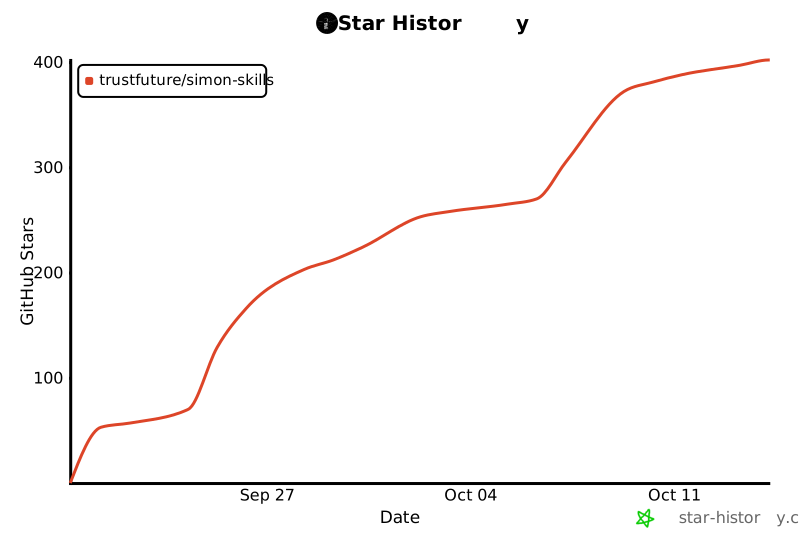](https://www.star-history.com/#trustfuture/simon-skills&Date)
- ## 许可
- MIT,见 `LICENSE`。第三方字体与素材的许可在各 skill 的 README 里单独说明。作品集里的成片和封面版权归作者,仅作展示。
Ratings and comments
Sign in to rate this skill.
Sign inFree to use. If it’s helped, pass it on.