tabby-mcp-server
MCP server for control Tabby terminal
Safety scan
A static text scan, not a guarantee. Select the badge to see what was scanned and every finding.
Badge for your README

Markdown
[](/listings/thuanpham582002--tabby-mcp-server)HTML
<a href="/listings/thuanpham582002--tabby-mcp-server"><img src="/api/listings/thuanpham582002--tabby-mcp-server/badge.svg" alt="findsafeskills safety rating" /></a>Install
Install instructions from the README
As written by the repo's author. findsafeskills has not verified these steps.
Option 1: Tabby Plugin Store
1. Open Tabby 2. Go to **Settings → Plugins** 3. Install **Tabby MCP** 4. Restart Tabby 5. Open **Settings → Plugins → MCP** and confirm the server configuration
Option 2: Local Docker Build
git clone https://github.com/thuanpham582002/tabby-mcp-server.git
cd tabby-mcp-server

make build-dist
bash scripts/copy_to_plugin_folder.sh
The install script copies the plugin to:
~/Library/Application Support/tabby/plugins/node_modules/tabby-mcp
Restart Tabby after installing or updating the plugin.
If your local Tabby installation requires bundled plugin dependencies, build the full package:
make build-dist-with-deps
bash scripts/copy_to_plugin_folder.sh
What was scanned
The files the safety scan read, as written by the repository's author and shown as plain text. Lines with a finding are marked.
README.md · README · 255 lines
View this file on GitHub (read at the repository's current version: the scan did not record which commit it read)
This file has changed since it was scanned, so this is not exactly the text that was scanned, and no line is marked. The findings are listed with the safety scan above.
- # Tabby MCP Server
- [](https://www.npmjs.com/package/tabby-mcp)
- [](https://opensource.org/licenses/MIT)
- [](https://github.com/thuanpham582002/tabby-mcp-server/issues)
- [](https://github.com/thuanpham582002/tabby-mcp-server/stargazers)
- A [Tabby Terminal](https://github.com/Eugeny/tabby) plugin that exposes your active terminal sessions through the [Model Context Protocol (MCP)](https://modelcontextprotocol.io/). It lets MCP-compatible AI clients discover terminal tabs, execute commands, read terminal buffers, and retrieve long command output.
- > Tabby stays the terminal UI. Your AI client connects to Tabby through MCP.
- ## Highlights
- - **MCP server inside Tabby** — exposes an SSE endpoint at `http://localhost:3001/sse`
- - **Terminal session discovery** — list local and SSH-backed Tabby terminal sessions
- - **Command execution** — run commands in a selected Tabby terminal tab
- - **Robust output capture** — simple marker protocol with exit-code parsing
- - **Terminal buffer access** — read visible/history buffer ranges from a tab
- - **Long output pagination** — retrieve full command output by `outputId`
- - **Pair programming mode** — optional confirmation dialogs and user feedback
- - **Docker-based build** — reproducible local plugin builds for Tabby
- ## Demo
- [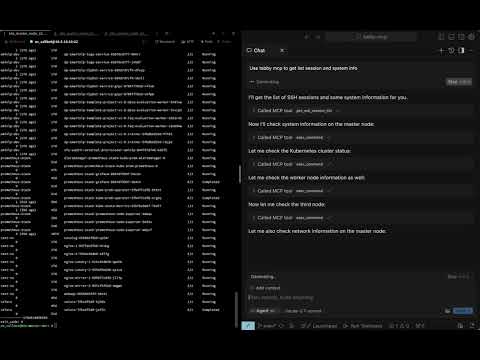](https://youtu.be/uFWBGiD4x9c)
- ## Table of Contents
- - [Requirements](#requirements)
- - [Installation](#installation)
- - [Quick Start](#quick-start)
- - [Connecting MCP Clients](#connecting-mcp-clients)
- - [SSE clients](#sse-clients)
- - [Claude Code](#claude-code)
- - [Codex / OpenAI Codex CLI](#codex--openai-codex-cli)
- - [Tools](#tools)
- - [Configuration](#configuration)
- - [Development](#development)
- - [License](#license)
- ## Requirements
- - Tabby Terminal installed and running
- - Docker, for local builds
- - macOS for the provided install script path
- - An MCP-compatible client with SSE support, such as Claude Code, Cursor, Windsurf, Codex, or another SSE-capable MCP client
- ## Installation
- ### Option 1: Tabby Plugin Store
- 1. Open Tabby
- 2. Go to **Settings → Plugins**
- 3. Install **Tabby MCP**
- 4. Restart Tabby
- 5. Open **Settings → Plugins → MCP** and confirm the server configuration
- ### Option 2: Local Docker Build
- ```bash
- git clone https://github.com/thuanpham582002/tabby-mcp-server.git
- cd tabby-mcp-server
- make build-dist
- bash scripts/copy_to_plugin_folder.sh
- ```
- The install script copies the plugin to:
- ```text
- ~/Library/Application Support/tabby/plugins/node_modules/tabby-mcp
- ```
- Restart Tabby after installing or updating the plugin.
- If your local Tabby installation requires bundled plugin dependencies, build the full package:
- ```bash
- make build-dist-with-deps
- bash scripts/copy_to_plugin_folder.sh
- ```
- ## Quick Start
- 1. Start or restart Tabby
- 2. Open at least one terminal tab
- 3. Verify the MCP server is running:
- ```bash
- curl http://localhost:3001/health
- # OK
- ```
- 4. List Tabby terminal sessions:
- ```bash
- curl -X POST http://localhost:3001/api/tool/get_ssh_session_list \
- -H 'Content-Type: application/json' \
- -d '{}'
- ```
- 5. Execute a command in a session:
- ```bash
- curl -X POST http://localhost:3001/api/tool/exec_command \
- -H 'Content-Type: application/json' \
- -d '{"command":"pwd","tabId":"0"}'
- ```
- ## Connecting MCP Clients
- Tabby-MCP provides:
- ```text
- SSE endpoint: http://localhost:3001/sse
- Health endpoint: http://localhost:3001/health
- HTTP test API: http://localhost:3001/api/tool/<tool-name>
- ```
- The Tabby plugin must be running before clients can connect.
- ### SSE clients
- Use this configuration for clients that support SSE MCP servers directly:
- ```json
- {
- "mcpServers": {
- "tabby-mcp": {
- "type": "sse",
- "url": "http://localhost:3001/sse"
- }
- }
- }
- ```
- For Cursor-style clients, place it in the MCP config file, for example:
- ```text
- ~/.cursor/mcp.json
- ```
- ### Claude Code
- If your Claude Code version supports SSE MCP servers:
- ```bash
- claude mcp add --transport sse tabby-mcp http://localhost:3001/sse
- ```
- If your setup uses JSON config, use the [SSE clients](#sse-clients) configuration.
- ### Codex / OpenAI Codex CLI
- Use the SSE MCP server configuration supported by your Codex client:
- ```json
- {
- "mcpServers": {
- "tabby-mcp": {
- "type": "sse",
- "url": "http://localhost:3001/sse"
- }
- }
- }
- ```
- For TOML-based configs, map the same SSE URL using your client's supported SSE MCP syntax.
- ## Tools
- | Tool | Description | Parameters |
- | --- | --- | --- |
- | `get_ssh_session_list` | List available Tabby terminal sessions | none |
- | `exec_command` | Execute a shell command in a terminal tab | `command`, `tabId`, `commandExplanation` |
- | `get_terminal_buffer` | Read terminal buffer content | `tabId`, `startLine`, `endLine` |
- | `get_command_output` | Retrieve full/paginated command output | `outputId`, `startLine`, `maxLines` |
- ## Configuration
- Default plugin configuration:
- ```json
- {
- "mcp": {
- "enabled": true,
- "startOnBoot": true,
- "port": 3001,
- "listenHost": "127.0.0.1",
- "serverUrl": "http://localhost:3001",
- "enableDebugLogging": true,
- "pairProgrammingMode": {
- "enabled": true,
- "showConfirmationDialog": true,
- "autoFocusTerminal": true
- }
- }
- }
- ```
- Configure these options in Tabby under **Settings → Plugins → MCP**.
- To accept connections from other machines or environments such as WSL, set
- `listenHost` to `0.0.0.0` in the MCP settings. This makes the server reachable
- over the network; use an address reachable from your MCP client in its server
- URL and apply any needed firewall restrictions.
- ### Pair Programming Mode
- Pair Programming Mode adds safety prompts when an AI client executes commands:
- - confirmation before command execution
- - optional terminal auto-focus
- - command rejection with feedback
- - command result dialog and history tracking
- ## Development
- Clone and build:
- ```bash
- git clone https://github.com/thuanpham582002/tabby-mcp-server.git
- cd tabby-mcp-server
- make build-dist
- ```
- Install into local Tabby:
- ```bash
- bash scripts/copy_to_plugin_folder.sh
- ```
- Restart Tabby and verify:
- ```bash
- curl http://localhost:3001/health
- ```
- ### Build targets
- ```bash
- make build-dist # Build dist only
- make build-dist-with-deps # Build dist and copy node_modules
- make help # Show available targets
- ```
- ## License
- MIT — see [LICENSE](LICENSE).
- ---
- <p align="center">
- Made with ❤️ by <a href="https://github.com/thuanpham582002">Pham Tien Thuan</a>
- </p>
Ratings and comments
Sign in to rate this skill.
Sign inFree to use. If it’s helped, pass it on.