claude-telegram-bot-bridge
A lightweight Telegram bot that bridges Claude Code to any local folder, with autostart support for remote mobile development.
Safety scan
A static text scan, not a guarantee. Select the badge to see what was scanned and every finding.
Badge for your README

Markdown
[](/listings/terranc--claude-telegram-bot-bridge)HTML
<a href="/listings/terranc--claude-telegram-bot-bridge"><img src="/api/listings/terranc--claude-telegram-bot-bridge/badge.svg" alt="findsafeskills safety rating" /></a>Install
Install instructions from the README
As written by the repo's author. findsafeskills has not verified these steps.
git clone https://github.com/terranc/claude-telegram-bot-bridge
cd claude-telegram-bot-bridge
claude
Then run `/setup`. Claude Code will handle everything: system checks, bot token collection, dependency installation, and configuration.
> **Note:** Commands starting with `/` (like `/setup`) are [Claude Code skills](https://code.claude.com/docs/en/skills). Type them in the `claude` CLI prompt, not in your regular terminal.
Once setup is complete, start the bot:
./start.sh --path /path/to/your/project
<details> <summary>Alternative: Direct installation script</summary>
If you prefer not to use Claude Code, run the installation script directly:
git clone https://github.com/terranc/claude-telegram-bot-bridge
cd claude-telegram-bot-bridge
./setup.sh
Then start the bot:
./start.sh --path /path/to/your/project
</details>
Common Commands
./start.sh --path /path/to/project              # Start (foreground)
./start.sh --path /path/to/project -d           # Start (daemon/background)
./start.sh --path /path/to/project --debug      # Debug mode
./start.sh --path /path/to/project --status     # Check status
./start.sh --path /path/to/project --stop       # Stop
./start.sh --path /path/to/project --upgrade    # Update to latest version
./start.sh --path /path/to/project --install    # macOS only: install startup service
./start.sh --path /path/to/project --uninstall  # macOS only: remove startup service
What was scanned
The files the safety scan read, as written by the repository's author and shown as plain text. Lines with a finding are marked.
README.md · README · 375 lines
View this file on GitHub (read at the repository's current version: the scan did not record which commit it read)
- # Claude Telegram Bot Bridge
- [中文文档](README-zh.md)
- Turn your Telegram into a remote Claude Code terminal. Chat with Claude, run skills, edit code, search files — all from your phone, anywhere.
- ## The Problem
- Claude Code is powerful, but it's bound to your terminal. When you step away from your computer — commuting, in a meeting, or just on the couch — you lose access. You can't quickly check a build result, ask Claude to fix a bug, or run a skill command until you're back at your desk.
- Solutions like [OpenClaw](https://github.com/anthropics/openclaw) exist, but they come with trade-offs: a full web stack to deploy and maintain, potential security concerns with exposing your dev environment through a web interface, and heavyweight infrastructure that feels like overkill when you just want to quickly send Claude a message from your phone.
- This bot takes a different approach — **lightweight, zero-infrastructure, secure by default**. It connects Claude Code SDK to a Telegram bot (a messaging app you already have), so you get a persistent, always-on Claude Code session you can talk to from anywhere. No web server, no ports to expose, no extra auth layer. Start it once for a project directory, and it runs as a daemon in the background — surviving crashes, rebooting with your Mac, managing its own dependencies. Telegram itself handles authentication, encryption, and push notifications.
- ## Features
- ### Screenshots
- | | | |
- |:---:|:---:|:---:|
- |  |  |  |
- **Core**
- - Chat with Claude directly in Telegram, powered by Claude Code SDK
- - Invoke any Claude Code skill (`/skill <name>`) or slash command (`/command <cmd>`) remotely
- - Switch between Sonnet, Opus, and Haiku on the fly via `/model`
- - Resume previous conversations with `/resume` and browse session history
- - View recent conversation history with `/history` — displays last 5 messages from current session
- - Revert to any previous message with `/revert` — choose from 5 modes: full restore (code + conversation), conversation only, code only, summarize from point, or cancel
- **Smart Interaction**
- - Progressive streaming: AI responses update in real-time as Claude thinks, not after completion
- - Claude's numbered options auto-convert to Telegram inline keyboard buttons — just tap to choose
- - File paths (images, PDFs, etc.) in Claude's responses are automatically sent as photos or documents
- - Native Telegram voice messages: auto-download, format detection/conversion (OGG/AMR → MP3), Whisper transcription, then forwarded to Claude
- - Per-user dedicated SDK streams — low latency, concurrent message support (up to 3 per user)
- - Priority `/stop` command: immediately cancels running tasks and voice transcription, even when message queue is full
- - Priority `/revert` command: bypasses message queue limit, cancels active operations, restores conversation state to any previous point
- **Security**
- - File access inside the project directory is auto-allowed
- - Access outside the project triggers inline-button confirmation in Telegram
- - User whitelist via `ALLOWED_USER_IDS`
- - Stale messages (>20 min) are silently dropped
- **Operations**
- - Daemon mode with auto-restart on crash (stops after 5 rapid crashes in 60s)
- - One-command macOS launchd auto-start on boot (`--install`) with inherited `PATH`/`HOME`
- - Auto-update check on startup — notifies when new version available
- - One-command upgrade (`--upgrade`) — pulls latest code and reinstalls dependencies
- - MD5-based dependency caching — skips reinstall when `requirements.txt` is unchanged
- - Auto venv creation, 14-day log rotation, crash logging with exit codes
- - Dedicated polling HTTP client with proxy-aware HTTP/1.1 settings for better recovery after network changes
- ## Prerequisites
- - **Python 3.11+**
- - **Claude CLI** — installed and in `$PATH`, or specify via `CLAUDE_CLI_PATH`
- - **Telegram Bot Token** — from [@BotFather](https://t.me/BotFather)
- - **ffmpeg** — required for audio format conversion
- - **OpenAI API Key** — required for Whisper transcription (`OPENAI_API_KEY`)
- ## Platform Support
- - **macOS** — fully supported, including `--install` / `--uninstall`
- - **WSL (Ubuntu/Debian-style Linux userland)** — supported for foreground run, `--daemon`, `--status`, and `--stop`
- - **Native Windows (PowerShell / CMD)** — not supported
- ## Quick Start
- ```bash
- git clone https://github.com/terranc/claude-telegram-bot-bridge
- cd claude-telegram-bot-bridge
- claude
- ```
- Then run `/setup`. Claude Code will handle everything: system checks, bot token collection, dependency installation, and configuration.
- > **Note:** Commands starting with `/` (like `/setup`) are [Claude Code skills](https://code.claude.com/docs/en/skills). Type them in the `claude` CLI prompt, not in your regular terminal.
- Once setup is complete, start the bot:
- ```bash
- ./start.sh --path /path/to/your/project
- ```
- <details>
- <summary>Alternative: Direct installation script</summary>
- If you prefer not to use Claude Code, run the installation script directly:
- ```bash
- git clone https://github.com/terranc/claude-telegram-bot-bridge
- cd claude-telegram-bot-bridge
- ./setup.sh
- ```
- Then start the bot:
- ```bash
- ./start.sh --path /path/to/your/project
- ```
- </details>
- ### Common Commands
- ```bash
- ./start.sh --path /path/to/project # Start (foreground)
- ./start.sh --path /path/to/project -d # Start (daemon/background)
- ./start.sh --path /path/to/project --debug # Debug mode
- ./start.sh --path /path/to/project --status # Check status
- ./start.sh --path /path/to/project --stop # Stop
- ./start.sh --path /path/to/project --upgrade # Update to latest version
- ./start.sh --path /path/to/project --install # macOS only: install startup service
- ./start.sh --path /path/to/project --uninstall # macOS only: remove startup service
- ```
- ## Usage Examples
- ### Fix a bug from your phone
- You're away from your desk and a teammate reports a bug. Open Telegram:
- ```
- You: login page crashes when email contains a plus sign
- Claude: I found the issue in src/auth/validator.ts:42 — the regex
- doesn't escape the + character. Fixed and the test passes now.
- ```
- ### Run a skill remotely
- ```
- You: /skill commit
- Claude: Created commit: fix(auth): escape special characters in email validation
- ```
- ### Send a voice message
- ```
- You: [send Telegram voice message]
- Bot: 🎤 Voice: summarize yesterday's git diff
- Claude: Here is a summary of yesterday's changes...
- ```
- ### Resume yesterday's work
- ```
- You: /resume
- Bot: 1. Refactoring auth module — 2 hours ago
- 2. Adding dark mode — yesterday
- 3. API rate limiting — 3 days ago
- You: 1
- Claude: Resuming session... [continues from where you left off]
- ```
- ### Check recent conversation history
- ```
- You: /history
- Bot: 📜 Recent History (last 5 messages)
- 🧑 User [2026-03-05 14:23:15]
- fix the login bug
- 🤖 Assistant [2026-03-05 14:23:18]
- I found the issue in src/auth/validator.ts:42...
- 🧑 User [2026-03-05 14:25:30]
- add a test for this
- 🤖 Assistant [2026-03-05 14:25:35]
- Added test in tests/auth.test.ts...
- ```
- ### Revert to a previous conversation state
- ```
- You: /revert
- Bot: 🔄 Select a message to revert to:
- [Shows paginated list of last 50 messages with inline buttons]
- You: [Tap on a message]
- Bot: Choose revert mode:
- 1️⃣ Restore code and conversation
- 2️⃣ Restore conversation only
- 3️⃣ Restore code only
- 4️⃣ Summarize from here
- 5️⃣ Cancel
- You: [Tap "Restore code and conversation"]
- Bot: ✅ Reverted to message #42. Conversation and code state restored.
- ```
- You: 1
- Bot: Switched to session: Refactoring auth module
- You: where did we leave off?
- Claude: We finished extracting the JWT logic into a separate service.
- Still remaining: updating the middleware to use the new service...
- ```
- ### Switch models mid-conversation
- ```
- You: /model haiku
- Bot: Switched to Claude Haiku
- You: summarize the changes in src/api/ from the last 3 commits
- Claude: ...
- ```
- ### Let the bot run 24/7
- ```bash
- # Install as macOS startup service — survives reboots
- ./start.sh --path ~/my-project --install
- # The generated launchd plist preserves PATH and HOME
- # so Claude CLI and proxy settings still resolve at boot
- # Check status anytime
- ./start.sh --path ~/my-project --status
- # 🟢 Bot is running (PID: 12345)
- # Uninstall when done
- ./start.sh --path ~/my-project --uninstall
- ```
- ## Bot Commands
- | Command | Description |
- |---|---|
- | `/start` | Start a conversation |
- | `/new` | Start a new session (clears current stream and cancels ongoing streaming) |
- | `/model` | Switch model (Sonnet / Opus / Haiku) |
- | `/resume` | Browse and resume a previous session (shows progress summary with last assistant message) |
- | `/stop` | Interrupt execution immediately (bypasses queue, cancels active task) |
- | `/history` | View recent conversation history |
- | `/revert` | Revert to a previous conversation state (browse history, select message, choose restore mode) |
- | `/skills` | List available Claude Code skills |
- | `/skill <name> [args]` | Execute a skill command |
- | `/command <cmd> [args]` | Execute a Claude Code slash command |
- Any unrecognized `/command` is also forwarded as a skill invocation.
- ## Environment Variables
- | Variable | Required | Default | Description |
- |---|---|---|---|
- | `TELEGRAM_BOT_TOKEN` | Yes | — | Telegram Bot API token |
- | `ALLOWED_USER_IDS` | No | *(allow all)* | Comma-separated user ID whitelist |
- | `CLAUDE_CLI_PATH` | No | *(auto-detect)* | Absolute path to Claude CLI binary |
- | `CLAUDE_SETTINGS_PATH` | No | `~/.claude/settings.json` | Path to Claude Code settings file |
- | `CLAUDE_PROCESS_TIMEOUT` | No | `600` | SDK timeout in seconds |
- | `AUTO_NEW_SESSION_AFTER_HOURS` | No | `24` | Auto-start new session after N hours of inactivity; set to `0`/`false`/`off` to disable |
- | `DRAFT_UPDATE_MIN_CHARS` | No | `150` | Minimum characters before streaming draft update |
- | `DRAFT_UPDATE_INTERVAL` | No | `1.0` | Minimum seconds between streaming draft updates |
- | `ENABLE_STREAMING_TOOL_CALLS` | No | `false` | Show Claude tool calls in Telegram streaming messages |
- | `TRANSCRIPTION_PROVIDER` | No | `whisper` | Voice transcription provider: `whisper` or `volcengine` |
- | `OPENAI_API_KEY` | Voice only | — | OpenAI API key for Whisper transcription |
- | `OPENAI_BASE_URL` | No | *(official OpenAI API)* | OpenAI-compatible Whisper endpoint base URL |
- | `WHISPER_MODEL` | No | `whisper-1` | Whisper model name |
- | `VOLCENGINE_APP_ID` | Volcengine only | — | Volcengine ASR `X-Api-App-Key` |
- | `VOLCENGINE_TOKEN` | Volcengine only | — | Volcengine ASR `X-Api-Access-Key` |
- | `VOLCENGINE_ACCESS_KEY` | Volcengine only | — | Volcengine TOS Access Key |
- | `VOLCENGINE_SECRET_ACCESS_KEY` | Volcengine only | — | Volcengine TOS Secret Access Key (create at `https://console.volcengine.com/iam/keymanage`) |
- | `VOLCENGINE_TOS_BUCKET_NAME` | Volcengine only | — | TOS bucket used for staging Telegram voice files |
- | `VOLCENGINE_TOS_ENDPOINT` | Volcengine only | — | TOS endpoint (must match your bucket region, e.g. `https://tos-cn-shanghai.volces.com`) |
- | `VOLCENGINE_TOS_REGION` | No | `cn-beijing` | TOS region used by SDK signing |
- | `FFMPEG_PATH` | No | *(auto-detect)* | Absolute path to ffmpeg binary |
- | `VOICE_REPLY_PERSONA` | No | `Tingting` | Persona name used by voice reply mode |
- | `LOG_LEVEL` | No | `INFO` | Logging level |
- | `PROXY_URL` | No | — | HTTP proxy; auto-configures `http_proxy`/`https_proxy`/`all_proxy` |
- ## Voice Transcription Channels
- - Default channel is `whisper`.
- - To use Volcengine file-fast ASR, set:
- - `TRANSCRIPTION_PROVIDER=volcengine`
- - `VOLCENGINE_APP_ID`
- - `VOLCENGINE_TOKEN`
- - `VOLCENGINE_ACCESS_KEY`
- - `VOLCENGINE_SECRET_ACCESS_KEY`
- - `VOLCENGINE_TOS_BUCKET_NAME`
- - `VOLCENGINE_TOS_ENDPOINT`
- - Secret Access Key must be created in Volcengine IAM key management:
- - `https://console.volcengine.com/iam/keymanage`
- - In Volcengine mode, the bot now uses `download -> TOS upload -> signed TOS URL -> ASR`.
- ## Voice Reply Mode (macOS)
- - User voice messages switch reply mode to voice automatically.
- - User text messages switch reply mode back to text.
- - In voice mode:
- - `>1000` Chinese characters or `>1000` English words: text only (voice mode is kept)
- - `>300` characters (and not over 1000 threshold): send voice + text
- - Otherwise: send voice only
- - Voice transcription preview (`🎤 Voice: ...`) is bundled with the final reply:
- - if text is sent, preview is merged at the top of that same text message
- - if voice-only reply is sent, the bot sends preview text first, then voice
- - The bot uses macOS `say` for synthesis, then converts output to Telegram-compatible `ogg/opus` via `ffmpeg`.
- - `VOICE_REPLY_PERSONA` should be a real macOS voice name from `say -v ?`.
- - If `VOICE_REPLY_PERSONA` is unavailable on current system, the bot sends a friendly error and falls back to text for that reply.
- - Set `VOICE_REPLY_PERSONA` to the first-column name shown by `say -v ?`.
- - Example:
- - `VOICE_REPLY_PERSONA=Tingting`
- ## ffmpeg Installation
- Install ffmpeg before enabling voice messages:
- - macOS (Homebrew): `brew install ffmpeg`
- - Ubuntu/Debian or WSL: `sudo apt-get update && sudo apt-get install -y ffmpeg`
- Then verify:
- ```bash
- ffmpeg -version
- ```
- ## Whisper Cost Notes
- Voice transcription uses OpenAI Whisper API (`whisper-1`) and incurs usage-based charges.
- Current reference pricing is about **$0.006/minute** of audio. Check OpenAI pricing for latest values.
- ## Security
- - `--path` sets the `PROJECT_ROOT` — the sandbox boundary for all file operations.
- - File access within `PROJECT_ROOT` is auto-allowed. Outside access requires user confirmation via inline buttons.
- - Bot output referencing external files requires confirmation before sending.
- - All runtime data stays under `PROJECT_ROOT/.telegram_bot/`.
- ## Lifecycle Management
- ```bash
- ./start.sh --path /path/to/project --status # Check if running
- ./start.sh --path /path/to/project --stop # Stop
- ./start.sh --path /path/to/project --install # macOS only: launchd auto-start on boot
- ./start.sh --path /path/to/project --uninstall # macOS only: remove auto-start
- ```
- The daemon auto-restarts on crash, logs each crash with exit code and uptime, and stops restarting after 5 rapid crashes in 60 seconds.
- When `PROXY_URL` is set, both regular Bot API calls and long-polling requests use proxy-aware HTTP/1.1 clients. This helps the bot recover more reliably after laptop sleep, network handoffs, or proxy reconnects.
- ### macOS Full Disk Access
- If your project directory is located in `~/Documents`, `~/Desktop`, or `~/Downloads`, macOS privacy protection will block launchd from reading files in those directories. This causes `--install` to fail with exit code 78 (EX_CONFIG).
- **Solution**: Add `/bin/bash` to Full Disk Access:
- 1. Open **System Settings** → **Privacy & Security** → **Full Disk Access**
- 2. Click the **+** button
- 3. Press `Cmd + Shift + G` and type `/bin/bash`
- 4. Select `bash` and confirm
- After this, `--install` will work correctly in protected directories.
- ## Debugging
- ```bash
- ./start.sh --path /path/to/project --debug
- # Or: BOT_DEBUG=1 python -m telegram_bot --path .
- ```
- Enables full console logging, per-session chat logs, and SDK tool call tracing.
- ## License
- MIT
- ## Star History
- [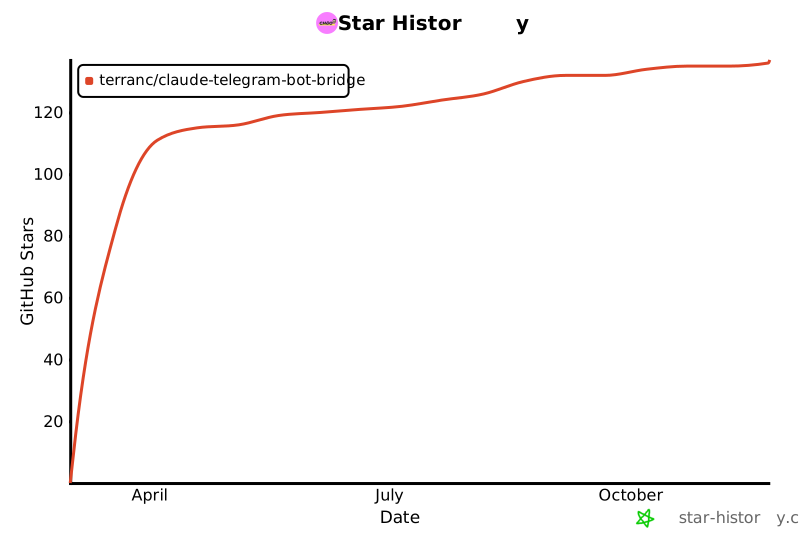](https://star-history.com/#terranc/claude-telegram-bot-bridge&Date)
Ratings and comments
Sign in to rate this skill.
Sign inFree to use. If it’s helped, pass it on.