tty-table
Cross-platform terminal table (Windows, Linux, macOS). Can also run in the browser console and provide. MCP server gives your coding agent with a quick way to add text-wrapped ASCII tables to your README or other files.
Safety scan
A static text scan, not a guarantee. Select the badge to see what was scanned and every finding.
Check it deeper on your machine
It has changed since its scan on 11 Nov 2026.
As a Claude Code plugin, install it and then ask Claude Code:
/plugin marketplace add keithmackay/mackayi/plugin install scanskillsafety@mackayiDo a deep scan of https://github.com/tecfu/tty-table with scanskillsafety
Or from a terminal, clone it and run it:
git clone https://github.com/keithmackay/scanskillsafety-skill ~/.claude/skills/scanskillsafetynode ~/.claude/skills/scanskillsafety/cli.cjs --deep 'https://github.com/tecfu/tty-table'
It checks the exact commit: every file, its packages against OSV (api.osv.dev), how it compares with this page's scan (findsafeskills.com receives the repository's address), and, if you agree, Claude reading every file with your own Claude subscription. It never runs the code.
Badge for your README

Markdown
[](/listings/tecfu--tty-table)HTML
<a href="/listings/tecfu--tty-table"><img src="/api/listings/tecfu--tty-table/badge.svg" alt="findsafeskills safety rating" /></a>Install
What was scanned
The files the safety scan read, as written by the repository's author and shown as plain text. Lines with a finding are marked.
README.md · README · 164 lines
View this file on GitHub (read at the repository's current version: the scan did not record which commit it read)
- # tty-table
- A TypeScript-first terminal table renderer with a compatibility-oriented factory API.
- ## [Examples](examples/)
- [See here for complete example list](examples/)
- To view all example output:
- ```sh
- $ git clone https://github.com/tecfu/tty-table && cd tty-table && npm i
- $ npm run view-examples
- ```
- ### Terminal (Static)
- [examples/styles-and-formatting.js](examples/styles-and-formatting.js)
- 
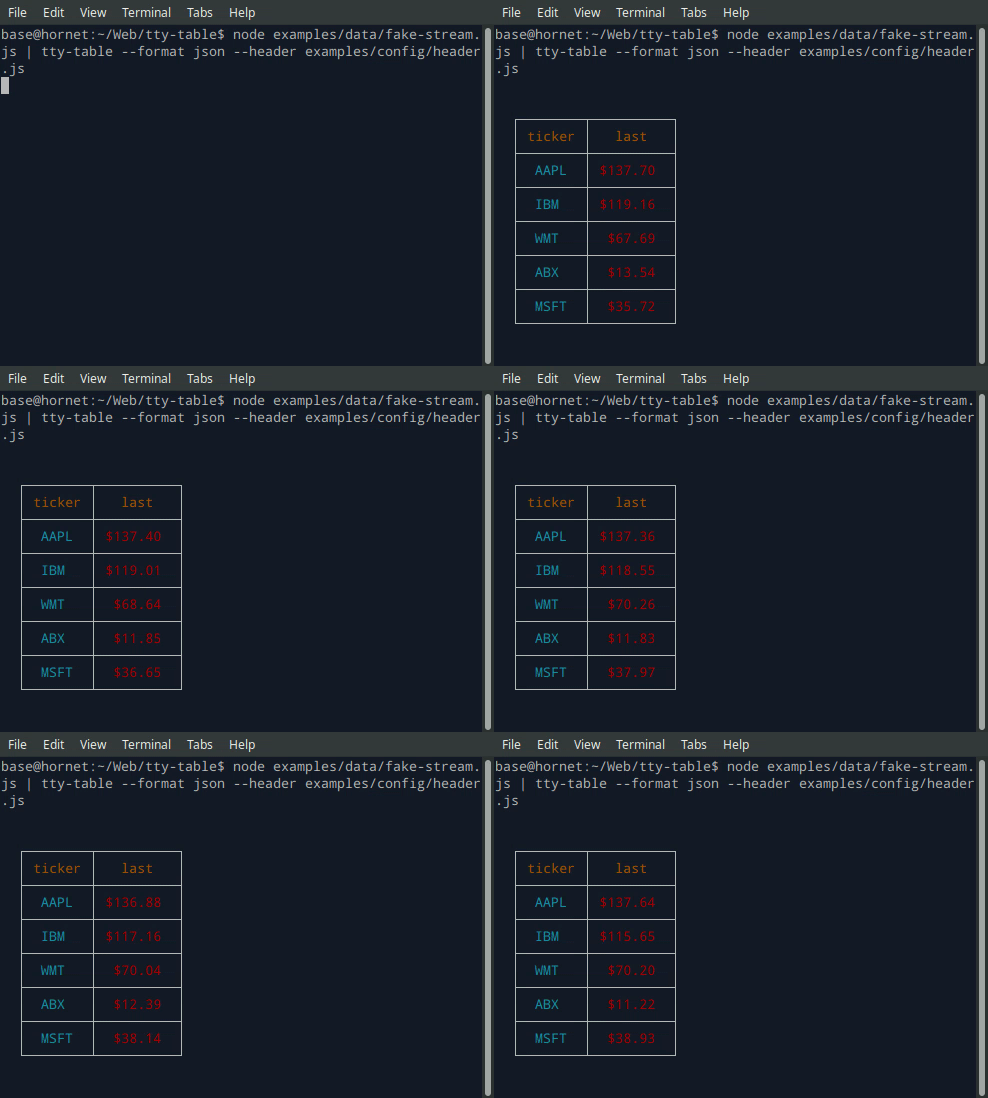
- ### Terminal (Streaming)
- ```
- $ node examples/data/fake-stream.js | tty-table --format json --header examples/config/header.js
- ```
- 
- - See the built-in help for the terminal version of tty-table with:
- ```
- $ tty-table -h
- ```
- ### MCP server
- Expose tty-table to MCP clients (Claude, IDE agents, Cursor, etc.) over stdio.
- #### Client configuration
- ```json
- {
- "mcpServers": {
- "tty-table": {
- "command": "npx",
- "args": ["-y", "--package=tty-table", "tty-table-mcp"]
- }
- }
- }
- ```
- #### Tools
- | Tool | Description |
- |------|-------------|
- | `render_table` | Render data as an ASCII/Unicode terminal table. Accepts `header`, `rows`, and any tty-table `options`; returns the rendered table as text. |
- **Arguments for `render_table`:**
- | Name | Type | Required | Description |
- |------|------|----------|-------------|
- | `header` | `(string \| {value, align?, width?})[]` | no | Column definitions |
- | `rows` | `(unknown[] \| Record<string, unknown>)[]` | yes | Row data (arrays of cells, or objects keyed by column name) |
- | `options` | `object` | no | Any tty-table option (e.g. `width`, `borderStyle`, `align`, `compact`) |
- Example tool call:
- ```json
- {
- "header": [{ "value": "name" }, { "value": "score", "align": "right" }],
- "rows": [["Ada", 100], ["Grace", 98]],
- "options": { "width": 40 }
- }
- ```
- Rendered result:
- ```text
- ┌───────┬───────┐
- │ name │ score │
- ├───────┼───────┤
- │ Ada │ 100 │
- ├───────┼───────┤
- │ Grace │ 98 │
- └───────┴───────┘
- ```
- > Additional tools may be added in future releases under the same MCP server.
- ### Browser & Browser Console
- The published package ships a standalone IIFE bundle that exposes a `TtyTable` global. Load it directly from a CDN — no install or build step required:
- ```html
- <script src="https://cdn.jsdelivr.net/npm/tty-table@7/dist/browser/tty-table.global.js"></script>
- <script>
- const Table = TtyTable.default
- console.log(Table([{ value: "name" }, { value: "score" }], [["Ada", 100]], null).render())
- </script>
- ```
- - Try it online before installing: [live example on JSFiddle](https://jsfiddle.net/u9dqv14j/)
- - View the full example locally in Chrome or Chromium by opening [examples/browser-example.html](examples/browser-example.html) (e.g. served with `npx serve .` or any static file server).
- - [source: examples/browser-example.html](examples/browser-example.html)
- 
- <br/>
- <br/>
- ## Compatibility
- ### Node.js
- **Current releases require Node.js 22 or newer.** This is a breaking change from the Node 20 baseline used by early v6 releases (and from the v5 line, which supported older Node.js releases). The floor was raised to match `smartwrap@4` / `breakword@2.1.0`. If your application must remain on Node 20, stay on a prior tty-table release until you can upgrade.
- The published package provides both ESM and CommonJS entry points for Node.js. The CLI requires Node.js 22+ as well.
- ## API
- ```ts
- import Table from "tty-table"
- const table = Table(
- [{ value: "name" }, { value: "score", align: "right" }],
- [
- { name: "Ada", score: 100 },
- { name: "Grace", score: 98 }
- ],
- { borderStyle: "solid" }
- )
- console.log(table.render())
- ```
- Legacy `Table(header, rows, footer, options)` and `Table(rows, options)` construction remains supported.
- ### Formatter context
- New code can use the explicit context form:
- ```ts
- const formatter = (value: unknown) => String(value).toUpperCase()
- ```
- The compatibility callback signature is still accepted. New integrations should prefer a formatter that accepts the documented context object and avoid relying on dynamic `this` mutation.
- ### Width semantics
- Widths are measured in terminal display columns, not JavaScript string length. ANSI escape sequences are ignored for measurement; Unicode code points are counted using [`breakword.width()`](https://github.com/tecfu/breakword) (Unicode 18.0.0 East Asian Width + UAX #51 Emoji_Presentation). Wrapping and truncation operate on the same display-width semantics.
- Compared with older releases that used `wcwidth`, some symbols that were previously treated as 1 cell are now 2 cells (for example `⚡` U+26A1). Tables containing those characters may reflow slightly; measurement is now aligned with the same library used for wrapping.
- ## Development
- ```sh
- npm install
- npm run typecheck
- npm run build
- npm test
- npm run test:unit
- npm run lint
- ```
Ratings and comments
Sign in to rate this skill.
Sign inFree to use. If it’s helped, pass it on.