trading_skills
Claude powered advisor system for option traders
Safety scan
A static text scan, not a guarantee. Select the badge to see what was scanned and every finding.
Check it deeper on your machine
It has changed since its scan on 11 Nov 2026.
As a Claude Code plugin, install it and then ask Claude Code:
/plugin marketplace add keithmackay/mackayi/plugin install scanskillsafety@mackayiDo a deep scan of https://github.com/staskh/trading_skills with scanskillsafety
Or from a terminal, clone it and run it:
git clone https://github.com/keithmackay/scanskillsafety-skill ~/.claude/skills/scanskillsafetynode ~/.claude/skills/scanskillsafety/cli.cjs --deep 'https://github.com/staskh/trading_skills'
It checks the exact commit: every file, its packages against OSV (api.osv.dev), how it compares with this page's scan (findsafeskills.com receives the repository's address), and, if you agree, Claude reading every file with your own Claude subscription. It never runs the code.
Badge for your README

Markdown
[](/listings/staskh--trading-skills)HTML
<a href="/listings/staskh--trading-skills"><img src="/api/listings/staskh--trading-skills/badge.svg" alt="findsafeskills safety rating" /></a>Install
Install instructions from the README
As written by the repo's author. findsafeskills has not verified these steps.
git clone https://github.com/staskh/trading_skills.git
cd trading_skills
uv sync
Run Claude Code or Cursor in the repository root. All skills are available as interactive commands — ask questions about your IBKR portfolio, symbols, or companies of interest.
What was scanned
The files the safety scan read, as written by the repository's author and shown as plain text. Lines with a finding are marked.
README.md · README · 334 lines
View this file on GitHub (read at the repository's current version: the scan did not record which commit it read)
This file has changed since it was scanned, so this is not exactly the text that was scanned, and no line is marked. The findings are listed with the safety scan above.
- # Trading Skills — AI-Powered Market Analysis
- Most retail traders juggle 5+ tabs — broker, charting platform, screener, news feed, spreadsheet — just to decide whether to enter a trade. This project collapses all of that into a single conversational interface powered by Claude.
- Ask a question in plain English, get back real data: technicals, fundamentals, option Greeks, risk metrics, earnings dates, correlation matrices, and full PDF reports. Connect your Interactive Brokers account and it manages your portfolio too — finds roll candidates for expiring shorts, flags earnings risk, and generates action reports.
- [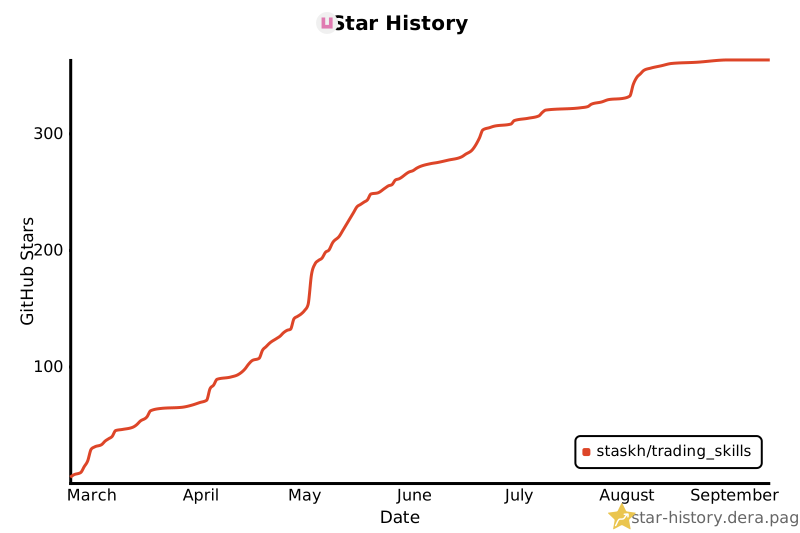](https://star-history.dera.page/#staskh/trading_skills&type=date&legend=bottom-right)
- **Who is this for?**
- - **Retail options traders** who sell premium, run PMCCs, or manage covered calls
- - **Self-directed investors** who want quick fundamental + technical scans without switching tools
- - **Python-literate traders** who want to extend the analysis with custom scripts
- - **IBRK users** who want AI-assisted portfolio management
- **Quick example** — scan for bullish setups and check PMCC viability:
- ```
- You: Scan AAPL,MSFT,NVDA,GOOGL,AMZN for bullish trends, then check the top picks for PMCC suitability
- Claude: [runs scanner-bullish → filters top scores → runs scanner-pmcc]
- NVDA: Bullish score 8/10, PMCC score 9.2/11 — LEAPS $95 call (Δ0.82),
- sell $140 call (Δ0.18), net debit $5,420, annual yield 47%...
- ```
- **Another example** — correlation check before adding to a portfolio:
- ```
- You: Show correlation for SPY,GOOG,NVDA,ZM,RTX,PFE,XOM
- Claude: NVDA is the standout diversifier — near-zero correlation with everything.
- RTX/XOM at 0.86 — little diversification benefit between them.
- ```
- ### Real sessions in Claude Desktop (free account)
- > *"Analyze option spread strategies and probability of profit for SPY, QQQ and DIA"*
- 
- ## Requirements
- - Python 3.12+
- - [uv](https://docs.astral.sh/uv/) package manager
- - [Claude Code](https://docs.anthropic.com/en/docs/claude-code), [Claude Desktop](https://claude.ai/download), or [Cursor](https://cursor.com/) with third-party skills enabled (fully installed and authenticated)
- - Optional: TWS or IB Gateway for portfolio features
- ## Two Ways to Use
- ### Claude Code / Cursor (Full Experience)
- #### Installation
- ```bash
- git clone https://github.com/staskh/trading_skills.git
- cd trading_skills
- uv sync
- ```
- Run Claude Code or Cursor in the repository root. All skills are available as interactive commands — ask questions about your IBKR portfolio, symbols, or companies of interest.
- ### MCP Server (Claude Desktop)
- The MCP server is a lightweight alternative for use with Claude Desktop (including the free tier). It exposes 23 trading analysis tools directly to Claude Desktop without needing Claude Code.
- #### Installation
- 1. Install the package (requires Python 3.12+):
- ```bash
- pip install trading-skills
- ```
- 2. Find the full path to the installed command:
- **macOS / Linux:**
- ```bash
- which trading-skills-mcp
- ```
- **Windows:**
- ```cmd
- where trading-skills-mcp
- ```
- If `where` doesn't find it, locate it manually:
- ```cmd
- python -c "import sysconfig; print(sysconfig.get_path('scripts'))"
- ```
- The script will be `trading-skills-mcp.exe` in that directory (typically at `C:\Users\<YourUsername>\AppData\Local\Programs\Python\Python<Version>\Scripts\`)
- 3. Open Claude Desktop, go to **Settings** → **Developer** → **Edit Config**:
- 
- Add the following to `claude_desktop_config.json`:
- **macOS / Linux:**
- ```json
- {
- "mcpServers": {
- "trading-skills": {
- "command": "/full/path/to/trading-skills-mcp"
- }
- }
- }
- ```
- **Windows:**
- ```json
- {
- "mcpServers": {
- "trading-skills": {
- "command": "C:\\full\\path\\to\\trading-skills-mcp.exe"
- }
- }
- }
- ```
- Replace the path with the output from step 2.
- 4. Restart Claude Desktop. Don't worry if you see an MCP error message — it will disappear once you try some of the examples below.
- #### Installation from GitHub
- Add the following to `claude_desktop_config.json`:
- **macOS / Linux:**
- ```json
- {
- "mcpServers": {
- "trading-skills": {
- "command": "uvx",
- "args": ["--from", "git+https://github.com/staskh/trading_skills.git", "trading-skills-mcp"]
- }
- }
- }
- ```
- **Windows:**
- ```json
- {
- "mcpServers": {
- "trading-skills": {
- "command": "cmd",
- "args": ["/c", "uvx", "--from", "git+https://github.com/staskh/trading_skills.git", "trading-skills-mcp"]
- }
- }
- }
- ```
- ## Example Queries
- - "What's AAPL's current price and 1y range?"
- - "Run technical analysis on SPY with RSI/MACD"
- - "Scan AAPL,MSFT,NVDA,GOOGL for bullish trends"
- - "Find PMCC candidates from my watchlist"
- - "Compare risk metrics for MSFT vs AAPL"
- - "Show correlation between SPY,NVDA,GOOG,XOM"
- - "When is NVDA's next earnings?"
- - "Show my portfolio positions" (requires IB)
- - "Generate portfolio action report" (requires IB)
- - "Find roll candidates for my GOOG short call" (requires IB)
- ## Available Skills (25)
- ### Market Data
- | Skill | Description |
- |-------|-------------|
- | `stock-quote` | Real-time price, volume, change, market cap, 52-week range |
- | `option-chain` | Calls and puts with strikes, bids, asks, volume, OI, IV |
- | `price-history` | Historical OHLCV data |
- | `fundamentals` | Financials, earnings, key metrics, Piotroski F-Score |
- | `news-sentiment` | Recent headlines and sentiment |
- | `earnings-calendar` | Upcoming earnings dates with BMO/AMC timing and EPS estimates |
- | `calendar` | Scheduled US economic events (CPI, NFP, FOMC, GDP...) in ET, with optional ForexFactory cross-check |
- | `insider-trading` | SEC Form 4 insider transactions — executive buys/sells and sentiment |
- ### Analysis
- | Skill | Description |
- |-------|-------------|
- | `technical-analysis` | RSI, MACD, Bollinger Bands, SMA, EMA, ATR, ADX, correlation matrix |
- | `greeks` | Delta, gamma, theta, vega, IV (Black-Scholes) |
- | `spread-analysis` | Verticals, diagonals, straddles, strangles, iron condors |
- | `risk-assessment` | Volatility, beta, VaR, drawdown, Sharpe ratio |
- | `chart-ema-rsi` | JPG chart: daily candles, EMA 9/20 with crossovers marked, RSI panel |
- ### Scanners
- | Skill | Description |
- |-------|-------------|
- | `scanner-bullish` | Scan symbols for bullish trends (SMA, RSI, MACD, ADX) |
- | `scanner-pmcc` | Scan for PMCC suitability (delta, liquidity, spread, IV, yield) |
- | `whale-hunting` | Detect institutional option whale activity for an underlying (requires Massive API key) |
- ### Portfolio (requires TWS/Gateway)
- > **TWS API access levels:**
- > - **Read-only** — fetches positions, prices, and Greeks; places no orders: `ib-account`, `ib-portfolio`, `ib-option-chain`, `ib-find-short-roll`, `ib-collar`, `ib-pmcc-advisor`, `ib-portfolio-action-report`, `ib-create-consolidated-report`, `ib-report-delta-adjusted-notional-exposure`
- > - **Read-write** — can place and cancel conditional orders in TWS: `ib-stop-loss` (only when `--execute` is passed; dry-run by default)
- | Skill | Description |
- |-------|-------------|
- | `ib-account` | Account summary (cash, buying power, margin) |
- | `ib-portfolio` | Portfolio positions with market prices |
- | `ib-option-chain` | Real-time option chain data from IB *(under development)* |
- | `ib-find-short-roll` | Roll candidates for short positions or covered call/put selection |
- | `ib-collar` | Tactical collar strategy for earnings/event protection |
- | `ib-pmcc-advisor` | PMCC position analysis: assignment risk, P&L projections, ranked roll candidates |
- | `ib-stop-loss` | Conditional stop-loss management for PMCC, naked LEAPS, and stock positions |
- | `ib-portfolio-action-report` | Portfolio review with earnings risk and action items |
- | `ib-create-consolidated-report` | Consolidate IBRK trade CSVs into summary reports |
- | `ib-report-delta-adjusted-notional-exposure` | Delta-adjusted notional exposure across accounts |
- ### Reports
- | Skill | Description |
- |-------|-------------|
- | `report-stock` | Comprehensive PDF/markdown report with trend, PMCC, and fundamental analysis |
- ## MCP Server Tools (32 tools)
- The MCP server exposes skills as tools for Claude Desktop:
- > **TWS API access levels for MCP tools:**
- > - **Read-only**: `ib_account`, `ib_portfolio`, `ib_option_expiries`, `ib_option_chain`, `ib_find_short_roll`, `ib_collar`, `ib_pmcc_advisor`, `ib_portfolio_action_report`, `ib_delta_exposure`
- > - **Read-write** (places/cancels orders): `ib_stop_loss` when `execute=True`
- | Category | Tools |
- |----------|-------|
- | **Market Data** | `stock_quote`, `price_history`, `news_sentiment`, `insider_trading`, `fundamentals`, `piotroski_score`, `earnings_calendar`, `economic_calendar` |
- | **Technical** | `technical_indicators`, `price_correlation`, `risk_assessment` |
- | **Options** | `option_expiries`, `option_chain`, `option_greeks` |
- | **Spreads** | `spread_vertical`, `spread_diagonal`, `spread_straddle`, `spread_strangle`, `spread_iron_condor` |
- | **Scanners** | `scan_bullish`, `scan_pmcc` |
- | **Whale Hunting** | `whale_hunting` |
- | **Reports** | `report_stock` |
- | **IB Portfolio** | `ib_account`, `ib_portfolio`, `ib_option_expiries`†, `ib_option_chain`, `ib_find_short_roll`, `ib_collar`, `ib_pmcc_advisor`, `ib_stop_loss`, `ib_portfolio_action_report`, `ib_delta_exposure` |
- † MCP-only helper — not a standalone skill. Used in Claude Desktop to discover available expiry dates before calling `ib_option_chain`.
- ## Sandbox Outputs (Not Committed)
- Temporary reports, datasets, and notebooks are saved to `sandbox/` and are not committed to git. Report filenames include timestamps: `<name>_YYYY-MM-DD_HHmm.<ext>`.
- ## Interactive Brokers Setup
- To use IB features:
- 1. Install [TWS](https://www.interactivebrokers.com/en/trading/tws.php) or [IB Gateway](https://www.interactivebrokers.com/en/trading/ibgateway-stable.php)
- 2. Enable API connections in TWS: Configure → API → Settings → Enable ActiveX and Socket Clients
- 3. Note the port: 7497 (paper) or 7496 (live)
- ## Massive (formerly Polygon.io) Setup
- Whale-detection features (`option_whales`, `whales_hunter`) require a [Massive](https://massive.com/) API key (the platform was previously known as Polygon.io).
- ### Claude Code / Cursor
- Create a `.env` file in the repository root:
- ```bash
- MASSIVE_API_KEY=your_polygon_api_key_here
- ```
- The library loads it automatically via `python-dotenv`.
- ### MCP Server (Claude Desktop)
- Pass the key through the `env` field in `claude_desktop_config.json`:
- **macOS / Linux:**
- ```json
- {
- "mcpServers": {
- "trading-skills": {
- "command": "/full/path/to/trading-skills-mcp",
- "env": {
- "MASSIVE_API_KEY": "your_massive_api_key_here"
- }
- }
- }
- }
- ```
- **Windows:**
- ```json
- {
- "mcpServers": {
- "trading-skills": {
- "command": "C:\\full\\path\\to\\trading-skills-mcp.exe",
- "env": {
- "MASSIVE_API_KEY": "your_massive_api_key_here"
- }
- }
- }
- }
- ```
- > The `env` block is merged with the system environment, so other variables are not affected.
- ## Development
- ```bash
- # Run tests
- uv run pytest tests/ -v
- # Lint
- uv run ruff check src/ tests/
- uv run ruff format src/ tests/
- # Test individual script
- uv run python .claude/skills/fundamentals/scripts/fundamentals.py AAPL
- # Debug MCP server with MCP Inspector
- npx @modelcontextprotocol/inspector uv run python -m mcp_server.server
- ```
- ## Architecture
- ```
- User Query → Claude Code/Desktop → Skill or MCP Tool → Python Script → Response
- ```
- Skills are SKILL.md files in `.claude/skills/` that instruct Claude how to fetch and analyze data using Python scripts. Skill scripts live under `.claude/skills/<skill-name>/scripts/`, and progressive reference material belongs in `.claude/skills/<skill-name>/references/`.
- The MCP server (`mcp_server/server.py`) wraps the same Python scripts as tools for Claude Desktop via the FastMCP framework.
- ## Data Sources
- | Source | Used by | Notes |
- |--------|---------|-------|
- | [Yahoo Finance](https://finance.yahoo.com/) | All market data, fundamental, and options skills | Free; up to 15-minute delay |
- | [Massive](https://massive.com/) (formerly Polygon.io) | `whale-hunting` (`whale_hunting` MCP tool) | Paid API key required; see setup section below |
- ## License
- MIT
Ratings and comments
Sign in to rate this skill.
Sign inFree to use. If it’s helped, pass it on.