OnePagent
One Page Agent.The browser-native workbench that lives in One Page.
Safety scan
A static text scan, not a guarantee. Select the badge to see what was scanned and every finding.
Badge for your README

Markdown
[](/listings/sligter--onepagent)HTML
<a href="/listings/sligter--onepagent"><img src="/api/listings/sligter--onepagent/badge.svg" alt="findsafeskills safety rating" /></a>Install
Install instructions from the README
As written by the repo's author. findsafeskills has not verified these steps.
git clone https://github.com/sligter/OnePagent.git
cd OnePagent
Double-click `onepagent.html`, or serve it from any static server:
python -m http.server 8000
# or
npx serve .
Visit `http://localhost:8000/onepagent.html`, click **Settings** in the top bar to configure Provider / API Key / Models. Takes effect immediately.
> **Service Worker note**: the bundled `sw.js` is only a PWA/offline cache for the app shell and static assets. LLM and Tavily requests are browser direct fetches with the configured BYOK credentials; the Service Worker does not proxy, inject, or hide API keys.
---
What was scanned
The files the safety scan read, as written by the repository's author and shown as plain text. Lines with a finding are marked.
README.md · README · 257 lines
View this file on GitHub (read at the repository's current version: the scan did not record which commit it read)
- <div align="center">
- <img src="logo.svg" alt="OnePagent" width="128" height="128" />
- # OnePagent
- ### *One Page, Omnipotent Agent.*
- **The browser-native AI agent workbench that lives in a single file.**
- [](onepagent.html)
- [](#getting-started)
- [](#configuration)
- [](#license)
- **English** | [简体中文](README.zh.md)
- [Live Demo](https://onepagent.top) · [Deploy Your Own](#deploy) · [Configuration](#configuration)
- </div>
- ---
- Open one HTML file and you get a fully-featured, internet-aware, programmable, extensible AI agent — multi-turn chat, tool calls, Python sandbox, web search, skills, context compaction, long-term memory, file operations, cloud sync — all running on a single page.
- > No backend. No `npm install`. No Docker. Just one `.html` that carries an entire universe.
- ---
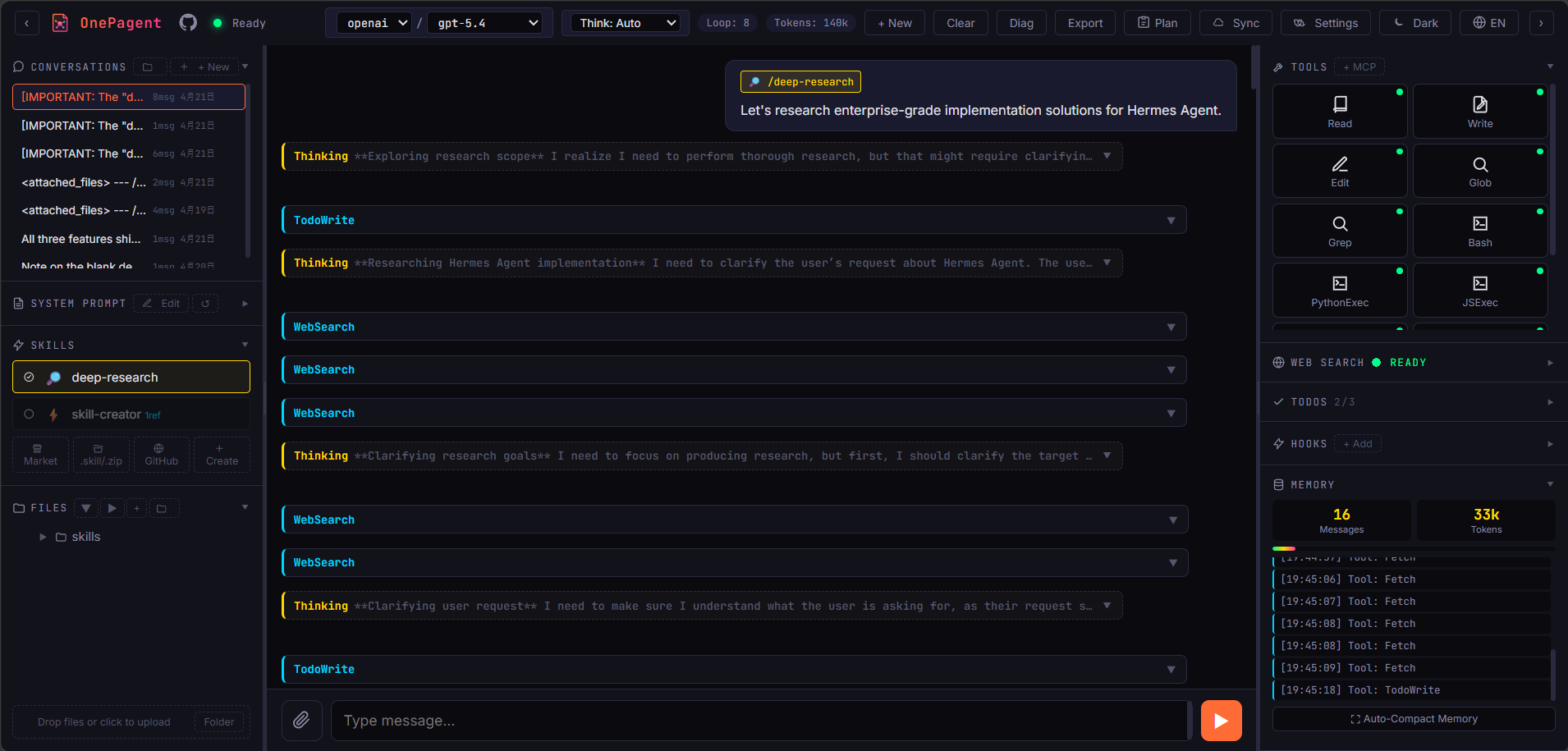
- ## Preview
- 
- ---
- ## Highlights
- | Capability | Description |
- |---|---|
- | Single-file deployment | Drop `onepagent.html` on any static host or open it locally |
- | Multi-provider LLM | Anthropic / OpenAI / DeepSeek with custom endpoints; BYOK keys are stored locally and sent directly to the configured API endpoint |
- | Reasoning levels | Inline selector with OpenAI `none / low / medium / high / xhigh / max` tiers (plus Auto) |
- | Long context compaction | Per-model context window with automatic LLM-driven summary compression |
- | Long-term memory | Opt-in persistent facts / preferences / events / skills across sessions — auto-extraction, agent tools, manual CRUD, tag & keyword search |
- | MCP Servers | Paste `mcpServers` JSON to import (`streamable_http` / `sse`), Bearer auth, optional CORS proxy |
- | Plan Mode | Agent investigates with read-only tools, drafts a Markdown plan for approval, then executes |
- | Ralph Loop | Fully unattended continue-until-done mode with marker, max/unlimited iterations, Stop, and no-progress guard |
- | Sub-agents | Delegate bounded read-only research tasks and monitor runs in the side panel |
- | Agent Swarm | Opt-in parallel orchestrator-worker fanout: lead emits multiple `SwarmSpawn` calls in one turn, role-scoped workers (researcher / critic / writer / coder) run concurrently with token budgets |
- | Human-in-the-loop | Agent can ask for text, choices, or confirmations when a task needs user input |
- | TodoWrite | Agent maintains a visible task list (pending / in-progress / completed) |
- | Hooks | User-defined JS handlers on 6 agent lifecycle events |
- | Python sandbox | Execute Python in-browser via Pyodide |
- | Remote sandbox | Optional isolated runtime for heavier code tasks |
- | Web Search | Tavily integration with `basic` / `advanced` depth modes |
- | Skills system | Install `.skill` / `.zip` packs, pull from GitHub, create in-page, or let AI manage skills with `SkillManager` |
- | Conversation management | Multiple sessions, folders, drag-and-drop, IndexedDB persistence, one-click export |
- | Cloud Sync | Incremental sync to S3-compatible buckets with optional AES-256-GCM encryption |
- ---
- ## Architecture
- ```
- ┌─────────────────────────────────────────────────────────────┐
- │ onepagent.html │
- │ ┌───────────┐ ┌──────────┐ ┌────────────┐ ┌──────────┐ │
- │ │ UI Shell │ │ Chat / │ │ Tools / │ │ Skills │ │
- │ │ (3-column)│ │ Streams │ │ MCP Bus │ │ Registry │ │
- │ └─────┬─────┘ └────┬─────┘ └─────┬──────┘ └────┬─────┘ │
- │ │ │ │ │ │
- │ ┌─────┴─────────────┴──────────────┴──────────────┴─────┐ │
- │ │ Pretext Layout Engine (inlined) │ │
- │ │ markdown → blocks → lines → flowed DOM │ │
- │ └──────────────────────────────────────────────────────┘ │
- │ │ │
- │ ┌─────┴───────┐ ┌──────────────┐ ┌───────────┐ ┌────────┐ │
- │ │ Service │ │ LocalStorage │ │ Pyodide │ │ S3 │ │
- │ │ Worker │ │ + IndexedDB │ │ (Python) │ │ SigV4 │ │
- │ │ (PWA cache) │ │ (all state) │ │ │ │ Client │ │
- │ └─────┬───────┘ └──────────────┘ └───────────┘ └───┬────┘ │
- └────────┼──────────────────────────────────────────────┼─────┘
- │ │
- ▼ ▼
- ┌──────────────┐ ┌────────────┐ ┌──────────┐ ┌─────────────┐
- │ Anthropic │ │ OpenAI │ │ Tavily │ │ Your bucket │
- │ DeepSeek │ │ … │ │ │ │ AWS/R2/MinIO│
- └──────────────┘ └────────────┘ └──────────┘ └─────────────┘
- ```
- ---
- ## Getting Started
- ```bash
- git clone https://github.com/sligter/OnePagent.git
- cd OnePagent
- ```
- Double-click `onepagent.html`, or serve it from any static server:
- ```bash
- python -m http.server 8000
- # or
- npx serve .
- ```
- Visit `http://localhost:8000/onepagent.html`, click **Settings** in the top bar to configure Provider / API Key / Models. Takes effect immediately.
- > **Service Worker note**: the bundled `sw.js` is only a PWA/offline cache for the app shell and static assets. LLM and Tavily requests are browser direct fetches with the configured BYOK credentials; the Service Worker does not proxy, inject, or hide API keys.
- ---
- ## Skills
- Install skills from the left **Skills** panel via Market, `.skill/.zip`, GitHub, or Create. GitHub folder URLs are supported, e.g. `https://github.com/anthropics/skills/tree/main/skills/skill-creator`.
- The agent can also use `SkillManager` to list, install, update, enable/disable, or remove skills; remote installs and destructive/high-risk changes require confirmation.
- ---
- ## Remote Sandbox
- Remote sandbox gives OnePagent an optional isolated runtime for code-heavy work while keeping the app itself a single static HTML file.
- ---
- ## Deploy
- OnePagent is a pure static site — runs on any static host:
- <div align="center">
- [](https://vercel.com/new/clone?repository-url=https%3A%2F%2Fgithub.com%2Fsligter%2FOnePagent&project-name=onepagent&repository-name=onepagent)
-
- [](https://zeabur.com/new)
-
- [](https://dash.cloudflare.com/?to=/:account/pages/new)
- </div>
- | Platform | Steps |
- |---|---|
- | **Vercel** | Click button, sign in, Deploy — done in ~10 seconds |
- | **Zeabur** | Click button, select your fork, auto-detected as static, Generate Domain |
- | **Cloudflare Pages** | Connect to Git, Framework: None, Build command: empty, Output: `/`, Deploy |
- | **GitHub Pages** | Settings, Pages, Source: GitHub Actions, push to deploy |
- > All data lives in the browser. Different domains do not share state. Use [Cloud Sync](#cloud-sync) for cross-domain / cross-device sync.
- ---
- ## Cloud Sync
- Back up and sync across devices via any S3-compatible bucket. Configure it in **Settings → Cloud Sync**.
- - Supports AWS S3, Cloudflare R2, Backblaze B2, and MinIO.
- - Required fields: Endpoint, Region, Bucket, Access Key ID, and Secret Access Key.
- - Optional: Prefix, AES-256-GCM encryption passphrase, auto-push, and path-style URLs for MinIO / R2.
- - Use **Test connection** / **Show CORS config** in Settings, then **Sync → Push now / Pull now** from the top bar.
- - LLM keys stay device-local and are never synced.
- ---
- ## Ralph Loop
- Ralph Loop keeps the agent working after a normal response ends. Turn on **Ralph**, send a task, and OnePagent will re-enter it until it sees the completion marker or a guard stops the run.
- - Configure defaults in **Settings → Ralph Loop**: max iterations, **Unlimited**, and completion marker (default `RALPH_DONE`).
- - Use the top-bar **Stop** button to cancel a run.
- - `AskUser` uses defaults or cancels instead of opening a modal; Plan Mode is never auto-approved.
- Example: `Audit this page, fix what you can, and when finished include RALPH_DONE.`
- ---
- ## Memory
- Long-term memory stores reusable facts across conversations. Enable it in **Settings → Memory**.
- - Stores `fact` / `preference` / `event` / `skill` / `note` records in IndexedDB.
- - Optional auto-extraction keeps durable facts after assistant turns.
- - Recall uses recency, tags, keywords, and prompt caching.
- - Tools: `memory_save`, `memory_search`, `memory_update`, `memory_forget`.
- - Memory Viewer supports search, filters, JSON import/export, and retired records.
- ---
- ## Agent Workflow
- - **Sub-agents**: the main agent can spawn bounded read-only research workers; runs and previews appear in the side panel.
- - **Human-in-the-loop**: `AskUser` supports text, choices, and confirmations for decisions the model should not guess.
- - **Media tools**: image/video generation is explicit through tools and configured generation models, not automatic after every turn.
- - **Diagnostics**: file-system diagnostics live in **Settings → Diagnostics**.
- ---
- ## Agent Swarm
- Opt-in parallel multi-agent runtime. Enable in **Settings → Agent Swarm**.
- - **Fanout** — lead emits several `SwarmSpawn(role, task)` calls in one turn; they run in parallel up to *Max concurrency*. Built-in roles: researcher, critic, writer, coder.
- - **Handoff** — workers chain via `SwarmHandoff(role, brief)`, e.g. `researcher → critic → writer`. Cycles and depth-overflow rejected.
- - **Blackboard** — per-turn shared workspace: `bb_write` / `bb_read` / `bb_list` / `bb_post_task` / `bb_claim`. Latest entries auto-injected into each worker's prompt.
- - **Custom roles** — manage in the left **Swarms** panel: own system prompt, tool whitelist, handoff targets, budgets. `bindSkills` grants any installed skill's tools. JSON import / export.
- - **RoleManager** *(opt-in)* — lead-only tool that creates / updates / deletes / duplicates roles at runtime. Storage choice: memory, global, or per-conversation. Built-in and user-authored roles are protected.
- Guards: per-worker and per-turn token budgets, concurrency cap, Plan Mode inheritance, Ralph Loop mutex, recursion blocked. Hooks `pre_swarm_spawn` / `post_swarm_spawn` join the existing six. Set *Worker model override* (e.g. Haiku) to keep workers cheap while the lead runs on a frontier model.
- Best for breadth-first work (research, comparison). Skip for tightly coupled refactors.
- ---
- ## Configuration
- All settings and conversations live in the browser (`localStorage` + `IndexedDB`). OnePagent has no server; requests go from your browser to your configured API endpoint.
- ---
- ## Contributing
- Single-file project — fork it, edit it, send a PR.
- - Keep `onepagent.html` runnable on its own
- - Avoid dependencies that require a build step
- - `index.html` is a redirect shim only — no real logic
- ---
- ## Star History
- <div align="center">
- [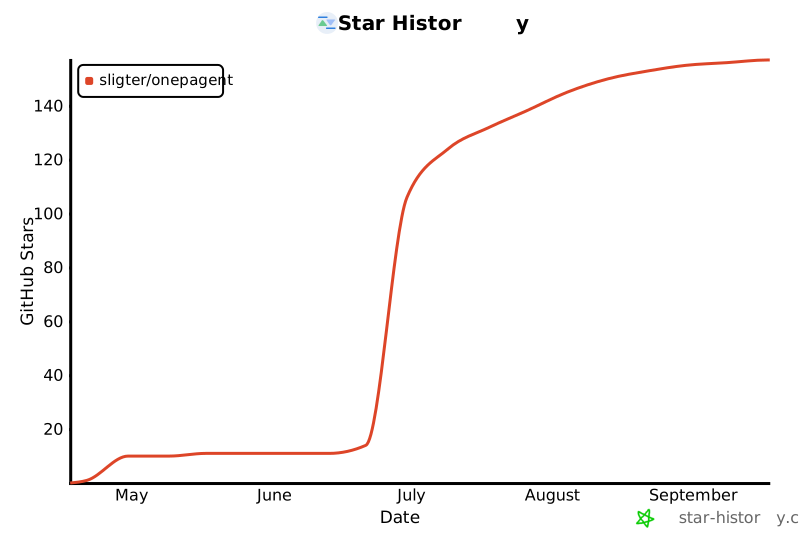](https://star-history.com/#sligter/OnePagent&Date)
- </div>
- ---
- ## Friends
- - [Linux Do](https://linux.do/) — A community for developers, by developers.
- ---
- ## License
- MIT (c) OnePagent contributors
- ---
- <div align="center">
- **One Page. Omnipotent Agent.**
- Built for people who believe a single HTML can still do everything.
- </div>
Ratings and comments
Sign in to rate this skill.
Sign inFree to use. If it’s helped, pass it on.