37studio
Open-source AI alternative to Buffer and Opus Clip: Claude Code makes on-brand videos, posts them to 9 platforms and drafts replies. Self-hosted, your own keys.
Safety scan
A static text scan, not a guarantee. Select the badge to see what was scanned and every finding.
Check it deeper on your machine
It has changed since its scan on 11 Nov 2026.
As a Claude Code plugin, install it and then ask Claude Code:
/plugin marketplace add keithmackay/mackayi/plugin install scanskillsafety@mackayiDo a deep scan of https://github.com/Shaitrish/37studio with scanskillsafety
Or from a terminal, clone it and run it:
git clone https://github.com/keithmackay/scanskillsafety-skill ~/.claude/skills/scanskillsafetynode ~/.claude/skills/scanskillsafety/cli.cjs --deep 'https://github.com/Shaitrish/37studio'
It checks the exact commit: every file, its packages against OSV (api.osv.dev), how it compares with this page's scan (findsafeskills.com receives the repository's address), and, if you agree, Claude reading every file with your own Claude subscription. It never runs the code.
Badge for your README

Markdown
[](/listings/shaitrish--37studio)HTML
<a href="/listings/shaitrish--37studio"><img src="/api/listings/shaitrish--37studio/badge.svg" alt="findsafeskills safety rating" /></a>Install
Install instructions from the README
As written by the repo's author. findsafeskills has not verified these steps.
These steps run a script from the network that findsafeskills does not scan.
You need [Docker Desktop](https://www.docker.com/products/docker-desktop/) (Windows 10 or 11 with WSL 2, macOS on Intel or Apple Silicon) or Docker Engine (Linux), 16 GB of RAM and about 20 GB of free disk, plus a Claude plan or an Anthropic API key.
On your computer: the ready-made app
1. Install Docker Desktop and open it once. 2. Download [37studio.zip](https://studio.shaitrish.com/37studio.zip) and unzip it into a folder you'll keep, for example `Documents/37Studio`. 3. Double-click `start.bat` (Windows) or `start.command` (Mac; the first time, right-click → Open), or run `./start.sh` (Linux).
The launcher starts Docker, pulls the latest image (about 3 GB the first time) and opens the app at http://localhost:8080, which only accepts connections from your own computer. Every later start checks for updates first. Your work lives in the `data` folder next to the launcher; back it up. The [setup guide](https://studio.shaitrish.com/setup) walks through every step for Windows, Mac and Linux.
From source
git clone https://github.com/Shaitrish/37studio.git && cd 37studio
cp .env.example .env      # optional: keys can also be added later in Settings → Keys
docker compose up --build
# open http://localhost:8080
- **Agent permissions.** From source, the agent uses an allowlist (`safe`: file edits, ffmpeg, `npx hyperframes`, `37studio` and a few shell basics) unless you set `STUDIO37_AGENT_PERMISSIONS=bypass` in `.env`, which lets it run any command inside the container. The launcher and the cloud file set `bypass`, because the container is the sandbox. `safe` keeps the agent from running arbitrary code by accident, but it is not a security boundary: the agent can read the AI keys in its environment and the files in `/data`, and ffmpeg and WebFetch can reach the internet. The allowlist covers Claude Code runs; OpenCode runs follow OpenCode's own permission settings. - **Windows.** Use Docker Desktop with the WSL 2 backend. Footage under `./data` is a bind mount, so for multi-GB files keep the repo inside the WSL filesystem (`\\wsl$\...`) rather than on `C:\`.
To work on the code with hot reload, see [CONTRIBUTING.md](CONTRIBUTING.md#running-it-from-source).
Run it in the cloud
Run it on a server when a team shares it, or when Autopilot and auto-replies should keep going while your laptop sleeps. [`docker-compose.cloud.yml`](docker-compose.cloud.yml) runs the app behind [Caddy](https://caddyserver.com), which gets and renews an HTTPS certificate for your domain by itself.
**Server.** A Linux VPS with 16 GB of RAM (recommended) and 4 or more vCPUs: rendering and transcription run on the CPU, so more cores make them faster. Give it 50 GB or more of disk for the image, footage and renders. Both amd64 and arm64 servers work.
1. Point a DNS **A** record (and **AAAA**, if the server has IPv6) for your domain, for example `studio.example.com`, at the server. 2. Install Docker: `curl -fsSL https://get.docker.com | sh`. 3. Open TCP ports **80**, **443** and **3100–3109** in the server's firewall (and in your cloud provider's firewall, if it has one). 4. Get the compose file and create `.env` next to it:
   mkdir 37studio && cd 37studio
   curl -fsSLO https://raw.githubusercontent.com/Shaitrish/37studio/main/docker-compose.cloud.yml
   printf 'STUDIO37_DOMAIN=studio.example.com\nSTUDIO37_PASSWORD=%s\n' "$(openssl rand -base64 24)" > .env
   cat .env                                  # note the password
   mkdir -p data && sudo chown 1000:1000 data  # the app runs as uid 1000 and writes here
   docker compose -f docker-compose.cloud.yml up -d
5. Open `https://studio.example.com` and sign in with any username and the password. Add your Claude key in **Settings → Keys** (for a subscription token, run `docker compose -f docker-compose.cloud.yml exec studio claude setup-token`).
What is different on a server:
What was scanned
The files the safety scan read, as written by the repository's author and shown as plain text. Lines with a finding are marked.
README.md · README · 111 lines
View this file on GitHub (read at the repository's current version: the scan did not record which commit it read)
This file has changed since it was scanned, so this is not exactly the text that was scanned, and no line is marked. The findings are listed with the safety scan above.
- <h1 align="center">37Studio</h1>
- <p align="center"><b>An AI video studio and social media desk that runs on your own computer.</b><br>
- Videos made, posted and answered, with your own keys and no monthly bill.</p>
- <p align="center">
- <a href="https://studio.shaitrish.com/desktop"><b>Download for Windows & Linux</b></a> ·
- <a href="https://studio.shaitrish.com">Website</a> ·
- <a href="docs/guide.md">User guide</a> ·
- <a href="CHANGELOG.md">Changelog</a> ·
- <a href="https://studio.shaitrish.com/donate">Donate</a>
- </p>
- <p align="center">
- <a href="LICENSE"><img src="https://img.shields.io/badge/license-MIT-d4502a" alt="MIT License"></a>
- <img src="https://img.shields.io/badge/runs%20on-Windows%20%C2%B7%20Linux%20%C2%B7%20macOS%20%C2%B7%20server-555" alt="Windows, Linux, macOS, server">
- <a href="https://skillsllm.com/skill/37studio"><img src="https://skillsllm.com/badges/security.svg?slug=37studio" alt="SkillsLLM Automated Security Scan"></a>
- </p>
- [](https://studio.shaitrish.com/#demo)
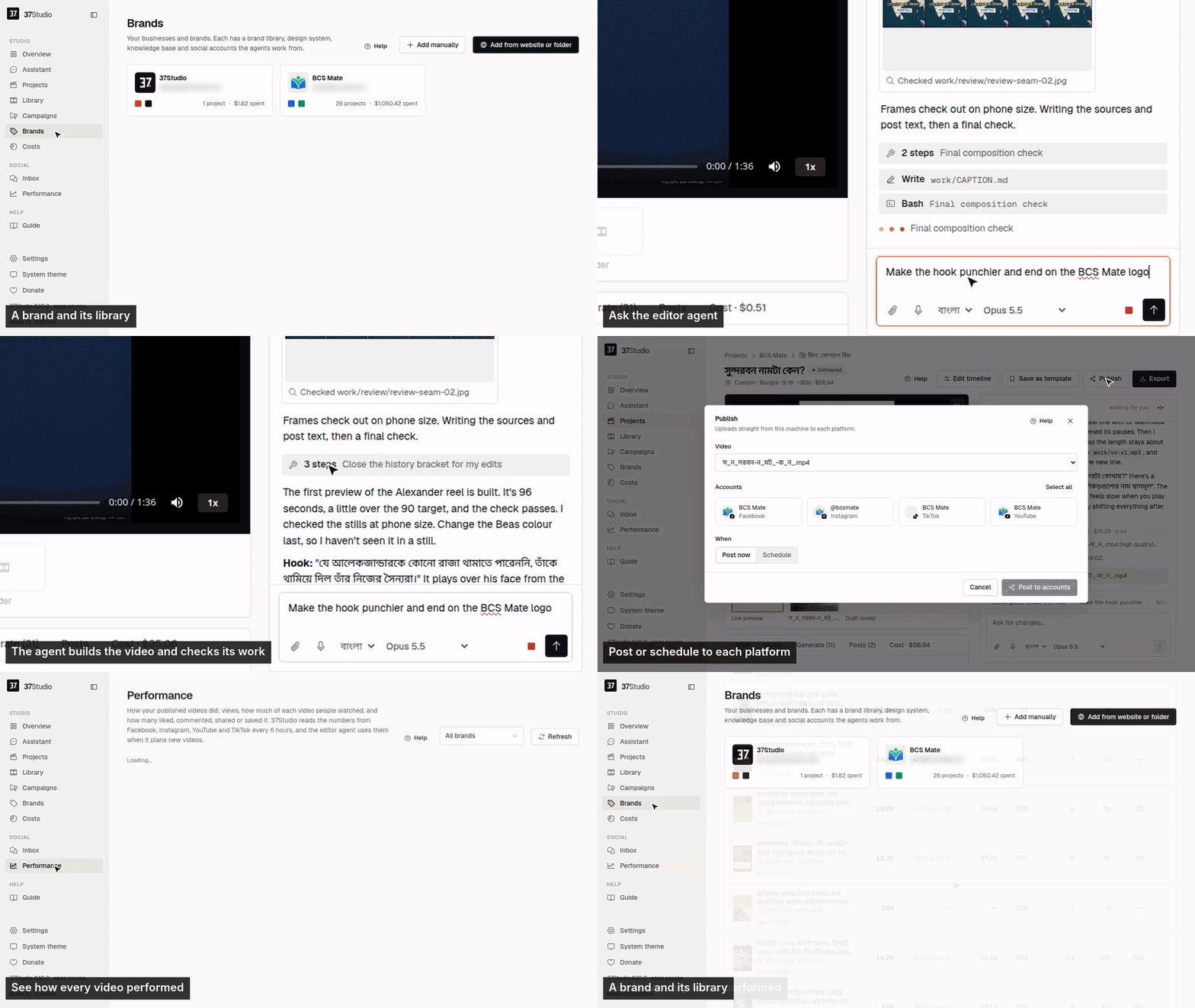
- 37Studio makes videos for a business and runs its social accounts, from one app on your own computer. Add a brand from its website and it builds a brand library and a knowledge base. Brief a video and Claude Code, the editor agent, builds it as a [HyperFrames](https://github.com/heygen-com/hyperframes) composition in that brand, checks its own frames and renders it on your machine. Publish it to the brand's accounts with a caption written for each platform, now, on a schedule or on Autopilot. Messages and comments land in one inbox with replies drafted from the knowledge base.
- You bring your own keys (a Claude plan or an Anthropic API key; optionally OpenAI, xAI, OpenRouter, Gemini, fal.ai or ElevenLabs) and pay the providers directly. It is free and open source under the MIT License, made by [Shaitrish](https://shaitrish.com) in Dhaka.
- ## Install
- **Desktop app (Windows 10/11 and Linux).** Download it from [studio.shaitrish.com/desktop](https://studio.shaitrish.com/desktop):
- - **Windows:** open the installer. It needs no admin rights and adds 37Studio to the Start menu and desktop. Windows may say it protected your PC, because the app isn't signed yet: **More info** → **Run anyway**.
- - **Ubuntu 24.04+ / Debian 13+:** `sudo apt install ./37studio_*_amd64.deb` (it brings ffmpeg and Python).
- Then install the tools the agent uses. Overview → **Finish setup** in the app lists anything missing:
- ```bash
- winget install Git.Git Gyan.FFmpeg OpenJS.NodeJS.LTS Python.Python.3.13 # Windows only
- npm install -g @anthropic-ai/claude-code # Node.js 22+; on Linux with sudo
- ```
- [docs/desktop.md](docs/desktop.md) covers other Linux, the .zip, building it yourself and troubleshooting.
- **Docker (macOS, or a server).** Every tool comes bundled. On your computer, install Docker Desktop, unzip [37studio.zip](https://studio.shaitrish.com/37studio.zip) and double-click `start.bat`, `start.command` or `start.sh`. For a team, or replies and Autopilot around the clock, run it on a Linux server with HTTPS and a password. [docs/docker.md](docs/docker.md) has both, plus building from source and every setting.
- ## One-Click Deploy
- [](https://repocloud.io/details/37Studio/)
- ## First steps
- 1. **Add your Claude key** in Settings → AI services (an Anthropic API key, or a Claude plan token from `claude setup-token`).
- 2. **Add a brand** from its website or a folder. In 5 to 10 minutes its library, design system and knowledge base are ready.
- 3. **Make a video.** **New video** asks what to make; the agent builds it while you watch, and takes changes in plain words.
- 4. **Connect accounts** on the brand's **Social** tab ([how](docs/platforms.md)), then **Publish** now, on a schedule, or with Autopilot.
- The [user guide](docs/guide.md), also inside the app as **Guide**, covers every screen.
- ## What it does
- - **Brand library from a website or folder.** Paste a URL, or pick the brand's own project folder, and get its logos, people, photos, fonts and exact colours sorted and captioned, plus a design system (`design.md`) and a knowledge base (`knowledge.md`).
- - **An editor agent.** Claude Opus 5.5 builds each video as an animated HyperFrames composition, checks its own frames and takes changes in plain words. Edit by hand on a real timeline when you want to.
- - **Many kinds of output.** Hook reels, captioned clips, motion-graphics explainers, podcast clips, promo ads, square and portrait posts, and thumbnails. Save any finished video as a template for the next one.
- - **Long recordings into many videos.** A 2-hour class becomes ten reels. Transcription runs locally with faster-whisper: free, private, about 100 languages. YouTube and Google Drive links import directly.
- - **Generated media.** Gemini images; video clips from Gemini or, through fal.ai, Seedance, Kling, Veo, Wan and others; ElevenLabs voiceover, sound effects and music. Each brand can keep its own voices, cloned from a short recording of the founder or presenter, with a default per language; ask the agent for a voice by name, or to switch a finished video to it. The agent asks before media on one project costs more than the limit in Settings → Spending, and keeps a person or product consistent by reusing one reference image across shots. The agent uses them only when the footage and brand library can't do the job, and says what it made.
- - **Publishing and Autopilot.** Post to any mix of a brand's accounts on nine platforms now or on a schedule, or let a content plan make a fresh video before every slot and wait for one-click approval.
- - **One inbox.** Messenger, Instagram and WhatsApp messages and Facebook and Instagram comments, with replies drafted in the customer's language, following the brand's own rules. Off, drafts to approve, or fully automatic, per brand.
- - **Performance.** Views, how much of each video people watched, likes, comments, shares, saves and engagement for every video on the brand's Facebook, Instagram, YouTube and TikTok, best and worst on top. The editor agent reads the same numbers before it plans the next video.
- - **Assistant and MCP.** Run everything by chatting with the Assistant in the sidebar, or from your own AI agent (Claude Code, Claude Desktop, Cursor) through 37Studio's MCP server: brands, campaigns, videos, publishing, Autopilot, settings and connections.
- - **Real costs.** Every project, campaign and brand shows its AI spend in your currency. No markup: you pay the AI providers directly.
- ## Platforms
- | Platform | Publishes | Inbox | You connect with |
- | --- | --- | --- | --- |
- | Facebook Pages | Reels and Page videos | Messenger, comments | Facebook Login through your own Meta app |
- | Instagram (Business or Creator) | Reels | Messages, comments | The same sign-in as Facebook |
- | YouTube | Videos | | Your own Google OAuth client |
- | TikTok | Videos, or to the creator's drafts | | Your own TikTok app |
- | LinkedIn | Videos to your profile; company Pages with LinkedIn's approval | | Your own LinkedIn app |
- | X | Video posts | | Your own X app |
- | Pinterest | Video Pins, on the boards you pick | | Your own Pinterest app |
- | Bluesky | Video posts | | Handle and an app password |
- | Mastodon | Video posts | | Server URL and an access token |
- | WhatsApp | | Messages | A WhatsApp Business API number and a Cloudflare Tunnel to your copy (or your own relay) |
- Not possible: **Threads** (its API only takes a video from a public URL, which a local-first app doesn't have), **Facebook Groups and personal profiles** (Meta removed it), **Reddit and Snapchat** (no usable public video-posting API). Setup for each one: [docs/platforms.md](docs/platforms.md).
- ## How it works
- ```
- Browser ──► 37studio (Go, one binary) ──► SQLite + data/ (brands, projects, encrypted tokens and keys)
- ├─ claude -p, the editor agent ──► ffmpeg · npx hyperframes · 37studio gen / transcribe / clip
- ├─ hyperframes render (Chrome + ffmpeg) ──► out/*.mp4, *.png
- ├─ post queue ──► Facebook · Instagram · YouTube · TikTok · LinkedIn · X · Pinterest · Bluesky · Mastodon
- └─ inbox loop ──► Messenger, Instagram (Graph API) · WhatsApp (webhook through your tunnel, or your own relay)
- ```
- Claude Code does the editing, HyperFrames renders, Go serves and React is the UI. Any MCP client (Claude Code, Claude Desktop, Cursor) can run the whole app through its MCP server at `http://localhost:8080/mcp`: `claude mcp add --transport http 37studio http://localhost:8080/mcp`. [docs/architecture.md](docs/architecture.md) has the job flow, the agent harness, a code map and the release process.
- **What leaves my computer?** Calls to the AI providers you set up, uploads to the platforms you connect, and the update check (GitHub Releases). Nothing is sent to Shaitrish. Questions and problems: the guide's [Troubleshooting](docs/guide.md#troubleshooting), or [open an issue](https://github.com/Shaitrish/37studio/issues).
- ## Support the project
- 37Studio is free and stays free. If it saves you time, you can [donate](https://studio.shaitrish.com/donate) by US bank transfer or bKash, star the repo, or share what you made with it. Want it set up for you? Shaitrish does paid setup over a screen share: [message us on WhatsApp](https://wa.me/8801635191148?text=Hi%2C%20I%27d%20like%20help%20setting%20up%2037Studio).
- ## Contributing
- Bug reports, ideas and pull requests are welcome: [CONTRIBUTING.md](CONTRIBUTING.md) covers running it from source and the checks to run. Report security problems privately, as [SECURITY.md](SECURITY.md) describes.
- ## License
- [MIT](LICENSE) © Shaitrish. The open-source tools 37Studio bundles (HyperFrames, ffmpeg, faster-whisper and others) keep their own licenses. Claude Code is Anthropic's software, used under Anthropic's terms.
Ratings and comments
Sign in to rate this skill.
Sign inFree to use. If it’s helped, pass it on.