vexor-marketplace
A semantic search engine for files and code.
Safety scan
A static text scan, not a guarantee. Select the badge to see what was scanned and every finding.
Badge for your README

Markdown
[](/listings/scarletkc--vexor)HTML
<a href="/listings/scarletkc--vexor"><img src="/api/listings/scarletkc--vexor/badge.svg" alt="findsafeskills safety rating" /></a>Install
Install instructions from the README
As written by the repo's author. findsafeskills has not verified these steps.
Download standalone binary from [releases](https://github.com/scarletkc/vexor/releases) (no Python required), or:
pip install vexor # also works with pipx, uv
What was scanned
The files the safety scan read, as written by the repository's author and shown as plain text. Lines with a finding are marked.
.claude-plugin/marketplace.json · Manifest · 19 lines
View this file on GitHub (read at the repository's current version: the scan did not record which commit it read)
This file has changed since it was scanned, so this is not exactly the text that was scanned, and no line is marked. The findings are listed with the safety scan above.
- {
- "name": "vexor-marketplace",
- "metadata": {
- "description": "Marketplace for the Vexor Claude Code plugin (skills for indexing and semantic search)."
- },
- "owner": {
- "name": "scarletkc"
- },
- "plugins": [
- {
- "name": "vexor",
- "source": "./plugins/vexor",
- "description": "A semantic search engine for files and code (Vexor skill bundle).",
- "category": "developer-tools",
- "tags": ["search", "indexing", "cli"],
- "strict": true
- }
- ]
- }
README.md · README · 191 lines
View this file on GitHub (read at the repository's current version: the scan did not record which commit it read)
This file has changed since it was scanned, so this is not exactly the text that was scanned, and no line is marked. The findings are listed with the safety scan above.
- <div align="center">
- <img src="https://raw.githubusercontent.com/scarletkc/vexor/refs/heads/main/assets/vexor.svg" alt="Vexor" width="35%" height="auto">
- # Vexor
- [](https://www.python.org/downloads/)
- [](https://pypi.org/project/vexor/)
- [](https://github.com/scarletkc/vexor/actions/workflows/publish.yml)
- [](https://codecov.io/github/scarletkc/vexor)
- [](https://coderabbit.ai)
- [](https://github.com/scarletkc/vexor/blob/main/LICENSE)
- [](https://deepwiki.com/scarletkc/vexor)
- </div>
- ---
- **Vexor** is a semantic search engine that builds reusable indexes over files and code.
- It supports configurable embedding and reranking providers, and exposes the same core through a Python API, a CLI tool, and an MCP server.
- <video src="https://github.com/user-attachments/assets/4d53eefd-ab35-4232-98a7-f8dc005983a9" controls="controls" style="max-width: 600px;">
- Vexor Demo Video
- </video>
- ## Featured In
- Vexor has been recognized and featured by the community:
- - **[Ruan Yifeng's Weekly (Issue #379)](https://github.com/ruanyf/weekly/blob/master/docs/issue-379.md#ai-%E7%9B%B8%E5%85%B3)** - A leading tech newsletter in the Chinese developer community.
- - **[Awesome Claude Skills](https://github.com/VoltAgent/awesome-claude-skills?tab=readme-ov-file#development-and-testing)** - Curated list of best-in-class skills for AI agents.
- - **[Awesome MCP Servers](https://github.com/punkpeye/awesome-mcp-servers#-developer-tools)** - Curated list of Model Context Protocol servers.
- - **[Awesome CLI Apps](https://github.com/agarrharr/awesome-cli-apps#search)** - Curated list of command-line apps.
- ## Why Vexor?
- When you remember what a file *does* but forget its name or location, Vexor finds it instantly—no grep patterns or directory traversal needed.
- Designed for both humans and AI coding assistants, enabling semantic file discovery in autonomous agent workflows.
- ## Install
- Download standalone binary from [releases](https://github.com/scarletkc/vexor/releases) (no Python required), or:
- ```bash
- pip install vexor # also works with pipx, uv
- ```
- ## Quick Start
- ### 0. Guided Setup (Recommended)
- ```bash
- vexor init
- ```
- The wizard also runs automatically before the first interactive operational
- command when no config exists. Configuration-management (`vexor config`), MCP,
- help, and version commands run directly.
- ### 1. Search
- ```bash
- vexor "api client config" # defaults to search current directory
- # or explicit path:
- vexor search "api client config" --path ~/projects/demo --top 5
- # in-memory search only:
- vexor search "api client config" --no-cache
- ```
- Vexor auto-indexes on first search. Example output:
- ```
- Vexor semantic file search results
- ──────────────────────────────────
- # Similarity File path Lines Preview
- 1 0.923 ./src/config_loader.py - config loader entrypoint
- 2 0.871 ./src/utils/config_parse.py - parse config helpers
- 3 0.809 ./tests/test_config_loader.py - tests for config loader
- ```
- ### 2. Explicit Index (Optional)
- ```bash
- vexor index # indexes current directory
- # or explicit path:
- vexor index --path ~/projects/demo --mode code
- ```
- Useful for CI warmup or when `auto_index` is disabled.
- ## Python API
- Vexor can also be imported and used directly from Python:
- ```python
- from vexor import index, search
- index(path=".", mode="head")
- response = search("config loader", path=".", mode="name")
- for hit in response.results:
- print(hit.path, hit.score)
- ```
- Configuration follows the same global and project-level resolution as the CLI.
- For runtime overrides, cache controls, and per-call options, see
- [`docs/api/python.md`](https://github.com/scarletkc/vexor/tree/main/docs/api/python.md).
- ## AI Agent Skill
- This repo includes a skill for AI agents to use Vexor effectively:
- ```bash
- vexor install --skills claude # Claude Code
- vexor install --skills codex # Codex
- ```
- Skill source: [`plugins/vexor/skills/vexor-cli`](https://github.com/scarletkc/vexor/raw/refs/heads/main/plugins/vexor/skills/vexor-cli/SKILL.md)
- ## MCP Server
- <!-- mcp-name: io.github.scarletkc/vexor -->
- [](https://glama.ai/mcp/servers/scarletkc/vexor)
- > [!NOTE]
- > The Agent Skill and the MCP server provide the same core capability — pick **one** per agent.
- > The skill teaches shell-capable agents (Claude Code, Codex) to drive the full CLI and assumes `vexor` is installed on PATH; the MCP server exposes search as native tools, works in any MCP client (Cursor, Windsurf, Zed, ...), and can bootstrap without prior setup via `uvx` and environment variables.
- Vexor ships a built-in [MCP](https://modelcontextprotocol.io) stdio server, so any MCP-capable agent can use semantic file search as a native tool:
- ```bash
- claude mcp add vexor -- vexor mcp # Claude Code
- codex mcp add vexor -- vexor mcp # Codex
- ```
- Or configure manually in any MCP client, optionally supplying the API key
- and any config overrides via `env` (no `vexor init` needed):
- ```json
- {
- "mcpServers": {
- "vexor": {
- "command": "vexor",
- "args": ["mcp"],
- "env": {
- "VEXOR_API_KEY": "sk-...",
- "VEXOR_CONFIG_JSON": "{\"provider\": \"gemini\", \"rerank\": \"bm25\"}"
- }
- }
- }
- }
- ```
- The server exposes two tools: `vexor_search` (semantic file search, returning the matching source text so an agent rarely needs a follow-up file read) and `vexor_index` (explicit index warm-up). No extra dependencies are required. Vexor is listed on the [official MCP registry](https://registry.modelcontextprotocol.io) as `io.github.scarletkc/vexor`. See [`docs/mcp.md`](https://github.com/scarletkc/vexor/tree/main/docs/mcp.md) for tool schemas, environment variables, and client setup details.
- ## Configuration
- ```bash
- vexor init # guided setup (recommended)
- vexor config --set-api-key "YOUR_KEY" # or env: VEXOR_API_KEY / OPENAI_API_KEY / ...
- vexor config --set-provider openai # default; also gemini/voyageai/custom/local
- vexor config --rerank hybrid # optional: fuse exact keyword + semantic ranking
- vexor config --show # view effective settings and origins
- ```
- Global config lives in `~/.vexor/config.json`; the nearest
- `<project>/.vexor/config.json` can override a restricted set of behavior fields
- for that project. Non-secret fields can also be injected via `VEXOR_CONFIG_JSON`
- (useful for MCP clients and CI), and fully offline use is supported through
- local embedding models.
- See [`docs/configuration.md`](https://github.com/scarletkc/vexor/blob/main/docs/configuration.md) for the complete reference: project config fields and precedence, all config commands, API keys and environment variables, rerank strategies (hybrid / BM25 / FlashRank / remote), remote vs local providers, embedding dimensions, and offline local model setup.
- ## CLI Reference
- Everyday usage fits in `vexor "query"`, `vexor search`, and `vexor index` (see Quick Start). The full command table, common flags, index modes (`--mode auto/name/head/brief/full/code/outline`), `.vexorignore` files, project-local indexes (`vexor index --local`), cache behavior, and porcelain output format are documented in [`docs/cli.md`](https://github.com/scarletkc/vexor/blob/main/docs/cli.md).
- ## Documentation
- - [Configuration](https://github.com/scarletkc/vexor/blob/main/docs/configuration.md) — providers, API keys, rerank, embedding dimensions, local models
- - [CLI reference](https://github.com/scarletkc/vexor/blob/main/docs/cli.md) — commands, flags, index modes, cache behavior
- - [MCP server](https://github.com/scarletkc/vexor/blob/main/docs/mcp.md) — client setup, environment variables, tool schemas
- - [Python API](https://github.com/scarletkc/vexor/blob/main/docs/api/python.md) — programmatic usage
- - [Collections API](https://github.com/scarletkc/vexor/blob/main/docs/api/collections.md) — database-backed text records and filtered search
- ## Contributing
- Contributions, issues, and PRs welcome! Commit messages and PR titles follow [Conventional Commits](https://www.conventionalcommits.org) (e.g. `feat(mcp): add stdio server`). Star if you find it helpful.
- ## Star History
- [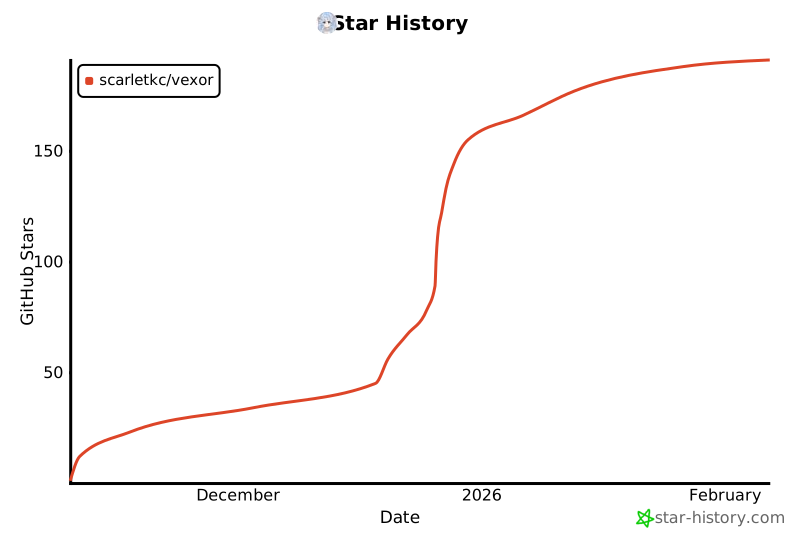](https://www.star-history.com/#scarletkc/vexor&type=date&legend=top-left)
- ## License
- [MIT](http://github.com/scarletkc/vexor/blob/main/LICENSE)
Ratings and comments
Sign in to rate this skill.
Sign inFree to use. If it’s helped, pass it on.