mcphub
Self-hosted MCP gateway and control plane for connecting, controlling, and operating MCP servers.
Safety scan
A static text scan, not a guarantee. Select the badge to see what was scanned and every finding.
Check it deeper on your machine
It has changed since its scan on 11 Nov 2026.
As a Claude Code plugin, install it and then ask Claude Code:
/plugin marketplace add keithmackay/mackayi/plugin install scanskillsafety@mackayiDo a deep scan of https://github.com/samanhappy/mcphub with scanskillsafety
Or from a terminal, clone it and run it:
git clone https://github.com/keithmackay/scanskillsafety-skill ~/.claude/skills/scanskillsafetynode ~/.claude/skills/scanskillsafety/cli.cjs --deep 'https://github.com/samanhappy/mcphub'
It checks the exact commit: every file, its packages against OSV (api.osv.dev), how it compares with this page's scan (findsafeskills.com receives the repository's address), and, if you agree, Claude reading every file with your own Claude subscription. It never runs the code.
Badge for your README

Markdown
[](/listings/samanhappy--mcphub)HTML
<a href="/listings/samanhappy--mcphub"><img src="/api/listings/samanhappy--mcphub/badge.svg" alt="findsafeskills safety rating" /></a>Install
Install instructions from the README
As written by the repo's author. findsafeskills has not verified these steps.
Prerequisites
- **Docker** (recommended) — the fastest way to run MCPHub; all commands below use it - **Node.js** `>=20.0.0` and **pnpm** `10.12.4` — only needed to run from source or develop locally (see [Local Development](#local-development))
Start with Docker
docker run -p 3000:3000 -v ./data:/app/data samanhappy/mcphub
Open `http://localhost:3000` and log in with username `admin`. On first launch, if no `ADMIN_PASSWORD` environment variable is set, a random password is generated and printed to the server logs.
Settings, users, and credential bindings persist in `./data` by default.
Want your own servers? Before the first launch, create `data/mcp_settings.json` (see [Configuration](#configuration)). After launch, add servers in the dashboard or edit the existing file and restart MCPHub.
Configuration
Create `data/mcp_settings.json` before the first launch:
{
  "mcpServers": {
    "time": {
      "command": "npx",
      "args": ["-y", "time-mcp"]
    },
    "fetch": {
      "command": "uvx",
      "args": ["mcp-server-fetch"]
    }
  }
}📖 See [Configuration Guide](https://docs.mcphub.app/configuration/mcp-settings) for full options including OAuth, environment variables, and more.
Docker Deployment
See [Start with Docker](#start-with-docker) for the copy-paste command. Keep `./data` mounted so settings, users, and credential bindings survive container recreation.
Two image variants are published under `samanhappy/mcphub`:
- **`latest`** — the default image. Includes Node.js/pnpm, Python, uv/uvx, Git, and build tools. Covers most MCP servers. - **`latest-full`** — the extended image. Adds Rust toolchain (Cargo/rustc), Docker Engine, and Playwright browsers (Chrome + Firefox, amd64 only). Use this for Rust-based servers or container-in-container workflows. Larger download.
See [Docker Setup](https://docs.mcphub.app/configuration/docker-setup) for build options and Docker-in-Docker configuration.
Access Dashboard
Open `http://localhost:3000` (see [Start with Docker](#start-with-docker) for login details). You can also pre-set the password:
# Docker: set admin password via environment variable
docker run -p 3000:3000 -v ./data:/app/data -e ADMIN_PASSWORD=your-secure-password samanhappy/mcphub
> **Tip:** Change the admin password after first login for security.
> **Headless mode:** Set `DISABLE_WEB=true` to skip serving the bundled dashboard UI and run MCPHub with only the backend/API and MCP endpoints. This is useful when you want to manage servers directly from `mcp_settings.json`.
Connect AI Clients
Connect AI clients (Claude Desktop, Cursor, etc.) via:
http://localhost:3000/mcp           # All servers
http://localhost:3000/mcp/{group}   # Specific group
http://localhost:3000/mcp/{server}  # Specific server
http://localhost:3000/mcp/$smart    # Smart routing
http://localhost:3000/mcp/$smart/{group} # Smart routing within group> **Security note**: MCP endpoints require authentication by default to prevent accidental exposure. To allow unauthenticated MCP access, disable **Enable Bearer Authentication** in the Keys section. **Skip Authentication** only affects dashboard login. Use only in trusted environments.
📖 See [API Reference](https://docs.mcphub.app/api-reference) for detailed endpoint documentation.
What was scanned
The files the safety scan read, as written by the repository's author and shown as plain text. Lines with a finding are marked.
README.md · README · 214 lines
View this file on GitHub (read at the repository's current version: the scan did not record which commit it read)
This file has changed since it was scanned, so this is not exactly the text that was scanned, and no line is marked. The findings are listed with the safety scan above.
- # MCPHub
- > An open-source, self-hosted MCP gateway and control plane for connecting, controlling, and operating MCP servers.
- [](https://github.com/samanhappy/mcphub/actions/workflows/ci.yml)
- [](https://www.npmjs.com/package/@samanhappy/mcphub)
- [](https://hub.docker.com/r/samanhappy/mcphub)
- [](LICENSE)
- [](https://discord.gg/2BJehJZVH5)
- [](https://github.com/samanhappy/mcphub/stargazers)
- English | [Français](README.fr.md) | [中文版](README.zh.md)
- MCPHub provides a unified control point between AI clients and MCP servers. Connect local and remote MCP servers once, organize and route their capabilities through stable endpoints, control access with authentication, scoped credentials, and per-user visibility, and operate everything with centralized logs, activity tracking, and health monitoring.
- It works with MCP clients such as Claude Code, Cursor, Cherry Studio, OpenWebUI, and other MCP-compatible applications.
- 
- ## 🌐 Website, Demo & Docs
- - **Website**: [mcphub.app](https://www.mcphub.app/)
- - **Documentation**: [docs.mcphub.app](https://docs.mcphub.app/)
- - **Demo Environment**: [demo.mcphub.app](https://demo.mcphub.app/)
- ## 🚀 Features
- ### Connect once, expose everywhere
- - **Smart Routing** ⭐ - AI-powered tool discovery using vector semantic search ([Learn more](https://docs.mcphub.app/features/smart-routing))
- - **Unified MCP Gateway** - Expose all connected servers through stable MCP endpoints, including routes for groups and individual servers
- - **Server Aliases and Routing** - Define aliases and route clients to all servers, specific groups, individual servers, or smart routing
- - **SSE / Streamable HTTP / stdio Support** - Connect local and remote MCP servers over the supported transports
- - **File Staging** - Let stdio tools accept an uploaded copy of a client file or write a result the hub serves as a one-time download ([Learn more](docs/features/file-staging.mdx))
- - **Hot-Swappable Config** - Add, remove, or update servers without downtime
- ### Control access and credentials
- - **Per-user Credentials** ⭐ - Bind personal keys to one shared server, with encrypted storage and isolated stdio runtimes ([Learn more](docs/features/per-user-credentials.mdx))
- - **Authentication and Access Control** - Use OAuth 2.0, bearer keys, passkeys, and server or group visibility controls to manage access
- - **OAuth 2.0 Support** ⭐ - Both client and server modes for secure authentication ([Learn more](https://docs.mcphub.app/features/oauth))
- - **Social Login** - Seamless GitHub and Google login support with Better Auth integration (requires Database Mode)
- - **Server and Group Management** - Organize servers into groups, manage visibility, and control Tool, Prompt, and Resource exposure
- ### Operate with confidence
- - **Logs and Observability** - Inspect tool-call activity, request status, latency, and server logs
- - **Health Checks** - Monitor connection health and server status from one place
- - **Web Dashboard** - Manage server configuration and runtime operations from a browser
- - **MCP Apps Proxy** - Transparently forward interactive MCP Apps on single-server routes ([Learn more](https://docs.mcphub.app/features/mcp-apps))
- - **Tool Result Compression** - Transparently reduce large text tool outputs before they reach clients
- - **Database Mode** - Store configuration in PostgreSQL for production environments ([Learn more](https://docs.mcphub.app/configuration/database-configuration))
- - **Multiple Replicas** - Share PostgreSQL configuration with explicit session affinity and reconnect boundaries ([Deployment guide](https://docs.mcphub.app/configuration/replicas))
- - **Docker-Ready** - Deploy instantly with containerized setup
- ## 🔧 Quick Start
- ### Prerequisites
- - **Docker** (recommended) — the fastest way to run MCPHub; all commands below use it
- - **Node.js** `>=22.0.0` and **pnpm** `10.12.4` — only needed to run from source or develop locally (see [Local Development](#local-development))
- ### Start with Docker
- ```bash
- docker run -p 3000:3000 -v ./data:/app/data samanhappy/mcphub
- ```
- Open `http://localhost:3000` and log in with username `admin`. On first launch, if no `ADMIN_PASSWORD` environment variable is set, a random password is generated and printed to the server logs.
- Settings, users, and credential bindings persist in `./data` by default.
- Want your own servers? Before the first launch, create `data/mcp_settings.json` (see [Configuration](#configuration)). After launch, add servers in the dashboard or edit the existing file and restart MCPHub.
- ### Configuration
- Create `data/mcp_settings.json` before the first launch:
- ```json
- {
- "mcpServers": {
- "time": {
- "command": "npx",
- "args": ["-y", "time-mcp"]
- },
- "fetch": {
- "command": "uvx",
- "args": ["mcp-server-fetch"]
- }
- }
- }
- ```
- 📖 See [Configuration Guide](https://docs.mcphub.app/configuration/mcp-settings) for full options including OAuth, environment variables, and more.
- ### Docker Deployment
- See [Start with Docker](#start-with-docker) for the copy-paste command. Keep `./data` mounted so settings, users, and credential bindings survive container recreation.
- Two image variants are published under `samanhappy/mcphub`:
- - **`latest`** — the default image. Includes Node.js/pnpm, Python, uv/uvx, Git, and build tools. Covers most MCP servers.
- - **`latest-full`** — the extended image. Adds Rust toolchain (Cargo/rustc), Docker Engine, and Playwright browsers (Chrome + Firefox, amd64 only). Use this for Rust-based servers or container-in-container workflows. Larger download.
- See [Docker Setup](https://docs.mcphub.app/configuration/docker-setup) for build options and Docker-in-Docker configuration.
- ### One-Click Deploy
- <a href="https://repocloud.io/details/MCPHub/"><img src="https://d16t0pc4846x52.cloudfront.net/deploylobe.svg" alt="Deploy on RepoCloud" height="42"></a>
- <a href="https://railway.com/deploy/mcphub"><img src="https://railway.com/button.svg" alt="Deploy on Railway" height="42"></a>
- ### Upgrading deployments with personal credentials
- Database mode requires a persistent `MCPHUB_CREDENTIAL_ENCRYPTION_KEY` or an existing key file; it no longer generates a local key automatically. Before replacing a working container, back up its original key and preserve the same value in deployment secrets. A database backup alone cannot recover encrypted credentials if the key is lost. See the [Credential Key Upgrade and Recovery Guide](docs/configuration/credential-key-upgrade.mdx) for working deployments and recovery after a failed upgrade.
- ### Access Dashboard
- Open `http://localhost:3000` (see [Start with Docker](#start-with-docker) for login details). You can also pre-set the password:
- ```bash
- # Docker: set admin password via environment variable
- docker run -p 3000:3000 -v ./data:/app/data -e ADMIN_PASSWORD=your-secure-password samanhappy/mcphub
- ```
- > **Tip:** Change the admin password after first login for security.
- > **Headless mode:** Set `DISABLE_WEB=true` to skip serving the bundled dashboard UI and run MCPHub with only the backend/API and MCP endpoints. This is useful when you want to manage servers directly from `mcp_settings.json`.
- ### Connect AI Clients
- Connect AI clients (Claude Desktop, Cursor, etc.) via:
- ```
- http://localhost:3000/mcp # All servers
- http://localhost:3000/mcp/{group} # Specific group
- http://localhost:3000/mcp/{server} # Specific server
- http://localhost:3000/mcp/$smart # Smart routing
- http://localhost:3000/mcp/$smart/{group} # Smart routing within group
- ```
- Set `SMART_ROUTING_PATH=my_smart` to use `/mcp/my_smart` (and `/mcp/my_smart/{group}`) without `$`. Restart to apply; `/mcp/$smart` remains supported. Include `BASE_PATH` before `/mcp` when configured. The custom segment must not match an existing server name, group name or group ID.
- > **Security note**: MCP endpoints require authentication by default to prevent accidental exposure. To allow unauthenticated MCP access, disable **Enable Bearer Authentication** in the Keys section. **Skip Authentication** only affects dashboard login. Use only in trusted environments.
- 📖 See [API Reference](https://docs.mcphub.app/api-reference) for detailed endpoint documentation.
- ## 📚 Documentation
- | Topic | Description |
- | ------------------------------------------------------------------------------ | --------------------------------- |
- | [Quick Start](https://docs.mcphub.app/quickstart) | Get started in 5 minutes |
- | [Configuration](https://docs.mcphub.app/configuration/mcp-settings) | MCP server configuration options |
- | [Database Mode](https://docs.mcphub.app/configuration/database-configuration) | PostgreSQL setup for production |
- | [OAuth](https://docs.mcphub.app/features/oauth) | OAuth 2.0 client and server setup |
- | [Smart Routing](https://docs.mcphub.app/features/smart-routing) | AI-powered tool discovery |
- | [MCP Apps](https://docs.mcphub.app/features/mcp-apps) | Interactive Apps transparent proxy |
- | [CLI Guide](https://docs.mcphub.app/features/cli) | Manage and call the hub from a terminal |
- | [Docker Setup](https://docs.mcphub.app/configuration/docker-setup) | Docker deployment guide |
- ## 🧑💻 Local Development
- ```bash
- git clone https://github.com/samanhappy/mcphub.git
- cd mcphub
- pnpm install
- pnpm dev
- ```
- Local development uses `admin` / `admin123` and stores its writable settings copy at `data/mcp_settings.dev.json`, so the repository `mcp_settings.json` stays credential-free.
- > For Windows users, start backend and frontend separately: `pnpm backend:dev`, `pnpm frontend:dev`
- 📖 See [Development Guide](https://docs.mcphub.app/development) for detailed setup instructions.
- ## 🔍 Tech Stack
- - **Backend**: Node.js, Express, TypeScript (ESM)
- - **Frontend**: React, Vite, Tailwind CSS
- - **Storage**: file-based `mcp_settings.json` by default; PostgreSQL via TypeORM with pgvector for Smart Routing
- - **Auth**: JWT + bcrypt for local accounts, with optional passkeys (WebAuthn); bearer keys; built-in OAuth 2.0 server (`@node-oauth/oauth2-server`); optional Better Auth for GitHub/Google login
- - **Protocol**: Model Context Protocol SDK
- ## 🏢 Production Support
- Running MCPHub in production?
- Work directly with the maintainer on production architecture, OAuth/OIDC,
- identity and access control, credential management, audit, Kubernetes, and HA readiness.
- [Discuss a production pilot →](https://www.mcphub.app/pricing)
- ## 👥 Contributing
- Contributions welcome! See our [Discord community](https://discord.gg/2BJehJZVH5) for discussions and support.
- ## ❤️ Sponsor
- [](https://github.com/sponsors/samanhappy)
- [](https://ko-fi.com/samanhappy)
- Chinese users can also support via WeChat Pay — see [中文版](README.zh.md).
- ## Acknowledgements
- - [AtomGit](https://atomgit.com/samanhappy/mcphub): Hosts MCPHub in China, making the project easier to access for users in mainland China.
- ## 🌟 Star History
- [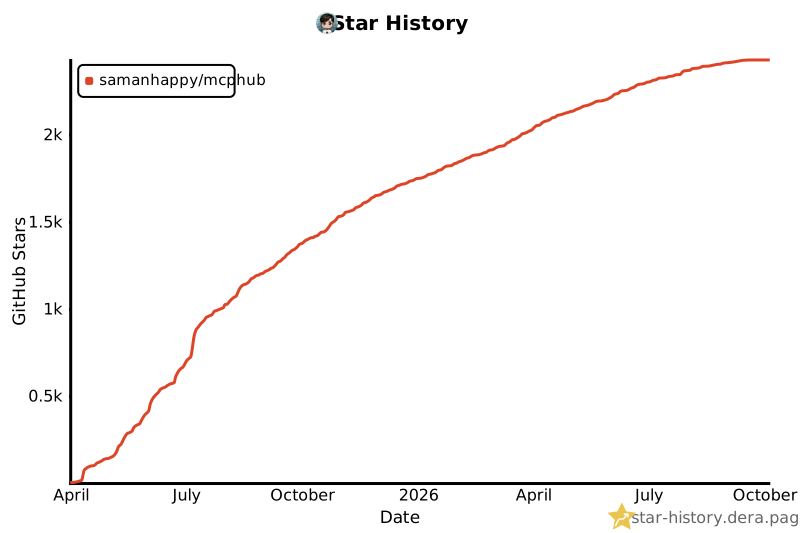](https://star-history.dera.page/#samanhappy/mcphub&Date)
- ## 📄 License
- Licensed under the [Apache 2.0 License](LICENSE).
Ratings and comments
Sign in to rate this skill.
Sign inFree to use. If it’s helped, pass it on.