Back to search
minder-publish
SkillGitHub
Self-hosted publishing for AI-generated HTML reports, files, and static sites. Share a link, control access, and update the content at the same URL.
Safety scan
A static text scan, not a guarantee. Select the badge to see what was scanned and every finding.
Badge for your README
Markdown
[](/listings/s1lash--minder-publish)HTML
<a href="/listings/s1lash--minder-publish"><img src="/api/listings/s1lash--minder-publish/badge.svg" alt="findsafeskills safety rating" /></a>Install
i
What was scanned
The files the safety scan read, as written by the repository's author and shown as plain text. Lines with a finding are marked.
README.md · README · 227 lines
- # minder publish.
- Turn an HTML report from your AI agent, a PDF, or a built static site into a link
- on your own server. Share it with your team, require a password, or keep it for
- yourself. Publish updates at the same address.
- One instance has one owner. The browser cabinet searches your publication history;
- the CLI and skills let an agent publish actual files. An optional MCP adapter uses
- the same API. Each instance manages its account and data locally.
- Review the required [security acceptance checks](docs/SECURITY.md#release-acceptance)
- before exposing a self-hosted build publicly.
- [Set up with your agent](#run-your-own-instance)
- ## Watch the demo
- [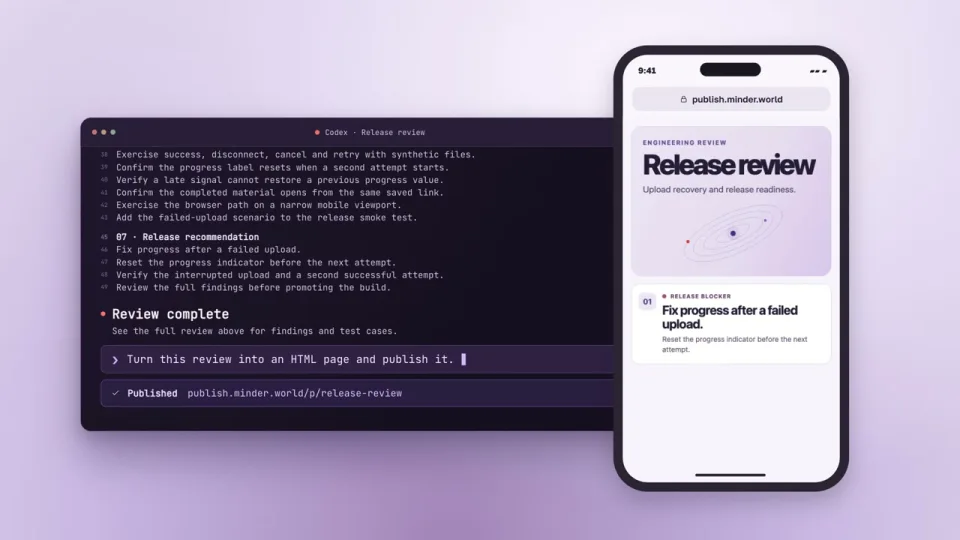](https://publish.minder.world/#demo)
- Follow one report from an agent’s terminal to a phone, then update and share it at the same address. [Open a sample publication](https://publish.minder.world/example/).
- - [Publish a Claude artifact as a website](https://publish.minder.world/guides/publish-claude-artifact/)
- - [Share an HTML file with a password](https://publish.minder.world/guides/share-html-with-password/)
- ## Run your own instance
- Set up one server, then connect the agents you already use.
- 1. **Deploy Minder Publish.** Start from a tagged source release. Follow the
- Docker Compose guide for your server, domain and TLS. Create the owner account,
- check server health and sign in to the cabinet.
- [Latest release](https://github.com/S1lash/minder-publish/releases/latest) · [Self-hosting guide](docs/SELF_HOSTING.md)
- 2. **Install the CLI and skill in your coding agents.** In the cabinet, go to
- **Connection**, choose **Codex** or **Claude Code**, and click **Copy setup
- instructions**. Paste the result into that agent. Repeat for each runtime and
- machine you use, including remote machines where the files live. The installer
- sets up both the CLI and its skill. When asked for a token, use **Create token**
- with **Manage materials**, run the exact command reported by the installer, and
- enter the token at its hidden prompt. Open a fresh chat to load the new skill.
- Other agents with terminal access can use the CLI and install the skill if
- supported. [CLI and skill setup](#connect-the-cli)
- 3. **Connect ChatGPT and Claude.** Enable remote MCP on your instance, then
- open **Connection → ChatGPT** or **Claude**. Start on the web and follow the
- steps to authorize the custom app or connector and choose when it asks for
- approval. Download the skill ZIP there and import it if your account
- supports skills. Try the connected app and skill in a fresh chat on each
- device you use, including your phone. OpenAI documents full custom MCP
- support for eligible ChatGPT Business and Enterprise/Edu workspaces on the
- web. If a client offers only read access or its connected app is unavailable,
- publish from the cabinet or CLI and keep the same instance.
- [Connection guide](docs/SELF_HOSTING.md#connect-an-ai-tool) ·
- [ChatGPT app availability](https://help.openai.com/en/articles/12584461-connecting-custom-mcp-servers-in-chatgpt) ·
- [Claude connector availability](https://support.claude.com/en/articles/11176164-use-connectors-to-extend-claude-s-capabilities)
- 4. **Make one test publication.** Create a small HTML page with sample text,
- open its link on your phone and update it from another connected client.
- Check that the new version opens at the original address. Use
- **Settings → Publication defaults** to set the access and expiry you want
- for future publications.
- ### Give this to your coding agent
- ```text
- Help me set up Minder Publish from https://github.com/S1lash/minder-publish.
- Follow the project's self-hosting guide and use a published release tag. If I already have an instance,
- verify its URL and health. Otherwise deploy to my chosen server and domain,
- then verify HTTPS and help me sign in as the owner.
- Set up the coding agents, ChatGPT and Claude that I use by following the
- Connection page. If you cannot reach my signed-in cabinet, ask me to paste its
- Copy setup instructions text for the relevant coding agent. Do the steps you
- can, and guide me through sign-in, authorization or skill upload where needed.
- For a new connector, ask how often it should request approval.
- For a new CLI token, give me the installer's exact terminal command and ask
- me to use its hidden prompt. Keep passwords and tokens in private prompts or
- sign-in forms. Tell me which clients you can verify, and use the cabinet or
- CLI if a cloud client has no write access.
- Publish a small HTML page titled "Publish setup check" with sample text,
- link access and a one-day expiry. Save the returned material ID and stable link.
- Open the link, then update that ID to say "Version 2" without changing access
- or expiry. Verify the new content at the original link. If a second client can
- publish, use it for the update. Return the link and say what I can check on my
- phone if you cannot test the phone yourself.
- ```
- ## What you can publish
- - Any ordinary file, including HTML, documents, images, audio, video and archives.
- - A built static site: a directory through the CLI, or an explicitly selected ZIP
- through the cabinet. The service does not run your build scripts.
- - A new immutable revision under the same stable link, preserving omitted metadata,
- access, password, expiry and cleanup rules.
- Choose owner-only, link or password access. Access expiry, file cleanup and record
- retention are separate policies. The owner can open protected materials through an
- active session, search by title/description/filename, pause, extend, expire or delete
- publications. Access badges identify password-protected materials; checkbox filters
- include expired and deleted-file records on demand. The owner can copy a saved
- publication password after recent authentication. New-publication defaults and
- storage limits are configurable. The UI
- ships in English, Russian, Spanish and French, with light, dark and system themes.
- Opening a material as its owner shows a thin management rail around the original
- document. The side menu previews saved versions, restores one as a new current
- version, copies the stable link or password, and shows guest-opening counts.
- **View without owner tools** opens the original separately; **Check guest access**
- checks the real password/access gate without counting an opening. The choice to
- show owner tools is remembered in this browser. History retention fits inside the
- instance storage quota; see [revision history](docs/REVISION_HISTORY.md).
- Use **Edit link** in the cabinet or the owner menu to give a publication a named
- address. The previous address stops working by default. Keep it when recipients
- still need it, and disable it later from the same menu.
- Shared links expose messenger-friendly titles, descriptions and a brand thumbnail.
- Protected materials use a generic card without revealing their contents. See
- [link previews](docs/LINK_PREVIEWS.md) for platform behavior and deployment requirements.
- Static sites can include a raster image for their library cover.
- See [site covers](docs/implementation/API.md#site-covers) for bundle filenames.
- Password protection is an access gate, not encryption. Author HTML runs on isolated
- revision origins. Read [the security model](docs/SECURITY.md) before sharing sensitive
- or executable material.
- ## Supported environments
- - **Server:** Docker Compose with Linux containers on a Linux host such as an Ubuntu
- VPS, or on macOS with OrbStack. Python for the server ships in the container.
- - **CLI and local skills:** Python 3.10 or later on Linux or macOS. Install the CLI
- on the machine where the agent reads the files you want to publish.
- For discussion of other environments, see [Contributing](CONTRIBUTING.md).
- ## Connect the CLI
- The [recommended setup](#run-your-own-instance) verifies the instance's installer
- and checks the connection. Each runtime's skill remembers its selected instance
- and verifies it before publishing. The supplied Docker image includes the
- CLI-only release wheel. See [the self-hosting guide](docs/SELF_HOSTING.md#connect-an-ai-tool)
- for supplying the wheel with a direct source installation.
- To install the CLI manually, use an isolated Python environment and an inspected
- source release:
- ```sh
- python -m pip install .
- minder-publish configure home --url https://publish.example.com
- minder-publish doctor --brief --json
- ```
- `configure` prompts privately for a device token created in the cabinet. For
- noninteractive setup, use `--token-stdin` or a private `--token-file`; never put the
- token in an argument, a URL, a skill or model context. Named instances are selected
- with `--instance NAME`. To connect through environment variables, pair
- `MINDER_PUBLISH_URL` with `MINDER_PUBLISH_TOKEN` or `MINDER_PUBLISH_TOKEN_FILE`.
- A complete pair supplies the connection independently of saved profiles. Unset
- these variables to use a named profile. Configuration uses your user profile.
- Redacted configuration
- is available with `minder-publish config --json`.
- The selected instance applies across project directories. Use another named
- instance explicitly when you want another destination. Omit `--brief` from doctor
- to inspect the full server capabilities.
- ```sh
- minder-publish preflight ./report.html --kind file --json
- minder-publish publish ./report.html --kind file --title "Research report" --json
- minder-publish preflight ./dist --kind site --entry index.html --json
- minder-publish publish ./dist --kind site --entry index.html --access link --expiry default --json
- minder-publish list --query "Research report" --json
- minder-publish update MATERIAL_ID ./report-v2.html --kind file --json
- ```
- After reviewing preflight, pass its `manifest_sha256` with `--expect-manifest HASH`
- to publish or update. If content or the site entry changed, the client stops before
- upload; review the new manifest before retrying. This guard covers content, not
- access or expiry policy. Dependency scanning covers static HTML/CSS references;
- empty findings do not guarantee that a site works offline.
- Private publications normally have no expiry; external links use the instance's
- external default. A ZIP remains a file unless site mode is explicit. Preflight
- reports included files, sensitive-name exclusions, paths and sizes. Review it before
- sending anything; do not bypass exclusions without inspecting the affected files.
- Use the server-returned `stable_url` rather than constructing a link.
- ## Add skills or MCP
- The combined setup installs the skill automatically. For a separate skill repair
- or installation, preview its diff first, then apply the managed files you reviewed.
- Use `--instance NAME` to select its preferred instance; otherwise the saved CLI
- default is selected. The preview reports the instance and server URL:
- ```sh
- minder-publish skills --runtime all
- minder-publish skills --runtime all --apply
- ```
- The installer changes only the named managed skill; it refuses to overwrite an
- unmanaged skill. Other tools can use [the same skill source](skill/minder-publish/SKILL.md)
- and the CLI.
- Claude Code invokes it as `/minder:publish`; Codex uses `$minder-publish`. The
- portable skill archive retains the `minder-publish` name; the installer applies the
- Claude Code namespace without copying a second set of instructions.
- For optional local MCP, use the source distribution. With a Python version supported by the MCP extra, install
- `python -m pip install ".[mcp]"` and configure the harness to launch
- `minder-publish-mcp` using the same private instance configuration. It uses stdio by
- default. Remote MCP is disabled by default; enabling it is a separate operator choice.
- Remote MCP supports owner-authorized OAuth connections as well as scoped device
- Bearer credentials. Its tools do not read server filesystem paths. For binary files
- or a complete site, a browser upload request lets the owner select, review and
- publish the actual file; the assistant retrieves the confirmed link. Optional host
- file inputs require an operator-approved source host. See [connection configuration](docs/SELF_HOSTING.md#connect-an-ai-tool)
- for setup and provider-specific limitations.
- ## Development and contracts
- The full Python distribution contains `server/`, `client/` and `mcp/` under
- [`src/minder_publish/`](src/minder_publish/). Browser resources and translations are
- packaged with the server. The [architecture](docs/ARCHITECTURE.md) describes component and data flows.
- The [packaged defaults](src/minder_publish/defaults.json) own configuration values;
- [security acceptance](docs/SECURITY.md#release-acceptance) defines release checks.
- Legacy import and API compatibility are maintained within the same distribution
- and verified against synthetic fixtures.
- See [CONTRIBUTING.md](CONTRIBUTING.md) for development, tests and clean wheel checks.
- Application code is [MIT](LICENSE); bundled fonts retain their adjacent OFL notices.
Ratings and comments
Sign in to rate this skill.
Sign inFree to use. If it’s helped, pass it on.