gear
Gear (General Evolution Architecture) is RSI infrastructure for AI agents. Use Gear to refine agent harnesses.
Safety scan
A static text scan, not a guarantee. Select the badge to see what was scanned and every finding.
Check it deeper on your machine
It has changed since its scan on 11 Nov 2026.
As a Claude Code plugin, install it and then ask Claude Code:
/plugin marketplace add keithmackay/mackayi/plugin install scanskillsafety@mackayiDo a deep scan of https://github.com/rsi-gear/gear with scanskillsafety
Or from a terminal, clone it and run it:
git clone https://github.com/keithmackay/scanskillsafety-skill ~/.claude/skills/scanskillsafetynode ~/.claude/skills/scanskillsafety/cli.cjs --deep 'https://github.com/rsi-gear/gear'
It checks the exact commit: every file, its packages against OSV (api.osv.dev), how it compares with this page's scan (findsafeskills.com receives the repository's address), and, if you agree, Claude reading every file with your own Claude subscription. It never runs the code.
Badge for your README

Markdown
[](/listings/rsi-gear--gear)HTML
<a href="/listings/rsi-gear--gear"><img src="/api/listings/rsi-gear--gear/badge.svg" alt="findsafeskills safety rating" /></a>Install
Install instructions from the README
As written by the repo's author. findsafeskills has not verified these steps.
Use Gear through its **Refine Skill** in Codex, Claude Code, DSH, or another compatible agent environment. Start with an existing benchmark or provide your own tasks in [Harbor format](docs/guide/en/datasets.md).
For installation and dependency setup, see the [quick start guide](docs/guide/en/quickstart.md).
**Let your agent install Gear.** Paste the following prompt into your agent session:
Follow https://rsigear.xyz/docs/gear/quickstart to install Gear in my environment.
Install rsi-gear@latest and agent-hitch@latest using npm and verify that all required dependencies are available.
Install the complete Refine Skill bundled with Gear in my current agent environment and configure its connection to Gear.
Use my actual task paths, target harness, and model settings; ask me for any missing information.
Verify that the Refine Skill can connect to Gear, then report the verification result and explain how to start my first optimization run.
For manual installation, install Gear and [Hitch](https://github.com/rsi-gear/agent-hitch), the evaluation runner. The following example also installs DSH as the task agent runtime:
npm install --global rsi-gear@latest agent-hitch@latest @deepseek-ai/dsh@latest
hitch eval setup harbor
Follow the [setup guide](docs/guide/en/quickstart.md) to install the bundled [Refine Skill](skills/refine/SKILL.md) in your agent environment and configure your benchmark. Then invoke `/refine` where supported, or submit the following request:
Use the Refine Skill to improve performance on AutomationBench's Marketing tasks.
Use Codex + Astra to propose improvements and DSH + Luna to run the tasks.
Run one round of optimization.
The agent that proposes changes is called the **Meta agent**. It can use a different model from the task agent that executes the benchmark tasks.
What was scanned
The files the safety scan read, as written by the repository's author and shown as plain text. Lines with a finding are marked.
README.md · README · 234 lines
View this file on GitHub (read at the repository's current version: the scan did not record which commit it read)
This file has changed since it was scanned, so this is not exactly the text that was scanned, and no line is marked. The findings are listed with the safety scan above.
- <div align="center">
- # Gear
- **A modular framework for recursive harness evolution.**
- [](https://www.npmjs.com/package/rsi-gear)
- [](https://rsi-gear.github.io/)
- [](https://huggingface.co/spaces/WizardTY/GEAR)
- 
- [](LICENSE)
- [](https://discord.gg/KH6D8Bezm)
- [English](README.md) | [简体中文](README.zh-CN.md) · [User guide](https://rsigear.xyz/docs/gear) · [Examples](https://rsigear.xyz/docs/gear/examples/evolution-search)
- </div>
- 
- <p align="center">
- <strong>RSI in Action: AutomationBench Evolution Replay</strong>
- </p>
- Gear is an open-source optimization framework for improving AI agent performance on real-world tasks.
- To tailor an agent to a target scenario, first prepare a benchmark of representative tasks with clear success criteria. You can use an existing benchmark or [build your own task set](docs/guide/en/datasets.md). Run an algorithm through the Python SDK or the [Refine Skill](skills/refine/SKILL.md). Gear uses task feedback to improve the agent’s instructions, tools, and workflows; model training has a separate experimental lifecycle.
- The two examples below compare Luna Max with a Gear-optimized harness against Astra Max with Codex on the same AutomationBench tasks. Follow their execution from reading source information and applying rules to delivering the final result.
- <table>
- <tr>
- <th width="50%">Landing page alerts</th>
- <th width="50%">Featured snippet opportunities</th>
- </tr>
- <tr>
- <td><a href="docs/guide/assets/landing-page-alerts-replay.mp4"><img src="docs/guide/assets/landing-page-alerts-replay.gif" width="100%" alt="Trajectory replay: Luna Max with GEAR includes Careers in the alert; Astra Max with Codex misses it."></a></td>
- <td><a href="docs/guide/assets/featured-snippet-replay.mp4"><img src="docs/guide/assets/featured-snippet-replay.gif" width="100%" alt="Trajectory replay: Luna Max with GEAR queues crm pricing; Astra Max with Codex omits the user-requested keyword."></a></td>
- </tr>
- <tr>
- <td>Luna: <strong>5/5</strong> scored checks · Astra: <strong>4/5</strong><br><a href="docs/guide/assets/landing-page-alerts-replay.mp4">Watch full-size video</a></td>
- <td>Luna: <strong>2/2</strong> scored checks · Astra: <strong>1/2</strong><br><a href="docs/guide/assets/featured-snippet-replay.mp4">Watch full-size video</a></td>
- </tr>
- </table>
- ## Experimental results
- 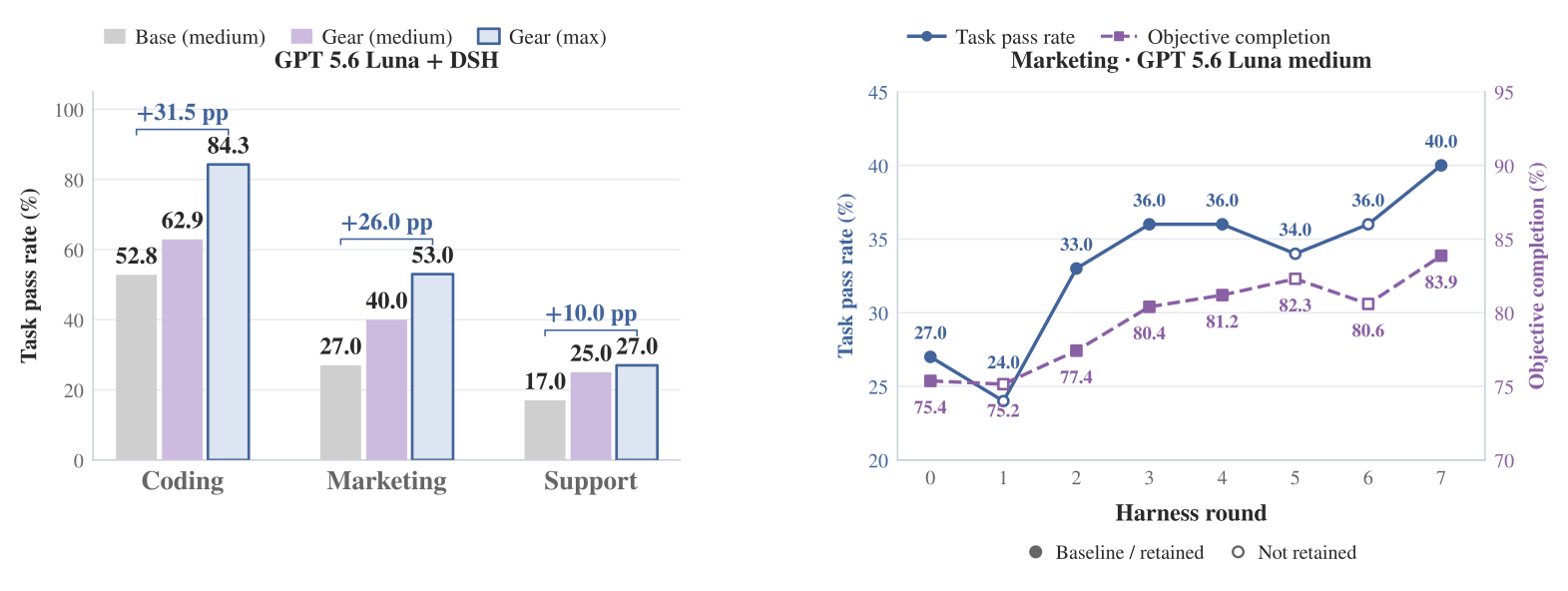
- ### Same-model, same-effort harness comparison
- Each group keeps the model and reasoning effort fixed. Luna compares the base DSH harness with Gear's optimized DSH harness; Astra compares Codex with Gear's optimized DSH harness.
- | Model (effort) | Harness | Marketing pass rate | Marketing objective completion | Support pass rate | Support objective completion | Terminal-Bench 2.1 pass rate |
- | --- | --- | --- | --- | --- | --- | --- |
- | GPT 5.6 Luna (medium) | DSH (Base) | 27.0% | 75.4% | 17.0% | 72.9% | 52.8% |
- | GPT 5.6 Luna (medium) | DSH + Gear | **40.0%** | **83.9%** | **25.0%** | **81.3%** | **62.9%** |
- | Δ (percentage points) | | +13.0 | +8.5 | +8.0 | +8.4 | +10.1 |
- | GPT 6 Astra (max) | Codex | 57.0% | 84.1% | 35.0% | 88.4% | 86.7% |
- | GPT 6 Astra (max) | DSH + Gear | **61.0%** | **86.3%** | **39.0%** | **88.7%** | **87.6%** |
- | Δ (percentage points) | | +4.0 | +2.2 | +4.0 | +0.3 | +0.9 |
- ### Additional evaluation: Luna at max effort
- The optimized DSH harness was also evaluated with GPT 5.6 Luna at max reasoning effort:
- | Benchmark | Task pass rate | Objective completion |
- | --- | --- | --- |
- | AutomationBench / Marketing | **53.0%** | **88.9%** |
- | AutomationBench / Support | **27.0%** | **82.4%** |
- | Terminal-Bench 2.1 | **84.3%** | — |
- These are separate evaluations at a higher reasoning effort; improvements over Luna's medium baseline include both harness and effort changes. The dash means the metric is not reported.
- On Marketing, Luna max with Gear achieved **88.88% objective completion**, compared with **84.08%** for Astra max in Codex; their task pass rates were **53%** and **57%**, respectively. In a separate cost comparison with both models using the same optimized DSH harness (`a0740800`), **Luna max's API cost averaged $0.0568 per task, versus $1.1858 for Astra max — 95.21% lower**. See the [token usage and cost methodology](docs/marketing-token-cost.md).
- ## Quick start
- ### Python SDK
- Build the matching Gear source and prepare a project using the [quick start guide](docs/guide/en/quickstart.md). With a DSH project, benchmark, execution profiles and budgets configured:
- ```python
- from gear import Project
- from gear.algorithms import OPRO
- project = Project.open("./my-benchmark")
- run = project.refine(
- algorithm=OPRO(prompt_path="prompts/system.md"),
- rounds=2,
- )
- print(run.id, run.report.summary)
- ```
- Pi uses `AGENTS.md` for this prompt path. See [algorithm selection](docs/guide/en/algorithms.md), [component customization](docs/guide/en/example-algorithm.md) and [resuming a run](docs/guide/en/evolutions.md). The Python examples describe this source revision; use a package built from matching source.
- ### Refine Skill
- Use Gear through its **Refine Skill** in Codex, Claude Code, DSH, or another compatible agent environment. Start with an existing benchmark or provide your own tasks in [Harbor format](docs/guide/en/datasets.md).
- For installation and dependency setup, see the [quick start guide](docs/guide/en/quickstart.md).
- **Let your agent install Gear.** Paste the following prompt into your agent session:
- ```text
- Follow https://rsigear.xyz/docs/gear/quickstart to install Gear in my environment.
- Install matching Gear and Hitch builds that support this guide's APIs and required Hitch capabilities, and verify all required dependencies.
- Install the complete Refine Skill bundled with Gear in my current agent environment and configure its connection to Gear.
- Use my actual task paths, target harness, and model settings; ask me for any missing information.
- Verify that the Refine Skill can connect to Gear, then report the verification result and explain how to start my first optimization run.
- ```
- For manual installation, install Gear and [Hitch](https://github.com/rsi-gear/agent-hitch), the evaluation runner. The following example also installs DSH as the task agent runtime:
- ```bash
- npm install --global rsi-gear@latest agent-hitch@latest @deepseek-ai/dsh@latest
- hitch eval setup harbor
- ```
- The seven algorithms are included in Gear 0.2.4. Use Hitch 0.2.19 or later and confirm its `isolated_agent_run: "1"` and `generation_budget: "1"` capabilities with `gear doctor`. When upgrading, run `gear setup` to prepare the matching Python environment and update custom algorithm imports using the [author guide](docs/search-algorithm-authoring.zh-CN.md).
- Follow the [setup guide](docs/guide/en/quickstart.md) to install the bundled [Refine Skill](skills/refine/SKILL.md) in your agent environment and configure your benchmark. Then invoke `/refine` where supported, or submit the following request:
- ```text
- Use the Refine Skill to improve performance on AutomationBench's Marketing tasks.
- Use Codex + Astra to propose improvements and DSH + Luna to run the tasks.
- Run one round of optimization.
- ```
- The agent that proposes changes is called the **Meta agent**. It can use a different model from the task agent that executes the benchmark tasks.
- ## Algorithm design
- 
- Gear adopts a two-level architecture inspired by **meta-learning**, separating task-level execution from harness optimization guided by evaluation feedback.
- - **Inner loop: task execution and evaluation.** Given a fixed model and harness configuration, the task agent interacts with the task environment to produce execution trajectories and task outcomes. These are evaluated according to predefined criteria, providing evidence for the outer loop.
- - **Outer loop: harness optimization.** The Meta agent analyzes execution trajectories and evaluation feedback to identify failure modes and propose candidate harness modifications. Gear's optimization algorithm evaluates and selects candidates according to the configured objective and evaluation budget, determining the harness used in subsequent iterations.
- A model's **harness** consists of the instructions, tools, and workflows used to run it as an agent. Gear aims to **evolve the model and harness together**, improving agent behavior through harness modifications and model capabilities through training, with task feedback guiding both processes. Harness optimization is supported today. Model training is experimental, and the full joint optimization loop remains under development.
- ### What can evolve?
- Optimization is limited to the components you authorize Gear to modify.
- | Component | What can change | Status |
- | --- | --- | --- |
- | Prompts and policies | Task instructions, system prompts, and action policies. | Supported |
- | Tools and hooks | Tool implementations and hooks that run before or after tool execution. | Supported |
- | Skills and workflows | Reusable procedures, helper scripts, and execution order. | Supported |
- | Context management | Context selection and conversation history summarization. | Supported |
- | Model weights | Model parameters updated through training using task feedback. | Experimental; full training and evaluation loop under development |
- ### Customizable algorithm components
- Reusable operators live in `gear.core`, `gear.evaluation`, `gear.memory`, `gear.training` and `gear.search`; complete recipes live in `gear.algorithms`. For example, `ApplyEdits` and `CheckEdits` belong to `gear.core`. The six search strategy modules are:
- | Module | What you can customize |
- | --- | --- |
- | `search.parents` | Parent selection and candidate allocation. |
- | `search.sampling` | Task subsets, repetitions and weights. |
- | `search.proposal` | Diagnosis and candidate proposal planning. |
- | `search.ranking` | Candidate comparison over matching evaluation scopes. |
- | `search.stopping` | Search termination conditions. |
- | `search.workflow` | Stage order and strategy composition. |
- Task rewards are defined by the benchmark/scorer; objectives aggregate the declared measurements and constraints. Python components define the algorithm, and the runtime coordinates execution, budgets, persistence and recovery. See the [customization tutorial](docs/guide/en/example-algorithm.md) and [operator author guide](docs/algorithm-operators.zh-CN.md).
- [Define a weighted objective](docs/guide/en/configuration.md#weighted-objectives-and-protected-tasks) to combine declared pass rate, process scores, cost or tokens while retaining the original measurements.
- ## Supported algorithms
- Complete, callable implementations are available from `gear.algorithms`. Their components can be replaced independently.
- | Algorithm | Current implementation |
- | --- | --- |
- | [GEPA](docs/guide/en/algorithms.md#gepa) | Staged candidate evaluation and selection: local → bridge → global. |
- | [RandomSearch](docs/guide/en/algorithms.md#randomsearch) | Random parent selection, exploratory proposals and full-task evaluation. |
- | [OPRO](docs/guide/en/algorithms.md#opro) | Iterative prompt optimization using scored history. |
- | [ACE](docs/guide/en/algorithms.md#ace) | Incremental playbook updates, evaluated before adoption. |
- | [RRSI](docs/guide/en/algorithms.md#rrsi) | Edit checks and a Meta critic screen proposals before task evaluation. |
- | [DarwinX](docs/guide/en/algorithms.md#darwinx) | Prompt optimization with additional fresh-sample confirmation. |
- | [Harness2](docs/guide/en/algorithms.md#harness2) | Continual learning from target outputs and trajectories, with scores hidden from the algorithm. |
- ## Explore the examples
- - [Optimize a harness for Marketing](docs/guide/en/example-harness.md): follow five rounds of harness optimization, from the initial configuration to the final retained harness.
- - [Customize the optimization algorithm](docs/guide/en/example-algorithm.md): change how Gear proposes candidate modifications, selects tasks for evaluation, and retains candidates. The Marketing experiment uses a GEPA variant that allocates more evaluation budget to promising candidates.
- ## Architecture
- 
- [Learn more about Hitch](https://github.com/rsi-gear/agent-hitch)
- ## Roadmap
- Gear supports harness optimization today. Two components of the broader learning loop remain under development:
- - [ ] **Iterative model training and evaluation.** Use task feedback to train the model, evaluate the updated model, and repeat. An [experimental training workflow](docs/guide/en/training.md) is available; the full model iteration loop is not yet complete.
- - [ ] **Automatic seed task generation.** Generate targeted practice tasks, or *seed tasks*, from task failures and incorporate them into subsequent optimization rounds. This automatic task generation loop is not yet complete.
- ## Citation
- If you use Gear in your research, please cite the following preprint. The [project website](https://rsi-gear.github.io/#citation) lists the current citation; the arXiv link is not yet available.
- ```bibtex
- @unpublished{tang2026gear,
- title = {{GEAR}: An Open General Evolutionary Architecture for
- Recursive Self-Improvement of {LLM} Agent Harness},
- author = {Tang, Yehui and Zhu, Guanqi and Xia, Shao-Jun and
- Chen, Xin and Geng, Mengzhe and Du, Hongyang and Tang, Yuhao},
- year = {2026},
- note = {Preprint},
- url = {https://github.com/rsi-gear/gear}
- }
- ```
- ## Build with us
- Start with the [user guide](docs/guide/en/index.md), browse the [example code](examples/evolution-search/README.md), or join [Discord](https://discord.gg/KH6D8Bezm).
- For local development:
- ```bash
- npm ci
- npm run typecheck
- npm run build
- npm test
- ```
- [Contributing](CONTRIBUTING.md) · [Documentation guidelines](docs/guide/README.md) · [GitHub issues](https://github.com/rsi-gear/gear/issues) · [MIT license](LICENSE)
- Model evaluation connects to [already deployed model endpoints](docs/training/standalone-inference.md), with immutable bindings for each candidate and configurable trial concurrency. SGLang and its official Model Gateway manage inference replicas outside Gear and Hitch.
Ratings and comments
Sign in to rate this skill.
Sign inFree to use. If it’s helped, pass it on.