comet
Comet: agent skill harness for turning ideas into evaluated workflows
Safety scan
A static text scan, not a guarantee. Select the badge to see what was scanned and every finding.
Check it deeper on your machine
It has changed since its scan on 11 Nov 2026. Its scripts were only partly scanned.
As a Claude Code plugin, install it and then ask Claude Code:
/plugin marketplace add keithmackay/mackayi/plugin install scanskillsafety@mackayiDo a deep scan of https://github.com/rpamis/comet with scanskillsafety
Or from a terminal, clone it and run it:
git clone https://github.com/keithmackay/scanskillsafety-skill ~/.claude/skills/scanskillsafetynode ~/.claude/skills/scanskillsafety/cli.cjs --deep 'https://github.com/rpamis/comet'
It checks the exact commit: every file, its packages against OSV (api.osv.dev), how it compares with this page's scan (findsafeskills.com receives the repository's address), and, if you agree, Claude reading every file with your own Claude subscription. It never runs the code.
Badge for your README

Markdown
[](/listings/rpamis-comet)HTML
<a href="/listings/rpamis-comet"><img src="/api/listings/rpamis-comet/badge.svg" alt="findsafeskills safety rating" /></a>Install
Install instructions from the README
As written by the repo's author. findsafeskills has not verified these steps.
Requirements:
- Node.js 22.16+ (22.x), or 24+ - npm/npx - Git
npm install -g @rpamis/comet
What was scanned
The files the safety scan read, as written by the repository's author and shown as plain text. Lines with a finding are marked.
README.md · README · 338 lines
View this file on GitHub (read at the repository's current version: the scan did not record which commit it read)
This file has changed since it was scanned, so this is not exactly the text that was scanned, and no line is marked. The findings are listed with the safety scan above.
- <p align="center">
- <a href="https://github.com/rpamis/comet/blob/master/img/title-log.png">
- <picture>
- <source srcset="https://github.com/rpamis/comet/blob/master/img/title-log.png">
- <img src="https://github.com/rpamis/comet/blob/master/img/title-log.png" alt="Comet logo">
- </picture>
- </a>
- </p>
- <p align="center">
- <a href="https://github.com/rpamis/comet/actions/workflows/ci.yml"><img alt="CI" src="https://img.shields.io/github/actions/workflow/status/rpamis/comet/ci.yml?branch=master&style=flat-square&label=CI" /></a>
- <a href="https://app.codecov.io/gh/rpamis/comet/tree/master"><img alt="codecov" src="https://img.shields.io/codecov/c/github/rpamis/comet/master?style=flat-square&label=coverage&color=%23E61A7A" /></a>
- <a href="https://deepwiki.com/rpamis/comet"><img alt="DeepWiki" src="https://img.shields.io/badge/DeepWiki-rpamis%2Fcomet-blue?style=flat-square" /></a>
- <a href="https://www.npmjs.com/package/@rpamis/comet"><img alt="npm version" src="https://img.shields.io/npm/v/@rpamis/comet?style=flat-square" /></a>
- <a href="https://www.npmjs.com/package/@rpamis/comet"><img alt="npm total download count" src="https://img.shields.io/npm/dt/@rpamis/comet?style=flat-square&label=Downloads" /></a>
- <a href="https://www.npmjs.com/package/@rpamis/comet"><img alt="npm monthly download count" src="https://img.shields.io/npm/dm/@rpamis/comet?style=flat-square&label=Downloads/mo" /></a>
- <a href="https://docs.comet.rpamis.com/"><img alt="Comet Docs" src="https://img.shields.io/badge/Docs-docs.comet.rpamis.com-FFD700?style=flat-square" /></a>
- <a href="./LICENSE"><img alt="License: MIT" src="https://img.shields.io/badge/License-MIT-blue.svg?style=flat-square" /></a>
- <a href="https://atomgit.com/rpamis/comet"><img alt="AtomGitStars" src="https://atomgit.com/rpamis/comet/star/badge.svg" /></a>
- </p>
- <p align="center">
- <a href="https://trendshift.io/repositories/38989?utm_source=repository-badge&utm_medium=badge&utm_campaign=badge-repository-38989" target="_blank" rel="noopener noreferrer"><img src="https://trendshift.io/api/badge/repositories/38989" alt="rpamis%2Fcomet | Trendshift" width="250" height="55"/></a>
- </p>
- ## 💎 Sponsorship
- > 中文版:[README-zh.md](README-zh.md)
- > [Bilibili video](https://www.bilibili.com/video/BV1y4Gi6CEo1/?spm_id_from=333.1387.homepage.video_card.click&vd_source=d22726fe6b108647dbebf1c5d8817377)
- > [DouYin](https://www.douyin.com/search/comet?aid=cd8fcc82-498b-4d59-8860-617deb719412&modal_id=7646429015808936293&type=general)
- This project is supported by sponsors including [PackyCode](https://www.packyapi.ai/register?aff=DIId)、[Cubence](https://cubence.com?source=comet).
- > [Want to be featured here?](mailto:benyuanming@gmail.com)
- <details open>
- <summary>Click to collapse</summary>
- <table width="100%">
- <tr>
- <td width="25%" align="center" valign="middle">
- <a href="https://www.packyapi.ai/register?aff=DIId">
- <img src="https://github.com/rpamis/comet/blob/master/img/PackyCode.png" alt="PackyCode Sponsor" width="180">
- </a>
- </td>
- <td width="75%" align="left" valign="middle">
- <p>Access leading AI models through PackyCode with one API endpoint and one API key. Enjoy fast, reliable access with automatic failover and dedicated high-speed routes for Codex and Claude Code.</p>
- <p>Get started with $1 in free credits, a discount on your first top-up, and savings of up to 80% on eligible routes. Pay in RMB with no currency conversion markups or extra top-up fees.</p>
- <p><a href="https://www.packyapi.ai/register?aff=DIId">Sign up through the link and start building today.</a></p>
- </td>
- </tr>
- <tr>
- <td width="25%" align="center" valign="middle">
- <a href="https://cubence.com?source=comet">
- <img src="https://github.com/rpamis/comet/blob/master/img/Cubence.png" alt="Cubence Sponsor" width="180">
- </a>
- </td>
- <td width="75%" align="left" valign="middle">
- <p>Cubence is a stable and efficient model aggregation gateway that supports API calls to mainstream large models, as well as dedicated groups for popular development tools such as Claude Code and Codex. It offers affordable pricing and stable, efficient service.</p>
- <p><a href="https://cubence.com?source=comet">Use the `COMET` coupon to enjoy a 10% discount on top-ups.</a></p>
- </td>
- </tr>
- </table>
- </details>
- ## What is Comet ?
- ```
- ██████╗ ██████╗ ███╗ ███╗███████╗████████╗
- ██╔════╝██╔═══██╗████╗ ████║██╔════╝╚══██╔══╝
- ██║ ██║ ██║██╔████╔██║█████╗ ██║
- ██║ ██║ ██║██║╚██╔╝██║██╔══╝ ██║
- ╚██████╗╚██████╔╝██║ ╚═╝ ██║███████╗ ██║
- ╚═════╝ ╚═════╝ ╚═╝ ╚═╝╚══════╝ ╚═╝
- ```
- **Comet is a resumable long-running task workflow and Skill platform for agents.**
- It provides two independent requirements workflows: Native for strong models, powered only by Comet's own runtime, and Classic, which preserves the full OpenSpec + Superpowers phase-governance model.
- Use Native or Classic directly to complete development tasks from requirements through acceptance and archive.
- Use Comet Any or the SDK to combine existing Skills and tools into workflows with user confirmation, outcome validation, and interruption recovery. Give your Skills the same workflow capabilities as Comet, while Comet SDK handles state, execution records, and recovery.
- Use Comet Eval to evolve your Skills with scientific **Rubric**, **Pass@k**, and **Pass^k** scoring.
- Use Personal Memory and Project Knowledge to learn your preferences over time and retain project knowledge that helps with future tasks.
- > [!IMPORTANT]
- > **Comet 0.5.0: Create, run, and evaluate Skill workflows with the SDK.**
- >
- > - **Comet SDK**: Combine tools, Skills, user confirmation, parallel tasks, and subflows through public JavaScript / TypeScript APIs, with persistent execution progress. See [SDK getting started](docs/architecture/sdk-getting-started.md).
- > - **Comet Any**: Describe your goal and the Skills you need, confirm the complete plan, and create a Native extension, Classic composition, or standalone workflow application. See the [creation and delivery guide](docs/operations/SKILL-CREATION.md).
- > - **Full-application evaluation**: Evaluate the workflow and its pinned dependencies, reuse the same cases to compare revisions, and inspect actual execution coverage. See [application Eval](https://docs.comet.rpamis.com/en/eval/applications).
- > - **Application distribution**: Preview and confirm local exports, project or user installation, and upgrades. Active runs retain their pinned application version. See [application distribution](https://docs.comet.rpamis.com/en/sdk/distribution).
- > - **Dashboard**: Inspect creation progress, application runs, artifacts, and execution traces; start and manage Eval; and preview installation or export for ready applications. See the [Dashboard guide](https://docs.comet.rpamis.com/en/dashboard/overview).
- >
- > **Comet 0.4.0** — Building on 0.3.9, this release adds Native workflows, multi-agent collaboration, memory and knowledge management, and a complete toolchain for creating, distributing, and evaluating Skills.
- >
- > - **Native workflows for strong models**: After requirements are confirmed, the Agent chooses how to plan, implement, test, and review. Comet handles state checks, acceptance, and resumable archive. Native runs independently of Classic, which retains the OpenSpec + Superpowers five-phase methodology; both share configuration, status, Dashboard, and Eval entry points.
- > - **Parallel delivery for complex requirements**: Supervisor Changes split a goal into dependency-aware child changes. Independent Codex sessions or Claude Code Agent Teams implement and verify them in isolated worktrees, then integrate them in dependency order before the parent change's final acceptance.
- > - **Manageable Personal Memory and Project Knowledge**: Retain collaboration preferences and reusable experience across tasks, and progressively supply context relevant to the current task. You can inspect, correct, forget, or pause it; new lessons start in trial and gain supporting evidence through actual adoption and verification.
- > - **Skill creation, delivery, and evaluation**: Create workflows owned by SDK Runs through `/comet-any`, approve a plan, and install or export locally; use `comet eval` to record evidence for the evaluated scope.
- > - **A unified three-pane Dashboard**: Inspect Native and Classic progress, Git worktrees, acceptance results, and archives in your browser, and manage Personal Memory, Project Knowledge, and plugin settings.
- > - **Cross-platform execution and recovery**: A pure Node.js Runtime supports Windows, macOS, and Linux without Bash or WSL. Task state stays in the project so work can resume after interruptions or session changes; CLI output identifies the next step and decisions that need your input.
- >
- > In the existing aligned Native vs. 0.4.0 Classic experiment (16 tasks, 48 runs per treatment), the 41 paired samples where both passed showed **76.8% fewer total tokens**, **57.4% fewer Agent rounds**, and **47.4% less time** for Native. Across the full sample, Native achieved **87.5% pass^3 (+12.5 percentage points)**, while both treatments reached **100% pass@3**. See the [evaluation report](https://docs.comet.rpamis.com/en/eval/comet-native-vs-040-experiment) for conditions and limitations, and the [Changelog](https://docs.comet.rpamis.com/en/changelog) for all changes.
- ## Why Comet
- - **Native workflow for strong models** — `/comet-native` uses a detailed brief with a directory-structure outline of the change scope, complete target specifications, phase checks, and recoverable archive to constrain outcomes while leaving planning, implementation, testing, and review methods to the model. User-readable artifacts live under `docs/comet/` by default, fully separate from Classic. See the [Native workflow guide](https://docs.comet.rpamis.com/en/native/quickstart).
- - **One-way, resumable Native archive** — Archive first returns a single dry-run continuation command, with explicit isolated-workspace finish choices and blocker paths; continuing the workflow lets Runtime own the archive commit without repeated status queries or manual runtime-file commits.
- - **Supervisor Changes for complex requirements** — Native can split work along real delivery boundaries, manage dependencies and readiness as a DAG, let multiple agents implement and verify in Runtime-created worktrees, and then integrate the results before the parent change's final acceptance.
- - **The stable core for long-running tasks** — Comet's Classic Spec mode combines OpenSpec and Superpowers into a five-phase flow with a state machine, phase checks, and scripts. It suits work that needs an explicit method and strong constraints; its permanent entry point is `/comet-classic`.
- - **A configuration-driven shared entry point** — `/comet` reads only the project's `.comet/config.yaml` and deterministically forwards to `/comet-native` or `/comet-classic`. It does not guess from task size or mix changes, state, or directories across workflows. `comet resume-probe` uses the same configuration to resume through the correct permanent entry point.
- - **Personal Memory, with less repetition** — Retain your language, output preferences, and stable collaboration habits across tasks, and supply context relevant to the current task so you spend less time repeating instructions in new sessions. Inspect, correct, forget, or pause memory in Dashboard. See the [Personal Memory guide](docs/operations/PERSONAL-MEMORY.md).
- - **Project Knowledge for reusable experience** — Retain project structure, module dependencies, confirmed decisions, and verified solutions so agents can understand the project and locate the scope of changes faster in future tasks, with less repeated exploration and fewer recurring mistakes. Knowledge retains sources and verification details; check it against current code and tests when applying it. See the [Project Knowledge guide](docs/operations/PROJECT-KNOWLEDGE.md).
- - **Skill platform** — `/comet-any` turns a goal and real Skills into Native extensions, Classic compositions, or standalone SDK workflows, with plan confirmation, complete local exports, and project or user installation. See the [creation and delivery guide](docs/operations/SKILL-CREATION.md).
- - **Composable Skill Runtime SDK** — `@rpamis/comet/runtime` orchestrates Skill/tool steps, approval, outcome validation, and interruption recovery as persistent workflows. Native and Classic are two built-in applications: new changes use SDK Runs by default, while existing changes keep their original Runtime. The Agent platform still provides model, MCP, Hooks, Rules, and tool calls. See the [Runtime SDK guide](docs/architecture/runtime-sdk.md).
- - **Eval platform** — Comet assesses your skills using scientific Rubric, Pass@k, and Pass^k scoring, ensuring skill evolution is based on scientific evidence rather than intuition. It supports integration with LangSmith assessments, bringing evaluation to real-world enterprise production environments. Its dual-agent architecture automates the assessment process in your production environment.
- ## Supervisor Change: coordinated delivery across multiple agents
- When a requirement contains multiple deliverables that can be implemented and verified independently, a Supervisor Change confirms the child changes and their dependencies before coordinating independent Codex sessions or Claude Code Agent Teams. The Runtime remains responsible for worktrees, task identity, verification, ordered integration, and the parent change's final Verify.
- `Complex goal → child-change DAG → isolated worktrees → independent implementation and verification → ordered integration → final parent Verify`
- **Codex multi-session execution**
- https://github.com/user-attachments/assets/96114cb0-f542-4f58-aa27-256f32adc46e
- **Claude Code Agent Teams execution**
- https://github.com/user-attachments/assets/41428669-a49a-46e3-a0ae-0775e4f4bb6f
- ## Extremely low memory threshold
- With Comet, you only need to remember two Skills and one command to turn ideas into results, create Skills, and evaluate them:
- - Use `/comet` to enter the project's configured Native or Classic workflow
- - Use `/comet-any` to create workflow applications
- - Use `comet eval` to evaluate any Skill
- ## Historical Comet 0.4.0 Baseline Comparison
- The following charts are from 16 Comet workflow tasks, with 5 samples per treatment, comparing no Comet, Comet 0.3.9, and Comet 0.4.0.
- The core observations were the differences in Pass@5, Pass^5, and Rubric scores. The baseline without Comet Skills only validated business behavior.
- <p align="center">
- <img src="https://github.com/rpamis/comet/blob/master/img/comet-eval-pass5.png" alt="Comet pass@5 and pass^5 baseline comparison" width="920">
- </p>
- <p align="center">
- <img src="https://github.com/rpamis/comet/blob/master/img/comet-eval-rubric-core.png" alt="Comet core rubric and LLM-as-judge baseline comparison" width="920">
- </p>
- ## From Industry-Frontier Practice
- Many Comet capabilities have parallels in current industry practice.
- > To compare Comet with those patterns, see [Comet Docs](https://docs.comet.rpamis.com/en/tech-blog/comet-vs-industry).
- ## What You Can Learn
- - **How to reliably trigger nested Skills** — not by making an agent perform something that merely looks like a Skill
- trigger, such as writing files based on a Skill description, but by actually triggering the Skill. Comet invokes many
- OpenSpec and Superpowers capabilities, with trigger prompts refined through broad real-world practice.
- - **How to make composed Skills advance through multiple phases automatically** — not through manual intervention. Aside
- from necessary user choices, Comet's five-phase flow can trigger core Skills automatically while the state machine keeps
- transitions reliable.
- - **How to make a Spec lifecycle resumable** — Comet links OpenSpec change/spec artifacts with Superpowers design and
- plan documents, then records phase, execution mode, verification result, and archive status in each change's
- state file so an agent can continue after interruption. New Classic changes use `comet-state.yaml`; existing
- `.comet.yaml` files remain supported in place.
- - **How to turn doc synchronization from reminders into automation** — Comet scripts handoff, state updates, validation,
- and archive sync, reducing repeated prompts such as "remember to update the design doc" or "remember to archive the
- change."
- - **How to design guard conditions that agents can execute** — phase exits do not rely on an agent saying "done." Scripts
- such as `comet-guard.mjs`, `comet-yaml-validate.mjs`, and `comet-state.mjs` check tasks, state fields, verification
- evidence, and archive conditions before the workflow advances.
- - **How to distribute and install Skills across platforms** — Comet supports many AI coding platforms, project/global
- install scopes, Chinese/English Skill variants, and platform-specific directories such as Antigravity's different
- project/global paths.
- - **How to turn scripts into agent workflow infrastructure** — Comet scripts handle hashes, YAML fields, state machines,
- and archive flow, showing how workflow control that is easy to scatter across prompts can become testable, reusable
- tooling.
- - **How to evolve Skills through scientific evaluation** — Comet Eval supports structured rubric scoring plus Pass@k and
- Pass^k metrics, with both local and LangSmith evaluation paths for production use.
- - **How to create recoverable workflow applications** — `/comet-any` investigates real Skills, fixes dependencies and execution contracts, compiles approved plans, and records local checks separately from real host acceptance.
- ## Install
- Requirements:
- - Node.js 22.16+ (22.x), or 24+
- - npm/npx
- - Git
- ```bash
- npm install -g @rpamis/comet
- ```
- ## Quick Start
- Initialize Comet in the project where you want to use it:
- ```bash
- cd your-project
- comet init
- # Invoke /comet in the host
- ```
- Interactive setup explains and offers Native, Classic, or both. Native is for strong models that can implement and verify autonomously; Classic is for tasks that need full Spec/TDD phase constraints; Both installs two independent entries while keeping `/comet` on Native by default. Non-interactive new projects default to Native, and project configuration is unified at `.comet/config.yaml`:
- ```bash
- comet init --workflow classic
- comet init --workflow both
- ```
- ## Support for OpenClaw and Hermes, and other AI platforms
- For platforms that use the generic `skills` CLI directly, you can install the Comet skill package with:
- ```bash
- npx skills add rpamis/comet
- ```
- ## Screenshots
- ### Comet Dashboard
- <p align="center">
- <img src="https://github.com/rpamis/comet/blob/master/img/dashboard-workflow-en.png" alt="Dashboard en" width="920">
- </p>
- Explore more live demos in the [Docs](https://docs.comet.rpamis.com/).
- ### Integration with LangSmith/LangFuse
- Comet Eval's automated dual-agent architecture can integrate online with LangSmith/LangFuse environments, making experiments traceable and skills evolvable.
- <p align="center">
- <img src="https://github.com/rpamis/comet/blob/master/img/langsmith-dataset.png" alt="runner">
- </p>
- <p align="center">Manage your Skill baseline in LangSmith and view detailed performance metrics, latency, and token consumption</p>
- <p align="center">
- <img src="https://github.com/rpamis/comet/blob/master/img/langsmith-trace.png" alt="runner">
- </p>
- <p align="center">Trace your Claude Code in LangSmith</p>
- <p align="center">
- <img src="https://github.com/rpamis/comet/blob/master/img/langsmith-baseline-detail.png" alt="runner">
- </p>
- <p align="center">Trace custom Rubric metrics with Pytest in LangSmith</p>
- ## Supported Platforms
- `comet init` supports 39 AI coding platforms:
- <details>
- <summary>View full platform list</summary>
- | Platform | Skills Dir | Platform | Skills Dir |
- | ------------------ | ------------- | ------------- | ------------ |
- | Claude Code | `.claude/` | Cursor | `.cursor/` |
- | Codex | `.codex/` | OpenCode | `.opencode/` |
- | Devin Desktop (formerly Windsurf) | `.devin/` | Cline | `.cline/` |
- | RooCode | `.roo/` | Continue | `.continue/` |
- | GitHub Copilot | `.github/` | Gemini CLI | `.gemini/` |
- | Amazon Q Developer | `.amazonq/` | Qwen Code | `.qwen/` |
- | Kilo Code | `.kilocode/` | Auggie | `.augment/` |
- | Kimi Code | `.kimi-code/` | Kiro | `.kiro/` |
- | Lingma | `.lingma/` | Junie | `.junie/` |
- | CodeBuddy | `.codebuddy/` | WorkBuddy | `.workbuddy/` |
- | Crush | `.crush/` | Factory Droid | `.factory/` |
- | iFlow | `.iflow/` | Pi | `.pi/` |
- | Qoder | `.qoder/` | Antigravity | `.agents/` |
- | Antigravity 2.0 | `.agents/` | Bob Shell | `.bob/` |
- | ForgeCode | `.forge/` | Trae | `.trae/` |
- | Trae CN | `.trae-cn/` | ZCode | `.zcode/` |
- | MimoCode | `.mimocode/` | CoStrict | `.cospec/` |
- | Grok | `.grok/` | Prime Agent | `.prime/agent/` |
- | Oh My Pi | `.omp/` | DeepSeek Harness | `.dsh/` |
- | MiniMax Code | `.minimax/` | | |
- </details>
- ## Development
- See [CONTRIBUTING.md](CONTRIBUTING.md) | [中文版](CONTRIBUTING-zh.md) for development setup, commit
- conventions, PR process, branch workflow, and guidance for adding platforms,
- skills, scripts, or changelog entries.
- See [CHANGELOG.md](CHANGELOG.md) for version history and updates.
- ## Roadmap
- Track our development progress and upcoming features on the [Comet Roadmap](https://github.com/orgs/rpamis/projects/1).
- ## Star History
- [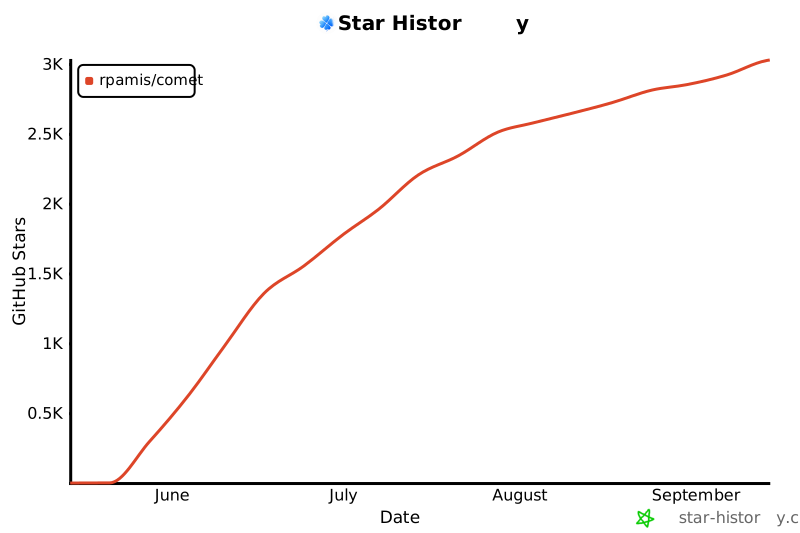](https://www.star-history.com/?repos=rpamis%2Fcomet&type=date&legend=top-left)
- ## Contributors
- <a href="https://github.com/rpamis/comet/graphs/contributors">
- <img src="https://contrib.rocks/image?repo=rpamis/comet&columns=12&anon=1" />
- </a>
- ## License
- [MIT](LICENSE)
- ## Community
- <table align="center">
- <tr>
- <td align="center" width="180">
- <img src="https://github.com/rpamis/comet/blob/master/img/douyin.png" width="120" height="120"><br>
- <b>DouYin (Recommended)</b>
- </td>
- <td align="center" width="180">
- <img src="https://github.com/rpamis/comet/blob/master/img/wechat.png" width="120" height="120"><br>
- <b>WeChat</b>
- </td>
- <td align="center" width="180">
- <img src="https://github.com/rpamis/comet/blob/master/img/qq.jpg" width="120" height="120"><br>
- <b>QQ</b>
- </td>
- </tr>
- </table>
- ## Reference
- [LINUX DO - 新的理想型社区](https://linux.do/)
Ratings and comments
Sign in to rate this skill.
Sign inFree to use. If it’s helped, pass it on.