dsh-marktext
MarkText (muya) WYSIWYG Markdown editor for the DeepSeek Harness right sidebar
Safety scan
A static text scan, not a guarantee. Select the badge to see what was scanned and every finding.
Badge for your README

Markdown
[](/listings/roland0511--dsh-marktext)HTML
<a href="/listings/roland0511--dsh-marktext"><img src="/api/listings/roland0511--dsh-marktext/badge.svg" alt="findsafeskills safety rating" /></a>Install
Install instructions from the README
As written by the repo's author. findsafeskills has not verified these steps.
dsh plugin --profile web add dsh-marktext
**Using the Desktop app?** Open **Plugins → Add plugin → Install a third-party plugin**, enter `dsh-marktext`, click **Enable now**, then restart the app once. (The desktop profile is managed by the app, so the CLI line above is for `dsh web` only.)
<details> <summary>Manual install, GitHub install, requirements</summary>
**Manual (desktop profile)** — edit `~/.dsh/profiles/desktop/package.json`:
{
  "dsh": { "profile": { "bundles": [..., "dsh-marktext"] } },
  "dependencies": { ..., "dsh-marktext": "^0.1.13" }
}cd ~/.dsh/profiles/desktop && pnpm install
Then restart the app.
**From GitHub instead of npm:** `github:Roland0511/dsh-marktext` works anywhere a package name does — the built renderer is committed, so there is no build step.
**Requirements:** DeepSeek Harness **0.2.1+** (`ctx.sidebarRightTabs`, `ctx.slots`, `ctx.fs`, `ctx.webServer`; the quote action also uses `ctx.conversation`). Node 20+ only if you build from source.
</details>
What was scanned
The files the safety scan read, as written by the repository's author and shown as plain text. Lines with a finding are marked.
README.md · README · 191 lines
- <p align="center">
- <img src="https://raw.githubusercontent.com/Roland0511/dsh-marktext/main/icon.svg" width="72" alt="dsh-marktext icon">
- </p>
- <h1 align="center">dsh-marktext</h1>
- <p align="center">
- <b>Write Markdown the way it will look.</b><br/>
- MarkText's editor engine, living in the DeepSeek Harness right sidebar.
- </p>
- <p align="center">
- <a href="https://www.npmjs.com/package/dsh-marktext"><img alt="npm version" src="https://img.shields.io/npm/v/dsh-marktext?color=cb3837"></a>
- <a href="https://www.npmjs.com/package/dsh-marktext"><img alt="npm downloads" src="https://img.shields.io/npm/dm/dsh-marktext?color=brightgreen"></a>
- <a href="https://github.com/Roland0511/dsh-marktext/stargazers"><img alt="GitHub stars" src="https://img.shields.io/github/stars/Roland0511/dsh-marktext?style=social"></a>
- <a href="https://opensource.org/licenses/MIT"><img alt="License: MIT" src="https://img.shields.io/badge/license-MIT-blue"></a>
- <img alt="DSH 0.2.1+" src="https://img.shields.io/badge/DSH-0.2.1%2B-4d6bfe">
- <a href="https://github.com/Roland0511/dsh-marktext/actions/workflows/publish.yml"><img alt="publish" src="https://github.com/Roland0511/dsh-marktext/actions/workflows/publish.yml/badge.svg"></a>
- </p>
- <p align="center">
- <a href="README.md"><b>English</b></a> · <a href="README.zh.md">简体中文</a>
- </p>
- 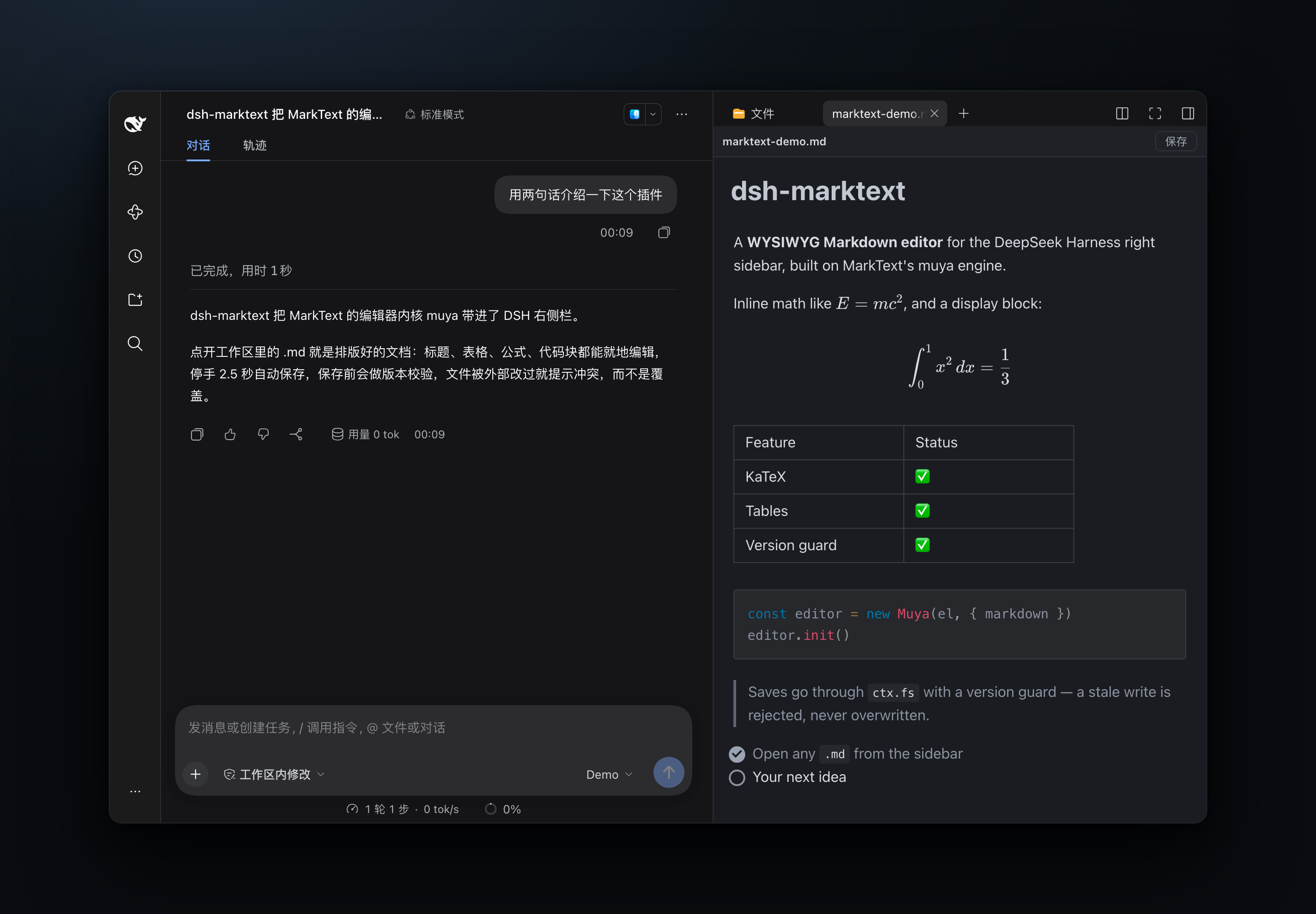
- **Click a `.md` and it opens as the document it will become** — headings, tables, math, diagrams and images, all editable where they stand. Fix a sentence, delete a paragraph, or **select the part you want to talk about and quote it into the chat**. No split pane, no source-and-preview dance. `⌘S` saves through a version guard, so you never overwrite someone else's edit.
- > MarkText is an Electron desktop app. This plugin doesn't ship its shell — it takes the editor core MarkText extracts ([`@muyajs/core`](https://www.npmjs.com/package/@muyajs/core) / muya, MIT) and adds only the DSH integration. Everything runs locally.
- ## Why it feels different
- - **✍️ You edit the document, not the source.** Markdown markers stay hidden; headings, lists, tables and quotes are real elements. Put the caret in a table cell and fix the cell, not a row of pipes.
- - **💬 Quote straight into the chat.** Select any text, hit **Quote** in the toolbar, and a Markdown blockquote — with the file path on top — is appended to the composer draft. No retyping, no "the third bullet under section 2".
- - **📄 Export a real PDF.** **PDF** in the toolbar (or `⌘P`) turns the open document into an A4 `.pdf`, writes it **next to the file** and opens it in the sidebar so you can check the result — no print dialog, no download prompt, no "Save as PDF" detour. The document is re-laid out at page width first, so text is a normal size instead of a sidebar-width strip, and pages break on blank rows so a line of text is never sliced in half.
- - **📊 Diagrams and math just render.** KaTeX, Mermaid, Vega and PlantUML ship with the plugin and load on demand — offline, no CDN, no account.
- - **🖼️ Images land where you expect.** `` resolves against the document's own folder, so docs written in your editor look right here.
- - **💾 Saving is boring, in the best way.** Autosave 2.5 s after you stop typing; `⌘S` saves immediately; a changed file on disk means a conflict banner, never a silent overwrite.
- - **🌗 It looks like DSH.** Light and dark follow the host, and the editor never adopts a foreign theme.
- - **⌨️ Your fingers already know it.** `⌘Z` / `⇧⌘Z` undo and redo, `⌘S` saves, `⌘P` exports a PDF, `⌘F` finds — nothing to relearn.
- ## Install in one line
- ```sh
- dsh plugin --profile web add dsh-marktext
- ```
- **Using the Desktop app?** Open **Plugins → Add plugin → Install a third-party plugin**, enter `dsh-marktext`, click **Enable now**, then restart the app once. (The desktop profile is managed by the app, so the CLI line above is for `dsh web` only.)
- <details>
- <summary>Manual install, GitHub install, requirements</summary>
- **Manual (desktop profile)** — edit `~/.dsh/profiles/desktop/package.json`:
- ```jsonc
- {
- "dsh": { "profile": { "bundles": [..., "dsh-marktext"] } },
- "dependencies": { ..., "dsh-marktext": "^0.1.13" }
- }
- ```
- ```sh
- cd ~/.dsh/profiles/desktop && pnpm install
- ```
- Then restart the app.
- **From GitHub instead of npm:** `github:Roland0511/dsh-marktext` works anywhere a package name does — the built renderer is committed, so there is no build step.
- **Requirements:** DeepSeek Harness **0.2.1+** (`ctx.sidebarRightTabs`, `ctx.slots`, `ctx.fs`, `ctx.webServer`; the quote action also uses `ctx.conversation`). Node 20+ only if you build from source.
- </details>
- ## What you get
- | | |
- |---|---|
- | **Open any Markdown**<br/>`*.md`, `*.markdown`, `*.mdown`, `*.mkd` in the sidebar open in an editing tab. | **Real editing**<br/>Tables, code blocks, quotes, task lists — direct manipulation, not text surgery. |
- | **Quote into the chat**<br/>Select → **Quote** → a blockquote with its source path lands in the composer draft. | **PDF export**<br/>`⌘P` or the toolbar button; a real A4 file laid out at page width, saved beside the `.md` and opened in the sidebar. |
- | **Math & diagrams**<br/>KaTeX inline/block, Mermaid, Vega-Lite, PlantUML, Prism highlighting. | **Version-guarded saves**<br/>Optimistic concurrency; conflicts surface instead of clobbering. |
- | **Relative images**<br/>Resolved against the document folder through a per-document token. | **Links between files**<br/>`[next](next.md)` opens in another MarkText tab, not as raw text. |
- | **Native shortcuts**<br/>`⌘S` · `⌘Z` · `⇧⌘Z` · `⌘P`, autosave, and a dirty-state dot in the toolbar. | **Follows DSH**<br/>Light/dark theme, locale, and the host's own sidebar chrome. |
- ## Under the hood
- ```
- DSH Web (React)
- lib/client.js ── sidebar tab kind `marktext` (patterns: *.md)
- │ tab body = <iframe src="/dsh-marktext/renderer/<token>/index.html">
- │ postMessage (single envelope: __dshmkt)
- ▼
- renderer/ (standalone Vite build, contains muya + mermaid)
- │ fetch
- ▼
- lib/index.js (host plugin)
- · /dsh-marktext/renderer/<token>/* static assets; misses fall back to the document folder
- · /dsh-marktext/api/open|save|stat through ctx.fs; save requires baseVersion
- ```
- The editor runs in an iframe on purpose: muya declares its CSS variables on `:root` and appends floating toolbars to `document.body`, so inlining it would leak styles into the host. The iframe isolates all of that; only document, theme and save calls cross the boundary.
- <details>
- <summary>Message protocol (v1) and the file-policy fallback</summary>
- Envelope: `{ __dshmkt: true, dir: 'down' | 'up', type, content }`
- | Direction | type | content |
- |---|---|---|
- | down | `doc` | `{ path, displayPath, text, version, dark, locale }` |
- | down | `saved` | `{ version }` |
- | down | `save-error` | `{ code, message }` |
- | down | `theme` | `{ dark }` |
- | down | `chat-inserted` | `{ mode: 'draft' \| 'clipboard' \| 'none' }` |
- | down | `pdf-saved` | `{ path, size }` |
- | down | `pdf-error` | `{ code, message }` |
- | up | `ready` | — |
- | up | `dirty` | `{ dirty }` |
- | up | `save` | `{ text, baseVersion }` |
- | up | `reload` | — |
- | up | `insert-chat` | `{ text }` |
- | up | `save-pdf` | `{ data }` (base64) |
- | up | `open-external` | `{ href }` |
- **Quoting into the chat.** The client resolves the tab's session, asks `ctx.conversation.input.for(sessionCtx)` for the composer facade, and appends `buildQuote(selection, path)` to the current draft with `setDraft`. The composer keeps its own history, so the quote is one undo step away. If the host doesn't expose the conversation service (older DSH, or a profile without the conversation plugin), the quote goes to the clipboard instead and the toolbar says so — the feature degrades, it doesn't disappear.
- **Saving and the file policy.** The normal path is `ctx.fs.writeText(target, text, { kind: 'replaceIfVersion', version })`; a stale version returns `FS_STALE_VERSION` and the UI shows a conflict banner. If the host policy refuses the write (`FS_SANDBOX_DENIED`, e.g. `workspace-write` / `read-only`), the save falls back to Node's `fs.writeFile` **with the version guard intact** — the version is checked before and re-read after. Real OS errors (`EACCES` / `EPERM`) still surface as-is.
- </details>
- ## Troubleshooting
- If a `.md` opens but the tab says something like "no viewer available", the client half didn't register its tab body. Read the registration report:
- ```sh
- curl -s http://127.0.0.1:<DSH-port>/dsh-marktext/api/diag | python3 -m json.tool
- ```
- `typeRegistered`, `bodyRegistered`, `conversation` and `errors` point at the failing step — `"conversation": false` means **Quote** will fall back to the clipboard.
- ## FAQ
- **Is this the MarkText app?** No. It's MarkText's editor core (muya) wrapped for DSH — no Electron, no desktop shell, no second app to install.
- **Where does a quote go?** Into the composer draft of the tab's own session, not the one in front of you — open a file from session A while working in session B and the quote still lands in A, the session that file belongs to.
- **Is the PDF a real file?** Yes — click **PDF** and `notes/plan.pdf` appears next to `notes/plan.md` (a `-1`, `-2` suffix avoids overwriting), and the tab that opens shows the result. It is generated in the page (html2canvas + jsPDF, both lazy-loaded only when you export) and laid out on A4 with half-inch margins. Text is rasterised, so the PDF is not selectable — that is the price of doing this without a 500 kB layout engine, and it keeps the plugin offline and dependency-free at runtime.
- **Why does it save instead of downloading?** The editor runs inside an Electron `dsh-app://` shell that treats a `blob:` download as "open this in a tab". Writing through the host's `fs` avoids that entirely and puts the PDF where the document already lives.
- **Will it reformat my file?** It saves what the editor serializes, which is standard CommonMark/GFM. The version guard is what protects you: if the file changed underneath, you get a conflict, not a silent rewrite.
- **Does it work offline?** Yes — every asset, font, diagram engine and syntax highlighter ships with the plugin.
- **Does it fight with other Markdown plugins?** Both it and `dsh-markdown-typora` claim `*.md` in the `extension` band, so install one of them, not both.
- **Known limits:** absolute image paths (`/abs/a.png`, `file://`) aren't resolved yet; quoting needs a session-scoped file (an absolute-path tab falls back to the clipboard); the exported PDF is raster, so its text can't be selected or searched. Package size ≈4 MB tarball; first paint ≈1.6 MB, plus ≈240 kB only when you export a PDF.
- ## Development
- ```sh
- npm install
- npm run build:renderer # writes renderer/ (committed; only needed when src/renderer changes)
- npm test # host routes, version guard, traversal, origin fence, client registration, quote formatting
- node scripts/verify-renderer.mjs # headless Chrome: open → render → save → disk
- node scripts/verify-pdf.mjs # headless Chrome: render → export PDF → assert the bytes
- node scripts/screenshot.mjs # regenerates docs/assets/screenshot-*.png
- ```
- ## Release
- Publishing uses **npm Trusted Publishing (OIDC)** — no token or secret in the repo. Every push to `main` runs tests, verifies the committed `renderer/` matches `src/renderer/`, publishes only when the version is new, and creates a **GitHub Release** (`v<version>`, generated notes).
- ```sh
- npm version patch --no-git-tag-version
- git commit -am "chore: release x.y.z"
- git push
- ```
- ## Star history
- <a href="https://www.star-history.com/?type=date&repos=Roland0511%2Fdsh-marktext">
- <picture>
- <source media="(prefers-color-scheme: dark)" srcset="https://api.star-history.com/chart?repos=Roland0511/dsh-marktext&type=date&theme=dark&legend=top-left" />
- <source media="(prefers-color-scheme: light)" srcset="https://api.star-history.com/chart?repos=Roland0511/dsh-marktext&type=date&legend=top-left" />
- <img alt="Star History Chart" src="https://api.star-history.com/chart?repos=Roland0511/dsh-marktext&type=date&legend=top-left" />
- </picture>
- </a>
- ## License
- MIT — see [LICENSE](LICENSE). Third-party components and MarkText attribution: [NOTICE.md](NOTICE.md).
Ratings and comments
Sign in to rate this skill.
Sign inFree to use. If it’s helped, pass it on.