x-research
General-purpose X/Twitter research agent. Searches X for real-time perspectives, dev discussions, product feedback, cultural takes, breaking news, and expert opinions. Works like a web research agent but uses X as the source. Use when: (1) user says "x research", "search x for", "search twitter for", "what are people saying about", "what's twitter saying", "check x for", "x search", "/x-research", (2) user is working on something where recent X discourse would provide useful context (new library releases, API changes, product launches, cultural events, industry drama), (3) user wants to find what devs/experts/community thinks about a topic. NOT for: posting tweets or account management. Note: currently uses recent search (last 7 days). Full-archive search is available on the same pay-per-use X API plan but not yet implemented in this skill.
Safety scan
A static text scan, not a guarantee. Select the badge to see what was scanned and every finding.
Badge for your README

Markdown
[](/listings/rohunvora-x-research-skill)HTML
<a href="/listings/rohunvora-x-research-skill"><img src="/api/listings/rohunvora-x-research-skill/badge.svg" alt="findsafeskills safety rating" /></a>Install
Install instructions from the README
As written by the repo's author. findsafeskills has not verified these steps.
Claude Code
# From your project
mkdir -p .claude/skills
cd .claude/skills
git clone https://github.com/rohunvora/x-research-skill.git x-research
OpenClaw
# From your workspace
mkdir -p skills
cd skills
git clone https://github.com/rohunvora/x-research-skill.git x-research
What was scanned
The files the safety scan read, as written by the repository's author and shown as plain text. Lines with a finding are marked.
SKILL.md · Manifest · 190 lines
View this file on GitHub (read at the repository's current version: the scan did not record which commit it read)
This file has changed since it was scanned, so this is not exactly the text that was scanned, and no line is marked. The findings are listed with the safety scan above.
- ---
- name: x-research
- description: >
- General-purpose X/Twitter research agent. Searches X for real-time perspectives,
- dev discussions, product feedback, cultural takes, breaking news, and expert opinions.
- Works like a web research agent but uses X as the source.
- Use when: (1) user says "x research", "search x for", "search twitter for",
- "what are people saying about", "what's twitter saying", "check x for", "x search",
- "/x-research", (2) user is working on something where recent X discourse would provide
- useful context (new library releases, API changes, product launches, cultural events,
- industry drama), (3) user wants to find what devs/experts/community thinks about a topic.
- NOT for: posting tweets or account management. Note: currently uses recent search (last 7 days). Full-archive search is available on the same pay-per-use X API plan but not yet implemented in this skill.
- ---
- # X Research
- General-purpose agentic research over X/Twitter. Decompose any research question into targeted searches, iteratively refine, follow threads, deep-dive linked content, and synthesize into a sourced briefing.
- For X API details (endpoints, operators, response format): read `references/x-api.md`.
- ## CLI Tool
- All commands run from this skill directory:
- ```bash
- cd ~/clawd/skills/x-research
- source ~/.config/env/global.env
- ```
- ### Search
- ```bash
- bun run x-search.ts search "<query>" [options]
- ```
- **Options:**
- - `--sort likes|impressions|retweets|recent` — sort order (default: likes)
- - `--since 1h|3h|12h|1d|7d` — time filter (default: last 7 days). Also accepts minutes (`30m`) or ISO timestamps.
- - `--min-likes N` — filter by minimum likes
- - `--min-impressions N` — filter by minimum impressions
- - `--pages N` — pages to fetch, 1-5 (default: 1, 100 tweets/page)
- - `--limit N` — max results to display (default: 15)
- - `--quick` — quick mode: 1 page, max 10 results, auto noise filter (`-is:retweet -is:reply`), 1hr cache, cost summary
- - `--from <username>` — shorthand for `from:username` in query
- - `--quality` — filter low-engagement tweets (≥10 likes, post-hoc)
- - `--no-replies` — exclude replies
- - `--save` — save results to `~/clawd/drafts/x-research-{slug}-{date}.md`
- - `--json` — raw JSON output
- - `--markdown` — markdown output for research docs
- Auto-adds `-is:retweet` unless query already includes it. All searches display estimated API cost.
- **Examples:**
- ```bash
- bun run x-search.ts search "BNKR" --sort likes --limit 10
- bun run x-search.ts search "from:frankdegods" --sort recent
- bun run x-search.ts search "(opus 4.6 OR claude) trading" --pages 2 --save
- bun run x-search.ts search "$BNKR (revenue OR fees)" --min-likes 5
- bun run x-search.ts search "BNKR" --quick
- bun run x-search.ts search "BNKR" --from voidcider --quick
- bun run x-search.ts search "AI agents" --quality --quick
- ```
- ### Profile
- ```bash
- bun run x-search.ts profile <username> [--count N] [--replies] [--json]
- ```
- Fetches recent tweets from a specific user (excludes replies by default).
- ### Thread
- ```bash
- bun run x-search.ts thread <tweet_id> [--pages N]
- ```
- Fetches full conversation thread by root tweet ID.
- ### Single Tweet
- ```bash
- bun run x-search.ts tweet <tweet_id> [--json]
- ```
- ### Watchlist
- ```bash
- bun run x-search.ts watchlist # Show all
- bun run x-search.ts watchlist add <user> [note] # Add account
- bun run x-search.ts watchlist remove <user> # Remove account
- bun run x-search.ts watchlist check # Check recent from all
- ```
- Watchlist stored in `data/watchlist.json`. Use for heartbeat integration — check if key accounts posted anything important.
- ### Cache
- ```bash
- bun run x-search.ts cache clear # Clear all cached results
- ```
- 15-minute TTL. Avoids re-fetching identical queries.
- ## Research Loop (Agentic)
- When doing deep research (not just a quick search), follow this loop:
- ### 1. Decompose the Question into Queries
- Turn the research question into 3-5 keyword queries using X search operators:
- - **Core query**: Direct keywords for the topic
- - **Expert voices**: `from:` specific known experts
- - **Pain points**: Keywords like `(broken OR bug OR issue OR migration)`
- - **Positive signal**: Keywords like `(shipped OR love OR fast OR benchmark)`
- - **Links**: `url:github.com` or `url:` specific domains
- - **Noise reduction**: `-is:retweet` (auto-added), add `-is:reply` if needed
- - **Crypto spam**: Add `-airdrop -giveaway -whitelist` if crypto topics flooding
- ### 2. Search and Extract
- Run each query via CLI. After each, assess:
- - Signal or noise? Adjust operators.
- - Key voices worth searching `from:` specifically?
- - Threads worth following via `thread` command?
- - Linked resources worth deep-diving with `web_fetch`?
- ### 3. Follow Threads
- When a tweet has high engagement or is a thread starter:
- ```bash
- bun run x-search.ts thread <tweet_id>
- ```
- ### 4. Deep-Dive Linked Content
- When tweets link to GitHub repos, blog posts, or docs, fetch with `web_fetch`. Prioritize links that:
- - Multiple tweets reference
- - Come from high-engagement tweets
- - Point to technical resources directly relevant to the question
- ### 5. Synthesize
- Group findings by theme, not by query:
- ```
- ### [Theme/Finding Title]
- [1-2 sentence summary]
- - @username: "[key quote]" (NL, NI) [Tweet](url)
- - @username2: "[another perspective]" (NL, NI) [Tweet](url)
- Resources shared:
- - [Resource title](url) — [what it is]
- ```
- ### 6. Save
- Use `--save` flag or save manually to `~/clawd/drafts/x-research-{topic-slug}-{YYYY-MM-DD}.md`.
- ## Refinement Heuristics
- - **Too much noise?** Add `-is:reply`, use `--sort likes`, narrow keywords
- - **Too few results?** Broaden with `OR`, remove restrictive operators
- - **Crypto spam?** Add `-$ -airdrop -giveaway -whitelist`
- - **Expert takes only?** Use `from:` or `--min-likes 50`
- - **Substance over hot takes?** Search with `has:links`
- ## Heartbeat Integration
- On heartbeat, can run `watchlist check` to see if key accounts posted anything notable. Flag to Frank only if genuinely interesting/actionable — don't report routine tweets.
- ## File Structure
- ```
- skills/x-research/
- ├── SKILL.md (this file)
- ├── x-search.ts (CLI entry point)
- ├── lib/
- │ ├── api.ts (X API wrapper: search, thread, profile, tweet)
- │ ├── cache.ts (file-based cache, 15min TTL)
- │ └── format.ts (Telegram + markdown formatters)
- ├── data/
- │ ├── watchlist.json (accounts to monitor)
- │ └── cache/ (auto-managed)
- └── references/
- └── x-api.md (X API endpoint reference)
- ```
README.md · README · 222 lines
View this file on GitHub (read at the repository's current version: the scan did not record which commit it read)
This file has changed since it was scanned, so this is not exactly the text that was scanned, and no line is marked. The findings are listed with the safety scan above.
- # x-research
- X/Twitter research agent for [Claude Code](https://code.claude.com) and [OpenClaw](https://openclaw.ai). Search, filter, monitor — all from the terminal.
- ## What it does
- Wraps the X API into a fast CLI so your AI agent (or you) can search tweets, pull threads, monitor accounts, and get sourced research without writing curl commands.
- - **Search** with engagement sorting, time filtering, noise removal
- - **Quick mode** for cheap, targeted lookups
- - **Watchlists** for monitoring accounts
- - **Cache** to avoid repeat API charges
- - **Cost transparency** — every search shows what it cost
- ## Install
- ### Claude Code
- ```bash
- # From your project
- mkdir -p .claude/skills
- cd .claude/skills
- git clone https://github.com/rohunvora/x-research-skill.git x-research
- ```
- ### OpenClaw
- ```bash
- # From your workspace
- mkdir -p skills
- cd skills
- git clone https://github.com/rohunvora/x-research-skill.git x-research
- ```
- ## Setup
- 1. **X API Bearer Token** — Get one from the [X Developer Portal](https://developer.x.com)
- 2. **Set the env var:**
- ```bash
- export X_BEARER_TOKEN="your-token-here"
- ```
- Or save it to `~/.config/env/global.env`:
- ```
- X_BEARER_TOKEN=your-token-here
- ```
- 3. **Install Bun** (for CLI tooling): https://bun.sh
- ## Usage
- ### Natural language (just talk to Claude)
- - "What are people saying about Opus 4.6?"
- - "Search X for OpenClaw skills"
- - "What's CT saying about BNKR today?"
- - "Check what @frankdegods posted recently"
- ### CLI commands
- ```bash
- cd skills/x-research
- # Search (sorted by likes, auto-filters retweets)
- bun run x-search.ts search "your query" --sort likes --limit 10
- # Profile — recent tweets from a user
- bun run x-search.ts profile username
- # Thread — full conversation
- bun run x-search.ts thread TWEET_ID
- # Single tweet
- bun run x-search.ts tweet TWEET_ID
- # Watchlist
- bun run x-search.ts watchlist add username "optional note"
- bun run x-search.ts watchlist check
- # Save research to file
- bun run x-search.ts search "query" --save --markdown
- ```
- ### Search options
- ```
- --sort likes|impressions|retweets|recent (default: likes)
- --since 1h|3h|12h|1d|7d Time filter (default: last 7 days)
- --min-likes N Filter minimum likes
- --min-impressions N Filter minimum impressions
- --pages N Pages to fetch, 1-5 (default: 1, 100 tweets/page)
- --limit N Results to display (default: 15)
- --quick Quick mode (see below)
- --from <username> Shorthand for from:username in query
- --quality Pre-filter low-engagement tweets (min_faves:10)
- --no-replies Exclude replies
- --save Save to ~/clawd/drafts/
- --json Raw JSON output
- --markdown Markdown research doc
- ```
- ## Quick Mode
- `--quick` is designed for fast, cheap lookups when you just need a pulse check on a topic.
- **What it does:**
- - Forces single page (max 10 results) — reduces API reads
- - Auto-appends `-is:retweet -is:reply` noise filters (unless you explicitly used those operators)
- - Uses 1-hour cache TTL instead of the default 15 minutes
- - Shows cost summary after results
- **Examples:**
- ```bash
- # Quick pulse check on a topic
- bun run x-search.ts search "BNKR" --quick
- # Quick check what someone is saying
- bun run x-search.ts search "BNKR" --from voidcider --quick
- # Quick quality-only results
- bun run x-search.ts search "AI agents" --quality --quick
- ```
- **Why it's cheaper:**
- - Prevents multi-page fetches (biggest cost saver)
- - 1hr cache means repeat searches are free
- - Noise filters mean fewer junk results in your 100-tweet page
- - You see cost after every search — no surprises
- ## `--from` Shorthand
- Adds `from:username` to your query without having to type the full operator syntax.
- ```bash
- # These are equivalent:
- bun run x-search.ts search "BNKR from:voidcider"
- bun run x-search.ts search "BNKR" --from voidcider
- # Works with --quick and other flags
- bun run x-search.ts search "AI" --from frankdegods --quick --quality
- ```
- If your query already contains `from:`, the flag won't double-add it.
- ## `--quality` Flag
- Filters out low-engagement tweets (≥10 likes required). Applied post-fetch since `min_faves` isn't available as an X API search operator.
- ```bash
- bun run x-search.ts search "crypto AI" --quality
- ```
- ## Cost
- As of February 2026, the X API uses **pay-per-use pricing** with prepaid credits. No subscriptions, no monthly caps. You buy credits in the [Developer Console](https://console.x.com) and they're deducted per request.
- **Per-resource costs:**
- | Resource | Cost |
- |----------|------|
- | Post read | $0.005 |
- | User lookup | $0.010 |
- | Post create | $0.010 |
- **Search cost:** Each search page returns up to 100 posts = ~$0.50/page.
- | Operation | Est. cost |
- |-----------|-----------|
- | Quick search (1 page, ≤100 posts) | ~$0.50 |
- | Standard search (1 page) | ~$0.50 |
- | Deep research (3 pages) | ~$1.50 |
- | Profile check (user + posts) | ~$0.51 |
- | Watchlist check (5 accounts) | ~$2.55 |
- | Cached repeat (any) | free |
- **24-hour deduplication:** If you request the same post twice in a UTC day, you're only charged once. This means repeat searches on the same topic within a day cost less than the estimate above.
- **Spending controls:** Set auto-recharge thresholds and spending limits per billing cycle in the Developer Console. Failed requests are never billed.
- **xAI credit bonus:** Spend $200+/cycle on X API → earn 10-20% back as xAI/Grok API credits. See [pricing docs](https://docs.x.com/x-api/getting-started/pricing).
- **How x-search saves money:**
- - Cache (15min default, 1hr in quick mode) — repeat queries are free
- - 24-hour dedup means re-running the same search costs $0 at API level too
- - Quick mode prevents accidental multi-page fetches
- - Cost displayed after every search so you know what you're spending
- - `--from` targets specific users instead of broad searches
- - Monitor your usage programmatically: `GET /2/usage/tweets`
- ## File structure
- ```
- x-research/
- ├── SKILL.md # Agent instructions (Claude reads this)
- ├── x-search.ts # CLI entry point
- ├── lib/
- │ ├── api.ts # X API wrapper
- │ ├── cache.ts # File-based cache
- │ └── format.ts # Telegram + markdown formatters
- └── data/
- ├── watchlist.json # Accounts to monitor
- └── cache/ # Auto-managed
- ```
- ## Security
- **Bearer token handling:** x-search reads your token from the `X_BEARER_TOKEN` env var or `~/.config/env/global.env`. The token is never printed to stdout, but be aware:
- - **AI coding agents** (Claude Code, Codex, etc.) may log tool calls — including HTTP headers — in session transcripts. If you're running x-search inside an agent session, your bearer token could appear in those logs.
- - **Recommendations:**
- - Set `X_BEARER_TOKEN` as a system env var (not inline in commands)
- - Review your agent's session log settings
- - Use a token with minimal permissions (read-only)
- - Rotate your token if you suspect exposure
- ## Limitations
- - Search covers last 7 days only (uses `/2/tweets/search/recent` — the full-archive `/2/tweets/search/all` endpoint is available on the same pay-per-use plan but not yet implemented in this skill)
- - Read-only — never posts or interacts
- - Requires X API access with prepaid credits ([sign up](https://console.x.com))
- - `min_likes` / `min_retweets` search operators unavailable (filtered post-hoc instead)
- - Full-archive search (beyond 7 days) is available on pay-per-use (same credits). See [X API search docs](https://docs.x.com/x-api/posts/search/introduction). This skill currently only uses recent search — full-archive support coming soon.
- ## Star History
- [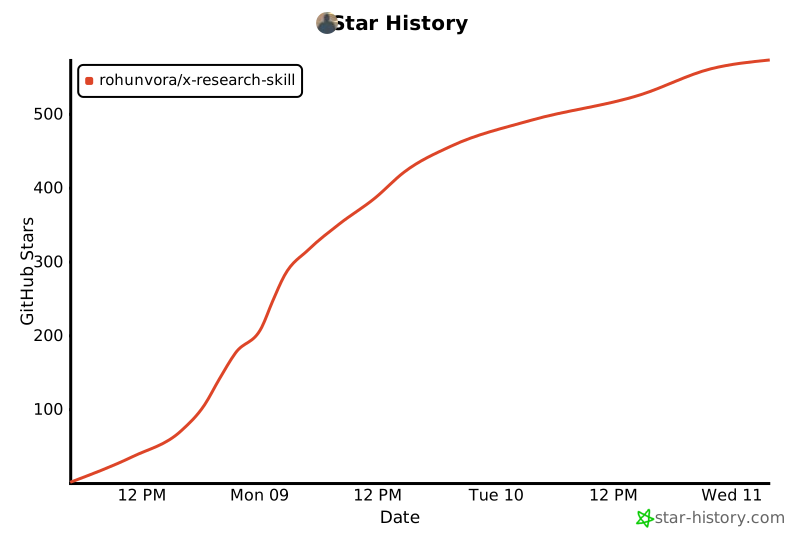](https://star-history.com/#rohunvora/x-research-skill&Date)
- ## License
- MIT
Ratings and comments
Sign in to rate this skill.
Sign inFree to use. If it’s helped, pass it on.