retentioneering-tools
Python toolkit, MCP server, and agent skills for reproducible, auditable clickstream and event log analytics. Helps AI agents, data scientists and analysts build, validate, and cross-check product analytics, quantitative UX, customer journeys, graph-based user flows, behavioral segmentation, A/B tests, process mining models, Markov chain simulation
Safety scan
A static text scan, not a guarantee. Select the badge to see what was scanned and every finding.
Check it deeper on your machine
It has changed since its scan on 11 Nov 2026.
As a Claude Code plugin, install it and then ask Claude Code:
/plugin marketplace add keithmackay/mackayi/plugin install scanskillsafety@mackayiDo a deep scan of https://github.com/retentioneering/retentioneering-tools with scanskillsafety
Or from a terminal, clone it and run it:
git clone https://github.com/keithmackay/scanskillsafety-skill ~/.claude/skills/scanskillsafetynode ~/.claude/skills/scanskillsafety/cli.cjs --deep 'https://github.com/retentioneering/retentioneering-tools'
It checks the exact commit: every file, its packages against OSV (api.osv.dev), how it compares with this page's scan (findsafeskills.com receives the repository's address), and, if you agree, Claude reading every file with your own Claude subscription. It never runs the code.
Badge for your README

Markdown
[](/listings/retentioneering--retentioneering-tools)HTML
<a href="/listings/retentioneering--retentioneering-tools"><img src="/api/listings/retentioneering--retentioneering-tools/badge.svg" alt="findsafeskills safety rating" /></a>Install
Install instructions from the README
As written by the repo's author. findsafeskills has not verified these steps.
Python 3.10+ is required.
pip install retentioneering
Or directly from a Jupyter (Lab, Notebook, Desktop) / [Google Colab](https://colab.research.google.com/) / VS Code:
!pip install retentioneering
What was scanned
The files the safety scan read, as written by the repository's author and shown as plain text. Lines with a finding are marked.
README.md · README · 382 lines
View this file on GitHub (read at the repository's current version: the scan did not record which commit it read)
This file has changed since it was scanned, so this is not exactly the text that was scanned, and no line is marked. The findings are listed with the safety scan above.
- # Retentioneering
- Retentioneering is an open-source Python library for **understanding user behavior from event logs**. Find where users get stuck, compare the paths different groups take, and discover patterns across clicks, sessions and repeat visits. Explore the data yourself or let an AI agent work with the same tools.
- [](https://pypi.org/project/retentioneering/)
- [](https://pypi.org/project/retentioneering/)
- [](https://pepy.tech/project/retentioneering)
- [](https://github.com/retentioneering/retentioneering-tools/blob/master/LICENSE)
- [](https://discord.com/invite/hBnuQABEV2)
- [](https://t.me/retentioneering_support)
- [](https://colab.research.google.com/github/retentioneering/retentioneering-tools/blob/master/notebooks/retentioneering_5_tour.ipynb)
- [Run a demo notebook in Google Colab](https://colab.research.google.com/github/retentioneering/retentioneering-tools/blob/master/notebooks/retentioneering_5_tour.ipynb) – no need to install the library locally, sample data included.
- [Quick start](#quick-start) · [Use cases](#common-use-cases) · [Use an AI agent](#work-with-an-ai-agent) · [Docs](https://retentioneering.com/docs/)
- <a href="https://retentioneering.com/docs/widgets/transition-graph"><img src="https://raw.githubusercontent.com/retentioneering/retentioneering-tools/master/.github/readme/transition-graph.gif" width="820" alt="A demo of the interactive features of the transition graph widget. You can highlight a route, compare path groups, focus on the step you want to investigate, and explore incoming and outgoing transition probabilities in the ego view."></a>
- *A demo of the interactive features of the [transition graph](https://retentioneering.com/docs/widgets/transition-graph) widget. You can highlight a route, compare path groups, focus on the step you want to investigate, and explore incoming and outgoing transition probabilities in the ego view.*
- ## Is it for you?
- Use Retentioneering when you have a question about *the sequence of actions* like these:
- - A metric changed. Where did journeys change and move the metric?
- - Users stop before reaching a goal. What do they do instead and how do successful paths differ?
- - You want to understand engagement. What behavior types are represented, and how does usage evolve across visits?
- - You need to investigate a flow. Where do checkout, onboarding, support or agent runs loop, branch or stall?
- Bring an event-level export from your analytics platform, warehouse or application logs. All you need is a **user, session or case ID; an event name; and a timestamp**.
- ## Quick start
- Python: 3.11 - 3.13.
- Environment: Jupyter (Jupyter Notebook, JupyterLab, JupyterLab Desktop), VS Code, Cursor, Google Colab.
- To install the library, run
- ```bash
- pip install retentioneering
- ```
- Within a notebook, use `%pip install retentioneering` instead. See the [installation guide](https://retentioneering.com/docs/installation) for the details.
- To try out the library quickly, without [loading your own data](#bring-your-own-data), you can use a built-in e-commerce dataset:
- ```python
- import retentioneering as rete
- stream = rete.datasets.load_ecom() # bundled synthetic store
- stream.transition_graph()
- ```
- ## Common use cases
- Below are a few examples of how you can apply retentioneering tools to approach common analytical problems on the [bundled e-commerce demo dataset](https://retentioneering.com/docs/eventstream#sample-dataset). The code chunks assume `stream = rete.datasets.load_ecom()`.
- <details>
- <summary>A key metric dropped. Where did journeys change and cause it?</summary>
- <br>
- Create a binary segment that [cuts each path at the boundaries of the affected period](https://retentioneering.com/docs/data-processors/add-segment#time_range--inside-vs-outside-a-window): its events inside the period are labelled `inside`, the rest `outside`, so one path can contribute to both parts. Then compare user behavior across these parts with the [transition graph widget](https://retentioneering.com/docs/widgets/transition-graph#diff-mode).
- ```python
- periods = stream.add_segment("period", time_range=("2024-05-19", "2024-06-07"))
- periods.transition_graph(diff=("period", "inside", "outside"))
- ```
- <a href="https://retentioneering.com/docs/widgets/transition-graph#diff-mode"><img src="https://raw.githubusercontent.com/retentioneering/retentioneering-tools/master/.github/readme/kpi-diff.png" width="760" alt="Transition graph in diff mode focused on payment_details: inside the window, the transition to payment_error rises while the transition to purchase falls."></a>
- Click a node (e.g. `payment_details`) to inspect the routes that pass this node. With this comparison configuration, red means a higher next-step probability inside the period; blue means lower. This locates a behavioral difference to investigate.
- Letting a path contribute to multiple levels of a segment gives more flexibility to diff mode: you can compare not only common attributes like mobile vs. desktop, acquisition channels, or experiment groups, but dynamic features as well: first session vs. the others, weekends vs. weekdays, etc.
- </details>
- <details>
- <summary>Where do users leave the funnel and what do they do instead?</summary>
- <br>
- Count sessions that complete the steps in order – rather than whole user journeys (`path_col="session_id"`) – with the [funnel widget](https://retentioneering.com/docs/widgets/funnel):
- ```python
- steps = ["cart", "shipping_details", "purchase"]
- stream.funnel(steps=steps, path_col="session_id")
- ```
- <a href="https://retentioneering.com/docs/widgets/funnel"><img src="https://raw.githubusercontent.com/retentioneering/retentioneering-tools/master/.github/readme/funnel.png" width="760" alt="Funnel of sessions from cart to shipping_details to purchase: 28.3%, 22.1% and 13.0% of 3,605 sessions."></a>
- Then compare sessions that stopped at the shipping stage of this funnel with those that completed it using the [step matrix widget](https://retentioneering.com/docs/widgets/step-matrix) in diff mode:
- ```python
- (
- stream
- .add_segment("stage", funnel_events=steps, path_col="session_id")
- .step_matrix(
- path_pattern="cart->.*->shipping_details",
- step_window=2, path_col="session_id",
- diff=("stage", "shipping_details", "purchase"),
- )
- )
- ```
- <a href="https://retentioneering.com/docs/widgets/step-matrix"><img src="https://raw.githubusercontent.com/retentioneering/retentioneering-tools/master/.github/readme/step-matrix-funnel.gif" width="820" alt="A Step Matrix aligned on cart and shipping_details compares shipping-stage and completed-funnel sessions: hovering cells shows each group's values, and the arrow buttons sort rows by preceding or following steps."></a>
- The `path_pattern="cart->.*->shipping_details"` argument of the step matrix breaks down the diagram into two parts: around `cart` and around `shipping_details`. You can inspect these surroundings and compare sessions that reached `shipping_details` but not `purchase` with those that completed the funnel.
- </details>
- <details>
- <summary>What leads to, or follows, an error or another key event?</summary>
- <br>
- Instead of using traditional tree-like diagrams for path exploration, you can use [Step Sankey](https://retentioneering.com/docs/widgets/step-sankey), which shows the same numbers as a [Step Matrix](https://retentioneering.com/docs/widgets/step-matrix), drawn as flows. In this example, we align all the paths by the `payment_error` event and display the two steps on either side of it:
- ```python
- stream.step_sankey(
- anchor="payment_error", step_window=2,
- path_col="session_id",
- )
- ```
- <a href="https://retentioneering.com/docs/widgets/step-sankey"><img src="https://raw.githubusercontent.com/retentioneering/retentioneering-tools/master/.github/readme/error-sankey.png" width="760" alt="Step Sankey centred on payment_error, showing the two steps before and after it; support_chat follows almost every error."></a>
- A plain event name anchors each path on its first occurrence. An [anchor spec](https://retentioneering.com/docs/data-processors/truncate-paths#anchoring-on-a-sequence-not-just-an-event) chooses the position more precisely: which occurrence to use, which event of a [pattern](https://retentioneering.com/docs/path-patterns) to center on (`at`), or how far to shift from it (`offset`). For example, align sessions on their *last* payment error to see whether users recover after it or give up:
- ```python
- stream.step_sankey(
- anchor={"pattern": "payment_error", "occurrence": "last"},
- step_window=2, path_col="session_id",
- )
- ```
- <a href="https://retentioneering.com/docs/widgets/step-sankey"><img src="https://raw.githubusercontent.com/retentioneering/retentioneering-tools/master/.github/readme/last-error-sankey.png" width="760" alt="Step Sankey centred on each session's last payment_error: support_chat is the most common next step, and path_end takes 41% of the step after it."></a>
- After the last error, sessions end more often than after the first one: two steps later, `path_end` takes 41% instead of 32%. Either way, the next step is almost always `support_chat` (89%).
- </details>
- <details>
- <summary>Which sessions match a behavior I care about?</summary>
- <br>
- Find sessions that opened the cart, then ended without reaching shipping or support:
- ```python
- abandoned = stream.filter_paths(
- {"metric": "matches_pattern", "op": "=", "value": True,
- "metric_args": {
- "pattern": "cart->[^shipping_details|support_chat]*->path_end"
- }},
- path_col="session_id",
- )
- abandoned.step_sankey(path_pattern="cart", path_col="session_id", step_window=3)
- ```
- <a href="https://retentioneering.com/docs/widgets/step-sankey"><img src="https://raw.githubusercontent.com/retentioneering/retentioneering-tools/master/.github/readme/abandoned-sankey.png" width="760" alt="Step Sankey of abandoned-cart sessions aligned on cart: most sessions end within three steps after it."></a>
- The [filter_paths](https://retentioneering.com/docs/data-processors/filter-paths) data processor can filter paths according to a [path metric](https://retentioneering.com/docs/path-metrics) value, such as length, duration, event count, etc. In our case we use the `matches_pattern` metric that checks if a path matches the [regex-like pattern](https://retentioneering.com/docs/path-patterns) `cart->[^shipping_details|support_chat]*->path_end`.
- </details>
- <details open>
- <summary>How does product usage differ between users? What behavioral patterns are represented?</summary>
- <br>
- To explore clusters interactively, start with a bare call of the [Cluster Analysis widget](https://retentioneering.com/docs/widgets/cluster-analysis) and set everything up in its sidebar:
- ```python
- stream.cluster_analysis()
- ```
- <a href="https://retentioneering.com/docs/widgets/cluster-analysis"><img src="https://raw.githubusercontent.com/retentioneering/retentioneering-tools/master/.github/readme/cluster-analysis.gif" width="820" alt="Starting from a bare cluster_analysis() call: features, the cluster range and overview metrics are set in the sidebar, Apply runs the grid, another partition is picked on the Silhouette tab, clusters are renamed in the header and saved as a segment."></a>
- Here users are clustered by [`event_count_bulk`](https://retentioneering.com/docs/path-metrics), which expands into one count per event type, over a grid of 3 to 8 clusters scored by the [silhouette metric](https://en.wikipedia.org/wiki/Silhouette_(clustering)). The heatmap compares mean metric values across clusters (blue for lower values, red for higher). Overview [metrics](https://retentioneering.com/docs/path-metrics) such as `length` or `in_segment_bulk` describe the clusters without changing the features used for clustering. Pick another partition on the **Silhouette** tab if you are not satisfied with the silhouette-best split. Once you find an optimal split, label the clusters in the header, click **Save Clusters** and save them as a [segment](https://retentioneering.com/docs/segments).
- The same configuration can also be passed directly:
- ```python
- stream.cluster_analysis(
- features=[{"metric": "event_count_bulk"}],
- method_args={"n_clusters": "3-8"},
- overview_metrics=[
- {"metric": "event_count_bulk"},
- {"metric": "length"},
- {"metric": "in_segment_bulk", "metric_args": {"segment_name": "acquisition_channel"}},
- ],
- )
- ```
- And the partition saved in the GIF above – four clusters, renamed – becomes a segment column with [add_clusters](https://retentioneering.com/docs/data-processors/add-clusters) and [rename_segment_levels](https://retentioneering.com/docs/data-processors/rename-segment-levels):
- ```python
- user_types = (
- stream
- .add_clusters(
- "user_type", features=[{"metric": "event_count_bulk"}],
- method_args={"n_clusters": 4},
- )
- .rename_segment_levels("user_type", {
- "cluster_0": "browsers",
- "cluster_1": "researchers",
- "cluster_2": "buyers",
- "cluster_3": "light_users",
- })
- )
- ```
- Once clusters are saved as a segment, explore them like any other segment: compare them in the [diff mode](https://retentioneering.com/docs/widgets#diff-mode) of any widget or side by side in [Segment Overview](https://retentioneering.com/docs/widgets/segment-overview).
- </details>
- <details>
- <summary>How does behavior change across visits?</summary>
- <br>
- [Cluster](https://retentioneering.com/docs/widgets/cluster-analysis) sessions according to behavioral types like this:
- ```python
- stream.cluster_analysis(
- features=[{"metric": "event_count_bulk"}],
- method_args={"n_clusters": "4-8"},
- path_col="session_id"
- )
- ```
- Suppose 4 clusters look best. [add_clusters](https://retentioneering.com/docs/data-processors/add-clusters) reproduces that split as the `session_type` segment – the same result as Save Clusters in the widget. Then we can collapse sessions and treat them as single events with the [collapse_events](https://retentioneering.com/docs/data-processors/collapse-events) data processor and visualize the session flow with any widget, such as the transition graph:
- ```python
- visits = (
- stream
- .add_clusters(
- "session_type", features=[{"metric": "event_count_bulk"}],
- method_args={"n_clusters": 4}, path_col="session_id",
- )
- .collapse_events(group_col="session_id", name={"col": "session_type"})
- .rename_events({
- "cluster_0": "browsing",
- "cluster_1": "quick_visit",
- "cluster_2": "purchase_visit",
- "cluster_3": "promo_visit"
- })
- )
- visits.transition_graph()
- ```
- <a href="https://retentioneering.com/docs/data-processors/collapse-events"><img src="https://raw.githubusercontent.com/retentioneering/retentioneering-tools/master/.github/readme/visit-graph.png" width="760" alt="Transition graph of users' visits, where each session is collapsed into its behavioral cluster."></a>
- </details>
- See [more analysis recipes](https://retentioneering.com/docs/recipes) in the docs.
- ## Bring your own data
- The minimum input is a table with three columns – `user_id`, `event` and `timestamp`:
- | user_id | event | timestamp |
- |---|---|---|
- | user_1 | signup | 2026-01-01 10:00:00 |
- | user_1 | project_created | 2026-01-01 10:02:00 |
- | user_1 | teammate_invited | 2026-01-01 10:05:00 |
- Retentioneering uses the [Eventstream](https://retentioneering.com/docs/eventstream) class to store data and to provide access to all the library's methods.
- ```python
- import pandas as pd
- import retentioneering as rete
- events = pd.read_csv("events.csv", parse_dates=["timestamp"])
- stream = rete.Eventstream(events)
- stream.transition_graph()
- ```
- Use a [schema](https://retentioneering.com/docs/eventstream#schema) to map other column names, declare [path segments](https://retentioneering.com/docs/segments) or pre-existing sessions. Any dataset readable by pandas – such as CSV, Parquet or the result of a warehouse query – can become an eventstream.
- <details>
- <summary><b>Map an export from GA4, Amplitude, Mixpanel or Segment</b></summary>
- <br>
- These are starting points for common exports; check identity and timestamp fields in your actual data.
- | Source | Path ID | Event | Timestamp |
- |---|---|---|---|
- | [GA4 BigQuery](https://support.google.com/analytics/answer/7029846) | `user_pseudo_id` | `event_name` | `event_timestamp` (microseconds) |
- | [Amplitude](https://amplitude.com/docs/apis/analytics/export) | `user_id` or `amplitude_id` | `event_type` | `event_time` |
- | [Mixpanel](https://docs.mixpanel.com/reference/raw-event-export) | `properties.distinct_id` | `event` | `properties.time` (Unix seconds) |
- | Segment tracks | `user_id` or `anonymous_id` | `event` | `timestamp` |
- Flatten nested properties and convert numeric timestamps to datetimes with the correct unit before loading. For example, after exporting the three GA4 fields above to a DataFrame named `ga4`:
- ```python
- ga4["event_timestamp"] = pd.to_datetime(ga4["event_timestamp"], unit="us")
- stream = rete.Eventstream(ga4, schema={
- "path_cols": ["user_pseudo_id"], "event_col": "event_name",
- "timestamp_col": "event_timestamp",
- })
- ```
- </details>
- ## Common analysis workflow
- - **Prepare paths.** [Data processors](https://retentioneering.com/docs/data-processors) filter events or whole journeys, split sessions, collapse repeated actions and define segments. Each returns a new eventstream, so steps chain into a pipeline.
- - **Explore.** Interactive [widgets](https://retentioneering.com/docs/widgets) show paths as graphs, step matrices, Sankey diagrams, funnels and clusters, and compare any two groups.
- - **Build your own outputs.** Every widget has a [headless](https://retentioneering.com/docs/widgets#headless-mode) `*_data()` twin that returns the numbers behind the chart, for custom charts, reports and checks.
- - **Share.** [`export_html()`](https://retentioneering.com/docs/widgets#exporting-to-html) saves a widget as a standalone interactive page that opens without Python.
- ## Explore agent runs, conversations and other event sequences
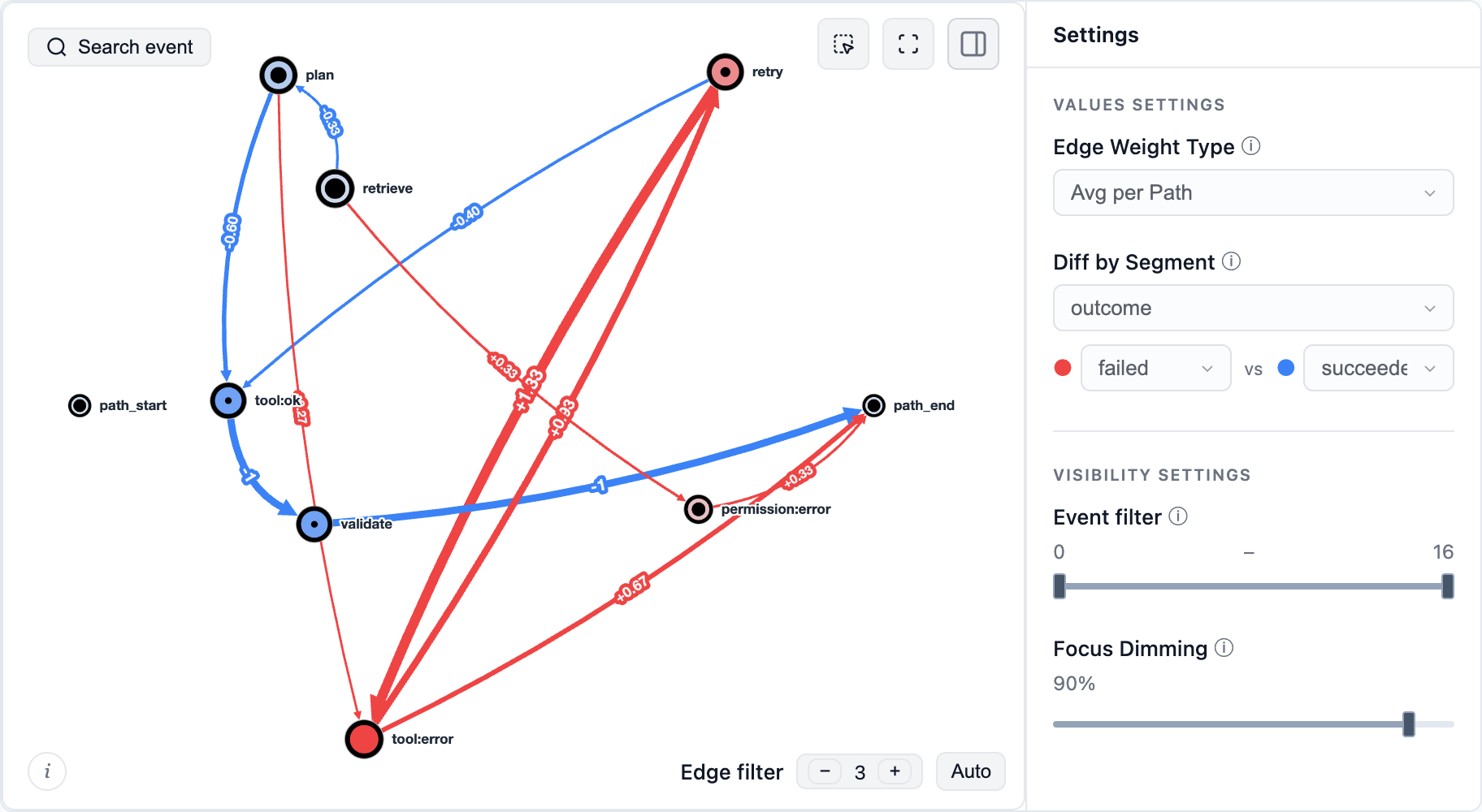
- A path doesn't have to be a user journey. Treat each agent run as a path and its internal steps – tool calls, retries, errors, validations – as events, then use the same tools to see where runs loop, recover or fail, and how successful runs differ from failed ones. See the [agent-run example notebook](https://github.com/retentioneering/retentioneering-tools/blob/master/notebooks/agent_path_analysis.ipynb) ([open in Colab](https://colab.research.google.com/github/retentioneering/retentioneering-tools/blob/master/notebooks/agent_path_analysis.ipynb)) for a synthetic walkthrough.
- [](https://github.com/retentioneering/retentioneering-tools/blob/master/notebooks/agent_path_analysis.ipynb)
- The same approach works for other processes: decide what one path is and which steps become its events. For example:
- - Support conversations: a path is the sequence of message intents and handoffs within one conversation, e.g. `billing_question → bot_answer → rephrased_question → escalation → agent_answer → resolved`.
- - Tickets: a path is the sequence of a ticket's status changes and reassignments, e.g. `opened → triaged → assigned:tier1 → waiting_for_customer → reassigned:tier2 → closed`.
- - Learning sessions: a path is the sequence of lessons, attempts and their results within a study session or across a learner's whole course, e.g. `lesson_3 → quiz_3:fail → lesson_3_review → quiz_3:pass → lesson_4`.
- ## Work with an AI agent
- Give your coding agent the [product-analytics skill](https://github.com/retentioneering/retentioneering-tools/blob/master/.agents/skills/retentioneering-product-analytics/SKILL.md) and an event file. The skill guides it through inspecting the log, choosing a recipe, running the analysis and checking the result. See [skill setup](https://retentioneering.com/docs/agent-skills) for supported workflows.
- For example:
- > Use Retentioneering to investigate where sessions in events.csv stall between cart and purchase. Check the schema and event order first. Compare sessions that purchased with those that stopped, keep non-purchasing sessions, and show the counts behind the main differences. Return the runnable analysis and an interactive HTML report.
- **Prefer an MCP connection?** The [data MCP server](https://retentioneering.com/docs/mcp-server) (beta) exposes an Eventstream to a compatible agent from a local Python environment. Its report collects several tools in tabs and links every number in the text to the element it comes from – a graph edge, a step matrix cell or a segment overview cell:
- <a href="https://retentioneering.com/docs/mcp-server"><img src="https://raw.githubusercontent.com/retentioneering/retentioneering-tools/master/.github/readme/agent-report.gif" width="820" alt="A report with three tabs beside its analysis text. Clicking links in the text switches tabs and highlights segment overview cells, transition graph edges and step matrix cells."></a>
- <details>
- <summary><b>For AI assistants: current API and execution guidance</b></summary>
- <br>
- - Read the [current API index](https://retentioneering.com/llms.txt), [full text docs](https://retentioneering.com/llms-full.txt) or [documentation MCP guide](https://retentioneering.com/docs/mcp-server#documentation-mcp-server). Documentation access supplies reference material; data analysis also needs Python execution and access to the event file.
- - This README uses **5.x**. Start with `import retentioneering as rete` and `rete.Eventstream(df, schema={...})`. Older 2.x/3.x examples use a different API.
- - Choose and declare the path grain (`path_cols`); pass `path_col` to analyses when switching between users and sessions. Declare comparison columns in `segment_cols`.
- - Use `transition_graph`, `step_matrix`, `step_sankey`, `funnel`, `segment_overview` and `cluster_analysis`. Their `*_data()` methods return computed results for inspection and automation; return types vary by tool.
- - Graph, matrix, Sankey and funnel comparisons take `diff=("segment", "A", "B")` and show A minus B. Check group sizes, metric definitions and the corresponding data output.
- - Processors return a new Eventstream. Assign the result, preserve the intended event order and population, and validate a complete sequence with a path pattern rather than inferring it from separate graph edges.
- - Save and replay transformations with [Eventstream.recipe()](https://retentioneering.com/docs/eventstream#reproducing-an-eventstream). Keep findings separate from hypotheses about their causes.
- </details>
- ## Telemetry
- Anonymous usage telemetry is enabled by default. Sensitive data like event names, identifiers, path contents and parameter values is **never** sent; see [what is collected](https://retentioneering.com/docs/tracking). Set `RETENTIONEERING_NO_TRACK=1` before starting Python to disable it.
- ## Documentation and community
- [Quick start](https://retentioneering.com/docs/quick-start) · [Eventstream](https://retentioneering.com/docs/eventstream) · [Widgets](https://retentioneering.com/docs/widgets) · [Data processors](https://retentioneering.com/docs/data-processors) · [Analysis recipes](https://retentioneering.com/docs/recipes)
- Using a 3.x example? Version 5 rewrites the API. See the [migration guide](https://retentioneering.com/docs/migration-from-3x); legacy `Sequences`, `Cohorts`, `StatTests` and the visual Preprocessing Graph remain on the [3.x branch](https://github.com/retentioneering/retentioneering-tools/tree/3.x).
- Bring a question, a useful recipe or a small reproducible example to [GitHub issues](https://github.com/retentioneering/retentioneering-tools/issues), [Discord](https://discord.com/invite/hBnuQABEV2) or [Telegram](https://t.me/retentioneering_support). Contributions to methods, widgets, examples and agent workflows are welcome – see [CONTRIBUTING.md](https://github.com/retentioneering/retentioneering-tools/blob/master/CONTRIBUTING.md).
- *Apps are better with math. Join us!*
- ## Citing Retentioneering
- If you use Retentioneering in your research, please cite it:
- ```bibtex
- @software{retentioneering,
- title = {Retentioneering: understanding user behavior from event logs},
- author = {Godzi, Maxim and Kukushkin, Vladimir and Zaytsev, Anatoly},
- year = {2026},
- url = {https://github.com/retentioneering/retentioneering-tools},
- license = {Apache-2.0},
- }
- ```
- ## License and commercial model
- Retentioneering-tools is open-source software licensed under the Apache License, Version 2.0.
- Retentioneering is a community research laboratory dedicated to developing new analytics methodology and open-source tools.
- Copyright retentioneering-tools v.5.0 [Maxim Godzi](https://www.linkedin.com/in/godsie/), [Vladimir Kukushkin](https://www.linkedin.com/in/vladimir-kukushkin/) and [Anatoly Zaytsev](https://www.linkedin.com/in/anatoly-zaytsev/). Updates may include software developed by the Retentioneering community.
- You are free to use, modify, distribute, and build commercial products with Retentioneering-tools, subject to the terms of the Apache-2.0 license.
- Other Retentioneering libraries, packages and managed execution services, enterprise integrations, premium diagnostic workflows, and hosted collaboration features are separate proprietary products and are governed by their respective commercial terms. Additional details are provided in [COMMERCIAL.md](https://github.com/retentioneering/retentioneering-tools/blob/master/COMMERCIAL.md).
- The Apache-2.0 license applies only to the source code and assets distributed in this repository. It does not grant rights to use the Retentioneering name, logo, trademarks, hosted services, proprietary cloud infrastructure, or commercial content that is not distributed in this repository.
- We welcome contributions from individuals and organizations. Contributions to Retentioneering-tools are accepted under the contribution terms described in [CONTRIBUTING.md](https://github.com/retentioneering/retentioneering-tools/blob/master/CONTRIBUTING.md#contribution-terms).
- Our goal is to keep the core analytical language and ecosystem open, extensible, and useful for independent analysts, researchers, startups, and enterprise teams, while funding long-term maintenance through optional commercial products and services.
Ratings and comments
Sign in to rate this skill.
Sign inFree to use. If it’s helped, pass it on.