opc-skills
Agent Skills for Solopreneurs
Safety scan
A static text scan, not a guarantee. Select the badge to see what was scanned and every finding.
Check it deeper on your machine
It has changed since its scan on 11 Nov 2026.
As a Claude Code plugin, install it and then ask Claude Code:
/plugin marketplace add keithmackay/mackayi/plugin install scanskillsafety@mackayiDo a deep scan of https://github.com/ReScienceLab/opc-skills with scanskillsafety
Or from a terminal, clone it and run it:
git clone https://github.com/keithmackay/scanskillsafety-skill ~/.claude/skills/scanskillsafetynode ~/.claude/skills/scanskillsafety/cli.cjs --deep 'https://github.com/ReScienceLab/opc-skills'
It checks the exact commit: every file, its packages against OSV (api.osv.dev), how it compares with this page's scan (findsafeskills.com receives the repository's address), and, if you agree, Claude reading every file with your own Claude subscription. It never runs the code.
Badge for your README

Markdown
[](/listings/resciencelab-opc-skills)HTML
<a href="/listings/resciencelab-opc-skills"><img src="/api/listings/resciencelab-opc-skills/badge.svg" alt="findsafeskills safety rating" /></a>Install
Install instructions from the README
As written by the repo's author. findsafeskills has not verified these steps.
Claude Code Plugin Marketplace
Install directly from Claude Code's plugin marketplace:
# Add the OPC Skills marketplace
/plugin marketplace add ReScienceLab/opc-skills

# Install specific skills
/plugin install requesthunt@opc-skills
/plugin install domain-hunter@opc-skills
/plugin install seo-geo@opc-skills

# List all available skills
/plugin marketplace list opc-skills
Universal Installation (16+ AI Tools)
Install with one command - works with Claude Code, Cursor, Windsurf, Droid, and 12+ other AI tools:
# Install all skills
npx skills add ReScienceLab/opc-skills

# Install specific skill
npx skills add ReScienceLab/opc-skills --skill reddit

# Install to specific agent
npx skills add ReScienceLab/opc-skills -a droid
Browse and discover skills at **[skills.sh](https://skills.sh/ReScienceLab/opc-skills)** 🎯
Skills with Dependencies
Some skills require other skills to function properly:
- **domain-hunter** → requires `twitter` and `reddit` - **logo-creator** → requires `nanobanana` - **banner-creator** → requires `nanobanana`
Install them together:
npx skills add ReScienceLab/opc-skills --skill reddit --skill twitter --skill domain-hunter
---
What was scanned
The files the safety scan read, as written by the repository's author and shown as plain text. Lines with a finding are marked.
.claude-plugin/marketplace.json · Manifest · 182 lines
View this file on GitHub (read at the repository's current version: the scan did not record which commit it read)
- {
- "name": "opc-skills",
- "owner": {
- "name": "ReScienceLab",
- "email": "yilin.jing@rescience.com"
- },
- "metadata": {
- "description": "Agent Skills for One Person Companies - Boost your AI agent with specialized skills for solopreneurs and indie hackers",
- "version": "1.0.4"
- },
- "keywords": [
- "skills",
- "agents",
- "automation",
- "solopreneur",
- "indie-hacker",
- "one-person-company",
- "productivity",
- "seo",
- "social-media",
- "design",
- "market-research"
- ],
- "plugins": [
- {
- "name": "requesthunt",
- "source": "./skills/requesthunt",
- "description": "Generate user demand research reports from real user feedback. Scrape and analyze feature requests, complaints, and questions from Reddit, X, and GitHub.",
- "version": "1.0.0",
- "homepage": "https://opc.dev/skills/requesthunt",
- "repository": "https://github.com/ReScienceLab/opc-skills",
- "license": "MIT",
- "category": "market-research",
- "keywords": [
- "market-research",
- "user-feedback",
- "reddit",
- "twitter",
- "github",
- "demand-analysis"
- ],
- "strict": true
- },
- {
- "name": "domain-hunter",
- "source": "./skills/domain-hunter",
- "description": "Search domains, compare registrar prices, and find promo codes. Help users find and purchase domain names at the best price.",
- "version": "1.0.0",
- "homepage": "https://opc.dev/skills/domain-hunter",
- "repository": "https://github.com/ReScienceLab/opc-skills",
- "license": "MIT",
- "category": "business",
- "keywords": [
- "domain",
- "registrar",
- "pricing",
- "whois"
- ],
- "strict": true
- },
- {
- "name": "logo-creator",
- "source": "./skills/logo-creator",
- "description": "Create logos using AI image generation. Discuss style/ratio, generate variations, iterate with user feedback, crop, remove background, and export as SVG.",
- "version": "1.0.0",
- "homepage": "https://opc.dev/skills/logo-creator",
- "repository": "https://github.com/ReScienceLab/opc-skills",
- "license": "MIT",
- "category": "design",
- "keywords": [
- "logo",
- "design",
- "branding",
- "ai-image-generation",
- "svg"
- ],
- "strict": true
- },
- {
- "name": "banner-creator",
- "source": "./skills/banner-creator",
- "description": "Create banners using AI image generation. Discuss format/style, generate variations, iterate with user feedback, crop to target ratio for GitHub, Twitter, LinkedIn, etc.",
- "version": "1.0.0",
- "homepage": "https://opc.dev/skills/banner-creator",
- "repository": "https://github.com/ReScienceLab/opc-skills",
- "license": "MIT",
- "category": "design",
- "keywords": [
- "banner",
- "header",
- "social-media",
- "ai-image-generation"
- ],
- "strict": true
- },
- {
- "name": "nanobanana",
- "source": "./skills/nanobanana",
- "description": "Generate and edit images using Google Gemini 3 Pro Image (Nano Banana Pro). Supports text-to-image, image editing, aspect ratios, and 2K/4K output.",
- "version": "1.0.0",
- "homepage": "https://opc.dev/skills/nanobanana",
- "repository": "https://github.com/ReScienceLab/opc-skills",
- "license": "MIT",
- "category": "ai-tools",
- "keywords": [
- "gemini",
- "image-generation",
- "ai",
- "batch-processing"
- ],
- "strict": true
- },
- {
- "name": "reddit",
- "source": "./skills/reddit",
- "description": "Search and retrieve content from Reddit. Get posts, comments, subreddit info, and user profiles via the public JSON API.",
- "version": "1.0.0",
- "homepage": "https://opc.dev/skills/reddit",
- "repository": "https://github.com/ReScienceLab/opc-skills",
- "license": "MIT",
- "category": "social-media",
- "keywords": [
- "reddit",
- "social-media",
- "api",
- "content-scraping"
- ],
- "strict": true
- },
- {
- "name": "twitter",
- "source": "./skills/twitter",
- "description": "Search and retrieve content from Twitter/X. Get user info, tweets, replies, followers, communities, spaces, and trends via twitterapi.io.",
- "version": "1.0.0",
- "homepage": "https://opc.dev/skills/twitter",
- "repository": "https://github.com/ReScienceLab/opc-skills",
- "license": "MIT",
- "category": "social-media",
- "keywords": [
- "twitter",
- "x",
- "social-media",
- "api"
- ],
- "strict": true
- },
- {
- "name": "producthunt",
- "source": "./skills/producthunt",
- "description": "Search and retrieve content from Product Hunt. Get posts, topics, users, and collections via the GraphQL API.",
- "version": "1.0.0",
- "homepage": "https://opc.dev/skills/producthunt",
- "repository": "https://github.com/ReScienceLab/opc-skills",
- "license": "MIT",
- "category": "product-discovery",
- "keywords": [
- "producthunt",
- "product-launch",
- "api"
- ],
- "strict": true
- },
- {
- "name": "seo-geo",
- "source": "./skills/seo-geo",
- "description": "SEO & GEO (Generative Engine Optimization) for websites. Optimize for AI search engines (ChatGPT, Perplexity, Gemini, Copilot, Claude) and traditional search (Google, Bing).",
- "version": "1.0.0",
- "homepage": "https://opc.dev/skills/seo-geo",
- "repository": "https://github.com/ReScienceLab/opc-skills",
- "license": "MIT",
- "category": "seo",
- "keywords": [
- "seo",
- "geo",
- "optimization",
- "schema-markup",
- "ai-visibility"
- ],
- "strict": true
- }
- ]
- }
README.md · README · 182 lines
View this file on GitHub (read at the repository's current version: the scan did not record which commit it read)
- # OPC Skills
- <p align="center">
- <img src="website/opc-banner.png" alt="OPC Skills - AI Agent Skills for Solopreneurs" width="100%">
- </p>
- <p align="center">
- <a href="https://opc.dev"><img src="https://img.shields.io/badge/Website-opc.dev-black?style=flat-square" alt="Website"></a>
- <a href="https://skills.sh/ReScienceLab/opc-skills"><img src="https://img.shields.io/badge/Browse-skills.sh-blue?style=flat-square" alt="Browse on skills.sh"></a>
- <a href="https://deepwiki.com/ReScienceLab/opc-skills"><img src="https://deepwiki.com/badge.svg" alt="Ask DeepWiki"></a>
- <a href="https://code.claude.com/docs/en/plugin-marketplaces"><img src="https://img.shields.io/badge/Claude_Code-Marketplace-orange?style=flat-square&logo=anthropic" alt="Claude Code Marketplace"></a>
- <a href="https://github.com/ReScienceLab/opc-skills/blob/main/LICENSE"><img src="https://img.shields.io/badge/License-MIT-green?style=flat-square" alt="MIT License"></a>
- <a href="https://github.com/ReScienceLab/opc-skills/stargazers"><img src="https://img.shields.io/github/stars/ReScienceLab/opc-skills?style=flat-square" alt="GitHub Stars"></a>
- </p>
- <p align="center">
- <a href="https://github.com/ReScienceLab/opc-skills/issues"><img src="https://img.shields.io/github/issues/ReScienceLab/opc-skills?style=flat-square" alt="GitHub issues"></a>
- <a href="https://github.com/ReScienceLab/opc-skills/pulls"><img src="https://img.shields.io/github/issues-pr/ReScienceLab/opc-skills?style=flat-square" alt="GitHub pull requests"></a>
- <img src="https://img.shields.io/github/last-commit/ReScienceLab/opc-skills?style=flat-square" alt="Last commit">
- <a href="https://github.com/ReScienceLab/opc-skills/graphs/contributors"><img src="https://img.shields.io/github/contributors/ReScienceLab/opc-skills?style=flat-square" alt="Contributors"></a>
- <a href="https://x.com/Yilin0x"><img src="https://img.shields.io/badge/Twitter-@Yilin0x-black?style=flat-square&logo=x" alt="Twitter"></a>
- <a href="https://discord.gg/Y2yBpRXvVa"><img src="https://img.shields.io/badge/Discord-Join-5865F2?style=flat-square&logo=discord&logoColor=white" alt="Discord"></a>
- </p>
- <p align="center">
- <strong>AI Agent Skills for Solopreneurs, Indie Hackers, and One-Person Companies</strong>
- </p>
- <p align="center">
- Extend Claude Code, Cursor, Codex, and more with automation skills.<br>
- <a href="https://opc.dev">Browse Skills</a> · <a href="#quick-install">Quick Install</a> · <a href="#included-skills">View All Skills</a>
- </p>
- ---
- ## What are Skills?
- Skills are folders of instructions, scripts, and resources that AI agents load dynamically to improve performance on specialized tasks. Each skill is self-contained with a `SKILL.md` file containing instructions and metadata.
- For more information about the Agent Skills standard, see [agentskills.io](http://agentskills.io).
- ## Included Skills
- | | Skill | Description |
- |:---:|-------|-------------|
- | <img src="./skill-logos/seo-geo.svg" width="24"> | [seo-geo](./skills/seo-geo) | SEO & GEO optimization for AI search engines (ChatGPT, Perplexity, Google) |
- | <img src="./skill-logos/requesthunt.svg" width="24"> | [requesthunt](./skills/requesthunt) | Research user demand from Reddit, X, and GitHub |
- | <img src="./skill-logos/domain-hunter.svg" width="24"> | [domain-hunter](./skills/domain-hunter) | Find domains, compare registrar prices, and discover promo codes |
- | <img src="./skill-logos/logo-creator.svg" width="24"> | [logo-creator](./skills/logo-creator) | Create logos with AI, crop, remove background, export as SVG |
- | <img src="./skill-logos/banner-creator.svg" width="24"> | [banner-creator](./skills/banner-creator) | Create banners for GitHub, Twitter, LinkedIn, etc. |
- | <img src="./skill-logos/nanobanana.svg" width="24"> | [nanobanana](./skills/nanobanana) | Generate images using Gemini 3 Pro Image (Nano Banana Pro) |
- | <img src="./skill-logos/reddit.svg" width="24"> | [reddit](./skills/reddit) | Search and retrieve content from Reddit via the public JSON API |
- | <img src="./skill-logos/twitter.svg" width="24"> | [twitter](./skills/twitter) | Search and retrieve content from Twitter/X via twitterapi.io |
- | <img src="./skill-logos/producthunt.svg" width="24"> | [producthunt](./skills/producthunt) | Search Product Hunt posts, topics, users, and collections |
- | <img src="./skill-logos/archive.svg" width="24"> | [archive](./skills/archive) | Archive session learnings and debugging solutions with indexed markdown |
- ## Quick Install
- ### Claude Code Plugin Marketplace
- Install directly from Claude Code's plugin marketplace:
- ```bash
- # Add the OPC Skills marketplace
- /plugin marketplace add ReScienceLab/opc-skills
- # Install specific skills
- /plugin install requesthunt@opc-skills
- /plugin install domain-hunter@opc-skills
- /plugin install seo-geo@opc-skills
- # List all available skills
- /plugin marketplace list opc-skills
- ```
- ### Universal Installation (16+ AI Tools)
- Install with one command - works with Claude Code, Cursor, Windsurf, Droid, and 12+ other AI tools:
- ```bash
- # Install all skills
- npx skills add ReScienceLab/opc-skills
- # Install specific skill
- npx skills add ReScienceLab/opc-skills --skill reddit
- # Install to specific agent
- npx skills add ReScienceLab/opc-skills -a droid
- ```
- Browse and discover skills at **[skills.sh](https://skills.sh/ReScienceLab/opc-skills)** 🎯
- ### Skills with Dependencies
- Some skills require other skills to function properly:
- - **domain-hunter** → requires `twitter` and `reddit`
- - **logo-creator** → requires `nanobanana`
- - **banner-creator** → requires `nanobanana`
- Install them together:
- ```bash
- npx skills add ReScienceLab/opc-skills --skill reddit --skill twitter --skill domain-hunter
- ```
- ---
- ## Supported AI Tools
- OPC Skills work with 16+ AI coding agents via `npx skills add`:
- - **Claude Code** - Desktop app for AI-assisted coding
- - **Cursor** - AI-first code editor
- - **Factory Droid** - AI software engineering agent
- - **Windsurf** - AI-powered IDE
- - **OpenCode** - Open-source AI coding assistant
- - **Codex** - AI code generation tool
- - **GitHub Copilot** - AI pair programmer
- - **Gemini CLI** - Command-line AI assistant
- - **Goose** - Terminal-based AI agent
- - **Kilo Code** - Lightweight AI coding tool
- - **Roo Code** - AI code assistant
- - **Trae** - AI development companion
- - **And more...**
- See the [full compatibility list](https://github.com/vercel-labs/add-skill#available-agents) for all supported tools.
- ---
- ## Documentation & Resources
- Explore OPC Skills through multiple channels:
- - **[DeepWiki](https://deepwiki.com/ReScienceLab/opc-skills)** - AI-powered interactive documentation with code exploration and Q&A
- - **[Skills Browser](https://skills.sh/ReScienceLab/opc-skills)** - Browse and discover all available skills
- - **[Official Website](https://opc.dev)** - Guides, tutorials, and usage examples
- - **[Agent Skills Standard](https://agentskills.io/)** - Learn about the skills specification
- ### Using DeepWiki
- DeepWiki provides an AI assistant that can answer questions about the codebase:
- - Ask: "How does the domain-hunter skill work?"
- - Ask: "Show me the dependencies between skills"
- - Ask: "Explain the skill installation process"
- The documentation auto-syncs with the repository, so it's always up to date.
- ---
- ## Creating New Skills
- See the template in `./template/` directory for the basic structure:
- 1. Create a folder in `skills/` with your skill name
- 2. Add a `SKILL.md` file with YAML frontmatter
- 3. (Optional) Add scripts, examples, or other resources
- **Required fields in SKILL.md:**
- ```yaml
- ---
- name: my-skill-name
- description: A clear description of what this skill does and when to use it
- ---
- ```
- For detailed guidance, check out existing skills or visit the [Agent Skills specification](https://agentskills.io/).
- ## Star History
- [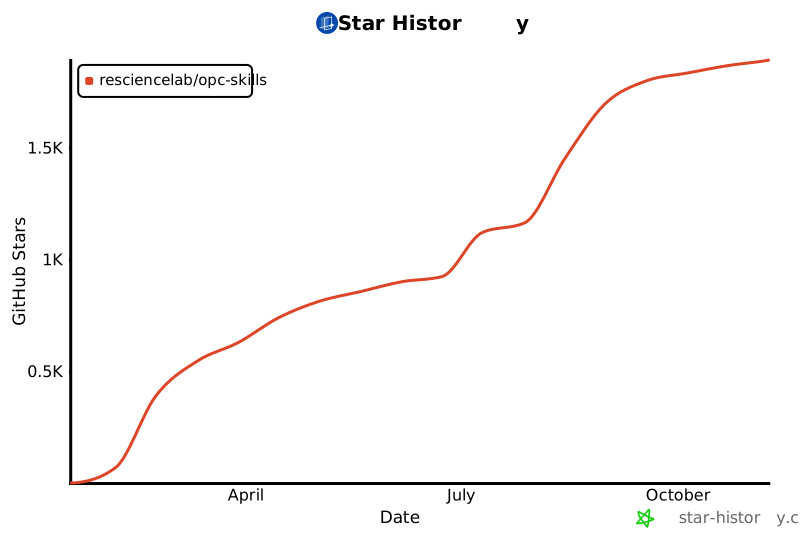](https://star-history.com/#ReScienceLab/opc-skills&Date)
- ## Contributing
- 1. Fork this repository
- 2. Create a new skill folder in `skills/`
- 3. Add a `SKILL.md` with proper frontmatter
- 4. Submit a pull request
- ## License
- Apache 2.0
Ratings and comments
Sign in to rate this skill.
Sign inFree to use. If it’s helped, pass it on.