Back to search
zendesk-mcp-server
MCP serverGitHub
A Model Context Protocol server for Zendesk
Safety scan
A static text scan, not a guarantee. Select the badge to see what was scanned and every finding.
Checked today
Badge for your README
Markdown
[](/listings/reminia--zendesk-mcp-server)HTML
<a href="/listings/reminia--zendesk-mcp-server"><img src="/api/listings/reminia--zendesk-mcp-server/badge.svg" alt="findsafeskills safety rating" /></a>Install
i
Install instructions from the README
As written by the repo's author. findsafeskills has not verified these steps.
- build: `uv venv && uv pip install -e .` or `uv build` in short. - configure authentication: see [Authentication](#authentication) below. - configure in Claude desktop:
{
  "mcpServers": {
      "zendesk": {
          "command": "uv",
          "args": [
              "--directory",
              "/path/to/zendesk-mcp-server",
              "run",
              "zendesk"
          ]
      }
  }
}What was scanned
The files the safety scan read, as written by the repository's author and shown as plain text. Lines with a finding are marked.
README.md · README · 330 lines
View this file on GitHub (read at the repository's current version: the scan did not record which commit it read)
- # Zendesk MCP Server
- 
- [](https://opensource.org/licenses/Apache-2.0)
- A Model Context Protocol server for Zendesk.
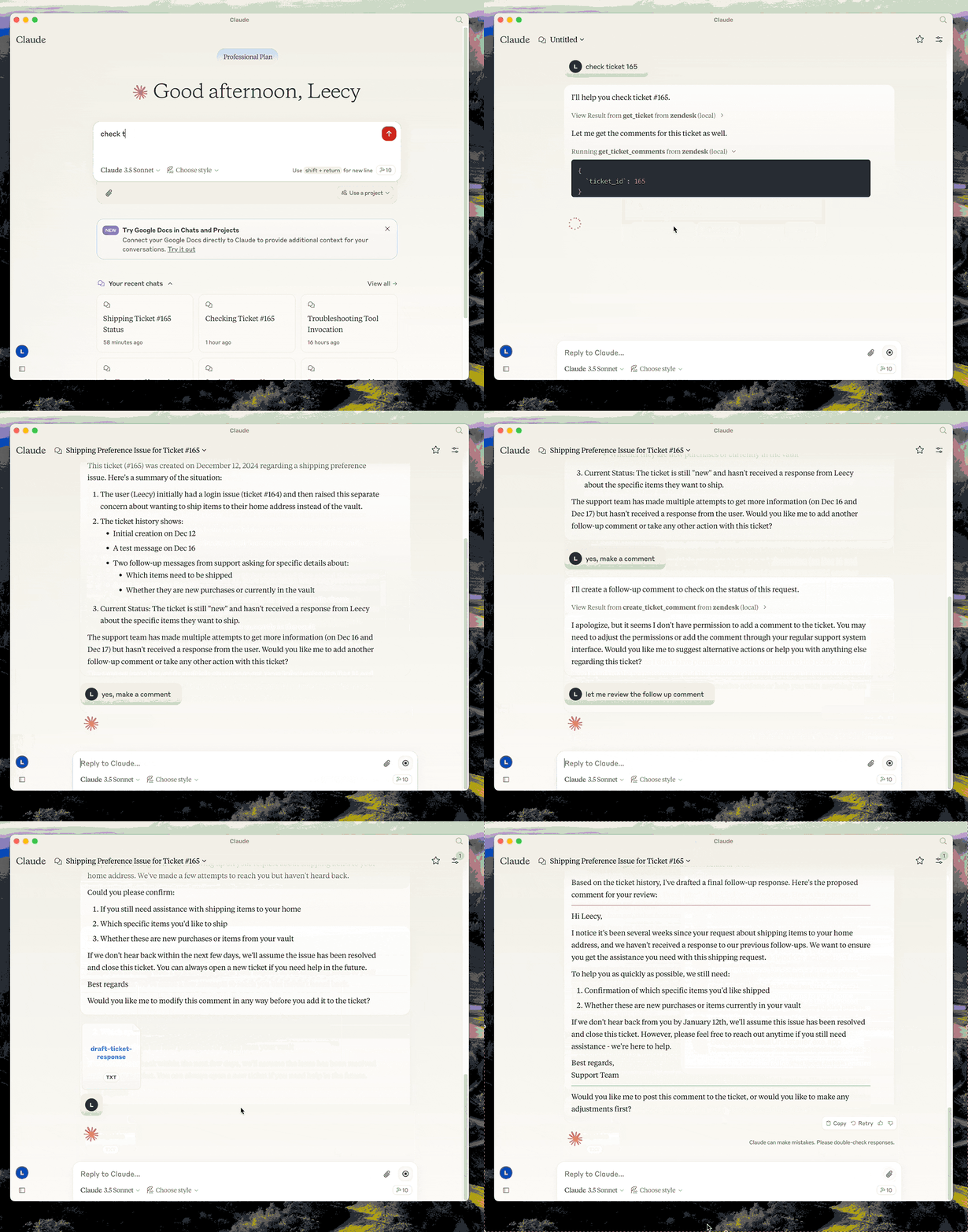
- This server provides a comprehensive integration with Zendesk. It offers:
- - Tools for retrieving and managing Zendesk tickets and comments
- - Specialized prompts for ticket analysis and response drafting
- - Full access to the Zendesk Help Center articles as knowledge base
- 
- ## Setup
- - build: `uv venv && uv pip install -e .` or `uv build` in short.
- - configure authentication: see [Authentication](#authentication) below.
- - configure in Claude desktop:
- ```json
- {
- "mcpServers": {
- "zendesk": {
- "command": "uv",
- "args": [
- "--directory",
- "/path/to/zendesk-mcp-server",
- "run",
- "zendesk"
- ]
- }
- }
- }
- ```
- ## Authentication
- This server authenticates with OAuth. Each operator authorizes with their own
- Zendesk login, so API calls carry their identity and Zendesk applies exactly the
- permissions it applies in the UI — their role, their group restrictions, their
- ticket access. Comments they post are authored by them.
- API token authentication still works but is deprecated. See
- [Migrating from an API token](#migrating-from-an-api-token).
- ### 1. Register a public OAuth client
- In Admin Center, go to **Apps and integrations > APIs > OAuth clients** and
- create a client:
- | Field | Value |
- | --- | --- |
- | Client kind | **Public** — this server runs on each operator's machine, so there is no secret it could keep. PKCE is used instead. |
- | Redirect URLs | `http://localhost:4567/callback` |
- | Allowed scopes | `tickets:read tickets:write ticket_attachments:read users:read hc:read` |
- Setting **Allowed scopes** is optional but recommended: it caps what any token
- from this client can ever request, even if the code changes.
- Note the client's **Identifier** — that is the `ZENDESK_CLIENT_ID` below.
- If Zendesk rejects `http://localhost:4567/callback`, register `https://localhost`
- instead and use `zendesk-auth --manual` in step 3.
- ### 2. Configure the environment
- Copy `.env.example` to `.env` and set:
- ```bash
- ZENDESK_SUBDOMAIN=acme # for https://acme.zendesk.com
- ZENDESK_CLIENT_ID=your-client-identifier
- ```
- Keep `.env` out of version control.
- Two optional settings, both of which must agree with the OAuth client:
- | Variable | Default | When to change it |
- | --- | --- | --- |
- | `ZENDESK_OAUTH_REDIRECT_URI` | `http://localhost:4567/callback` | Port 4567 is in use, or the client is registered with a different redirect URL. Must match a redirect URL on the client exactly. |
- | `ZENDESK_TOKEN_FILE` | `$XDG_CONFIG_HOME/zendesk-mcp/tokens.json` | Storing tokens elsewhere, for example a Docker volume. |
- ### 3. Authorize this machine, once
- ```bash
- uv run zendesk-auth
- ```
- This opens a browser, asks the operator to approve access, and stores the
- resulting tokens locally. From then on the server renews access on its own; the
- operator never repeats this unless the tokens are revoked or left unused past the
- refresh token's lifetime (90 days as requested by this server).
- If the browser cannot reach this machine — a remote shell, or an OAuth client
- registered with `https://localhost` — use the paste-based flow instead:
- ```bash
- uv run zendesk-auth --manual
- ```
- Tokens are written to `$XDG_CONFIG_HOME/zendesk-mcp/tokens.json`
- (`~/.config/zendesk-mcp/tokens.json` by default), created `0600` inside a `0700`
- directory. Override the location with `ZENDESK_TOKEN_FILE`. The file holds live
- credentials: treat it like a password and never commit it.
- ### How token renewal works
- Zendesk access tokens are short-lived — 30 minutes by default, 48 hours at most —
- so the server refreshes them for you:
- - **before expiry**, when the stored token is within 60 seconds of expiring, and
- - **on rejection**, when Zendesk answers `401` with `{"error": "invalid_token"}`,
- in which case the request is retried once with a fresh token.
- Only `invalid_token` triggers a retry. A `401` or `403` from insufficient scope or
- from the operator's own Zendesk permissions is passed through unchanged, so
- permission problems stay visible instead of looking like auth flakiness.
- Each refresh rotates the refresh token and invalidates the previous one
- immediately, so the new pair is written to disk before it is used. Writes are
- atomic and guarded by a lock file, which matters if you run the server from more
- than one MCP client at the same time.
- When the refresh token itself is expired or revoked, tools fail with a message
- telling the operator to re-run `zendesk-auth`.
- ### Choosing scopes
- The default scopes cover every tool this server exposes:
- | Scope | Needed for |
- | --- | --- |
- | `tickets:read` | `get_ticket`, `get_tickets`, `get_ticket_comments` |
- | `tickets:write` | `create_ticket`, `update_ticket`, `create_ticket_comment` |
- | `ticket_attachments:read` | `get_ticket_attachment` |
- | `users:read` | requester and assignee details on tickets |
- | `hc:read` | the `zendesk://knowledge-base` resource |
- Narrow them with `ZENDESK_OAUTH_SCOPES` if you do not need every tool — for
- read-only access, `tickets:read users:read hc:read`.
- Scopes are a ceiling, not a grant: a token can never do more than the
- authorizing operator is allowed to do. Note that Zendesk accepts unrecognised
- scope names when issuing a token but then rejects every request with `403`, so
- `zendesk-auth` prints the scope Zendesk actually granted for comparison.
- ### Migrating from an API token
- Zendesk is retiring API tokens on this schedule:
- | Date | Change |
- | --- | --- |
- | 2026-07-28 | Tokens unused for 30 days are deactivated automatically; new accounts cannot create tokens. |
- | 2026-10-27 | No account can create new API tokens. |
- | 2027-04-30 | All API tokens stop working permanently. |
- Until then `ZENDESK_EMAIL` + `ZENDESK_API_KEY` continue to work, and the server
- logs a deprecation warning the first time it authenticates. Set
- `ZENDESK_CLIENT_ID` and OAuth takes precedence, so you can migrate without
- removing the old variables.
- Beyond the deadline, there is a reason to move sooner: a Zendesk API token is
- account-level and unscoped. Whoever holds it gets the full access of the user it
- is paired with, which for most installations is an admin. That is what per-operator
- OAuth fixes.
- > **Why not the client credentials flow?** It is simpler — no browser step, no
- > refresh tokens — but its tokens are attributed to the Zendesk user who created
- > the OAuth client. Every operator would act as that one user, usually an admin,
- > and audit logs and comment authorship would all point at them. Since the goal
- > is for operators to have exactly their own Zendesk permissions, the
- > authorization code flow is the only one that fits.
- ## Docker
- You can containerize the server if you prefer an isolated runtime:
- 1. Copy `.env.example` to `.env` and fill in your Zendesk configuration. Keep this file outside version control.
- 2. Build the image:
- ```bash
- docker build -t zendesk-mcp-server .
- ```
- 3. Authorize on the **host**, not in the container. `zendesk-auth` needs a
- browser and a local callback port, so run it once outside Docker:
- ```bash
- uv run zendesk-auth
- ```
- 4. Run the server, passing the environment file and mounting the token store:
- ```bash
- docker run --rm \
- --env-file /path/to/.env \
- --user "$(id -u):$(id -g)" \
- -e ZENDESK_TOKEN_FILE=/tokens/tokens.json \
- -v "$HOME/.config/zendesk-mcp:/tokens" \
- zendesk-mcp-server
- ```
- The mount must be writable: the server rewrites the file every time it
- rotates the refresh token, and a read-only mount will strand it on an expired
- token. `--user` makes the container run as you, so it can read the `0600`
- token file created on the host.
- Add `-i` when wiring the container to MCP clients over STDIN/STDOUT (Claude Code uses this mode). For daemonized runs, add `-d --name zendesk-mcp`.
- The image installs dependencies from `requirements.lock` and drops privileges to a non-root user. With API token authentication no volume is needed, since configuration comes entirely from environment variables.
- ### Claude MCP Integration
- To use the Dockerized server from Claude Code/Desktop, add an entry to Claude Code's `settings.json` similar to:
- ```json
- {
- "mcpServers": {
- "zendesk": {
- "command": "/usr/local/bin/docker",
- "args": [
- "run",
- "--rm",
- "-i",
- "--env-file",
- "/path/to/zendesk-mcp-server/.env",
- "zendesk-mcp-server"
- ]
- }
- }
- }
- ```
- Adjust the paths to match your environment. After saving the file, restart Claude for the new MCP server to be detected.
- ## Development
- Run the test suite:
- ```bash
- uv pip install -e '.[test]'
- pytest
- ```
- The tests use mocked HTTP and never contact Zendesk. They cover the API-token and
- OAuth paths, PKCE derivation, token storage and rotation, and each of the four
- ways this server calls Zendesk.
- ## Resources
- - zendesk://knowledge-base, get access to the whole help center articles.
- ## Prompts
- ### analyze-ticket
- Analyze a Zendesk ticket and provide a detailed analysis of the ticket.
- ### draft-ticket-response
- Draft a response to a Zendesk ticket.
- ## Tools
- ### get_tickets
- Fetch the latest tickets with pagination support
- - Input:
- - `page` (integer, optional): Page number (defaults to 1)
- - `per_page` (integer, optional): Number of tickets per page, max 100 (defaults to 25)
- - `sort_by` (string, optional): Field to sort by - created_at, updated_at, priority, or status (defaults to created_at)
- - `sort_order` (string, optional): Sort order - asc or desc (defaults to desc)
- - Output: Returns a list of tickets with essential fields including id, subject, status, priority, description, timestamps, and assignee information, along with pagination metadata
- ### get_ticket
- Retrieve a Zendesk ticket by its ID
- - Input:
- - `ticket_id` (integer): The ID of the ticket to retrieve
- ### get_ticket_comments
- Retrieve all comments for a Zendesk ticket by its ID
- - Input:
- - `ticket_id` (integer): The ID of the ticket to get comments for
- ### create_ticket_comment
- Create a new comment on an existing Zendesk ticket
- - Input:
- - `ticket_id` (integer): The ID of the ticket to comment on
- - `comment` (string): The comment text/content to add
- - `public` (boolean, optional): Whether the comment should be public (defaults to true)
- ### create_ticket
- Create a new Zendesk ticket
- - Input:
- - `subject` (string): Ticket subject
- - `description` (string): Ticket description
- - `requester_id` (integer, optional)
- - `assignee_id` (integer, optional)
- - `priority` (string, optional): one of `low`, `normal`, `high`, `urgent`
- - `type` (string, optional): one of `problem`, `incident`, `question`, `task`
- - `tags` (array[string], optional)
- - `custom_fields` (array[object], optional)
- ### update_ticket
- Update fields on an existing Zendesk ticket (e.g., status, priority, assignee)
- - Input:
- - `ticket_id` (integer): The ID of the ticket to update
- - `subject` (string, optional)
- - `status` (string, optional): one of `new`, `open`, `pending`, `on-hold`, `solved`, `closed`
- - `priority` (string, optional): one of `low`, `normal`, `high`, `urgent`
- - `type` (string, optional)
- - `assignee_id` (integer, optional)
- - `requester_id` (integer, optional)
- - `tags` (array[string], optional)
- - `custom_fields` (array[object], optional)
- - `due_at` (string, optional): ISO8601 datetime
Ratings and comments
Sign in to rate this skill.
Sign inFree to use. If it’s helped, pass it on.