Back to search
mcp-server-deep-research
MCP serverGitHub
MCP Server for Deep Research
Safety scan
A static text scan, not a guarantee. Select the badge to see what was scanned and every finding.
Checked today
Badge for your README
Markdown
[](/listings/reading-plus-ai--mcp-server-deep-research)HTML
<a href="/listings/reading-plus-ai--mcp-server-deep-research"><img src="/api/listings/reading-plus-ai--mcp-server-deep-research/badge.svg" alt="findsafeskills safety rating" /></a>Install
i
What was scanned
The files the safety scan read, as written by the repository's author and shown as plain text. Lines with a finding are marked.
README.md · README · 120 lines
View this file on GitHub (read at the repository's current version: the scan did not record which commit it read)
- # MCP Server for Deep Research
- MCP Server for Deep Research is a tool designed for conducting comprehensive research on complex topics. It helps you explore questions in depth, find relevant sources, and generate structured research reports.
- Your personal Research Assistant, turning research questions into comprehensive, well-cited reports.
- ## 🚀 Try it Out
- [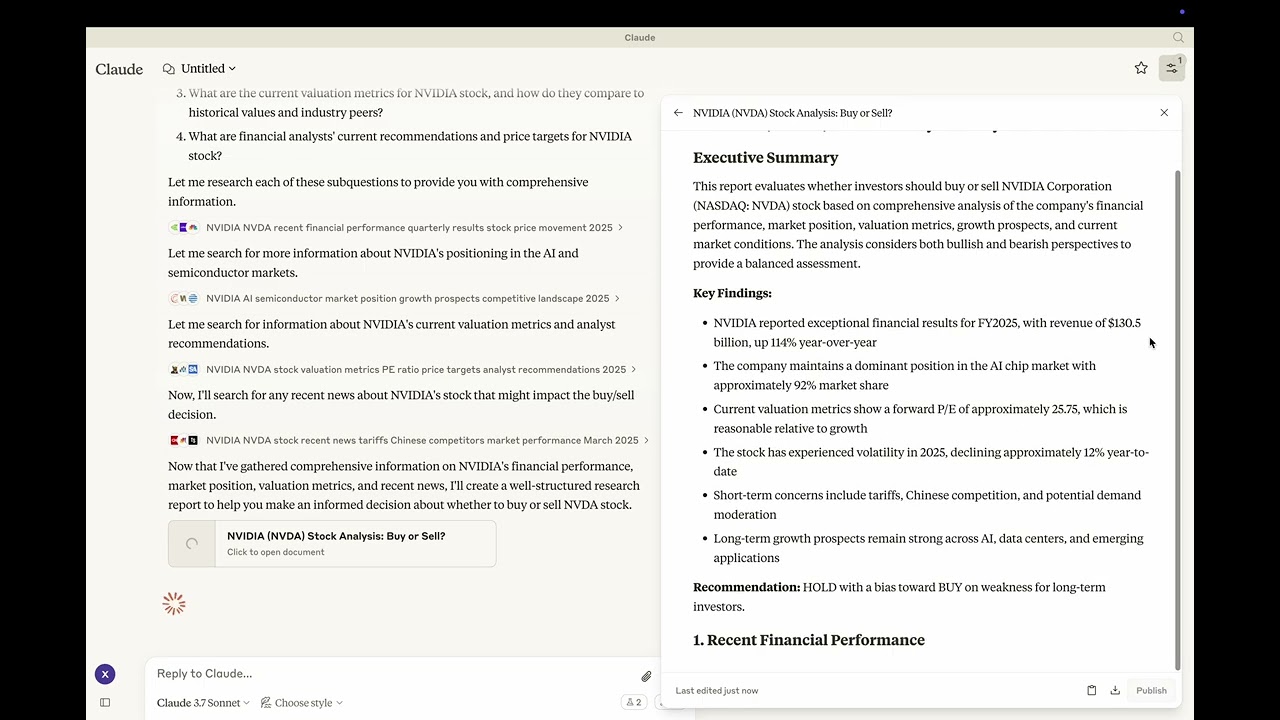]([VIDEO_URL](https://youtu.be/_a7sfo5yxoI))
- Youtube: https://youtu.be/_a7sfo5yxoI
- 1. **Download Claude Desktop**
- - Get it [here](https://claude.ai/download)
- 2. **Install and Set Up**
- - On macOS, run the following command in your terminal:
- ```bash
- python setup.py
- ```
- 3. **Start Researching**
- - Select the deep-research prompt template from MCP
- - Begin your research by providing a research question
- ## Features
- The Deep Research MCP Server offers a complete research workflow:
- 1. **Question Elaboration**
- - Expands and clarifies your research question
- - Identifies key terms and concepts
- - Defines scope and parameters
- 2. **Subquestion Generation**
- - Creates focused subquestions that address different aspects
- - Ensures comprehensive coverage of the main topic
- - Provides structure for systematic research
- 3. **Web Search Integration**
- - Uses Claude's built-in web search capabilities
- - Performs targeted searches for each subquestion
- - Identifies relevant and authoritative sources
- - Collects diverse perspectives on the topic
- 4. **Content Analysis**
- - Evaluates information quality and relevance
- - Synthesizes findings from multiple sources
- - Provides proper citations for all sources
- 5. **Report Generation**
- - Creates well-structured, comprehensive reports as artifacts
- - Properly cites all sources used
- - Presents a balanced view with evidence-based conclusions
- - Uses appropriate formatting for clarity and readability
- ## 📦 Components
- ### Prompts
- - **deep-research**: Tailored for comprehensive research tasks with a structured approach
- ## ⚙️ Modifying the Server
- ### Claude Desktop Configurations
- - macOS: `~/Library/Application\ Support/Claude/claude_desktop_config.json`
- - Windows: `%APPDATA%/Claude/claude_desktop_config.json`
- ### Development (Unpublished Servers)
- ```json
- "mcpServers": {
- "mcp-server-deep-research": {
- "command": "uv",
- "args": [
- "--directory",
- "/Users/username/repos/mcp-server-application/mcp-server-deep-research",
- "run",
- "mcp-server-deep-research"
- ]
- }
- }
- ```
- ### Published Servers
- ```json
- "mcpServers": {
- "mcp-server-deep-research": {
- "command": "uvx",
- "args": [
- "mcp-server-deep-research"
- ]
- }
- }
- ```
- ## 🛠️ Development
- ### Building and Publishing
- 1. **Sync Dependencies**
- ```bash
- uv sync
- ```
- 2. **Build Distributions**
- ```bash
- uv build
- ```
- Generates source and wheel distributions in the dist/ directory.
- 3. **Publish to PyPI**
- ```bash
- uv publish
- ```
- ## 🤝 Contributing
- Contributions are welcome! Whether you're fixing bugs, adding features, or improving documentation, your help makes this project better.
- ## 📜 License
- This project is licensed under the MIT License.
- See the LICENSE file for details.
Ratings and comments
Sign in to rate this skill.
Sign inFree to use. If it’s helped, pass it on.