workmux
git worktrees + tmux windows for zero-friction parallel dev
Safety scan
A static text scan, not a guarantee. Select the badge to see what was scanned and every finding.
Check it deeper on your machine
It has changed since its scan on 11 Nov 2026.
As a Claude Code plugin, install it and then ask Claude Code:
/plugin marketplace add keithmackay/mackayi/plugin install scanskillsafety@mackayiDo a deep scan of https://github.com/raine/workmux with scanskillsafety
Or from a terminal, clone it and run it:
git clone https://github.com/keithmackay/scanskillsafety-skill ~/.claude/skills/scanskillsafetynode ~/.claude/skills/scanskillsafety/cli.cjs --deep 'https://github.com/raine/workmux'
It checks the exact commit: every file, its packages against OSV (api.osv.dev), how it compares with this page's scan (findsafeskills.com receives the repository's address), and, if you agree, Claude reading every file with your own Claude subscription. It never runs the code.
Badge for your README

Markdown
[](/listings/raine--workmux)HTML
<a href="/listings/raine--workmux"><img src="/api/listings/raine--workmux/badge.svg" alt="findsafeskills safety rating" /></a>Install
Install instructions from the README
As written by the repo's author. findsafeskills has not verified these steps.
These steps run a script from the network that findsafeskills does not scan.
**Official sources:** [github.com/raine/workmux](https://github.com/raine/workmux) and [workmux.raine.dev](https://workmux.raine.dev/). This project is not affiliated with workmux.com.
Bash YOLO
curl -fsSL https://raw.githubusercontent.com/raine/workmux/main/scripts/install.sh | bash
Homebrew (macOS/Linux)
brew install raine/workmux/workmux
<details> <summary>Other methods (Cargo, mise, Nix)</summary>
**Cargo** (requires [rustup](https://rustup.rs/)):
cargo install workmux
**mise:**
mise use -g cargo:raine/workmux
**Nix** ([flake and home-manager setup](https://workmux.raine.dev/guide/nix)):
nix profile install github:raine/workmux
</details>
---
For manual installation, see [pre-built binaries](https://github.com/raine/workmux/releases/latest).
What was scanned
The files the safety scan read, as written by the repository's author and shown as plain text. Lines with a finding are marked.
.claude-plugin/marketplace.json · Manifest · 17 lines
View this file on GitHub (read at the repository's current version: the scan did not record which commit it read)
This file has changed since it was scanned, so this is not exactly the text that was scanned, and no line is marked. The findings are listed with the safety scan above.
- {
- "name": "workmux",
- "owner": {
- "name": "raine",
- "email": "raine.virta@gmail.com"
- },
- "metadata": {
- "description": "Plugins for workmux - git worktrees and tmux workflow tool"
- },
- "plugins": [
- {
- "name": "workmux-status",
- "source": "./",
- "description": "Display Claude agent status (working/waiting) in tmux window names"
- }
- ]
- }
README.md · README · 2,963 lines
View this file on GitHub (read at the repository's current version: the scan did not record which commit it read)
This file has changed since it was scanned, so this is not exactly the text that was scanned, and no line is marked. The findings are listed with the safety scan above.
- <p align="center">
- <picture>
- <source media="(prefers-color-scheme: dark)" srcset="meta/logo-dark.svg">
- <img src="meta/logo.svg" alt="workmux icon" width="300">
- </picture>
- </p>
- <p align="center">
- <strong>Parallel development in tmux* with git worktrees</strong>
- </p>
- <p align="center">
- <a href="https://workmux.dev/"><strong>📖 Documentation</strong></a> ·
- <a href="#installation">Install</a> ·
- <a href="#quick-start">Quick start</a> ·
- <a href="#commands">Commands</a> ·
- <a href="CHANGELOG.md">Changelog</a>
- </p>
- ---
- Giga opinionated zero-friction workflow tool for managing
- [git worktrees](https://git-scm.com/docs/git-worktree) and tmux windows as
- isolated development environments. Perfect for running multiple AI agents in
- parallel without conflict.
- **Philosophy**: Build on tools you already use. tmux/zellij/kitty/etc. for
- windowing, git for worktrees, your agent for coding - workmux ties them together.
- <sup><sub>\* Also supports
- <a href="https://workmux.dev/guide/kitty">kitty</a>,
- <a href="https://workmux.dev/guide/wezterm">WezTerm</a>, and
- <a href="https://workmux.dev/guide/zellij">Zellij</a> as alternative
- backends.</sub></sup>
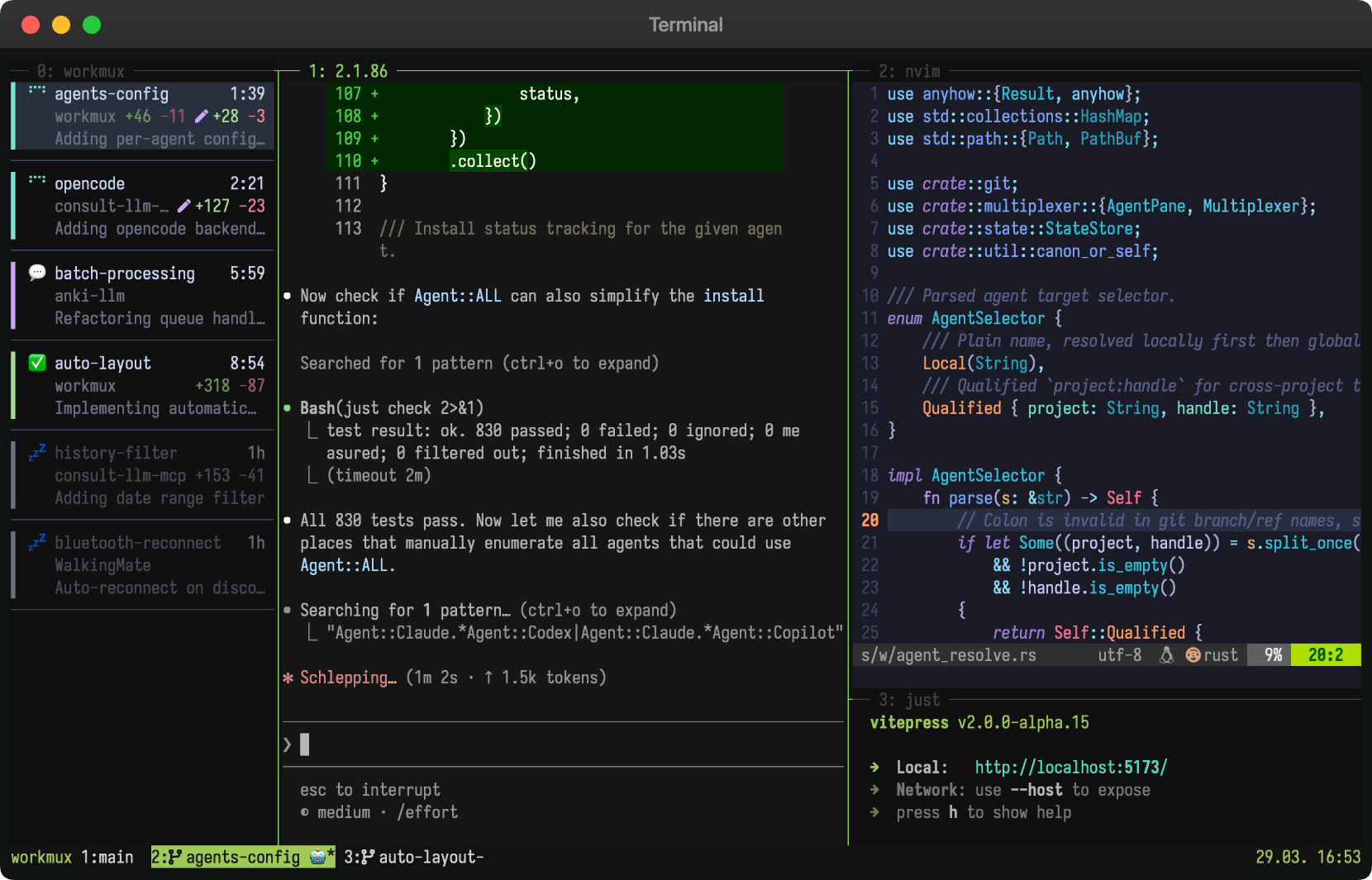
- 📖 **New to workmux?** Read the
- [introduction blog post](https://raine.dev/blog/introduction-to-workmux/) for a
- quick overview.
- 
- <a href="https://aventasks.dev/">
- <picture>
- <source media="(prefers-color-scheme: dark)" srcset="https://aventasks.dev/readme/aven-banner-dark.webp">
- <img src="https://aventasks.dev/readme/aven-banner-light.webp" alt="aven: one task queue for you and your coding agents" width="100%">
- </picture>
- </a>
- <sub>Also from the author of workmux: <a href="https://aventasks.dev/"><b>aven</b></a>, one
- queue for every project, with a keyboard-driven TUI for you and a CLI for your
- agents.</sub>
- ## Why workmux?
- **Parallel workflows.** Work on multiple features the same time, each with its
- own AI agent. No stashing, no branch switching, no conflicts.
- **One window per task.** A natural mental model. Each has its own terminal
- state, editor session, dev server, and AI agent. Context switching is switching
- tabs.
- **Automated setup.** New worktrees start broken (no `.env`, no `node_modules`,
- no dev server). workmux can copy config files, symlink dependencies, and run
- install commands on creation.
- **One-command cleanup.** `workmux merge` handles the full lifecycle: merge the
- branch, delete the worktree, close the tmux window, remove the local branch.
- **Terminal workflow.** Build on your terminal setup instead of yet another
- agentic GUI that won't exist next year. If you don't have one yet, tmux might be
- worth picking up.
- New to worktrees? See [Why git worktrees?](#why-git-worktrees)
- ## Features
- - Create git worktrees with matching tmux windows in a single command (`add`)
- - Merge branches and clean up everything (worktree, tmux window, branches) in
- one command (`merge`)
- - [Dashboard](#workmux-dashboard) for monitoring agents, reviewing changes, and
- sending commands
- - [Sidebar](https://workmux.dev/guide/sidebar/) for a persistent,
- at-a-glance view of all agents across tmux windows or Zellij tabs
- - [Delegate tasks to worktree agents](#delegating-tasks-with-worktree) with the
- `/worktree` skill
- - [Display agent status in tmux window names](#agent-status-tracking)
- - Automatically set up your preferred tmux pane layout (editor, shell, watchers,
- etc.)
- - Run post-creation hooks (install dependencies, setup database, etc.)
- - Copy or symlink configuration files (`.env`, `node_modules`) into new
- worktrees
- - [Sandbox agents](#sandbox) in containers or VMs for enhanced security
- - [Run agents on a remote server](https://workmux.dev/guide/remote/)
- over SSH while others stay local
- - [Automatic branch name generation](#automatic-branch-name-generation) from
- prompts using LLM
- - Shell completions
- ## What people say
- - *"I've been using (and loving) workmux which brings together tmux, git
- worktrees, and CLI agents into an opinionated workflow."* -
- [Coolin96 on Hacker News](https://news.ycombinator.com/item?id=46029809)
- - *"Thank you so much for your work with workmux! It's a tool I've been wanting
- to exist for a long time."* -
- [rstacruz on GitHub](https://github.com/raine/workmux/issues/2)
- - *"It's become my daily driver - the perfect level of abstraction over tmux +
- git, without getting in the way or obscuring the underlying tooling."* -
- [cisaacstern on GitHub](https://github.com/raine/workmux/issues/33)
- - *"I have to mention workmux at every opportunity because it's the perfect glue
- between worktrees, agents and tmux windows."* -
- [dedbrizz on Threads](https://www.threads.com/@dedbrizz/post/DVt1DtLkr_l)
- - *"Since I discovered workmux I'm cooking. Amazing parallel-agent driver if you
- like tmux and want to keep your config."* -
- [MatijaSosic on X](https://x.com/MatijaSosic/status/2080022087281127659)
- - *"Using workmux with a well-configured tmux has been a breath of fresh air"* -
- [sbeirakh_il on X](https://x.com/sbeirakh_il/status/2080279929778733305)
- - *"I've been using it for about a month now, and it's been nothing but
- great."* -
- [gabrielrockson_ on X](https://x.com/gabrielrockson_/status/2080386326566736189)
- - *"I still don't see the need for Herdr. Workmux adds busy/question/done
- status, manages worktrees by itself, and etc. It lives on an already existing
- tmux setup."* -
- [13hcoks on X](https://x.com/13hcoks/status/2080278051309355485)
- - *"workmux is fantastic. nothing too fancy, solves a real problem and stays in
- TMUX ❤️"* -
- [devopstoolbox on X](https://x.com/devopstoolbox/status/2094442083717390547)
- - *"Workmux is fantastic if you're mostly terminal bound."* -
- [cody1786 on X](https://x.com/cody1786/status/2033959173361213870)
- - *"Want modern terminal workspace features without abandoning your setup?
- Here is how to keep Tmux and boost your workflow using Workmux."* -
- [Sam Natale on YouTube](https://www.youtube.com/watch?v=ww1wykxJps8)
- ## Community videos
- Some kind people have made videos about workmux on YouTube. If you're looking
- for a demo, check them out.
- <table>
- <tr>
- <td width="33%">
- <a href="https://www.youtube.com/watch?v=ww1wykxJps8"><img src="https://raw.githubusercontent.com/raine/workmux/refs/heads/main/docs/src/assets/videos/ww1wykxJps8.webp" alt="Tmux is Still Better Than Herdr (Here's Why)"></a><br>
- <a href="https://www.youtube.com/watch?v=ww1wykxJps8">Tmux is Still Better Than Herdr (Here's Why)</a><br>
- Sam Natale
- </td>
- <td width="33%">
- <a href="https://www.youtube.com/watch?v=7uumknh43rM"><img src="https://raw.githubusercontent.com/raine/workmux/refs/heads/main/docs/src/assets/videos/7uumknh43rM.webp" alt="I Don't Want a New Terminal. I Want THIS for Tmux."></a><br>
- <a href="https://www.youtube.com/watch?v=7uumknh43rM">I Don't Want a New Terminal. I Want THIS for Tmux.</a><br>
- DevOps Toolbox
- </td>
- <td width="33%">
- <a href="https://www.youtube.com/watch?v=0RGyt3EDP-E"><img src="https://raw.githubusercontent.com/raine/workmux/refs/heads/main/docs/src/assets/videos/0RGyt3EDP-E.webp" alt="Tmux Didn't Need a Replacement, It Needed Workmux"></a><br>
- <a href="https://www.youtube.com/watch?v=0RGyt3EDP-E">Tmux Didn't Need a Replacement, It Needed Workmux</a><br>
- Seth Phaeno
- </td>
- </tr>
- </table>
- ## Installation
- **Official sources:** [github.com/raine/workmux](https://github.com/raine/workmux)
- and [workmux.dev](https://workmux.dev/). This project is not affiliated
- with workmux.com.
- ### Bash YOLO
- ```bash
- curl -fsSL https://raw.githubusercontent.com/raine/workmux/main/scripts/install.sh | bash
- ```
- ### Homebrew (macOS/Linux)
- ```bash
- brew install raine/workmux/workmux
- ```
- <details>
- <summary>Other methods (Cargo, mise, Nix)</summary>
- **Cargo** (requires [rustup](https://rustup.rs/)):
- ```bash
- cargo install workmux
- ```
- **mise:**
- ```bash
- mise use -g cargo:raine/workmux
- ```
- **Nix** ([flake and home-manager setup](https://workmux.dev/guide/nix)):
- ```bash
- nix profile install github:raine/workmux
- ```
- </details>
- ---
- For manual installation, see
- [pre-built binaries](https://github.com/raine/workmux/releases/latest).
- ## Quick start
- <!-- prettier-ignore -->
- > [!NOTE]
- > workmux requires a terminal multiplexer. Make sure you have
- > [tmux](https://github.com/tmux/tmux) (or
- > [WezTerm](https://raine.github.io/workmux/guide/wezterm) /
- > [Kitty](https://raine.github.io/workmux/guide/kitty) /
- > [Zellij](https://raine.github.io/workmux/guide/zellij)) installed and running
- > before you start. See [My tmux setup](https://raine.dev/blog/my-tmux-setup/)
- > if you need a starting point.
- 1. **Initialize configuration (optional)**:
- ```bash
- workmux init
- ```
- This creates a `.workmux.yaml` file to customize your workflow (pane layouts,
- setup commands, file operations, etc.). workmux works out of the box with
- sensible defaults, so this step is optional.
- 2. **Create a new worktree and tmux window**:
- ```bash
- workmux add new-feature
- ```
- This will:
- - Create a git worktree at
- `<project_root>/../<project_name>__worktrees/new-feature`
- - Copy config files and symlink dependencies (if
- [configured](#file-operations))
- - Run any [`post_create`](#lifecycle-hooks) setup commands
- - Create a tmux window named `wm-new-feature` (the prefix is configurable)
- - Set up your configured or the default tmux pane layout
- - Automatically switch your tmux client to the new window
- 3. **Do your thing**
- 4. **Finish and clean up**
- **Local merge:** Run `workmux merge` to merge into the base branch and clean
- up in one step.
- **PR workflow:** Push and open a PR. After it's merged, run `workmux remove`
- to clean up.
- ## Configuration
- workmux uses a two-level configuration system:
- - **Global** (`~/.config/workmux/config.yaml`): Personal defaults for all
- projects
- - **Project** (`.workmux.yaml`): Project-specific overrides
- Project settings override global settings. When you run workmux from a
- subdirectory, it walks upward to find the nearest `.workmux.yaml`, allowing
- nested configs for monorepos. See the
- [Monorepos guide](https://workmux.dev/guide/monorepos#nested-configuration)
- for details. For hook lists (`post_create`, `pre_merge`, `pre_remove`) and file
- operation lists (`files.copy`, `files.symlink`), you can use `"<global>"` to
- include global values alongside project-specific ones. Other settings like
- `panes` are replaced entirely when defined in the project config.
- ### Global configuration example
- `~/.config/workmux/config.yaml`:
- ```yaml
- nerdfont: true # Enable nerdfont icons (prompted on first run)
- merge_strategy: rebase # Make workmux merge do rebase by default
- merge_keep: true # Keep worktree, window, and branch after merge by default
- confirm_unmerged_removal: false # Remove unmerged branches without confirmation
- agent: claude
- panes:
- - command: <agent> # Start the configured agent (e.g., claude)
- focus: true
- - split: horizontal # Second pane with default shell
- ```
- ### Project configuration example
- `.workmux.yaml`:
- ```yaml
- post_create:
- - '<global>'
- - mise use
- files:
- symlink:
- - '<global>' # Include global symlinks (node_modules)
- - .pnpm-store # Add project-specific symlink
- panes:
- - command: pnpm install
- focus: true
- - command: <agent>
- split: horizontal
- - command: pnpm run dev
- split: vertical
- ```
- For a real-world example, see
- [workmux's own `.workmux.yaml`](https://github.com/raine/workmux/blob/main/.workmux.yaml).
- ### Configuration options
- Most options have sensible defaults. You only need to configure what you want to
- customize.
- #### Basic options
- | Option | Description | Default |
- | ---------------- | ----------------------------------------------------------------------------------------------------- | --------------------------- |
- | `main_branch` | Branch to merge into | Auto-detected |
- | `base_branch` | Default base ref for new worktrees, or `auto` for the effective main branch | Current branch |
- | `worktree_dir` | Directory for worktrees (absolute or relative). Supports `~` and `{project}`. | `<project>__worktrees/` |
- | `window_prefix` | Prefix for tmux window/session names. Supports `{project}`. | `wm-` |
- | `mode` | Tmux mode (`window` or `session`) | `window` |
- | `default_session` | Session to return to when a workmux session closes (session mode) | Previous session |
- | `window_placement` | New tmux window placement (`after_current` or `rightmost`) | `after_current` |
- | `agent` | Default agent for `<agent>` placeholder | `claude` |
- | `agents` | Named agent commands ([docs](https://workmux.dev/guide/agents#named-agents), global-only) | `{}` |
- | `merge_strategy` | Default merge strategy (`merge`, `rebase`, `squash`) | `merge` |
- | `merge_keep` | Keep resources after `workmux merge` by default | `false` |
- | `confirm_unmerged_removal` | Confirm before deleting branches with commits not merged into their base | `true` |
- | `theme` | Dashboard color scheme ([custom colors](https://workmux.dev/guide/configuration#custom-colors)) | `default` (auto dark/light) |
- Set `base_branch: auto` to create independent work streams from each repository's
- effective main branch. Workmux uses configured `main_branch`, then the local
- `origin/HEAD`, `main`, or `master`. Detection uses local Git state and does not
- fetch. Omitting `base_branch` continues to create branches from the checked-out
- branch.
- #### Naming options
- | Option | Description | Default |
- | ----------------- | ------------------------------------------- | ------- |
- | `worktree_naming` | How to derive names from branches | `full` |
- | `worktree_prefix` | Prefix for worktree directories and windows | none |
- `worktree_naming` strategies:
- - `full`: Use the full branch name (slashes become dashes)
- - `basename`: Use only the part after the last `/` (e.g., `prj-123/feature` →
- `feature`)
- #### Panes
- Define your multiplexer pane layout with the `panes` array. For multiple windows in
- session mode, use [`windows`](#multiple-windows-per-session) instead (they are
- mutually exclusive).
- ```yaml
- panes:
- - command: <agent>
- name: agent
- focus: true
- - command: npm run dev
- name: dev
- split: horizontal
- size: 15
- ```
- Each pane supports:
- | Option | Description | Default |
- | ------------ | ---------------------------------------------------------------------------- | ---------------- |
- | `name` | Pane display name (currently applied by the Zellij backend) | --- |
- | `command` | Command to run (see [agent placeholders](#agent-placeholders)) | Shell |
- | `focus` | Whether this pane receives focus | `false` |
- | `zoom` | Zoom pane to fullscreen (implies `focus: true`) | `false` |
- | `split` | Split direction (`horizontal` or `vertical`) | --- |
- | `size` | Absolute size in lines/cells | 50% |
- | `percentage` | Size as percentage (1-100) | 50% |
- | `target` | 0-based pane index to split from; defaults to most recent pane | most recent pane |
- Use `target` when you want to split something other than the pane that was just
- created. The target must reference an earlier pane in the same layout.
- ```yaml
- panes:
- - command: nvim
- focus: true
- - command: pnpm install && pnpm run dev
- split: vertical
- size: 15
- - command: <agent>
- split: horizontal
- target: 0
- ```
- This creates three panes: `nvim` is at the top left, the agent is to its right,
- and the dev server spans the bottom.
- ##### Agent placeholders
- - `<agent>`: resolves to the configured agent (from `agent` config or `--agent`
- flag)
- Built-in agents (`claude`, `gemini`, `agy`, `codex`, `copilot`, `opencode`, `kiro-cli`,
- `vibe`, `pi`, `omp`, `grok`) are auto-detected when used as literal commands and receive prompt
- injection automatically, without needing the `<agent>` placeholder or a matching
- `agent` config:
- ```yaml
- panes:
- - command: 'claude --dangerously-skip-permissions'
- focus: true
- - command: 'codex --yolo'
- split: vertical
- ```
- Each agent receives the prompt (via `-p`/`-P`/`-e`) using the correct format for
- that agent. Auto-detection matches the executable name regardless of flags or
- path.
- Antigravity CLI support covers command detection, prompt injection, and status
- tracking via lifecycle hooks installed by `workmux setup`.
- #### Named layouts
- Define reusable pane arrangements in the `layouts` map and select one at
- add-time with `-l/--layout`:
- ```yaml
- layouts:
- design:
- panes:
- - command: <agent>
- focus: true
- - command: <agent:codex>
- split: vertical
- review:
- panes:
- - command: <agent>
- ```
- ```bash
- workmux add my-feature -l design
- ```
- When `-l` is used, the layout's `panes` replace the top-level `panes` for that
- worktree. All other config (hooks, files, agent, etc.) comes from the top-level
- as usual. The `-l` flag cannot be combined with `--agent`.
- #### File operations
- New worktrees are clean checkouts with no gitignored files (`.env`,
- `node_modules`, etc.). Use `files` to automatically copy or symlink what each
- worktree needs:
- ```yaml
- files:
- copy:
- - .env
- symlink:
- - .next/cache # Share build cache across worktrees
- ```
- Both `copy` and `symlink` accept glob patterns.
- To re-apply file operations to an existing worktree (e.g., after updating the
- config), run `workmux sync-files` from inside the worktree. Use `--all` to sync
- all worktrees at once.
- #### Lifecycle hooks
- Run commands at specific points in the worktree lifecycle, such as installing
- dependencies or running database migrations. All hooks run with the **worktree
- directory** as the working directory (or the nested config directory for
- [nested configs](https://workmux.dev/guide/monorepos#nested-configuration))
- and receive environment variables: `WM_HANDLE`, `WM_WORKTREE_PATH`,
- `WM_PROJECT_ROOT`, `WM_CONFIG_DIR`.
- `hook_shell` is an argv list containing the executable followed by its
- arguments. Workmux appends each hook command as the final argument. It defaults
- to `["bash", "-c"]` for compatibility. Machine-specific paths belong in global
- configuration:
- ```yaml
- hook_shell: ["/opt/homebrew/bin/bash", "-c"]
- ```
- A project can override the complete argv, or inherit the global value by
- omitting `hook_shell`. The argv must contain a non-empty executable. Shell flags
- and error handling apply only when included explicitly.
- `WM_PROJECT_ROOT` points to the repository's main worktree, regardless of where
- the selected config is stored. `WM_CONFIG_DIR` points to the corresponding
- config directory in the new worktree, which may differ from `WM_WORKTREE_PATH`
- when using nested configs.
- | Hook | When it runs | Additional env vars |
- | ------------- | ------------------------------------------------- | ------------------------------------ |
- | `post_create` | After worktree creation, before tmux window opens | — |
- | `pre_merge` | Before merging (aborts on failure) | `WM_BRANCH_NAME`, `WM_TARGET_BRANCH` |
- | `pre_remove` | Before worktree removal (aborts on failure) | — |
- Example:
- ```yaml
- post_create:
- - direnv allow
- pre_merge:
- - just check
- ```
- In Node.js projects, `pre_remove` defaults to a fast `node_modules` cleanup, and
- defining your own commands replaces that default. Use
- `"<cleanup-node-modules>"` to keep it:
- ```yaml
- pre_remove:
- - cp -r test-results/ "$WM_PROJECT_ROOT/artifacts/$WM_HANDLE/"
- - "<cleanup-node-modules>"
- ```
- #### Agent status icons
- Customize the icons shown in tmux window names:
- ```yaml
- status_icons:
- working: '🤖' # Agent is processing
- waiting: '💬' # Agent needs input (auto-clears on focus)
- done: '✅' # Agent finished (auto-clears on focus)
- ```
- Agents in "working" status that produce no pane output for 10 seconds are
- automatically detected as interrupted.
- Set `status_format: false` to disable automatic tmux format modification
- #### Default behavior
- - Worktrees are created in `<project>__worktrees` as a sibling directory to your
- project by default
- - If no `panes` configuration is defined, workmux provides opinionated defaults:
- - For projects with a `CLAUDE.md` file: Opens the configured agent (see
- `agent` option) in the first pane, defaulting to `claude` if none is set.
- - For all other projects: Opens your default shell.
- - Both configurations include a second pane split horizontally
- - `post_create` commands are optional and only run if you configure them
- ### Automatic setup with panes
- Use the `panes` configuration to automate environment setup. Unlike
- `post_create` hooks which must finish before the tmux window opens, pane
- commands execute immediately _within_ the new window.
- This can be used for:
- - **Installing dependencies**: Run `npm install` or `cargo build` in a focused
- pane to monitor progress.
- - **Starting services**: Launch dev servers, database containers, or file
- watchers automatically.
- - **Running agents**: Initialize AI agents with specific context.
- Since these run in standard tmux panes, you can interact with them (check logs,
- restart servers) just like a normal terminal session.
- Running dependency installation (like `pnpm install`) in a pane command rather
- than `post_create` has a key advantage: you get immediate access to the tmux
- window while installation runs in the background. With `post_create`, you'd have
- to wait for the install to complete before the window even opens. This also
- means AI agents can start working immediately in their pane while dependencies
- install in parallel.
- ```yaml
- panes:
- # Pane 1: Install dependencies, then start dev server
- - command: pnpm install && pnpm run dev
- # Pane 2: AI agent
- - command: <agent>
- split: horizontal
- focus: true
- ```
- ### Directory structure
- Here's how workmux organizes your worktrees by default:
- ```
- ~/projects/
- ├── my-project/ <-- Main project directory
- │ ├── src/
- │ ├── package.json
- │ └── .workmux.yaml
- │
- └── my-project__worktrees/ <-- Worktrees created by workmux
- ├── feature-A/ <-- Isolated workspace for 'feature-A' branch
- │ ├── src/
- │ └── package.json
- │
- └── bugfix-B/ <-- Isolated workspace for 'bugfix-B' branch
- ├── src/
- └── package.json
- ```
- Each worktree is a separate working directory for a different branch, all
- sharing the same git repository. This allows you to work on multiple branches
- simultaneously without conflicts.
- You can customize the worktree directory location using the `worktree_dir`
- configuration option (see [Configuration options](#configuration-options)).
- The value supports `~` for the home directory and a `{project}` placeholder
- that resolves to the main worktree's directory name. This lets a single
- global config namespace every repo's worktrees under one root, e.g.
- `worktree_dir: ~/.workmux/{project}`.
- ### Shell alias (recommended)
- For faster typing, alias `workmux` to `wm`:
- ```bash
- alias wm='workmux'
- ```
- ## Commands
- - [`add`](#workmux-add-branch-name) - Create a new worktree and tmux window
- - [`merge`](#workmux-merge-branch-name) - Merge a branch and clean up everything
- - [`rebase`](#workmux-rebase-name) - Rebase a worktree branch onto its base branch
- - [`remove`](#workmux-remove-name-alias-rm) - Remove worktrees without merging
- - [`list`](#workmux-list) - List all worktrees with status
- - [`open`](#workmux-open-name) - Open a tmux window for an existing worktree
- - [`close`](#workmux-close-name) - Close a worktree's tmux window (keeps
- worktree)
- - [`resurrect`](#workmux-resurrect) - Restore worktree windows after a crash
- - [`path`](#workmux-path-name) - Get the filesystem path of a worktree
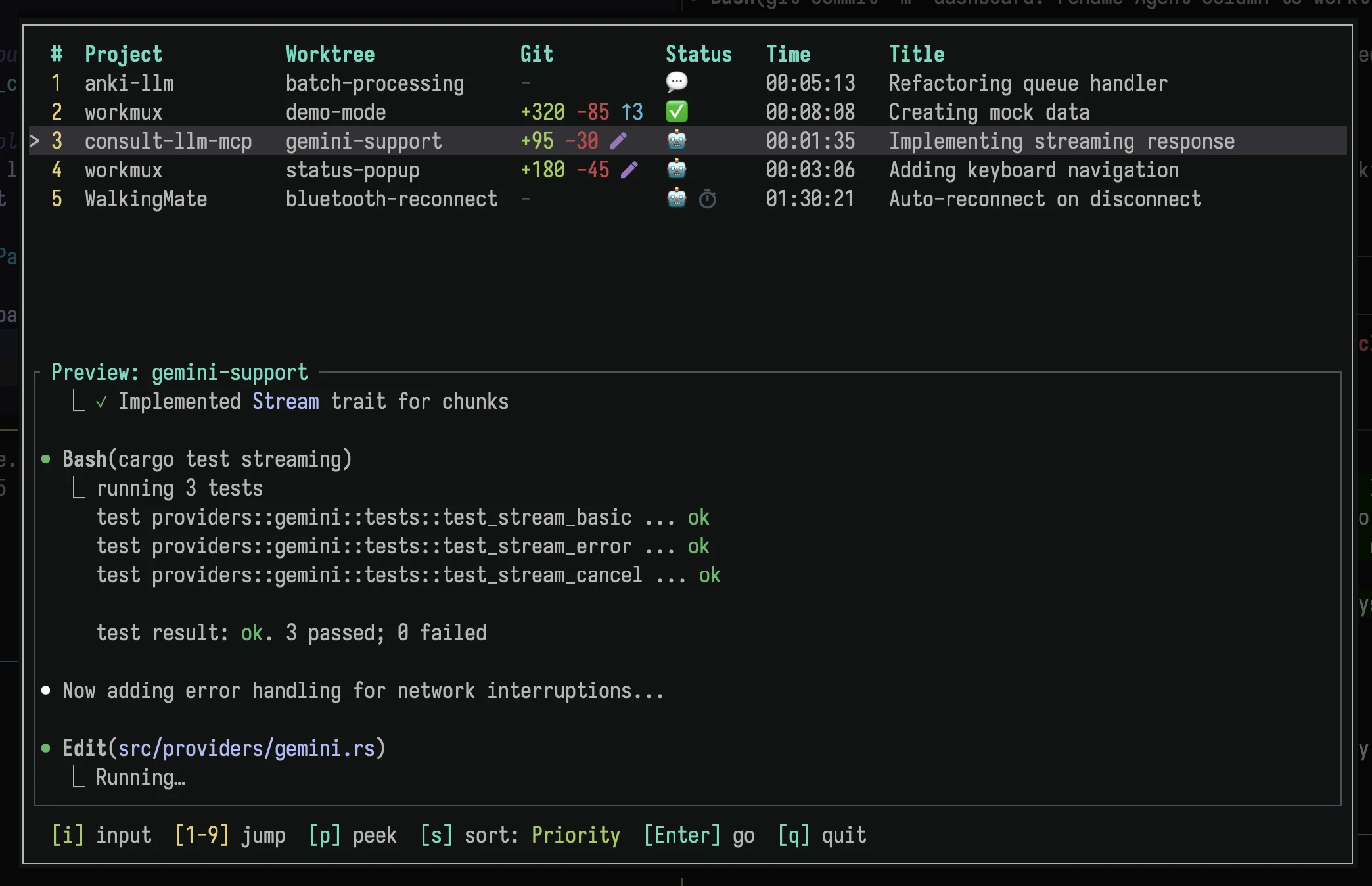
- - [`dashboard`](#workmux-dashboard) - Show TUI dashboard of all active agents
- - [`sidebar`](#workmux-sidebar) - Toggle a compact agent status sidebar in tmux, Zellij or Rex
- - [`reap-agents`](#workmux-reap-agents) - Exit tracked agent processes older than a threshold
- - [`config edit`](#workmux-config-edit) - Edit the global configuration file
- - [`init`](#workmux-init) - Generate configuration file
- - [`sandbox`](#workmux-sandbox) - Manage sandbox backends (container/Lima)
- - [`claude prune`](#workmux-claude-prune) - Clean up stale Claude Code entries
- - [`completions`](#workmux-completions-shell) - Generate shell completions
- - [`docs`](#workmux-docs) - Show detailed documentation
- ### `workmux add <branch-name>`
- Creates a new git worktree with a matching tmux window and switches you to it
- immediately. If the branch doesn't exist, it will be created automatically.
- - `<branch-name>`: Name of the branch to create or switch to, a remote branch
- reference (e.g., `origin/feature-branch`), or a GitHub fork reference (e.g.,
- `user:branch`). Remote and fork references are automatically fetched and
- create a local branch with the derived name. Fork references derive the local
- branch as `user-branch` (e.g., `someuser:feature` creates local branch
- `someuser-feature`). Optional when using `--pr`.
- #### Options
- - `--base <branch|commit|tag>`: Specify a base branch, commit, or tag to branch
- from when creating a new branch. Overrides `base_branch` config. The config
- value `auto` uses the effective main branch. Without either setting, workmux
- uses the currently checked out branch.
- - `--pr <number|url>`: Checkout a GitHub pull request by its number or full URL
- into a new worktree.
- - Requires the `gh` command-line tool to be installed and authenticated.
- - URLs use the form `https://github.com/<owner>/<repository>/pull/<number>`.
- - The local branch name defaults to the PR's head branch name, but can be
- overridden (e.g., `workmux add custom-name --pr 123`).
- - If that local branch already exists and has no worktree, it is reused.
- - `-A, --auto-name`: Generate branch name from prompt using LLM. See
- [Automatic branch name generation](#automatic-branch-name-generation).
- - `--name <name>`: Override the worktree directory and tmux window name. By
- default, these are derived from the branch name (slugified). Cannot be used
- with multi-worktree generation (`--count`, `--foreach`, or multiple
- `--agent`).
- - `-b, --background`: Create the tmux window in the background without switching
- to it. Useful with `--prompt-editor`.
- - `--remote [<name>]`: Create the workspace on a
- [remote server](https://workmux.dev/guide/remote/). The name is
- optional when `placement` names a remote or only one is configured. Put the
- branch name first: `workmux add my-branch --remote`.
- - `--local`: Create the workspace locally even when `placement` names a remote.
- - `-w, --with-changes`: Move uncommitted changes from the current worktree to
- the new worktree, then reset the original worktree to a clean state. Useful
- when you've started working on main and want to move your branches to a new
- worktree.
- - `--patch`: Interactively select which changes to move (requires
- `--with-changes`). Opens an interactive prompt for selecting hunks to stash.
- - `-u, --include-untracked`: Also move untracked files (requires
- `--with-changes`). By default, only staged and modified tracked files are
- moved.
- - `-p, --prompt <text>`: Provide an inline prompt that will be automatically
- passed to AI agent panes.
- - `-P, --prompt-file <path>`: Provide a path to a file whose contents will be
- used as the prompt.
- - `-e, --prompt-editor`: Open your `$EDITOR` (or `$VISUAL`) to write the prompt
- interactively.
- - `--prompt-file-only`: Write the prompt file to the worktree without injecting
- it into agent commands. No agent pane is required. Useful when your editor has
- an embedded agent that reads `.workmux/PROMPT-*.md` directly.
- - `-l, --layout <name>`: Use a named pane layout from config instead of the
- default panes. Cannot be combined with `--agent`.
- - `-a, --agent <name>`: The agent(s) to use for the worktree(s). Can be
- specified multiple times to generate a worktree for each agent. Overrides the
- `agent` from your config file.
- - `-W, --wait`: Block until the created tmux window is closed. Useful for
- scripting when you want to wait for an agent to complete its work. The agent
- can signal completion by running `workmux remove --keep-branch`.
- - `-o, --open-if-exists`: If a worktree for the branch already exists, open it
- instead of failing. Similar to `tmux new-session -A`. Useful when you don't
- know or care whether the worktree already exists.
- - `-s, --session`: Create a tmux session instead of a window. See
- [Session mode](#session-mode) for details.
- - `--dry-run`: Print the resolved worktree path, branch, base, multiplexer
- target, file operations, and post-create hooks without creating or modifying
- anything.
- - `--headless`: Create the worktree, apply file operations, and run
- `post_create` hooks without requiring or creating a multiplexer target.
- - `--json`: Emit a versioned provisioning receipt on stdout. Requires
- `--headless`. Hook output and diagnostics use stderr.
- - `--config <path>`: Use an alternate config file for this invocation. Still
- merges with global config.
- - `--fork`: Fork the last conversation from the current worktree into the new
- one. The agent resumes with the forked conversation context. Use
- `--fork=<session-id>` to fork a specific session (prefix matching supported).
- Supports Claude Code and Codex.
- #### Skip options
- These options allow you to skip expensive setup steps when they're not needed
- (e.g., for documentation-only changes):
- - `-H, --no-hooks`: Skip running `post_create` commands
- - `-F, --no-file-ops`: Skip file copy/symlink operations (e.g., skip linking
- `node_modules`)
- - `-C, --no-pane-cmds`: Skip executing pane commands (panes open with plain
- shells instead)
- #### What happens
- 1. Determines the **handle** for the worktree by slugifying the branch name
- (e.g., `feature/auth` becomes `feature-auth`). This can be overridden with
- the `--name` flag.
- 2. Creates a git worktree at `<worktree_dir>/<handle>` (the `worktree_dir` is
- configurable and defaults to a sibling directory of your project)
- 3. Runs any configured file operations (copy/symlink)
- 4. Executes `post_create` commands if defined (runs before the tmux window
- opens, so keep them fast)
- 5. Creates a new tmux window named `<window_prefix><handle>` (e.g.,
- `wm-feature-auth` with `window_prefix: wm-`)
- 6. Sets up your configured tmux pane layout
- 7. Automatically switches your tmux client to the new window
- In tmux window mode without `--parent-session`, `$TMUX_PANE` identifies the
- calling pane and its parent session. When `$TMUX_PANE` is absent or stale,
- workmux uses live pane working directories when their closest matches identify
- one session. A tmux server with one session is the final fallback. Remaining
- ambiguity requires `--parent-session <name>`. The working directory selects the
- Git repository and only provides conservative evidence for tmux placement.
- #### Headless provisioning
- Automation can provision a fully configured worktree without asking workmux to
- manage its terminal process:
- ```bash
- workmux add suba-parser-a1b2c3d4 \
- --name suba-parser-a1b2c3d4 \
- --headless \
- --json
- ```
- The command creates or checks out the local branch, applies configured file
- operations, and runs `post_create` hooks. It does not inspect or create mux
- sessions, windows, panes, layouts, or pane commands. The JSON receipt includes
- `schema_version`, `handle`, `branch`, absolute `worktree_path`, absolute
- `working_directory`, `base_branch`, and `post_create_hooks_run`.
- Headless worktrees persist until removed with `workmux remove <handle>`. A later
- `workmux open <handle>` attaches a workmux-managed multiplexer target. Headless
- branch arguments are local branch names; remote branch syntax is rejected.
- Prompt, rescue, multi-worktree, sandbox, wait, dry-run, and mux-specific options
- are not accepted with `--headless`.
- #### Examples
- ##### Basic usage
- ```bash
- # Create a new branch and worktree
- workmux add user-auth
- # Use an existing branch
- workmux add existing-work
- # Create a new branch from a specific base
- workmux add hotfix --base production
- # Create a worktree from a remote branch (creates local branch "user-auth-pr")
- workmux add origin/user-auth-pr
- # Remote branches with slashes work too (creates local branch "feature/foo")
- workmux add origin/feature/foo
- # Preview the resolved plan without creating anything
- workmux add feature/parallel-task --dry-run
- # Create a worktree in the background without switching to it
- workmux add feature/parallel-task --background
- # Use a custom name for the worktree directory and tmux window
- workmux add feature/long-descriptive-branch-name --name short
- # Open existing worktree if it exists, create if it doesn't (idempotent)
- workmux add my-feature -o
- ```
- ##### Checking out pull requests and fork branches
- ```bash
- # Checkout PR #123. The local branch will be named after the PR's branch.
- workmux add --pr 123
- # Checkout a pull request from its full GitHub URL with a custom local branch
- workmux add --pr https://github.com/raine/workmux/pull/456 fix/api-bug
- # Checkout a fork branch using GitHub's owner:branch format (copy from GitHub UI)
- # Creates local branch "someuser-feature-branch" tracking the fork
- workmux add someuser:feature-branch
- ```
- ##### Moving changes to a new worktree
- ```bash
- # Move uncommitted changes to a new worktree (including untracked files)
- workmux add feature/new-thing --with-changes -u
- # Move only staged/modified files (not untracked files)
- workmux add fix/bug --with-changes
- # Interactively select which changes to move
- workmux add feature/partial --with-changes --patch
- ```
- ##### AI agent prompts
- ```bash
- # Create a worktree with an inline prompt for AI agents
- workmux add feature/ai --prompt "Implement user authentication with OAuth"
- # Override the default agent for a specific worktree
- workmux add feature/testing -a gemini
- # Create a worktree with a prompt from a file
- workmux add feature/refactor --prompt-file task-description.md
- # Open your editor to write a prompt interactively
- workmux add feature/new-api --prompt-editor
- # Write prompt file only (for editors with embedded agents like neovim)
- workmux add feature/task -P task.md --prompt-file-only
- ```
- ##### Skipping setup steps
- ```bash
- # Skip expensive setup for documentation-only changes
- workmux add docs-update --no-hooks --no-file-ops --no-pane-cmds
- # Skip just the file operations (e.g., you don't need node_modules)
- workmux add quick-fix --no-file-ops
- ```
- ##### Scripting with --wait
- ```bash
- # Block until the agent completes and closes the window
- workmux add feature/api --wait -p "Implement the REST API, then run: workmux remove --keep-branch"
- # Use in a script to run sequential agent tasks
- for task in task1.md task2.md task3.md; do
- workmux add "task-$(basename $task .md)" --wait -P "$task"
- done
- ```
- #### AI agent integration
- When you provide a prompt via `--prompt`, `--prompt-file`, or `--prompt-editor`,
- workmux automatically injects the prompt into panes running the configured agent
- command (e.g., `claude`, `codex`, `copilot`, `opencode`, `gemini`, `agy`, `kiro-cli`, `vibe`,
- `pi`, `omp`, `grok`, or whatever you've set via the `agent` config or `--agent` flag) without
- requiring any `.workmux.yaml` changes:
- - Panes with a command matching the configured agent are automatically started
- with the given prompt.
- - You can keep your `.workmux.yaml` pane configuration simple (e.g.,
- `panes: [{ command: "<agent>" }]`) and let workmux handle prompt injection at
- runtime.
- This means you can launch AI agents with task-specific prompts without modifying
- your project configuration for each task.
- If your editor has an embedded agent (e.g., neovim with an agent plugin), use
- `--prompt-file-only` to write the prompt to `.workmux/PROMPT-<branch>.md`
- without requiring an agent pane. Your editor can then detect and consume the
- file on startup. This can also be set permanently in config with
- `prompt_file_only: true`.
- #### Automatic branch name generation
- The `--auto-name` (`-A`) flag generates a branch name from your prompt using an
- LLM. The tool used depends on your configuration:
- 1. `auto_name.command` is set: uses that command as-is
- 2. `config.agent` is a known agent (`claude`, `gemini`, `agy`, `codex`, `opencode`,
- `kiro-cli`, `vibe`, `pi`, `omp`): uses the agent's CLI with a fast/cheap model
- 3. Neither: falls back to the [`llm`](https://llm.datasette.io/) CLI tool
- ##### Usage
- ```bash
- # Opens editor for prompt, generates branch name
- workmux add -A
- # With inline prompt
- workmux add -A -p "Add OAuth authentication"
- # With prompt file
- workmux add -A -P task-spec.md
- ```
- ##### Requirements
- When `agent` is configured (e.g., `agent: claude`), workmux automatically uses
- that agent's CLI for branch naming. No additional setup is required beyond
- having the agent installed.
- If no agent is configured and no `auto_name.command` is set, workmux uses the
- `llm` CLI tool:
- ```bash
- pipx install llm
- ```
- Configure a model (e.g., OpenAI):
- ```bash
- llm keys set openai
- # Or use a local model
- llm install llm-ollama
- ```
- If you set `auto_name.command`, `llm` is not required.
- ##### Agent profile defaults
- When an agent is configured, these commands are used automatically:
- | Agent | Auto-name command |
- | ---------- | ---------------------------------------------------------------------------- |
- | `claude` | `claude --model haiku --no-session-persistence -p` |
- | `gemini` | `gemini -m gemini-2.5-flash-lite -p` |
- | `codex` | `codex exec --ephemeral --config model_reasoning_effort="low" -m gpt-6-luna` |
- | `opencode` | `opencode run` |
- | `kiro-cli` | `kiro-cli chat --no-interactive` |
- | `pi` | `pi --no-session -p` |
- | `omp` | `omp --no-session -p` |
- To override back to `llm` when an agent is configured, set
- `auto_name.command: "llm"`.
- ##### Configuration
- Optionally configure auto-name behavior in `.workmux.yaml`:
- ```yaml
- auto_name:
- model: 'gemini-2.5-flash-lite'
- background: true # Always run in background when using --auto-name
- system_prompt: |
- Generate a concise git branch name based on the task description.
- Rules:
- - Use kebab-case (lowercase with hyphens)
- - Keep it short: 1-3 words, max 4 if necessary
- - Focus on the core task/feature, not implementation details
- - No prefixes like feat/, fix/, chore/
- Examples of good branch names:
- - "Add dark mode toggle" → dark-mode
- - "Fix the search results not showing" → fix-search
- - "Refactor the authentication module" → auth-refactor
- - "Add CSV export to reports" → export-csv
- - "Shell completion is broken" → shell-completion
- Output ONLY the branch name, nothing else.
- ```
- To use a specific tool, set `auto_name.command`. The command string is split
- into program and arguments, and the composed prompt is piped via stdin. Valid
- Git branch names are preserved, including slash-separated prefixes such as
- `fix/issue-123`.
- ```yaml
- auto_name:
- command: 'claude -p'
- # Force llm even when an agent is configured
- auto_name:
- command: 'llm'
- ```
- | Option | Description | Default |
- | --------------- | ---------------------------------------------------------------- | -------------------------- |
- | `command` | Command for branch name generation (overrides agent profile) | Agent profile or `llm` CLI |
- | `model` | LLM model to use with the `llm` CLI (ignored when `command` set) | `llm`'s default |
- | `background` | Always run in background when using `--auto-name` | `false` |
- | `system_prompt` | Custom system prompt for branch name generation | Built-in prompt |
- Recommended models for fast, cheap branch name generation (with `llm`):
- - `gemini-2.5-flash-lite` (recommended)
- - `gpt-5-nano`
- #### Parallel workflows & multi-worktree generation
- workmux can generate multiple worktrees from a single `add` command, which is
- ideal for running parallel experiments or delegating tasks to multiple AI
- agents. This is controlled by four mutually exclusive modes:
- - (`-a`, `--agent`): Create a worktree for each specified agent.
- - (`-n`, `--count`): Create a specific number of worktrees.
- - (`--foreach`): Create worktrees based on a matrix of variables.
- - **stdin**: Pipe input lines to create worktrees with templated prompts.
- When using any of these modes, branch names are generated from a template, and
- prompts are templated with variables. Single-worktree prompts are passed through
- literally, so common syntax like GitHub Actions `${{ ... }}` does not need to be
- escaped.
- ##### Multi-worktree options
- - `-a, --agent <name>`: When used multiple times, creates one worktree for each
- agent.
- - `-n, --count <number>`: Creates `<number>` worktree instances. Can be combined
- with a single `--agent` flag to apply that agent to all instances.
- - `--foreach <matrix>`: Creates worktrees from a variable matrix string. The
- format is `"var1:valA,valB;var2:valX,valY"`. All value lists must have the
- same length. Values are paired by index position (zip, not Cartesian product):
- the first value of each variable goes together, the second with the second,
- etc.
- - `--branch-template <template>`: A
- [MiniJinja](https://docs.rs/minijinja/latest/minijinja/) (Jinja2-compatible)
- template for generating branch names.
- - Available variables: `{{ base_name }}`, `{{ agent }}`, `{{ num }}`,
- `{{ index }}`, `{{ input }}` (stdin), and any variables from `--foreach`.
- - Default:
- `{{ base_name }}{% if agent %}-{{ agent | slugify }}{% endif %}{% for key, value in foreach_vars %}-{{ value | slugify }}{% endfor %}{% if num %}-{{ num }}{% endif %}`
- - `--max-concurrent <number>`: Limits how many worktrees run simultaneously.
- When set, workmux creates up to `<number>` worktrees, then waits for any
- window to close before starting the next. Requires agents to close windows
- when done (e.g., via prompt instruction to run
- `workmux remove --keep-branch`).
- ##### Prompt templating
- When generating multiple worktrees, any prompt provided via `-p`, `-P`, or `-e`
- is treated as a MiniJinja template. You can use variables from your generation
- mode to create unique prompts for each agent or instance. For ordinary
- single-worktree `add` commands, prompt text is not templated.
- ##### Variable matrices in prompt files
- Instead of passing `--foreach` on the command line, you can specify the variable
- matrix directly in your prompt file using YAML frontmatter. This is more
- convenient for complex matrices and keeps the variables close to the prompt that
- uses them.
- **Format:**
- Create a prompt file with YAML frontmatter at the top, separated by `---`:
- **Example 1:** `mobile-task.md`
- ```markdown
- ---
- foreach:
- platform: [iOS, Android]
- lang: [swift, kotlin]
- ---
- Build a {{ platform }} app using {{ lang }}. Implement user authentication and
- data persistence.
- ```
- ```bash
- workmux add mobile-app --prompt-file mobile-task.md
- # Generates worktrees: mobile-app-ios-swift, mobile-app-android-kotlin
- ```
- **Example 2:** `agent-task.md` (using `agent` as a foreach variable)
- ```markdown
- ---
- foreach:
- agent: [claude, gemini]
- ---
- Implement the dashboard refactor using your preferred approach.
- ```
- ```bash
- workmux add refactor --prompt-file agent-task.md
- # Generates worktrees: refactor-claude, refactor-gemini
- ```
- **Behavior:**
- - Variables from the frontmatter are available in both the prompt template and
- the branch name template
- - All value lists must have the same length, and values are paired by index
- position (same zip behavior as `--foreach`)
- - CLI `--foreach` overrides frontmatter with a warning if both are present
- - Works with both `--prompt-file` and `--prompt-editor`
- ##### Stdin input
- You can pipe input lines to `workmux add` to create multiple worktrees. Each
- line becomes available as the `{{ input }}` template variable in your prompt.
- This is useful for batch-processing tasks from external sources.
- **Plain text:** Each line becomes `{{ input }}`
- ```bash
- echo -e "api\nauth\ndatabase" | workmux add refactor -P task.md
- # {{ input }} = "api", "auth", "database"
- ```
- **JSON lines:** Each key becomes a template variable
- ```bash
- gh repo list --json url,name --jq -c '.[]' | workmux add analyze \
- --branch-template '{{ base_name }}-{{ name }}' \
- -P prompt.md
- # Line: {"url":"https://github.com/raine/workmux","name":"workmux"}
- # Variables: {{ url }}, {{ name }}, {{ input }} (raw JSON line)
- ```
- This lets you structure data upstream with `jq` and use meaningful branch names
- while keeping the full URL available in your prompt.
- **Behavior:**
- - Empty lines and whitespace-only lines are filtered out
- - Stdin input cannot be combined with `--foreach` (mutually exclusive)
- - JSON objects (lines starting with `{`) are parsed and each key becomes a
- variable
- - `{{ input }}` always contains the raw line
- - If JSON contains an `input` key, it overwrites the raw line value
- ##### Examples
- ```bash
- # Create one worktree for claude and one for gemini with a focused prompt
- workmux add my-feature -a claude -a gemini -p "Implement the new search API integration"
- # Generates worktrees: my-feature-claude, my-feature-gemini
- # Create 2 instances of the default agent
- workmux add my-feature -n 2 -p "Implement task #{{ num }} in TASKS.md"
- # Generates worktrees: my-feature-1, my-feature-2
- # Create worktrees from a variable matrix
- workmux add my-feature --foreach "platform:iOS,Android" -p "Build for {{ platform }}"
- # Generates worktrees: my-feature-ios, my-feature-android
- # Create agent-specific worktrees via --foreach
- workmux add my-feature --foreach "agent:claude,gemini" -p "Implement the dashboard refactor"
- # Generates worktrees: my-feature-claude, my-feature-gemini
- # Use frontmatter in a prompt file for cleaner syntax
- # task.md contains:
- # ---
- # foreach:
- # env: [staging, production]
- # task: [smoke-tests, integration-tests]
- # ---
- # Run {{ task }} against the {{ env }} environment
- workmux add testing --prompt-file task.md
- # Generates worktrees: testing-staging-smoke-tests, testing-production-integration-tests
- # Pipe input from stdin to create worktrees
- # review.md contains: Review the {{ input }} module for security issues.
- echo -e "auth\npayments\napi" | workmux add review -A -P review.md
- # Generates worktrees with LLM-generated branch names for each module
- ```
- ##### Recipe: Batch processing with worker pools
- Combine stdin input, prompt templating, and concurrency limits to create a
- worker pool that processes items from an external command.
- **Example: Generate test scaffolding for untested files**
- ```bash
- # generate-tests.md contains:
- # Read the file at {{ input }} and generate a test suite covering
- # the exported functions. Focus on happy path and edge cases.
- # When done, run: workmux remove --keep-branch
- find src/utils -name "*.ts" ! -name "*.test.ts" | \
- workmux add add-tests \
- --branch-template '{{ base_name }}-{{ index }}' \
- --prompt-file generate-tests.md \
- --max-concurrent 3 \
- --background
- ```
- - `find ...` lists files without tests (one per line) piped to stdin
- - `--branch-template` uses `{{ index }}` for unique branch names
- - `--prompt-file` uses `{{ input }}` to pass each file path to the agent
- - `--max-concurrent 3` limits parallel agents to avoid rate limits
- - `--background` runs without switching focus
- ---
- ### `workmux merge [branch-name]`
- Merges a branch into a target branch (main by default) and automatically cleans
- up all associated resources (worktree, tmux window, and local branch).
- <!-- prettier-ignore -->
- > [!TIP]
- > **`merge` vs `remove`**: Use `merge` when you want to merge directly
- > without a pull request. If your workflow uses pull requests, use
- > [`remove`](#workmux-remove-name-alias-rm) to clean up after your PR is merged
- > on the remote.
- - `[branch-name]`: Optional name of the branch to merge. If omitted,
- automatically detects the current branch from the worktree you're in.
- #### Options
- - `--into <branch>`: Merge into the specified branch instead of the main branch.
- Useful for stacked PRs, git-flow workflows, or merging subtasks into a parent
- feature branch. If the target branch has its own worktree, the merge happens
- there; otherwise, the main worktree is used.
- - `--ignore-uncommitted`: Commit any staged changes before merging without
- opening an editor
- - `--keep`, `-k`: Keep the worktree, window, and branch after merging (skip
- cleanup). Useful when you want to verify the merge before cleaning up.
- - `--cleanup`: Clean up after merging, overriding `merge_keep: true`.
- - `--notification`: Show a system notification on successful merge. Useful when
- delegating merge to an AI agent and you want to be notified when it completes.
- #### Merge strategies
- By default, `workmux merge` performs a standard merge commit (configurable via
- `merge_strategy`). You can override the configured behavior with these mutually
- exclusive flags:
- - `--rebase`: Rebase the feature branch onto the target before merging (creates
- a linear history via fast-forward merge). If conflicts occur, you'll need to
- resolve them manually in the worktree and run `git rebase --continue`.
- - `--squash`: Squash all commits from the feature branch into a single commit on
- the target. You'll be prompted to provide a commit message in your editor.
- If you don't want to have merge commits in your main branch, use the `rebase`
- merge strategy, which does `--rebase` by default.
- ```yaml
- # ~/.config/workmux/config.yaml
- merge_strategy: rebase
- ```
- To keep the worktree, window, and branch after every merge unless overridden,
- set:
- ```yaml
- merge_keep: true
- ```
- Use `workmux merge --cleanup` to clean up for a single merge when this default is
- enabled.
- #### What happens
- 1. Determines which branch to merge (specified branch or current branch if
- omitted)
- 2. Determines the target branch (`--into` or main branch from config)
- 3. Checks for uncommitted changes (errors if found, unless
- `--ignore-uncommitted` is used)
- 4. Commits staged changes if present (unless `--ignore-uncommitted` is used)
- 5. Merges your branch into the target using the selected strategy (default:
- merge commit)
- 6. Deletes the tmux window unless keep behavior is enabled via `--keep` or
- `merge_keep: true`
- 7. Removes the worktree unless keep behavior is enabled via `--keep` or
- `merge_keep: true`
- 8. Deletes the local branch unless keep behavior is enabled via `--keep` or
- `merge_keep: true`
- #### Typical workflow
- When you're done working in a worktree, simply run `workmux merge` from within
- that worktree's tmux window. The command will automatically detect which branch
- you're on, merge it into main, and close the current window as part of cleanup.
- #### Examples
- ```bash
- # Merge branch into main (default: merge commit)
- workmux merge user-auth
- # Merge the current worktree you're in
- # (run this from within the worktree's tmux window)
- workmux merge
- # Rebase onto main before merging for a linear history
- workmux merge user-auth --rebase
- # Squash all commits into a single commit
- workmux merge user-auth --squash
- # Merge but keep the worktree/window/branch to verify before cleanup
- workmux merge user-auth --keep
- # ... verify the merge in main ...
- workmux remove user-auth # clean up later when ready
- # Merge into a different branch (stacked PRs)
- workmux merge feature/subtask --into feature/parent
- ```
- ---
- ### `workmux rebase [name]`
- Rebases a worktree branch onto its saved base branch. If the branch does not have
- a saved local base branch, workmux rebases onto the configured main branch.
- - `[name]`: Optional worktree name or branch. If omitted, workmux detects the
- current worktree from the current directory.
- #### What happens
- 1. Determines which worktree branch to rebase
- 2. Reads the saved base branch recorded when the worktree was created
- 3. Falls back to the configured main branch when the saved base is not a local branch
- 4. Runs `git rebase <base>` inside the worktree
- 5. Leaves the worktree, window, and branch in place
- #### Examples
- ```bash
- workmux rebase user-auth
- workmux rebase
- ```
- ---
- ### `workmux remove [name]...` (alias: `rm`)
- Removes worktrees, tmux windows, and branches without merging (unless you keep
- the branches). Useful for abandoning work or cleaning up experimental branches.
- Supports removing multiple worktrees in a single command.
- - `[name]...`: One or more worktree names (the directory names). Defaults to
- current directory name if omitted.
- #### Options
- - `--all`: Remove all worktrees at once (except the main worktree). Prompts for
- confirmation unless `--force` is used. Safely skips worktrees with uncommitted
- changes or unmerged commits.
- - `--gone`: Remove worktrees whose upstream remote branch has been deleted
- (e.g., after a PR is merged on GitHub). Automatically runs `git fetch --prune`
- first.
- - `--force`, `-f`: Skip confirmation prompt and ignore uncommitted changes
- - `--keep-branch`, `-k`: Remove only the worktree and tmux window while keeping
- the local branch
- Set `confirm_unmerged_removal: false` to remove branches with unmerged commits
- without an extra confirmation. Worktrees with uncommitted changes remain
- protected and still require `--force`.
- #### Examples
- ```bash
- # Remove the current worktree (run from within the worktree)
- workmux remove
- # Remove a specific worktree with confirmation if unmerged
- workmux remove experiment
- # Remove multiple worktrees at once
- workmux rm feature-a feature-b feature-c
- # Remove multiple worktrees with force (no confirmation)
- workmux rm -f old-work stale-branch
- # Use the alias
- workmux rm old-work
- # Remove worktree/window but keep the branch
- workmux remove --keep-branch experiment
- # Force remove without prompts
- workmux rm -f experiment
- # Remove worktrees whose remote branches were deleted (e.g., after PR merge)
- workmux rm --gone
- # Force remove all gone worktrees (no confirmation)
- workmux rm --gone -f
- # Remove all worktrees at once
- workmux rm --all
- ```
- ---
- ### `workmux rename [old-name] <new-name>`
- Renames a worktree's directory, its tmux window or session, and the per-worktree
- workmux metadata. Optionally also renames the underlying git branch.
- - `[old-name]`: Optional current worktree name. Defaults to the current worktree
- when run from inside one.
- - `<new-name>`: The new handle (directory name and tmux window/session base name).
- #### Options
- - `--branch`, `-b`: Also rename the underlying git branch to match `<new-name>`.
- Fails if the worktree is on a detached HEAD.
- #### Examples
- ```bash
- # Rename a worktree from inside it
- workmux rename feature-new
- # Rename a specific worktree by name
- workmux rename feature-old feature-new
- # Also rename the branch to match
- workmux rename feature-old feature-new --branch
- ```
- Rename is non-destructive: uncommitted changes and untracked files are
- preserved. The main worktree cannot be renamed. Collisions (existing target
- path, existing tmux target, or existing branch) are rejected before any changes
- are made.
- ---
- ### `workmux list` (alias: `ls`)
- Lists git worktrees with their agent status, multiplexer window status, and
- merge status. Supports filtering by worktree handle or branch name.
- #### Arguments
- - `[worktree-or-branch...]`: Filter by worktree handle (directory name) or
- branch name. Accepts multiple values. When omitted, shows all worktrees.
- #### Options
- - `--pr`: Show GitHub PR status for each worktree. Requires the `gh` CLI to be
- installed and authenticated. Note that it shows pull requests' statuses with
- [Nerd Font](https://www.nerdfonts.com/) icons, which requires Nerd Font
- compatible font installed.
- - `--all`: Include worktrees from every repository represented by a tracked
- agent in the current multiplexer instance. Repositories without tracked agents
- cannot be discovered.
- - `--json`: Output as JSON. Produces a JSON array of objects with fields:
- `project`, `project_path`, `handle`, `branch`, `path`, `is_main`, `mode`,
- `has_uncommitted_changes`, `is_open`, `agent_statuses`, `created_at`.
- #### Examples
- ```bash
- # List all worktrees
- workmux list
- # List with PR status
- workmux list --pr
- # Output as JSON for scripting
- workmux list --json
- # List tracked projects in one JSON response
- workmux list --all --json
- # Filter to specific worktrees
- workmux list my-feature
- workmux list feature-auth feature-api
- ```
- #### Example output
- ```
- BRANCH AGE AGENT MUX UNMERGED PATH
- main - - - - ~/project
- user-auth 2h 🤖 ✓ - ~/project__worktrees/user-auth
- bug-fix 3d ✅ ✓ ● ~/project__worktrees/bug-fix
- api-work 1w - ✓ - ~/project__worktrees/api-work
- ```
- #### Key
- - AGE shows how old the worktree is (e.g., `2h`, `3d`, `1w`, `2mo`)
- - AGENT shows the current agent status (see
- [status tracking](https://workmux.dev/guide/status-tracking/)):
- - `🤖` = working, `💬` = waiting for input, `✅` = finished
- - Multiple agents per worktree show a count (e.g., `2🤖 1✅`)
- - `✓` in MUX column = multiplexer window exists for this worktree
- - `●` in UNMERGED column = branch has commits not merged into main
- - `-` = not applicable
- ---
- ### `workmux status [worktree...]`
- Queries tracked agents in the current repository or in explicitly requested
- worktrees. Use `project:handle` to target a worktree in another project.
- - `--all`: Include tracked agents across every repository in the current
- multiplexer instance. This option conflicts with explicit worktree targets.
- - `--json`: Emit an observation object containing the selected multiplexer
- context, repository and target scope, state-file counts, the reconciled agent
- count before scope filtering, and the scoped `agents` array. Agent entries
- include `project` and `project_path` when their Git repository can be resolved.
- - `--git`: Include staged, unstaged, and unmerged commit information.
- Automation must check the command exit status before interpreting an empty
- `agents` array. See the
- [`status` command reference](https://workmux.dev/reference/commands/status/) for
- the JSON contract and fail-closed rules.
- ---
- ### `workmux config edit`
- Opens the global configuration file (`~/.config/workmux/config.yaml`) in your
- preferred editor. Uses `$VISUAL`, `$EDITOR`, or falls back to `vi`. Creates the
- file with commented-out defaults if it doesn't exist yet.
- ---
- ### `workmux config path`
- Prints the path to the global configuration file. Useful for scripting.
- ---
- ### `workmux config reference`
- Prints the default configuration file with all options documented. Useful for
- discovering available options or piping to an AI agent for context.
- ---
- ### `workmux init`
- Generates `.workmux.yaml` with example configuration and `"<global>"`
- placeholder usage.
- ---
- ### `workmux open [name...]`
- Opens or switches to a tmux window for a pre-existing git worktree. If the
- window already exists, switches to it. If not, creates a new window with the
- configured pane layout and environment. Accepts multiple names to open several
- worktrees at once.
- - `[name...]`: One or more worktree names (the directory name, which is also the
- tmux window name without the prefix). Optional with `--new` when run from
- inside a worktree.
- #### Options
- - `-n, --new`: Force opening in a new window even if one already exists. Creates
- a duplicate window with a suffix (e.g., `-2`, `-3`). Useful for having
- multiple terminal views into the same worktree. In tmux, the duplicate appears
- immediately to the right of the window identified by `$TMUX_PANE`.
- - `-s, --session`: Open in session mode, overriding the stored mode. Persists
- the mode change for subsequent opens. Cannot be combined with `--new`. Only
- supported with tmux.
- - `--config <path>`: Use an alternate config file for this invocation. Still
- merges with global config.
- - `--run-hooks`: Re-runs the `post_create` commands (these block window
- creation).
- - `--force-files`: Re-applies file copy/symlink operations. Useful for restoring
- a deleted `.env` file.
- - `-p, --prompt <text>`: Provide an inline prompt for AI agent panes.
- - `-P, --prompt-file <path>`: Provide a path to a file containing the prompt.
- - `-c, --continue`: Resume the agent's most recent conversation in this
- worktree. Injects the appropriate flag for the configured agent (e.g.,
- `--continue` for Claude, `--resume` for Gemini).
- - `-e, --prompt-editor`: Open your editor to write the prompt interactively.
- - `--prompt-file-only`: Write the prompt file without injecting it into agent
- commands.
- #### What happens
- 1. Verifies that a worktree with `<name>` exists.
- 2. If a tmux window exists and `--new` is not set, switches to it.
- 3. Otherwise, creates a new tmux window (with suffix if duplicating). In tmux,
- duplicate windows appear immediately to the right of the window where the
- command runs.
- 4. (If specified) Runs file operations and `post_create` hooks.
- 5. Sets up your configured tmux pane layout.
- 6. Automatically switches your tmux client to the new window.
- #### Examples
- ```bash
- # Open or switch to a window for an existing worktree
- workmux open user-auth
- # Force open a second window for the same worktree (creates user-auth-2)
- workmux open user-auth --new
- # Open a new window for the current worktree (run from within the worktree)
- workmux open --new
- # Open in session mode (converts from window mode if needed)
- workmux open user-auth --session
- # Resume the agent's last conversation
- workmux open user-auth --continue
- # Resume and send a follow-up prompt
- workmux open user-auth --continue -p "Continue implementing the login flow"
- # Open and re-run dependency installation
- workmux open user-auth --run-hooks
- # Open and restore configuration files
- workmux open user-auth --force-files
- # Open multiple worktrees at once
- workmux open user-auth api-refactor bugfix-login
- ```
- ---
- ### `workmux close [name]`
- Closes the tmux window for a worktree without removing the worktree or branch.
- This is useful when you want to temporarily close a window to reduce clutter or
- free resources, but plan to return to the work later.
- - `[name]`: Optional worktree name (the directory name). Defaults to current
- directory if omitted.
- #### Examples
- ```bash
- # Close the window for a specific worktree
- workmux close user-auth
- # Close the current worktree's window (run from within the worktree)
- workmux close
- ```
- To reopen the window later, use [`workmux open`](#workmux-open-name).
- **Tip**: You can also use tmux's native kill-window command (default:
- `prefix + &`) to close a worktree's window with the same effect.
- ---
- ### `workmux resurrect`
- Restores worktree windows after a tmux or computer crash. Uses persisted agent
- state files to detect which worktrees had active agents before the crash, then
- reopens them with `--continue` to resume agent conversations.
- #### Options
- - `--dry-run`: Show what would be restored without doing it.
- #### Examples
- ```bash
- # See what would be restored after a crash
- workmux resurrect --dry-run
- # Restore all worktrees that had agents running
- workmux resurrect
- ```
- #### How it works
- 1. Reads agent state files from `~/.local/state/workmux/agents/`
- 2. Matches each state file's working directory to a git worktree in the current
- repo
- 3. Skips worktrees that are already open or no longer exist
- 4. Opens each matched worktree with `--continue` to resume the agent
- Agent state from known earlier multiplexer boots is compacted to one recovery
- candidate per exact working directory. This keeps repeated server restarts from
- accumulating duplicate recovery history while retaining unrestored worktrees
- across any number of restarts. Current-boot records, records without a reliable
- boot identity, malformed files, and state owned by another multiplexer instance
- or backend are preserved. Each instance compacts its own history when workmux
- observes that instance with a reliable boot identity.
- ---
- ### `workmux sync-files`
- Re-applies file operations (copy and symlink from `files` config) to existing
- worktrees. Useful when you add new entries to the `files` config or a symlink
- was accidentally deleted.
- #### Options
- - `--all`: Sync all worktrees instead of just the current one.
- #### Examples
- ```bash
- # Sync files to the current worktree
- workmux sync-files
- # Sync files to all worktrees
- workmux sync-files --all
- ```
- ---
- ### `workmux path <name>`
- Prints the filesystem path of an existing worktree. Useful for scripting or
- quickly navigating to a worktree directory.
- - `<name>`: Worktree name (the directory name).
- #### Examples
- ```bash
- # Get the path of a worktree
- workmux path user-auth
- # Output: /Users/you/project__worktrees/user-auth
- # Use in scripts or with cd
- cd "$(workmux path user-auth)"
- # Copy a file to a worktree
- cp config.json "$(workmux path feature-branch)/"
- ```
- ---
- ### `workmux dashboard`
- Opens a TUI dashboard showing all active AI agents across all tmux sessions.
- Useful for monitoring multiple parallel agents and quickly jumping between them.
- #### Options
- - `-d, --diff`: Open the diff view directly for the current worktree. Useful
- when you want to quickly review uncommitted changes without navigating through
- the agent list.
- - `-P, --preview-size <10-90>`: Set preview pane size as percentage (larger =
- more preview, less table). Default: 60.
- - `-s, --session`: Filter to only show agents in the current session. Useful for
- session-per-project workflows where each session maps to a different
- repository.
- - `-t, --tab <agents|worktrees>`: Open directly on the specified tab.
- <!-- prettier-ignore -->
- > [!IMPORTANT]
- > This feature requires [agent status tracking](#agent-status-tracking) to be
- > configured. Without it, no agents will appear in the dashboard.
- 
- #### Keybindings
- | Key | Action |
- | --------- | --------------------------------------- |
- | `1`-`9` | Quick jump to agent (closes dashboard) |
- | `Tab` | Toggle between current and last agent |
- | `d` | View diff (opens WIP view) |
- | `o` | Open PR in browser |
- | `p` | Peek at agent (dashboard stays open) |
- | `s` | Cycle sort mode |
- | `/` | Filter agents by name |
- | `F` | Toggle session filter |
- | `f` | Toggle stale filter (show/hide stale) |
- | `i` | Enter input mode (type to agent) |
- | `Ctrl+u` | Scroll preview up |
- | `Ctrl+d` | Scroll preview down |
- | `+`/`-` | Resize preview pane |
- | `Enter` | Go to selected agent (closes dashboard) |
- | `j`/`k` | Navigate up/down |
- | `:` | Open command palette |
- | `q` | Quit |
- #### Mouse controls
- The dashboard captures mouse input while it is open. Click the **Agents** and
- **Worktrees** tabs to switch views, click a table row to select it, and
- double-click a row to jump to its agent or worktree. Right-click a row to open
- its action menu, then click an action or use `j`/`k` and `Enter`. Click a footer
- command to run it. Use the mouse wheel over a table to change the selection
- without wrapping, or over the live preview to scroll its output.
- In diff view, use the wheel to scroll and click a file in the sidebar to jump to
- its diff. Visible diff and patch footer commands are clickable. Mouse capture is
- released when the dashboard exits.
- #### Live preview
- The bottom half shows a live preview of the selected agent's terminal output.
- The preview auto-scrolls to show the latest output, but you can scroll through
- history with `Ctrl+u`/`Ctrl+d`. Press `i` to enter input mode and type directly
- to the agent without leaving the dashboard.
- #### Columns
- - **#**: Quick jump key (1-9)
- - **Project**: Project name (from `__worktrees` path or directory name)
- - **Agent**: Worktree/window name
- - **Git**: Diff stats showing branch changes (dim) and uncommitted changes
- (bright). Shows a rebase icon when a rebase is in progress.
- - **Status**: Agent status icon (🤖 working, 💬 waiting, ✅ done, or "stale")
- - **Time**: Time since last status change
- - **Title**: Claude Code session title (auto-generated summary)
- #### Sort modes
- Press `s` to cycle through sort modes:
- - **Priority** (default): Waiting > Done > Working > Stale
- - **Project**: Group by project name, then by priority within each project
- - **Recency**: Most recently updated first
- - **Natural**: Original tmux order (by pane creation)
- Your sort preference persists in the tmux session.
- #### Session filter
- Press `F` to toggle the session filter. When active, only agents in the current
- session are shown. This is useful for session-per-project workflows where each
- session maps to a repository. You can also start the dashboard with `--session`
- to default to session filtering. The preference persists across sessions.
- #### Name filter
- Press `/` to activate the name filter. Type to filter the agent list by project
- or worktree name (case-insensitive). Press `Enter` to accept the filter and
- return to normal navigation, or `Esc` to clear the filter. When a filter is
- active, it is shown in the footer bar.
- #### Stale filter
- Press `f` to toggle between showing all agents or hiding stale ones. The filter
- state persists across dashboard sessions within the same tmux server.
- #### Diff view
- Press `d` to view the diff for the selected agent. The diff view has two modes:
- - **WIP** - Shows uncommitted changes (`git diff HEAD`)
- - **review** - Shows all changes on the branch vs main (`git diff main...HEAD`)
- Press `Tab` to toggle between modes. The footer displays which mode is active
- along with diff statistics showing lines added (+) and removed (-).
- | Key | Action |
- | --------- | -------------------------------- |
- | `Tab` | Toggle WIP / review |
- | `a` | Enter patch mode (WIP only) |
- | `j`/`k` | Scroll down/up |
- | `Ctrl+d` | Page down |
- | `Ctrl+u` | Page up |
- | `c` | Send commit command to agent |
- | `m` | Trigger merge and exit dashboard |
- | `:` | Open command palette |
- | `q`/`Esc` | Close diff view |
- #### Patch mode
- Patch mode (`a` from WIP diff) allows staging individual hunks like
- `git add -p`. This is useful for selectively staging parts of an agent's work.
- When [delta](https://github.com/dandavison/delta) is installed, hunks are
- rendered with syntax highlighting for better readability.
- | Key | Action |
- | --------- | -------------------------------- |
- | `y` | Stage current hunk |
- | `n` | Skip current hunk |
- | `u` | Undo last staged hunk |
- | `s` | Split hunk (if splittable) |
- | `o` | Comment on hunk (sends to agent) |
- | `j`/`k` | Navigate to next/previous hunk |
- | `:` | Open command palette |
- | `q`/`Esc` | Exit patch mode |
- Press `y` to stage the current hunk and advance to the next. Press `n` to skip
- without staging. The counter in the header shows your progress (e.g., `[3/10]`).
- Press `s` to split the current hunk into smaller pieces when there are context
- lines between separate changes. Press `u` to undo the last staged hunk.
- Press `o` to comment on the current hunk. This sends a message to the agent
- including the file path, line number, the diff hunk as context, and your
- comment. Useful for giving feedback like "This function should handle the error
- case".
- #### Example tmux binding
- Add to your `~/.tmux.conf` for quick access:
- ```bash
- bind C-s display-popup -h 30 -w 100 -E "workmux dashboard"
- # Open directly on Worktrees tab
- bind C-w display-popup -h 30 -w 100 -E "workmux dashboard --tab worktrees"
- ```
- Then press `prefix + Ctrl-s` to open the dashboard as a tmux popup.
- ---
- ### `workmux sidebar`
- Toggles a live agent status sidebar on the left or top edge of tmux windows or
- Zellij tabs. tmux can show agents across sessions; Zellij is scoped to the
- current session. The sidebar provides an always-visible overview without taking
- over the full screen like the dashboard.
- ```bash
- workmux sidebar # Toggle sidebar on/off (all sessions)
- workmux sidebar on # Ensure the global sidebar is running
- workmux sidebar off # Ensure the global sidebar is stopped
- workmux sidebar --session on # Ensure it is running in this session
- workmux sidebar --session off # Ensure it is stopped in this session
- workmux sidebar on --position top # Enable with a top sidebar
- ```
- The sidebar displays:
- - Status icon (working/waiting/done with spinner animation)
- - Project and worktree name (e.g. `myproject/fix-bug`)
- - Elapsed time since last status change
- | Key | Action |
- | ------- | ---------------------- |
- | `j`/`k` | Navigate up/down |
- | `Enter` | Run configured action |
- | `o` | Focus the agent pane |
- | `g`/`G` | Jump to first/last |
- | `v` | Toggle layout mode |
- | `f` | Toggle session filter |
- | `q` | Open quit confirmation |
- With tmux mouse mode enabled (`set -g mouse on`), click an agent row or top-bar
- chip to jump to its pane, or scroll to navigate the list.
- When the global sidebar is active, `workmux sidebar --session` hides it in the
- current tmux session only. Run the same command again to show it in that session
- again while keeping the global sidebar active elsewhere.
- Configure placement, width, and layout in `.workmux.yaml`:
- ```yaml
- sidebar:
- position: left # "left" (default) or "top"
- width: 40 # left width in columns, or "15%" for percentage
- layout: tiles # left only: "compact" or "tiles" (default)
- enter_action: focus # "focus" (default) or "select"
- ```
- Set `enter_action: select` to show an agent's window while keeping focus in its
- sidebar. Press `o` to focus the selected agent pane.
- The left sidebar defaults to 10% of terminal width, clamped between 25 and 50
- columns. Widths above 80 columns use the default width so tmux pane expansion
- recovers automatically.
- Use `workmux sidebar on --position top` or `--position left` to override the
- configured placement when enabling the sidebar. The `on` action also accepts
- `--width` and `--height`. The `off` action rejects appearance flags because they
- have no effect while stopping the sidebar.
- #### Example tmux binding
- ```bash
Lines 2,001–2,963 are not shown. The link to the file on GitHub has every line.
docs/src/components/landing/data.ts · Bundled script · 135 lines · 1 finding marked
- import { getEntry } from "astro:content";
- import { getGitHubStars } from "./stars";
- export const starsPromise = getGitHubStars();
- // The release pill reads CHANGELOG.md (the docs changelog page). A release can
- // name its headline feature with a `<!-- highlight: ... -->` comment under its
- // heading; the pill shows the newest release that has one, or the newest
- // release with a generic label when none does.
- async function latestRelease() {
- const body = (await getEntry("docs", "changelog"))?.body ?? "";
- const releases = body
- .split(/^## /m)
- .slice(1)
- .map((s) => ({
- version: s.match(/^v[\d.]+/)?.[0],
- highlight: s.match(/<!--\s*highlight:\s*(.+?)\s*-->/)?.[1],
- }))
- .filter(
- (r): r is { version: string; highlight: string | undefined } =>
- !!r.version,
- );
- const featured = releases.find((r) => r.highlight);
- return featured
- ? { version: featured.version, latest: featured.highlight! }
- : { version: releases[0]?.version ?? "", latest: "What’s new" };
- }
- export const { version, latest } = await latestRelease();
- export const install = [
- {
- id: "curl",
- label: "curl",
- cmd: "curl -fsSL https://raw.githubusercontent.com/raine/workmux/main/scripts/install.sh | bash",
- Note: Pipes a downloaded script directly into a shell (curl | sh / wget | bash)
- Line 35 on GitHub
- },
- { id: "brew", label: "Homebrew", cmd: "brew install raine/workmux/workmux" },
- { id: "cargo", label: "Cargo", cmd: "cargo install workmux" },
- ];
- export const testimonials = [
- {
- quote:
- "It's become my daily driver - the perfect level of abstraction over tmux + git, without getting in the way or obscuring the underlying tooling.",
- author: "@cisaacstern",
- source: "GitHub",
- href: "https://github.com/raine/workmux/issues/33",
- },
- {
- quote:
- "workmux is fantastic. nothing too fancy, solves a real problem and stays in TMUX ❤️",
- author: "@devopstoolbox",
- source: "X",
- href: "https://x.com/devopstoolbox/status/2094442083717390547",
- },
- {
- quote:
- "I have to mention workmux at every opportunity because it's the perfect glue between worktrees, agents and tmux windows.",
- author: "@dedbrizz",
- source: "Threads",
- href: "https://www.threads.com/@dedbrizz/post/DVt1DtLkr_l",
- },
- {
- quote:
- "Since I discovered workmux I'm cooking. Amazing parallel-agent driver if you like tmux and want to keep your config.",
- author: "@MatijaSosic",
- source: "X",
- href: "https://x.com/MatijaSosic/status/2080022087281127659",
- },
- {
- quote:
- "Thank you so much for your work with workmux! It's a tool I've been wanting to exist for a long time.",
- author: "@rstacruz",
- source: "GitHub",
- href: "https://github.com/raine/workmux/issues/2",
- },
- {
- quote:
- "I've been using (and loving) workmux which brings together tmux, git worktrees, and CLI agents into an opinionated workflow.",
- author: "@Coolin96",
- source: "Hacker News",
- href: "https://news.ycombinator.com/item?id=46029809",
- },
- ];
- export const workflows = [
- {
- id: "solo",
- name: "Solo",
- command: 'workmux add -A -p "Add cursor-based pagination to /api/users"',
- href: "/reference/commands/add/",
- link: "workmux add",
- kind: "Command",
- prompt: "$",
- body: "One command creates a branch, worktree, and starts an agent with your prompt in a new window.",
- },
- {
- id: "delegated",
- name: "Delegated",
- command: "/worktree Implement the caching layer",
- href: "/guide/skills/#worktree",
- link: "/worktree",
- kind: "Skill",
- prompt: "❯",
- body: "From inside an agent, spin off a subtask to a new worktree with full context.",
- },
- {
- id: "coordinated",
- name: "Coordinated",
- command: "/coordinator Break down the auth refactor into parallel tasks",
- href: "/guide/skills/#coordinator",
- link: "/coordinator",
- kind: "Skill",
- prompt: "❯",
- body: "One agent spawns, monitors, and merges multiple worktree agents.",
- },
- ];
- export const videos = [
- {
- title: "Tmux is Still Better Than Herdr (Here’s Why)",
- author: "Sam Natale",
- href: "https://www.youtube.com/watch?v=ww1wykxJps8",
- },
- {
- title: "I Don’t Want a New Terminal. I Want THIS for Tmux.",
- author: "DevOps Toolbox",
- href: "https://www.youtube.com/watch?v=7uumknh43rM",
- },
- {
- title: "Tmux Didn’t Need a Replacement, It Needed Workmux",
- author: "Seth Phaeno",
- href: "https://www.youtube.com/watch?v=0RGyt3EDP-E",
- },
- ];
scripts/install.sh · Bundled script · 360 lines · 1 finding marked
- #!/usr/bin/env bash
- #
- # workmux installation script
- # Usage: curl -fsSL https://raw.githubusercontent.com/raine/workmux/main/scripts/install.sh | bash
- Note: Pipes a downloaded script directly into a shell (curl | sh / wget | bash)
- Line 4 on GitHub
- #
- # Environment variables:
- # WORKMUX_VERSION - Pin a specific version (e.g., v0.1.96)
- # WORKMUX_INSTALL_DIR - Override install directory (default: /usr/local/bin or ~/.local/bin)
- #
- # Examples:
- # WORKMUX_VERSION=v0.1.96 bash install.sh
- # WORKMUX_INSTALL_DIR=/opt/bin bash install.sh
- #
- # ⚠️ IMPORTANT: This script must be EXECUTED, never SOURCED
- # ❌ WRONG: source install.sh (will exit your shell on errors)
- # ✅ CORRECT: bash install.sh
- # ✅ CORRECT: curl -fsSL ... | bash
- #
- set -e
- # Colors
- RED='\033[0;31m'
- GREEN='\033[0;32m'
- YELLOW='\033[1;33m'
- BLUE='\033[0;34m'
- NC='\033[0m' # No Color
- log_info() {
- echo -e "${BLUE}==>${NC} $1"
- }
- log_success() {
- echo -e "${GREEN}==>${NC} $1"
- }
- log_warning() {
- echo -e "${YELLOW}==>${NC} $1"
- }
- log_error() {
- echo -e "${RED}Error:${NC} $1" >&2
- }
- # Detect OS and architecture
- detect_platform() {
- local os arch
- case "$(uname -s)" in
- Darwin)
- os="darwin"
- ;;
- Linux)
- os="linux"
- ;;
- *)
- log_error "Unsupported operating system: $(uname -s)"
- echo ""
- echo "workmux supports macOS and Linux."
- echo "For other platforms, try building from source with Cargo:"
- echo " cargo install workmux"
- echo ""
- exit 1
- ;;
- esac
- case "$(uname -m)" in
- x86_64 | amd64)
- arch="amd64"
- ;;
- aarch64 | arm64)
- arch="arm64"
- ;;
- *)
- log_error "Unsupported architecture: $(uname -m)"
- echo ""
- echo "workmux prebuilt binaries are available for amd64 and arm64."
- echo "For other architectures, try building from source with Cargo:"
- echo " cargo install workmux"
- echo ""
- exit 1
- ;;
- esac
- echo "${os}-${arch}"
- }
- # Check required dependencies
- check_dependencies() {
- local missing=()
- if ! command -v git &>/dev/null; then
- missing+=("git")
- fi
- if ! command -v tmux &>/dev/null; then
- missing+=("tmux")
- fi
- if [ ${#missing[@]} -gt 0 ]; then
- log_warning "Missing required dependencies: ${missing[*]}"
- echo ""
- echo "workmux requires git and tmux to function."
- echo "Please install them first:"
- echo " - macOS: brew install git tmux"
- echo " - Ubuntu/Debian: sudo apt install git tmux"
- echo " - Other Linux: Use your distro's package manager"
- echo ""
- echo "Installation will continue, but workmux won't work until dependencies are installed."
- echo ""
- fi
- }
- # Download and install from GitHub releases
- install_from_release() {
- log_info "Installing workmux from GitHub releases..."
- local platform=$1
- local tmp_dir
- tmp_dir=$(mktemp -d)
- trap 'rm -rf "$tmp_dir"' EXIT
- # Get latest release version (or use override)
- local version="${WORKMUX_VERSION:-}"
- if [ -z "$version" ]; then
- log_info "Fetching latest release..."
- local latest_url="https://api.github.com/repos/raine/workmux/releases/latest"
- local release_json
- if command -v curl &>/dev/null; then
- release_json=$(curl -fsSL --retry 3 --retry-connrefused --connect-timeout 10 --max-time 30 "$latest_url")
- elif command -v wget &>/dev/null; then
- release_json=$(wget --tries=3 --timeout=30 -qO- "$latest_url")
- else
- log_error "Neither curl nor wget found. Please install one of them."
- exit 1
- fi
- version=$(echo "$release_json" | grep '"tag_name"' | sed -E 's/.*"tag_name": "([^"]+)".*/\1/')
- if [ -z "$version" ]; then
- log_error "Failed to fetch latest version"
- echo ""
- echo "This might be due to network issues or GitHub API rate limits."
- echo "You can specify a version manually:"
- echo " WORKMUX_VERSION=v0.1.96 bash install.sh"
- echo ""
- exit 1
- fi
- fi
- log_info "Installing version: $version"
- # Download URL
- local archive_name="workmux-${platform}.tar.gz"
- local download_url="https://github.com/raine/workmux/releases/download/${version}/${archive_name}"
- log_info "Downloading $archive_name..."
- cd "$tmp_dir"
- if command -v curl &>/dev/null; then
- if ! curl -fsSL --retry 3 --retry-connrefused --connect-timeout 10 --max-time 120 -o "$archive_name" "$download_url"; then
- log_error "Download failed"
- echo ""
- echo "The release may not have a prebuilt binary for your platform."
- echo "Try installing with Cargo instead:"
- echo " cargo install workmux"
- echo ""
- cd - >/dev/null || cd "$HOME"
- exit 1
- fi
- elif command -v wget &>/dev/null; then
- if ! wget --tries=3 --timeout=120 -q -O "$archive_name" "$download_url"; then
- log_error "Download failed"
- echo ""
- echo "The release may not have a prebuilt binary for your platform."
- echo "Try installing with Cargo instead:"
- echo " cargo install workmux"
- echo ""
- cd - >/dev/null || cd "$HOME"
- exit 1
- fi
- fi
- # Download and verify checksum
- log_info "Verifying checksum..."
- local checksum_file="${archive_name%.tar.gz}.sha256"
- local checksum_url="https://github.com/raine/workmux/releases/download/${version}/${checksum_file}"
- if command -v curl &>/dev/null; then
- if ! curl -fsSL --retry 3 --retry-connrefused --connect-timeout 10 --max-time 30 -o "$checksum_file" "$checksum_url"; then
- log_error "Failed to download checksum file"
- cd - >/dev/null || cd "$HOME"
- exit 1
- fi
- elif command -v wget &>/dev/null; then
- if ! wget --tries=3 --timeout=30 -q -O "$checksum_file" "$checksum_url"; then
- log_error "Failed to download checksum file"
- cd - >/dev/null || cd "$HOME"
- exit 1
- fi
- fi
- # Verify checksum using sha256sum (Linux) or shasum (macOS)
- if command -v sha256sum &>/dev/null; then
- if ! sha256sum -c "$checksum_file" &>/dev/null; then
- log_error "Checksum verification failed"
- echo ""
- echo "The downloaded file may be corrupted or tampered with."
- echo "Please try again or report this issue."
- echo ""
- cd - >/dev/null || cd "$HOME"
- exit 1
- fi
- elif command -v shasum &>/dev/null; then
- if ! shasum -a 256 -c "$checksum_file" &>/dev/null; then
- log_error "Checksum verification failed"
- echo ""
- echo "The downloaded file may be corrupted or tampered with."
- echo "Please try again or report this issue."
- echo ""
- cd - >/dev/null || cd "$HOME"
- exit 1
- fi
- else
- log_warning "Neither sha256sum nor shasum found, skipping checksum verification"
- fi
- log_success "Checksum verified"
- # Extract archive
- log_info "Extracting archive..."
- if ! tar -xzf "$archive_name"; then
- log_error "Failed to extract archive"
- exit 1
- fi
- # Determine install location (with override support)
- local install_dir="${WORKMUX_INSTALL_DIR:-}"
- if [ -z "$install_dir" ]; then
- if [[ -w /usr/local/bin ]]; then
- install_dir="/usr/local/bin"
- else
- install_dir="$HOME/.local/bin"
- mkdir -p "$install_dir"
- fi
- fi
- # Check for existing installation
- if [ -f "$install_dir/workmux" ]; then
- local existing_version
- existing_version=$("$install_dir/workmux" --version 2>/dev/null | grep -oE 'v[0-9]+\.[0-9]+\.[0-9]+' || echo "unknown")
- log_info "Existing installation found: $existing_version"
- log_info "Upgrading to: $version"
- fi
- # Install binary atomically
- log_info "Installing to $install_dir..."
- local tmp_binary="$install_dir/workmux.tmp.$$"
- if [[ -w "$install_dir" ]]; then
- cp workmux "$tmp_binary"
- chmod +x "$tmp_binary"
- mv -f "$tmp_binary" "$install_dir/workmux"
- else
- if ! sudo cp workmux "$tmp_binary"; then
- log_error "Failed to install to $install_dir (sudo required)"
- exit 1
- fi
- sudo chmod +x "$tmp_binary"
- sudo mv -f "$tmp_binary" "$install_dir/workmux"
- fi
- # Remove macOS quarantine attribute if present
- if [[ "$(uname -s)" == "Darwin" ]] && command -v xattr &>/dev/null; then
- xattr -d com.apple.quarantine "$install_dir/workmux" 2>/dev/null || true
- fi
- log_success "workmux installed to $install_dir/workmux"
- # Check if install_dir is in PATH
- if [[ ":$PATH:" != *":$install_dir:"* ]]; then
- log_warning "$install_dir is not in your PATH"
- echo ""
- echo "Add this to your shell profile (~/.bashrc, ~/.zshrc, etc.):"
- echo " export PATH=\"\$PATH:$install_dir\""
- echo ""
- fi
- cd - >/dev/null || cd "$HOME"
- # Return the install directory via a global variable
- INSTALL_DIR="$install_dir"
- }
- # Verify installation
- verify_installation() {
- local install_dir="$1"
- # Verify the binary exists and is executable
- if [ ! -x "$install_dir/workmux" ]; then
- log_error "workmux binary not found or not executable at $install_dir/workmux"
- exit 1
- fi
- # Test the binary works
- if ! "$install_dir/workmux" --version &>/dev/null; then
- log_error "workmux binary exists but failed to run"
- exit 1
- fi
- log_success "workmux is installed and ready!"
- echo ""
- "$install_dir/workmux" --version
- echo ""
- # Check if install_dir is in PATH
- if ! command -v workmux &>/dev/null; then
- log_warning "$install_dir is not in your PATH"
- echo ""
- echo "Add this to your shell profile (~/.bashrc, ~/.zshrc, etc.):"
- echo " export PATH=\"\$PATH:$install_dir\""
- echo ""
- fi
- echo "Get started:"
- echo " cd your-project"
- echo " workmux init # (optional) create .workmux.yaml config"
- echo " workmux add feature # create a worktree and tmux window"
- echo ""
- echo "Recommended:"
- echo " alias wm='workmux' # add to your shell profile for faster typing"
- echo ""
- echo "Documentation: https://workmux.dev"
- echo ""
- }
- # Main installation flow
- main() {
- echo ""
- echo "🚀 workmux installer"
- echo ""
- log_info "Detecting platform..."
- local platform
- platform=$(detect_platform)
- log_info "Platform: $platform"
- # Check dependencies (warn but don't fail)
- check_dependencies
- # Download and install
- install_from_release "$platform"
- # Verify
- verify_installation "$INSTALL_DIR"
- }
- main "$@"
scripts/uninstall.sh · Bundled script · 97 lines · 1 finding marked
- #!/usr/bin/env bash
- #
- # workmux uninstall script
- #
- # Removes workmux binary, status tracking hooks, skills, and data
- # directories. Handles all install methods.
- #
- # Usage: curl -fsSL https://raw.githubusercontent.com/raine/workmux/main/scripts/uninstall.sh | bash
- Note: Pipes a downloaded script directly into a shell (curl | sh / wget | bash)
- Line 8 on GitHub
- #
- # IMPORTANT: This script must be EXECUTED, never SOURCED.
- set -euo pipefail
- RED='\033[0;31m'
- GREEN='\033[0;32m'
- YELLOW='\033[1;33m'
- BLUE='\033[0;34m'
- NC='\033[0m'
- log_info() { echo -e "${BLUE}==>${NC} $1"; }
- log_success() { echo -e "${GREEN}==>${NC} $1"; }
- log_warning() { echo -e "${YELLOW}==>${NC} $1"; }
- log_error() { echo -e "${RED}Error:${NC} $1" >&2; }
- echo ""
- echo " workmux uninstall"
- echo ""
- # 1. Detect install method and delegate to package manager if applicable
- brew_path=""
- if command -v brew &>/dev/null; then
- brew_path=$(brew --prefix workmux 2>/dev/null || true)
- fi
- cargo_bin="$HOME/.cargo/bin/workmux"
- local_bin="$HOME/.local/bin/workmux"
- usr_bin="/usr/local/bin/workmux"
- workmux_path="$(command -v workmux 2>/dev/null || true)"
- if [ -n "$brew_path" ]; then
- log_info "Detected Homebrew installation."
- log_info "Run these commands to finish uninstalling:"
- echo " brew uninstall workmux"
- echo " brew untap raine/workmux"
- echo ""
- log_info "You can also run the remaining cleanup steps:"
- fi
- if [ "$workmux_path" = "$cargo_bin" ] || [ -f "$cargo_bin" ]; then
- log_info "Detected Cargo installation."
- log_info "Run this command to finish uninstalling:"
- echo " cargo uninstall workmux"
- echo ""
- log_info "You can also run the remaining cleanup steps:"
- fi
- # 2. If workmux binary is available, run binary uninstall first
- if [ -n "$workmux_path" ]; then
- log_info "Removing status tracking hooks and skills..."
- if ! workmux uninstall 2>&1 | sed 's/^/ /'; then
- log_warning "workmux uninstall encountered issues (see above)"
- fi
- echo ""
- fi
- # 3. Remove binary from known locations
- log_info "Removing workmux binary..."
- for path in "$usr_bin" "$local_bin" "$cargo_bin"; do
- if [ -f "$path" ]; then
- if [ -w "$(dirname "$path")" ]; then
- rm -f "$path"
- log_success "Removed $path"
- else
- log_info "Removing $path requires sudo..."
- sudo rm -f "$path"
- log_success "Removed $path"
- fi
- fi
- done
- echo ""
- # 4. Manual cleanup guidance
- log_info "Manual cleanup (check your shell config):"
- echo " - Remove 'eval \"\$(workmux completions bash)\"' or similar from"
- echo " ~/.bashrc, ~/.zshrc, ~/.config/fish/config.fish"
- echo " - Remove 'alias wm=workmux' from your shell config"
- echo ""
- log_info "Configuration preserved at ~/.config/workmux/"
- echo " Remove manually with: rm -rf ~/.config/workmux"
- echo ""
- log_info "Worktrees remain on disk:"
- echo " Clean up with: git worktree list && git worktree remove <path>"
- echo ""
- log_success "workmux has been uninstalled."
Ratings and comments
Sign in to rate this skill.
Sign inFree to use. If it’s helped, pass it on.