Back to search
peek-cli
MarketplaceWorks with Claude CodeGitHub
Let coding agents see your browser.
Safety scan
A static text scan, not a guarantee. Select the badge to see what was scanned and every finding.
Checked today
Badge for your README
Markdown
[](/listings/puffinsoft--peek-cli)HTML
<a href="/listings/puffinsoft--peek-cli"><img src="/api/listings/puffinsoft--peek-cli/badge.svg" alt="findsafeskills safety rating" /></a>Install
Install instructions from the README
As written by the repo's author. findsafeskills has not verified these steps.
1. Install the [Chrome Extension](https://chromewebstore.google.com/detail/peek-cli/fekplnpejnpnfmgikkleldnncgickmbb).
<sup>🎉 the extension has been approved on the Chrome Web Store!</sup>
2. Install the CLI
npm i -g peeked
3. Install the Skill
For Claude Code:
/plugin marketplace add puffinsoft/peek-cli
/plugin install view-browser-tab@peek-cli
For Codex:
codex plugin marketplace add puffinsoft/peek-cli
codex plugin add view-browser-tab@peek-cli
---
What was scanned
The files the safety scan read, as written by the repository's author and shown as plain text. Lines with a finding are marked.
.claude-plugin/marketplace.json · Manifest · 13 lines
- {
- "name": "peek-cli",
- "owner": {
- "name": "ColonelParrot"
- },
- "plugins": [
- {
- "name": "view-browser-tab",
- "source": "./",
- "description": "Screenshot open browser tabs for visual debugging."
- }
- ]
- }
README.md · README · 109 lines
- <p align="center">
- <img src="https://raw.githubusercontent.com/puffinsoft/peek-cli/HEAD/assets/banner.png" width="400" />
- </p>
- <p align="center">
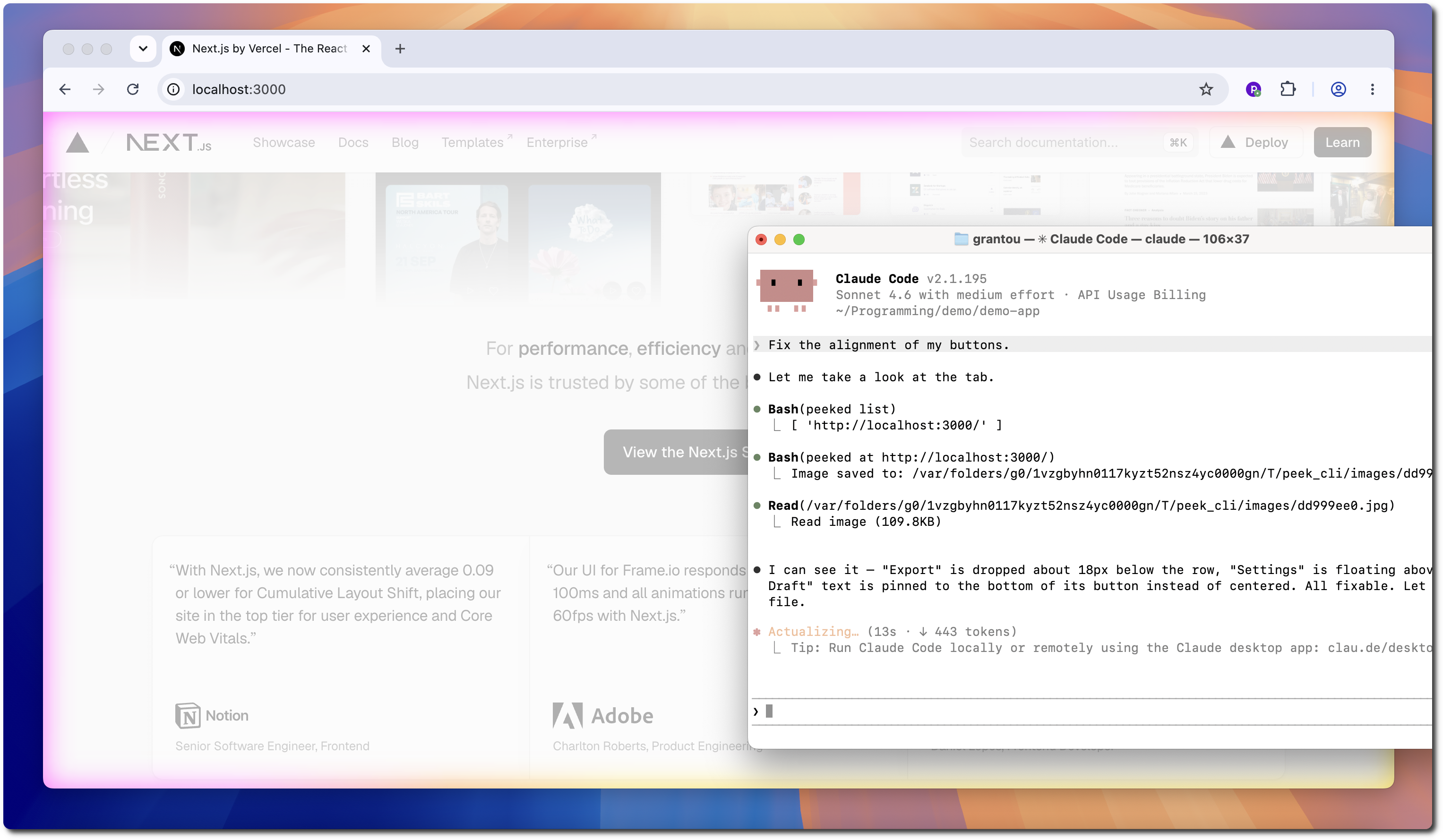
- peek-cli allows agents to capture a screenshot of any open tab in your browser.
- </p>
- <p align="center">
- Your agents can now iterate on frontend designs until they're flawless.
- </p>
- ---
- <p align="center">
- Works with Claude Code, Codex, Copilot and many more...
- </p>
- 
- ---
- <p align="center">
- See it in action:
- </p>
- https://github.com/user-attachments/assets/99c0614a-b622-40cb-8125-cd64ead9833e
- <p align="center">
- It works by using a browser extension to stream screenshots over WebSockets.
- </p>
- ---
- ### Usage
- *For security, you need to connect the agent once on every startup.*
- 1. Start the WebSocket daemon:
- ```bash
- peeked start
- > Successfully started server.
- ```
- 2. Connect your browser:
- <img src="https://raw.githubusercontent.com/puffinsoft/peek-cli/HEAD/assets/extension.png" width="300">
- 3. You're good to go!
- ```bash
- peeked list # view available tabs
- > [ 'http://localhost:3000/' ]
- peeked at http://localhost:3000 # capture screenshot
- > Image saved to: /var/.../peek_cli/images/dd999ee0.jpg
- ```
- ---
- ### Installation
- 1. Install the [Chrome Extension](https://chromewebstore.google.com/detail/peek-cli/fekplnpejnpnfmgikkleldnncgickmbb).
- <sup>🎉 the extension has been approved on the Chrome Web Store!</sup>
- 2. Install the CLI
- ```bash
- npm i -g peeked
- ```
- 3. Install the Skill
- For Claude Code:
- ```bash
- /plugin marketplace add puffinsoft/peek-cli
- /plugin install view-browser-tab@peek-cli
- ```
- For Codex:
- ```bash
- codex plugin marketplace add puffinsoft/peek-cli
- codex plugin add view-browser-tab@peek-cli
- ```
- ---
- ### Examples
- 
- ---
- ### ⚠️ Is this safe?
- Yes, 100%. It is impossible for the agent to do anything **but take a screenshot**.
- This is because the agent sends *screenshot requests* to the extension through a WebSocket server.
- It never accesses the browser and cannot inject any scripts / perform any actions.
- We invite you to take a look at the extension [source code](src/extension/background.ts) for added peace of mind.
- ---
- peek-cli is open source software, licensed under the [MIT](LICENSE) license.
Ratings and comments
Sign in to rate this skill.
Sign inFree to use. If it’s helped, pass it on.