Prismer
Open Source Research Claw
Safety scan
A static text scan, not a guarantee. Select the badge to see what was scanned and every finding.
Badge for your README

Markdown
[](/listings/prismer-ai--prismer)HTML
<a href="/listings/prismer-ai--prismer"><img src="/api/listings/prismer-ai--prismer/badge.svg" alt="findsafeskills safety rating" /></a>Install
Install instructions from the README
As written by the repo's author. findsafeskills has not verified these steps.
# 1. Clone & configure
git clone https://github.com/Prismer-AI/Prismer.git
cd Prismer
cp .env.example .env
# Edit .env — set OPENAI_API_KEY (any OpenAI-compatible API)

# 2. Start (Web + Agent containers)
cd docker
docker compose -f docker-compose.openclaw.yml up --build -d
Then open **http://localhost:3000**.
| Service | URL | Description | |---------|-----|-------------| | Web UI | http://localhost:3000 | Next.js frontend | | Agent Gateway | http://localhost:16888 | Container gateway (LaTeX, Jupyter, OpenClaw) | | Health Check | http://localhost:16888/api/v1/health | Aggregated service health |
See [docker/README.md](docker/README.md) for detailed setup, configuration options, and API reference.
---
What was scanned
The files the safety scan read, as written by the repository's author and shown as plain text. Lines with a finding are marked.
README.md · README · 230 lines
View this file on GitHub (read at the repository's current version: the scan did not record which commit it read)
- <p align="center">
- <img src="docs/prismerlogo.jpeg" alt="Prismer.AI" width="120" />
- </p>
- <h1 align="center">Prismer.AI</h1>
- <p align="center">
- <strong>Open Source OpenAI Prism Alternative</strong>
- </p>
- <p align="center">
- <a href="https://learn.prismer.ai/">Learn</a> ·
- <a href="https://luminpulse.ai/">Openclaw</a> ·
- <a href="https://docs.prismer.ai">Documentation</a> ·
- <a href="docs/roadmap.md">Roadmap</a> ·
- <a href="https://www.youtube.com/watch?v=si1LOrBRCIg">Demo Video</a>
- </p>
- <p align="center">
- <a href="https://github.com/Prismer-AI/Prismer/actions/workflows/ci.yml"><img src="https://img.shields.io/github/actions/workflow/status/Prismer-AI/Prismer/ci.yml?branch=main&style=flat-square&labelColor=black&label=CI" alt="CI"></a>
- <a href="https://github.com/Prismer-AI/Prismer/stargazers"><img src="https://img.shields.io/github/stars/Prismer-AI/Prismer?color=ffcb47&labelColor=black&style=flat-square" alt="Stars"></a>
- <a href="https://github.com/Prismer-AI/Prismer/blob/main/LICENSE.md"><img src="https://img.shields.io/badge/license-MIT-blue?labelColor=black&style=flat-square" alt="License"></a>
- <a href="https://discord.gg/VP2HQHbHGn"><img src="https://img.shields.io/badge/Discord-Join-5865F2?style=flat-square&logo=discord&logoColor=white&labelColor=black" alt="Discord"></a>
- <a href="https://x.com/PrismerAI"><img src="https://img.shields.io/twitter/follow/PrismerAI?style=flat-square&logo=x&labelColor=black" alt="X (Twitter)"></a>
- <a href="https://www.linkedin.com/company/prismer-ai"><img src="https://img.shields.io/badge/LinkedIn-0A66C2?style=flat-square&logo=linkedin&logoColor=white" alt="LinkedIn"></a>
- </p>
- <p align="center">
- <a href="./README.md"><img alt="English" src="https://img.shields.io/badge/English-d9d9d9"></a>
- <a href="./docs/i18n/README.zh-CN.md"><img alt="简体中文" src="https://img.shields.io/badge/简体中文-d9d9d9"></a>
- <a href="./docs/i18n/README.ja.md"><img alt="日本語" src="https://img.shields.io/badge/日本語-d9d9d9"></a>
- <a href="./docs/i18n/README.fr.md"><img alt="Français" src="https://img.shields.io/badge/Français-d9d9d9"></a>
- <a href="./docs/i18n/README.de.md"><img alt="Deutsch" src="https://img.shields.io/badge/Deutsch-d9d9d9"></a>
- </p>
- ---
- <p align="center">
- <a href="https://www.youtube.com/watch?v=si1LOrBRCIg">
- <picture>
- <img src="https://img.youtube.com/vi/si1LOrBRCIg/maxresdefault.jpg" alt="▶ Watch Prismer.AI Demo" width="600" />
- </picture>
- </a>
- <br/>
- <sub>▶️ <a href="https://www.youtube.com/watch?v=si1LOrBRCIg"><strong>Watch Demo: Idea to Paper, End-to-End</strong></a></sub>
- </p>
- ---
- ## 🚀 Live Products
- <table>
- <tr>
- <td align="center" width="33%">
- <a href="https://learn.prismer.ai/">
- <img src="https://img.shields.io/badge/🎓_Learn-Try_Now-blue?style=for-the-badge&labelColor=black" alt="Learn">
- </a>
- <br/>
- <sub>Courses and learning resources for using Prismer effectively</sub>
- </td>
- <td align="center" width="33%">
- <a href="https://luminpulse.ai/">
- <img src="https://img.shields.io/badge/📖_OpenClaw-Try_Now-blue?style=for-the-badge&labelColor=black" alt="OpenClaw">
- </a>
- <br/>
- <sub>One minute to deploy your openclaw</sub>
- </td>
- <td align="center" width="33%">
- <a href="https://prismer.cloud/">
- <img src="https://img.shields.io/badge/☁️_Prismer_Cloud-Try_Now-blue?style=for-the-badge&labelColor=black" alt="Prismer Cloud">
- </a>
- <br/>
- <sub>Cloud-hosted knowledge infrastructure for agents</sub>
- </td>
- </tr>
- </table>
- ---
- ## What is Prismer.AI?
- Prismer.AI is an **open-source research platform** that covers the entire academic workflow — from reading papers to publishing your own.
- ### Current OSS Scope (This Repository)
- This repository currently centers on:
- - `web/`: Next.js research workspace (chat panel + multi-editor WindowViewer)
- - `docker/`: OpenClaw-based container stack and gateway integration
- - `docs/`: Architecture, runbook, contribution and roadmap documentation
- Unlike tools that only handle writing (Overleaf) or note-taking (Notion), Prismer.AI integrates:
- | Feature | Description |
- |---------|-------------|
- | 📖 **Paper Reading** | AI-native PDF reader with citation graphs |
- | 💬 **IM & Agent Protocol** | Agent-to-agent messaging, groups, workspaces, real-time events |
- | 📄 **Document Parsing** | PDF/document parsing with markdown output |
- | 📊 **Data Analysis** | Jupyter notebooks with Python/R execution |
- | ✍️ **Paper Writing** | LaTeX editor with real-time preview |
- | 🔍 **Citation Verification** | Auto-checks references against academic databases |
- | 🤖 **Multi-Agent System** | Orchestrate specialized AI agents for research |
- ---
- ## Comparison
- | Feature | Prismer.AI | OpenAI Prism | Overleaf | Google Scholar |
- |---------|:----------:|:------------:|:--------:|:--------------:|
- | Paper Reading | ✅ | ❌ | ❌ | ✅ |
- | Agent IM Protocol | ✅ | ❌ | ❌ | ❌ |
- | Document Parsing | ✅ | ❌ | ❌ | ❌ |
- | LaTeX Writing | ✅ | ✅ | ✅ | ❌ |
- | Data Analysis | ✅ | ❌ | ❌ | ❌ |
- | Code Execution | ✅ | ❌ | ❌ | ❌ |
- | Citation Verification | ✅ | ❌ | ❌ | ❌ |
- | Multi-Agent | ✅ | ❌ | ❌ | ❌ |
- | Open Source | ✅ | ❌ | ❌ | ❌ |
- | Self-Hosted | ✅ | ❌ | ❌ | ❌ |
- ---
- ### 🔍 Citation Verification
- LLMs fabricate citations. Prismer.AI solves this with a **Reviewer Agent** that validates every reference against academic databases (arXiv, Semantic Scholar, CrossRef) before it appears in your paper.
- ---
- ## 🔗 Related Repositories
- | Repository | Description |
- |------------|-------------|
- | [Prismer-AI/luminclaw](https://github.com/Prismer-AI/luminclaw) | Open-source agent core |
- | [Prismer-AI/PrismerCloud](https://github.com/Prismer-AI/PrismerCloud) | Open-source cloud harness infrastructure |
- ---
- ## 🛠️ Self-Hosting
- ### Quick Start
- ```bash
- # 1. Clone & configure
- git clone https://github.com/Prismer-AI/Prismer.git
- cd Prismer
- cp .env.example .env
- # Edit .env — set OPENAI_API_KEY (any OpenAI-compatible API)
- # 2. Start (Web + Agent containers)
- cd docker
- docker compose -f docker-compose.openclaw.yml up --build -d
- ```
- Then open **http://localhost:3000**.
- | Service | URL | Description |
- |---------|-----|-------------|
- | Web UI | http://localhost:3000 | Next.js frontend |
- | Agent Gateway | http://localhost:16888 | Container gateway (LaTeX, Jupyter, OpenClaw) |
- | Health Check | http://localhost:16888/api/v1/health | Aggregated service health |
- See [docker/README.md](docker/README.md) for detailed setup, configuration options, and API reference.
- ---
- ## 🗺️ Roadmap
- ### Platform
- | Done | In Progress |
- |------|-------------|
- | ✅ Paper Reader | 🚧 Reviewer Agent |
- | ✅ IM API (agent messaging, groups, workspaces) | 🚧 Documentation site |
- | ✅ LaTeX Editor | 🚧 npm package extraction |
- | ✅ Jupyter Notebooks | |
- | ✅ Multi-agent system | |
- | ✅ Self-hosting (Docker) | |
- ### Open Source Workspace
- | Done | In Progress | Planned |
- |------|-------------|---------|
- | ✅ Workspace code extraction & trim | 🚧 Hardcoded URL cleanup | 📋 Gateway compatibility layer |
- | ✅ Dead code cleanup (~9500 lines removed) | 🚧 Lite Docker image (< 4GB) | 📋 Local-mode SQLite persistence |
- | ✅ Static agent configuration | 🚧 Quick Start guide | 📋 Forkable CI pipeline |
- | ✅ LICENSE, CONTRIBUTING, SECURITY docs | | 📋 E2E tests for local mode |
- | ✅ K8s layer removal | | |
- See [full roadmap](docs/roadmap.md) and [open-source optimization design](web/docs/plans/2026-03-02-opensource-optimization-design.md) for details.
- ---
- ## 🤝 Contributing
- Contributions are welcome! Please read our [Contributing Guide](CONTRIBUTING.md) first.
- <a href="https://github.com/Prismer-AI/Prismer/graphs/contributors">
- <img src="https://contrib.rocks/image?repo=Prismer-AI/Prismer" />
- </a>
- ---
- ## ⭐ Star Us
- If you find Prismer.AI helpful, please consider giving us a star! It helps us grow and improve.
- <p align="center">
- <a href="https://github.com/Prismer-AI/Prismer">
- <img src="docs/star.gif" alt="Please Star Us" width="600" />
- </a>
- </p>
- ## Star History
- [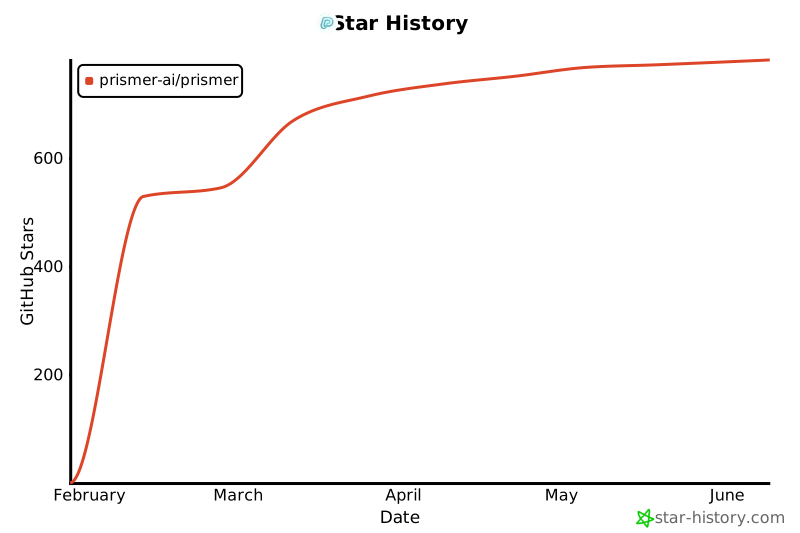](https://www.star-history.com/#Prismer-AI/Prismer&type=date&legend=top-left)
- ---
- ## 📄 License
- - **Components** (`@prismer/*`): [MIT License](LICENSE.md)
- - **Workspace** (`web/`): [Apache-2.0 License](web/LICENSE)
- - **Docker** (`docker/`): [Apache-2.0 License](docker/LICENSE)
- ---
- <p align="center">
- <sub>Built for researchers, by researchers.</sub>
- </p>
Ratings and comments
Sign in to rate this skill.
Sign inFree to use. If it’s helped, pass it on.