infiAgent
Build your own Cowork, AI Scientist and other SoTA Agents just by editing config files. Support anthropic skills. An infinite-horizon agent framework designed for long-running, complex tasks.
Safety scan
A static text scan, not a guarantee. Select the badge to see what was scanned and every finding.
Check it deeper on your machine
It has changed since its scan on 11 Nov 2026.
As a Claude Code plugin, install it and then ask Claude Code:
/plugin marketplace add keithmackay/mackayi/plugin install scanskillsafety@mackayiDo a deep scan of https://github.com/polyuiislab/infiAgent with scanskillsafety
Or from a terminal, clone it and run it:
git clone https://github.com/keithmackay/scanskillsafety-skill ~/.claude/skills/scanskillsafetynode ~/.claude/skills/scanskillsafety/cli.cjs --deep 'https://github.com/polyuiislab/infiAgent'
It checks the exact commit: every file, its packages against OSV (api.osv.dev), how it compares with this page's scan (findsafeskills.com receives the repository's address), and, if you agree, Claude reading every file with your own Claude subscription. It never runs the code.
Badge for your README

Markdown
[](/listings/polyuiislab--infiagent)HTML
<a href="/listings/polyuiislab--infiagent"><img src="/api/listings/polyuiislab--infiagent/badge.svg" alt="findsafeskills safety rating" /></a>Install
Install instructions from the README
As written by the repo's author. findsafeskills has not verified these steps.
These steps run a script from the network that findsafeskills does not scan.
Vedio of Docker Mode:
<a href="https://www.bilibili.com/video/BV142vQB2EDu/?share_source=copy_web&vd_source=8f099df5d40b73e936381e57d7fc05aa ">infiagent:全自动写作工具</a>
Option 1: Docker (Recommended - No Python Required)
**1. Install Docker** - Mac/Windows: [Docker Desktop](https://www.docker.com/products/docker-desktop) - Linux: `curl -fsSL https://get.docker.com | sh`
**2. Pull Image**
docker pull chenglinhku/mlav3:latest
**3. Choose Your Mode**
Option A: Web UI Mode (Recommended)
The current Docker image starts the SDK-based Web UI directly. Use the Agent System selector to switch between `Researcher` and `OpenCowork`. The old standalone config page on `9641` is no longer required.
cd /your/workspace
mkdir -p ~/.mla_v3

docker run -d --name mla-webui \
  -e HOST_PWD=$(pwd) \
  -e PORT=4242 \
  -v $(pwd):/workspace$(pwd) \
  -v ~/.mla_v3:/root/mla_v3 \
  -p 4242:4242 \
  chenglinhku/mlav3:latest webui
Then open browser: `http://localhost:4242`
- On a fresh volume, the bootstrap admin account is `admin` / `admin123` - You can also create a new user directly from the login page - Click the `Config` button inside Web UI to edit `llm_config.yaml`, `app_config.json`, and agent configuration files - View logs with `docker logs -f mla-webui`
If you want Docker runtime data to stay inside the project instead of `~/.mla_v3`, replace the runtime mount with:
mkdir -p .mla_v3_docker
# replace: -v ~/.mla_v3:/root/mla_v3
# with:    -v $(pwd)/.mla_v3_docker:/root/mla_v3
<p align="center"> </p>
📖 **Web UI usage & UI details**: see [web_ui/README.md](web_ui/README.md).
Option B: CLI Mode
cd /your/workspace
mkdir -p ~/.mla_v3

docker run -it --rm \
  -e HOST_PWD=$(pwd) \
  -v $(pwd):/workspace$(pwd) \
  -v ~/.mla_v3:/root/mla_v3 \
  chenglinhku/mlav3:latest cli
**Windows Users:**
Windows users can mount any working folder into `/workspace/<your_task_root>` and reuse the same `/root/mla_v3` runtime volume across runs.
# CLI Mode (PowerShell)
docker run -it --rm `
  -e HOST_PWD="/docker_web" `
  -v "${PWD}:/workspace/docker_web" `
  -v "${HOME}\.mla_v3:/root/mla_v3" `
  chenglinhku/mlav3:latest cli

# Web UI Mode (PowerShell)
docker run -d --name mla-webui `
  -e HOST_PWD="/docker_web" `
  -e PORT=4242 `
  -v "${PWD}:/workspace/docker_web" `
  -v "${HOME}\.mla_v3:/root/mla_v3" `
  -p 4242:4242 `
  chenglinhku/mlav3:latest webui

# Then open browser: http://localhost:4242
# View logs: docker logs -f mla-webui**4. Configure API Key**
Open browser: `http://localhost:4242`
<p align="center"> </p>
Sign in, open the `Config` dialog, edit `llm_config.yaml`, fill in your API key, and save.
**🎉 Done!** Start using MLA CLI.
📖 **[Complete Docker Guide](docs/DOCKER_GUIDE.md)**
---
Option 2: Local Installation (Python Required)
**1. Install the package**
# Python 3.9+ is supported. Use Python 3.10+ if you need MCP support through the packaged dependency set.
cd install_path
python -m venv venv
source venv/bin/activate  # Windows: venv\Scripts\activate
git clone https://github.com/ChenglinPoly/infiAgent.git
cd infiAgent
pip install -e .
**2. Install Playwright**
playwright install chromium
**3. Configure API Key**
mla-agent --config-set api_key "your-api-key"
**4. Start CLI**
cd /your/workspace
mla-agent --cli
📖 **[Complete CLI Guide](docs/CLI_GUIDE.md)**
---
What was scanned
The files the safety scan read, as written by the repository's author and shown as plain text. Lines with a finding are marked.
README.md · README · 927 lines
View this file on GitHub (read at the repository's current version: the scan did not record which commit it read)
This file has changed since it was scanned, so this is not exactly the text that was scanned, and no line is marked. The findings are listed with the safety scan above.
- <div align="center">
- <img src="assets/logo.png" alt="infiAgent Logo" width="200">
- <h1>MLA V3 - Build Domain-Specific SOTA-Level AI Agents</h1>
- <p>
- <img src="https://img.shields.io/badge/version-3.13.0-blue.svg" alt="Version">
- <img src="https://img.shields.io/badge/python-3.10+-green.svg" alt="Python">
- <img src="https://img.shields.io/badge/license-GPL-blue.svg" alt="License: GPL">
- </p>
- <p>
- <a href="README.md">English</a> | <a href="README_CN.md">简体中文</a>
- </p>
- </div>
- ---
- ## 🌟 Introduction
- **InfiAgent, also called MLA (Multi-Level Agent),** is a framework for long-running general-purpose and domain-specific agents. Define responsibilities, prompts, and tools in YAML, delegate complex work to cooperating agents, and keep execution records and artifacts in files so each step can retrieve the context it needs.
- ### Key Features
- - ✅ **Long-running execution:** Thinking, ReAct, and ReAct Lite loops combine bounded action windows, file-based handoffs, and context compression.
- - ✅ **Hierarchical and parallel agents:** retain Researcher's multi-level orchestration and OpenCowork's general-purpose assistant; run independent instances of the same child agent, collect results, and cancel background work.
- - ✅ **Resumable sessions:** atomic state writes and durable tool receipts support continuation after interruption. Calls with uncertain side effects are reported for inspection.
- - ✅ **Persistent memory and workspaces:** sessions keep separate execution records while sharing project files and artifacts through a workspace.
- - ✅ **Agent Skills and extensible tools:** compatible with the [Agent Skills standard](https://agentskills.io/), custom Python tools, and MCP.
- - ✅ **Developer console:** the yellow runtime interface brings together sessions, files, human interaction, five model API roles, and a usage panel.
- ### Update & News🔥
- - **3.13.0 runtime update:** parallel sub-agents, reliable session recovery, local shared workspaces, the yellow developer console, five model configuration roles, and usage reporting. See Quick Start below and the [CHANGELOG](CHANGELOG.md).
- - **July 2026:** runtime and Python SDK updates, multi-provider model failover, and experience-store improvements.
- - **March 2026:** Thinking / ReAct modes, task-history retrieval, and per-agent execution, thinking, compression, and image model settings.
- - **February 2026:** Agent Skills, multi-provider model support, and desktop integrations.
- - **January 2026:** OpenCowork and the paper [InfiAgent: An Infinite-Horizon Framework for General-Purpose Autonomous Agents](https://arxiv.org/abs/2601.03204).
- **OpenCowork demos: file organization and presentation creation**
- These original demos illustrate example tasks and outputs. Their interfaces may differ from the current version.
- [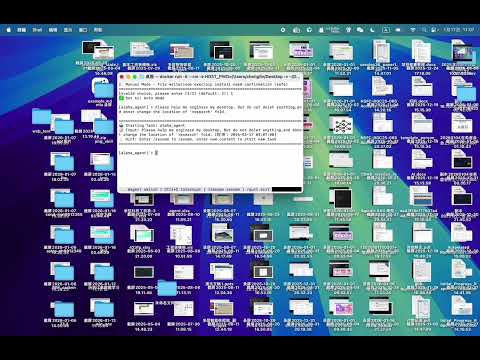](https://www.youtube.com/watch?v=IuTVRPIIW-s)
- [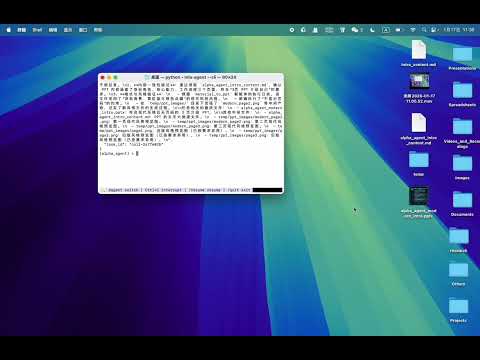](https://www.youtube.com/watch?v=uuxAvCLIX9M)
- [Original writing demo (Bilibili)](https://www.bilibili.com/video/BV142vQB2EDu/)
- ## 🎬 Outputs
- Paper artifacts from the original Researcher demos:
- **Demo 1:**
- <p align="center">
- <img src="assets/paper1.png" alt="Paper generation example 1" width="800">
- </p>
- **Demo 2:**
- <p align="center">
- <img src="assets/paper2.png" alt="Paper generation example 2" width="800">
- </p>
- MLA handles the entire research workflow - from literature search and experiment design to code execution, figure generation, and LaTeX paper writing. All automatically orchestrated through multi-level agents.
- Large demo videos and GIFs are now distributed outside git history so clones stay smaller and faster.
- ---
- ## 📚 Table of Contents
- - [Outputs](#-outputs)
- - [Quick Start](#-quick-start)
- - [How It Works](#-how-it-works)
- - [Interface Screenshots](#-interface-screenshots)
- - [Configuration Guide](#-configuration-guide)
- - [CLI Interface](#-cli-interface)
- - [SDK Integration](#-sdk-integration)
- - [Example Outputs](#-example-outputs)
- - [Project Extensions](#-project-extensions)
- ---
- ## 🚀 Quick Start
- ### Option 1: Docker developer console
- The image includes the Python runtime, browser, and document tools. Mount `user_root` to persist your working data:
- ```bash
- mkdir -p user_root
- docker run -d --name infiagent \
- -p 127.0.0.1:4260:4260 \
- -v "$PWD/user_root:/data/user_root" \
- chenglinhku/mlav3:3.13.0
- ```
- Open [http://localhost:4260](http://localhost:4260). Select **模型 API 配置** (Model API configuration) to enter model names, API URLs, and keys. Choose an **Agent System** and **Agent Name**, create a task, and click **Stream Send**. Open **Usage Panel** for token statistics.
- Execution, thinking, compression, vision, and image generation can share a connection or use separate ones. Workspaces and files persist in the mounted directory.
- **Windows PowerShell:**
- ```powershell
- New-Item -ItemType Directory -Force user_root
- docker run -d --name infiagent `
- -p 127.0.0.1:4260:4260 `
- -v "${PWD}/user_root:/data/user_root" `
- chenglinhku/mlav3:3.13.0
- ```
- **Docker CLI mode:**
- ```bash
- docker run -it --rm \
- -v "$PWD/user_root:/data/user_root" \
- chenglinhku/mlav3:3.13.0 cli
- ```
- See the [Docker guide](docs/DOCKER_GUIDE.md) for configuration, upgrades, and mounts.
- ### Option 2: Local Python installation
- Python 3.10 or later is required.
- ```bash
- pip install infiagent==3.13.0
- infiagent-runtime --user-root ./user_root
- ```
- Configure models in the browser, then use the Python SDK with the same `user_root`. Run `infiagent` for the interactive CLI, or use `pip install -e .` for source development.
- ---
- ## 🎯 How It Works
- MLA's design philosophy is **"Provide short but high-value context for the next step."** To achieve this, the framework implements multiple innovations:
- ### 1. 🌲 Hierarchical and Parallel Multi-Agent System
- MLA deploys agents in a **tree-structured hierarchy** (e.g., Grandparent → Parent → Child). This ensures:
- - ✅ **Single-purpose agents**: Each agent has a focused role
- - ✅ **Minimal tool sets**: Agents only access necessary tools
- - ✅ **Parallel coordination**: independent child instances execute delegated work; parents collect results, while shared files follow workspace concurrency rules
- - ✅ **Clear delegation**: Parent agents orchestrate child agents
- **Example Hierarchy:**
- ```
- alpha_agent (Level 3)
- ├── data_collection_agent (Level 2)
- │ └── web_search_agent (Level 1)
- ├── coder_agent (Level 2)
- └── material_to_document_agent (Level 2)
- ```
- ### 2. 🎯 Nested Attention Mechanism
- Long documents (PDFs, novels, papers) can be retrieved selectively through tools. Instead:
- - ✅ Use `answer_from_pdf`, `answer_from_document` tools
- - ✅ Query-driven content extraction
- - ✅ Only relevant excerpts or summaries enter context
- - ✅ **Application-layer attention allocation** through tools
- **Traditional Approach:**
- ```
- Load entire 50-page PDF → Agent processes everything → Token overflow
- ```
- **MLA Approach:**
- ```
- Agent asks: "What is the methodology?"
- → Tool extracts relevant sections (2 pages)
- → Returns concise answer → Minimal token usage
- ```
- ### 3. 📁 File-Centric Architecture
- **"Files are everything."** All outputs and interactions are saved to the file system:
- - ✅ Web scraping → Saves as Markdown files
- - ✅ PDF parsing → Extracts to structured documents
- - ✅ Sub-agent results → Stored as files
- - ✅ Large results retain full files with bounded previews in context
- **Benefits:**
- - Clear audit trail
- - Reusable artifacts
- - Context-free state representation
- ### 4. ⚡ Action Windows and Thinking Cadence
- Files retain task artifacts and execution records retain the process. Each new step can work with the current goal, relevant files, and recent actions.
- - **Thinking:** plan, execute, and revisit the plan at a configurable cadence.
- - **ReAct / ReAct Lite:** advance through tool calls with the reflection mode appropriate to the task.
- - `action_window_steps` and `thinking_interval` control the window and cadence; context compression is available when needed.
- - Historical records remain local and can be retrieved beyond the current context window.
- ```text
- Set a goal → Execute steps → Save artifacts to files
- → Update current state → Retrieve relevant records and continue
- ```
- ### 5. 🔧 Batch File Operations
- Inspired by [Claude Code](https://www.anthropic.com/), MLA uses **list-based tool parameters** to save tokens:
- - ✅ Read multiple files in one call
- - ✅ Batch operations reduce cumulative overhead
- - ✅ Significant token savings on repeated actions
- **Example:**
- ```python
- # Traditional: 3 separate calls
- file_read(path=["file1.txt"])
- file_read(path=["file2.txt"])
- file_read(path=["file3.txt"])
- # MLA: 1 batch call
- file_read(path=["file1.txt", "file2.txt", "file3.txt"])
- ```
- ### 6. 💾 Session Memory and Shared Workspaces
- `task_id` identifies a persistent session; reusing it continues its records. `workspace_id` binds multiple sessions to the same working files while retaining separate execution histories.
- ```python
- agent.create_workspace("research", title="Research project")
- agent.run("Collect papers and save notes", task_id="./user_root/tasks/collect", workspace_id="research")
- agent.run("Write a review from the notes", task_id="./user_root/tasks/write", workspace_id="research")
- ```
- Sessions in one workspace run sequentially by default. Concurrent mode is available when the tools used are compatible with concurrent file access.
- ### 7. 📊 Call Graph-Based Shared Context
- The `hierarchy_manager` maintains a **dynamic call relationship graph**:
- - ✅ Tracks parent-child agent relationships
- - ✅ Injects call graph into shared context
- - ✅ Prevents agents from overstepping boundaries
- - ✅ Maintains task alignment across multi-agent system
- **Call Graph Example:**
- ```json
- {
- "current_agent": "coder_agent",
- "parent": "alpha_agent",
- "siblings": ["data_collection_agent", "material_to_document_agent"],
- "allowed_tools": ["python_run", "file_write", "file_read"]
- }
- ```
- The runtime enforces `available_tools` and records separate identities and parent-child relationships for parallel instances.
- ---
- ## 📸 Interface Screenshots
- ### Model Configuration and Usage
- The yellow developer console provides separate execution, thinking, compression, vision, and image-generation settings. This is the actual configuration dialog; saved keys are not displayed:
- <p align="center"><img src="assets/model-configuration.png" alt="Five model API roles" width="900"></p>
- The usage panel shows time buckets, cache usage, and model and task breakdowns. This screenshot comes from a real test run with two parallel child agents:
- <p align="center"><img src="assets/usage-panel.png" alt="Token usage from a real parallel-agent run" width="1000"></p>
- ### CLI Interface
- MLA provides a rich interactive CLI with real-time task monitoring, HIL handling, and agent switching:
- **System Selection:**
- <p align="center">
- <img src="assets/cli_choose_system.png" alt="CLI System Selection" width="800">
- </p>
- **Tool Mode Configuration:**
- <p align="center">
- <img src="assets/cli_choose_tool_mode.png" alt="CLI Tool Mode" width="800">
- </p>
- **Starting Tasks:**
- <p align="center">
- <img src="assets/cli_start_task.png" alt="CLI Task Execution" width="800">
- </p>
- *Interactive CLI with prompt_toolkit and rich terminal UI - featuring multi-turn conversations, automatic HIL detection, and tool execution confirmation.*
- ### VS Code Integration Example
- Build powerful IDE extensions using MLA's JSONL mode:
- <p align="center">
- <img src="assets/vscode_plugin.png" alt="VS Code Plugin Screenshot" width="800">
- </p>
- *VS Code extension powered by MLA - seamless integration with workspace context and real-time streaming output.*
- ---
- ## ⚙️ Configuration Guide
- Agents and tools are configured in YAML. After the first launch, the user directory contains:
- ```text
- user_root/
- ├── config/
- │ ├── llm_config.yaml
- │ └── app_config.json
- ├── agent_library/
- │ ├── Researcher/
- │ │ ├── general_prompts.yaml
- │ │ ├── level_0_tools.yaml
- │ │ ├── level_1_agents.yaml
- │ │ ├── level_2_agents.yaml
- │ │ └── level_3_agents.yaml
- │ └── OpenCowork/
- ├── tools_library/
- ├── skills/
- ├── tasks/
- └── workspaces/
- ```
- ### Key Configuration Files
- #### 1. `llm_config.yaml` — Model configuration
- Use the page editor to get started. The YAML structure below shows all five roles; replace model names and URLs with your actual service:
- ```yaml
- api_key: "your-api-key"
- base_url: "https://your-provider.example/v1"
- models:
- - "openai/your-execution-model"
- thinking_models:
- - "openai/your-thinking-model"
- compressor_models:
- - "openai/your-compression-model"
- read_figure_models:
- - "openai/your-vision-model"
- figure_models:
- - name: "openai/your-image-model"
- base_url: "https://your-image-provider.example/v1"
- api_key: "your-image-api-key"
- image_api: "images"
- multimodal: false
- compressor_multimodal: false
- ```
- Each role can inherit the default connection or override `api_key` / `base_url`. Vision and image generation require models that support those capabilities; image generation can use `images` or `chat`. Per-agent model overrides take precedence over role defaults.
- #### 2. Agent Hierarchy
- MLA organizes agents into levels:
- - **Level 3**: Top-level orchestrators (e.g., `alpha_agent`)
- - **Level 2**: Functional specialists (e.g., `data_collection_agent`, `coder_agent`)
- - **Level 1**: Basic executors (e.g., `web_search_agent`)
- - **Level 0**: Tool definitions
- - **Level -1**: Quality control (e.g., `judge_agent`)
- #### 3. Creating Custom Agents
- Define responsibilities, tools, and parameters in a system's level YAML, for example:
- ```yaml
- tools:
- notes_agent:
- type: llm_call_agent
- level: 1
- name: notes_agent
- description: Read project files and write notes.
- available_tools:
- - file_read
- - file_write
- - final_output
- prompts:
- agent_responsibility: Read project files and write concise notes.
- parameters:
- type: object
- properties:
- task_id:
- type: string
- task_input:
- type: string
- required: [task_id, task_input]
- ```
- Use `spawn_subagents`, `collect`, and `cancel` for parallel delegation. Children must be linked in the parent’s available tool set. See the [SDK guide](docs/SDK_GUIDE.md).
- ---
- ## 💻 CLI Interface
- ### Interactive Mode
- Start the CLI for a conversational experience:
- ```bash
- mla-agent --cli
- ```
- **Key Features:**
- - 🔄 **Multi-turn conversations** with persistent context
- - 🤖 **Agent switching** with `@agent_name` syntax
- - 🔔 **Automatic HIL detection** with audio alerts
- - ⚠️ **Tool execution confirmation** in manual mode
- - ⏸️ **Interrupt and resume** support (Ctrl+C to pause)
- - 🎨 **Rich terminal UI** powered by `prompt_toolkit` and `rich`
- **Usage Examples:**
- ```bash
- # Direct task input (uses default agent)
- [alpha_agent] > Collect papers on Transformers
- # Switch agent and execute task
- [alpha_agent] > @data_collection_agent Search for recent NLP papers
- # Switch default agent only
- [alpha_agent] > @coder_agent
- ✅ Switched to: coder_agent
- [coder_agent] >
- ```
- **CLI Commands:**
- | Command | Description |
- |---------|-------------|
- | `/help` | Show help and available commands |
- | `/agents` | List all available agents |
- | `/resume` | Resume interrupted tasks |
- | `/quit` or `/exit` | Exit CLI mode |
- | `Ctrl+C` | Interrupt current task (stays in CLI) |
- | `Ctrl+D` | Exit CLI immediately |
- **Human-in-Loop (HIL) Handling:**
- When an agent requests human input, the CLI automatically detects it:
- ```
- 🔔🔔🔔 Detected HIL task! Press Enter to handle... 🔔🔔🔔
- ================================================================================
- 🔔 Human Interaction Task (HIL)
- ================================================================================
- 📝 Task ID: upload_file_20250124
- 📋 Instruction: Please upload the required dataset files...
- ================================================================================
- 💡 Enter your response (any text)
- Type /skip to skip this task
- ================================================================================
- [alpha_agent] HIL Response > Files uploaded successfully
- ✅ HIL task responded
- ```
- **Tool Confirmation (Manual Mode):**
- When `--auto-mode false` is set, each tool execution requires confirmation:
- ```
- ⚠️⚠️⚠️ Detected tool execution request! Press Enter to confirm... ⚠️⚠️⚠️
- ================================================================================
- ⚠️ Tool Execution Confirmation Request
- ================================================================================
- 🔧 Tool Name: python_run
- 📝 Confirmation ID: confirm_12345
- 📋 Parameters:
- code: import numpy as np...
- timeout: 300
- ================================================================================
- 💡 Choose action:
- yes / y - Approve execution
- no / n - Reject execution
- ================================================================================
- [alpha_agent] Confirm [yes/no] > yes
- ✅ Approved tool execution: python_run
- ```
- **Screenshot:** *(User will provide)*
- ---
- ### Command-Line Mode
- For scripting and automation:
- ```bash
- mla-agent \
- --task_id /path/to/workspace \
- --user_input "Your task description" \
- --agent_name alpha_agent
- ```
- **Common Parameters:**
- | Parameter | Description | Default |
- |-----------|-------------|---------|
- | `--task_id` | Workspace path (absolute) | Required |
- | `--user_input` | Task description | Required |
- | `--agent_name` | Agent to invoke | `alpha_agent` |
- | `--agent_system` | Agent library name | `Researcher` |
- | `--cli` | Interactive CLI mode | `false` |
- | `--jsonl` | JSONL output mode | `false` |
- | `--force-new` | Clear all state and start fresh | `false` |
- | `--auto-mode` | Tool execution mode (`true`/`false`) | Auto-detect |
- **Auto-Mode Examples:**
- ```bash
- # Automatic tool execution (no confirmation needed)
- mla-agent --task_id ~/project --user_input "Task" --auto-mode true
- # Manual confirmation for each tool
- mla-agent --task_id ~/project --user_input "Task" --auto-mode false
- ```
- ---
- ### Runtime Tool Execution
- ```bash
- # Tools are executed in-process through direct-tools.
- # No standalone mla-tool-server process is required.
- ```
- ---
- ## 🔌 SDK Integration
- MLA provides two SDK options: **Python SDK** for direct integration and **JSONL mode** for IDE plugins.
- ---
- ### Python SDK
- Use the bundled `infiagent` SDK. The current SDK model is:
- - instantiate `infiagent(...)` once to describe runtime defaults
- - pass a concrete `task_id` to `run(...)` and other task APIs
- - optionally point the whole runtime at a dedicated `user_data_root`
- Minimal example:
- ```python
- from infiagent import infiagent
- agent = infiagent(
- user_data_root="/abs/path/to/my_root",
- default_agent_system="Researcher",
- default_agent_name="alpha_agent",
- action_window_steps=30,
- thinking_interval=30,
- max_turns=100000,
- fresh_enabled=True,
- fresh_interval_sec=300,
- )
- result = agent.run(
- "Write a survey paper on Transformers",
- task_id="/abs/path/to/tasks/transformer_survey",
- )
- print(f"Status: {result['status']}")
- print(f"Output: {result['output']}")
- ```
- If your `user_data_root` already contains:
- - `config/llm_config.yaml`
- - `config/app_config.json`
- - `agent_library/...`
- - `tools_library/...`
- you usually do not need to pass `llm_config_path`, `agent_library_dir`, or `tools_dir` again.
- Common task APIs:
- ```python
- # Ask a running or stopped task to refresh runtime config.
- agent.fresh(
- task_id="/abs/path/to/tasks/transformer_survey",
- reason="reload runtime config",
- )
- # Append a new instruction to the same task.
- agent.add_message(
- "Keep the existing outline and only revise section 3.",
- task_id="/abs/path/to/tasks/transformer_survey",
- source="user",
- resume_if_needed=True,
- )
- # Launch a separate background task in another Python process.
- agent.start_background_task(
- task_id="/abs/path/to/tasks/subtask_eval",
- user_input="Run the evaluation pipeline and summarize results",
- force_new=True,
- )
- # Inspect task state for dashboards or lightweight watchdogs.
- snapshot = agent.task_snapshot(
- task_id="/abs/path/to/tasks/transformer_survey",
- )
- # Reset a broken task loop while optionally preserving history.
- agent.reset_task(
- task_id="/abs/path/to/tasks/transformer_survey",
- reason="clear broken loop",
- preserve_history=True,
- )
- ```
- Runtime introspection:
- ```python
- runtime = agent.describe_runtime()
- print(runtime["user_data_root"])
- print(runtime["agent_library_dir"])
- print(runtime["tools_dir"])
- systems = agent.list_agent_systems()
- print(systems["systems"])
- ```
- Advanced runtime features supported by the SDK:
- - task-scoped background execution and resume/fresh control
- - `user_data_root`-scoped conversations, logs, runtime state, and config
- - tool hooks before/after tool execution
- - context hooks that can inspect or rewrite the final prompt before the LLM call
- - per-instance MCP server injection through `mcp_servers=[...]`
- See the full guide: [docs/SDK_GUIDE.md](docs/SDK_GUIDE.md)
- **Use Cases for Python SDK:**
- - 🔧 Building custom workflows
- - 🤖 Embedding agents in existing applications
- - 📊 Batch processing multiple tasks
- - 🧭 Building external dashboards, watchdogs, and orchestration layers
- - 🔬 Research experiments with programmatic control
- ---
- ### JSONL Mode for IDE Plugins
- MLA provides a JSONL streaming mode for real-time integration with IDEs and editors:
- ```bash
- mla-agent \
- --task_id $(pwd) \
- --user_input "Optimize code performance" \
- --jsonl 2>/dev/null
- ```
- **Output Format:**
- ```jsonl
- {"type":"start","call_id":"c-1760936557-474c43","project":"~/project","agent":"alpha_agent","task":"Optimize..."}
- {"type":"token","text":"[alpha_agent] Analyzing code..."}
- {"type":"progress","phase":"execution","pct":30}
- {"type":"token","text":"Calling tool: code_analyzer"}
- {"type":"result","ok":true,"summary":"Optimization complete"}
- {"type":"end","status":"ok","duration_ms":5432}
- ```
- **Event Types:**
- | Event Type | Description | Key Fields |
- |------------|-------------|------------|
- | `start` | Task begins | `call_id`, `agent`, `task` |
- | `token` | Streaming text output | `text` |
- | `progress` | Progress update | `phase`, `pct` |
- | `result` | Task result | `ok`, `summary` |
- | `end` | Task completed | `status`, `duration_ms` |
- | `error` | Error occurred | `message` |
- ---
- ### TypeScript/JavaScript Integration
- ```typescript
- import { spawn } from 'child_process';
- interface AgentEvent {
- type: 'start' | 'token' | 'progress' | 'result' | 'end' | 'error';
- [key: string]: any;
- }
- function runAgent(
- workspacePath: string,
- userInput: string,
- onEvent: (event: AgentEvent) => void
- ): Promise<AgentEvent> {
- return new Promise((resolve, reject) => {
- const child = spawn('mla-agent', [
- '--task_id', workspacePath,
- '--user_input', userInput,
- '--jsonl'
- ]);
- let buffer = '';
- child.stdout.on('data', (data) => {
- buffer += data.toString();
- const lines = buffer.split('\n');
- buffer = lines.pop() || '';
- lines.forEach(line => {
- if (!line.trim()) return;
- try {
- const event: AgentEvent = JSON.parse(line);
- onEvent(event);
- if (event.type === 'end') {
- resolve(event);
- } else if (event.type === 'error') {
- reject(new Error(event.message));
- }
- } catch (e) {
- console.error('Failed to parse event:', line);
- }
- });
- });
- child.stderr.on('data', (data) => {
- // Log errors to stderr
- console.error(data.toString());
- });
- child.on('error', reject);
- });
- }
- // Usage
- await runAgent('/path/to/workspace', 'Write unit tests', (event) => {
- switch (event.type) {
- case 'start':
- console.log(`Task started: ${event.task}`);
- break;
- case 'token':
- process.stdout.write(event.text);
- break;
- case 'progress':
- updateProgressBar(event.pct);
- break;
- case 'result':
- console.log(`\nResult: ${event.summary}`);
- break;
- }
- });
- ```
- ---
- ### VS Code Extension Example
- Build your own Cursor/VS Code extension using MLA:
- **Extension Features:**
- - 🤖 Agent commands in command palette
- - 💬 Inline chat with workspace context
- - 📝 Automatic code generation and refactoring
- - 🔍 Literature search within editor
- - 🔔 HIL task handling with UI prompts
- **Basic Extension Structure:**
- ```typescript
- // extension.ts
- import * as vscode from 'vscode';
- import { runAgent } from './mla-client';
- export function activate(context: vscode.ExtensionContext) {
- let disposable = vscode.commands.registerCommand(
- 'mla.executeTask',
- async () => {
- const workspace = vscode.workspace.workspaceFolders?.[0].uri.fsPath;
- const input = await vscode.window.showInputBox({
- prompt: 'Enter task description'
- });
- if (!workspace || !input) return;
- // Show progress
- await vscode.window.withProgress({
- location: vscode.ProgressLocation.Notification,
- title: 'MLA Agent',
- cancellable: true
- }, async (progress, token) => {
- await runAgent(workspace, input, (event) => {
- if (event.type === 'token') {
- vscode.window.showInformationMessage(event.text);
- } else if (event.type === 'progress') {
- progress.report({ increment: event.pct });
- }
- });
- });
- }
- );
- context.subscriptions.push(disposable);
- }
- ```
- **Screenshot:** *(User will provide)*
- ---
- ## 📊 Example Outputs
- ### Academic Paper Output
- MLA can generate complete research papers with the following structure:
- ```
- upload/
- ├── paper.tex # Main LaTeX document
- ├── references.bib # Bibliography
- ├── figures/
- │ ├── architecture.png
- │ ├── results_comparison.png
- │ └── ablation_study.png
- └── supplementary/
- └── detailed_results.pdf
- ```
- **Quality Metrics:**
- - ✅ Passes peer review at EI/IEEE conferences
- - ✅ Proper citation formatting
- - ✅ High-quality figures (300 DPI)
- - ✅ Coherent structure and flow
- ### Other Capabilities
- **1. Scientific Computing**
- - ECM protein composition simulation
- - Logistics company shift scheduling
- - Student assignment grading with feedback
- **2. General Tasks**
- - Web scraping and data extraction
- - Code generation and debugging
- - Document conversion and processing
- ---
- ## 🌱 Project Extensions
- **Status: Prototyping and testing.** Around InfiAgent, we are exploring a development workflow that spans agent engineering, execution validation, and platform management.
- ### Cosine: agent engineering
- Cosine brings project editing, an embedded assistant, configuration and tool changes, file management, and container-based trial runs into one workflow. The screenshot shows the assistant interface under development:
- 
- ### Reusable end-to-end testing and repair
- Reuse project configurations, runtime environments, and test cases. An assistant can execute real tasks, inspect records and artifacts, locate problems, modify tools or prompts, and rerun the same cases to verify results. Test materials and repair records accumulate with the project.
- ### Operations console and high-availability platform
- Development directions include multiple execution nodes, recovery of resumable tasks after node failures, and management of nodes, configuration, versions, permissions, data sources, and usage. The screenshot shows quota management in a prototype test environment:
- 
- See [Project extensions](docs/PLATFORM_OVERVIEW.md) for more details and development status.
- ---
- ## 📖 Documentation
- - Runtime tools are executed in-process via direct-tools; no standalone tool server is required.
- - [SDK guide](docs/SDK_GUIDE.md) — Python calls, parallel orchestration, workspaces, and human interaction
- - [Docker guide](docs/DOCKER_GUIDE.md) — Developer console and deployment
- - [Event schema](docs/EVENT_SCHEMA.md) · [Usage reporting](docs/USAGE.md)
- - [Configuration Examples](config/agent_library/Researcher/) - Agent YAML templates
- ---
- ## 🤝 Contributing
- Contributions are welcome! Please feel free to submit issues or pull requests.
- ---
- ## 📄 License
- see [LICENSE](LICENSE) for details.
- ---
- ## 📄 Citation
- If you use InfiAgent in your research, please cite our paper:
- ```bibtex
- @article{yu2026infiagent,
- title={InfiAgent: An Infinite-Horizon Framework for General-Purpose Autonomous Agents},
- author={Yu, Chenglin and Wang, Yuchen and Wang, Songmiao and Yang, Hongxia and Li, Ming},
- journal={arXiv preprint arXiv:2601.03204},
- year={2026}
- }
- ```
- ---
- ## 🙏 Acknowledgments
- - Built with [LiteLLM](https://github.com/BerriAI/litellm) for unified LLM access
- - Uses [Crawl4AI](https://github.com/unclecode/crawl4ai) for web scraping
- ---
- Thanks to contributors: @yuchenglin @wangyuchen @wangsongmiao @yuyang @lijinjia
Ratings and comments
Sign in to rate this skill.
Sign inFree to use. If it’s helped, pass it on.