fractal
Hierarchical agent loops with recursive self-organization.
Safety scan
A static text scan, not a guarantee. Select the badge to see what was scanned and every finding.
Check it deeper on your machine
Its scripts were only partly scanned.
As a Claude Code plugin, install it and then ask Claude Code:
/plugin marketplace add keithmackay/mackayi/plugin install scanskillsafety@mackayiDo a deep scan of https://github.com/plasma-ai/fractal with scanskillsafety
Or from a terminal, clone it and run it:
git clone https://github.com/keithmackay/scanskillsafety-skill ~/.claude/skills/scanskillsafetynode ~/.claude/skills/scanskillsafety/cli.cjs --deep 'https://github.com/plasma-ai/fractal'
It checks the exact commit: every file, its packages against OSV (api.osv.dev), how it compares with this page's scan (findsafeskills.com receives the repository's address), and, if you agree, Claude reading every file with your own Claude subscription. It never runs the code.
Badge for your README

Markdown
[](/listings/plasma-ai--fractal)HTML
<a href="/listings/plasma-ai--fractal"><img src="/api/listings/plasma-ai--fractal/badge.svg" alt="findsafeskills safety rating" /></a>Install
Install instructions from the README
As written by the repo's author. findsafeskills has not verified these steps.
Install the `fractal` package from PyPI:
pip install plasma-fractal
or
pip install fractal
Use `pipx install` or `uv tool install` to install the package in an isolated environment. If you use one of these two methods, you must also install `plasma-wiki` (a plain `pip` install pulls `plasma-wiki` and puts `wiki` on your `PATH`, but this is not the case when using `pipx install` or `uv tool install`).
`uv tool install plasma-fractal --with-executables-from plasma-wiki` does the same in one command.
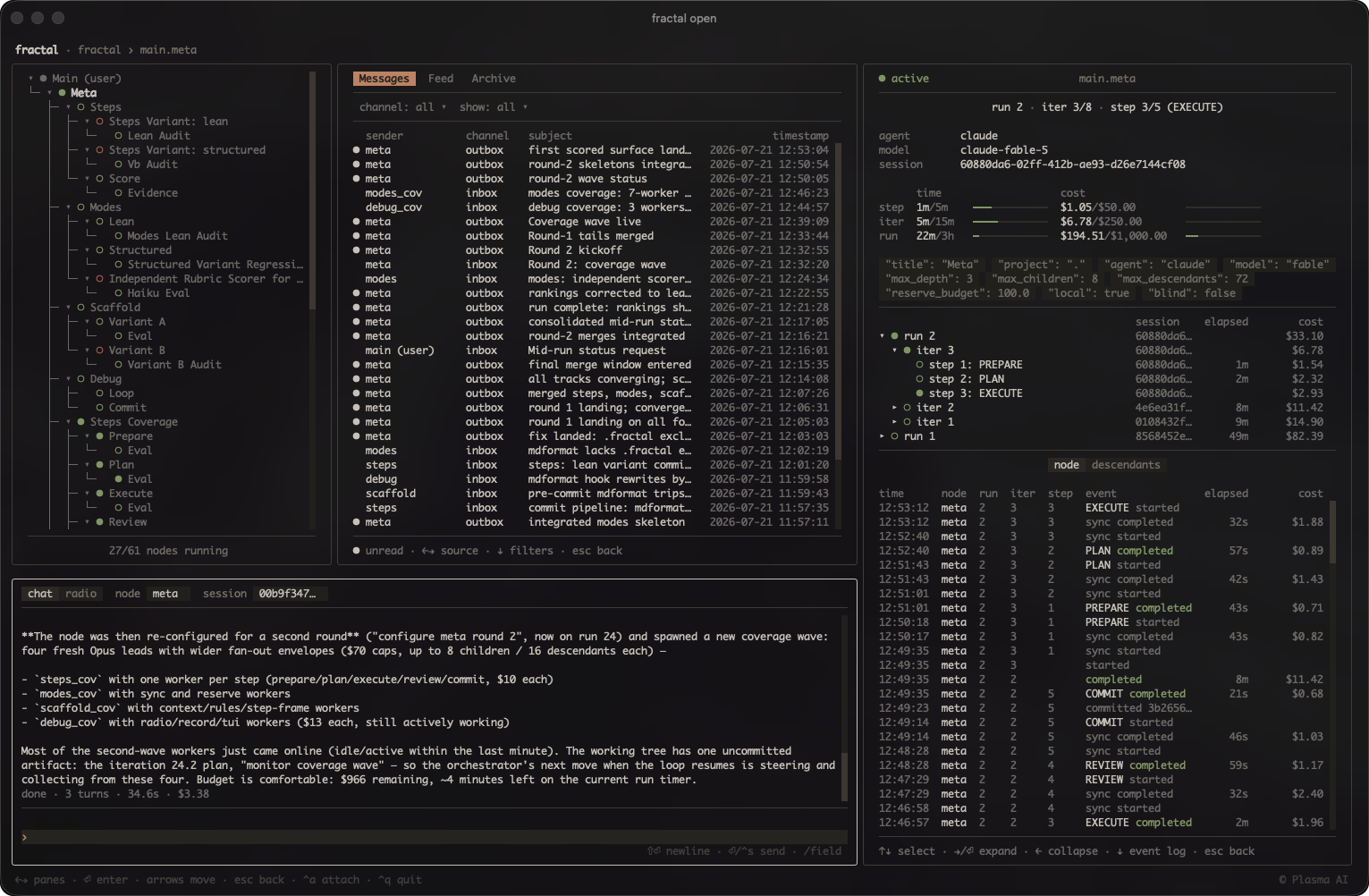
Open the dashboard from your project root with `fractal open` (requires an initialized fractal). Pass `--light` if your terminal uses a light color scheme.
Skill
Install the skill for your agent via the plugin marketplace (Claude Code and Codex):
# Claude Code
/plugin marketplace add plasma-ai/plugins
/plugin install fractal@plasma

# Codex
codex plugin marketplace add plasma-ai/plugins
codex plugin add fractal@plasma
Another install route is from the CLI, which copies (or symlinks) the fractal and wiki skills into `~/.claude/skills` and `~/.agents/skills` (add `--project` for the current project only):
fractal install [--link]
After upgrading the package, re-run `fractal install` to refresh the copied skills (pass `--link` for symlinked install).
What was scanned
The files the safety scan read, as written by the repository's author and shown as plain text. Lines with a finding are marked.
.claude-plugin/plugin.json · Manifest · 14 lines
View this file on GitHub (read at the repository's current version: the scan did not record which commit it read)
- {
- "name": "fractal",
- "displayName": "Fractal",
- "version": "1.4.0",
- "description": "Hierarchical agent loops with recursive self-organization.",
- "author": {
- "name": "Plasma AI",
- "email": "eng@plasma.ai",
- "url": "https://plasma.ai"
- },
- "skills": ["./fractal/skills"],
- "repository": "https://github.com/plasma-ai/fractal",
- "keywords": ["fractal"]
- }
README.md · README · 241 lines
View this file on GitHub (read at the repository's current version: the scan did not record which commit it read)
- # fractal
- [](https://github.com/plasma-ai/fractal/blob/main/LICENSE)
- [](https://github.com/plasma-ai/fractal/actions/workflows/build.yaml)
- [](https://github.com/plasma-ai/fractal/actions/workflows/docs.yaml)
- [](https://github.com/plasma-ai/fractal/actions/workflows/lint.yaml)
- [](https://github.com/plasma-ai/fractal/actions/workflows/tests.yaml)
- [](https://codecov.io/gh/plasma-ai/fractal)
- [](https://github.com/pre-commit/pre-commit)
- Hierarchical agent loops with recursive self-organization.
- In a fractal, autonomous agent loops arrange themselves into a tree: a node
- iterates toward a goal in its own `git worktree` and spawns child nodes for
- separable subtasks, so the tree grows to fit the problem rather than a fixed
- plan. Hard caps (iterations, depth, children, cost, time) keep each loop
- bounded, and an operator can steer or stop it at any point. Run metadata
- (including cost) lands in one local `SQLite` database, which can be interacted
- with live in a terminal UI.
- 
- > [!WARNING]
- > **Nodes run their agent without permission prompts by default.** Unattended
- > loops cannot stop to ask, so every seeded agent config disables the approval
- > gate — Claude `bypassPermissions`, Codex `danger-full-access`, Grok
- > `--always-approve`, opencode `--auto`, omp `--yolo`. A node can therefore run
- > any command its agent decides to run, with your credentials and your machine's
- > reach. The per-node `git worktree` isolates the *branch* it commits to, not
- > the filesystem, the network, or anything else outside it. Only launch nodes
- > whose task you would trust to run unsupervised, and prefer a sandboxed or
- > otherwise disposable host for anything else.
- ______________________________________________________________________
- **Source**:
- [https://github.com/plasma-ai/fractal](https://github.com/plasma-ai/fractal)
- **Package**:
- [https://pypi.org/project/plasma-fractal/](https://pypi.org/project/plasma-fractal/)
- **Documentation**:
- [https://docs.plasma.ai/fractal](https://docs.plasma.ai/fractal)
- ______________________________________________________________________
- ## Installation
- Install the `fractal` package from PyPI:
- ```bash
- pip install plasma-fractal
- ```
- or
- ```bash
- pip install fractal
- ```
- Use `pipx install` or `uv tool install` to install the package in an isolated
- environment. If you use one of these two methods, you must also install
- `plasma-wiki` (a plain `pip` install pulls `plasma-wiki` and puts `wiki` on your
- `PATH`, but this is not the case when using `pipx install` or
- `uv tool install`).
- `uv tool install plasma-fractal --with-executables-from plasma-wiki` does the
- same in one command.
- Open the dashboard from your project root with `fractal open` (requires an
- initialized fractal). Pass `--light` if your terminal uses a light color scheme.
- ### Skill
- Install the skill for your agent via the plugin marketplace (Claude Code and
- Codex):
- ```bash
- # Claude Code
- /plugin marketplace add plasma-ai/plugins
- /plugin install fractal@plasma
- # Codex
- codex plugin marketplace add plasma-ai/plugins
- codex plugin add fractal@plasma
- ```
- Another install route is from the CLI, which copies (or symlinks) the fractal
- and wiki skills into `~/.claude/skills` and `~/.agents/skills` (add `--project`
- for the current project only):
- ```bash
- fractal install [--link]
- ```
- After upgrading the package, re-run `fractal install` to refresh the copied
- skills (pass `--link` for symlinked install).
- ## Usage
- A fractal is a tree of git worktrees, each running an autonomous agent loop. The
- root (user) node is your current branch itself — it has no worktree or loop of
- its own; top-level nodes branch from it, and child nodes branch from their
- parent. Agents iterate in tmux sessions (or, with `--headless`, in detached
- process groups), and all state (runs, iters, steps, costs, signals) is tracked
- in a local SQLite database.
- Five agent backends are supported — Claude Code (`claude`), Codex (`codex`),
- Grok Build (`grok`), OpenCode (`opencode`), and Oh My Pi (`omp`) — selected per
- node with `--agent` (children inherit it). Claude and Codex can additionally
- route through OpenRouter with `--provider=openrouter`, which authenticates via
- `OPENROUTER_API_KEY` from the launching shell; OpenCode and Oh My Pi reach
- OpenRouter natively through their own `openrouter/<author>/<model>` model ids.
- Use the `/fractal` skill to spawn and manage agent nodes. The `fractal` CLI is
- also available directly — run `fractal --help` and `fractal <command> --help` to
- explore.
- The skill is invoked as `/fractal [directive]` and takes plain-language
- instructions. The agent interprets the directive and prints any suggested
- `NODE.md` instructions and completion requirement it can distill from the
- directive, plus a table of every parameter (empty where the directive said
- nothing), then asks for anything it could not infer. From there it walks you
- through refining the node's definition and, once you approve, launches the node
- in a tmux session. On hosts where tmux cannot run, add `--headless`; the node's
- output appends to `headless.log`, delegated child starts follow the parent's
- backend, and an unflagged relaunch reuses the backend the node last launched
- with.
- Parameters the skill interprets from the directive:
- - **`name`**: node name (required; letters, digits, and `_` only — no `-`)
- - **`path`**: project root, repo root or monorepo sub-project (default: `.`)
- - **`title`**: human-readable display name (default: de-slugged node name)
- - **`scope`**: restrict commits to subdirectories within the worktree
- (comma-separated, e.g. `parent/child,tests`)
- - **`base`**: branch to start from (default: current branch)
- - **`meta`**: target node branch for meta-configuration
- - **`inherit`**: seed surfaces from the parent node instead of the package seed
- (comma-separated: `steps`, `scripts`, `skills`, `config`, or `all`); agent
- config always inherits. A top-level spawn's parent is the user node, which
- carries no steps, scripts, or skills — the parameter is for configured nodes
- spawning children
- - **`agent`**: agent command; inherits the user node's default when omitted
- - **`provider`**: provider route for the agent (e.g. `openrouter`); inherits the
- user node's default when omitted
- - **`model`**: model override; when omitted, the agent uses its own default
- model (Claude runs on the seed's `best` alias, or
- `anthropic/claude-sonnet-4.6` when routed through OpenRouter)
- - **`effort`**: reasoning-effort override; when omitted, the Claude and Codex
- seeds' own pinned level (`high`) applies rather than the vendor default, while
- Grok, OpenCode, and Oh My Pi fall back to the vendor default
- - **`max-iters`**: per-run iteration cap
- - **`max-depth`**: maximum child node nesting depth
- - **`max-children`**: maximum direct child nodes
- - **`max-descendants`**: maximum total descendant nodes
- - **`timeout`**: per-run time limit (e.g. `30m`, `1.5h`)
- - **`iter-timeout`**: per-iteration time limit (e.g. `30m`, `1.5h`)
- - **`step-timeout`**: per-step time limit (e.g. `30s`, `10m`); caps each step
- - **`interval`**: fixed iteration schedule (e.g. `1h`)
- - **`sleep`**: delay between iterations (e.g. `10s`)
- - **`wait`**: sleep between approval-wait sync invocations (default: `1m`)
- - **`max-cost`**: cost ceiling in USD per run — runs are isolated, so each
- launch arms the cap anew; after a budget-ended run, `node start --continue`
- refuses without an explicit `--max-cost`
- - **`max-iter-cost`**: per-iteration cost ceiling in USD
- - **`max-step-cost`**: per-step cost ceiling in USD (warn-only when
- unenforceable)
- - **`reserve-budget`**: budget reserved for cleanup; USD or N% of `max-cost`
- (default: 10%)
- - **`sync`**: enable (default) or disable radio sync before each step
- - **`detached`**: run each step as a separate agent session (default: one
- continuous session)
- - **`local`**: skip pushing to remote after each commit
- ## Development
- ### Install
- Run `install.sh` in the package root. With no environment active it creates and
- uses a local `.venv`; with one active (e.g. pyenv) it installs into that
- environment (editable), without recreating it:
- ```bash
- ./install.sh --all-extras --groups=test,lint,type
- ```
- Run `./install.sh --help` for all options. Alternatively, run
- `uv sync --all-extras --group test --group lint --group type` and
- `uv run pre-commit install` to set up the environment manually.
- Installing a dependency as editable (e.g. a sibling package) is left to the
- caller: `uv pip install --editable <path>`.
- With an editable install, `fractal install --link` symlinks the bundled skill
- into the agent skill directories instead of copying it, so skill edits apply
- without re-running the install.
- Once installed, run tools with `uv run --no-sync <command>`, or activate the
- environment first (`source .venv/bin/activate`).
- ### Tests
- Run the test suite:
- ```bash
- pytest .
- ```
- The suite runs with `--doctest-modules` enabled, and the integration tests
- create real git repositories and worktrees.
- ### Linting
- Run linters and formatters:
- ```bash
- pre-commit run --all-files
- ```
- ### Contributing
- The contribution workflow, repository conventions, and release process (version
- sources, tagging, CI guard) are documented in:
- - Contribution workflow (organization-wide):
- [CONTRIBUTING.md](https://github.com/plasma-ai/.github/blob/main/CONTRIBUTING.md)
- - Repository conventions:
- [AGENTS.md](https://github.com/plasma-ai/fractal/blob/main/AGENTS.md)
- - Release process (organization-wide):
- [RELEASING.md](https://github.com/plasma-ai/.github/blob/main/RELEASING.md)
- Pull requests should be branched from `dev`, not `main`, and opened against
- `dev` — `main` only advances at releases.
- ## License
- Licensed under the Apache License 2.0 — see
- [LICENSE](https://github.com/plasma-ai/fractal/blob/main/LICENSE).
- Copyright © 2026 Plasma AI
Version history
v1.4.010/26/2026
Ratings and comments
Sign in to rate this skill.
Sign inFree to use. If it’s helped, pass it on.