mcpm.sh
CLI MCP package manager & registry for all platforms and all clients. Search & configure MCP servers. Advanced Router & Profile features.
Safety scan
A static text scan, not a guarantee. Select the badge to see what was scanned and every finding.
Check it deeper on your machine
It has changed since its scan on 11 Nov 2026.
As a Claude Code plugin, install it and then ask Claude Code:
/plugin marketplace add keithmackay/mackayi/plugin install scanskillsafety@mackayiDo a deep scan of https://github.com/pathintegral-institute/mcpm.sh with scanskillsafety
Or from a terminal, clone it and run it:
git clone https://github.com/keithmackay/scanskillsafety-skill ~/.claude/skills/scanskillsafetynode ~/.claude/skills/scanskillsafety/cli.cjs --deep 'https://github.com/pathintegral-institute/mcpm.sh'
It checks the exact commit: every file, its packages against OSV (api.osv.dev), how it compares with this page's scan (findsafeskills.com receives the repository's address), and, if you agree, Claude reading every file with your own Claude subscription. It never runs the code.
Badge for your README

Markdown
[](/listings/pathintegral-institute--mcpm-sh)HTML
<a href="/listings/pathintegral-institute--mcpm-sh"><img src="/api/listings/pathintegral-institute--mcpm-sh/badge.svg" alt="findsafeskills safety rating" /></a>Install
Install instructions from the README
As written by the repo's author. findsafeskills has not verified these steps.
These steps run a script from the network that findsafeskills does not scan.
Recommended:
curl -sSL https://mcpm.sh/install | bash
Or choose [other installation methods](#-other-installation-methods) like `brew`, `pipx`, `uv` etc.
What was scanned
The files the safety scan read, as written by the repository's author and shown as plain text. Lines with a finding are marked.
README.md · README · 444 lines · 1 finding marked
View this file on GitHub (read at the repository's current version: the scan did not record which commit it read)
- 
- 
- 
- 
- 
- 
- 
- English | [简体中文](README.zh-CN.md)
- 
- ```
- Open Source. Forever Free.
- Built with ❤️ by Path Integral Institute
- ```
- # 🌟 MCPM - Model Context Protocol Manager
- MCPM is an open source CLI tool for managing MCP servers. It provides a simplified global configuration approach where you install servers once and organize them with profiles, then integrate them into any MCP client. Features include server discovery through a central registry, direct execution, sharing capabilities, and client integration tools.
- Demo is showing outdated v1 commands, new demo is baking ...
- 
- ## 🤝 Community Contributions
- > 💡 **Grow the MCP ecosystem!** We welcome contributions to our [MCP Registry](mcp-registry/README.md). Add your own servers, improve documentation, or suggest features. Open source thrives with community participation!
- ## 🚀 Quick Installation
- ### Recommended:
- ```bash
- curl -sSL https://mcpm.sh/install | bash
- Note: Pipes a downloaded script directly into a shell (curl | sh / wget | bash)
- Line 34 on GitHub
- ```
- Or choose [other installation methods](#-other-installation-methods) like `brew`, `pipx`, `uv` etc.
- ## 🔎 Overview
- MCPM v2.0 provides a simplified approach to managing MCP servers with a global configuration model. Key features include:
- - ✨ **Global Server Management**: Install servers once, use everywhere
- - 📋 **Virtual Profiles**: Organize servers with tags for different workflows
- - 🔍 **Server Discovery**: Browse and install from the MCP Registry
- - 🚀 **Direct Execution**: Run servers over stdio or HTTP for testing
- - 🌐 **Public Sharing**: Share servers through secure tunnels
- - 🔄 **Server Updates**: Check for and apply updates to git-based, NPX, and binary servers
- - 🎛️ **Client Integration**: Manage configurations for Claude Desktop, Cursor, Windsurf, and more
- - 🤖 **AI Agent Friendly**: Non-interactive CLI with comprehensive automation support and [llm.txt](llm.txt) guide
- - 💻 **Beautiful CLI**: Rich formatting and interactive interfaces
- - 📊 **Usage Analytics**: Monitor server usage and performance
- MCPM v2.0 eliminates the complexity of v1's target-based system in favor of a clean global workspace model.
- ## 🖥️ Supported MCP Clients
- MCPM will support managing MCP servers for the following clients:
- - 🤖 Claude Desktop (Anthropic)
- - ⌨️ Cursor
- - 🏄 Windsurf
- - 🧩 Vscode
- - 📝 Cline
- - ➡️ Continue
- - 🦢 Goose
- - 🔥 5ire
- - 🦘 Roo Code
- - 💻 OpenCode
- - ✨ More clients coming soon...
- ## 🔥 Command Line Interface (CLI)
- MCPM provides a comprehensive CLI with a clean, organized interface. The v2.0 architecture uses a global configuration model where servers are installed once and can be organized with profiles, then integrated into specific MCP clients as needed.
- ### ℹ️ General
- ```bash
- mcpm --help # Display help information and available commands
- mcpm --version # Display the current version of MCPM
- ```
- ### 🌐 Server Management
- Global server installation and management commands:
- ```bash
- # 🔍 Search and Install
- mcpm search [QUERY] # Search the MCP Registry for available servers
- mcpm info SERVER_NAME # Display detailed information about a server
- mcpm install SERVER_NAME # Install a server from registry to global configuration
- mcpm uninstall SERVER_NAME # Remove a server from global configuration
- # 📋 List and Inspect
- mcpm ls # List all installed servers and their profile assignments
- mcpm edit SERVER_NAME # Edit a server configuration
- mcpm inspect SERVER_NAME # Launch MCP Inspector to test/debug a server
- ```
- ### 🚀 Server Execution
- Execute servers directly for testing or integration:
- ```bash
- mcpm run SERVER_NAME # Execute a server directly over stdio
- mcpm run SERVER_NAME --http # Execute a server over HTTP for testing
- mcpm share SERVER_NAME # Share a server through secure tunnel for remote access
- mcpm usage # Display comprehensive analytics and usage data
- ```
- ### 📂 Profile Management
- Profiles are virtual tags that organize servers into logical groups for different workflows:
- ```bash
- # 🔄 Profile Operations
- mcpm profile ls # List all profiles and their tagged servers
- mcpm profile create PROFILE # Create a new profile
- mcpm profile rm PROFILE # Remove a profile (servers remain installed)
- mcpm profile edit PROFILE # Interactive server selection for profile
- # 🚀 Profile Execution
- mcpm profile run PROFILE # Execute all servers in a profile over stdio or HTTP
- mcpm profile share PROFILE # Share all servers in a profile through secure tunnel
- mcpm profile inspect PROFILE # Launch MCP Inspector for all servers in profile
- ```
- ### 🖥️ Client Integration
- Manage MCP client configurations (Claude Desktop, Cursor, Windsurf, etc.):
- ```bash
- mcpm client ls # List all supported MCP clients and their status
- mcpm client edit CLIENT_NAME # Interactive server enable/disable for a client
- mcpm client edit CLIENT_NAME -e # Open client config in external editor
- mcpm client import CLIENT_NAME # Import server configurations from a client
- ```
- ### 🔄 Server Updates
- Check for and apply updates to installed MCP servers:
- ```bash
- mcpm update # Update all servers
- mcpm update SERVER_NAME # Update a specific server
- mcpm update --check # Dry run — check for updates without applying
- mcpm update --rebase # Use git rebase instead of fast-forward
- mcpm update --init # Scan servers and populate source metadata
- mcpm update --init --force # Re-detect all source metadata
- ```
- MCPM tracks where each server came from (git repo, npm package, HTTP remote) and can pull the latest changes automatically. Git-based servers are updated via `git pull --ff-only` by default, with `--rebase` as an opt-in alternative. NPX/UVX servers auto-update at runtime and are shown for informational purposes.
- ### 🛠️ System & Configuration
- ```bash
- mcpm doctor # Check system health and server status
- mcpm config # Manage MCPM configuration and settings
- mcpm migrate # Migrate from v1 to v2 configuration
- ```
- ### 📚 Registry
- The MCP Registry is a central repository of available MCP servers that can be installed using MCPM. The registry is available at [mcpm.sh/registry](https://mcpm.sh/registry).
- ## 🤖 AI Agent Integration
- MCPM is designed to be AI agent friendly with comprehensive automation support. Every interactive command has a non-interactive alternative using CLI parameters and environment variables.
- ### 🔧 Non-Interactive Mode
- Set environment variables to enable full automation:
- ```bash
- export MCPM_NON_INTERACTIVE=true # Disable all interactive prompts
- export MCPM_FORCE=true # Skip confirmations
- export MCPM_JSON_OUTPUT=true # JSON output for parsing
- ```
- ### 📋 LLM.txt Guide
- The [llm.txt](llm.txt) file provides comprehensive documentation specifically designed for AI agents, including:
- - Complete command reference with parameters and examples
- - Environment variable usage patterns
- - Best practices for automation
- - Error handling and troubleshooting
- - Batch operation patterns
- The llm.txt file is automatically generated from the CLI structure and kept up-to-date with each release.
- ### ⚡ Example Usage
- #### Use case 1: expose a local stdio server over HTTP
- 1) Add the server to MCPM
- ```bash
- mcpm new [MY_SERVER_NAME] --type stdio --command "[COMMAND]" --args "[ARG_1] [ARG_2] ..."
- ```
- (Add `--force` arg to bypass the confirmation interaction)
- Verify it appears in your installed servers:
- ```bash
- mcpm ls
- ```
- You should see `[MY_SERVER_NAME]` in the list.
- 2) Serve it over HTTP
- ```bash
- mcpm run [MY_SERVER_NAME] --http
- ```
- MCPM prints the server URL, for example:
- ```
- URL: http://127.0.0.1:6276/mcp/
- ```
- 3) Expose it on your network (optional)
- ```bash
- mcpm run [MY_SERVER_NAME] --http --host 0.0.0.0
- ```
- Tip: add `--port <PORT>` to choose a different port.
- #### Use case 2: combine multiple servers and serve them as one profile
- 1) Add the servers to MCPM
- ```bash
- # Stdio server
- mcpm new [SERVER_A] --type stdio --command "[COMMAND]" --args "[ARG_1] [ARG_2] ..." --force
- # Remote HTTP/SSE server
- mcpm new [SERVER_B] --type remote --url "http://SERVER_ADDR/mcp/" --force
- ```
- 2) Create a profile and add the servers
- Interactive:
- ```bash
- mcpm profile create [PROFILE_NAME]
- mcpm profile edit [PROFILE_NAME]
- ```
- MCPM would list out all installed servers, you can use arrows to navigate, space to select/deselect, type to search, and Enter to confirm.
- Verify:
- ```bash
- mcpm profile ls
- ```
- You should see your profile with the selected servers.
- 3) Run the profile
- ```bash
- # Stdio
- mcpm profile run [PROFILE_NAME]
- # HTTP
- mcpm profile run [PROFILE_NAME] --http
- # Optional: host and port
- mcpm profile run [PROFILE_NAME] --http --host 0.0.0.0 --port 8080
- ```
- #### Other common usage
- ```bash
- # Server management
- mcpm new myserver --type stdio --command "python -m server" --force
- mcpm edit myserver --env "API_KEY=secret" --force
- # Profile management
- mcpm profile edit web-dev --add-server myserver --force
- mcpm profile run web-dev --port 8080
- # Client integration
- mcpm client edit cursor --add-profile web-dev --force
- ```
- ## 🗺️ Roadmap
- ### ✅ v2.0 Complete
- - [x] Global server configuration model
- - [x] Profile-based server tagging and organization
- - [x] Interactive command interfaces
- - [x] Client integration management (`mcpm client edit`)
- - [x] Modern CLI with consistent UX
- - [x] Registry integration and server discovery
- - [x] Direct server execution and sharing
- - [x] Import from existing client configurations
- - [x] Additional client support (gemini-cli, codex, etc.)
- ### 🔮 Future Enhancements
- - [x] Server update management (`mcpm update`)
- - [ ] GitHub release binary updates (download + replace)
- - [ ] Advanced Server access monitoring and analytics
- - [ ] Execution in docker
- - [ ] Expose MCPM functionality as an MCP server (search, install, profile management etc.)
- - [ ] TUI interface for MCP inspect
- - [ ] TUI interface for MCP & profile management
- ## 📦 Other Installation Methods
- ### 🍺 Homebrew
- ```bash
- brew install mcpm
- ```
- ### 📦 pipx (Recommended for Python tools)
- ```bash
- pipx install mcpm
- ```
- ### 🪄 uv tool
- ```bash
- uv tool install mcpm
- ```
- ## More Installation Methods
- ### 🐍 pip
- ```bash
- pip install mcpm
- ```
- ### 🧰 X-CMD
- If you are a user of [x-cmd](https://x-cmd.com), you can run:
- ```sh
- x install mcpm.sh
- ```
- ## 👨💻 Development
- This repository contains the CLI and service components for MCP Manager, built with Python and Click following modern package development practices.
- ### 📋 Development Requirements
- - 🐍 Python 3.10+
- - 🚀 uv (for virtual environment and dependency management)
- - 🖱️ Click framework for CLI
- - ✨ Rich for enhanced console output
- - 🌐 Requests for API interactions
- ### 📁 Project Structure
- The project follows the modern src-based layout:
- ```
- mcpm.sh/
- ├── src/ # Source package directory
- │ └── mcpm/ # Main package code
- ├── tests/ # Test directory
- ├── test_cli.py # Development CLI runner
- ├── pyproject.toml # Project configuration
- ├── pages/ # Website content
- │ └── registry/ # Registry website
- ├── mcp-registry/ # MCP Registry data
- └── README.md # Documentation
- ```
- ### 🚀 Development Setup
- 1. Clone the repository
- ```
- git clone https://github.com/pathintegral-institute/mcpm.sh.git
- cd mcpm.sh
- ```
- 2. Set up a virtual environment with uv
- ```
- uv venv --seed
- source .venv/bin/activate # On Unix/Mac
- ```
- 3. Install dependencies in development mode
- ```
- uv pip install -e .
- ```
- 4. Run the CLI directly during development
- ```
- # Either use the installed package
- mcpm --help
- # Or use the development script
- ./test_cli.py --help
- ```
- 5. Run tests
- ```
- pytest tests/
- ```
- ### ✅ Best Practices
- - 📁 Use the src-based directory structure to prevent import confusion
- - 🔧 Develop with an editable install using `uv pip install -e .`
- - 🧩 Keep commands modular in the `src/mcpm/commands/` directory
- - 🧪 Add tests for new functionality in the `tests/` directory
- - 💻 Use the `test_cli.py` script for quick development testing
- ### 🔢 Version Management
- MCP uses a single source of truth pattern for version management to ensure consistency across all components.
- #### 🏷️ Version Structure
- - 📍 The canonical version is defined in `version.py` at the project root
- - 📥 `src/mcpm/__init__.py` imports this version
- - 📄 `pyproject.toml` uses dynamic versioning to read from `version.py`
- - 🏷️ Git tags are created with the same version number prefixed with 'v' (e.g., v1.0.0)
- #### 🔄 Updating the Version
- When releasing a new version:
- 1. Use the provided version bump script
- ```
- ./bump_version.sh NEW_VERSION
- # Example: ./bump_version.sh 1.1.0
- ```
- 2. Push the changes and tags
- ```
- git push && git push --tags
- ```
- 3. Create a GitHub release matching the new version
- This process ensures that the version is consistent in all places: code, package metadata, and git tags.
- PyPI release is handled by the CI/CD pipeline and will be triggered automatically.
- ## 📜 License
- MIT
- ## Star History
- [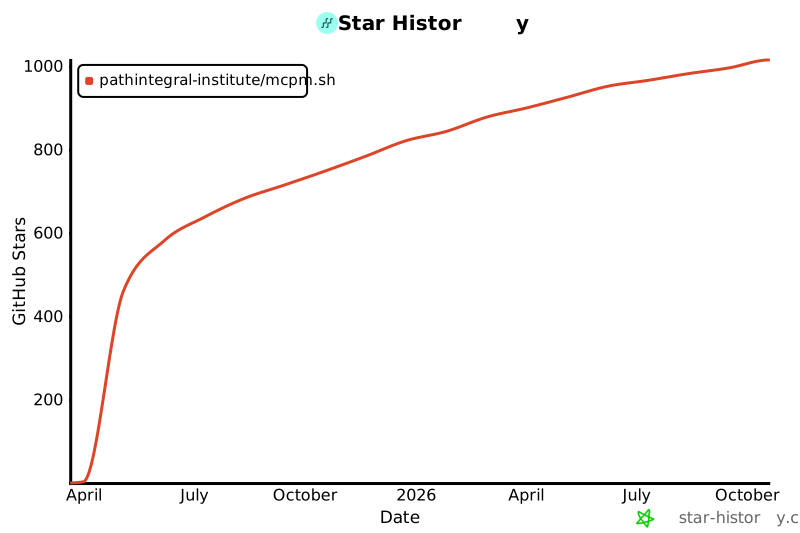](https://www.star-history.com/#pathintegral-institute/mcpm.sh&Date)
Ratings and comments
Sign in to rate this skill.
Sign inFree to use. If it’s helped, pass it on.