swiftshift
Sweet window management for macOS
Safety scan
A static text scan, not a guarantee. Select the badge to see what was scanned and every finding.
Check it deeper on your machine
It has changed since its scan on 11 Nov 2026.
As a Claude Code plugin, install it and then ask Claude Code:
/plugin marketplace add keithmackay/mackayi/plugin install scanskillsafety@mackayiDo a deep scan of https://github.com/pablopunk/swiftshift with scanskillsafety
Or from a terminal, clone it and run it:
git clone https://github.com/keithmackay/scanskillsafety-skill ~/.claude/skills/scanskillsafetynode ~/.claude/skills/scanskillsafety/cli.cjs --deep 'https://github.com/pablopunk/swiftshift'
It checks the exact commit: every file, its packages against OSV (api.osv.dev), how it compares with this page's scan (findsafeskills.com receives the repository's address), and, if you agree, Claude reading every file with your own Claude subscription. It never runs the code.
Badge for your README

Markdown
[](/listings/pablopunk--swiftshift)HTML
<a href="/listings/pablopunk--swiftshift"><img src="/api/listings/pablopunk--swiftshift/badge.svg" alt="findsafeskills safety rating" /></a>Install
Install instructions from the README
As written by the repo's author. findsafeskills has not verified these steps.
There are several ways:
* 💰 Buy it at [swiftshift.app](https://swiftshift.app) (pay what you want) * 🍺 Install it with homebrew `brew install --cask swift-shift` * ⬇️ Download the [latest release on Github](https://github.com/pablopunk/SwiftShift/releases) * 🚀 Clone it and build it yourself
What was scanned
The files the safety scan read, as written by the repository's author and shown as plain text. Lines with a finding are marked.
README.md · README · 94 lines
View this file on GitHub (read at the repository's current version: the scan did not record which commit it read)
- # [SwiftShift.app](https://swiftshift.app) [](https://GitHub.com/pablopunk/swiftshift/releases/)
- <p align="center">
- <img width="250" height="250" alt="icon" src="https://github.com/user-attachments/assets/8ad784bb-4b03-4598-8215-5e1bb2c8efc9" />
- <br/>
- <i>Sweet window management for macOS</i>
- </p>
- https://github.com/pablopunk/SwiftShift/assets/4324982/8f0566b9-d18e-462e-8d74-52bcf6c95f52
- ## Installation
- There are several ways:
- * 💰 Buy it at [swiftshift.app](https://swiftshift.app) (pay what you want)
- * 🍺 Install it with homebrew `brew install --cask swift-shift`
- * ⬇️ Download the [latest release on Github](https://github.com/pablopunk/SwiftShift/releases)
- * 🚀 Clone it and build it yourself
- ## Features
- <img src="https://github.com/pablopunk/SwiftShift/blob/main/www/src/images/screenshot-dark.jpg?raw=true#gh-dark-mode-only" width="700" />
- <img src="https://github.com/pablopunk/SwiftShift/blob/main/www/src/images/screenshot-light.jpg?raw=true#gh-light-mode-only" width="700" />
- * Launch at login
- * Hide menubar icon
- * Focus on window
- * Smart resizing with quadrants
- * Ignore custom apps
- ### Quadrants
- https://github.com/pablopunk/SwiftShift/assets/4324982/5aac5bab-ad87-43c1-b2fe-fd55077f56f6
- ## Contributing
- You can either use Xcode ([be careful with signing](https://github.com/pablopunk/SwiftShift/issues/52#issuecomment-2160423351)) or build it
- directly from the command line:
- ### Build and run from the command line
- ```bash
- make run
- ```
- ### Website
- The marketing site lives in `www/` and is deployed by Vercel with Root Directory set to `www`.
- ```bash
- cd www
- bun install
- bun run dev
- ```
- ### Accessibility permissions running locally
- Local Debug builds use a separate app identity (`Swift Shift Dev` / `com.pablopunk.Swift-Shift.dev`), so they can coexist with the released app without reusing the same Accessibility permission entry.
- I'm open to PRs and requests. If you are looking for something to do, take a look at the issues marked as [`help wanted`](https://github.com/pablopunk/SwiftShift/issues?q=is:issue+is:open+label:%22help+wanted%22).
- ### Release
- One-time setup: store notarization credentials in your keychain:
- 1. Generate an app-specific password at [appleid.apple.com](https://appleid.apple.com) (Sign-In and Security → App-Specific Passwords)
- 2. Run:
- ```bash
- xcrun notarytool store-credentials "SwiftShift" --apple-id YOUR_APPLE_ID --team-id YOUR_TEAM_ID
- ```
- It will prompt you to paste the app-specific password.
- Then release with a single command:
- ```bash
- make release VERSION=0.28.0
- ```
- This will: bump the version, archive, export, notarize, staple, generate the appcast, create a branch/commit/tag, open a PR with auto-merge, create a GitHub release with the zip attached, and update the Homebrew cask automatically.
- If `GH_PAT` is available in the environment, the release script will use it to push the Homebrew tap update to `pablopunk/homebrew-brew`.
- ## Star History
- [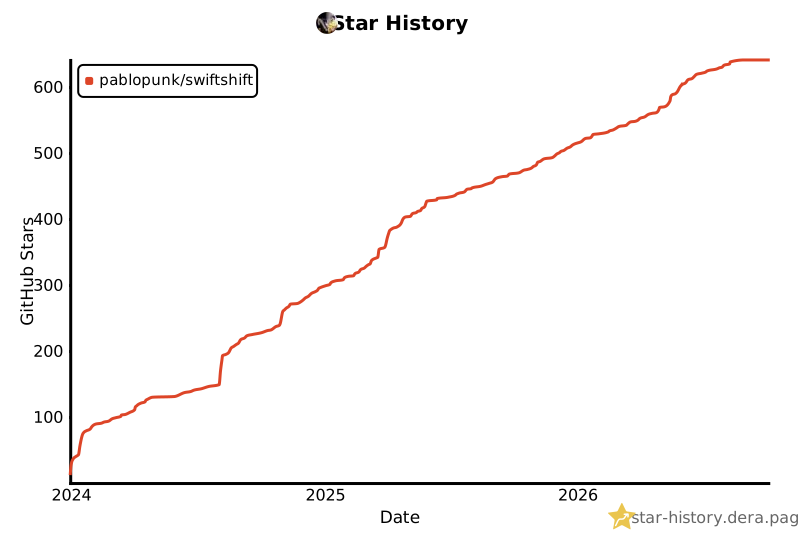](https://star-history.dera.page/#pablopunk/SwiftShift&type=date&legend=top-left)
- ## License
- MIT License
Ratings and comments
Sign in to rate this skill.
Sign inFree to use. If it’s helped, pass it on.