dsh-claude-style
Claude Code Desktop theme for DeepSeek Harness| 为 DeepSeek Harness 网页 GUI 打造的 Claude Code 桌面主题
Safety scan
A static text scan, not a guarantee. Select the badge to see what was scanned and every finding.
Check it deeper on your machine
It has changed since its scan on 11 Nov 2026.
As a Claude Code plugin, install it and then ask Claude Code:
/plugin marketplace add keithmackay/mackayi/plugin install scanskillsafety@mackayiDo a deep scan of https://github.com/Nwflower/dsh-claude-style with scanskillsafety
Or from a terminal, clone it and run it:
git clone https://github.com/keithmackay/scanskillsafety-skill ~/.claude/skills/scanskillsafetynode ~/.claude/skills/scanskillsafety/cli.cjs --deep 'https://github.com/Nwflower/dsh-claude-style'
It checks the exact commit: every file, its packages against OSV (api.osv.dev), how it compares with this page's scan (findsafeskills.com receives the repository's address), and, if you agree, Claude reading every file with your own Claude subscription. It never runs the code.
Badge for your README

Markdown
[](/listings/nwflower--dsh-claude-style)HTML
<a href="/listings/nwflower--dsh-claude-style"><img src="/api/listings/nwflower--dsh-claude-style/badge.svg" alt="findsafeskills safety rating" /></a>Install
Install instructions from the README
As written by the repo's author. findsafeskills has not verified these steps.
1. 官方插件页,添加以下插件即可快速安装
dsh-claude-style
2. 通过终端安装
dsh plugin --profile web add dsh-claude-style # npm 包(推荐)
3. 通过[插件市场](https://github.com/dsh-market/dsh-market)安装
同一时刻建议只启用一个主题。安装后推荐重启 `DeepSeek Harness`以获得完整能力。
What was scanned
The files the safety scan read, as written by the repository's author and shown as plain text. Lines with a finding are marked.
README.md · README · 120 lines
View this file on GitHub (read at the repository's current version: the scan did not record which commit it read)
This file has changed since it was scanned, so this is not exactly the text that was scanned, and no line is marked. The findings are listed with the safety scan above.
- <div align="center">
- # DSH Claude Style
- **为 DeepSeek Harness 复刻 Claude Code Desktop 风格与交互体验的主题插件。**
- > **你的下一个 Claude Code Desktop,何必是 Claude Code。**
- [](README.md)
- [](README.en.md)
- [](https://www.npmjs.com/package/dsh-claude-style)
- [](https://www.npmjs.com/package/dsh-claude-style)
- [](https://github.com/Nwflower/dsh-claude-style)
- </div>
- ## 预览
- Claude 与 DeepSeek 品牌在插件设置里切换,亮暗跟随系统。外观设置提供 Claude、DeepSeek、羊皮纸、森林、暮色、蔷薇六套配色预设,可编辑预设,也可新建、复制、重命名与删除多套配色方案。
- ### Claude
- <table>
- <tr>
- <td align="center" width="50%"><img src="./docs/screenshots/claude-home-light.png" alt="Claude 档编程首页 —— 亮色" /></td>
- <td align="center" width="50%"><img src="./docs/screenshots/claude-home-dark.png" alt="Claude 档编程首页 —— 暗色" /></td>
- </tr>
- <tr>
- <td align="center" width="50%"><img src="./docs/screenshots/claude-conversation-light.png" alt="Claude 档 Markdown 对话 —— 亮色" /></td>
- <td align="center" width="50%"><img src="./docs/screenshots/claude-conversation-dark.png" alt="Claude 档 Markdown 对话 —— 暗色" /></td>
- </tr>
- </table>
- > 编程首页(上),对话界面(下);浅色在左,深色在右。
- ### DeepSeek
- <table>
- <tr>
- <td align="center" width="50%"><img src="./docs/screenshots/deepseek-home-light.png" alt="DeepSeek 档编程首页 —— 亮色" /></td>
- <td align="center" width="50%"><img src="./docs/screenshots/deepseek-home-dark.png" alt="DeepSeek 档编程首页 —— 暗色" /></td>
- </tr>
- <tr>
- <td align="center" width="50%"><img src="./docs/screenshots/deepseek-conversation-light.png" alt="DeepSeek 档 Markdown 对话 —— 亮色" /></td>
- <td align="center" width="50%"><img src="./docs/screenshots/deepseek-conversation-dark.png" alt="DeepSeek 档 Markdown 对话 —— 暗色" /></td>
- </tr>
- </table>
- > 输入框上沿站着宠物小鲸鱼 Deepy,八个状态:
- <table>
- <tr>
- <td align="center" width="25%"><img src="./docs/gifs/idle.gif" width="120" alt="空闲" /><br />空闲</td>
- <td align="center" width="25%"><img src="./docs/gifs/thinking.gif" width="120" alt="思考" /><br />思考</td>
- <td align="center" width="25%"><img src="./docs/gifs/typing.gif" width="120" alt="写回答、调用工具" /><br />写回答、调用工具</td>
- <td align="center" width="25%"><img src="./docs/gifs/conducting.gif" width="120" alt="指挥子代理" /><br />指挥子代理</td>
- </tr>
- <tr>
- <td align="center" width="25%"><img src="./docs/gifs/notification.gif" width="120" alt="等你操作" /><br />等你操作</td>
- <td align="center" width="25%"><img src="./docs/gifs/error.gif" width="120" alt="失败" /><br />失败</td>
- <td align="center" width="25%"><img src="./docs/gifs/happy.gif" width="120" alt="完成" /><br />完成</td>
- <td align="center" width="25%"><img src="./docs/gifs/sleeping.gif" width="120" alt="睡着" /><br />睡着</td>
- </tr>
- </table>
- ## 安装
- 官方插件页添加这个包名,或从终端安装:
- ```
- dsh-claude-style
- ```
- ```bash
- dsh plugin --profile web add dsh-claude-style # npm 包(推荐)
- dsh plugin --profile web add Nwflower/dsh-claude-style#dist # GitHub 发布分支
- ```
- 也可从[插件市场](https://github.com/dsh-market/dsh-market)或 dsh-web-all 的皮肤中心安装。同一时刻只启用一个主题;需要 dsh ≥ 0.2.2-rc.1,装好后重启 DeepSeek Harness。
- 官方 DSH 网页和桌面界面自带浏览器组件模块 `@deepseek-ai/dsh-client-ui-primitives`。即使 profile 关闭了 pnpm 的 `autoInstallPeers`,也无需在 profile 中另外安装组件包。
- ## 字体
- > Anthropic 没有公开发行这三款字体;本仓库只提供下载与研究的[副本](https://github.com/Nwflower/dsh-claude-style/tree/master/packages/assets/src/fonts/anthropic)。
- 启用时二选一:装进系统,或把 `.ttf` 复制到 `$DSH_HOME/dsh-claude-style/fonts/`(刷新页面后生效)。
- ## 文档
- | 文档 | 说明 |
- | --- | --- |
- | [架构](docs/ARCHITECTURE.md) | 仓库结构、引擎与两半边边界、跨模块不变量 |
- | [设计令牌](docs/STYLE.md) | 配色、字体、形状、动效与层级 |
- | [架构决策](docs/adr/README.md) | 每条方向一页:背景、决定、后果与重审条件 |
- | [更新日志](docs/CHANGELOG.md) | 版本历史 |
- | [贡献指南](CONTRIBUTING.md) | 修复优先的贡献流程与变更记录格式 |
- ## 许可
- 除特别说明,本仓库以 MIT 授权。
- 钠(Sodium)渲染引擎以 [PolyForm Shield 1.0.0](packages/client/src/features/sodium/LICENSE) 授权。
- ## 鸣谢
- - 「钠 / Sodium」取名致敬 Minecraft 的 [Sodium](https://github.com/CaffeineMC/sodium) 渲染优化模组,本插件与它无关。
- - 消息导航参考 SherUnlocked-4869 的 [dsh-plugin-msg-nav](https://github.com/SherUnlocked-4869/dsh-plugin-msg-nav)(MIT)。
- - Deepy 小鲸鱼的动画帧图来自 calmly-eating-bugs([@wp3171216237](https://github.com/wp3171216237))绘制的主题包,经作者授权随插件发布;20 个动画的 GIF 见 [docs/gifs/](docs/gifs/)。
- - 鲸鱼娘像素表情来自 issue #224。
- - 聊天区的增强动效改自 [dsh-chat-ux](https://github.com/alm-allen/dsh-chat-ux)(MIT)。
- - Clawd 是 Anthropic 的角色形象,其帧图不在 MIT 许可范围内(见 [LICENSE](LICENSE))。本插件是非官方爱好者作品,与 Anthropic 没有关联。
- ## 友链
- > 想把 Claude Code / Codex 等外部代理的会话历史导入 DSH 接着聊?推荐作者的另一个插件 [dsh-chat-import](https://github.com/Nwflower/dsh-chat-import)。
- ## Star History
- [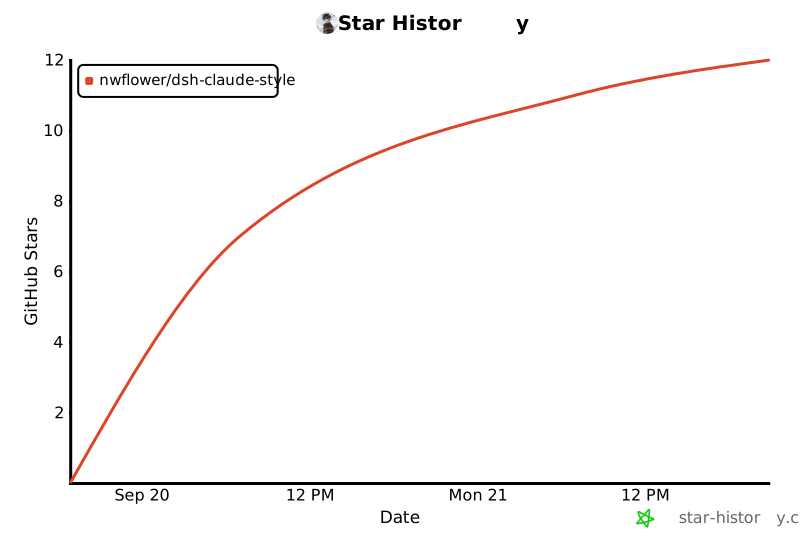](https://star-history.com/#Nwflower/dsh-claude-style&Date)
Ratings and comments
Sign in to rate this skill.
Sign inFree to use. If it’s helped, pass it on.