RL
Scalable toolkit for efficient model reinforcement
Safety scan
A static text scan, not a guarantee. Select the badge to see what was scanned and every finding.
Check it deeper on your machine
It has changed since its scan on 11 Nov 2026.
As a Claude Code plugin, install it and then ask Claude Code:
/plugin marketplace add keithmackay/mackayi/plugin install scanskillsafety@mackayiDo a deep scan of https://github.com/NVIDIA-NeMo/RL with scanskillsafety
Or from a terminal, clone it and run it:
git clone https://github.com/keithmackay/scanskillsafety-skill ~/.claude/skills/scanskillsafetynode ~/.claude/skills/scanskillsafety/cli.cjs --deep 'https://github.com/NVIDIA-NeMo/RL'
It checks the exact commit: every file, its packages against OSV (api.osv.dev), how it compares with this page's scan (findsafeskills.com receives the repository's address), and, if you agree, Claude reading every file with your own Claude subscription. It never runs the code.
Badge for your README

Markdown
[](/listings/nvidia-nemo--rl)HTML
<a href="/listings/nvidia-nemo--rl"><img src="/api/listings/nvidia-nemo--rl/badge.svg" alt="findsafeskills safety rating" /></a>Install
Install instructions from the README
As written by the repo's author. findsafeskills has not verified these steps.
> [!TIP] > **Recommended:** Use the pre-built NGC container to skip manual system dependency setup. The container ships with CUDA, cuDNN, vLLM, and SGLang already installed. > > ```sh > docker pull nvcr.io/nvidia/nemo-rl:latest > git clone git@github.com:NVIDIA-NeMo/RL.git nemo-rl --recursive > cd nemo-rl > # export HF_TOKEN=hf_... # required for gated models (e.g. Llama) > # export HF_HOME=~/.cache/huggingface # model and tokenizer cache > # export HF_DATASETS_CACHE=~/.cache/huggingface/datasets # dataset cache > docker run --rm -it \ > -u root \ > --runtime=nvidia \ > --gpus all \ > --shm-size=64g \ > --ulimit memlock=-1 \ > -v $PWD:/opt/nemo-rl \ > -v ${HF_HOME:-$HOME/.cache/huggingface}:/hf_home \ > -v ${HF_DATASETS_CACHE:-$HOME/.cache/huggingface/datasets}:/hf_datasets_cache \ > -e HF_HOME=/hf_home \ > -e HF_DATASETS_CACHE=/hf_datasets_cache \ > -e HF_TOKEN \ > -e WANDB_API_KEY \ > -w /opt/nemo-rl \ > nvcr.io/nvidia/nemo-rl:latest \ > bash > ``` > > Then inside the container: `uv run python examples/run_grpo.py` > > See the [Installation guide](docs/about/installation.md#docker-quickstart) for details.
Bare-Metal Quick Start
Use this quick start to get going with either the native PyTorch DTensor or Megatron Core training backends.
> [!NOTE] > Both training backends are independent — you can install and use either one on its own.
For more examples and setup details, continue to the [Prerequisites](#prerequisites) section.
<table style="border-collapse:collapse; width:100%; table-layout:fixed;"> <thead> <tr> <th style="border:1px solid #d0d7de; padding:8px; text-align:left; width:50%; word-break:break-word; overflow-wrap:anywhere; white-space:normal;">Native PyTorch (DTensor)</th> <th style="border:1px solid #d0d7de; padding:8px; text-align:left; width:50%; word-break:break-word; overflow-wrap:anywhere; white-space:normal;">Megatron Core</th> </tr> </thead> <tbody> <tr> <td colspan="2" style="border:1px solid #d0d7de; padding:8px; vertical-align:top; word-break:break-word; overflow-wrap:anywhere; white-space:normal;"> <strong>Clone and create the environment</strong> <pre style="white-space:pre-wrap; word-break:break-word; overflow-wrap:anywhere;"><code class="language-sh">git clone git@github.com:NVIDIA-NeMo/RL.git nemo-rl --recursive cd nemo-rl uv venv</code></pre> <em>Note:</em> If you previously ran without checking out the submodules, you may need to rebuild virtual environments by setting <code>NRL_FORCE_REBUILD_VENVS=true</code>. See <a href="#tips-and-tricks">Tips and Tricks</a>. </td> </tr> <tr> <td style="border:1px solid #d0d7de; padding:8px; vertical-align:top; word-break:break-word; overflow-wrap:anywhere; white-space:normal;"> <strong>Run GRPO (DTensor)</strong> <pre style="white-space:pre-wrap; word-break:break-word; overflow-wrap:anywhere;"><code class="language-sh">uv run python examples/run_grpo.py</code></pre> </td> <td style="border:1px solid #d0d7de; padding:8px; vertical-align:top; word-break:break-word; overflow-wrap:anywhere; white-space:normal;"> <strong>Run GRPO (Megatron)</strong> <pre style="white-space:pre-wrap; word-break:break-word; overflow-wrap:anywhere;"><code class="language-sh">uv run examples/run_grpo.py \ --config examples/configs/grpo_math_1B_megatron.yaml</code></pre> </td> </tr> </tbody> </table>
> [!TIP] > **Smoke test:** to validate your install end-to-end more quickly, run the smoke recipe — it switches to GSM8K and caps the run at 10 steps: > ```sh > uv run examples/run_grpo.py --config examples/configs/grpo_smoke.yaml > ```
What was scanned
The files the safety scan read, as written by the repository's author and shown as plain text. Lines with a finding are marked.
README.md · README · 779 lines
View this file on GitHub (read at the repository's current version: the scan did not record which commit it read)
This file has changed since it was scanned, so this is not exactly the text that was scanned, and no line is marked. The findings are listed with the safety scan above.
- <div align="center">
- # NeMo RL: A Scalable and Efficient Post-Training Library
- [](https://github.com/NVIDIA-NeMo/RL/actions/workflows/cicd-main.yml)
- [](https://github.com/NVIDIA-NeMo/RL/stargazers/)
- [Documentation](https://docs.nvidia.com/nemo/rl/latest/index.html) | [Discussions](https://github.com/NVIDIA-NeMo/RL/discussions/categories/announcements) | [Contributing](https://github.com/NVIDIA-NeMo/RL/blob/main/CONTRIBUTING.md)
- </div>
- ## 📣 News
- * [11/16/2026] Inkling 2 Small early-access GRPO training is supported on the [inkling2-small branch](https://github.com/NVIDIA-NeMo/RL/tree/inkling2-small) with the AutoModel backend and either synchronous BF16 SGLang or asynchronous MXFP8 vLLM generation! See the [model guide](https://github.com/NVIDIA-NeMo/RL/blob/inkling2-small/docs/guides/models/inkling/inkling2-small.md) for setup, recipes, and training results.
- * [11/02/2026] Muse Spark text GRPO training is supported on the [Muse Spark support branch](https://github.com/NVIDIA-NeMo/RL/tree/larkz/muse-spark-support) with the AutoModel backend and BF16 vLLM generation! See the [model guide](https://github.com/NVIDIA-NeMo/RL/blob/larkz/muse-spark-support/docs/guides/models/muse/muse-spark.md) for setup, the validated recipe, and known limitations.
- * [11/02/2026] Flint early-access GRPO training is supported on the [flint-support branch](https://github.com/NVIDIA-NeMo/RL/tree/flint-support) with the AutoModel backend and SGLang generation! See the [model guide](https://github.com/NVIDIA-NeMo/RL/blob/flint-support/docs/guides/models/flint/flint.md) for access requirements, setup, and training results.
- * [10/22/2026] MiniMax-M3.1-Flash BF16 GRPO training is supported on the [minimax-m3-1-flash branch](https://github.com/NVIDIA-NeMo/RL/tree/minimax-m3-1-flash) with the AutoModel backend and vLLM generation! See the [model guide](https://github.com/NVIDIA-NeMo/RL/blob/minimax-m3-1-flash/docs/guides/models/minimax/minimax-m3-1-flash.md) for setup, the validated recipe, and known limitations.
- * [10/22/2026] Nemotron 3.5 Super VL (120B-A12B) is now supported in NeMo RL with text DAPO, image GRPO, and NeMo Gym agentic training on the Automodel backend with vLLM generation! See the [model guide](docs/guides/models/nemotron/nemotron-3.5-super-vl.md) for recipes and training results.
- * [10/16/2026] Beam 1.0 Day 0 support by NeMo RL with SFT and RL recipes! See the [beam-support branch](https://github.com/NVIDIA-NeMo/RL/tree/beam-support) and [doc](https://github.com/NVIDIA-NeMo/RL/blob/beam-support/docs/guides/models/reflection/beam.md).
- * [10/07/2026] We shared the [NeMo-DCR preprint](https://huggingface.co/papers/2610.08430), which presents the delta-compressed refit method used in NeMo RL for fast, bitwise-exact sparse weight synchronization between training and rollout clusters.
- * [09/21/2026] DeepSeek V4.1 Flash RL is supported [on this branch](https://github.com/NVIDIA-NeMo/RL/tree/deepseek-v4.1-support) with the following [doc](https://github.com/NVIDIA-NeMo/RL/blob/deepseek-v4.1-support/docs/guides/models/deepseek/deepseek-v4.1-flash.md).
- * [08/26/2026] Qwen3.8-Flash-Next RL is supported [on this branch](https://github.com/NVIDIA-NeMo/RL/tree/qwen3-8-flash-next-support) with the following [doc](https://github.com/NVIDIA-NeMo/RL/blob/qwen3-8-flash-next-support/docs/guides/models/qwen/qwen3-8-flash-next.md).
- * [08/12/2026] MuseGlimmer RL is supported [on this branch](https://github.com/NVIDIA-NeMo/RL/tree/muse-glimmer-support) with the following [doc](https://github.com/NVIDIA-NeMo/RL/blob/muse-glimmer-support/docs/guides/models/muse-glimmer.md).
- * [08/11/2026] Nemotron-3.5-lightning is released. Trained natively using NeMo RL. Check out [reproducible recipes](https://github.com/NVIDIA-NeMo/RL/tree/main/examples/nemo_gym/nemotron-3.5-lightning).
- * [07/25/2026] [Release v0.7.0!](https://github.com/NVIDIA-NeMo/RL/releases/tag/v0.7.0): PPO, MOPD, Cross-tokenizer, Router-replay, CISPO, model support for Qwen3-Omni, Nemotron Nano v3 Omni, Gemma 4, GLM 5.1 and many more!
- * [06/12/2026] [Minimax-M3](https://github.com/NVIDIA-NeMo/RL/tree/minimax-m3) Day 0 support by NeMo RL! More details on the [accuracy verifications](https://github.com/NVIDIA-NeMo/RL/blob/minimax-m3/docs/guides/minimax-m3.md). Thank you [vLLM for the shoutout](https://x.com/vllm_project/status/2065445062423826534).
- * [06/04/2026] [Nemotron-3-Ultra](https://research.nvidia.com/labs/nemotron/Nemotron-3-Ultra/) was trained with NeMo-RL! Follow [this guide](https://github.com/NVIDIA-NeMo/RL/blob/ultra-v3/docs/guides/nemotron-3-ultra.md) to explore the post-training recipe.
- * [04/30/2026] [Release v0.6.0!](https://github.com/NVIDIA-NeMo/RL/releases/tag/v0.6.0)
- * Sglang backend, Muon Optimizer, Speculative Decoding, Yarn long-context training, Chunked Cross Entropy Loss, top-p/top-k training
- * Newly published SWE RL release benchmark demonstrating a long-context, multi-step RL rollout. See the performance numbers [here](https://docs.nvidia.com/nemo/rl/latest/about/performance-summary.html#gb200-bf16-benchmarks) with the accompanying recipe and scripts [here](https://github.com/NVIDIA-NeMo/RL/pull/2327).
- * Release runs coming soon!
- * [04/06/2026] New Model Support
- * Added support for [Qwen3.5](https://huggingface.co/collections/Qwen/qwen35) dense and MoE models (LLM and VLM) for GRPO training.
- * Added support for [GLM-4.7-Flash](https://huggingface.co/zai-org/GLM-4.7-Flash) for GRPO training.
- * Recipes: [grpo-qwen3.5-9b-1n8g-megatron.yaml](/examples/configs/recipes/llm/grpo-qwen3.5-9b-1n8g-megatron.yaml), [grpo-qwen3.5-35ba3b-2n8g-megatron-ep16tp2cp2.yaml](/examples/configs/recipes/llm/grpo-qwen3.5-35ba3b-2n8g-megatron-ep16tp2cp2.yaml), [grpo-glm47-flash-4n8g-automodel-ep32.yaml](/examples/configs/recipes/llm/grpo-glm47-flash-4n8g-automodel-ep32.yaml)
- * [03/12/2026] GDPO Support
- * Enabling [Group reward-Decoupled Normalization Policy Optimization](https://arxiv.org/abs/2601.05242) (GDPO) for multi-reward RL training is now supported.
- * Example: [gdpo_math_1B.yaml](/examples/configs/gdpo_math_1B.yaml)
- * Support Async RL training
- * WIP: Nemo-gym compatibility
- * [03/11/2026] [Nemotron-3-Super](https://research.nvidia.com/labs/nemotron/Nemotron-3-Super/) was post-trained with NeMo-RL! Follow [this guide](https://github.com/NVIDIA-NeMo/RL/blob/super-v3/docs/guides/nemotron-3-super.md) to reproduce the full RL training recipe.
- <details>
- <summary>Previous News</summary>
- * [02/04/2026] LoRA Support
- * LoRA SFT is supported on both [Automodel](https://github.com/NVIDIA-NeMo/RL/pull/1556) and [Megatron Core](https://github.com/NVIDIA-NeMo/RL/pull/1629) backends.
- * LoRA GRPO is supported on both [Automodel](https://github.com/NVIDIA-NeMo/RL/pull/1797) and [Megatron Core](https://github.com/NVIDIA-NeMo/RL/pull/1889) backends.
- * LoRA DPO is supported on both [Automodel](https://github.com/NVIDIA-NeMo/RL/pull/1826) and [Megatron Core](https://github.com/NVIDIA-NeMo/RL/pull/2125) backends.
- * Nano v3 LoRA recipes:
- * [sft-nanov3-30BA3B-2n8g-automodel-lora.yaml](examples/configs/recipes/llm/sft-nanov3-30BA3B-2n8g-automodel-lora.yaml)
- * [grpo-nanov3-30BA3B-2n8g-automodel-lora.yaml](examples/configs/recipes/llm/grpo-nanov3-30BA3B-2n8g-automodel-lora.yaml)
- * [grpo-nanov3-30BA3B-2n8g-megatron-lora.yaml](examples/configs/recipes/llm/grpo-nanov3-30BA3B-2n8g-megatron-lora.yaml)
- * [01/30/2026] [Release v0.5.0!](https://github.com/NVIDIA-NeMo/RL/releases/tag/v0.5.0)
- * Both linux/amd64 and linux/arm64 Docker containers are available on NGC [nvcr.io/nvidia/nemo-rl:v0.5.0](https://registry.ngc.nvidia.com/orgs/nvidia/containers/nemo-rl/tags).
- * NeMo-Gym + NeMo-RL support
- * 📊 View the release run metrics on [Google Colab](https://colab.research.google.com/drive/1Xgg8D7mNkWnz6t2uL8BbPfPb7UTkN1H0?usp=sharing) to get a head start on your experimentation.
- * [12/15/2025] NeMo-RL is the framework that trained [NVIDIA-NeMotron-3-Nano-30B-A3B-FP8](https://huggingface.co/nvidia/NVIDIA-Nemotron-3-Nano-30B-A3B-FP8)! [This guide](docs/guides/models/nemotron/nemotron-3-nano.md) provides reproducible instructions for the post-training process.
- * [10/10/2025] **DAPO Algorithm Support**
- NeMo RL now supports [Decoupled Clip and Dynamic Sampling Policy Optimization (DAPO)](https://arxiv.org/pdf/2503.14476) algorithm that extends GRPO with **Clip-Higher**, **Dynamic Sampling**, **Token-Level Policy Gradient Loss**, and **Overlong Reward Shaping** for more stable and efficient RL training. See the [DAPO guide](docs/guides/dapo.md) for more details.
- * [9/27/2025] [FP8 Quantization in NeMo RL](https://github.com/NVIDIA-NeMo/RL/discussions/1216)
- * [9/25/2025] On-policy Distillation
- * Student generates on-policy sequences and aligns logits to a larger teacher via KL, achieving near-larger-model quality at lower cost than RL. See [On-policy Distillation](#on-policy-distillation).
- * [12/1/2025] [Release v0.4.0!](https://github.com/NVIDIA-NeMo/RL/releases/tag/v0.4.0)
- * First release with official NGC Container [nvcr.io/nvidia/nemo-rl:v0.4.0](https://registry.ngc.nvidia.com/orgs/nvidia/containers/nemo-rl/tags).
- * 📊 View the release run metrics on [Google Colab](https://colab.research.google.com/drive/1u5lmjHOsYpJqXaeYstjw7Qbzvbo67U0v?usp=sharing) to get a head start on your experimentation.
- * [9/30/2025] [Accelerated RL on GCP with NeMo RL!](https://discuss.google.dev/t/accelerating-reinforcement-learning-on-google-cloud-using-nvidia-nemo-rl/269579/4)
- * [8/15/2025] [NeMo-RL: Journey of Optimizing Weight Transfer in Large MoE Models by 10x](https://github.com/NVIDIA-NeMo/RL/discussions/1189)
- * [7/31/2025] [NeMo RL V0.3: Scalable and Performant Post-training with NeMo RL via Megatron Core](https://github.com/NVIDIA-NeMo/RL/discussions/1161)
- * [7/25/2025] [Release v0.3.0!](https://github.com/NVIDIA-NeMo/RL/releases/tag/v0.3.0)
- * 📝 [v0.3.0 Announcement](https://github.com/NVIDIA-NeMo/RL/discussions/1161)
- * 📊 View the release run metrics on [Google Colab](https://colab.research.google.com/drive/15kpesCV1m_C5UQFStssTEjaN2RsBMeZ0?usp=sharing) to get a head start on your experimentation.
- * [5/14/2025] [Reproduce DeepscaleR with NeMo RL!](docs/guides/grpo-deepscaler.md)
- * [5/14/2025] [Release v0.2.1!](https://github.com/NVIDIA-NeMo/RL/releases/tag/v0.2.1)
- * 📊 View the release run metrics on [Google Colab](https://colab.research.google.com/drive/1o14sO0gj_Tl_ZXGsoYip3C0r5ofkU1Ey?usp=sharing) to get a head start on your experimentation.
- </details>
- ## Overview
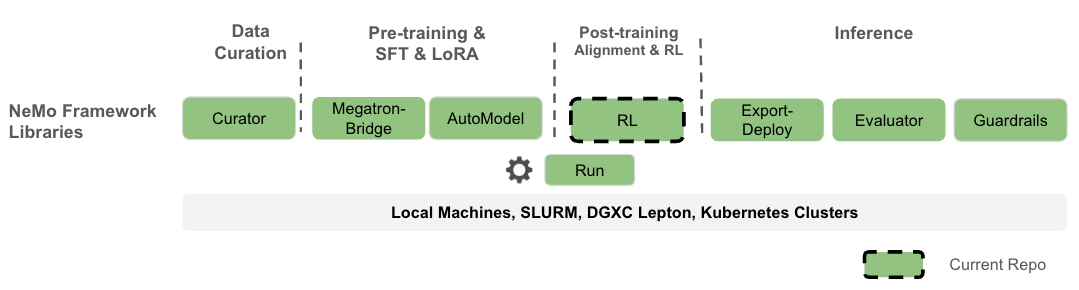
- **NeMo RL** is an open-source post-training library under the [NVIDIA NeMo Framework](https://github.com/NVIDIA-NeMo), designed to streamline and scale reinforcement learning methods for multimodal models (LLMs, VLMs etc.). Designed for flexibility, reproducibility, and scale, NeMo RL enables both small-scale experiments and massive multi-GPU, multi-node deployments for fast experimentation in research and production environments.
- 
- What you can expect:
- - **Flexibility** with a modular design that allows easy integration and customization.
- - **Efficient resource management using Ray**, enabling scalable and flexible deployment across different hardware configurations.
- - **Hackable** with native PyTorch-only paths for quick research prototypes.
- - **High performance with Megatron Core**, supporting various parallelism techniques for large models and large context lengths.
- - **Seamless integration with Hugging Face** for ease of use, allowing users to leverage a wide range of pre-trained models and tools.
- - **Comprehensive documentation** that is both detailed and user-friendly, with practical examples.
- Please refer to our [design documents](https://github.com/NVIDIA-NeMo/RL/tree/main/docs/design-docs) for more details on the architecture and design philosophy.
- ### Training Backends
- NeMo RL supports multiple training backends to accommodate different model sizes and hardware configurations:
- - [**Automodel**](https://github.com/NVIDIA-NeMo/Automodel) - Accelerated PyTorch training with improved memory efficiency (PyTorch-native TP, SP, CP, EP, and FSDP2).
- - [**Megatron**](https://github.com/NVIDIA-NeMo/Megatron-Bridge) - NVIDIA's high-performance training framework for scaling to large models with 6D parallelisms.
- The training backend is automatically determined based on your YAML configuration settings. For detailed information on backend selection, configuration, and examples, see the [Training Backends documentation](docs/design-docs/training-backends.md).
- ### Generation Backends
- NeMo RL supports multiple generation/rollout backends to accommodate different model sizes and hardware configurations:
- - [**vLLM**](https://github.com/vllm-project/vllm) - A high-throughput and memory-efficient popular inference and serving engine.
- - [**Megatron**](https://github.com/NVIDIA/Megatron-LM/tree/main/megatron/core/inference) - A high-performance Megatron-native inference backend which eliminates weight conversion between training and inference.
- For detailed information on backend selection, configuration, and examples, see the [Generation Backends documentation](docs/design-docs/generation.md).
- ## Features
- ✅ _Available now_ | 🔜 _Coming in a future release_
- - 🔜 **Improved Native Performance** - Improve training time for native PyTorch models.
- - 🔜 **Improved Large MoE Performance** - Improve Megatron Core training performance and generation performance.
- - 🔜 **Resiliency** - Fault tolerance and auto-scaling support
- - 🔜 **On-Policy Cross-Tokenizer Distillation** - cross-tokenizer support for the on-policy (MOPD) recipe (today MOPD is same-tokenizer; cross-tokenizer xToken is off-policy)
- - 🔜 **New Models** - Qwen3-Next, Minimax
- - ✅ **X-Token Off-Policy Distillation** - Distillation across mismatched (student, teacher) tokenizers via a precomputed projection matrix.
- - ✅ **Muon Optimizer** - Emerging Optimizer support for SFT/RL
- - ✅ **Megatron Inference** - Improved performance for Megatron Inference (avoid weight conversion).
- - ✅ **SGLang Inference** - SGLang rollout support for optimized inference.
- - ✅ **Speculative Decoding** - Speculative Decoding support for rollout acceleration and training
- - ✅ **New Models** - Nemotron-Super, Qwen3.5, GLM Flash-4.7
- - ✅ **Expand Algorithms** - GDPO, LoRA support for RL(GRPO) and DPO
- - ✅ **Distributed Training** - Ray-based infrastructure.
- - ✅ **Environment Support and Isolation** - Support for multi-environment training and dependency isolation between components.
- - ✅ **Worker Isolation** - Process isolation between RL Actors (no worries about global state).
- - ✅ **Learning Algorithms** - GRPO/GSPO/DAPO, SFT(with LoRA), DPO, and On-policy distillation.
- - ✅ **Multi-Turn RL** - Multi-turn generation and training for RL with tool use, games, etc.
- - ✅ **Advanced Parallelism with Automodel** - PyTorch FSDP2, TP, CP, SP, and EP for efficient training (through NeMo AutoModel).
- - ✅ **Larger Model Support with Longer Sequences** - Performant parallelisms with Megatron Core (TP/PP/CP/SP/EP/FSDP) (through NeMo Megatron Bridge).
- - ✅ **Sequence Packing** - Sequence packing in both Automodel and Megatron Core for huge training performance gains.
- - ✅ **Fast Generation** - vLLM backend for optimized inference.
- - ✅ **Hugging Face Integration** - OOB support in the Automodel path, CKPT conversion available for Megatron path through Megatron Bridge middleware.
- - ✅ **End-to-End FP8 Low-Precision Training** - Support for Megatron Core FP8 training and FP8 vLLM generation.
- - ✅ **Vision Language Models (VLM)** - Support SFT and GRPO on VLMs.
- - ✅ **Megatron Inference** - Megatron Inference for fast Day-0 support for new Megatron models (avoid weight conversion).
- - ✅ **Async RL** - Support for asynchronous rollouts and replay buffers for off-policy training, and enable a fully asynchronous GRPO.
- - ✅ **Nemo-Gym Integration** - RL Environment Integration.
- - ✅ **GB200** - container support for GB200.
- ## Table of Contents
- - [Quick Start](#quick-start)
- - [Bare-Metal Quick Start](#bare-metal-quick-start)
- - [Prerequisites](#prerequisites)
- - Support Matrix
- <p></p>
- |Algorithms|Single Node|Multi-node|
- |-|-|-|
- |[GRPO](#grpo)|[GRPO Single Node](#grpo-single-node)|[GRPO Multi-node](#grpo-multi-node): [GRPO Qwen2.5-32B](#grpo-qwen25-32b), [GRPO Multi-Turn](#grpo-multi-turn)|
- |[On-policy Distillation](#on-policy-distillation)|[Distillation Single Node](#on-policy-distillation-single-node)|[Distillation Multi-node](#on-policy-distillation-multi-node)|
- |[X-Token Off-Policy Distillation](#x-token-off-policy-distillation)|[X-Token Off-Policy Distillation Single Node](#x-token-off-policy-distillation-single-node)|[X-Token Off-Policy Distillation Multi-node](#x-token-off-policy-distillation-multi-node)|
- |[SFT](#supervised-fine-tuning-sft)|[SFT Single Node](#sft-single-node)|[SFT Multi-node](#sft-multi-node)|
- |[DPO](#dpo)|[DPO Single Node](#dpo-single-node)|[DPO Multi-node](#dpo-multi-node)|
- |[RM](#rm)|[RM Single Node](#rm-single-node)|[RM Multi-node](#rm-multi-node)|
- <p></p>
- - [Evaluation](#evaluation)
- - [Set Up Clusters](#set-up-clusters)
- - [Tips and Tricks](#tips-and-tricks)
- - [Citation](#citation)
- - [Acknowledgement and Contribution Guide](#acknowledgement-and-contribution-guide)
- - [Licenses](#licenses)
- ## Quick Start
- > [!TIP]
- > **Recommended:** Use the pre-built NGC container to skip manual system dependency setup. The container ships with CUDA, cuDNN, vLLM, and SGLang already installed.
- >
- > ```sh
- > docker pull nvcr.io/nvidia/nemo-rl:latest
- > git clone git@github.com:NVIDIA-NeMo/RL.git nemo-rl --recursive
- > cd nemo-rl
- > # export HF_TOKEN=hf_... # required for gated models (e.g. Llama)
- > # export HF_HOME=~/.cache/huggingface # model and tokenizer cache
- > # export HF_DATASETS_CACHE=~/.cache/huggingface/datasets # dataset cache
- > docker run --rm -it \
- > -u root \
- > --runtime=nvidia \
- > --gpus all \
- > --shm-size=64g \
- > --ulimit memlock=-1 \
- > -v $PWD:/opt/nemo-rl \
- > -v ${HF_HOME:-$HOME/.cache/huggingface}:/hf_home \
- > -v ${HF_DATASETS_CACHE:-$HOME/.cache/huggingface/datasets}:/hf_datasets_cache \
- > -e HF_HOME=/hf_home \
- > -e HF_DATASETS_CACHE=/hf_datasets_cache \
- > -e HF_TOKEN \
- > -e WANDB_API_KEY \
- > -w /opt/nemo-rl \
- > nvcr.io/nvidia/nemo-rl:latest \
- > bash
- > ```
- >
- > Then inside the container: `uv run python examples/run_grpo.py`
- >
- > See the [Installation guide](docs/about/installation.md#docker-quickstart) for details.
- ### Bare-Metal Quick Start
- Use this quick start to get going with either the Automodel or Megatron Core training backends.
- > [!NOTE]
- > Both training backends are independent — you can install and use either one on its own.
- For more examples and setup details, continue to the [Prerequisites](#prerequisites) section.
- <table style="border-collapse:collapse; width:100%; table-layout:fixed;">
- <thead>
- <tr>
- <th style="border:1px solid #d0d7de; padding:8px; text-align:left; width:50%; word-break:break-word; overflow-wrap:anywhere; white-space:normal;">Automodel</th>
- <th style="border:1px solid #d0d7de; padding:8px; text-align:left; width:50%; word-break:break-word; overflow-wrap:anywhere; white-space:normal;">Megatron Core</th>
- </tr>
- </thead>
- <tbody>
- <tr>
- <td colspan="2" style="border:1px solid #d0d7de; padding:8px; vertical-align:top; word-break:break-word; overflow-wrap:anywhere; white-space:normal;">
- <strong>Clone and create the environment</strong>
- <pre style="white-space:pre-wrap; word-break:break-word; overflow-wrap:anywhere;"><code class="language-sh">git clone git@github.com:NVIDIA-NeMo/RL.git nemo-rl --recursive
- cd nemo-rl
- uv venv</code></pre>
- <em>Note:</em> If you previously ran without checking out the submodules, you may need to rebuild virtual environments by setting <code>NRL_FORCE_REBUILD_VENVS=true</code>. See <a href="#tips-and-tricks">Tips and Tricks</a>.
- </td>
- </tr>
- <tr>
- <td style="border:1px solid #d0d7de; padding:8px; vertical-align:top; word-break:break-word; overflow-wrap:anywhere; white-space:normal;">
- <strong>Run GRPO (Automodel)</strong>
- <pre style="white-space:pre-wrap; word-break:break-word; overflow-wrap:anywhere;"><code class="language-sh">uv run python examples/run_grpo.py</code></pre>
- </td>
- <td style="border:1px solid #d0d7de; padding:8px; vertical-align:top; word-break:break-word; overflow-wrap:anywhere; white-space:normal;">
- <strong>Run GRPO (Megatron)</strong>
- <pre style="white-space:pre-wrap; word-break:break-word; overflow-wrap:anywhere;"><code class="language-sh">uv run examples/run_grpo.py \
- --config examples/configs/grpo_math_1B_megatron.yaml</code></pre>
- </td>
- </tr>
- </tbody>
- </table>
- > [!TIP]
- > **Smoke test:** to validate your install end-to-end more quickly, run the smoke recipe — it switches to GSM8K and caps the run at 10 steps:
- > ```sh
- > uv run examples/run_grpo.py --config examples/configs/grpo_smoke.yaml
- > ```
- ## Prerequisites
- Clone **NeMo RL**.
- ```sh
- git clone git@github.com:NVIDIA-NeMo/RL.git nemo-rl --recursive
- cd nemo-rl
- # If you have already cloned without the recursive option, you can initialize the submodules recursively
- git submodule update --init --recursive
- # Different branches of the repo can have different pinned versions of these third-party submodules. Ensure
- # submodules are automatically updated after switching branches or pulling updates by configuring git with:
- # git config submodule.recurse true
- # **NOTE**: this setting will not download **new** or remove **old** submodules with the branch's changes.
- # You will have to run the full `git submodule update --init --recursive` command in these situations.
- ```
- If you are using the Megatron backend on bare metal (outside of a container), you may need to install the cuDNN headers as well. Here is how you check and install them:
- ```sh
- # Check if you have libcudnn installed
- dpkg -l | grep cudnn.*cuda
- # Find the version you need here: https://developer.nvidia.com/cudnn-downloads?target_os=Linux&target_arch=x86_64&Distribution=Ubuntu&target_version=20.04&target_type=deb_network
- # As an example, these are the "Linux Ubuntu 20.04 x86_64" instructions
- wget https://developer.download.nvidia.com/compute/cuda/repos/ubuntu2004/x86_64/cuda-keyring_1.1-1_all.deb
- sudo dpkg -i cuda-keyring_1.1-1_all.deb
- sudo apt update
- sudo apt install cudnn # Will install cuDNN meta packages that point to the latest versions
- # sudo apt install cudnn9-cuda-13 # Will install cuDNN version 9.x.x compiled for cuda 13.x (CUDA 13 — current primary)
- # sudo apt install cudnn9-cuda-13-2 # Will install cuDNN version 9.x.x compiled for cuda 13.2 specifically
- ```
- If you encounter problems when installing vllm's dependency deep_ep on bare-metal (outside of a container), you may need to install libibverbs-dev as well. Here is how you can install it:
- ```sh
- sudo apt-get update
- sudo apt-get install libibverbs-dev
- ```
- For faster setup and environment isolation, we use [uv](https://docs.astral.sh/uv/).
- Follow [these instructions](https://docs.astral.sh/uv/getting-started/installation/) to install uv.
- Then, initialize the NeMo RL project virtual environment via:
- ```sh
- uv venv
- ```
- > [!NOTE]
- > Please do not use `-p/--python` and instead allow `uv venv` to read it from `.python-version`.
- > This ensures that the version of python used is always what we prescribe.
- Use `uv run` to launch all commands. It handles pip installing implicitly and ensures your environment is up to date with our lock file.
- > [!IMPORTANT]
- > **Bare metal only (skip if using the NeMo RL container):** If you use the Megatron backend (`--extra mcore`), set these environment variables so Transformer Engine uses the pip-installed cuDNN instead of a potentially mismatched system version:
- > ```sh
- > export CUDNN_HOME=.venv/lib/python3.13/site-packages/nvidia/cudnn
- > export LD_LIBRARY_PATH=".venv/lib/python3.13/site-packages/nvidia/cudnn/lib:${LD_LIBRARY_PATH:-}"
- > # Verify (should match the nvidia-cudnn-cu13 pin in pyproject.toml):
- > # uv run --extra mcore python -c "import transformer_engine.pytorch as te; print(te.get_cudnn_version())"
- > ```
- > See [docs/about/installation.md](docs/about/installation.md#configure-cudnn-for-transformer-engine-bare-metal-only) for details.
- > [!NOTE]
- > - It is not recommended to activate the `venv`, and you should use `uv run <command>` instead to execute scripts within the managed environment.
- > This ensures consistent environment usage across different shells and sessions. Example: `uv run python examples/run_grpo.py`
- > - Ensure your system has the appropriate CUDA drivers installed, and that your PyTorch version is compatible with both your CUDA setup and hardware.
- > - If you update your environment in `pyproject.toml`, it is necessary to force a rebuild of the virtual environments by setting `NRL_FORCE_REBUILD_VENVS=true` next time you launch a run.
- > - **Reminder**: Don't forget to set your `HF_HOME`, `WANDB_API_KEY`, and `HF_DATASETS_CACHE` (if needed). You'll need to do a `hf auth login` as well for Llama models.
- ## GRPO
- We provide a reference GRPO configuration for math benchmarks using the [OpenMathInstruct-2](https://huggingface.co/datasets/nvidia/OpenMathInstruct-2) dataset.
- You can read about the details of the GRPO implementation [here](docs/guides/grpo.md)
- ### GRPO Single Node
- To run GRPO on a single GPU for `Qwen/Qwen2.5-1.5B`:
- ```sh
- # Run the GRPO math example using a 1B parameter model
- uv run python examples/run_grpo.py
- ```
- By default, this uses the configuration in `examples/configs/grpo_math_1B.yaml`. You can customize parameters with command-line overrides. For example, to run on 8 GPUs,
- ```sh
- # Run the GRPO math example using a 1B parameter model using 8 GPUs
- uv run python examples/run_grpo.py \
- cluster.gpus_per_node=8
- ```
- You can override any of the parameters listed in the YAML configuration file. For example,
- ```sh
- uv run python examples/run_grpo.py \
- policy.model_name="meta-llama/Llama-3.2-1B-Instruct" \
- checkpointing.checkpoint_dir="results/llama1b_math" \
- logger.wandb_enabled=True \
- logger.wandb.name="grpo-llama1b_math" \
- logger.num_val_samples_to_print=10
- ```
- The default configuration uses the Automodel training backend. We also provide a config `examples/configs/grpo_math_1B_megatron.yaml` which is set up to use the Megatron backend out of the box.
- To train using this config on a single GPU:
- ```sh
- # Run a GRPO math example on 1 GPU using the Megatron backend
- uv run python examples/run_grpo.py \
- --config examples/configs/grpo_math_1B_megatron.yaml
- ```
- For additional details on supported backends and how to configure the training backend to suit your setup, refer to the [Training Backends documentation](docs/design-docs/training-backends.md).
- ### GRPO Multi-node
- ```sh
- # Run from the root of NeMo RL repo
- NUM_ACTOR_NODES=2
- # grpo_math_8b uses Llama-3.1-8B-Instruct model
- COMMAND="uv run ./examples/run_grpo.py --config examples/configs/grpo_math_8B.yaml cluster.num_nodes=2 checkpointing.checkpoint_dir='results/llama8b_2nodes' logger.wandb_enabled=True logger.wandb.name='grpo-llama8b_math'" \
- CONTAINER=YOUR_CONTAINER \
- MOUNTS="$PWD:$PWD" \
- sbatch \
- --nodes=${NUM_ACTOR_NODES} \
- --account=YOUR_ACCOUNT \
- --job-name=YOUR_JOBNAME \
- --partition=YOUR_PARTITION \
- --time=4:0:0 \
- --gres=gpu:8 \
- ray.sub
- ```
- > [!NOTE]
- > For GB200 systems with 4 GPUs per node, use `--gres=gpu:4` instead.
- The required `CONTAINER` can be built by following the instructions in the [Docker documentation](docs/docker.md).
- #### GRPO Qwen2.5-32B
- This section outlines how to run GRPO for Qwen2.5-32B with a 16k sequence length.
- ```sh
- # Run from the root of NeMo RL repo
- NUM_ACTOR_NODES=32
- # Download Qwen before the job starts to avoid spending time downloading during the training loop
- HF_HOME=/path/to/hf_home hf download Qwen/Qwen2.5-32B
- # Ensure HF_HOME is included in your MOUNTS
- HF_HOME=/path/to/hf_home \
- COMMAND="uv run ./examples/run_grpo.py --config examples/configs/grpo_math_8B.yaml policy.model_name='Qwen/Qwen2.5-32B' policy.generation.vllm_cfg.tensor_parallel_size=4 policy.max_total_sequence_length=16384 cluster.num_nodes=${NUM_ACTOR_NODES} policy.automodel_cfg.enabled=True policy.automodel_cfg.tensor_parallel_size=8 policy.automodel_cfg.sequence_parallel=True policy.automodel_cfg.activation_checkpointing=True checkpointing.checkpoint_dir='results/qwen2.5-32b' logger.wandb_enabled=True logger.wandb.name='qwen2.5-32b'" \
- CONTAINER=YOUR_CONTAINER \
- MOUNTS="$PWD:$PWD" \
- sbatch \
- --nodes=${NUM_ACTOR_NODES} \
- --account=YOUR_ACCOUNT \
- --job-name=YOUR_JOBNAME \
- --partition=YOUR_PARTITION \
- --time=4:0:0 \
- --gres=gpu:8 \
- ray.sub
- ```
- > [!NOTE]
- > For GB200 systems with 4 GPUs per node, use `--gres=gpu:4` instead.
- #### GRPO Multi-Turn
- We also support multi-turn generation and training (tool use, games, etc.).
- Reference example for training to play a Sliding Puzzle Game:
- ```sh
- uv run python examples/run_grpo_sliding_puzzle.py
- ```
- ## Distillation
- NeMo RL supports two distillation recipes:
- | Recipe | Multi-teacher | Asynchronous | Policy | Loss | Tokenizer | Backend |
- |---|---|---|---|---|---|---|
- | MOPD | Yes | Yes | On-policy | Top-1 sampled (RL-style) | Same | Megatron |
- | xToken | Yes | No (sync) | Off-policy | Full-logit (KL) | Same or different | Automodel |
- ## On-policy Distillation
- We provide an example on-policy distillation experiment using the [DeepScaler dataset](https://huggingface.co/agentica-org/DeepScaleR-1.5B-Preview).
- ### On-policy Distillation Single Node
- To run on-policy distillation on a single GPU using `Qwen/Qwen3-1.7B-Base` as the student and `Qwen/Qwen3-4B` as the teacher:
- ```sh
- uv run python examples/run_distillation.py
- ```
- Customize parameters with command-line overrides. For example:
- ```sh
- uv run python examples/run_distillation.py \
- policy.model_name="Qwen/Qwen3-1.7B-Base" \
- teacher.model_name="Qwen/Qwen3-4B" \
- cluster.gpus_per_node=8
- ```
- ### On-policy Distillation Multi-node
- ```sh
- # Run from the root of NeMo RL repo
- NUM_ACTOR_NODES=2
- COMMAND="uv run ./examples/run_distillation.py --config examples/configs/distillation_math.yaml cluster.num_nodes=2 cluster.gpus_per_node=8 checkpointing.checkpoint_dir='results/distill_2nodes' logger.wandb_enabled=True logger.wandb.name='distill-2nodes'" \
- CONTAINER=YOUR_CONTAINER \
- MOUNTS="$PWD:$PWD" \
- sbatch \
- --nodes=${NUM_ACTOR_NODES} \
- --account=YOUR_ACCOUNT \
- --job-name=YOUR_JOBNAME \
- --partition=YOUR_PARTITION \
- --time=4:0:0 \
- --gres=gpu:8 \
- ray.sub
- ```
- > [!NOTE]
- > For GB200 systems with 4 GPUs per node, use `--gres=gpu:4` instead.
- ## X-Token Off-Policy Distillation
- We support off-policy distillation between a student and a teacher that **do not share a tokenizer** (cross-tokenizer, or "x-token", distillation) — for example, distilling a `Qwen/Qwen3-4B` teacher into a `meta-llama/Llama-3.2-1B` student. The reference recipe trains on the ungated, CC-BY-4.0 [Nemotron-Pretraining-Specialized-v1.1](https://huggingface.co/datasets/nvidia/Nemotron-Pretraining-Specialized-v1.1) corpus (`Nemotron-Pretraining-Formal-Logic` subset).
- You can read about the details of the x-token distillation implementation [here](docs/guides/xtoken-off-policy-distillation.md) and [here](https://arxiv.org/abs/2605.21699), including how the (student, teacher) projection matrix is built and how the loss modes work.
- Before launching a run, build the projection matrix for your (student, teacher) tokenizer pair:
- ```sh
- ./tools/x_token/build_projection_matrix.sh \
- --student-model meta-llama/Llama-3.2-1B \
- --teacher-model Qwen/Qwen3-4B \
- --runtime-top-k 4 \
- --final-output cross_tokenizer_data/projection_matrix_llama_qwen_top4.pt
- ```
- > [!NOTE]
- > X-token distillation runs on the Automodel backend only, and the student and teacher must be colocated on the same node (teacher logits travel via CUDA IPC).
- ### X-Token Off-Policy Distillation Single Node
- To run x-token distillation on a single node using `meta-llama/Llama-3.2-1B` as the student and `Qwen/Qwen3-4B` as the teacher:
- ```sh
- uv run python examples/run_xtoken_off_policy_distillation.py \
- teachers.0.aligner.projection_matrix_path=cross_tokenizer_data/projection_matrix_llama_qwen_top4.pt
- ```
- By default, this uses the configuration in `examples/configs/xtoken_off_policy_distillation.yaml`. The projection matrix path (per teacher) is the only required override. You can customize other parameters with command-line overrides. For example:
- ```sh
- uv run python examples/run_xtoken_off_policy_distillation.py \
- teachers.0.aligner.projection_matrix_path=cross_tokenizer_data/projection_matrix_llama_qwen_top4.pt \
- policy.model_name="meta-llama/Llama-3.2-1B" \
- teachers.0.model_name="Qwen/Qwen3-4B" \
- cluster.gpus_per_node=8
- ```
- ### X-Token Off-Policy Distillation Multi-node
- ```sh
- # Run from the root of NeMo RL repo
- NUM_ACTOR_NODES=2
- COMMAND="uv run ./examples/run_xtoken_off_policy_distillation.py --config examples/configs/xtoken_off_policy_distillation.yaml teachers.0.aligner.projection_matrix_path='cross_tokenizer_data/projection_matrix_llama_qwen_top4.pt' cluster.num_nodes=2 cluster.gpus_per_node=8 checkpointing.checkpoint_dir='results/xtoken_distill_2nodes' logger.wandb_enabled=True logger.wandb.name='xtoken-distill-2nodes'" \
- CONTAINER=YOUR_CONTAINER \
- MOUNTS="$PWD:$PWD" \
- sbatch \
- --nodes=${NUM_ACTOR_NODES} \
- --account=YOUR_ACCOUNT \
- --job-name=YOUR_JOBNAME \
- --partition=YOUR_PARTITION \
- --time=4:0:0 \
- --gres=gpu:8 \
- ray.sub
- ```
- > [!NOTE]
- > For GB200 systems with 4 GPUs per node, use `--gres=gpu:4` instead.
- ## Supervised Fine-Tuning (SFT)
- We provide example SFT experiments using various datasets including [SQuAD](https://rajpurkar.github.io/SQuAD-explorer/), OpenAI format datasets (with tool calling support), and custom JSONL datasets. For detailed documentation on supported datasets and configurations, see the [SFT documentation](docs/guides/sft.md).
- ### SFT Single Node
- The default SFT configuration is set to run on a single GPU. To start the experiment:
- ```sh
- uv run python examples/run_sft.py
- ```
- This fine-tunes the `Llama3.2-1B` model on the SQuAD dataset using a 1 GPU.
- To use multiple GPUs on a single node, you can modify the cluster configuration. This adjustment will also let you potentially increase the model and batch size:
- ```sh
- uv run python examples/run_sft.py \
- policy.model_name="meta-llama/Meta-Llama-3-8B" \
- policy.train_global_batch_size=128 \
- sft.val_global_batch_size=128 \
- cluster.gpus_per_node=8
- ```
- Refer to `examples/configs/sft.yaml` for a full list of parameters that can be overridden.
- ### SFT Multi-node
- ```sh
- # Run from the root of NeMo RL repo
- NUM_ACTOR_NODES=2
- COMMAND="uv run ./examples/run_sft.py --config examples/configs/sft.yaml cluster.num_nodes=2 cluster.gpus_per_node=8 checkpointing.checkpoint_dir='results/sft_llama8b_2nodes' logger.wandb_enabled=True logger.wandb.name='sft-llama8b'" \
- CONTAINER=YOUR_CONTAINER \
- MOUNTS="$PWD:$PWD" \
- sbatch \
- --nodes=${NUM_ACTOR_NODES} \
- --account=YOUR_ACCOUNT \
- --job-name=YOUR_JOBNAME \
- --partition=YOUR_PARTITION \
- --time=4:0:0 \
- --gres=gpu:8 \
- ray.sub
- ```
- > [!NOTE]
- > For GB200 systems with 4 GPUs per node, use `--gres=gpu:4` instead.
- ## DPO
- We provide a sample DPO experiment that uses the [HelpSteer3 dataset](https://huggingface.co/datasets/nvidia/HelpSteer3) for preference-based training.
- ### DPO Single Node
- The default DPO experiment is configured to run on a single GPU. To launch the experiment:
- ```sh
- uv run python examples/run_dpo.py
- ```
- This trains `Llama3.2-1B-Instruct` on 1 GPU.
- If you have access to more GPUs, you can update the experiment accordingly. To run on 8 GPUs, we update the cluster configuration and switch to an 8B Llama3.1 Instruct model:
- ```sh
- uv run python examples/run_dpo.py \
- policy.model_name="meta-llama/Llama-3.1-8B-Instruct" \
- policy.train_global_batch_size=256 \
- cluster.gpus_per_node=8
- ```
- Any of the DPO parameters can be customized from the command line. For example:
- ```sh
- uv run python examples/run_dpo.py \
- dpo.sft_loss_weight=0.1 \
- dpo.preference_average_log_probs=True \
- checkpointing.checkpoint_dir="results/llama_dpo_sft" \
- logger.wandb_enabled=True \
- logger.wandb.name="llama-dpo-sft"
- ```
- Refer to `examples/configs/dpo.yaml` for a full list of parameters that can be overridden. For an in-depth explanation of how to add your own DPO dataset, refer to the [DPO documentation](docs/guides/dpo.md).
- ### DPO Multi-node
- For distributed DPO training across multiple nodes, modify the following script for your use case:
- ```sh
- # Run from the root of NeMo RL repo
- ## number of nodes to use for your job
- NUM_ACTOR_NODES=2
- COMMAND="uv run ./examples/run_dpo.py --config examples/configs/dpo.yaml cluster.num_nodes=2 cluster.gpus_per_node=8 dpo.val_global_batch_size=32 checkpointing.checkpoint_dir='results/dpo_llama81_2nodes' logger.wandb_enabled=True logger.wandb.name='dpo-llama1b'" \
- CONTAINER=YOUR_CONTAINER \
- MOUNTS="$PWD:$PWD" \
- sbatch \
- --nodes=${NUM_ACTOR_NODES} \
- --account=YOUR_ACCOUNT \
- --job-name=YOUR_JOBNAME \
- --partition=YOUR_PARTITION \
- --time=4:0:0 \
- --gres=gpu:8 \
- ray.sub
- ```
- > [!NOTE]
- > For GB200 systems with 4 GPUs per node, use `--gres=gpu:4` instead.
- ## RM
- We provide a sample RM experiment that uses the [HelpSteer3 dataset](https://huggingface.co/datasets/nvidia/HelpSteer3) for preference-based training.
- ### RM Single Node
- The default RM experiment is configured to run on a single GPU. To launch the experiment:
- ```sh
- uv run python examples/run_rm.py
- ```
- This trains a RM based on `meta-llama/Llama-3.2-1B-Instruct` on 1 GPU.
- If you have access to more GPUs, you can update the experiment accordingly. To run on 8 GPUs, we update the cluster configuration:
- ```sh
- uv run python examples/run_rm.py cluster.gpus_per_node=8
- ```
- Refer to the [RM documentation](docs/guides/rm.md) for more information.
- ### RM Multi-node
- For distributed RM training across multiple nodes, modify the following script for your use case:
- ```sh
- # Run from the root of NeMo RL repo
- ## number of nodes to use for your job
- NUM_ACTOR_NODES=2
- COMMAND="uv run ./examples/run_rm.py --config examples/configs/rm.yaml cluster.num_nodes=2 cluster.gpus_per_node=8 checkpointing.checkpoint_dir='results/rm_llama1b_2nodes' logger.wandb_enabled=True logger.wandb.name='rm-llama1b-2nodes'" \
- CONTAINER=YOUR_CONTAINER \
- MOUNTS="$PWD:$PWD" \
- sbatch \
- --nodes=${NUM_ACTOR_NODES} \
- --account=YOUR_ACCOUNT \
- --job-name=YOUR_JOBNAME \
- --partition=YOUR_PARTITION \
- --time=4:0:0 \
- --gres=gpu:8 \
- ray.sub
- ```
- > [!NOTE]
- > For GB200 systems with 4 GPUs per node, use `--gres=gpu:4` instead.
- ## Evaluation
- For general model and agent evaluation, use [NeMo Gym](https://docs.nvidia.com/nemo/gym/). NeMo Gym supports repeatable benchmarks and custom evaluations with environments that can also produce rollouts and rewards for RL training. Follow the [evaluation overview](docs/about/evaluation.md) to choose a benchmark, run it against a model, and analyze the results.
- NeMo RL also includes a convenient [built-in evaluator](examples/run_eval.py) for quickly checking a Hugging Face-format checkpoint against a selection of bundled benchmarks. It runs vLLM directly from the NeMo RL configuration, making it useful for quick checks within an existing NeMo RL setup. For broader benchmark coverage and custom evaluations, use NeMo Gym.
- ```sh
- uv run python examples/run_eval.py generation.model_name=/path/to/hugging-face-checkpoint
- ```
- If the checkpoint is not in Hugging Face format, convert it first:
- - [Automodel DCP checkpoints](docs/design-docs/checkpointing.md#converting-torch-distributed-checkpoints-to-hugging-face-format)
- - [Megatron checkpoints](docs/design-docs/checkpointing.md#converting-megatron-checkpoints-to-hugging-face-format)
- - [Megatron LoRA adapter checkpoints](docs/design-docs/checkpointing.md#converting-megatron-lora-adapter-checkpoints-to-hugging-face-format)
- See `examples/configs/evals/eval.yaml` for the available configuration options.
- ## Set Up Clusters
- For detailed instructions on how to set up and launch NeMo RL on Slurm or Kubernetes clusters, please refer to the dedicated [Set Up Clusters](docs/cluster.md) documentation.
- ## Tips and Tricks
- - If you forget to initialize the NeMo and Megatron submodules when cloning the NeMo-RL repository, you may run into an error like this:
- ```sh
- ModuleNotFoundError: No module named 'megatron'
- ```
- If you see this error, there is likely an issue with your virtual environments. To fix this, first initialize the submodules:
- ```sh
- git submodule update --init --recursive
- ```
- and then force a rebuild of the virtual environments by setting `NRL_FORCE_REBUILD_VENVS=true` next time you launch a run:
- ```sh
- NRL_FORCE_REBUILD_VENVS=true uv run examples/run_grpo.py ...
- ```
- - Large amounts of memory fragmentation might occur when running models without support for FlashAttention2.
- If OOM occurs after a few iterations of training, it may help to tweak the allocator settings to reduce memory fragmentation.
- To do so, specify [`max_split_size_mb`](https://docs.pytorch.org/docs/2.12/notes/cuda.html#optimizing-memory-usage-with-pytorch-alloc-conf) at **either** one of the following places:
- 1. Launch training with:
- ```sh
- # This will globally apply to all Ray actors
- PYTORCH_CUDA_ALLOC_CONF=max_split_size_mb:64 uv run python examples/run_dpo.py ...
- ```
- 2. Make the change more permanently by adding this flag in the training configuration:
- ```yaml
- policy:
- # ...
- automodel_cfg:
- env_vars:
- PYTORCH_CUDA_ALLOC_CONF: "max_split_size_mb:64"
- ```
- ## Citation
- If you use NeMo RL in your research, please cite it using the following BibTeX entry:
- ```bibtex
- @misc{nemo-rl,
- title = {NeMo RL: A Scalable and Efficient Post-Training Library},
- howpublished = {\url{https://github.com/NVIDIA-NeMo/RL}},
- year = {2025},
- note = {GitHub repository},
- }
- ```
- ## Acknowledgement and Contribution Guide
- NeMo RL would like to acknowledge the adoption and contribution by the following community partners - Google, Argonne National Labs, Atlassian, Camfer, Domyn, Future House, Inflection AI, Lila, Paypal, Pegatron, PyTorch, Radical AI, Samsung, SB Instituition, Shanghai AI Lab, Speakleash, Sword Health, TII, NVIDIA Nemotron team, and many others.
- NeMo RL is the re-architected repo of [NeMo Aligner](https://github.com/NVIDIA/NeMo-Aligner), which was one of the earliest LLM Reinforcement Learning libraries, and has inspired other open-source libraries such as [VeRL](https://github.com/volcengine/verl), [SkyRL](https://github.com/NovaSky-AI/SkyRL) and [ROLL](https://github.com/alibaba/ROLL).
- We welcome contributions to NeMo RL! Please see our [Contributing Guidelines](https://github.com/NVIDIA-NeMo/RL/blob/main/CONTRIBUTING.md) for more information on how to get involved.
- ## Licenses
- NVIDIA NeMo RL is licensed under the [Apache License 2.0](https://github.com/NVIDIA-NeMo/RL/blob/main/LICENSE).
Ratings and comments
Sign in to rate this skill.
Sign inFree to use. If it’s helped, pass it on.