budgetline
Safety scan
A static text scan, not a guarantee. Select the badge to see what was scanned and every finding.
Badge for your README

Markdown
[](/listings/nibforge--budgetline)HTML
<a href="/listings/nibforge--budgetline"><img src="/api/listings/nibforge--budgetline/badge.svg" alt="findsafeskills safety rating" /></a>Install
Install instructions from the README
As written by the repo's author. findsafeskills has not verified these steps.
Requires **Node.js 20 or later on your `PATH`** (the plugin's hooks and commands run `node`).
As a Claude Code plugin
Inside Claude Code:
/plugin marketplace add nibforge/budgetline
/plugin install budgetline@budgetline
Then, in a terminal, add the usage-limit status line (a plugin cannot set it; this prints the `settings.json` entry and installs it after asking you):
npx budgetline setup-statusline --write
Plugin commands:
- `/budgetline:estimate <task description>` (or `/estimate` when no other plugin uses the name): estimates only; it does not start the task. - `/budgetline:budget <tokens> [--warn <tokens>|80%]` sets a budget for the session you are in (`60k`, `1.5M` work too); `/budgetline:budget clear` removes it.
The plugin does not put a `budgetline` command on your `PATH`. In a terminal use `npx budgetline …` (or `npm install -g budgetline`). The examples below write `budgetline …` for short.
With npx (no plugin)
npx budgetline history
npx budgetline estimate "add input validation to src/api/users.ts"
Commands
budgetline history  [--project <text>] [--since <YYYY-MM-DD>] [--limit N] [--json] [--show-prompts] [--show-titles]
budgetline session  [--id <session id prefix>] [--json]
budgetline estimate "<task description>" [--cwd <dir>] [--session <id>] [--json]
budgetline statusline install | uninstall | status
budgetline setup-statusline [--write [--yes]]
budgetline hook enable | disable | status
budgetline guard enable [--budget N] [--warn N|80%] [--context P] [--window N|auto] | disable | status
budgetline guard session --budget N [--warn N|80%] [--session <id>] | --clear
What was scanned
The files the safety scan read, as written by the repository's author and shown as plain text. Lines with a finding are marked.
.claude-plugin/marketplace.json · Manifest · 17 lines
- {
- "name": "budgetline",
- "owner": {
- "name": "budgetline contributors"
- },
- "plugins": [
- {
- "name": "budgetline",
- "source": "./",
- "version": "0.3.1",
- "description": "See where your Claude Code budget goes — and stop hitting your limits."
- }
- ],
- "metadata": {
- "description": "budgetline: see where your Claude Code budget goes — and stop hitting your limits."
- }
- }
README.md · README · 248 lines
- # budgetline
- **See where your Claude Code budget goes — and stop hitting your limits.**
- `budgetline` reads your local Claude Code history (nothing leaves your machine) and shows
- what has been expensive and why, keeps your usage-limit % in sight, warns you before a
- costly prompt or a session that has grown too long, and estimates new tasks with an honest
- range that measures its own accuracy.
- 
- ## What it does
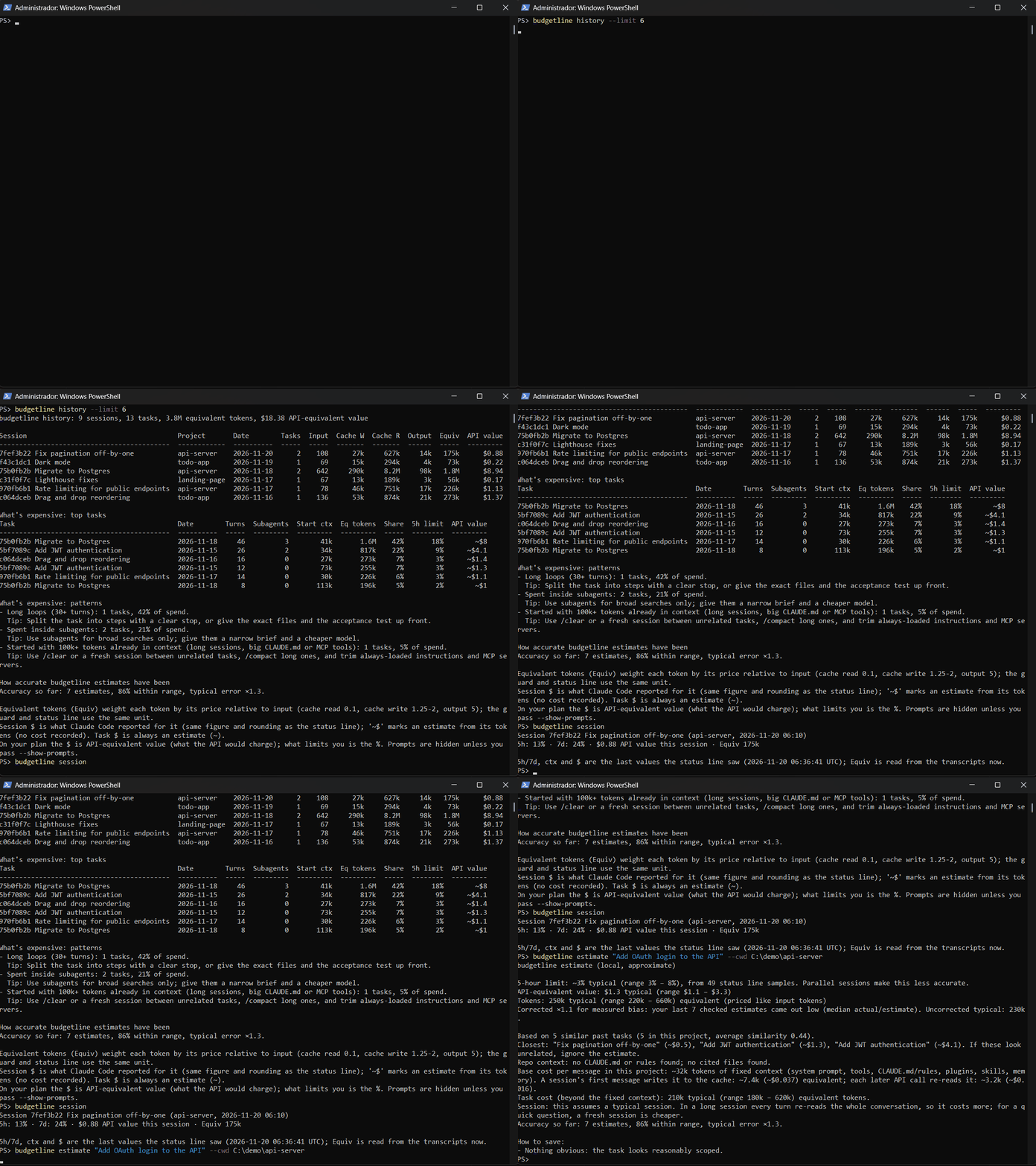
- 1. **`budgetline history`: where the budget goes.** Tokens (input, cache writes, cache
- reads, output) and cost per session, plus **What's expensive**: your top tasks and the
- patterns behind the spend (long loops, sessions carrying a big context, subagents,
- cache rewrites), each with its share of your spend and a tip.
- 2. **Usage-limit % in your status line (optional).** `5h: 23% · 7d: 41% · $1.25 API value this session · Equiv 484k`.
- It wraps an existing status line instead of replacing it.
- 3. **A note on the first prompt of a session (opt-in).** If the task you start a session
- with looks expensive, a hook adds one line with its typical estimate. Follow-up messages
- never get a note. It never blocks. Details in [Prompt note](#prompt-note).
- 4. **Guard (opt-in): a session token budget and a context-full warning.** Delivered to
- Claude itself, so they also work during long autonomous runs. Over budget, Claude is told
- to finish the current step and propose a fresh session. It never blocks.
- 5. **`budgetline estimate "<task>"`: an estimate, not a promise.** Cost first, as a
- low / typical / high range from similar past tasks, the 3 closest past tasks so you can
- judge the match, and savings tips. Every estimate is checked against the task you
- actually run next, and **Accuracy so far** reports how often the range was right.
- ## Install
- Requires **Node.js 20 or later on your `PATH`** (the plugin's hooks and commands run `node`).
- ### As a Claude Code plugin
- Inside Claude Code:
- ```text
- /plugin marketplace add nibforge/budgetline
- /plugin install budgetline@budgetline
- ```
- Then, in a terminal, add the usage-limit status line (a plugin cannot set it; this prints
- the `settings.json` entry and installs it after asking you):
- ```sh
- npx budgetline setup-statusline --write
- ```
- Plugin commands:
- - `/budgetline:estimate <task description>` (or `/estimate` when no other plugin uses the
- name): estimates only; it does not start the task.
- - `/budgetline:budget <tokens> [--warn <tokens>|80%]` sets a budget for the session you are
- in (`60k`, `1.5M` work too); `/budgetline:budget clear` removes it.
- The plugin does not put a `budgetline` command on your `PATH`. In a terminal use
- `npx budgetline …` (or `npm install -g budgetline`). The examples below write
- `budgetline …` for short.
- ### With npx (no plugin)
- ```sh
- npx budgetline history
- npx budgetline estimate "add input validation to src/api/users.ts"
- ```
- ### Commands
- ```text
- budgetline history [--project <text>] [--since <YYYY-MM-DD>] [--limit N] [--json] [--show-prompts] [--show-titles]
- budgetline session [--id <session id prefix>] [--json]
- budgetline estimate "<task description>" [--cwd <dir>] [--session <id>] [--json]
- budgetline statusline install | uninstall | status
- budgetline setup-statusline [--write [--yes]]
- budgetline hook enable | disable | status
- budgetline guard enable [--budget N] [--warn N|80%] [--context P] [--window N|auto] | disable | status
- budgetline guard session --budget N [--warn N|80%] [--session <id>] | --clear
- ```
- ## Reading the numbers
- ### Equiv: one number for what you spend
- Claude Code bills four kinds of tokens at different prices. **Equiv** (equivalent tokens)
- weights each by its price relative to a plain input token, so one number tracks what you
- actually spend:
- | Token | Weight |
- |---|---|
- | Input | 1 |
- | Cache write | 1.25 (5 min) or 2 (1 h) |
- | Cache read | 0.1 |
- | Output | 5 |
- ### Why Cache R dominates
- The counter beside the spinner counts the output of the current turn. But **every request
- re-sends the whole conversation**: your prompt, the history, the tool results, the system
- prompt, CLAUDE.md and tool definitions. Prompt caching makes those re-reads cheap (0.1 each),
- but they happen on every turn and every tool round. In a long session the **Cache R** column
- is millions of tokens, and it is usually most of the Equiv. That is why a task that "looked
- like 200k tokens" scrolling by often costs about ten times more, and why long sessions and
- big contexts are the first things `history` points at.
- ### The $ figure on a Pro/Max plan
- The $ is the session cost Claude Code itself reports. On a plan you do not pay per token, so
- it is **API-equivalent value**: what the same work would cost on the API. What limits you
- is the **usage-limit %**, so once the status line has seen it, every view shows the % first.
- Without limit data (pay-as-you-go API), the $ is your real cost and comes first.
- ## Prompt note
- Off by default. `budgetline hook enable` turns it on; **`budgetline hook disable` turns it
- off** (`budgetline hook status` shows which). With the plugin, run them as
- `npx budgetline hook …`.
- - **Only the first prompt of a session** is estimated: the first one this hook sees for that
- session id, while the transcript has no reply yet. Enabling the hook mid-session or
- resuming a session does not count as a start, and follow-up messages never get a note.
- - It appears only when the typical estimate is above `hookThreshold` (500k equivalent
- tokens by default, in `config.json`).
- - It uses your similar past tasks as they are, **without the bias correction** that
- `estimate` applies: that correction was measured on whole sessions, not on one message.
- - With few or very different similar tasks it says so (`low confidence`) and gives the
- rough figure only, without calling the task big. `/budgetline:estimate <task>` shows the
- full range and savings tips.
- ## Guard
- 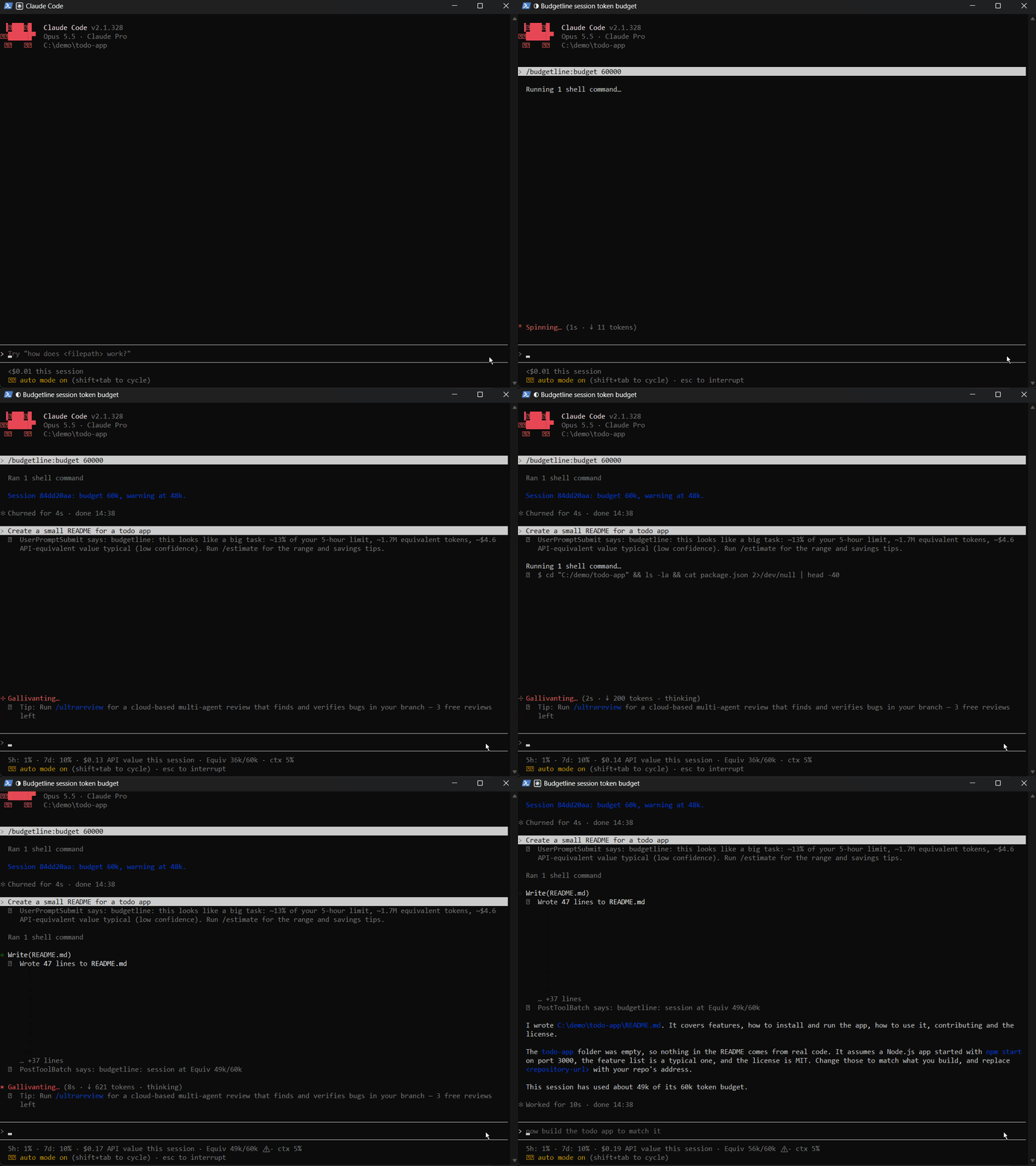
- Opt-in, off by default. Two independent warnings, delivered **to Claude itself** and shown
- to you:
- - **Session budget**, in Equiv. At the warning threshold Claude gets one line
- (`budgetline: session at 165k/200k tokens`). Over the budget, Claude is told not to start
- new work, to finish the current step, summarize the state and propose a fresh session with
- a continuation prompt.
- - **Context full**: the latest request against the model's window (70% by default). Claude
- is told that answer quality may degrade and to tell you so.
- ```sh
- budgetline guard enable # budget from your history (p75 of last 30 sessions; 2M fallback), warning at 80%
- budgetline guard enable --budget 2000000 --warn 80% --context 70 --window auto
- budgetline guard status
- budgetline guard disable
- budgetline guard session --budget 1200000 # this session only (from inside Claude Code)
- budgetline guard session --clear
- ```
- With the plugin, `/budgetline:budget 1.2M` sets the budget of the session you typed it in.
- A target written in your prompt is only text: the guard knows nothing about it until you
- set it this way. Each warning fires once per threshold; the over-budget instruction repeats.
- The guard runs on the plugin's `UserPromptSubmit` and `PostToolBatch` hooks, reads only what
- was appended to the transcripts since the last call, and stays silent if anything goes
- wrong. After `/clear` Claude Code starts a new session, so the counters start from zero.
- ## Usage-limit % (status line)
- Claude Code only shows your usage-limit percentages to the status line; they are not stored
- anywhere. `budgetline setup-statusline --write` installs a small wrapper that records one
- sample and then runs your original status line with the same input, so what you see does not
- change. With no status line of your own, it shows `5h: 23% · 7d: 41% · $1.25 API value this session · Equiv 484k`
- (with the guard on, `Equiv 484k/2M · ctx 37%`).
- ```sh
- budgetline setup-statusline # shows the entry; --write installs it (asks first)
- budgetline statusline status # samples collected and calibration
- budgetline statusline uninstall # puts your settings back exactly as they were
- ```
- The entry runs a launcher in the data folder that finds the current plugin install each
- time, so nothing needs redoing after an update. After about 10 samples and $1 of usage,
- `estimate` shows a 5-hour limit %. Several sessions at once make this less accurate, and the
- output says so.
- ## How the estimate works
- 1. A past **task** is one prompt plus all the responses until your next prompt (subagents
- included).
- 2. Tokens are combined into Equiv. Costs come from the real per-session cost Claude Code
- records; there is no bundled price table.
- 3. Tasks are classified as questions or changes, and only the same kind is compared.
- Similar tasks are found by keyword overlap (TF-IDF), same project ranked higher. The range
- is the 25th / 50th / 90th percentile of their spend. With fewer than 5 similar tasks, your
- overall distribution is used and flagged as low confidence.
- 4. Once 3 estimates have been checked against the task you ran next, new estimates are
- corrected by the measured bias, and say so.
- 5. **Base cost vs task cost.** Every call carries a fixed context (system prompt, tools,
- CLAUDE.md, plugins, skills, memory), measured from the first response of your recent
- sessions. The estimate shows it apart and suggests trimming it past 40k tokens.
- ## Privacy
- - **Nothing leaves your machine.** No server, no telemetry, no network calls.
- - It reads `~/.claude/projects` (or `$CLAUDE_CONFIG_DIR/projects`) read-only.
- - **Your prompt text is never shown or stored** unless you pass `--show-prompts`. Sessions
- are identified by a short id and the title Claude Code gave them.
- - Local data lives in `~/.budgetline` (or `$BUDGETLINE_DATA`), readable by you only (0700)
- on macOS and Linux: a per-task metrics index (keyword stems, no prompt text), status line
- samples (dropped after 30 days), past estimates (no task text), settings in `config.json`,
- the guard's per-session state and a backup of your `settings.json` if you installed the
- status line. Delete the folder to remove everything.
- - Upgrading from the old name (pre-budget): the first run moves `~/.pre-budget` to
- `~/.budgetline` when the new one does not exist yet.
- ## Verify it yourself
- Every view shows the same figures for a session. The $ is Claude Code's own
- `cost.total_cost_usd` (from the status line, or the `cost-state` line in the transcript);
- `budgetline` never prices a session itself when that figure exists, and when it has to
- estimate, the figure starts with `~`. `budgetline session` prints the current session in the
- status line's exact format, so you can compare them side by side.
- **On a plan with extra usage:** note your balance, work in one session on extra usage, run
- `budgetline session` and check that your balance went down by that $.
- **On the API:** use a fresh key or a quiet day, work in one session, run `budgetline session`
- and compare with the usage page of the Anthropic Console for that day.
- If your bill differs, the difference comes from Claude Code's figure, not from `budgetline`.
- ## Limitations
- - Estimates come from your own history. A new kind of task has no good comparison, and the
- output says so.
- - Keyword similarity is good at "same area of the code" and "same kind of work", not at
- judging how hard a task is.
- - Transcript formats are internal to Claude Code and can change; unknown lines are skipped.
- - **History only goes back as far as Claude Code keeps transcripts: 30 days by default.**
- To keep more, set `cleanupPeriodDays` in `~/.claude/settings.json`, e.g.
- `{"cleanupPeriodDays": 90}`. See the [settings reference](https://code.claude.com/docs/en/settings-reference#cleanupperioddays).
- - The usage-limit % needs the status line wrapper, and several sessions at once blur it.
- - On Windows, your original status line command runs through `cmd.exe`; one written for
- Git Bash may behave differently.
- ## Contributing
- Bug reports and pull requests are welcome; see [CONTRIBUTING](.github/CONTRIBUTING.md).
- `npm install`, then `npm run verify` (lint, types, tests and build). Change only `src/`
- and `tests/`: the maintainer rebuilds and commits `dist/cli.js`.
- ## License
- MIT, see [LICENSE](LICENSE).
Ratings and comments
Sign in to rate this skill.
Sign inFree to use. If it’s helped, pass it on.