arkon
Arkon: Enterprise AI Knowledge Hub & MCP Server. Self-hosted knowledge base for teams to manage RAG contexts, access policies, and AI skills. Connect Claude and other LLMs via Model Context Protocol (MCP) for automated, secure organizational knowledge integration.
Safety scan
A static text scan, not a guarantee. Select the badge to see what was scanned and every finding.
Badge for your README

Markdown
[](/listings/nduckmink--arkon)HTML
<a href="/listings/nduckmink--arkon"><img src="/api/listings/nduckmink--arkon/badge.svg" alt="findsafeskills safety rating" /></a>Install
Install instructions from the README
As written by the repo's author. findsafeskills has not verified these steps.
> [!NOTE] > **Arkon is built for teams, not individuals.** If you're looking for a personal knowledge setup, [Obsidian](https://obsidian.md) + Claude Skills is a much simpler fit. > > **Not a tech person?** Skip the self-hosting hassle — reach out for a **free guided demo** tailored for your team. No config, no Docker, just a walkthrough of what Arkon can do for your organization.
**Prerequisites:** Docker & Docker Compose, plus an API key from your preferred AI provider (Anthropic, Google, or OpenAI).
1. **Clone the repository:**
   git clone https://github.com/nduckmink/arkon.git
   cd arkon
2. **Configure environment:**
   cp .env.docker.example .env.docker
   # Edit .env.docker - set SECRET_KEY, admin credentials, and Postgres/MinIO secrets
3. **Launch:**
docker compose --env-file .env.docker up -d --build
4. Access the portal at `http://localhost:3119`, sign in as admin, then go to **Settings** to pick your embedding / LLM / vision models and paste API keys.
→ See [Setup Guide](docs/SETUP.md) for development mode and the full env reference.
---
What was scanned
The files the safety scan read, as written by the repository's author and shown as plain text. Lines with a finding are marked.
README.md · README · 228 lines
View this file on GitHub (read at the repository's current version: the scan did not record which commit it read)
- # Arkon - The Open-Source Enterprise AI Knowledge Hub & MCP Server
- <p align="center">
- <a href="LICENSE"><img src="https://img.shields.io/badge/License-PolyForm_Internal_Use_1.0.0-blue.svg" alt="License"></a>
- <a href="https://github.com/nduckmink/arkon/stargazers"><img src="https://img.shields.io/github/stars/nduckmink/arkon.svg" alt="GitHub Stars"></a>
- <a href="https://www.docker.com/"><img src="https://img.shields.io/badge/Docker-Ready-blue.svg" alt="Docker"></a>
- </p>
- <p align="center">
- <img src="docs/assets/arkon.png" alt="Arkon" width="720">
- </p>
- **Arkon** is a self-hosted, enterprise-grade knowledge management layer that bridges organizational data and AI clients. It runs as a centralized **MCP Server** (Model Context Protocol), compiling your SOPs, policies, and internal docs into a structured, traceable knowledge wiki - then serving that wiki to Claude and other LLMs through a single permission-scoped endpoint.
- ## 🚀 Why Arkon?
- In most organizations, AI adoption is fragmented. Employees copy-paste documents into chatbots, producing inconsistent context, security risks, and duplicated work.
- **Arkon treats AI as a managed organizational resource.** Every employee gets the right context, automatically and securely - filtered by their department and role.
- <p align="center">
- <img src="docs/assets/how-arkon-works.png" alt="How Arkon Works" width="720">
- </p>
- ---
- ## ✨ Key Features
- ### 🧠 Intelligent Knowledge Wiki - the MRP Pipeline
- Unlike a vector database that just chunks and indexes, Arkon's **MRP pipeline** (**M**ap → **R**educe → **P**lan-review → **R**efine → **V**erify → Commit) actually compiles documents into a coherent wiki of interlinked pages.
- - **Plan review before write:** every ingestion produces a human-reviewable plan listing which wiki pages will be created or updated. Editors can regenerate the plan with feedback before any page is written.
- - **Page merge instead of overwrite:** when a new source touches an existing wiki page, content is LLM-merged so prior knowledge is never lost.
- - **Traceable claims:** every page records the source documents it was compiled from.
- - **Image-aware:** vision captions are baked into source text before compilation, so wiki pages reference the right images in the right places.
- - **Resumable:** drafts persist mid-pipeline; a crashed run resumes without re-doing the expensive LLM work.
- ### 📚 Wiki Browser & Knowledge Graph
- - Three-panel layout: page tree, content, backlinks & outlinks.
- - Full-text + semantic (pgvector) search.
- - Interactive knowledge graph visualization (per-scope or global).
- - Wikilink-style cross-references between pages.
- - Version history and rollback on every page.
- - Draft proposal → editor review → approval workflow.
- <p align="center">
- <img src="docs/assets/arkon-wiki-ui.png" alt="Arkon Wiki Browser UI — three-panel knowledge base with page tree, content viewer, and knowledge graph" width="720">
- </p>
- ### 🏢 Department & Global Scopes
- Precise context boundaries with their own scoped wiki, document set, and department rosters.
- - **Department-level isolation** for HR, Legal, Engineering, etc.
- - **Global scope** for company-wide SOPs, policies, and general knowledge.
- - **Hard scope enforcement:** members only see knowledge from their assigned departments or the global realm - at the API, MCP, and search layers.
- ### 🛂 Fine-Grained RBAC
- Role-based access control at the department and global levels.
- - Built-in roles: **Viewer · Contributor · Editor · Admin** to control draft, edit, and setting access.
- - Granular permissions (`doc:read:own_dept`, `wiki:edit:all`, `org:settings:manage`, ...).
- - **Audit log** for every privileged action - settings changes, plan approvals, and role updates.
- ### 🔌 MCP Server for Claude & Other AI Clients
- Employees connect Claude Desktop or Claude.ai to Arkon via **OAuth 2.1 + PKCE** — just add the server URL and sign in through the browser. No manual token copying required. The MCP server exposes:
- - **Wiki tools** - `search_wiki`, `read_wiki_page`, `list_wiki_pages`, `read_wiki_index`.
- - **Source drill-down** - `get_source`, `get_source_outline`, `get_source_pages`, `list_sources`.
- - **Edit workflow** - `propose_wiki_edit`, `edit_wiki_page`, `list_pending_drafts`, `review_draft`, `approve_draft`, `reject_draft`.
- - **Discovery** - `list_knowledge_types`, `get_knowledge_type_docs`.
- All tools enforce per-token scope (department, knowledge type, source list).
- ### 🧰 AI Skills Distribution
- Upload custom agent packages once and distribute them across the org.
- - Versioned skill packages (.zip with `SKILL.md`).
- - Department-scoped visibility.
- - Contribution workflow for end-user updates.
- ### 🤖 Pluggable AI Providers
- Catalog-driven selection - admins pick from a curated list with context window, cost, and capability metadata on display.
- - **LLM:** Anthropic Claude (Opus / Sonnet / Haiku 4.x), Google Gemini (3.x Pro / Flash / Flash-Lite, 2.5), OpenAI (GPT-5.x, GPT-4.x).
- - **Embedding:** Google `gemini-embedding-*`, OpenAI `text-embedding-3-*` - switchable with online re-embed migration (active model atomically flipped on completion, no zero-result search window).
- - **Vision:** Google Gemini Flash, OpenAI GPT-4o family.
- ### 🔒 Privacy & Security First
- - **Self-hosted.** Deploy on-prem or in your private cloud via Docker.
- - **No telemetry.** Outbound traffic goes only to the AI provider you choose.
- - **Encrypted at rest.** API keys stored with Fernet encryption in PostgreSQL.
- ---
- ## 🛠️ Tech Stack
- <p align="center">
- <img src="docs/assets/arkon-architecture.png" alt="Arkon Architecture" width="720">
- </p>
- - **Backend:** FastAPI · PostgreSQL + pgvector · Redis (arq workers) · MinIO
- - **Frontend:** Next.js · Tailwind CSS
- - **AI integration:** Model Context Protocol via FastMCP
- - **Document parsing:** PDF, DOCX, DOC, plain text, URLs, embedded images
- ---
- ## 💻 Server Requirements
- Arkon runs **7 Docker containers** (PostgreSQL + pgvector, Redis, MinIO, FastAPI API, 2 ARQ workers, Next.js frontend). The table below provides recommended configurations based on team size:
- | | **Starter** | **Team** | **Enterprise** |
- |---|:---:|:---:|:---:|
- | **Team size** | 1 – 20 | 20 – 100 | 100+ |
- | **vCPU** | 2 cores | 4 cores | 8+ cores |
- | **RAM** | 4 GB | 8 GB | 16+ GB |
- | **Storage** | 40 GB SSD | 100 GB SSD | 250+ GB NVMe SSD |
- | **OS** | Ubuntu 22.04+ / Debian 12+ | Ubuntu 22.04+ / Debian 12+ | Ubuntu 22.04+ / Debian 12+ |
- | **Use case** | Evaluation / small teams | Departmental deployment | Organization-wide rollout |
- > [!NOTE]
- > - **RAM** is the primary bottleneck — the MRP pipeline workers load large LLM context windows into memory during wiki compilation.
- > - **Storage** scales with your document corpus — pgvector indexes, MinIO file storage, and PostgreSQL WAL logs are the main consumers.
- > - All AI inference happens externally (Anthropic / Google / OpenAI APIs), so **GPU is not required**.
- > - A reverse proxy (Nginx / Caddy) with SSL is recommended for production. See [Setup Guide](docs/SETUP.md).
- ---
- ## 🚦 Quick Start (Docker)
- > [!NOTE]
- > **Arkon is built for teams, not individuals.** If you're looking for a personal knowledge setup, [Obsidian](https://obsidian.md) + Claude Skills is a much simpler fit.
- >
- > **Not a tech person?** Skip the self-hosting hassle — reach out for a **free guided demo** tailored for your team. No config, no Docker, just a walkthrough of what Arkon can do for your organization.
- **Prerequisites:** Docker & Docker Compose, plus an API key from your preferred AI provider (Anthropic, Google, or OpenAI).
- 1. **Clone the repository:**
- ```shell
- git clone https://github.com/nduckmink/arkon.git
- cd arkon
- ```
- 2. **Configure environment:**
- ```shell
- cp .env.docker.example .env.docker
- # Edit .env.docker - set SECRET_KEY, admin credentials, and Postgres/MinIO secrets
- ```
- 3. **Launch:**
- ```shell
- docker compose --env-file .env.docker up -d --build
- ```
- 4. Access the portal at `http://localhost:3119`, sign in as admin, then go to **Settings** to pick your embedding / LLM / vision models and paste API keys.
- → See [Setup Guide](docs/SETUP.md) for development mode and the full env reference.
- ---
- ## 🔗 Connecting Claude
- In **Claude Desktop** or **Claude.ai → Settings → Connectors**, add a custom connector:
- - **Name:** `Arkon`
- - **URL:** `https://your-arkon-server/mcp`
- Click **Connect** → a browser window opens with the Arkon login form → sign in with your Arkon credentials → done. Arkon uses OAuth 2.1 + PKCE so no manual token setup is required.
- **To make Claude consistently use Arkon**, add this to Claude's **Custom Instructions** (Settings → Custom Instructions):
- ```
- Whenever answering questions related to the company — its processes, products,
- people, departments, policies, or projects — always search Arkon first using
- the search_wiki tool before relying on general knowledge.
- ```
- For stronger enforcement, create a **Project** in Claude Desktop, attach Arkon as a connector, and paste the same text as Project Instructions.
- <p align="center">
- <img src="docs/assets/arkon-in-use-of-claude.png" alt="Arkon in use with Claude Desktop" width="720">
- </p>
- → See [MCP & Claude](docs/MCP.md) for the complete tool reference.
- ---
- ## 🗺️ Roadmap
- - [x] **MRP Pipeline** - deterministic compilation with plan review, page merge, and resume-on-crash.
- - [x] **MCP Server** - scoped wiki + source + draft tools.
- - [x] **Department & Global Scopes** - department isolation with RBAC.
- - [x] **Wiki draft & revision workflow** - propose, review, approve, rollback.
- - [x] **AI Skills** - versioned, department-scoped agent packages.
- - [x] **Catalog-driven model selection** - LLM, embedding, and vision picked from a curated list with cost/context-window metadata.
- - [x] **Online embedding migration** - atomic re-embed with no search downtime.
- - [x] **Audit log** - privileged actions tracked.
- - [ ] **Rich media ingestion** - bulk folder upload with images, videos, and Excel/spreadsheet parsing baked into the MRP pipeline.
- - [x] **Usage analytics dashboard**
- - [ ] **External data import** - connectors for SharePoint, Google Drive, Notion, and other common org data sources.
- - [ ] **Arkon CLI** - one-command setup for employees.
- - [ ] **Notification system** - for draft reviews and plan approvals.
- ---
- ## ⭐ Star History
- [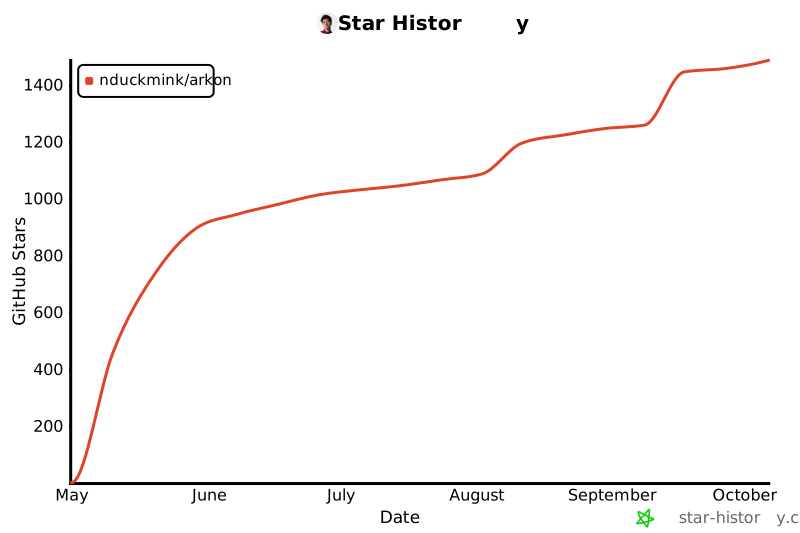](https://star-history.com/#nduckmink/arkon&Date)
- ---
- ## 📄 License
- Arkon is licensed under the [PolyForm Internal Use License 1.0.0](LICENSE). Free for internal business operations; you may not offer Arkon as a service to third parties.
- For enterprise support or custom integrations, please contact the maintainers.
- ---
- **Keywords:** *Enterprise AI, Model Context Protocol, MCP Server, Knowledge Management System, Self-hosted RAG, AI Knowledge Base, Claude MCP, LLM Context Management, Open Source Wiki.*
- ---
- ## 📬 Contact
- **Main Author**
- Minh Nguyen (Nguyễn Đức Minh) — Vietnam (GMT+7) · Fluent English
- ✉️ [duckmink.bitsness@gmail.com](mailto:duckmink.bitsness@gmail.com)
- **Company**
- BITSNESS TECHNOLOGY AND SOLUTIONS COMPANY LIMITED
- ✉️ [bitsness.ad@bitsness.vn](mailto:bitsness.ad@bitsness.vn)
- For enterprise inquiries, demo requests, or custom integrations — email us directly.
Ratings and comments
Sign in to rate this skill.
Sign inFree to use. If it’s helped, pass it on.