yaak
Plugins for Yaak, the desktop API client
Safety scan
A static text scan, not a guarantee. Select the badge to see what was scanned and every finding.
Check it deeper on your machine
It has changed since its scan on 11 Nov 2026.
As a Claude Code plugin, install it and then ask Claude Code:
/plugin marketplace add keithmackay/mackayi/plugin install scanskillsafety@mackayiDo a deep scan of https://github.com/mountain-loop/yaak with scanskillsafety
Or from a terminal, clone it and run it:
git clone https://github.com/keithmackay/scanskillsafety-skill ~/.claude/skills/scanskillsafetynode ~/.claude/skills/scanskillsafety/cli.cjs --deep 'https://github.com/mountain-loop/yaak'
It checks the exact commit: every file, its packages against OSV (api.osv.dev), how it compares with this page's scan (findsafeskills.com receives the repository's address), and, if you agree, Claude reading every file with your own Claude subscription. It never runs the code.
Badge for your README

Markdown
[](/listings/mountain-loop--yaak)HTML
<a href="/listings/mountain-loop--yaak"><img src="/api/listings/mountain-loop--yaak/badge.svg" alt="findsafeskills safety rating" /></a>Install
What was scanned
The files the safety scan read, as written by the repository's author and shown as plain text. Lines with a finding are marked.
.claude-plugin/marketplace.json · Manifest · 18 lines
View this file on GitHub (read at the repository's current version: the scan did not record which commit it read)
- {
- "$schema": "https://json.schemastore.org/claude-code-marketplace.json",
- "name": "yaak",
- "description": "Plugins for Yaak, the desktop API client",
- "owner": {
- "name": "Yaak",
- "url": "https://yaak.app"
- },
- "plugins": [
- {
- "name": "yaak",
- "source": "./crates-cli/yaak-cli",
- "description": "Build, save, and send API requests with the yaak CLI, with its MCP server for agents",
- "category": "development",
- "tags": ["api", "http", "rest", "graphql", "grpc", "openapi", "api-client"]
- }
- ]
- }
README.md · README · 80 lines
View this file on GitHub (read at the repository's current version: the scan did not record which commit it read)
- <p align="center">
- <a href="https://github.com/JamesIves/github-sponsors-readme-action">
- <img width="200px" src="https://github.com/mountain-loop/yaak/raw/main/crates-tauri/yaak-app-client/icons/icon.png">
- </a>
- </p>
- <h1 align="center">
- 💫 Yaak ➟ Desktop API Client 💫
- </h1>
- <p align="center">
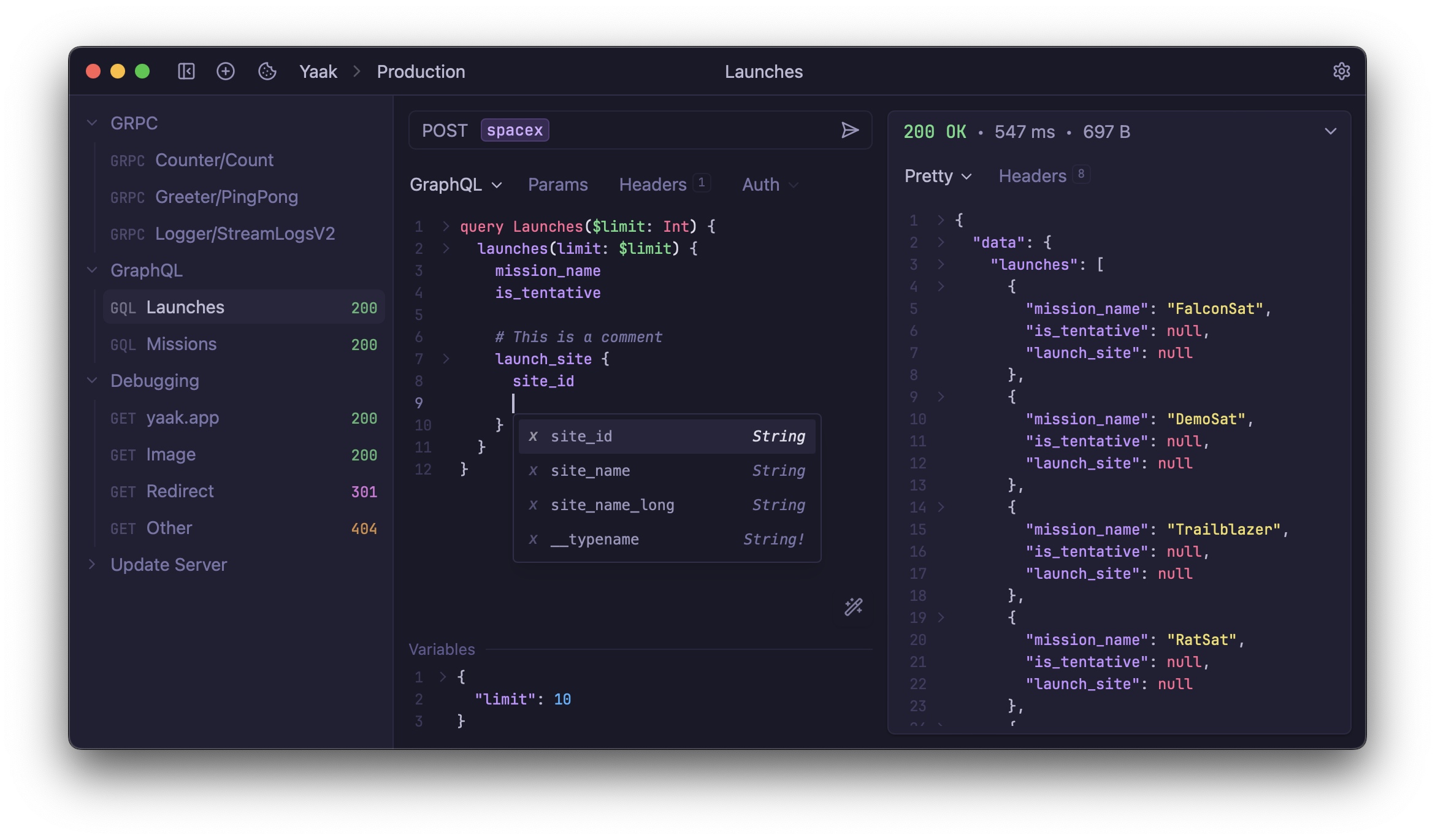
- A fast, privacy-first API client for REST, GraphQL, SSE, WebSocket, and gRPC – built with Tauri, Rust, and React.
- </p>
- <p align="center">
- Development is funded by community-purchased <a href="https://yaak.app/pricing">licenses</a>. You can also <a href="https://github.com/sponsors/gschier">become a sponsor</a> to have your logo appear below. 💖
- </p>
- <br>
- <p align="center">
- <!-- sponsors-premium --><a href="https://github.com/MVST-Solutions"><img src="https://github.com/MVST-Solutions.png" width="80px" alt="User avatar: MVST-Solutions" /></a> <a href="https://github.com/dharsanb"><img src="https://github.com/dharsanb.png" width="80px" alt="User avatar: dharsanb" /></a> <a href="https://github.com/railwayapp"><img src="https://github.com/railwayapp.png" width="80px" alt="User avatar: railwayapp" /></a> <a href="https://github.com/caseyamcl"><img src="https://github.com/caseyamcl.png" width="80px" alt="User avatar: caseyamcl" /></a> <a href="https://github.com/bytebase"><img src="https://github.com/bytebase.png" width="80px" alt="User avatar: bytebase" /></a> <a href="https://github.com/rauchg"><img src="https://github.com/rauchg.png" width="80px" alt="User avatar: rauchg" /></a> <a href="https://github.com/"><img src="https://raw.githubusercontent.com/JamesIves/github-sponsors-readme-action/dev/.github/assets/placeholder.png" width="80px" alt="User avatar: " /></a> <!-- sponsors-premium -->
- </p>
- <p align="center">
- <!-- sponsors-base --><a href="https://github.com/seanwash"><img src="https://github.com/seanwash.png" width="50px" alt="User avatar: seanwash" /></a> <a href="https://github.com/jerath"><img src="https://github.com/jerath.png" width="50px" alt="User avatar: jerath" /></a> <a href="https://github.com/itsa-sh"><img src="https://github.com/itsa-sh.png" width="50px" alt="User avatar: itsa-sh" /></a> <a href="https://github.com/dmmulroy"><img src="https://github.com/dmmulroy.png" width="50px" alt="User avatar: dmmulroy" /></a> <a href="https://github.com/timcole"><img src="https://github.com/timcole.png" width="50px" alt="User avatar: timcole" /></a> <a href="https://github.com/VLZH"><img src="https://github.com/VLZH.png" width="50px" alt="User avatar: VLZH" /></a> <a href="https://github.com/terasaka2k"><img src="https://github.com/terasaka2k.png" width="50px" alt="User avatar: terasaka2k" /></a> <a href="https://github.com/andriyor"><img src="https://github.com/andriyor.png" width="50px" alt="User avatar: andriyor" /></a> <a href="https://github.com/majudhu"><img src="https://github.com/majudhu.png" width="50px" alt="User avatar: majudhu" /></a> <a href="https://github.com/axelrindle"><img src="https://github.com/axelrindle.png" width="50px" alt="User avatar: axelrindle" /></a> <a href="https://github.com/jirizverina"><img src="https://github.com/jirizverina.png" width="50px" alt="User avatar: jirizverina" /></a> <a href="https://github.com/chip-well"><img src="https://github.com/chip-well.png" width="50px" alt="User avatar: chip-well" /></a> <a href="https://github.com/GRAYAH"><img src="https://github.com/GRAYAH.png" width="50px" alt="User avatar: GRAYAH" /></a> <a href="https://github.com/flashblaze"><img src="https://github.com/flashblaze.png" width="50px" alt="User avatar: flashblaze" /></a> <a href="https://github.com/Frostist"><img src="https://github.com/Frostist.png" width="50px" alt="User avatar: Frostist" /></a> <a href="https://github.com/PurplProto"><img src="https://github.com/PurplProto.png" width="50px" alt="User avatar: PurplProto" /></a> <!-- sponsors-base -->
- </p>
- 
- ## Install
- Download Yaak for macOS, Windows, or Linux from [yaak.app/download](https://yaak.app/download). Package managers and other install methods are in the [installation docs](https://yaak.app/docs/getting-started/installation).
- ## Features
- Yaak is an offline-first API client designed to stay out of your way while giving you everything you need when you need it.
- Built with [Tauri](https://tauri.app), Rust, and React, it’s fast, lightweight, and private. No telemetry, no VC funding, and no cloud lock-in.
- ### 🌐 Work with any API
- - Import collections from Postman, Insomnia, OpenAPI, Swagger, or Curl.
- - Send requests via REST, GraphQL, gRPC, WebSocket, or Server-Sent Events.
- - Filter and inspect responses with JSONPath or XPath.
- ### 🔐 Stay secure
- - Use OAuth 2.0, JWT, Basic Auth, or custom plugins for authentication.
- - Secure sensitive values with encrypted secrets.
- - Store secrets in your OS keychain.
- ### ☁️ Organize & collaborate
- - Group requests into workspaces and nested folders.
- - Use environment variables to switch between dev, staging, and prod.
- - Mirror workspaces to your filesystem for versioning in Git or syncing with Dropbox.
- ### 🧩 Extend & customize
- - Insert dynamic values like UUIDs or timestamps with template tags.
- - Pick from built-in themes or build your own.
- - Create plugins to extend authentication, template tags, or the UI.
- ## Contribution Policy
- > [!IMPORTANT]
- > Community PRs are currently limited to bug fixes.
- > If your PR is not a bug fix, link the [feedback item](https://yaak.app/feedback) where @gschier explicitly gave you permission to work on it.
- > See [`CONTRIBUTING.md`](CONTRIBUTING.md) for policy details and [`DEVELOPMENT.md`](DEVELOPMENT.md) for local setup.
- ## Useful Resources
- - [Feedback and Bug Reports](https://feedback.yaak.app)
- - [Documentation](https://yaak.app/docs)
- - [Yaak vs Postman](https://yaak.app/alternatives/postman)
- - [Yaak vs Bruno](https://yaak.app/alternatives/bruno)
- - [Yaak vs Insomnia](https://yaak.app/alternatives/insomnia)
- ## License
- The source is [MIT licensed](LICENSE) and can be built and run for free, for both personal and commercial use.
- The prebuilt binaries follow Yaak's [pricing terms](https://yaak.app/pricing): free for personal use, license required for commercial use.
Ratings and comments
Sign in to rate this skill.
Sign inFree to use. If it’s helped, pass it on.