iphone-duo-skills
Agent skills for building iOS apps on iPhone Duo, Apple's first foldable iPhone — adaptive layout, vertical bars, hinge & scenes, camera, and design review.
Safety scan
A static text scan, not a guarantee. Select the badge to see what was scanned and every finding.
Check it deeper on your machine
It has changed since its scan on 11 Nov 2026.
As a Claude Code plugin, install it and then ask Claude Code:
/plugin marketplace add keithmackay/mackayi/plugin install scanskillsafety@mackayiDo a deep scan of https://github.com/mirzaaghazadeh/iphone-duo-skills with scanskillsafety
Or from a terminal, clone it and run it:
git clone https://github.com/keithmackay/scanskillsafety-skill ~/.claude/skills/scanskillsafetynode ~/.claude/skills/scanskillsafety/cli.cjs --deep 'https://github.com/mirzaaghazadeh/iphone-duo-skills'
It checks the exact commit: every file, its packages against OSV (api.osv.dev), how it compares with this page's scan (findsafeskills.com receives the repository's address), and, if you agree, Claude reading every file with your own Claude subscription. It never runs the code.
Badge for your README

Markdown
[](/listings/mirzaaghazadeh--iphone-duo-skills)HTML
<a href="/listings/mirzaaghazadeh--iphone-duo-skills"><img src="/api/listings/mirzaaghazadeh--iphone-duo-skills/badge.svg" alt="findsafeskills safety rating" /></a>Install
Install instructions from the README
As written by the repo's author. findsafeskills has not verified these steps.
npx skills add mirzaaghazadeh/iphone-duo-skills
Installs all eleven. The CLI detects your agent — Claude Code, Cursor, Copilot, Gemini and others — and puts them where that agent looks.
Useful flags:
# just one skill
npx skills add mirzaaghazadeh/iphone-duo-skills --skill iphone-duo-readiness

# user-level instead of project-level
npx skills add mirzaaghazadeh/iphone-duo-skills --global

# see what's in here without installing
npx skills add mirzaaghazadeh/iphone-duo-skills --list
To try a skill without installing it at all:
npx skills use mirzaaghazadeh/iphone-duo-skills@iphone-duo-readiness
<details> <summary>Manual install</summary>
git clone https://github.com/mirzaaghazadeh/iphone-duo-skills.git
cp -r iphone-duo-skills/skills/* ~/.claude/skills/
Or project-level, into `.claude/skills/` in a repo.
</details>
Each skill is a self-contained `SKILL.md` with YAML frontmatter, so it also works anywhere that reads plain Markdown instructions. Restart the session and the skills appear; invoke one by name or just describe the task.
What was scanned
The files the safety scan read, as written by the repository's author and shown as plain text. Lines with a finding are marked.
README.md · README · 262 lines
View this file on GitHub (read at the repository's current version: the scan did not record which commit it read)
This file has changed since it was scanned, so this is not exactly the text that was scanned, and no line is marked. The findings are listed with the safety scan above.
- # iPhone Duo Skills
- [English](README.md) | [简体中文](README_CN.md) | [Français](README_FR.md) | [Türkçe](README_TR.md)
- 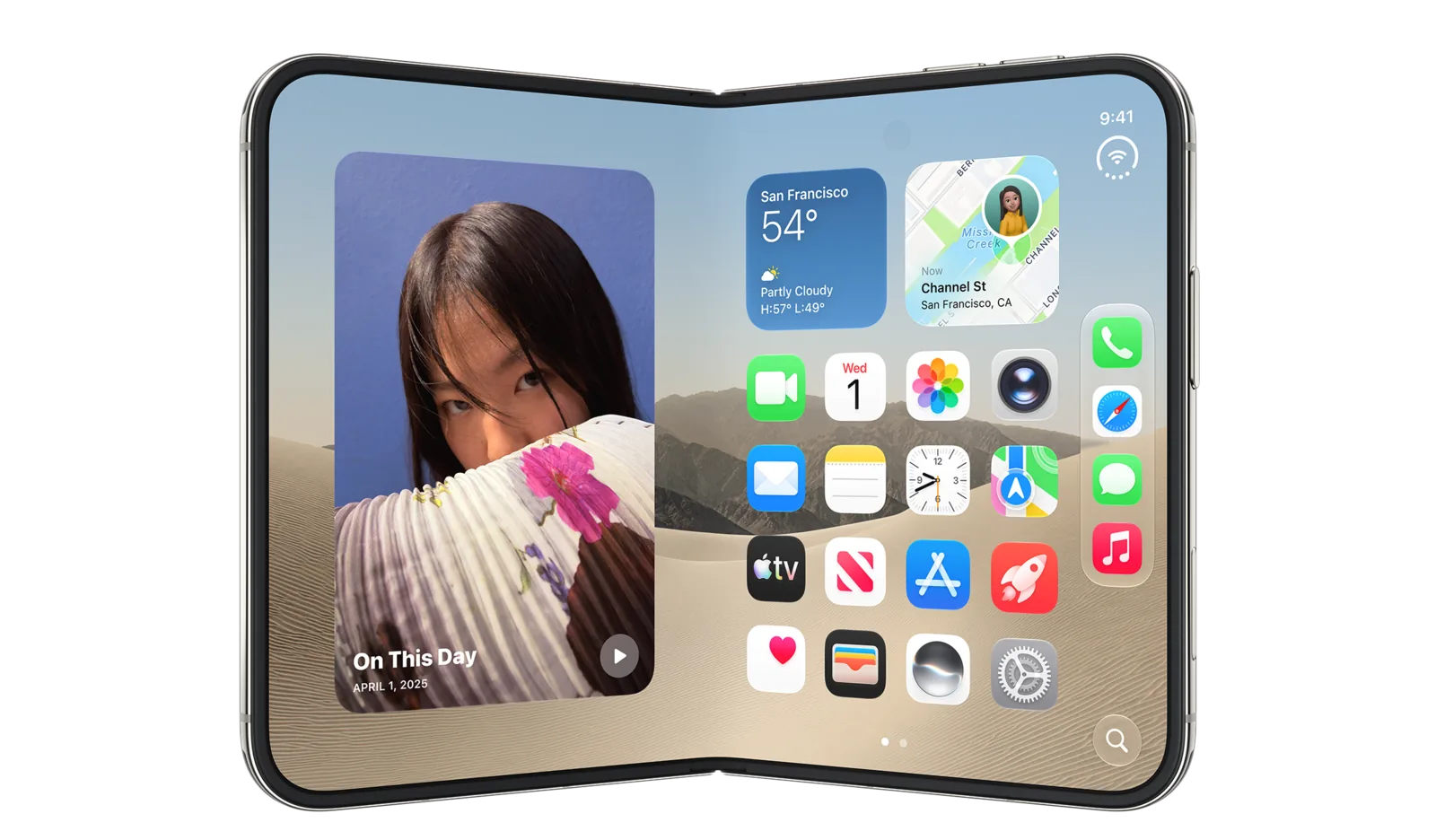
- <sup>Image © Apple Inc., from the [iPhone Duo developer page](https://developer.apple.com/iphone-duo/), used for identification. Not affiliated with or endorsed by Apple.</sup>
- Agent skills for building iOS apps on **iPhone Duo** — Apple's first foldable
- iPhone, announced September 9, 2026.
- Apple's developer material for iPhone Duo is now six Tech Talk videos, the
- [Designing for iPhone Duo](https://developer.apple.com/design/human-interface-guidelines/designing-for-iphone-duo)
- HIG page, the [Prepare](https://developer.apple.com/iphone-duo/prepare/)
- checklist, and the API reference. The last two landed after this repo started —
- the API reference corrected three claims, and the Prepare guide added several
- more. Both passes are reflected here.
- These skills distill all of it into structured guidance an agent can act on,
- plus reference sheets for device facts and the full API surface.
- ## Install
- ```bash
- npx skills add mirzaaghazadeh/iphone-duo-skills
- ```
- Installs all eleven. The CLI detects your agent — Claude Code, Cursor, Copilot,
- Gemini and others — and puts them where that agent looks.
- Useful flags:
- ```bash
- # just one skill
- npx skills add mirzaaghazadeh/iphone-duo-skills --skill iphone-duo-readiness
- # user-level instead of project-level
- npx skills add mirzaaghazadeh/iphone-duo-skills --global
- # see what's in here without installing
- npx skills add mirzaaghazadeh/iphone-duo-skills --list
- ```
- To try a skill without installing it at all:
- ```bash
- npx skills use mirzaaghazadeh/iphone-duo-skills@iphone-duo-readiness
- ```
- <details>
- <summary>Manual install</summary>
- ```bash
- git clone https://github.com/mirzaaghazadeh/iphone-duo-skills.git
- cp -r iphone-duo-skills/skills/* ~/.claude/skills/
- ```
- Or project-level, into `.claude/skills/` in a repo.
- </details>
- Each skill is a self-contained `SKILL.md` with YAML frontmatter, so it also works
- anywhere that reads plain Markdown instructions. Restart the session and the
- skills appear; invoke one by name or just describe the task.
- ## The skills
- | Skill | Works with | Use it when |
- |---|---|---|
- | **iphone-duo-readiness** | SwiftUI · UIKit | Entry point. Auditing or porting an existing app — SDK tiers, fixed-assumption hunting, safe areas, routing to the rest. |
- | **iphone-duo-adaptive-layout** | SwiftUI · UIKit | Content lands in the fold. Reserved regions, division vs occlusion, displacement patterns, `ArrangementView`. |
- | **iphone-duo-vertical-bars** | SwiftUI · UIKit | Toolbars and tab bars. The vertical axis, symbol vs text, `AxisBehavior`, overflow and visibility priority. |
- | **iphone-duo-hinge-and-scenes** | SwiftUI · UIKit | Hinge-driven effects, Split View, multiple scenes, dual-display UI via scene accessories. |
- | **iphone-duo-camera** | AVFoundation · AVKit | Capture apps. Virtual front camera vs individual cameras, direction coordinator, mirroring, preview. |
- | **iphone-duo-dual-pane-patterns** | SwiftUI · UIKit | Deciding what goes in each pane. Pixel/point dimensions, safe-area and layout tokens, exact hinge callback types, pose → pattern mapping, hinge-driven effects, two-pane paywalls, fold-aware onboarding. |
- | **iphone-duo-design-review** | Any framework | Design critique rather than code — poses, side controls, asymmetry, fold avoidance, sheets. |
- | **iphone-duo-games** | Unity · Unreal · Godot · SpriteKit · Metal | The project is a game. Filling the screen across poses, aspect ratio vs letterboxing, touch controls clear of the fold. |
- | **iphone-duo-flutter** | Flutter · Dart | The app is Flutter. What `MediaQuery` gives you, why `displayFeatures` doesn't work here, bridging via platform channels. |
- | **iphone-duo-react-native** | React Native · Expo | The app is React Native. Asymmetric insets, resize handling, bridging via a native module. |
- | **iphone-duo-capacitor** | Capacitor · Ionic · Angular · React · Vue | The app runs in a web view. Why Device Posture and Viewport Segments do not reach it, safe-area asymmetry, and getting fold state from the native side. |
- ### Which skills apply to your stack
- **Native iOS — SwiftUI or UIKit.** Start with `iphone-duo-readiness`, which routes
- you to the rest. The five Swift-focused skills name real iOS 27.1 APIs you can
- call directly; `iphone-duo-design-review` applies whatever you build in.
- **Flutter.** Read `iphone-duo-flutter` first, then `iphone-duo-design-review` —
- the design guidance is framework-neutral and applies unchanged. Skim
- `iphone-duo-adaptive-layout` for the *reasoning* behind reserved regions and
- displacement; the concepts transfer even though the code doesn't.
- **React Native or Expo.** Same shape: `iphone-duo-react-native`, then
- `iphone-duo-design-review`, then `iphone-duo-adaptive-layout` for background.
- **Any framework, if you capture photo or video.** `iphone-duo-camera` matters
- regardless of stack, because the two front cameras and the "which way is this
- camera facing" problem are AVFoundation-level facts. Cross-platform apps hit them
- through whatever camera plugin they use, or through their own bridge.
- **Games — Unity, Unreal, Godot, SpriteKit, Metal.** Read `iphone-duo-games`. Games
- sidestep most of the UI guidance but not resizing, and the fold is a genuine
- hazard for on-screen touch controls.
- **Capacitor, Ionic or another web view.** Read `iphone-duo-capacitor` first,
- then `iphone-duo-design-review`. The twist there is that the standard web APIs
- for this exist but are flagged off in a `WKWebView`, so the fold has to come
- from the native side even though the CSS for it is specified.
- **Kotlin Multiplatform, .NET MAUI and friends.** No dedicated skill,
- but the pattern from the Flutter and React Native skills carries over directly:
- everything is either *resize and safe-area handling you can do in your existing
- layer*, or *a native bridge to the iOS 27.1 APIs*. Read whichever cross-platform
- skill is closer to your setup, plus `iphone-duo-design-review`.
- > **Cross-platform reality check.** Neither Flutter nor React Native supports
- > iPhone Duo yet. Flutter's `MediaQuery.displayFeatures` is documented as
- > populated **only on Android**, so it returns an empty list here; React Native has
- > no fold API at all. Both skills split what works today from what needs a native
- > bridge, so you don't lose an afternoon hunting for an API that isn't there.
- ## Reference
- - [`reference/device-facts.md`](reference/device-facts.md) — displays (pixels,
- ppi, points), dimensions, silicon, cameras, poses, and the size-class table
- - [`reference/api-index.md`](reference/api-index.md) — every announced API by
- job, with framework and minimum SDK
- - [`reference/sources.md`](reference/sources.md) — every source, linked
- ## What actually matters on this device
- If you read nothing else:
- **iPhone Duo is not a new idiom — it's a wider continuum of sizes.** Every bug in
- a foldable port comes from an app asserting something fixed (this idiom, this
- orientation, this screen, this width, this symmetric inset), and every fix
- replaces that assertion with a question about the space available right now.
- <picture>
- <source media="(prefers-color-scheme: dark)" srcset="assets/layout-model-dark.svg">
- <img alt="Three device states — closed on the 5.4-inch outer display (compact by regular, bars move to the side), partially folded with a division region down the centre of the inner display (regular by regular, keep touch targets out of the curve), and open flat on the 7.6-inch inner display (regular by regular, room for a split view). Below, the chain: pose, available space, size class, what the system moves." src="assets/layout-model.svg" width="900">
- </picture>
- <sup>Diagram by this project. The underlying behavior is documented across Apple's
- [iPhone Duo Tech Talks](https://developer.apple.com/iphone-duo/) and
- [Designing for iPhone Duo](https://developer.apple.com/design/human-interface-guidelines/designing-for-iphone-duo);
- see [`reference/sources.md`](reference/sources.md).</sup>
- Three concrete consequences:
- 1. **The inner display ignores your supported interface orientations.** Branch on
- size class, never on orientation or idiom.
- 2. **`UIScreen.main` is ambiguous here** and slated for deprecation. Use the
- environment, the trait collection, or the scene's bounds.
- 3. **Safe areas are asymmetric.** Any math shaped like
- `width - safeAreaInsets.left * 2` is a defect.
- And the highest-leverage single change: **build against the iOS 27.1 SDK.**
- It's the gate for edge-to-edge content, vertical bars, reserved regions and
- arrangements.
- ## Accuracy
- Every technical claim traces to Apple's Tech Talks, the *Designing for iPhone Duo*
- HIG page, the published API reference, or the Newsroom announcement.
- **Verified against Apple's API reference on 25 September 2026.** The symbol docs
- are now live, so the signatures in `reference/api-index.md` come from them rather
- than from the Tech Talk sessions. That pass corrected three things that had been
- wrong:
- - The direction coordinator's change handler receives an
- `AVCaptureDeviceDirectionMap`, not an `AVCaptureDeviceDescriptor` — it hands you
- *arrays* of forward- and backward-facing descriptors to choose from.
- - The UIKit arrangement mutators take an `animated:` parameter. (It defaults to
- `false`, the October pass found, so the Tech Talks' shorter calls compile —
- they just don't animate.)
- - `toolbarVerticalEdge` reports the system's preferred edge **whether or not a
- vertical bar is visible** — it isn't a "are items vertical right now" flag.
- A second pass on **27 September 2026** covered the hinge types and the SwiftUI
- reserved-region query, and corrected three more:
- - UIKit's `UIHinge.angle` is in **radians**, and `UIHinge.Status` has a fourth
- case, `.unknown`. SwiftUI's `DeviceHinge.Status` is a struct, not an enum.
- - The SwiftUI `reservedRegions` query takes a `layoutDirectionBehavior:`
- parameter (default `.mirrors`).
- - A reserved region's `frame` **already includes** its `margins` — they aren't
- extra padding to add around it.
- A third pass on **23 October 2026**, after Apple expanded the reserved-region and
- arrangement pages into full articles, settled one question and opened another:
- - The region query returns **only active regions** by default. The September
- reference had read otherwise; it now agrees with the Tech Talks.
- - The Tech Talk says a flat fold is inactive with zero width; the reference and
- Group Lab Day 3 now say an inactive region keeps a frame you can leave room for
- ahead of time. The skills follow the later sources, with a note to check the
- frame in the simulator.
- - A split arrangement shows **only its primary view** on a closed iPhone Duo held
- in landscape, and along any axis you excluded.
- A fourth pass on **30 October 2026** read *Registering a camera capture accessory
- on iPhone Duo*, which the docs watcher had been looking for at the wrong path,
- and corrected one more:
- - UIKit has **no `CameraCaptureAccessory`**. It registers a
- `UISceneAccessory.cameraCapture(sceneConfiguration:userInfo:)` on the view
- controller and gets back a `UISceneAccessoryRegistration` to observe and
- toggle.
- A fifth pass on **6 November 2026** diffed every page the watcher flagged
- against an archived copy. Apple had only reordered text or added links, but the
- pass filled two gaps:
- - `toolbarVerticalEdge` is `nil` only where the system never places a vertical
- bar. The bar keeps its physical side in right-to-left languages, so its
- `.leading` / `.trailing` value changes with the locale.
- - Tech Talk 111465 now links *Supporting device rotation in your camera app*. A
- rotation coordinator is bound to one camera, so each camera switch a fold
- causes needs a new one.
- Corrections and open conflicts are marked ⚠ in the API index.
- `scripts/fetch-transcripts.py` re-fetches the Tech Talk transcripts from the
- WebVTT subtitle track in each video's HLS manifest, which is how this repo was
- researched. Re-run it when `scripts/check-sources.py` reports a new session.
- ## Maintenance
- Three workflows keep this honest, since the main risk to a repo like this is
- drifting out of date without anyone noticing.
- | Workflow | Runs | Does |
- |---|---|---|
- | `validate.yml` | every push and PR | Checks every `SKILL.md` has valid frontmatter, that `name` matches its directory and is unique, that cross-references resolve, and that the npm package still builds |
- | `watch-apple-docs.yml` | Fridays, 06:00 UTC | Diffs 33 Apple pages — the landing page, Prepare checklist, HIG, API reference, articles and sessions — and opens (or comments on) an issue labelled `apple-docs` when something changes |
- | `publish.yml` | on a GitHub release | Validates, checks the tag matches `package.json`, then publishes to npm with provenance |
- Both scripts run locally too:
- ```bash
- python3 scripts/validate-skills.py # same checks CI runs
- python3 scripts/check-sources.py # refresh the Apple docs baseline
- ```
- The watcher also reads the links on Apple's iPhone Duo landing page, the
- references in the *Preparing your app for iPhone Duo* article and each
- session's Resources list, and reports any page it doesn't track as
- **UNTRACKED** — guessed URLs have missed a published
- article twice. Its state lives in `.github/sources-state.json`.
- `publish.yml` needs an `NPM_TOKEN` secret. Because this account requires 2FA for
- publishing, an ordinary automation token won't work — it needs a **granular
- access token with "bypass 2FA" enabled**, scoped to this package.
- ## License
- MIT — see [LICENSE](LICENSE).
- Not affiliated with or endorsed by Apple. "iPhone" and "iPhone Duo" are
- trademarks of Apple Inc.
Ratings and comments
Sign in to rate this skill.
Sign inFree to use. If it’s helped, pass it on.