Memoria
Secure memory management for AI Agents • Ensures data integrity • Reduces hallucinations • Maintains consistent long-term context
Safety scan
A static text scan, not a guarantee. Select the badge to see what was scanned and every finding.
Check it deeper on your machine
It has changed since its scan on 11 Nov 2026.
As a Claude Code plugin, install it and then ask Claude Code:
/plugin marketplace add keithmackay/mackayi/plugin install scanskillsafety@mackayiDo a deep scan of https://github.com/matrixorigin/Memoria with scanskillsafety
Or from a terminal, clone it and run it:
git clone https://github.com/keithmackay/scanskillsafety-skill ~/.claude/skills/scanskillsafetynode ~/.claude/skills/scanskillsafety/cli.cjs --deep 'https://github.com/matrixorigin/Memoria'
It checks the exact commit: every file, its packages against OSV (api.osv.dev), how it compares with this page's scan (findsafeskills.com receives the repository's address), and, if you agree, Claude reading every file with your own Claude subscription. It never runs the code.
Badge for your README

Markdown
[](/listings/matrixorigin--memoria)HTML
<a href="/listings/matrixorigin--memoria"><img src="/api/listings/matrixorigin--memoria/badge.svg" alt="findsafeskills safety rating" /></a>Install
Install instructions from the README
As written by the repo's author. findsafeskills has not verified these steps.
These steps run a script from the network that findsafeskills does not scan.
<details open> <summary><b>☁️ Memoria Cloud (Recommended — no Docker, no database)</b></summary> <br/>
**1. Sign up** at [thememoria.ai](https://thememoria.ai/auth) and get your token
**2. Install & configure**
curl -sSL https://raw.githubusercontent.com/matrixorigin/Memoria/main/scripts/install.sh | bash
cd your-project
memoria init -i   # Select "Remote" mode, paste your token
**3. Restart & verify** — restart your AI tool, then ask: *"Do you have memory tools available?"*
</details>
<details> <summary><b>🐳 Self-Hosted (Docker — full data control)</b></summary> <br/>
# 1. Start MatrixOne + API
git clone https://github.com/matrixorigin/Memoria.git
cd Memoria
docker compose up -d

# 2. Install CLI
curl -sSL https://raw.githubusercontent.com/matrixorigin/Memoria/main/scripts/install.sh | bash

# 3. Configure your AI tool
cd your-project
memoria init -i   # Select "Embedded" mode
Restart your AI tool, then ask: *"Do you have memory tools available?"*
</details>
<details> <summary><b>🦞 OpenClaw Plugin</b></summary> <br/>
Use the native OpenClaw plugin: [OpenClaw Plugin Setup](plugins/openclaw/README.md)
# ensure memoria CLI exists
command -v memoria >/dev/null || curl -sSL https://raw.githubusercontent.com/matrixorigin/Memoria/main/scripts/install.sh | bash -s -- -y -d ~/.local/bin

# install & enable
openclaw plugins install @matrixorigin/memory-memoria
openclaw plugins enable memory-memoria

# cloud-first setup
openclaw memoria setup --mode cloud --api-url <MEMORIA_API_URL> --api-key <MEMORIA_API_KEY> --install-memoria
openclaw memoria health
</details>
Or download binaries directly from [GitHub Releases](https://github.com/matrixorigin/Memoria/releases). For detailed setup, see [Setup Skill](skills/setup/SKILL.md).
---
What was scanned
The files the safety scan read, as written by the repository's author and shown as plain text. Lines with a finding are marked.
README.md · README · 518 lines
View this file on GitHub (read at the repository's current version: the scan did not record which commit it read)
This file has changed since it was scanned, so this is not exactly the text that was scanned, and no line is marked. The findings are listed with the safety scan above.
- <div align="center">
- <img src="assets/memoria-logo.png" alt="Memoria Logo" width="300"/>
- # Memoria
- **The World's First Git for AI Agent Memory**
- *Snapshot · Branch · Merge · Rollback — for memory, not code.*
- > Git made code safe to change. Memoria makes memory safe to change.
- [](https://github.com/matrixorigin/Memoria/actions/workflows/test.yml)
- [](https://github.com/matrixorigin/Memoria/releases)
- [](https://github.com/matrixorigin/Memoria/stargazers)
- [](https://github.com/matrixorigin/Memoria/releases)
- [](LICENSE)
- [](https://modelcontextprotocol.io)
- [](https://github.com/matrixorigin/matrixone)
- [](https://arxiv.org/abs/2604.03927)
- [Quick Start](#-quick-start) · [Memoria in Astra](#-memoria-in-astra) · [Why Memoria](#-why-memoria) · [Research](#-research-foundation) · [See It in Action](#-see-git-for-data-in-action) · [API Reference](#-api-reference) · [Architecture](#-architecture) · [Development](#-development) · [Citation](#-citation)
- </div>
- ---
- ## Overview
- Memoria is a **persistent memory layer** for AI agents with Git-level version control.
- Every memory change is tracked, auditable, and reversible — snapshots, branches, merges, and time-travel rollback, all powered by [MatrixOne](https://github.com/matrixorigin/matrixone)'s native Copy-on-Write engine.
- > **A core memory component of [MatrixOrigin's Astra](https://github.com/matrixorigin/Astra).**
- >
- > Astra runs the agent. Memoria helps it remember across sessions. [MatrixOne](https://github.com/matrixorigin/matrixone) powers the data storage and search.
- >
- > [Using Astra?](#-memoria-in-astra) · [Use Memoria with another agent](#-quick-start)
- <table>
- <tr>
- <td align="center" width="33%">
- **🔀 Git for Memory**
- Zero-copy branching, instant snapshots, point-in-time rollback — version control for every memory mutation
- </td>
- <td align="center" width="33%">
- **🔍 Semantic Search**
- Vector + full-text hybrid retrieval finds memories by meaning, not just keywords
- </td>
- <td align="center" width="33%">
- **🛡️ Self-Governing**
- Auto-detects contradictions, quarantines low-confidence memories, maintains audit trails
- </td>
- </tr>
- </table>
- <table>
- <tr>
- <td align="center" width="33%">
- **🔒 Private by Default**
- Local embedding model option — no data leaves your machine
- </td>
- <td align="center" width="33%">
- **🧠 Cross-Conversation**
- Preferences, facts, and decisions persist across sessions
- </td>
- <td align="center" width="33%">
- **📋 Full Audit Trail**
- Every memory mutation has a snapshot + provenance chain
- </td>
- </tr>
- </table>
- ### Supported Agents
- <p align="center">
- <a href="https://kiro.dev"><img src="https://img.shields.io/badge/Kiro-00C853?style=for-the-badge&logo=data:image/svg+xml;base64,PHN2ZyB4bWxucz0iaHR0cDovL3d3dy53My5vcmcvMjAwMC9zdmciIHZpZXdCb3g9IjAgMCAyNCAyNCI+PHRleHQgeD0iNCIgeT0iMTgiIGZvbnQtc2l6ZT0iMTYiIGZpbGw9IndoaXRlIj5LPC90ZXh0Pjwvc3ZnPg==&logoColor=white" alt="Kiro"/></a>
- <a href="https://cursor.sh"><img src="https://img.shields.io/badge/Cursor-000000?style=for-the-badge&logo=cursor&logoColor=white" alt="Cursor"/></a>
- <a href="https://docs.anthropic.com/en/docs/claude-code"><img src="https://img.shields.io/badge/Claude_Code-D97757?style=for-the-badge&logo=anthropic&logoColor=white" alt="Claude Code"/></a>
- <a href="https://openai.com/index/introducing-codex/"><img src="https://img.shields.io/badge/Codex-412991?style=for-the-badge&logo=openai&logoColor=white" alt="Codex"/></a>
- <a href="https://geminicli.com"><img src="https://img.shields.io/badge/Gemini_CLI-4285F4?style=for-the-badge&logo=google&logoColor=white" alt="Gemini CLI"/></a>
- <a href="plugins/openclaw/README.md"><img src="https://img.shields.io/badge/OpenClaw-FF6B6B?style=for-the-badge" alt="OpenClaw"/></a>
- <a href="plugins/hermes/README.md"><img src="https://img.shields.io/badge/Hermes-8B5CF6?style=for-the-badge" alt="Hermes"/></a>
- </p>
- <p align="center"><i>Works with any MCP-compatible agent</i></p>
- ---
- ## 🧠 Memoria in Hermes
- Memoria is available from the Hermes plugin catalog. Log in at
- [Memoria](https://thememoria.ai) and create/copy a memory-service API key, then run:
- ```bash
- hermes plugins install memoria --yes-deps --enable
- hermes memory setup
- hermes memory status
- ```
- In the interactive setup, select **memoria**, paste your API key at the masked
- prompt, and choose whether to enable automatic capture (off by default). Confirm
- that status reports `memoria`, installed and `available`, then exit any existing
- conversation and start a new one with `hermes`. Status checks local readiness;
- verify a live write using the [complete Hermes guide](plugins/hermes/README.md).
- The free Memoria Cloud requires no local Memoria server or database. Self-hosting,
- fixed GitHub installation and named profiles are covered in the same guide.
- ---
- ## 🧩 Memoria in Astra
- In [Astra](https://github.com/matrixorigin/Astra), Memoria stores and retrieves facts, preferences, decisions, and session summaries so agents can reuse knowledge across conversations. Memory changes can be reviewed and rolled back.
- | How you use it | Where to start |
- |----------------|----------------|
- | **Hosted Astra** | Memoria is already running for you. Follow the [Astra quick start](https://github.com/matrixorigin/Astra#quick-start). |
- | **Self-hosted Astra** | Astra's deployment includes compatible Memoria and MatrixOne services. Follow [Astra's Docker setup](https://github.com/matrixorigin/Astra#self-host-with-docker). |
- | **Memoria with other agents** | Use Memoria independently via MCP. Follow the [Memoria quick start](#-quick-start) below. |
- For example, search your memories from Astra:
- ```bash
- astra memory search "deployment preferences"
- ```
- ---
- ## 🚀 Quick Start
- <details open>
- <summary><b>☁️ Memoria Cloud (Recommended — no Docker, no database)</b></summary>
- <br/>
- **1. Sign up** at [thememoria.ai](https://thememoria.ai/auth) and get your token
- **2. Install & configure**
- ```bash
- curl -sSL https://raw.githubusercontent.com/matrixorigin/Memoria/main/scripts/install.sh | bash
- cd your-project
- memoria init -i # Select "Remote" mode, paste your token
- ```
- **3. Restart & verify** — restart your AI tool, then ask: *"Do you have memory tools available?"*
- </details>
- <details>
- <summary><b>🐳 Self-Hosted (Docker — full data control)</b></summary>
- <br/>
- ```bash
- # 1. Start MatrixOne + API
- git clone https://github.com/matrixorigin/Memoria.git
- cd Memoria
- cp .env.example .env
- # Edit .env: set MEMORIA_MASTER_KEY (min 16 chars, e.g. `openssl rand -hex 32`)
- # and your embedding provider settings
- docker compose up -d
- # 2. Install CLI
- curl -sSL https://raw.githubusercontent.com/matrixorigin/Memoria/main/scripts/install.sh | bash
- # 3. Configure your AI tool
- cd your-project
- memoria init -i # Select "Embedded" mode
- ```
- Restart your AI tool, then ask: *"Do you have memory tools available?"*
- </details>
- <details>
- <summary><b>🦞 OpenClaw Plugin</b></summary>
- <br/>
- Use the native OpenClaw plugin: [OpenClaw Plugin Setup](plugins/openclaw/README.md)
- ```bash
- # ensure memoria CLI exists
- command -v memoria >/dev/null || curl -sSL https://raw.githubusercontent.com/matrixorigin/Memoria/main/scripts/install.sh | bash -s -- -y -d ~/.local/bin
- # install & enable
- openclaw plugins install @matrixorigin/memory-memoria
- openclaw plugins enable memory-memoria
- # cloud-first setup
- openclaw memoria setup --mode cloud --api-url <MEMORIA_API_URL> --api-key <MEMORIA_API_KEY> --install-memoria
- openclaw memoria health
- ```
- </details>
- Or download binaries directly from [GitHub Releases](https://github.com/matrixorigin/Memoria/releases). For detailed setup, see [Setup Skill](skills/setup/SKILL.md).
- ---
- ## 💡 Why Memoria?
- | Capability | Memoria | Letta / Mem0 / Traditional RAG |
- |---|---|---|
- | **Git-level version control** | Native zero-copy snapshots & branches | File-level or none |
- | **Isolated experimentation** | One-click branch, merge after validation | Manual data duplication |
- | **Audit trail** | Full snapshot + provenance on every mutation | Limited logging |
- | **Semantic retrieval** | Vector + full-text hybrid search | Vector only |
- | **Self-governance** | Automatic contradiction detection & quarantine | Manual cleanup |
- ---
- ## 🔬 Research Foundation
- Memoria's Git-for-Data layer is backed by [**Version Control System for Data with MatrixOne**](https://arxiv.org/abs/2604.03927), our arXiv paper on bringing Git-like workflows directly into a cloud-native database.
- The paper describes how MatrixOne's immutable storage and MVCC architecture make `clone`, `branch` / `tag`, `diff`, `merge`, and `revert` practical at terabyte scale without loading whole datasets into memory. Memoria applies the same foundation to AI-agent memory, so every memory change can be isolated, reviewed, merged, or rolled back with database-native consistency.
- ---
- ## 🎬 See Git for Data in Action
- <p align="center">
- <img src="assets/git4data-story-writing-demo.svg" alt="Animated Memoria Git-for-Data demo showing an author branching a story draft, merging a better plot direction into the main storyline, and rolling back the last two unsatisfying beats." width="100%"/>
- </p>
- A story-writing scenario demonstrates the core concept: an author has accepted story beats on `main`, opens an experimental branch for a different plot direction, merges the stronger draft back, and rolls back when the newest beats don't work.
- <details>
- <summary><b>What the demo shows</b></summary>
- - **Main storyline** — accepted story beats live on `main`
- - **Experimental branch** — the author tries a new plot turn without rewriting canon
- - **Merge** — the stronger draft is promoted back into the main storyline
- - **Rollback** — the last two bad turns are discarded, and writing resumes from a safe snapshot
- </details>
- ---
- ## 📖 Steering Rules
- Steering rules teach your AI agent **when and how** to use memory tools. Without them, the agent has tools but no guidance — like having a database without knowing the schema.
- | Rule | Purpose |
- |------|---------|
- | `memory` | Core memory tools — when to store, retrieve, correct, purge |
- | `session-lifecycle` | Bootstrap at conversation start, cleanup at end |
- | `memory-hygiene` | Proactive governance, contradiction resolution, snapshot cleanup |
- | `memory-branching-patterns` | Isolated experiments with branches |
- | `goal-driven-evolution` | Track goals, plans, progress across conversations |
- **File locations:** Kiro: `.kiro/steering/*.md` · Cursor: `.cursor/rules/*.mdc` · Claude: `.claude/rules/*.md` · Codex: `AGENTS.md` · Gemini CLI: `GEMINI.md` + `.gemini/*.md`
- After upgrading: `memoria rules --force`
- <details>
- <summary><b>Example: Conversation Lifecycle</b></summary>
- ```
- ┌─────────────────────────────────────────────────────────────────────────────┐
- │ CONVERSATION START │
- │ ┌─────────────────────────────────────────────────────────────────────┐ │
- │ │ 1. memory_retrieve(query="<user's question>") ← load context │ │
- │ │ 2. memory_search(query="GOAL ACTIVE") ← check active goals │ │
- │ └─────────────────────────────────────────────────────────────────────┘ │
- ├─────────────────────────────────────────────────────────────────────────────┤
- │ MID-CONVERSATION │
- │ ┌─────────────────────────────────────────────────────────────────────┐ │
- │ │ • User states preference → memory_store(type="profile") │ │
- │ │ • User corrects a fact → memory_correct(query="...", new="...") │ │
- │ │ • Topic shifts → memory_retrieve(query="<new topic>") │ │
- │ └─────────────────────────────────────────────────────────────────────┘ │
- ├─────────────────────────────────────────────────────────────────────────────┤
- │ CONVERSATION END │
- │ ┌─────────────────────────────────────────────────────────────────────┐ │
- │ │ 1. memory_purge(topic="<task>") ← clean up working memories │ │
- │ │ 2. memory_store(type="episodic") ← save session summary │ │
- │ └─────────────────────────────────────────────────────────────────────┘ │
- └─────────────────────────────────────────────────────────────────────────────┘
- ```
- </details>
- <details>
- <summary><b>Example: Goal-Driven Evolution</b></summary>
- ```
- You: "I want to add OAuth support to the API"
- AI: → memory_search(query="GOAL OAuth") ← check for existing goal
- → memory_store(content="🎯 GOAL: Add OAuth support\nStatus: ACTIVE", type="procedural")
- ... works on implementation, stores progress as working memories ...
- → memory_store(content="✅ STEP 1/3: Added OAuth routes", type="working")
- → memory_store(content="❌ STEP 2/3: Token refresh failed — need to fix expiry logic", type="working")
- ... next conversation ...
- AI: → memory_search(query="GOAL ACTIVE") ← finds OAuth goal
- → memory_search(query="STEP for GOAL OAuth") ← loads progress
- "Last time we were working on OAuth. Step 2 failed on token refresh. Want to continue?"
- ... goal completed ...
- AI: → memory_correct(query="GOAL OAuth", new_content="🎯 GOAL: OAuth — ✅ ACHIEVED")
- → memory_store(content="💡 LESSON: Token refresh needs 5min buffer before expiry", type="procedural")
- → memory_purge(topic="STEP for GOAL OAuth") ← clean up working memories
- ```
- </details>
- <details>
- <summary><b>Example: Branch for Risky Experiments</b></summary>
- ```
- You: "Let's try switching from PostgreSQL to SQLite"
- AI: → memory_branch(name="eval_sqlite")
- → memory_checkout(name="eval_sqlite")
- ... experiments on branch, stores findings ...
- → memory_diff(source="eval_sqlite") ← preview changes
- → memory_checkout(name="main")
- → memory_merge(source="eval_sqlite") ← or delete if failed
- ```
- </details>
- ---
- ## 📚 API Reference
- ### Core Tools
- | Tool | Description |
- |------|-------------|
- | `memory_store` | Store a new memory |
- | `memory_retrieve` | Retrieve relevant memories (call at conversation start) |
- | `memory_search` | Semantic search across all memories |
- | `memory_correct` | Update an existing memory |
- | `memory_purge` | Delete by ID or topic keyword |
- | `memory_list` | List active memories |
- | `memory_profile` | Get user's memory-derived profile |
- | `memory_feedback` | Record relevance feedback (useful/irrelevant/outdated/wrong) |
- | `memory_capabilities` | List available memory tools |
- <details>
- <summary><b>Snapshots & Branches</b></summary>
- | Tool | Description |
- |------|-------------|
- | `memory_snapshot` | Create named snapshot |
- | `memory_snapshots` | List snapshots with pagination |
- | `memory_snapshot_delete` | Delete snapshots by name, prefix, or age |
- | `memory_rollback` | Restore to snapshot |
- | `memory_branch` | Create isolated branch |
- | `memory_branches` | List all branches |
- | `memory_checkout` | Switch branch |
- | `memory_merge` | Merge branch back |
- | `memory_branch_delete` | Delete a branch |
- | `memory_diff` | Preview merge changes |
- </details>
- REST clients can use [cached-count snapshot listing](docs/snapshot-listing.md)
- to avoid historical count queries and exclude automatic safety snapshots.
- <details>
- <summary><b>Maintenance</b></summary>
- | Tool | Description |
- |------|-------------|
- | `memory_governance` | Quarantine low-confidence memories (1h cooldown) |
- | `memory_consolidate` | Detect contradictions (30min cooldown) |
- | `memory_reflect` | Synthesize insights (2h cooldown) |
- > `memory_rebuild_index`, `memory_observe`, `memory_get_retrieval_params`, `memory_tune_params`, `memory_extract_entities`, and `memory_link_entities` are available via REST API but hidden from MCP tool listing — they are ops/debug tools not intended for agent use.
- </details>
- ### Memory Types
- | Type | Use for | Example |
- |------|---------|---------|
- | `semantic` | Project facts, decisions | "Uses Go 1.22 with modules" |
- | `profile` | User preferences | "Prefers pytest over unittest" |
- | `procedural` | Workflows, how-to | "Deploy: make build && kubectl apply" |
- | `working` | Temporary task context | "Currently debugging auth module" |
- | `episodic` | Session summaries | "Session: optimized DB, added indexes" |
- Full API details: [API Reference Skill](skills/api-reference/SKILL.md)
- Retry-safe single-memory writes: [Idempotent store protocol](docs/api/idempotent_store.md).
- Trusted adapter content preservation: [Content-filter policy](docs/api/content_filter_policy.md).
- ---
- ## 🔧 Commands
- | Command | Description |
- |---------|-------------|
- | `memoria init -i` | Interactive setup wizard |
- | `memoria status` | Show config and rule versions |
- | `memoria rules` | Update steering rules (auto-detect, `--tool`, or `-i`) |
- | `memoria mcp` | Start MCP server |
- | `memoria serve` | Start REST API server |
- | `memoria benchmark` | Run benchmark suite |
- ---
- ## 🤖 For AI Agents
- If you're an AI agent helping a user set up Memoria:
- 1. **Load the [Setup Skill](skills/setup/SKILL.md)** — it has step-by-step instructions
- 2. **Ask before acting**: which AI tool? · database mode? · embedding service? *(Self-Hosted only)*
- 3. **Run `memoria init -i`** in the user's project directory
- 4. **Tell user to restart** their AI tool, then **verify** with `memory_retrieve("test")`
- > **Self-Hosted only:** Configure embedding BEFORE first MCP server start — dimension is locked into schema.
- ---
- ## 🏗️ Architecture
- ```
- Cloud / Remote Mode:
- ┌─────────────┐ MCP (stdio) ┌──────────────────┐ HTTP/REST ┌──────────────────┐
- │ AI Agent │ ◄─────────────────► │ Memoria CLI │ ◄──────────────► │ Memoria Cloud │
- │ │ store / retrieve │ (MCP bridge) │ Bearer token │ API Server │
- └─────────────┘ └──────────────────┘ └──────────────────┘
- Self-Hosted / Embedded Mode:
- ┌─────────────┐ MCP (stdio) ┌──────────────────────────────────────┐ SQL ┌────────────┐
- │ AI Agent │ ◄─────────────────► │ Memoria MCP Server │ ◄──────────► │ MatrixOne │
- │ │ store / retrieve │ ├── Canonical Storage │ vector + │ Database │
- │ │ │ ├── Retrieval (vector / semantic) │ fulltext │ │
- │ │ │ └── Git-for-Data (snap/branch/merge)│ │ │
- └─────────────┘ └──────────────────────────────────────┘ └────────────┘
- ```
- For codebase details, see [Architecture Skill](skills/architecture/SKILL.md).
- ---
- ## 🛠️ Development
- ```bash
- make up # Start MatrixOne + API
- make test # Run all tests
- make release VERSION=0.2.0 # Bump, tag, push
- ```
- **Developer documentation** (for contributing to Memoria):
- | Skill | Description |
- |-------|-------------|
- | [Architecture](skills/architecture/SKILL.md) | Codebase layout, traits, tables |
- | [API Reference](skills/api-reference/SKILL.md) | REST endpoints, request/response |
- | [Deployment](skills/deployment/SKILL.md) | Docker, K8s, multi-instance |
- | [Plugin Development](skills/plugin-development/SKILL.md) | Governance plugins |
- | [Release](skills/release/SKILL.md) | Version bump, CI/CD |
- | [Local Embedding](skills/local-embedding/SKILL.md) | Offline embedding build |
- ---
- ## 📝 Citation
- If you use Memoria in academic work, or refer to its Git-for-Data foundation for AI-agent memory, please cite the MatrixOne paper that describes the underlying data version control design:
- ```bibtex
- @misc{gou2026versioncontrolsystemdata,
- title={Version Control System for Data with MatrixOne},
- author={Gou, Hongshen and Tian, Feng and Wang, Long and Deng, Nan and Xu, Peng},
- year={2026},
- eprint={2604.03927},
- archivePrefix={arXiv},
- primaryClass={cs.DB},
- doi={10.48550/arXiv.2604.03927},
- url={https://arxiv.org/abs/2604.03927}
- }
- ```
- ---
- ## 🌟 Community
- We'd love your support! If Memoria helps you, consider giving us a star.
- [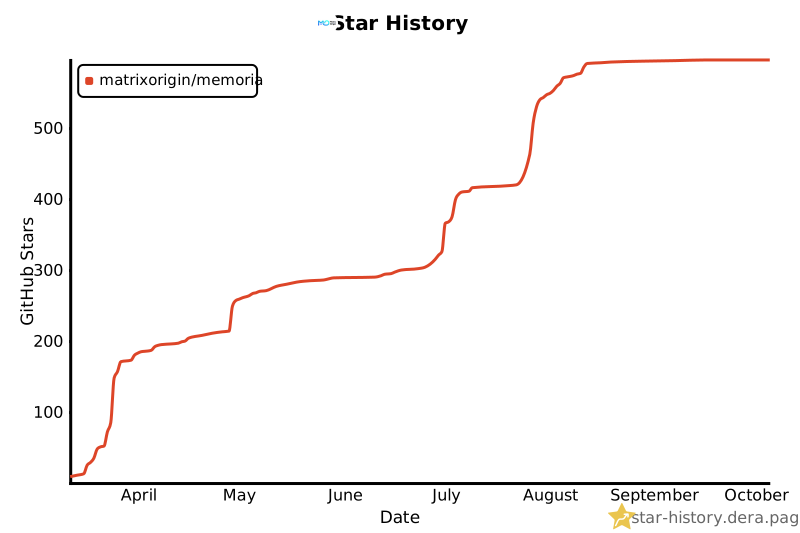](https://star-history.dera.page/#matrixorigin/Memoria&type=Date)
- **Contributing** — See the [developer documentation](#-development) above and check out our [issue templates](https://github.com/matrixorigin/Memoria/issues/new/choose) for bug reports, feature requests, and more.
- ---
- ## License
- Apache-2.0 © [MatrixOrigin](https://github.com/matrixorigin)
Ratings and comments
Sign in to rate this skill.
Sign inFree to use. If it’s helped, pass it on.