llmquant
Finance research, trading, risk, and portfolio Agent Skills grounded in LLMQuant Data.
Safety scan
A static text scan, not a guarantee. Select the badge to see what was scanned and every finding.
Badge for your README

Markdown
[](/listings/llmquant--skills)HTML
<a href="/listings/llmquant--skills"><img src="/api/listings/llmquant--skills/badge.svg" alt="findsafeskills safety rating" /></a>Install
Install instructions from the README
As written by the repo's author. findsafeskills has not verified these steps.
Recommended: `npx skills add`
One command, and it works across Claude Code, Codex, Cursor, Antigravity, Gemini, and other agents.
> [!TIP] > Already inside an agent? Just run `npx skills add LLMQuant/skills` — it auto-detects the host and installs to the right place.
# Pick skills interactively for the current agent
npx skills add LLMQuant/skills

# Install all category skills globally
npx skills add LLMQuant/skills -g --all

# Install specific skills
npx skills add LLMQuant/skills -g --skill llmquant-options llmquant-equities

# Target a specific agent
npx skills add LLMQuant/skills -a codex
Manage installed skills with `npx skills list`, `npx skills update`, and `npx skills remove`. Then ask the agent `What skills are available?`, or invoke one directly, e.g. `/llmquant-options`.
<div align="center"> </div>
Native plugin install
The whole repository is also packaged as a single plugin that bundles every category skill, for agents with a native plugin system.
**Claude Code** — add this repo as a plugin marketplace, then install the bundle:
/plugin marketplace add LLMQuant/skills
/plugin install llmquant-skills@llmquant
**Codex** — the repo ships `.codex-plugin/plugin.json`, so it is plugin-ready. To install today, use the CLI above (`npx skills add LLMQuant/skills -a codex`), or install a single category skill via the skill installer:
$skill-installer install https://github.com/LLMQuant/skills/tree/main/skills/llmquant-options
**Cursor · Antigravity · other agents** — use the recommended CLI with the matching agent, e.g. `npx skills add LLMQuant/skills -a cursor` or `-a antigravity`.
What was scanned
The files the safety scan read, as written by the repository's author and shown as plain text. Lines with a finding are marked.
.claude-plugin/marketplace.json · Manifest · 19 lines
View this file on GitHub (read at the repository's current version: the scan did not record which commit it read)
- {
- "name": "llmquant",
- "owner": {
- "name": "LLMQuant",
- "url": "https://llmquant.com"
- },
- "description": "Finance research, trading, risk, and portfolio Agent Skills grounded in LLMQuant Data.",
- "version": "0.1.0",
- "plugins": [
- {
- "name": "llmquant-skills",
- "source": ".",
- "description": "All LLMQuant category skills bundled as one plugin: equities, ETFs, options, equity-derivatives, commodities, crypto, prediction-markets, macro, credit, rates/FX, events, portfolio, portfolio-lab, risk, strategies, market-intelligence, investor-lenses, and data.",
- "version": "0.1.0",
- "homepage": "https://github.com/LLMQuant/skills",
- "license": "MIT"
- }
- ]
- }
README.md · README · 215 lines
View this file on GitHub (read at the repository's current version: the scan did not record which commit it read)
- <div align="center">
- <img src="assets/llmquant-skills-logo.svg" alt="LLMQuant Skills" width="128" />
- <h1>LLMQuant Skills</h1>
- <p><strong>Reusable finance Agent Skills — grounded in <a href="https://github.com/LLMQuant/data-mcp">LLMQuant Data</a></strong></p>
- <p><strong>English</strong> · <a href="README.zh-CN.md">简体中文</a></p>
- <p>
- <a href="https://github.com/LLMQuant/skills/stargazers"><img src="https://img.shields.io/github/stars/LLMQuant/skills?style=flat" alt="GitHub stars" /></a>
- <a href="LICENSE"><img src="https://img.shields.io/badge/License-MIT-lightgrey.svg" alt="License: MIT" /></a>
- <a href="https://github.com/LLMQuant/data-mcp"><img src="https://img.shields.io/badge/native%20data-LLMQuant%20Data%20MCP-0B5FFF" alt="Native LLMQuant Data MCP" /></a>
- <a href="https://llmquantdata.com/agent"><img src="https://img.shields.io/badge/agent%20playground-open-8A5A44" alt="Open LLMQuant Agent Playground" /></a>
- <a href="https://github.com/LLMQuant/skills/commits"><img src="https://img.shields.io/github/last-commit/LLMQuant/skills" alt="Last commit" /></a>
- </p>
- </div>
- ```bash
- npx skills add LLMQuant/skills # Claude Code · Codex · Cursor · Antigravity · OpenClaw · Hermes · …
- ```
- > [!TIP]
- > 18 category skills — equities, options, macro, crypto, credit, portfolio, risk, and more — that route an agent to the right finance workflow and keep every claim grounded in LLMQuant Data.
- ## Contents
- - [Contents](#contents)
- - [Overview](#overview)
- - [Category Skills](#category-skills)
- - [Install](#install)
- - [Recommended: `npx skills add`](#recommended-npx-skills-add)
- - [Native plugin install](#native-plugin-install)
- - [LLMQuant Data](#llmquant-data)
- - [Contributing](#contributing)
- - [License](#license)
- - [Star History](#star-history)
- ## Overview
- <div align="center">
- <img src="assets/llmquant-skills-header.png" alt="LLMQuant Skills — finance Agent Skills grounded in LLMQuant Data" width="820" />
- </div>
- This repository is a **skill catalog**. The install/import unit is a category folder under `skills/llmquant-*` — each one a router `SKILL.md` that indexes `workflows/*.md`, tells the agent which workflow to load, and enforces the LLMQuant Data evidence contract. It is not an isolated `SKILL.md` and not a single workflow file.
- <details>
- <summary><strong>Repository layout</strong></summary>
- ```text
- skills/
- ├── llmquant-data/
- │ ├── SKILL.md
- │ ├── workflows/
- │ ├── scripts/
- │ └── assets/
- ├── llmquant-etfs/
- │ ├── SKILL.md
- │ └── workflows/
- └── ...
- .claude-plugin/ # Claude Code plugin + marketplace manifests
- .codex-plugin/ # Codex plugin manifest
- .cursor-plugin/ # Cursor plugin manifest
- assets/
- README.md
- README.zh-CN.md
- ```
- </details>
- ## Category Skills
- | Skill | Scope | Key workflows |
- |---|---|---|
- | [`llmquant-data`](skills/llmquant-data) | LLMQuant Data primitives and source-grounded research. | 10-K risk review, 13F holders, U.S. macro snapshot, macro brief |
- | [`llmquant-equities`](skills/llmquant-equities) | Equity research, comparison, valuation, catalysts, and sell discipline. | Five-lens analysis, equity compare, research memo, merger arb, take-profit lab |
- | [`llmquant-etfs`](skills/llmquant-etfs) | ETF holdings, overlap, concentration, and exposure analysis. | ETF overlap report |
- | [`llmquant-options`](skills/llmquant-options) | Options, volatility, Greeks, unusual activity, and option backtests. | IV rank, strategy builder, Greeks dashboard, P&L simulator, volatility surface |
- | [`llmquant-equity-derivatives`](skills/llmquant-equity-derivatives) | Single-stock derivative and hybrid security research. | Single-stock derivative playbook, convertible and warrant lens |
- | [`llmquant-commodities`](skills/llmquant-commodities) | Commodity spot, futures curve, inventory, and macro linkage work. | Commodity market lens, futures curve monitor |
- | [`llmquant-crypto`](skills/llmquant-crypto) | Crypto regime, token research, perpetual funding, basis, and leverage monitoring. | Crypto market regime, token research, perp funding monitor |
- | [`llmquant-prediction-markets`](skills/llmquant-prediction-markets) | Event odds, prediction-market contracts, probability gaps, and cross-venue arb review. | Event probability brief, arb watch, probability vs options pricing |
- | [`llmquant-macro`](skills/llmquant-macro) | Macro dashboards, central-bank previews, liquidity, growth, inflation, and portfolio impact. | Global macro dashboard, Fed policy preview, macro-to-portfolio impact |
- | [`llmquant-credit`](skills/llmquant-credit) | Issuer credit, spread regimes, high-yield stress, refinancing, and default risk. | Issuer credit risk review, credit spread regime, high-yield stress monitor |
- | [`llmquant-rates-fx`](skills/llmquant-rates-fx) | Rates, yield curves, central-bank divergence, FX carry, and currency risk. | Yield curve trade lens, central-bank divergence, FX carry dashboard |
- | [`llmquant-events`](skills/llmquant-events) | Earnings, M&A, regulatory, legal, policy, and catalyst event monitoring. | Earnings event brief, M&A event tracker, regulatory risk monitor |
- | [`llmquant-portfolio`](skills/llmquant-portfolio) | Company profiles, thesis tracking, watchlists, alerts, and themes. | Company profile, thesis tracker, theme research, watchlist monitor, alert manager |
- | [`llmquant-portfolio-lab`](skills/llmquant-portfolio-lab) | Portfolio exposure maps, what-if simulations, and virtual portfolio states. | Portfolio exposure map, portfolio what-if simulator |
- | [`llmquant-risk`](skills/llmquant-risk) | Risk regime, hedging, panic scoring, and research quality checks. | Fear score, VIX status, hedge advisor, research health check |
- | [`llmquant-strategies`](skills/llmquant-strategies) | Hedge-fund and PM strategy playbooks. | Equity long/short, long-biased, event-driven, macro, quant, multi-strategy |
- | [`llmquant-market-intelligence`](skills/llmquant-market-intelligence) | Reusable market utilities and signal views. | Macro view, market sentiment, event probability signals |
- | [`llmquant-investor-lenses`](skills/llmquant-investor-lenses) | Investor-style reasoning overlays using LLMQuant Data evidence. | Buffett, Graham, Munger, Lynch, Fisher, Burry, Ackman, Damodaran, and more |
- ## Install
- ### Recommended: `npx skills add`
- One command, and it works across Claude Code, Codex, Cursor, Antigravity, Gemini, and other agents.
- > [!TIP]
- > Already inside an agent? Just run `npx skills add LLMQuant/skills` — it auto-detects the host and installs to the right place.
- ```bash
- # Pick skills interactively for the current agent
- npx skills add LLMQuant/skills
- # Install all category skills globally
- npx skills add LLMQuant/skills -g --all
- # Install specific skills
- npx skills add LLMQuant/skills -g --skill llmquant-options llmquant-equities
- # Target a specific agent
- npx skills add LLMQuant/skills -a codex
- ```
- Manage installed skills with `npx skills list`, `npx skills update`, and `npx skills remove`. Then ask the agent `What skills are available?`, or invoke one directly, e.g. `/llmquant-options`.
- <div align="center">
- <img src="assets/skills-add-screenshot.png" alt="Selecting LLMQuant skills with npx skills add" width="720" />
- </div>
- ### Native plugin install
- The whole repository is also packaged as a single plugin that bundles every category skill, for agents with a native plugin system.
- **Claude Code** — add this repo as a plugin marketplace, then install the bundle:
- ```text
- /plugin marketplace add LLMQuant/skills
- /plugin install llmquant-skills@llmquant
- ```
- **Codex** — the repo ships `.codex-plugin/plugin.json`, so it is plugin-ready. To install today, use the CLI above (`npx skills add LLMQuant/skills -a codex`), or install a single category skill via the skill installer:
- ```text
- $skill-installer install https://github.com/LLMQuant/skills/tree/main/skills/llmquant-options
- ```
- **Cursor · Antigravity · other agents** — use the recommended CLI with the matching agent, e.g. `npx skills add LLMQuant/skills -a cursor` or `-a antigravity`.
- ## LLMQuant Data
- These skills are the workflow layer for **[LLMQuant Data](https://github.com/LLMQuant/data-mcp)** — one MCP server that feeds prices, filings, 13F, macro, ETF holdings, crypto, and more to your agents. **Configure once, and every agent in your stack gets the data.**
- <div align="center">
- <img src="assets/ecosystem.png" alt="LLMQuant Data, everywhere your agent runs — Claude Code, Cursor, Codex, Gemini, and more" width="800" />
- </div>
- **Set it up the AI-native way** — paste this to your agent:
- ```text
- Install the LLMQuant data-mcp server in this environment by following https://github.com/LLMQuant/data-mcp
- ```
- Or add it by hand:
- ```bash
- claude mcp add llmquant-data -e LLMQUANT_API_KEY=your_api_key -- npx -y @llmquant/data-mcp
- ```
- > [!NOTE]
- > Grab an API key and the full multi-agent setup at **[docs.llmquantdata.com](https://docs.llmquantdata.com)** and **[`LLMQuant/data-mcp`](https://github.com/LLMQuant/data-mcp)**.
- Skills describe the data they need in natural language and let the agent route to whatever LLMQuant Data exposes, so coverage can grow without editing any skill. Without `llmquant-data` connected, skills still run as reusable workflows — the agent asks for user-provided data and clearly labels anything missing. The full evidence contract is in [CONTRIBUTING.md](CONTRIBUTING.md).
- <div align="center">
- <a href="https://llmquantdata.com/agent"><img src="assets/playground.png" alt="LLMQuant Agent Playground — Data MCP and Skills enabled" width="800" /></a>
- <br/>
- <strong><a href="https://llmquantdata.com/agent">Open the LLMQuant Agent Playground →</a></strong>
- </div>
- <details>
- <summary><strong>▶ Watch the playground demo</strong></summary>
- <br/>
- <div align="center">
- <img src="assets/llmquant-data-agentplayground-demo.gif" alt="LLMQuant Agent Playground demo — Data MCP and Skills in action" width="800" />
- </div>
- </details>
- ## Contributing
- Add or update workflows inside the relevant category (`skills/llmquant-<category>/` → `SKILL.md` + `workflows/` + `scripts/` + `assets/`):
- - Category folders must be named `llmquant-*`, and `SKILL.md` is the router that indexes every workflow.
- - Workflow files hold the repeatable procedure, output format, data contract, and guardrails.
- - Describe data needs as natural-language capabilities, not exact MCP tool names.
- - Update this README when a category or major workflow is added, removed, or renamed.
- See [CONTRIBUTING.md](CONTRIBUTING.md) for the full contract and quality bar.
- ## License
- MIT — see [LICENSE](LICENSE). Listing a project here does not change the license of any linked code or artifact.
- <div align="center">
- <br/>
- <img src="assets/llmquant-logo.svg" alt="LLMQuant" width="64" />
- <br/><br/>
- <strong><a href="https://llmquant.com">LLMQuant</a></strong>
- <br/>
- <sub>Open-source community for AI, LLMs, and quantitative finance.</sub>
- <br/><br/>
- <a href="https://llmquant.com">Website</a> ·
- <a href="https://github.com/LLMQuant">GitHub</a> ·
- <a href="https://linkedin.com/company/llmquant">LinkedIn</a>
- </div>
- ## Star History
- [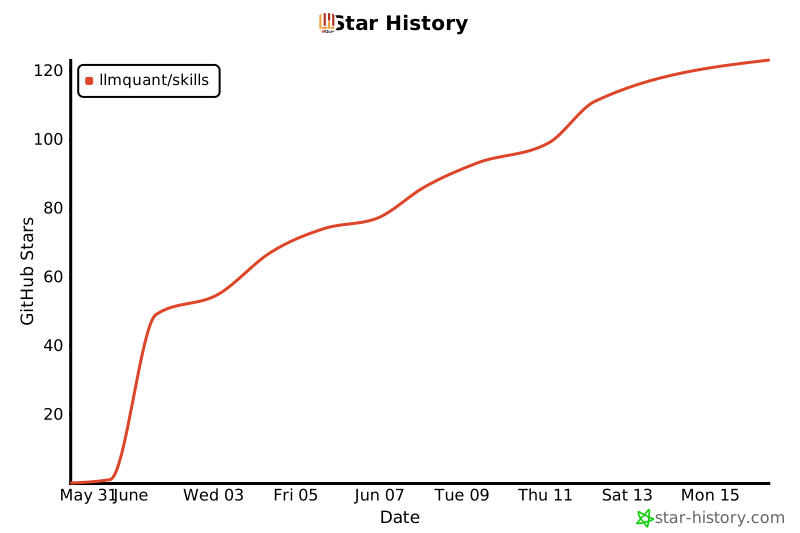](https://www.star-history.com/#LLMQuant/skills&Date)
Ratings and comments
Sign in to rate this skill.
Sign inFree to use. If it’s helped, pass it on.