dsh-undo-savepoint
DSH crash-rescue plugin: undo config & plugin-code changes, secret-safe snapshots, one-click SAFE MODE, plus offline CLI/GUI that work even when DSH won't boot.
Safety scan
A static text scan, not a guarantee. Select the badge to see what was scanned and every finding.
Check it deeper on your machine
It has changed since its scan on 11 Nov 2026.
As a Claude Code plugin, install it and then ask Claude Code:
/plugin marketplace add keithmackay/mackayi/plugin install scanskillsafety@mackayiDo a deep scan of https://github.com/lire1131/dsh-undo-savepoint with scanskillsafety
Or from a terminal, clone it and run it:
git clone https://github.com/keithmackay/scanskillsafety-skill ~/.claude/skills/scanskillsafetynode ~/.claude/skills/scanskillsafety/cli.cjs --deep 'https://github.com/lire1131/dsh-undo-savepoint'
It checks the exact commit: every file, its packages against OSV (api.osv.dev), how it compares with this page's scan (findsafeskills.com receives the repository's address), and, if you agree, Claude reading every file with your own Claude subscription. It never runs the code.
Badge for your README

Markdown
[](/listings/lire1131--dsh-undo-savepoint)HTML
<a href="/listings/lire1131--dsh-undo-savepoint"><img src="/api/listings/lire1131--dsh-undo-savepoint/badge.svg" alt="findsafeskills safety rating" /></a>Install
Install instructions from the README
As written by the repo's author. findsafeskills has not verified these steps.
前置:已安装 DSH(`@deepseek-ai/dsh`)与 Node.js(≥20)。宿主模式运行于提供 tools / systemPrompt / webServer 服务的 profile(Web 型 profile 均满足); DSH 完全无法启动时改用局外 CLI / GUI,不依赖宿主。
方式 A:GitHub 直装(推荐)
安装 master 最新提交:
dsh plugin --profile web add github:lire1131/dsh-undo-savepoint#master
安装完成后重启 DSH 即生效(快照目录、参数等均可在设置中修改)。
方式 C:npm 源安装
dsh plugin --profile web add dsh-undo-savepoint
`dsh plugin add` 转发 pnpm 在 profile 目录完成安装,本包的 `package.json` 声明了 `dsh.bundle.patch`,安装后自动登记进 profile 的 bundle 清单,重启 DSH 即生效。
方式 B:本地源码 / 免发布
1. **把仓库放到本地插件目录**(无中文路径更稳妥),例如 `D:\dsh\plugins\dsh-undo-savepoint`:
git clone https://github.com/lire1131/dsh-undo-savepoint.git D:\dsh\plugins\dsh-undo-savepoint
2. **建立 junction**(Windows),让 DSH 的模块解析器通过包名 `dsh-undo-savepoint` 找到本地源码(host 插件与 WebUI client 插件都靠它):
mklink /J "<你的DSH安装>\node_modules\dsh-undo-savepoint" "D:\dsh\plugins\dsh-undo-savepoint"
> DSH 从它自己的 `node_modules` 向上解析包名。默认安装位置是 `C:\Users\<用户名>\node_modules`(npm 安装在用户目录时);若用 npx 缓存运行,则对 npx 缓存目录下的 `node_modules` 建 junction。执行 `npm root -g` 或检查 DSH 启动报错路径即可确认。
3. **挂载到 profile 补丁层**:编辑 `<DSH_HOME>\profiles\web\cordis.patch.yml`,追加:
- insert:
    - id: dsh-undo-savepoint
name: dsh-undo-savepoint4. **生效**:保存即热加载(host 部分);刷新页面出现头部按钮与设置项;重启 DSH 后一切进入稳态(旧版扁平快照会自动迁移)。
> 依赖说明:host 插件通过 `createRequire('<DSH安装根>/package.json')` 加载 `@deepseek-ai/dsh-tools`。若 DSH 安装在其他位置,设置环境变量 `DSH_ROOT=<DSH安装根>` 即可,无需额外安装依赖。
What was scanned
The files the safety scan read, as written by the repository's author and shown as plain text. Lines with a finding are marked.
README.md · README · 130 lines
View this file on GitHub (read at the repository's current version: the scan did not record which commit it read)
This file has changed since it was scanned, so this is not exactly the text that was scanned, and no line is marked. The findings are listed with the safety scan above.
- # dsh-undo-savepoint DSH 安全管家(撤销 / 回退 / 崩溃自愈)
- [](https://awesome-dsh-plugin.com)
- [](https://github.com/lire1131/dsh-undo-savepoint/actions/workflows/ci.yml)
- > 中文 | [English](README.en.md) | [更新日志](CHANGELOG.md)
- **为 [DeepSeek Harness (DSH)](https://github.com/deepseek-ai/deepseek-harness) 打造的安全管家。改设置自动存档,一键撤销 / 恢复 / 回退到任意版本;DSH 起不来时,局外 WebUI / GUI / CLI 依然可用。**
- 主动检查,有异常才说话。DSH 版本变化时先打升级保险快照,崩溃后给出最后正常快照。
- ## 预览
- | 局外 WebUI:端口 → Profile → 快照库,逐条对比 / 恢复 / 备注 / 删除 |
- |---|
- | 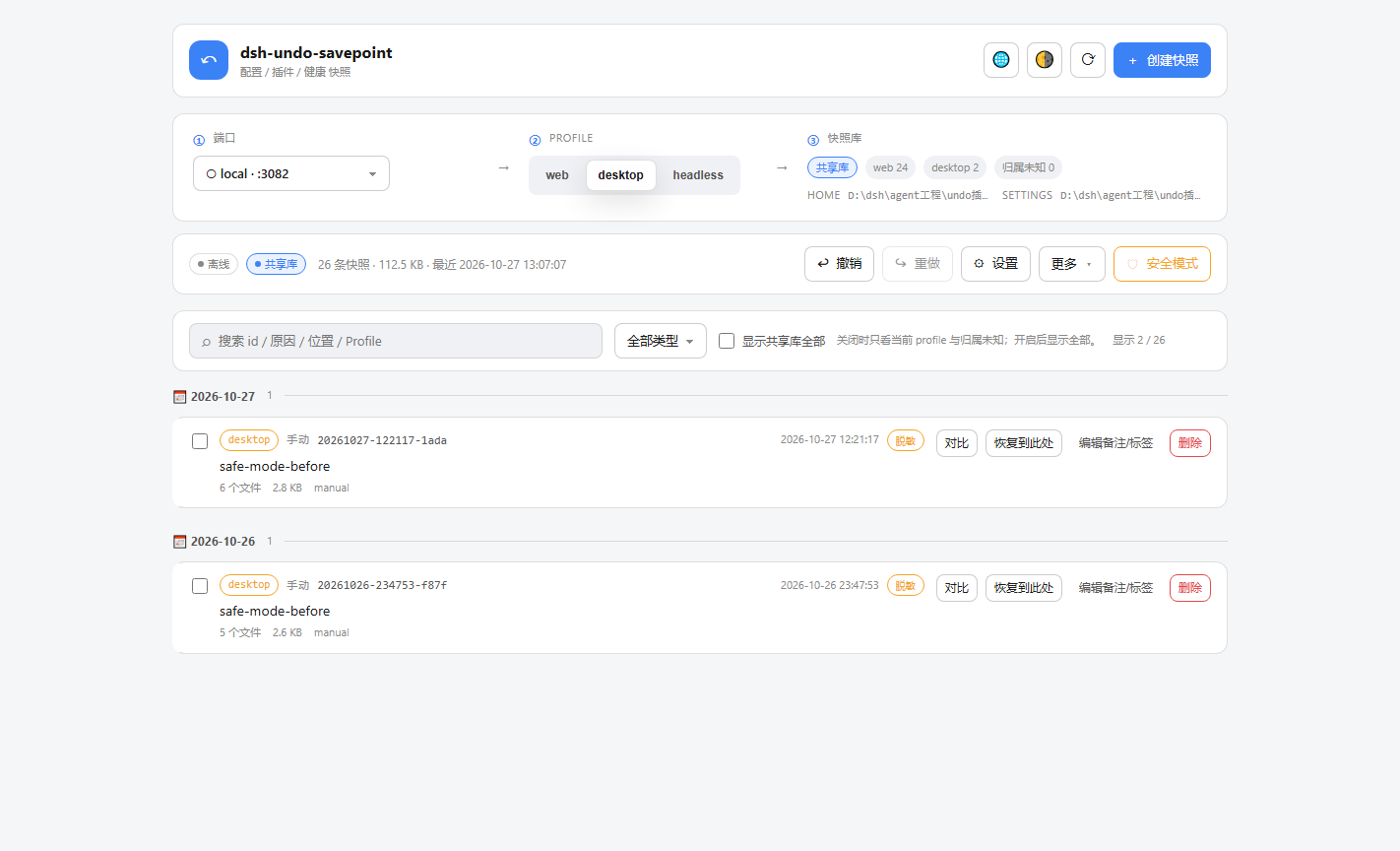 |
- | 快照对比:左栏文件导航带增删行数,右栏逐行红绿 | 设置:实例管理、快照策略、自动清理与保留数量 |
- |---|---|
- | 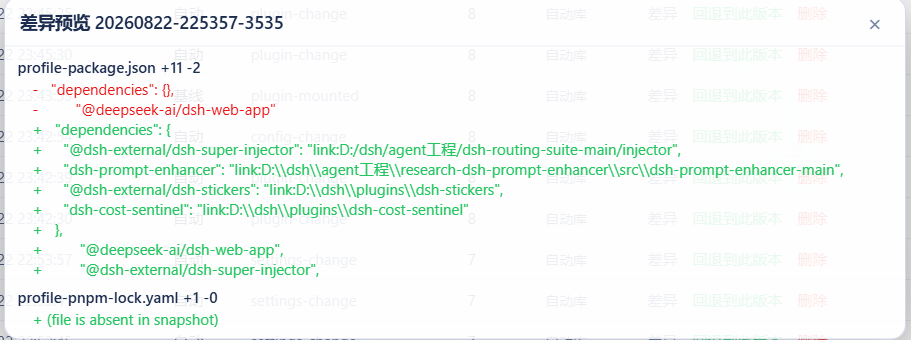 | 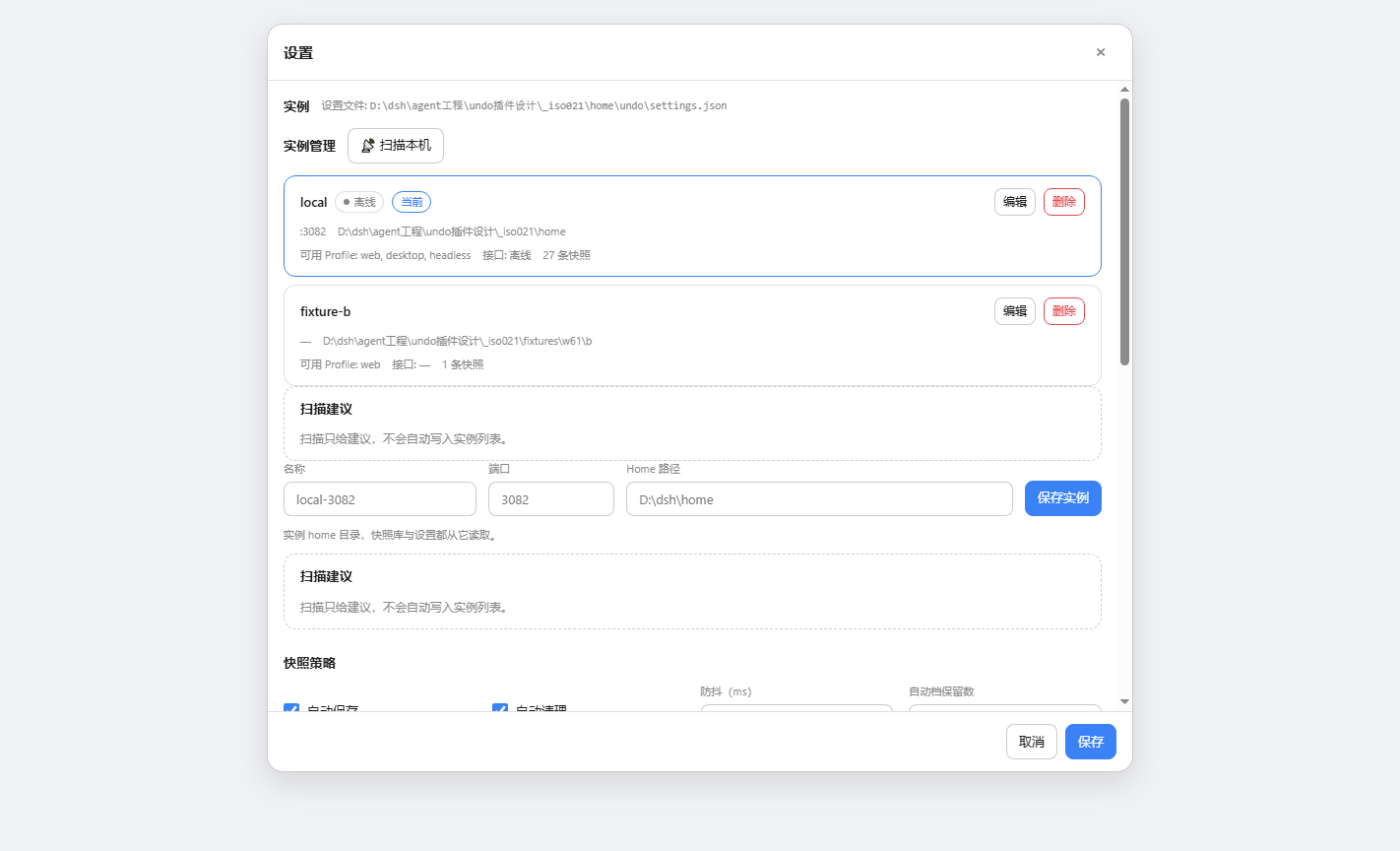 |
- ## 核心能力
- | 能力 | 说明 |
- |---|---|
- | **配置与插件代码回滚** | 快照覆盖配置与用户插件代码树,undo / redo / 回退任意版本,WebUI、对话、离线 CLI 三入口。 |
- | **消息级撤销** | 按 AI 消息或 60s 批次回滚工作区文件改动,不依赖 git,不碰会话存储。 |
- | **一键安全模式** | DSH 完全起不来时只保留本插件保证启动,自动快照并备份 profile 与 home 补丁。 |
- | **崩溃归因** | 按日志签名分类崩溃原因,给出最后正常快照与一键回退。 |
- | **会话扫描修复** | `undo_scan` 修复会话单帧布局违规与 seq 重叠,修不了的隔离,原件不动。 |
- | **时间线与快照管理** | 日期分组、备注标签、定时快照、ZIP 导出导入。 |
- | **启动预检与诊断** | `undo_doctor` 检查启动硬失败与补丁、清单结构,可修项一键修复,修前自动落快照。 |
- | **局外急救** | WebUI、GUI 窗口、CLI 与桌面快捷方式,DSH 挂了也能回滚、对比、进安全模式。 |
- ## 平台支持
- | 能力 | Windows | macOS | Linux |
- |---|---|---|---|
- | 配置 / 插件快照、撤销 / 重做 | ✅ | ✅ | ✅ |
- | 局外 CLI / GUI | ✅(.bat / .ps1) | ✅(.command) | ✅(.sh) |
- | 局外 WebUI(undo-server) | ✅ | ✅ | ✅ |
- | 文件选择对话框 | PowerShell 原生 | osascript | zenity → kdialog(都没有则回退手输) |
- ## 安装
- 前置:已安装 DSH(`@deepseek-ai/dsh`)与 Node.js。DSH 0.2.2 及以后版本的宿主要求 Node.js ≥24.9;本插件的离线 CLI / GUI 只要求 ≥20。
- ### 桌面端安装(推荐)
- 桌面端是主要使用场景,走 `desktop profile`。先启动一次桌面端完成初始化,再**完全退出**桌面客户端后执行安装。
- GitHub 直装。默认装默认分支的最新提交,需要固定版本时在末尾加 `#vX.Y.Z`。
- ```bat
- dsh plugin --profile desktop add github:lire1131/dsh-undo-savepoint
- ```
- npm 源安装。默认装 npm 上的 latest,需要固定版本时在包名后加 `@X.Y.Z`。
- ```bat
- dsh plugin --profile desktop add dsh-undo-savepoint
- ```
- 安装完成后重启 DSH 即生效。DSH 0.2.0-rc.2 起的桌面版遇到致命错误会弹官方恢复窗,第三个按钮会摘掉第三方插件的 bundles 条目,并把补丁备份为 `cordis.patch.yml.bak-<时间戳>`,包本体保留。被禁用后不需要重装,恢复挂载声明即可。桌面形态下 safe-mode 默认拒绝执行,带 `confirmDesktop` 的显式确认会先落前置快照再写文件;官方恢复窗第三个按钮仍是首选逃生路径。
- ### Web profile 安装
- 把 profile 换成 `web`。需要固定版本时按上面的方式自行加 tag 或版本号。
- ```bat
- dsh plugin --profile web add github:lire1131/dsh-undo-savepoint
- dsh plugin --profile web add dsh-undo-savepoint
- ```
- ### 安装期环境自检
- 安装钩子会检查外部 Node.js、PowerShell、平台与 DSH home 可写性。设置 `DSH_UNDO_SKIP_ENV_CHECK=1` 可跳过整个自检。
- ## 使用
- - **撤销**:头部「撤销」按钮 / `Ctrl+Alt+Z` / 对 AI 说「撤销上一步」。
- - **恢复**:「恢复」按钮 / `Ctrl+Alt+Y`(仅当撤销后没有新操作)。
- - **手动保存**:面板「手动保存」/ 对 AI 说「保存快照」。
- - **回退到指定版本**:面板里点快照行「回退到此版本」。
- - **删除快照**:面板里点「删除」。
- - **消息级撤销**:对话头部「对话撤回」,选择消息批次撤回其文件改动。
- - **设置**:通用页可改自动保存、防抖、保留数、两个快照目录与跟踪工作区目录。
- ## DSH 起不来时
- 运行局外 WebUI,不依赖 DSH。
- ```bash
- node tools/undo-server.mjs
- ```
- 时间线、回滚、对比、诊断与安全模式都在这个本地页面里。插件加载后会自动创建桌面快捷方式,双击也能打开。需要一键禁用除本插件外的全部用户插件时,用安全模式,重启 DSH 后再逐个排查。
- ## 支持范围
- `package.json` 的 `engines.dsh` 覆盖 0.1.x 与 0.2.x 的历次声明,末段为 `>=0.2.2-0`。已验证桌面版 DSH 0.2.0-rc.2、0.2.1-rc.3 与 0.2.1-rc.5;0.2.2-rc.1 在隔离实例里验证过宿主激活与客户端装配,桌面形态待维护者机器复核。
- DSH 0.2.2 起宿主要求 Node.js 24.9,本插件离线工具仍只要求 20,两者分开判定。版本不在声明范围内时,不要改 `package.json`,用官方的版本豁免。
- ```bat
- dsh plugin --profile web allow-version dsh-undo-savepoint@<插件版本> --dsh-version <运行时版本> --accept-risk
- ```
- ## 卸载
- ```bat
- dsh plugin remove dsh-undo-savepoint
- node tools/uninstall.mjs
- ```
- `uninstall.mjs` 默认摘掉挂载声明、junction 与桌面快捷方式,保留快照库与设置。确认不再需要历史快照时加 `--purge`。
- ```bat
- node tools/uninstall.mjs --purge
- ```
- ## 快照存放与安全
- 快照默认在 `$DSH_HOME\undo-snapshots`,按 profile 分 manual 与 auto 两个库,手动库不自动清理。快照会复制 `.env` 等配置,可能含密钥;插件写入时对敏感文件做脱敏,真实值只存本机 vault。快照库仍是本机敏感目录,不要外传。
- ## 更多
- - 版本变更见 [CHANGELOG.md](CHANGELOG.md)。
- - English README 见 [README.en.md](README.en.md)。
- - License: MIT
Ratings and comments
Sign in to rate this skill.
Sign inFree to use. If it’s helped, pass it on.