Back to search
mck-ppt
SkillWorks with Claude CodeGitHubIncomplete
Safety scan
A static text scan, not a guarantee. Select the badge to see what was scanned and every finding.
Checked today
Badge for your README
Markdown
[](/listings/likaku--mck-ppt-design-skill)HTML
<a href="/listings/likaku--mck-ppt-design-skill"><img src="/api/listings/likaku--mck-ppt-design-skill/badge.svg" alt="findsafeskills safety rating" /></a>Install
i
What was scanned
The files the safety scan read, as written by the repository's author and shown as plain text. Lines with a finding are marked.
.claude-plugin/marketplace.json · Manifest · 14 lines
View this file on GitHub (read at the repository's current version: the scan did not record which commit it read)
- {
- "name": "mck-ppt",
- "owner": { "name": "Kaku Li" },
- "plugins": [
- {
- "name": "mck-ppt-design",
- "source": "./",
- "description": "Consulting-style, editable PowerPoint decks: 62 layouts, native shapes, built-in QA gates.",
- "version": "2.4.1",
- "skills": ["./"],
- "strict": false
- }
- ]
- }
README.md · README · 237 lines
View this file on GitHub (read at the repository's current version: the scan did not record which commit it read)
- <div align="center">
- <img src="docs/img/hero.png" alt="MCK PPT Design Skill: consulting-grade PowerPoint, fully editable, checked by code" width="100%" />
- <br/>
- [](https://github.com/likaku/Mck-ppt-design-skill/stargazers)
- [](https://github.com/likaku/Mck-ppt-design-skill/network/members)
- [](LICENSE)
- [](https://python.org)
- **[Try it in 60 seconds](#-try-it-in-60-seconds)** · **[Use with your agent](#-use-it-with-your-agent)** · **[Gallery](docs/GALLERY.md)** · **[简体中文](README.zh-CN.md)** · **[Architecture](docs/ARCHITECTURE.md)**
- </div>
- <br/>
- > **Your AI agent writes the story. This skill draws the deck and checks the file.**
- > The output is a real `.pptx`: native shapes, native charts, every element editable in PowerPoint, WPS or Keynote.
- <div align="center">
- <img src="docs/img/demo.gif" alt="A prompt turns into a 6-slide deck that passes the QA gate" width="86%" />
- <br/><sub>Prompt to deck. The slides and the gate result are real output; the terminal is a recreation. Data in the slides is illustrative.</sub>
- </div>
- <br/>
- ## What the output looks like
- <table>
- <tr>
- <td width="33%"><img src="docs/img/showcase-1-cover.png" alt="Cover with three headline numbers"/></td>
- <td width="33%"><img src="docs/img/showcase-2-summary.png" alt="Executive summary with three big numbers"/></td>
- <td width="33%"><img src="docs/img/showcase-3-chart.png" alt="Native clustered column chart with insight panel"/></td>
- </tr>
- <tr>
- <td align="center"><sub><b>Cover</b><br/>numbers carry the story</sub></td>
- <td align="center"><sub><b>Executive summary</b><br/>result, risk, decision</sub></td>
- <td align="center"><sub><b>Native chart</b><br/>click it, edit the data</sub></td>
- </tr>
- <tr>
- <td width="33%"><img src="docs/img/showcase-4-waterfall.png" alt="Waterfall chart built from a native stacked column"/></td>
- <td width="33%"><img src="docs/img/showcase-5-matrix.png" alt="Impact and effort matrix with positioned items"/></td>
- <td width="33%"><img src="docs/img/showcase-6-roadmap.png" alt="Four-quarter roadmap with a decision gate"/></td>
- </tr>
- <tr>
- <td align="center"><sub><b>Waterfall</b><br/>native stacked column</sub></td>
- <td align="center"><sub><b>Prioritisation</b><br/>items placed by judgement</sub></td>
- <td align="center"><sub><b>Roadmap</b><br/>with a decision gate</sub></td>
- </tr>
- </table>
- <sub>All six slides come from [`examples/freeform_showcase.py`](examples/freeform_showcase.py), rendered with LibreOffice. Data is illustrative. Fonts differ slightly in PowerPoint.</sub>
- ## Why this exists
- Ask an agent for a deck and you usually get text boxes on a white page, or a picture you cannot edit. This skill gives the agent a third path.
- | | |
- |---|---|
- | **Real, editable `.pptx`** | Native shapes, text and charts. No screenshots. Change a number in the chart's data sheet and the bars move. |
- | **Consulting grammar built in** | Action titles that state the conclusion, a source line on every slide, restrained navy and grey, flat design. |
- | **The agent decides, Python draws** | `eng.donut(...)` costs the agent about 20 tokens; deterministic code does the rest. The author measured a 30-slide deck dropping from 40,000-60,000 output tokens to 9,000-12,000 in the v1 to v2 rewrite. |
- | **A gate that is code, not opinion** | `gate_check.py` writes `gate_result.json`. `passed` is computed by the script, so the agent cannot declare its own work done. It catches overflow, out-of-bounds shapes, font inconsistency and legend overflow. It does **not** catch every visual flaw: render and look before you ship. |
- | **Files that open cleanly** | No connectors, shadows or 3D; the post-save cleanup removes the XML that triggers PowerPoint's "repair" prompt. |
- | **CJK aware** | An East Asian font (KaiTi by default) is written on every text run so Chinese does not fall back to boxes where that font is installed. |
- ## 🚀 Try it in 60 seconds
- No API key, no network. Needs Python 3.8+.
- ```bash
- pip install "git+https://github.com/likaku/Mck-ppt-design-skill.git"
- python -m mck_ppt demo # writes mck_demo.pptx (13 slides, passes the built-in check)
- python -m mck_ppt layouts # lists every layout with a one-line description
- ```
- Then the freeform example that produced the slides above:
- ```bash
- git clone https://github.com/likaku/Mck-ppt-design-skill && cd Mck-ppt-design-skill
- python examples/freeform_showcase.py out.pptx
- python references/scripts/gate_check.py out.pptx . # writes gate_result.json
- ```
- > The gate scripts live in `references/scripts/` and are not part of the pip package; clone the repo to use them.
- ## 🤖 Use it with your agent
- | Agent | How |
- |---|---|
- | **Claude Code** | `git clone https://github.com/likaku/Mck-ppt-design-skill ~/.claude/skills/mck-ppt-design` and `pip install python-pptx lxml` |
- | **WorkBuddy / CodeBuddy** | Search `mck-ppt-design` in the skill market, or clone into `~/.workbuddy/skills/mck-ppt-design` |
- | **Cursor / Continue / any LLM** | Add `SKILL.md` as a project rule or paste it as context, and `pip install` the package |
- Then ask in plain language:
- > Make a 12-slide board deck on why our Q1 growth now depends on one channel. Action titles, one chart per argument, a source line on every slide.
- > 用麦肯锡风格做一份 15 页的年度战略汇报:先给执行摘要,再分三章,最后列出需要决策的四件事。
- The agent follows five stages, and two of the gates are scripts it cannot argue with:
- ```mermaid
- flowchart LR
- A[S1 Brief] --> B[S2 Structure<br/>outline.json]
- B --> C[S3 Content<br/>content.json]
- C --> G1{{gate_check_s3.py}}
- G1 -->|pass| D[S4 Render]
- D --> G2{{gate_check.py}}
- G2 -->|pass| E[S5 Deliver]
- G1 -.->|fail| C
- G2 -.->|fail| D
- ```
- Details in [docs/HARNESS.md](docs/HARNESS.md).
- ## Two ways to build a deck
- | | **Layout methods** | **Free composition** |
- |---|---|---|
- | What | `eng.cover()`, `eng.table_insight()`, `eng.donut()` and 59 more | Drawing primitives and native charts, as in `examples/freeform_showcase.py` |
- | Strength | Fast, consistent, hard to break | More visual: big numbers, native charts, custom composition |
- | Risk | Fixed text boxes: long text overflows, the layout cannot bend | Needs a render-and-look pass; there is no template to lean on |
- | Use when | Many slides, tight deadline, uniform look | The deck has to persuade, or a layout does not fit the message |
- Both go through the same cleanup and the same gate. In our own tests the free-composition version of the same content looked clearly better; the layout version is faster.
- ```python
- from mck_ppt import MckEngine
- from mck_ppt.constants import *
- eng = MckEngine(total_slides=3)
- eng.cover(title='Q1 strategy review', subtitle='Board presentation', date='2026')
- eng.table_insight(
- title='Three shifts are restructuring the market',
- headers=['Dimension', 'Before', 'After'],
- rows=[['Distribution', 'Offline-first', 'Digital-first'], ['Pricing', 'Cost-plus', 'Value-based']],
- insights=['Digital channels now drive 60% of acquisition', 'Value pricing unlocks about 3x margin'])
- eng.closing(title='Thank you')
- eng.save('deck.pptx')
- ```
- <details>
- <summary><b>All 62 layout methods</b></summary>
- <br/>
- | Category | Layouts |
- |---|---|
- | **Structure** | `cover`, `section_divider`, `toc`, `agenda`, `appendix_title`, `closing` |
- | **Key numbers** | `big_number`, `two_stat`, `three_stat`, `metric_cards`, `scorecard`, `kpi_tracker`, `rag_status`, `data_table`, `harvey_ball_table` |
- | **Frameworks** | `table_insight`, `matrix_2x2`, `pyramid`, `process_chevron`, `temple`, `swot`, `value_chain`, `risk_matrix`, `stakeholder_map`, `decision_tree` |
- | **Comparison** | `side_by_side`, `before_after`, `pros_cons`, `metric_comparison` |
- | **Narrative** | `executive_summary`, `key_takeaway`, `four_column`, `two_column_text`, `case_study`, `action_items`, `checklist`, `quote`, `meet_the_team`, `numbered_list_panel`, `icon_grid` |
- | **Timeline** | `timeline`, `vertical_steps` |
- | **Charts** | `donut`, `waterfall`, `line_chart`, `pareto`, `bubble`, `grouped_bar`, `stacked_bar`, `horizontal_bar`, `stacked_area`, `multi_bar_panel`, `dashboard_kpi_chart`, `dashboard_table_chart` |
- | **Image layouts** | `content_right_image`, `three_images`, `image_four_points`, `full_width_image`, `case_study_image`, `quote_bg_image`, `goals_illustration`, `two_col_image_grid` |
- Signatures: `python -m mck_ppt layouts`, or [docs/GALLERY.md](docs/GALLERY.md).
- </details>
- <details>
- <summary><b>Guard rails enforced in code</b></summary>
- <br/>
- - No connectors (they trigger PowerPoint repair prompts); lines are thin rectangles.
- - Shadows, 3D and `p:style` are stripped after save.
- - Same-row shapes keep the same font size; text never touches separator lines.
- - Circular charts use native `BLOCK_ARC`, 3-4 shapes instead of thousands of rectangles.
- - Every CJK run gets an East Asian font.
- Full list: [docs/ARCHITECTURE.md](docs/ARCHITECTURE.md).
- </details>
- <details>
- <summary><b>Known limitations (read before you rely on it)</b></summary>
- <br/>
- - **Gate is not a visual review.** It misses some problems, for example a long title that wraps onto the subtitle. Render the deck and look at it.
- - **Layout methods use fixed text boxes.** Long text overflows; some layouts are sparse (for instance `big_number`).
- - **Preview needs LibreOffice.** `scripts/render_preview.py` uses LibreOffice and poppler. Install KaiTi and Arial for faithful output; without KaiTi the text falls back to another font and wrapping changes.
- - **Not supported:** SmartArt, animations, slide masters.
- - **Layout QA is not clean yet.** `python run_qa_tests.py` still reports layout errors on several layouts; they are tracked for v2.4.x.
- - **AI cover image** needs a Tencent Cloud key and extra dependencies (`pip install ...[cover-image]`).
- </details>
- <details>
- <summary><b>FAQ</b></summary>
- <br/>
- **Does it open in WPS and Keynote?** The file uses standard shapes and charts. We test mainly in PowerPoint and LibreOffice; please open an issue if you see differences.
- **Chinese text looks different from the screenshots.** The default East Asian font is KaiTi. If it is not installed, your viewer substitutes another font. Install KaiTi, or change the font in `mck_ppt/constants.py`.
- **Can I change the colors?** Yes. Palette constants are in `mck_ppt/constants.py`.
- **Do I need an API key?** No, except for the optional AI cover image.
- </details>
- ## Roadmap
- - [x] `python -m mck_ppt demo`, `layouts`, `pip install` from GitHub
- - [x] Free-composition example with native charts
- - [ ] Publish to PyPI (`pip install mck-ppt`)
- - [ ] Render-and-check step in the gate (catch text overlapping other shapes)
- - [ ] Native chart helpers in the engine (clustered, stacked, waterfall)
- - [ ] Theme switch (navy / graphite / warm)
- - [ ] Import an existing `.pptx` and restyle it
- Want something? [Request a layout](https://github.com/likaku/Mck-ppt-design-skill/issues/new?template=layout_request.yml) · [Show a deck you built](https://github.com/likaku/Mck-ppt-design-skill/issues/new?template=showcase.yml)
- ## Community
- - **Made a deck with it?** [Show it](https://github.com/likaku/Mck-ppt-design-skill/issues/new?template=showcase.yml). Good ones get featured here.
- - **Bug or broken layout?** [Open an issue](https://github.com/likaku/Mck-ppt-design-skill/issues/new?template=bug_report.yml) with the layout name, a 5-line repro and a screenshot.
- - **Chat:** [Discord](https://discord.gg/SaFybFAT) · WeChat group (200+ members): add `Kashinmoto`
- - **Contribute:** see [CONTRIBUTING.md](CONTRIBUTING.md)
- If it saved you an evening, a star helps other people find it.
- <div align="center">
- [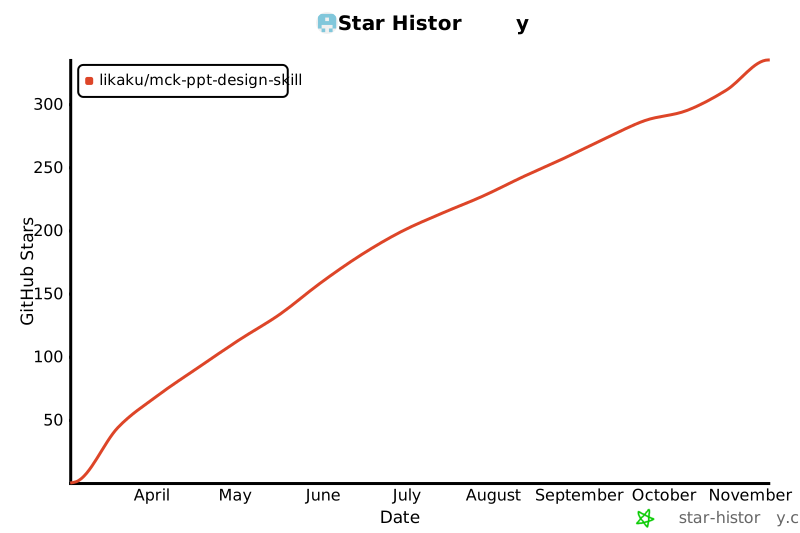](https://star-history.com/#likaku/Mck-ppt-design-skill&Date)
- </div>
- ---
- <div align="center"><sub>Apache 2.0 · © 2024-2026 <strong>Kaku Li</strong> · <a href="NOTICE">NOTICE</a> · <a href="CHANGELOG.md">Changelog</a></sub></div>
Ratings and comments
Sign in to rate this skill.
Sign inFree to use. If it’s helped, pass it on.