Back to search
n8n-mcp-server
SkillGitHub
MCP server that provides tools and resources for interacting with n8n API
Safety scan
A static text scan, not a guarantee. Select the badge to see what was scanned and every finding.
Checked today
Badge for your README
Markdown
[](/listings/leonardsellem--n8n-mcp-server)HTML
<a href="/listings/leonardsellem--n8n-mcp-server"><img src="/api/listings/leonardsellem--n8n-mcp-server/badge.svg" alt="findsafeskills safety rating" /></a>Install
i
Install instructions from the README
As written by the repo's author. findsafeskills has not verified these steps.
Prerequisites
- Node.js 20 or later - n8n instance with API access enabled
Install from npm
npm install -g @leonardsellem/n8n-mcp-server
Install from source
# Clone the repository
git clone https://github.com/leonardsellem/n8n-mcp-server.git
cd n8n-mcp-server

# Install dependencies
npm install

# Build the project
npm run build

# Optional: Install globally
npm install -g .
Docker Installation
You can also run the server using Docker:
# Pull the image
docker pull leonardsellem/n8n-mcp-server

# Run the container with your n8n API configuration
docker run -e N8N_API_URL=http://your-n8n:5678/api/v1 \
  -e N8N_API_KEY=your_n8n_api_key \
  -e N8N_WEBHOOK_USERNAME=username \
  -e N8N_WEBHOOK_PASSWORD=password \
  leonardsellem/n8n-mcp-server
What was scanned
The files the safety scan read, as written by the repository's author and shown as plain text. Lines with a finding are marked.
README.md · README · 385 lines
View this file on GitHub (read at the repository's current version: the scan did not record which commit it read)
- # n8n MCP Server
- [](https://badge.fury.io/js/%40leonardsellem%2Fn8n-mcp-server)
- A Model Context Protocol (MCP) server that allows AI assistants to interact with n8n workflows through natural language.
- ## Overview
- This project provides a Model Context Protocol (MCP) server that empowers AI assistants to seamlessly interact with n8n, a popular workflow automation tool. It acts as a bridge, enabling AI assistants to programmatically manage and control n8n workflows and executions using natural language commands.
- ## Installation
- ### Prerequisites
- - Node.js 20 or later
- - n8n instance with API access enabled
- ### Install from npm
- ```bash
- npm install -g @leonardsellem/n8n-mcp-server
- ```
- ### Install from source
- ```bash
- # Clone the repository
- git clone https://github.com/leonardsellem/n8n-mcp-server.git
- cd n8n-mcp-server
- # Install dependencies
- npm install
- # Build the project
- npm run build
- # Optional: Install globally
- npm install -g .
- ```
- ### Docker Installation
- You can also run the server using Docker:
- ```bash
- # Pull the image
- docker pull leonardsellem/n8n-mcp-server
- # Run the container with your n8n API configuration
- docker run -e N8N_API_URL=http://your-n8n:5678/api/v1 \
- -e N8N_API_KEY=your_n8n_api_key \
- -e N8N_WEBHOOK_USERNAME=username \
- -e N8N_WEBHOOK_PASSWORD=password \
- leonardsellem/n8n-mcp-server
- ```
- ## Updating the Server
- How you update the server depends on how you initially installed it.
- ### 1. Installed globally via npm
- If you installed the server using `npm install -g @leonardsellem/n8n-mcp-server`:
- 1. Open your terminal or command prompt.
- 2. Run the following command to get the latest version:
- ```bash
- npm install -g @leonardsellem/n8n-mcp-server@latest
- ```
- 3. If the server is currently running (e.g., as a background process or service), you'll need to restart it for the changes to take effect.
- ### 2. Installed from source
- If you cloned the repository and installed from source:
- 1. Open your terminal or command prompt.
- 2. Navigate to the directory where you cloned the project:
- ```bash
- cd path/to/n8n-mcp-server
- ```
- 3. If you've made any local changes to the code that you want to keep, consider stashing them (optional):
- ```bash
- git stash
- ```
- You can apply them later with `git stash pop`.
- 4. Pull the latest changes from the repository (assuming you are on the `main` branch):
- ```bash
- git pull origin main
- ```
- If you are on a different branch, replace `main` with your branch name.
- 5. Install or update any changed dependencies:
- ```bash
- npm install
- ```
- 6. Rebuild the project to include the latest updates:
- ```bash
- npm run build
- ```
- 7. If you previously installed it globally from this source folder using `npm install -g .`, you might want to run this command again to update the global link:
- ```bash
- npm install -g .
- ```
- 8. Restart the server.
- * If you run the server directly using a command like `node build/index.js` in your AI assistant's MCP configuration, ensure the path is still correct. Using `npm install -g .` and then `n8n-mcp-server` as the command should keep this consistent.
- ### 3. Using Docker
- If you are running the server using Docker:
- 1. Pull the latest image from Docker Hub:
- ```bash
- docker pull leonardsellem/n8n-mcp-server:latest
- ```
- 2. Stop and remove your old container. You'll need your container's name or ID (you can find it using `docker ps`):
- ```bash
- docker stop <your_container_name_or_id>
- docker rm <your_container_name_or_id>
- ```
- 3. Start a new container with the updated image. Use the same `docker run` command you used previously, including all your necessary environment variables (refer to the "Docker Installation" section for an example command). For instance:
- ```bash
- docker run -e N8N_API_URL=http://your-n8n:5678/api/v1 \
- -e N8N_API_KEY=your_n8n_api_key \
- -e N8N_WEBHOOK_USERNAME=username \
- -e N8N_WEBHOOK_PASSWORD=password \
- leonardsellem/n8n-mcp-server:latest
- ```
- Ensure you use `:latest` or the specific version tag you intend to run.
- ## Configuration
- Create a `.env` file in the directory where you'll run the server, using `.env.example` as a template:
- ```bash
- cp .env.example .env
- ```
- Configure the following environment variables:
- | Variable | Description | Example |
- |----------|-------------|---------|
- | `N8N_API_URL` | Full URL of the n8n API, including `/api/v1` | `http://localhost:5678/api/v1` |
- | `N8N_API_KEY` | API key for authenticating with n8n | `n8n_api_...` |
- | `N8N_WEBHOOK_USERNAME` | Username for webhook authentication (if using webhooks) | `username` |
- | `N8N_WEBHOOK_PASSWORD` | Password for webhook authentication | `password` |
- | `DEBUG` | Enable debug logging (optional) | `true` or `false` |
- ### Generating an n8n API Key
- 1. Open your n8n instance in a browser
- 2. Go to Settings > API > API Keys
- 3. Create a new API key with appropriate permissions
- 4. Copy the key to your `.env` file
- ## Usage
- ### Running the Server
- From the installation directory:
- ```bash
- n8n-mcp-server
- ```
- Or if installed globally:
- ```bash
- n8n-mcp-server
- ```
- ### Integrating with AI Assistants
- After building the server (`npm run build`), you need to configure your AI assistant (like VS Code with the Claude extension or the Claude Desktop app) to run it. This typically involves editing a JSON configuration file.
- **Example Configuration (e.g., in VS Code `settings.json` or Claude Desktop `claude_desktop_config.json`):**
- ```json
- {
- "mcpServers": {
- // Give your server a unique name
- "n8n-local": {
- // Use 'node' to execute the built JavaScript file
- "command": "node",
- // Provide the *absolute path* to the built index.js file
- "args": [
- "/path/to/your/cloned/n8n-mcp-server/build/index.js"
- // On Windows, use double backslashes:
- // "C:\\path\\to\\your\\cloned\\n8n-mcp-server\\build\\index.js"
- ],
- // Environment variables needed by the server
- "env": {
- "N8N_API_URL": "http://your-n8n-instance:5678/api/v1", // Replace with your n8n URL
- "N8N_API_KEY": "YOUR_N8N_API_KEY", // Replace with your key
- // Add webhook credentials only if you plan to use webhook tools
- // "N8N_WEBHOOK_USERNAME": "your_webhook_user",
- // "N8N_WEBHOOK_PASSWORD": "your_webhook_password"
- },
- // Ensure the server is enabled
- "disabled": false,
- // Default autoApprove settings
- "autoApprove": []
- }
- // ... other servers might be configured here
- }
- }
- ```
- **Key Points:**
- * Replace `/path/to/your/cloned/n8n-mcp-server/` with the actual absolute path where you cloned and built the repository.
- * Use the correct path separator for your operating system (forward slashes `/` for macOS/Linux, double backslashes `\\` for Windows).
- * Ensure you provide the correct `N8N_API_URL` (including `/api/v1`) and `N8N_API_KEY`.
- * The server needs to be built (`npm run build`) before the assistant can run the `build/index.js` file.
- ## Available Tools
- The server provides the following tools:
- ### Using Webhooks
- This MCP server supports executing workflows through n8n webhooks. To use this functionality:
- 1. Create a webhook-triggered workflow in n8n.
- 2. Set up Basic Authentication on your webhook node.
- 3. Use the `run_webhook` tool to trigger the workflow, passing just the workflow name.
- Example:
- ```javascript
- const result = await useRunWebhook({
- workflowName: "hello-world", // Will call <n8n-url>/webhook/hello-world
- data: {
- prompt: "Hello from AI assistant!"
- }
- });
- ```
- The webhook authentication is handled automatically using the `N8N_WEBHOOK_USERNAME` and `N8N_WEBHOOK_PASSWORD` environment variables.
- ### Workflow Management
- - `workflow_list`: List all workflows
- - `workflow_get`: Get details of a specific workflow
- - `workflow_create`: Create a new workflow
- - `workflow_update`: Update an existing workflow
- - `workflow_delete`: Delete a workflow
- - `workflow_activate`: Activate a workflow
- - `workflow_deactivate`: Deactivate a workflow
- ### Execution Management
- - `execution_run`: Execute a workflow via the API
- - `run_webhook`: Execute a workflow via a webhook
- - `execution_get`: Get details of a specific execution
- - `execution_list`: List executions for a workflow
- - `execution_stop`: Stop a running execution
- ## Resources
- The server provides the following resources:
- - `n8n://workflows/list`: List of all workflows
- - `n8n://workflow/{id}`: Details of a specific workflow
- - `n8n://executions/{workflowId}`: List of executions for a workflow
- - `n8n://execution/{id}`: Details of a specific execution
- ## Roadmap
- The n8n MCP Server is a community-driven project, and its future direction will be shaped by your feedback and contributions!
- Currently, our roadmap is flexible and under continuous development. We believe in evolving the server based on the needs and ideas of our users.
- We encourage you to get involved in shaping the future of this tool:
- - **Suggest Features:** Have an idea for a new tool, resource, or improvement?
- - **Discuss Priorities:** Want to weigh in on what we should focus on next?
- Please share your thoughts, feature requests, and ideas by opening an issue on our [GitHub Issues page](https://github.com/leonardsellem/n8n-mcp-server/issues). Let's build a powerful tool for AI assistants together!
- ## Development
- ### Building
- ```bash
- npm run build
- ```
- ### Running in Development Mode
- ```bash
- npm run dev
- ```
- ### Testing
- ```bash
- npm test
- ```
- ### Linting
- ```bash
- npm run lint
- ```
- ## Contributing
- We welcome contributions from the community and are excited to see how you can help improve the n8n MCP Server! Whether you're fixing a bug, proposing a new feature, or improving documentation, your help is valued.
- ### Reporting Bugs
- If you encounter a bug, please report it by opening an issue on our [GitHub Issues page](https://github.com/leonardsellem/n8n-mcp-server/issues).
- When submitting a bug report, please include the following:
- - A clear and descriptive title.
- - A detailed description of the problem, including steps to reproduce the bug.
- - Information about your environment (e.g., Node.js version, n8n MCP Server version, operating system).
- - Any relevant error messages or screenshots.
- ### Suggesting Enhancements
- We're always looking for ways to make the server better. If you have an idea for an enhancement or a new feature, please open an issue on our [GitHub Issues page](https://github.com/leonardsellem/n8n-mcp-server/issues).
- Please provide:
- - A clear and descriptive title for your suggestion.
- - A detailed explanation of the proposed enhancement and why it would be beneficial.
- - Any potential use cases or examples.
- ### Submitting Pull Requests
- If you'd like to contribute code, please follow these steps:
- 1. **Fork the repository:** Create your own fork of the [n8n-mcp-server repository](https://github.com/leonardsellem/n8n-mcp-server).
- 2. **Create a branch:** Create a new branch in your fork for your changes (e.g., `git checkout -b feature/your-feature-name` or `bugfix/issue-number`).
- 3. **Make your changes:** Implement your feature or bug fix.
- * Ensure your code adheres to the existing coding style. (We use Prettier for formatting, which can be run with `npm run lint`).
- * Include tests for your changes if applicable. You can run tests using `npm test`.
- 4. **Commit your changes:** Write clear and concise commit messages.
- 5. **Push to your fork:** Push your changes to your forked repository.
- 6. **Open a Pull Request (PR):** Submit a PR to the `main` branch of the official `n8n-mcp-server` repository.
- * Provide a clear title and description for your PR, explaining the changes you've made and referencing any related issues.
- We'll review your PR as soon as possible and provide feedback. Thank you for your contribution!
- ## License
- [MIT](LICENSE)
- ## 🚀 Join Our Team: Call for Co-Maintainers!
- This project is a vibrant, community-driven tool actively used by AI enthusiasts and developers. Currently, it's maintained on a part-time basis by a passionate individual who isn't a seasoned engineer but is dedicated to bridging AI with workflow automation. To help this project flourish, ensure its long-term health, and keep up with its growing user base, we're looking for enthusiastic **co-maintainers** to join the team!
- ### Why Contribute?
- - **Learn and Grow:** Sharpen your skills in areas like TypeScript, Node.js, API integration, and AI tool development.
- - **Collaborate:** Work alongside other motivated developers and AI users.
- - **Make an Impact:** Directly shape the future of this project and help build a valuable tool for the AI community.
- - **Open Source:** Gain experience contributing to an open-source project.
- ### How You Can Help
- We welcome contributions in many forms! Here are some areas where you could make a big difference:
- - **Bug Fixing:** Help us identify and squash bugs to improve stability.
- - **Feature Development:** Implement new tools and functionalities based on user needs and your ideas.
- - **Documentation:** Improve our guides, examples, and API references to make the project more accessible.
- - **Testing:** Enhance our test suite (unit, integration) to ensure code quality and reliability.
- - **CI/CD:** Help streamline our development and deployment pipelines.
- - **Code Reviews:** Provide feedback on pull requests and help maintain code standards.
- - **Community Support:** Assist users with questions and help manage discussions.
- ### Get Involved!
- If you're excited about the intersection of AI and workflow automation, and you're looking for a rewarding open-source opportunity, we'd love to hear from you!
- **Ready to contribute?**
- 1. Check out our [GitHub Issues page](https://github.com/leonardsellem/n8n-mcp-server/issues) to find existing tasks, suggest new ideas, or express your interest in becoming a co-maintainer.
- 2. You can open an issue titled "Co-maintainer Application" to formally apply, or simply start contributing to existing issues.
- 3. Alternatively, feel free to reach out to the existing maintainers if you have questions.
- Let’s build the future of AI-powered workflow automation together! 🙌
- **Thanks to the community for the support!**
- [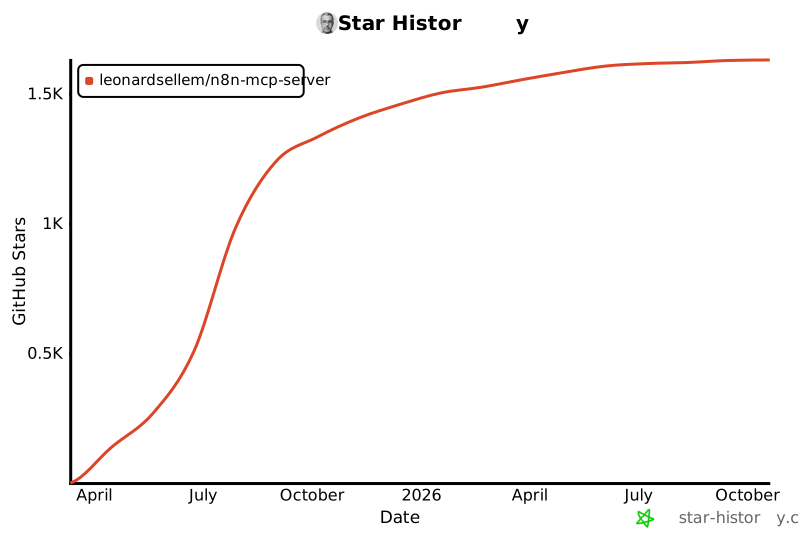](https://www.star-history.com/#leonardsellem/n8n-mcp-server&Date)
Ratings and comments
Sign in to rate this skill.
Sign inFree to use. If it’s helped, pass it on.