claude-statusbar
Safety scan
A static text scan, not a guarantee. Select the badge to see what was scanned and every finding.
Badge for your README

Markdown
[](/listings/leeguooooo--claude-code-usage-bar)HTML
<a href="/listings/leeguooooo--claude-code-usage-bar"><img src="/api/listings/leeguooooo--claude-code-usage-bar/badge.svg" alt="findsafeskills safety rating" /></a>Install
Install instructions from the README
As written by the repo's author. findsafeskills has not verified these steps.
These steps run a script from the network that findsafeskills does not scan.
curl -fsSL https://raw.githubusercontent.com/leeguooooo/claude-code-usage-bar/main/install.sh | bash
A prebuilt binary for macOS Apple Silicon and Linux x86_64 — no Python needed. Other platforms fall back to pip.
**Windows** (PowerShell, no admin):
irm https://raw.githubusercontent.com/leeguooooo/claude-code-usage-bar/main/install.ps1 | iex
**pip / uv:**
pip install claude-statusbar     # or: uv tool install / pipx install
cs --setup                       # wires the statusLine hook + installs the skill
Restart Claude Code and the bar appears. `cs` upgrades itself every 6 hours; if you're stuck on an old version, run `cs upgrade` or re-run the one-liner ([why](docs/troubleshooting.md#stuck-on-an-old-version)). More paths in the **[install guide](docs/install.md)**.
What was scanned
The files the safety scan read, as written by the repository's author and shown as plain text. Lines with a finding are marked.
.claude-plugin/marketplace.json · Manifest · 31 lines
- {
- "name": "claude-statusbar",
- "owner": {
- "name": "leeguooooo",
- "email": "leeguooooo@gmail.com"
- },
- "metadata": {
- "description": "Self-hosted marketplace for the claude-statusbar plugin. Add with `/plugin marketplace add leeguooooo/claude-code-usage-bar`, then `/plugin install claude-statusbar`. The plugin wires Claude Code statusLine + slash commands; the render engine is the `cs` CLI.",
- "version": "3.53.1"
- },
- "plugins": [
- {
- "name": "claude-statusbar",
- "source": "./",
- "description": "Lightweight Claude Code status-line monitor: 5h/7d rate-limit usage, reset timers, projection/forecast, model + context, prompt-cache countdown, optional cost/balance, project/branch/session/activity lines. 3 styles x 9 themes. Install the `cs` CLI with the GitHub Release installer.",
- "category": "monitoring",
- "tags": [
- "statusline",
- "monitoring",
- "rate-limit",
- "usage",
- "projection",
- "forecast",
- "context-window",
- "prompt-cache",
- "todos",
- "subscriber"
- ]
- }
- ]
- }
README.md · README · 129 lines · 2 findings marked
- > Using **Codex CLI**? Try the sibling project **[Codex Statebar](https://github.com/leeguooooo/codex-statebar)** — the same status bar, built for Codex.
- <div align="center">
- # Claude Status Bar
- **Your Claude Code usage, at a glance.**
- 5h / 7d rate-limit bars, reset countdowns, model, context window, and prompt-cache
- freshness — inline in Claude Code's status line.
- [](https://pypi.org/project/claude-statusbar/)
- [](https://pepy.tech/project/claude-statusbar)
- [](https://pypi.org/project/claude-statusbar/)
- [](https://github.com/leeguooooo/claude-code-usage-bar/actions/workflows/ci.yml)
- [](LICENSE)
- [](https://github.com/leeguooooo/claude-code-usage-bar/stargazers)
- **English** · [简体中文](README.zh-CN.md) · [Install](docs/install.md) · [Documentation](#documentation)
- 
- </div>
- Claude Code tells you almost nothing about where you stand against your rate limits.
- `cs` puts the numbers that matter on one quiet line at the bottom of your terminal:
- how much you have left, and when it resets.
- | Line | Segments |
- |---|---|
- | **Usage** | 5h / 7d rate-limit bars, reset countdowns, end-of-window projections (`→NN%`), model & context window, prompt-cache countdown, optional session cost or relay balance |
- | **Project** | git worktree marker (`name (🌳3)` / `worktree (🌳3)`), project name, branch, session `+/−` lines, duration, version |
- - **Official numbers** — the same 5h / 7d limits Claude Code enforces, not a local guess.
- - **Prompt-cache countdown** — `❄ 4m23s` tells you when the next turn pays full price.
- - **Fast** — native cache reader plus a background daemon; well under 1% CPU at one refresh per second.
- - **Opt-in extras** — cost, relay balance, git ahead/behind, activity, IP checks, [IELTS writing-coach](https://github.com/leeguooooo/prompt-language-coach) progress.
- ## Install
- ```bash
- curl -fsSL https://raw.githubusercontent.com/leeguooooo/claude-code-usage-bar/main/install.sh | bash
- Note: Pipes a downloaded script directly into a shell (curl | sh / wget | bash)
- Line 41 on GitHub
- ```
- A prebuilt binary for macOS Apple Silicon and Linux x86_64 — no Python needed. Other platforms fall back to pip.
- **Windows** (PowerShell, no admin):
- ```powershell
- irm https://raw.githubusercontent.com/leeguooooo/claude-code-usage-bar/main/install.ps1 | iex
- Note: Runs a downloaded PowerShell script (iex / Invoke-Expression)
- Line 49 on GitHub
- ```
- **pip / uv:**
- ```bash
- pip install claude-statusbar # or: uv tool install / pipx install
- cs --setup # wires the statusLine hook + installs the skill
- ```
- Restart Claude Code and the bar appears. `cs` upgrades itself every 6 hours; if you're stuck on
- an old version, run `cs upgrade` or re-run the one-liner
- ([why](docs/troubleshooting.md#stuck-on-an-old-version)). More paths in the **[install guide](docs/install.md)**.
- ## Customize
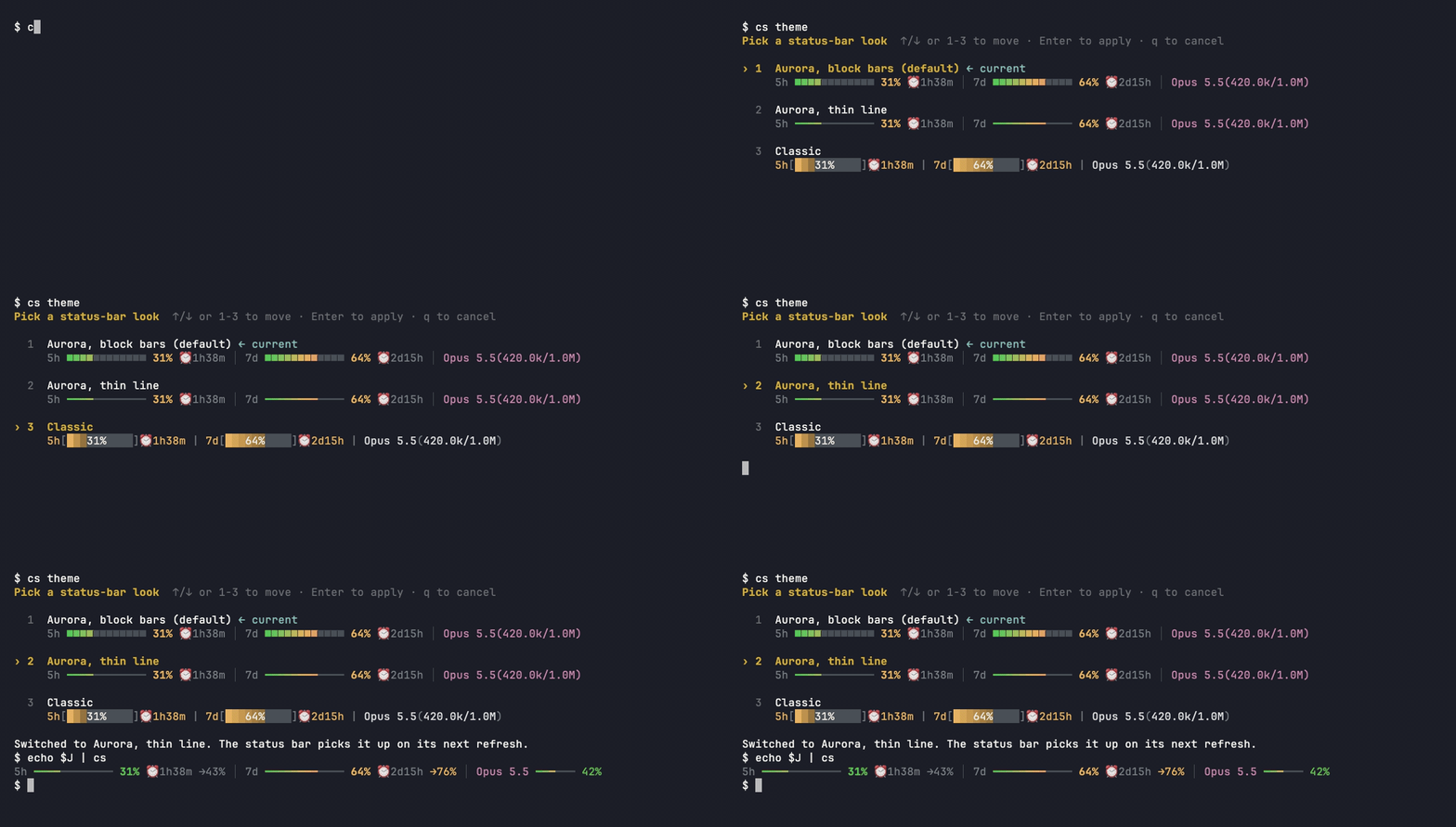
- Three looks — aurora with block bars (default), aurora with a thin line, and classic:
- 
- 
- 
- `cs theme` picks one with a live preview:
- 
- ```bash
- cs theme # pick one with a live preview (↑/↓, Enter)
- cs config set bar_glyph thin # thin ━ line instead of ■ blocks (default)
- cs config set style classic # the original battery-bar look
- cs config set narrow_layout stack # stack quota bars in narrow panes
- cs preview # all three looks, with your real numbers
- cs config show # every key, and which ones you changed
- ```
- ## Documentation
- | Guide | What's inside |
- |-------|---------------|
- | [Install](docs/install.md) | Binary, PyPI, skill-only, plugin, Codex bridge |
- | [What it shows](docs/segments.md) | Every segment, icon and color threshold |
- | [Looks](docs/styles-and-themes.md) | The three looks, slash commands |
- | [Configuration](docs/configuration.md) | All keys, env vars, JSON output |
- | [Fast mode (daemon)](docs/daemon.md) | Daemon, auto-start, refresh and caching |
- | [No-quota mode](docs/no-quota-mode.md) | Relay / Bedrock / Vertex layout and balance |
- | [Cache countdown](docs/cache-countdown.md) | How `❄ 4m23s` is computed |
- | [Troubleshooting](docs/troubleshooting.md) | `cs doctor`, IP checks, upgrading |
- Want charts and weekly cost breakdowns instead of one line? Run
- [ccusage](https://github.com/ryoppippi/ccusage) or
- [Claude Code Usage Monitor](https://github.com/Maciek-roboblog/Claude-Code-Usage-Monitor) in a
- side pane — they coexist with `cs`.
- **[ccx](https://github.com/aaronwong1999/ccx)** — keeps a Claude Code session and a Codex thread
- linked on macOS. With the bar installed, ccx's menu bar app warns you when Claude's 5-hour
- window passes 90% or its weekly quota is exhausted, and offers to continue the newest session in Codex in one click (no
- config; ccx reads `rate_limits` from `~/.cache/claude-statusbar/last_stdin.json` while it's fresh).
- ## Contributing
- PRs welcome — see **[CONTRIBUTING.md](CONTRIBUTING.md)** (setup, tests, architecture, release flow)
- and **[SECURITY.md](SECURITY.md)**. Changes per version: **[CHANGELOG.md](CHANGELOG.md)**.
- ## Acknowledgments
- - [@marcwimmer](https://github.com/marcwimmer) — original `show_cache_age` widget ([#9](https://github.com/leeguooooo/claude-code-usage-bar/pull/9))
- - [claude-monitor](https://github.com/Maciek-roboblog/Claude-Code-Usage-Monitor) — token-usage analysis library used as the optional fast-path data source
- <a href="https://github.com/leeguooooo/claude-code-usage-bar/graphs/contributors">
- <img src="https://contrib.rocks/image?repo=leeguooooo/claude-code-usage-bar" alt="Contributors" />
- </a>
- ---
- <div align="center">
- <sub>MIT © <a href="https://github.com/leeguooooo">leeguooooo</a> · Built for people who live in Claude Code.</sub>
- </div>
- ## Author
- Built by **郭立 (Guo Li / leeguoo)** — [leeguoo.com](https://leeguoo.com/about) · [GitHub](https://github.com/leeguooooo) · [X](https://x.com/leeguooooo) · more tools in the [*-use family](https://github.com/leeguooooo/plugins).
demo/record_demo.sh · Bundled script · 40 lines · 1 finding marked
- #!/bin/bash
- # Demo script for recording installation and usage of claude-statusbar
- # Requires: asciinema (brew install asciinema) and asciicast2gif or svg-term-cli
- echo "📹 Claude Status Bar Demo Recording Script"
- echo "========================================="
- echo ""
- echo "This script will help you record a demo of the installation process."
- echo "Prerequisites: asciinema (brew install asciinema)"
- echo ""
- # Colors for output
- GREEN='\033[0;32m'
- BLUE='\033[0;34m'
- NC='\033[0m' # No Color
- # Start recording
- echo -e "${BLUE}Starting recording...${NC}"
- echo "Press Ctrl+D when done recording"
- echo ""
- asciinema rec --title="Claude Status Bar Installation Demo" demo.cast
- echo ""
- echo -e "${GREEN}Recording saved to demo.cast${NC}"
- echo ""
- echo "To convert to GIF, you can use:"
- echo "1. Upload to asciinema.org and use their embed"
- echo "2. Use svg-term-cli: npx svg-term-cli --cast demo.cast --out demo.svg"
- echo "3. Use asciicast2gif: docker run --rm -v \$PWD:/data asciinema/asciicast2gif demo.cast demo.gif"
- echo ""
- echo "Demo script outline:"
- echo "==================="
- echo "1. Show current directory: pwd"
- echo "2. Show we don't have claude-statusbar: which claude-statusbar (should fail)"
- echo "3. Run installation: curl -fsSL https://raw.githubusercontent.com/leeguooooo/claude-code-usage-bar/main/web-install.sh | bash"
- Note: Pipes a downloaded script directly into a shell (curl | sh / wget | bash)
- Line 37 on GitHub
- echo "4. Show it's installed: which claude-statusbar"
- echo "5. Run it: claude-statusbar"
- echo "6. Show the alias: cs"
install.ps1 · Bundled script · 40 lines · 2 findings marked
- # Windows installer for claude-statusbar (the `cs` status line for Claude Code).
- # irm https://raw.githubusercontent.com/leeguooooo/claude-code-usage-bar/main/install.ps1 | iex
- Note: Runs a downloaded PowerShell script (iex / Invoke-Expression)
- Line 2 on GitHub
- # Needs uv (https://docs.astral.sh/uv/). If uv is missing it installs it with
- # winget (Microsoft's package manager, built into Windows 10/11) — it never runs
- # a remote install script; without winget it stops with install hints. Installs
- # the package as a uv tool (uv brings its own Python), puts the tool directory
- # on the user PATH, then runs `cs --setup`. Re-run to upgrade.
- # Wrapped in a script block so `irm | iex` doesn't leave settings in your shell.
- Note: Runs a downloaded PowerShell script (iex / Invoke-Expression)
- Line 8 on GitHub
- & {
- $ErrorActionPreference = 'Stop'
- if (-not (Get-Command uv -ErrorAction SilentlyContinue)) {
- if (Get-Command winget -ErrorAction SilentlyContinue) {
- Write-Host 'uv not found; installing it with winget...'
- winget install --id=astral-sh.uv -e --accept-source-agreements --accept-package-agreements
- # winget updates the persisted PATH, not this session's; reload it.
- $env:Path = @(
- [Environment]::GetEnvironmentVariable('Path', 'User'),
- [Environment]::GetEnvironmentVariable('Path', 'Machine'),
- "$env:LOCALAPPDATA\Microsoft\WinGet\Links",
- $env:Path
- ) -join ';'
- }
- if (-not (Get-Command uv -ErrorAction SilentlyContinue)) {
- Write-Host 'uv is required but could not be installed automatically. Install it, open a new terminal, then re-run:'
- Write-Host ' winget install --id=astral-sh.uv -e'
- Write-Host ' or see https://docs.astral.sh/uv/getting-started/installation/'
- throw 'uv not found'
- }
- }
- uv tool install --upgrade claude-statusbar
- if ($LASTEXITCODE) { throw 'uv tool install failed' }
- uv tool update-shell # adds the tool bin dir to the user PATH (new terminals)
- $env:Path = "$(uv tool dir --bin);$env:Path"
- cs --setup
- if ($LASTEXITCODE) { throw 'cs --setup failed' }
- Write-Host 'Done. Restart Claude Code to see the status bar.'
- }
install.sh · Bundled script · 437 lines · 2 findings marked
- #!/usr/bin/env bash
- # claude-statusbar — standalone binary installer (no Python, no pip required).
- #
- # Usage (read the script first, please):
- # curl -fsSL https://raw.githubusercontent.com/leeguooooo/claude-code-usage-bar/main/install.sh -o /tmp/cs.sh
- # less /tmp/cs.sh # audit it
- # bash /tmp/cs.sh
- #
- # Or, if you trust this repo:
- # curl -fsSL https://raw.githubusercontent.com/leeguooooo/claude-code-usage-bar/main/install.sh | bash
- Note: Pipes a downloaded script directly into a shell (curl | sh / wget | bash)
- Line 10 on GitHub
- #
- # What it does (full disclosure):
- # 1. Detects your OS + CPU arch and downloads the matching prebuilt `cs`
- # bundle from the latest GitHub Release (self-contained — no Python
- # needed on your machine). The installed bundle uses PyInstaller onedir,
- # not onefile, so the once-per-second status render never extracts `_MEI*`
- # runtime copies into your temp directory.
- # 2. Verifies the SHA-256 checksum published alongside it.
- # 3. Installs it to ~/.local/bin (no sudo; everything under $HOME) and, with
- # your [y/N] consent, adds ~/.local/bin to PATH in your shell rc.
- # 4. Runs `cs --setup` to wire the Claude Code statusLine + slash commands.
- # 5. Removes inactive `_MEI*` directories leaked by legacy onefile versions,
- # after stopping the old daemon and verifying no process has them open.
- #
- # If no prebuilt binary matches your platform (e.g. Linux arm64, Windows), it
- # automatically falls back to the pip/uv-based installer (web-install.sh),
- # which needs Python 3.9+.
- #
- # No sudo. No telemetry. The only remote hosts touched are github.com (release
- # assets) and, only on fallback, PyPI / astral.sh (uv).
- set -euo pipefail
- REPO="leeguooooo/claude-code-usage-bar"
- INSTALL_DIR="${CS_INSTALL_DIR:-$HOME/.local/bin}"
- BUNDLE_ROOT="${CS_BUNDLE_ROOT:-$HOME/.local/lib/claude-statusbar}"
- FALLBACK_URL="https://raw.githubusercontent.com/${REPO}/main/web-install.sh"
- # A pip/uv/pipx copy of claude-statusbar competes with this binary for the one
- # `cs` on PATH: whichever upgrades last rewrites the symlink and silently takes
- # over. We don't remove another package manager's package behind the user's
- # back, but staying quiet about it is how a stale uv 3.32.0 replaced a working
- # binary install without anyone noticing.
- warn_about_duplicate_installs() {
- local found=""
- [ -d "$HOME/.local/share/uv/tools/claude-statusbar" ] && found="uv tool"
- [ -d "$HOME/.local/pipx/venvs/claude-statusbar" ] && found="${found:+$found and }pipx"
- [ -n "$found" ] || return 0
- warn "Another claude-statusbar install ($found) is also present."
- echo " Both compete for $INSTALL_DIR/cs — whichever upgrades last wins."
- echo " Remove the other one so upgrades stay predictable:"
- [ -d "$HOME/.local/share/uv/tools/claude-statusbar" ] && \
- echo " uv tool uninstall claude-statusbar"
- [ -d "$HOME/.local/pipx/venvs/claude-statusbar" ] && \
- echo " pipx uninstall claude-statusbar"
- }
- # Scratch dir for the downloaded tarball, cleaned up on any exit. Declared here
- # (not inside the function that fills it) so the trap can still see it — see the
- # note at the mktemp call.
- TMP_DIR=""
- INSTALL_STAGE=""
- INSTALLED_BUNDLE_DIR=""
- DMG_MOUNT=""
- cleanup() {
- if [ -n "${DMG_MOUNT:-}" ]; then
- hdiutil detach "$DMG_MOUNT" -quiet || hdiutil detach "$DMG_MOUNT" -force -quiet || return 0
- fi
- [ -n "${TMP_DIR:-}" ] && rm -rf "$TMP_DIR"
- [ -n "${INSTALL_STAGE:-}" ] && rm -rf "$INSTALL_STAGE"
- return 0
- }
- trap cleanup EXIT
- GREEN='\033[0;32m'; YELLOW='\033[1;33m'; BLUE='\033[0;34m'; RED='\033[0;31m'; NC='\033[0m'
- say() { echo -e "${BLUE}$*${NC}"; }
- ok() { echo -e "${GREEN}$*${NC}"; }
- warn() { echo -e "${YELLOW}$*${NC}"; }
- err() { echo -e "${RED}$*${NC}" >&2; }
- echo -e "${BLUE}╔══════════════════════════════════════╗${NC}"
- echo -e "${BLUE}║ Claude Status Bar — binary install ║${NC}"
- echo -e "${BLUE}╚══════════════════════════════════════╝${NC}"
- echo ""
- # ---------------------------------------------------------------------------
- # ask_yes_no PROMPT — reads from /dev/tty so it works under `curl | bash`.
- # Returns 0 on yes; anything else (incl. no tty) is treated as "no".
- # ---------------------------------------------------------------------------
- ask_yes_no() {
- local reply
- if [ ! -r /dev/tty ]; then
- warn "(no /dev/tty — treating as 'no')"
- return 1
- fi
- printf "%s [y/N]: " "$1" > /dev/tty
- read -r reply < /dev/tty || return 1
- case "$reply" in y|Y|yes|YES) return 0 ;; *) return 1 ;; esac
- }
- # ---------------------------------------------------------------------------
- # fall_back_to_pip — hand off to the Python/pip installer for platforms with no
- # prebuilt binary. Runs it in-place via the same shell.
- # ---------------------------------------------------------------------------
- fall_back_to_pip() {
- warn "No prebuilt binary for this platform — falling back to the pip installer."
- warn "(needs Python 3.9+; it will use uv/pipx/pip, bootstrapping uv if needed)"
- if command -v curl >/dev/null 2>&1; then
- curl -fsSL "$FALLBACK_URL" | bash
- else
- err "curl not found; install Python + run: pip install claude-statusbar && cs --setup"
- exit 1
- fi
- exit $?
- }
- # ---------------------------------------------------------------------------
- # detect_asset — echo the release asset name for this OS/arch, or "" if none.
- # ---------------------------------------------------------------------------
- detect_asset() {
- local os arch
- case "$(uname -s)" in
- Darwin) os="darwin" ;;
- Linux) os="linux" ;;
- *) echo ""; return ;;
- esac
- case "$(uname -m)" in
- arm64|aarch64) arch="arm64" ;;
- x86_64|amd64) arch="x86_64" ;;
- *) echo ""; return ;;
- esac
- # Published matrix: darwin arm64, linux x86_64. Everything else (Intel mac,
- # linux arm64, Windows) has no prebuilt binary → fall back to pip.
- case "$os-$arch" in
- darwin-arm64|linux-x86_64) echo "cs-${os}-${arch}.tar.gz" ;;
- *) echo "" ;;
- esac
- }
- # ---------------------------------------------------------------------------
- # sha256_of FILE — portable SHA-256 (shasum on macOS, sha256sum on Linux).
- # ---------------------------------------------------------------------------
- sha256_of() {
- if command -v sha256sum >/dev/null 2>&1; then
- sha256sum "$1" | awk '{print $1}'
- else
- shasum -a 256 "$1" | awk '{print $1}'
- fi
- }
- verify_checksum() {
- local base="$1" asset="$2" directory="$3" want got
- if ! curl -fsSL "$base/$asset.sha256" -o "$directory/$asset.sha256"; then
- err "Checksum file unavailable for $asset; refusing to install."
- exit 1
- fi
- want="$(awk '{print $1}' "$directory/$asset.sha256")"
- got="$(sha256_of "$directory/$asset")"
- if [ "$want" != "$got" ]; then
- err "Checksum mismatch for $asset; refusing to install."
- exit 1
- fi
- ok "✓ Checksum verified"
- }
- verify_apple_signature() {
- local target="$1" info
- codesign --verify --strict "$target" || { err "Apple signature verification failed."; exit 1; }
- info="$(codesign --display --verbose=4 "$target" 2>&1)"
- if ! [[ "$info" == *"Authority=Developer ID Application:"* &&
- "$info" == *"TeamIdentifier=6ZPXG4KVVS"* ]]; then
- err "Unexpected developer identity; refusing to install."
- exit 1
- fi
- }
- # ---------------------------------------------------------------------------
- # stop_old_daemon — stop the legacy onefile daemon before replacing the
- # launcher. Its `_MEI*` directory can be hours old while still in active use,
- # so age alone is never a safe cleanup criterion.
- # ---------------------------------------------------------------------------
- stop_old_daemon() {
- if [ -x "$INSTALL_DIR/cs" ]; then
- "$INSTALL_DIR/cs" daemon stop >/dev/null 2>&1 || true
- # The HUD is another long-lived frozen process. Stop it before old
- # onedir versions are pruned; the installer restarts it below when the
- # Claude desktop app is present.
- "$INSTALL_DIR/cs" hud stop >/dev/null 2>&1 || true
- fi
- }
- # BSD mv follows a destination symlink to a directory unless `-h` is passed;
- # GNU mv uses `-T` for the same no-follow replacement semantics.
- replace_path_atomically() {
- local source="$1" target="$2"
- if [ "$(uname -s)" = "Darwin" ]; then
- mv -fh "$source" "$target"
- else
- mv -fT "$source" "$target"
- fi
- }
- # ---------------------------------------------------------------------------
- # install_onedir_bundle SOURCE_DIR — copy a release bundle into a content-
- # addressed version directory and atomically repoint ~/.local/bin/cs through a
- # stable `current` symlink. A failed copy can never leave a half-written CLI.
- # Sets INSTALLED_BUNDLE_DIR to the final bundle directory.
- # ---------------------------------------------------------------------------
- install_onedir_bundle() {
- local source_dir="$1"
- mkdir -p "$INSTALL_DIR" "$BUNDLE_ROOT"
- INSTALL_STAGE="$(mktemp -d "$BUNDLE_ROOT/.install.XXXXXX")"
- cp -R "$source_dir/." "$INSTALL_STAGE/"
- chmod 0755 "$INSTALL_STAGE/cs"
- local version_line version build_id final_dir next_link
- version_line="$("$INSTALL_STAGE/cs" --version)"
- version="${version_line##* }"
- case "$version" in
- ''|*[!A-Za-z0-9._-]*) err "Invalid cs version in release bundle: $version_line"; exit 1 ;;
- esac
- build_id="$(sha256_of "$INSTALL_STAGE/cs" | cut -c1-12)"
- final_dir="$BUNDLE_ROOT/v${version}-${build_id}"
- if [ -d "$final_dir" ]; then
- rm -rf "$INSTALL_STAGE"
- else
- mv "$INSTALL_STAGE" "$final_dir"
- fi
- INSTALL_STAGE=""
- stop_old_daemon
- # `current` must remain a symlink owned by this installer. Refuse to move a
- # real directory out of the way: it may contain user data from a custom
- # CS_BUNDLE_ROOT.
- if [ -e "$BUNDLE_ROOT/current" ] && [ ! -L "$BUNDLE_ROOT/current" ]; then
- err "$BUNDLE_ROOT/current exists and is not a symlink; refusing to replace it."
- exit 1
- fi
- next_link="$BUNDLE_ROOT/.current.$$"
- ln -s "$final_dir" "$next_link"
- replace_path_atomically "$next_link" "$BUNDLE_ROOT/current"
- # Atomic rename replaces either a previous symlink or the legacy regular
- # binary without ever exposing a missing `cs` path to Claude Code.
- next_link="$INSTALL_DIR/.cs.$$"
- ln -s "$BUNDLE_ROOT/current/cs" "$next_link"
- replace_path_atomically "$next_link" "$INSTALL_DIR/cs"
- ln -sfn "$INSTALL_DIR/cs" "$INSTALL_DIR/claude-statusbar"
- ln -sfn "$INSTALL_DIR/cs" "$INSTALL_DIR/cstatus"
- INSTALLED_BUNDLE_DIR="$final_dir"
- }
- # ---------------------------------------------------------------------------
- # prune_old_bundles KEEP_DIR — the new daemon is already running before this
- # executes, so no process needs a previous onedir version.
- #
- # One exception: an unattended `cs upgrade` runs *out of* an old bundle, and a
- # PyInstaller onedir binary dlopens its libraries lazily — deleting that dir
- # mid-run can kill the upgrade while it is still working. The updater passes
- # its own bundle in CS_KEEP_BUNDLE_DIR; the next upgrade prunes it once nothing
- # is running inside it.
- # ---------------------------------------------------------------------------
- prune_old_bundles() {
- local keep_dir="$1" old
- for old in "$BUNDLE_ROOT"/v*; do
- [ -e "$old" ] || continue
- [ "$old" = "$keep_dir" ] && continue
- [ -n "${CS_KEEP_BUNDLE_DIR:-}" ] && [ "$old" = "$CS_KEEP_BUNDLE_DIR" ] && continue
- [ -d "$old" ] && [ ! -L "$old" ] && rm -rf "$old"
- done
- }
- main() {
- command -v curl >/dev/null 2>&1 || { err "curl is required."; exit 1; }
- local asset
- asset="$(detect_asset)"
- [ -n "$asset" ] || fall_back_to_pip
- # CS_RELEASE_BASE_URL pins the download to one release. `cs upgrade` sets it
- # to the exact tag it decided to install, because `releases/latest/download`
- # lags for a while after publishing — long enough for an upgrade to fetch
- # the version it was upgrading away from. Also used by the offline
- # installer integration test.
- local base="${CS_RELEASE_BASE_URL:-https://github.com/${REPO}/releases/latest/download}"
- # NOTE: the scratch dir must be a global, not a `local`. The EXIT trap runs
- # after this function has already returned, so a local `tmp` is out of scope
- # by then — under `set -u` that ended the install with a bare
- # "tmp: unbound variable", and the temp dir was never cleaned up.
- TMP_DIR="$(mktemp -d)"
- local tmp="$TMP_DIR"
- # Prefer a stapled, notarized disk image on supported Macs. Only a genuine
- # 404 (or an absent offline fixture) permits the legacy tar path; a network
- # or server error must not silently downgrade the authenticity checks.
- if [ "$(uname -s)" = "Darwin" ]; then
- local dmg_asset="cs-darwin-arm64.dmg" status effective
- say "Checking for the notarized macOS disk image..."
- if status="$(curl -sSL -w '%{http_code} %{url_effective}' "$base/$dmg_asset" -o "$tmp/$dmg_asset")"; then
- effective="${status#* }"
- status="${status%% *}"
- if [ "$status" = "200" ] || [ "$status" = "000" ]; then
- verify_checksum "$base" "$dmg_asset" "$tmp"
- verify_apple_signature "$tmp/$dmg_asset"
- spctl --assess --type open --context context:primary-signature "$tmp/$dmg_asset" || {
- err "Gatekeeper did not accept the disk image; refusing to install."; exit 1;
- }
- ok "✓ Apple signature and notarization verified"
- mkdir -p "$tmp/mounted"
- hdiutil attach "$tmp/$dmg_asset" -readonly -nobrowse -noautoopen -mountpoint "$tmp/mounted" >/dev/null
- DMG_MOUNT="$tmp/mounted"
- verify_apple_signature "$DMG_MOUNT/cs/cs"
- verify_apple_signature "$DMG_MOUNT/cs/cs-python"
- install_onedir_bundle "$DMG_MOUNT/cs"
- finish_install "onedir" "$INSTALLED_BUNDLE_DIR"
- return
- elif [ "$status" = "404" ]; then
- if [[ "$base" == */download/v* && "$effective" != */download/v* ]]; then
- effective="$base/"
- fi
- if [[ "$base" == "https://github.com/$REPO/releases/latest/download" &&
- "$effective" != */download/v* ]]; then
- local latest
- latest="$(curl -fsSL "https://api.github.com/repos/$REPO/releases/latest" |
- sed -n 's/.*"tag_name":[[:space:]]*"\(v[0-9]*\.[0-9]*\.[0-9]*\)".*/\1/p')"
- [ -n "$latest" ] || { err "Could not resolve the release; retry later."; exit 1; }
- effective="https://github.com/$REPO/releases/download/$latest/"
- fi
- if [[ "$effective" =~ /download/v([0-9]+)\.([0-9]+)\.([0-9]+)/ ]] &&
- { [ "${BASH_REMATCH[1]}" -gt 3 ] ||
- { [ "${BASH_REMATCH[1]}" -eq 3 ] && [ "${BASH_REMATCH[2]}" -ge 46 ]; }; }; then
- err "The notarized disk image is missing for this release; refusing to downgrade."
- exit 1
- fi
- else
- err "Disk image download returned HTTP $status; refusing to downgrade."; exit 1
- fi
- elif [[ "$base" != file://* ]]; then
- err "Disk image download failed; retry when the network is available."; exit 1
- fi
- fi
- say "Downloading $asset from the latest release..."
- if ! curl -fsSL "$base/$asset" -o "$tmp/$asset"; then
- warn "Download failed (no release asset yet?)."
- fall_back_to_pip
- fi
- verify_checksum "$base" "$asset" "$tmp"
- say "Extracting..."
- tar -xzf "$tmp/$asset" -C "$tmp"
- local install_mode bundle_dir
- if [ -x "$tmp/cs/cs" ]; then
- install_mode="onedir"
- install_onedir_bundle "$tmp/cs"
- bundle_dir="$INSTALLED_BUNDLE_DIR"
- ok "✓ Installed cs bundle → $bundle_dir"
- ok "✓ Linked cs → $INSTALL_DIR/cs ($("$INSTALL_DIR/cs" --version 2>/dev/null || echo 'version unknown'))"
- warn_about_duplicate_installs
- elif [ -f "$tmp/cs" ]; then
- # Transition compatibility: `main/install.sh` can be newer than the
- # latest Release for a short window while CI is still building the
- # first onedir asset. Keep old releases installable, but do not pretend
- # they have fixed the onefile extraction problem.
- install_mode="legacy-onefile"
- bundle_dir=""
- stop_old_daemon
- mkdir -p "$INSTALL_DIR"
- rm -f "$INSTALL_DIR/cs"
- install -m 0755 "$tmp/cs" "$INSTALL_DIR/cs"
- ln -sfn "$INSTALL_DIR/cs" "$INSTALL_DIR/claude-statusbar"
- ln -sfn "$INSTALL_DIR/cs" "$INSTALL_DIR/cstatus"
- warn "Installed a legacy onefile asset; update again after the new onedir Release finishes building."
- else
- err "Archive did not contain a 'cs' bundle."
- exit 1
- fi
- finish_install "$install_mode" "$bundle_dir"
- }
- finish_install() {
- local install_mode="$1" bundle_dir="$2"
- # Ensure the install dir is on PATH.
- if ! command -v cs >/dev/null 2>&1 || [ "$(command -v cs)" != "$INSTALL_DIR/cs" ]; then
- if [[ ":$PATH:" != *":$INSTALL_DIR:"* ]]; then
- warn "$INSTALL_DIR is not on your PATH."
- if ask_yes_no "Append 'export PATH=\"$INSTALL_DIR:\$PATH\"' to ~/.bashrc and ~/.zshrc?"; then
- for rc in "$HOME/.bashrc" "$HOME/.zshrc"; do
- echo "export PATH=\"$INSTALL_DIR:\$PATH\"" >> "$rc" 2>/dev/null || true
- done
- ok "✓ PATH updated (open a new shell, or run: export PATH=\"$INSTALL_DIR:\$PATH\")"
- else
- warn "Skipped. Add $INSTALL_DIR to your PATH manually to use 'cs'."
- fi
- fi
- fi
- export PATH="$INSTALL_DIR:$PATH"
- say "Wiring Claude Code statusLine (cs --setup)..."
- local setup_ok=1
- if [ "${CS_SKIP_SETUP:-0}" = "1" ]; then
- setup_ok=0
- say "Binary installed; setup skipped."
- elif ! "$INSTALL_DIR/cs" --setup; then
- setup_ok=0
- warn "cs --setup reported an issue; run it manually if the bar doesn't appear."
- fi
- if [ "$install_mode" = "onedir" ] && [ "${CS_SKIP_SETUP:-0}" != "1" ]; then
- # The new process is onedir, so this scan cannot create another `_MEI`.
- # cleanup.py refuses to delete unless lsof proves the legacy directory
- # inactive; if that proof is unavailable, it leaves everything alone.
- "$INSTALL_DIR/cs" -m claude_statusbar.cleanup || true
- [ "$setup_ok" -eq 1 ] && prune_old_bundles "$bundle_dir"
- fi
- echo ""
- ok "═══════════════════════════════════════"
- ok "Install complete."
- ok "═══════════════════════════════════════"
- echo " Upgrade: live on the next statusline tick — no restart needed."
- echo " First install: restart Claude Code once so the status bar appears."
- echo " cs doctor # verify the wiring"
- echo " cs preview # try every style × theme"
- echo ""
- echo "Update later: curl -fsSL https://raw.githubusercontent.com/${REPO}/main/install.sh | bash"
- Note: Pipes a downloaded script directly into a shell (curl | sh / wget | bash)
- Line 434 on GitHub
- }
- main "$@"
scripts/sign_macos.py · Bundled script · 137 lines · 1 finding marked
- """Developer ID sign an onedir bundle and notarize its distributable DMG.
- Credentials stay in the keychain or environment. This script never exports a
- private key, changes keychain trust, or removes quarantine attributes.
- """
- import argparse
- import hashlib
- import json
- import os
- import shutil
- import subprocess
- import sys
- import tempfile
- from pathlib import Path
- MACHO_MAGICS = {b'\xfe\xed\xfa\xce', b'\xce\xfa\xed\xfe',
- b'\xfe\xed\xfa\xcf', b'\xcf\xfa\xed\xfe',
- b'\xca\xfe\xba\xbe', b'\xbe\xba\xfe\xca',
- b'\xca\xfe\xba\xbf', b'\xbf\xba\xfe\xca'}
- def code_paths(bundle):
- """Sign nested code before the framework containers that seal it."""
- root = bundle.resolve()
- binaries, frameworks = [], []
- for path in bundle.rglob('*'):
- if path.is_symlink():
- if not path.resolve().is_relative_to(root):
- raise ValueError('bundle symlink escapes its root')
- continue
- if path.is_dir() and path.suffix == '.framework':
- frameworks.append(path)
- elif path.is_file():
- with path.open('rb') as source:
- if source.read(4) in MACHO_MAGICS:
- binaries.append(path)
- return sorted(binaries, key=lambda p: len(p.parts), reverse=True) + sorted(
- frameworks, key=lambda p: len(p.parts), reverse=True)
- def run(*args, **kwargs):
- subprocess.run(list(map(str, args)), check=True, **kwargs)
- def sign(bundle, identity, keychain=None):
- paths = code_paths(bundle)
- if not paths or not (bundle / 'cs').is_file() or not (bundle / 'cs-python').is_file():
- raise ValueError('expected a native cs + onedir Python runtime bundle')
- for path in paths:
- args = ['codesign', '--force', '--options', 'runtime', '--timestamp', '--sign', identity]
- if keychain:
- args += ['--keychain', keychain]
- if path == bundle / 'cs':
- args += ['--identifier', 'com.leeguoo.claude-statusbar.cli']
- elif path == bundle / 'cs-python':
- args += ['--identifier', 'com.leeguoo.claude-statusbar.runtime']
- run(*args, path)
- for path in paths:
- run('codesign', '--verify', '--strict', path)
- for path in (bundle / 'cs', bundle / 'cs-python'):
- details = subprocess.run(['codesign', '--display', '--verbose=4', str(path)],
- capture_output=True, text=True, check=True).stderr
- if ('Authority=Developer ID Application:' not in details
- or 'TeamIdentifier=6ZPXG4KVVS' not in details
- or '(runtime)' not in details):
- raise ValueError('unexpected signing identity or missing hardened runtime')
- return len(paths)
- def notarize(dmg, profile=None):
- args = ['xcrun', 'notarytool', 'submit', str(dmg), '--wait', '--timeout', '30m',
- '--output-format', 'json']
- if profile:
- args += ['--keychain-profile', profile]
- else:
- for name in ('ASC_KEY_PATH', 'ASC_KEY_ID', 'ASC_ISSUER_ID'):
- if not os.environ.get(name):
- raise ValueError('missing notarization configuration: ' + name)
- args += ['--key', os.environ['ASC_KEY_PATH'], '--key-id', os.environ['ASC_KEY_ID'],
- '--issuer', os.environ['ASC_ISSUER_ID']]
- result = subprocess.run(args, capture_output=True, text=True, check=True)
- data = json.loads(result.stdout)
- if data.get('status') != 'Accepted':
- raise RuntimeError('Apple notarization did not accept the DMG')
- run('xcrun', 'stapler', 'staple', dmg)
- run('xcrun', 'stapler', 'validate', dmg)
- run('spctl', '--assess', '--type', 'open', '--context', 'context:primary-signature', dmg)
- return data['id']
- def package(bundle, output, identity, keychain=None, profile=None):
- output.mkdir(parents=True, exist_ok=True)
- count = sign(bundle, identity, keychain)
- run(bundle / 'cs', '--version')
- run(bundle / 'cs', 'hud', 'check')
- dmg = output / 'cs-darwin-arm64.dmg'
- with tempfile.TemporaryDirectory(prefix='cs-dmg-') as tmp:
- stage = Path(tmp)
- shutil.copytree(bundle, stage / 'cs', symlinks=True)
- (stage / 'Install.txt').write_text(
- 'Claude Status Bar\n\nInstall or upgrade without sudo:\n'
- 'curl -fsSL https://raw.githubusercontent.com/leeguooooo/claude-code-usage-bar/main/install.sh | bash\n'
- Note: Pipes a downloaded script directly into a shell (curl | sh / wget | bash)
- Line 102 on GitHub
- '\nThis disk image includes the signed CLI, Python runtime and desktop HUD.\n',
- encoding='utf-8')
- run('hdiutil', 'create', '-volname', 'Claude Status Bar', '-srcfolder', stage,
- '-ov', '-format', 'UDZO', dmg, stdout=subprocess.DEVNULL)
- args = ['codesign', '--force', '--timestamp', '--sign', identity]
- if keychain:
- args += ['--keychain', keychain]
- run(*args, dmg)
- submission = notarize(dmg, profile)
- # Tar remains available for existing clients; these exact binary hashes
- # were scanned inside the notarized DMG. Only the DMG can carry a ticket.
- archive = output / 'cs-darwin-arm64.tar.gz'
- run('tar', '-czf', archive, '-C', bundle.parent, bundle.name)
- for path in (dmg, archive):
- digest = hashlib.sha256(path.read_bytes()).hexdigest()
- path.with_name(path.name + '.sha256').write_text(f'{digest} {path.name}\n')
- print(json.dumps({'signed_code_objects': count, 'notarization': 'Accepted',
- 'submission_id': submission, 'dmg': str(dmg)}))
- def main():
- parser = argparse.ArgumentParser(description=__doc__)
- parser.add_argument('bundle', type=Path)
- parser.add_argument('--output', required=True, type=Path)
- parser.add_argument('--identity', default=os.environ.get('SIGNING_IDENTITY', 'Developer ID Application'))
- parser.add_argument('--keychain', default=os.environ.get('SIGNING_KEYCHAIN'))
- parser.add_argument('--profile', default=os.environ.get('NOTARY_KEYCHAIN_PROFILE'))
- args = parser.parse_args()
- if sys.platform != 'darwin':
- raise SystemExit('macOS signing requires a Mac')
- package(args.bundle.resolve(), args.output.resolve(), args.identity, args.keychain, args.profile)
- if __name__ == '__main__':
- main()
web-install.sh · Bundled script · 369 lines · 1 finding marked
- #!/bin/bash
- # claude-statusbar — one-shot installer for `curl | bash` convenience.
- #
- # Usage (read the script first, please):
- # curl -fsSL https://raw.githubusercontent.com/leeguooooo/claude-code-usage-bar/main/web-install.sh -o /tmp/cs-install.sh
- # less /tmp/cs-install.sh # audit it
- # bash /tmp/cs-install.sh
- #
- # Or, if you trust this repo:
- # curl -fsSL https://raw.githubusercontent.com/leeguooooo/claude-code-usage-bar/main/web-install.sh | bash
- Note: Pipes a downloaded script directly into a shell (curl | sh / wget | bash)
- Line 10 on GitHub
- #
- # What this script does (full disclosure):
- # 1. Detects an available Python package manager (uv, pipx, or pip) and uses it
- # to install the `claude-statusbar` PyPI package. Nothing else is installed.
- # 2. Optionally writes `alias cs=...` and `alias cstatus=...` to your shell rc
- # file (~/.bashrc, ~/.zshrc, or fish config). Asks for [y/N] confirmation
- # first, reading from /dev/tty so the prompt works under `curl | bash`.
- # 3. Writes a `statusLine` block into ~/.claude/settings.json (backing up any
- # existing file first) so Claude Code picks up the bar on next launch.
- # 4. Runs `claude-statusbar --version` once to verify the install worked.
- #
- # What this script does NOT do:
- # - No `sudo`. Everything stays under $HOME.
- # - No silent install of any other package.
- # - No telemetry, no analytics, no calls to any author-controlled server.
- # The only remote endpoints touched are PyPI (or your chosen mirror) and,
- # if no package manager is found, https://astral.sh/uv/install.sh (the
- # official uv installer from Astral) — and that branch always prints a
- # warning so you can Ctrl-C.
- set -e
- GREEN='\033[0;32m'
- YELLOW='\033[1;33m'
- BLUE='\033[0;34m'
- RED='\033[0;31m'
- NC='\033[0m'
- echo -e "${BLUE}╔══════════════════════════════════════╗${NC}"
- echo -e "${BLUE}║ Claude Status Bar Quick Installer ║${NC}"
- echo -e "${BLUE}╚══════════════════════════════════════╝${NC}"
- echo ""
- # ----------------------------------------------------------------------------
- # ask_yes_no PROMPT
- #
- # Returns 0 on yes, 1 on no/timeout/no-tty. Reads from /dev/tty explicitly
- # because under `curl | bash` the script's own stdin is the piped HTTP body,
- # not the user's keyboard. If /dev/tty isn't available (e.g. inside a CI
- # container) we treat that as "no" so we never silently modify shell rc files.
- # ----------------------------------------------------------------------------
- ask_yes_no() {
- local prompt="$1"
- local reply
- if [ ! -r /dev/tty ]; then
- echo -e "${YELLOW}(no /dev/tty available — treating as 'no')${NC}"
- return 1
- fi
- printf "%s [y/N]: " "$prompt" > /dev/tty
- read -r reply < /dev/tty || return 1
- case "$reply" in
- y|Y|yes|YES) return 0 ;;
- *) return 1 ;;
- esac
- }
- # ----------------------------------------------------------------------------
- # detect_package_manager
- #
- # Prints "uv" | "pipx" | "pip" | "none" based on what's first on PATH.
- # Preference order chosen because uv > pipx > pip for isolation + speed.
- # ----------------------------------------------------------------------------
- detect_package_manager() {
- if command -v uv &> /dev/null; then
- echo "uv"
- elif command -v pipx &> /dev/null; then
- echo "pipx"
- elif command -v pip &> /dev/null || command -v pip3 &> /dev/null; then
- echo "pip"
- else
- echo "none"
- fi
- }
- # ----------------------------------------------------------------------------
- # show_current_version
- #
- # Print the currently-installed claude-statusbar version (if any) for context
- # so the user can see what they're upgrading from. Pure read; no side effects.
- # ----------------------------------------------------------------------------
- show_current_version() {
- if command -v claude-statusbar &> /dev/null; then
- local current_version
- current_version=$(claude-statusbar --version 2>/dev/null | grep -o '[0-9]\+\.[0-9]\+\.[0-9]\+' || echo "unknown")
- echo -e "${YELLOW}Current version: ${current_version}${NC}"
- else
- echo -e "${YELLOW}Not currently installed${NC}"
- fi
- }
- # ----------------------------------------------------------------------------
- # install_package
- #
- # Calls the detected package manager to install (or upgrade) the
- # `claude-statusbar` PyPI package. Only this one package is installed.
- #
- # Per-channel commands:
- # uv → `uv tool install --upgrade claude-statusbar`
- # pipx → `pipx install --force claude-statusbar`
- # pip → `pip install --user --upgrade claude-statusbar` (+ PATH fix-up if
- # ~/.local/bin is missing from PATH; PATH fix-up writes are
- # confirmation-gated via ask_yes_no)
- # none → installs uv from https://astral.sh/uv/install.sh, then uv branch
- # (loud warning + confirmation before the chained curl|sh).
- # ----------------------------------------------------------------------------
- install_package() {
- local pm
- pm=$(detect_package_manager)
- echo -e "${BLUE}Installing/upgrading claude-statusbar...${NC}"
- show_current_version
- case $pm in
- uv)
- echo "Using uv (recommended)..."
- uv tool install --upgrade claude-statusbar
- ;;
- pipx)
- echo "Using pipx..."
- pipx install --force claude-statusbar
- ;;
- pip)
- echo "Using pip..."
- if command -v pip3 &> /dev/null; then
- pip3 install --user --upgrade claude-statusbar
- else
- pip install --user --upgrade claude-statusbar
- fi
- # pip --user puts binaries under ~/.local/bin. If that's not on
- # PATH the `cs` command won't be found. Offer to append to the
- # user's rc files, but only after explicit consent — modifying
- # shell startup is a shared-system change.
- if [[ ":$PATH:" != *":$HOME/.local/bin:"* ]]; then
- echo -e "${YELLOW}~/.local/bin is not on your PATH.${NC}"
- if ask_yes_no "Append 'export PATH=\"\$HOME/.local/bin:\$PATH\"' to ~/.bashrc and ~/.zshrc?"; then
- echo 'export PATH="$HOME/.local/bin:$PATH"' >> ~/.bashrc 2>/dev/null || true
- echo 'export PATH="$HOME/.local/bin:$PATH"' >> ~/.zshrc 2>/dev/null || true
- export PATH="$HOME/.local/bin:$PATH"
- echo -e "${GREEN}✅ PATH updated.${NC}"
- else
- echo -e "${YELLOW}Skipped. You'll need to add ~/.local/bin to PATH manually.${NC}"
- export PATH="$HOME/.local/bin:$PATH"
- fi
- fi
- ;;
- none)
- # No Python tooling at all — the only way to bootstrap without
- # `sudo` is to install uv. uv's installer is itself a curl|sh
- # script; we warn the user and ask before chaining.
- echo -e "${YELLOW}No Python package manager found.${NC}"
- echo -e "${YELLOW}This step will download and run https://astral.sh/uv/install.sh${NC}"
- echo -e "${YELLOW}(official uv installer from Astral, the maintainers of ruff).${NC}"
- if ! ask_yes_no "Proceed with installing uv?"; then
- echo -e "${RED}Aborted. Install Python + pip manually, then re-run this script.${NC}"
- exit 1
- fi
- if [[ "$OSTYPE" == "msys" || "$OSTYPE" == "cygwin" || "$OSTYPE" == "win32" ]]; then
- powershell -ExecutionPolicy ByPass -c "irm https://astral.sh/uv/install.ps1 | iex"
- else
- curl -LsSf https://astral.sh/uv/install.sh | sh
- fi
- # uv installs to ~/.local/bin or ~/.cargo/bin depending on platform.
- # Make both visible to this shell so the next `uv tool install` works.
- export PATH="$HOME/.local/bin:$PATH"
- export PATH="$HOME/.cargo/bin:$PATH"
- uv tool install --upgrade claude-statusbar
- ;;
- esac
- }
- # ----------------------------------------------------------------------------
- # configure_shell
- #
- # Optionally adds `alias cs=...` and `alias cstatus=...` to the user's shell
- # rc file. Confirmation-gated. Pure convenience — the `cs` script itself
- # ships an entry point under the same name, so skipping this just means the
- # user types `claude-statusbar` instead.
- # ----------------------------------------------------------------------------
- configure_shell() {
- echo -e "\n${BLUE}Shell aliases (optional)${NC}"
- local shell_name
- shell_name=$(basename "$SHELL")
- local config_file=""
- case "$shell_name" in
- bash) config_file="$HOME/.bashrc" ;;
- zsh) config_file="$HOME/.zshrc" ;;
- fish) config_file="$HOME/.config/fish/config.fish" ;;
- *) config_file="" ;;
- esac
- if [ -z "$config_file" ] || [ ! -f "$config_file" ]; then
- echo -e "${YELLOW}No supported shell rc file found. Skipping aliases.${NC}"
- return
- fi
- if grep -q "claude-statusbar" "$config_file" 2>/dev/null; then
- echo -e "${GREEN}✅ Aliases already configured in $config_file${NC}"
- return
- fi
- echo "Would append the following lines to $config_file:"
- echo " # Claude Status Bar Monitor"
- echo " alias cs='claude-statusbar'"
- echo " alias cstatus='claude-statusbar'"
- if ask_yes_no "Append?"; then
- {
- echo ""
- echo "# Claude Status Bar Monitor"
- echo "alias cs='claude-statusbar'"
- echo "alias cstatus='claude-statusbar'"
- } >> "$config_file"
- echo -e "${GREEN}✅ Aliases added to $config_file${NC}"
- else
- echo -e "${YELLOW}Skipped.${NC}"
- fi
- }
- # ----------------------------------------------------------------------------
- # configure_claude_statusbar
- #
- # Writes a `statusLine` block into ~/.claude/settings.json so Claude Code
- # loads the bar on next launch. If the file already exists it is backed up
- # to settings.json.backup.<timestamp> first (no overwrite without backup).
- #
- # The settings JSON is written via a Python helper, with the binary path
- # passed through an environment variable (CS_STATUSBAR_CMD) rather than
- # string-interpolated into the heredoc — avoids any shell quoting issues
- # if the path contains spaces or single quotes.
- # ----------------------------------------------------------------------------
- configure_claude_statusbar() {
- echo -e "\n${BLUE}Configuring Claude Code statusLine...${NC}"
- local claude_settings="$HOME/.claude/settings.json"
- # Prefer the canonical uv-tool binary path over ~/.local/bin symlinks so
- # auto-update via `uv tool install --upgrade` keeps pointing at the right
- # binary even if the symlink dance changes.
- local uv_tool_cmd="$HOME/.local/share/uv/tools/claude-statusbar/bin/claude-statusbar"
- local legacy_uv_tool_cmd="$HOME/.uv/tools/claude-statusbar/bin/claude-statusbar"
- local statusbar_cmd=""
- if [ -x "$uv_tool_cmd" ]; then
- statusbar_cmd="$uv_tool_cmd"
- elif [ -x "$legacy_uv_tool_cmd" ]; then
- statusbar_cmd="$legacy_uv_tool_cmd"
- else
- statusbar_cmd=$(which claude-statusbar 2>/dev/null)
- fi
- if [ -z "$statusbar_cmd" ]; then
- echo -e "${YELLOW}⚠️ claude-statusbar command not found in PATH${NC}"
- return
- fi
- mkdir -p "$HOME/.claude"
- if [ -f "$claude_settings" ]; then
- cp "$claude_settings" "$claude_settings.backup.$(date +%Y%m%d_%H%M%S)"
- echo -e "${GREEN}✅ Backed up existing settings${NC}"
- fi
- # Pass values via env vars, not via shell interpolation into the heredoc.
- # This eliminates the only potential injection surface in the script.
- export CS_SETTINGS_PATH="$claude_settings"
- export CS_STATUSBAR_CMD="$statusbar_cmd"
- if [ -f "$claude_settings" ] && [ -s "$claude_settings" ]; then
- python3 - <<'PY' || { echo -e "${YELLOW}⚠️ Failed to update settings${NC}"; return; }
- import json, os
- path = os.environ["CS_SETTINGS_PATH"]
- cmd = os.environ["CS_STATUSBAR_CMD"]
- try:
- with open(path) as f:
- settings = json.load(f)
- except Exception:
- settings = {}
- settings["statusLine"] = {"type": "command", "command": cmd, "padding": 0}
- with open(path, "w") as f:
- json.dump(settings, f, indent=2)
- print("✅ Updated Claude Code settings")
- PY
- else
- python3 - <<'PY' || { echo -e "${YELLOW}⚠️ Failed to create settings${NC}"; return; }
- import json, os
- path = os.environ["CS_SETTINGS_PATH"]
- cmd = os.environ["CS_STATUSBAR_CMD"]
- with open(path, "w") as f:
- json.dump({"statusLine": {"type": "command", "command": cmd, "padding": 0}}, f, indent=2)
- print("✅ Created Claude Code settings")
- PY
- fi
- echo -e "${GREEN}✅ Claude Code statusLine configured!${NC}"
- echo -e "${YELLOW}📝 Restart Claude Code to see the bar.${NC}"
- }
- # ----------------------------------------------------------------------------
- # test_installation
- #
- # Smoke-test: just verify that `claude-statusbar` is now resolvable and prints
- # a version. Does not run the bar rendering itself (that needs Claude Code
- # session data, which the install path doesn't have).
- # ----------------------------------------------------------------------------
- test_installation() {
- echo -e "\n${BLUE}Verifying install...${NC}"
- if command -v claude-statusbar &> /dev/null; then
- local new_version
- new_version=$(claude-statusbar --version 2>/dev/null | grep -o '[0-9]\+\.[0-9]\+\.[0-9]\+' || echo "unknown")
- echo -e "${GREEN}✅ Installed: claude-statusbar ${new_version}${NC}"
- else
- echo -e "${RED}❌ claude-statusbar not on PATH after install${NC}"
- echo "Check the output above; you may need to open a new shell or run:"
- echo " export PATH=\"\$HOME/.local/bin:\$PATH\""
- exit 1
- fi
- }
- # ----------------------------------------------------------------------------
- # show_usage
- # ----------------------------------------------------------------------------
- show_usage() {
- echo -e "\n${GREEN}═══════════════════════════════════════${NC}"
- echo -e "${GREEN}Install complete.${NC}"
- echo -e "${GREEN}═══════════════════════════════════════${NC}"
- echo ""
- echo "Usage:"
- echo " claude-statusbar # full command"
- echo " cstatus # short alias (if you opted in)"
- echo " cs # shortest alias (if you opted in)"
- echo ""
- echo "Next steps:"
- echo " cs doctor # verify the wiring"
- echo " cs preview # try every style × theme"
- echo ""
- echo "Disable auto-update: export CLAUDE_STATUSBAR_NO_UPDATE=1"
- }
- # ----------------------------------------------------------------------------
- # main
- # ----------------------------------------------------------------------------
- main() {
- if ! command -v python3 &> /dev/null; then
- echo -e "${RED}Python 3 is required but not installed.${NC}"
- echo "Install Python 3.9+ from https://python.org and re-run."
- exit 1
- fi
- install_package
- configure_shell
- configure_claude_statusbar
- test_installation
- show_usage
- }
- main "$@"
Ratings and comments
Sign in to rate this skill.
Sign inFree to use. If it’s helped, pass it on.